

این راهنما به شما نشان میدهد که چگونه از Google Mobile Ads SDK (Legacy) برای بارگذاری و نمایش تبلیغات از Liftoff Monetize با استفاده از میانجیگری که شامل ادغامهای پیشنهاد قیمت و آبشاری میشود، استفاده کنید. این راهنما نحوه اضافه کردن Liftoff Monetize به پیکربندی میانجیگری یک واحد تبلیغاتی و نحوه ادغام SDK و آداپتور Vungle را در یک برنامه اندروید پوشش میدهد.
ادغامها و قالبهای تبلیغاتی پشتیبانیشده
آداپتور میانجیگری برای Liftoff Monetize قابلیتهای زیر را دارد:
| ادغام | |
|---|---|
| مناقصه | |
| آبشار | |
| قالبها | |
| برنامه باز است | |
| بنر | |
| بینابینی | |
| پاداش داده شده | |
| تبلیغات بینابینی پاداشدار | |
| بومی | |
پیشنیازها
قبل از ادامه، موارد زیر را بررسی کنید:
- اندروید API سطح ۲۴ یا بالاتر.
- [برای پیشنهاد قیمت]: برای ادغام تمام قالبهای تبلیغاتی پشتیبانیشده در پیشنهاد قیمت، از آداپتور Liftoff Monetize نسخه ۷.۳.۰.۰ یا بالاتر ( آخرین نسخه توصیه میشود ) استفاده کنید.
آخرین نسخه Google Mobile Ads SDK (Legacy) .
مرحله ۱: تنظیمات را در Liftoff Monetize UI تنظیم کنید
ثبت نام کنید یا وارد حساب کاربری خود در Liftoff Monetize شوید .
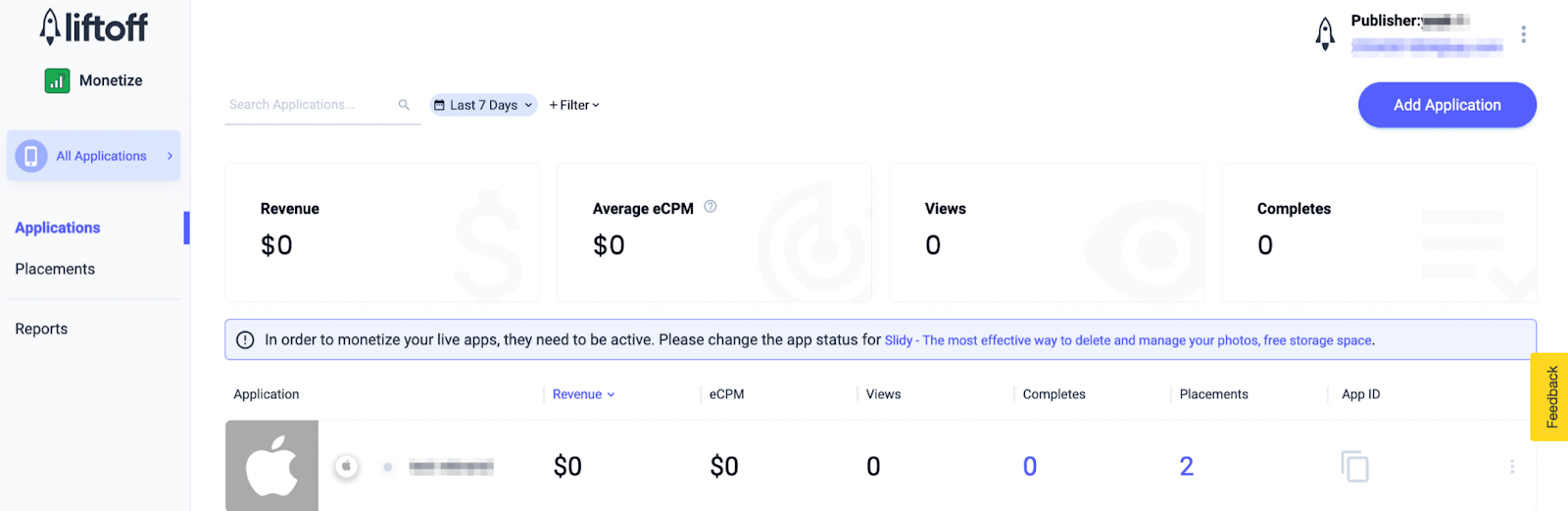
با کلیک بر روی دکمهی «افزودن برنامه» ، برنامهی خود را به داشبورد Liftoff Monetize اضافه کنید.
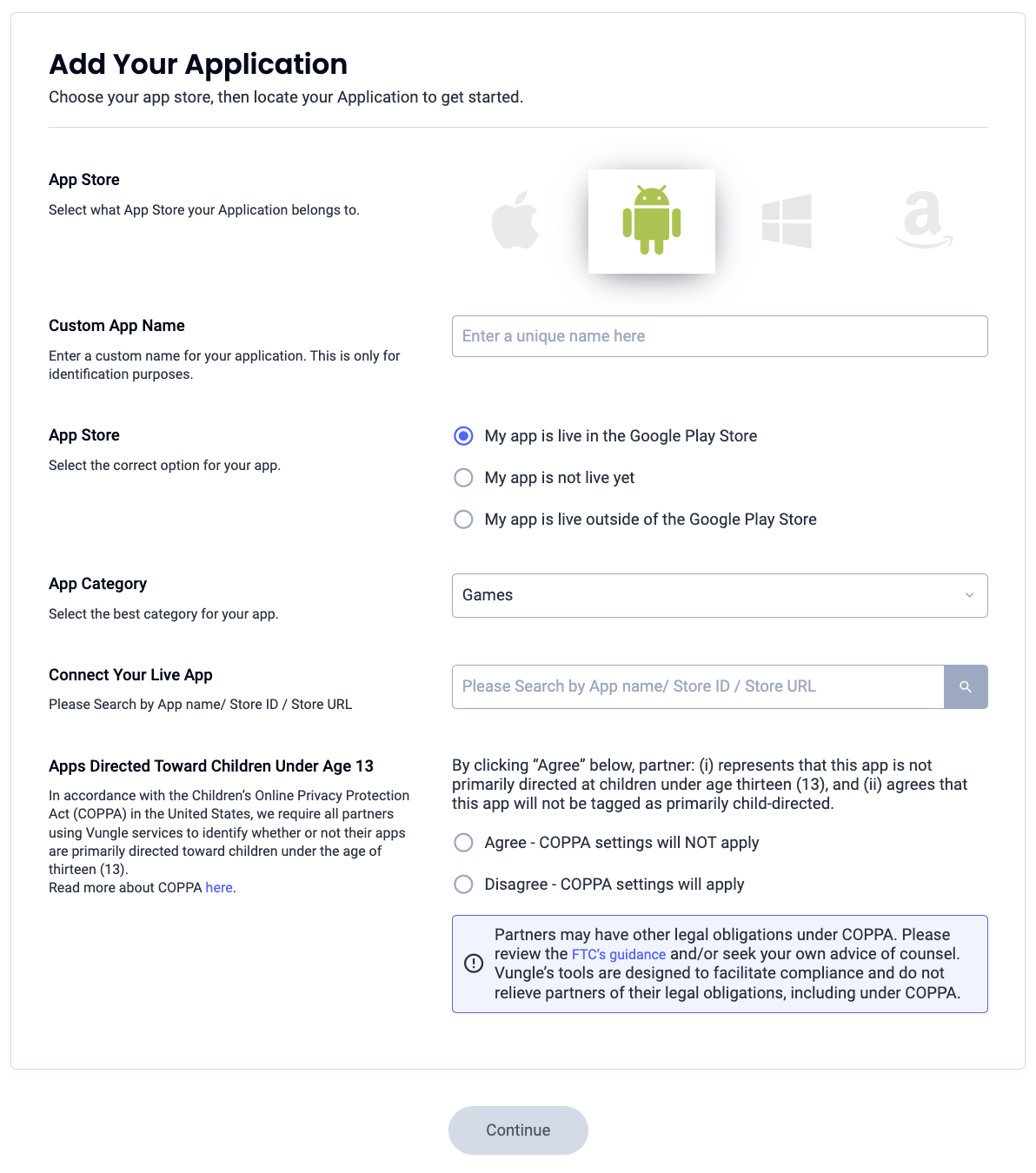
فرم را پر کنید و تمام جزئیات لازم را وارد کنید.
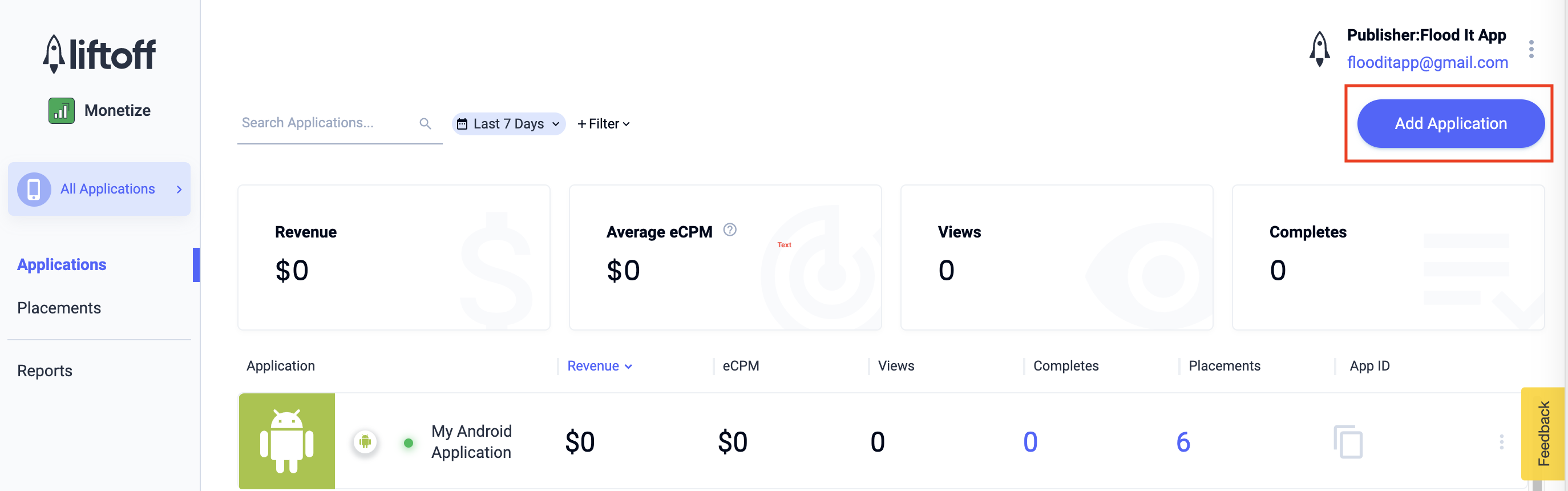
پس از ایجاد برنامه، آن را از داشبورد Liftoff Monetize Applications انتخاب کنید.
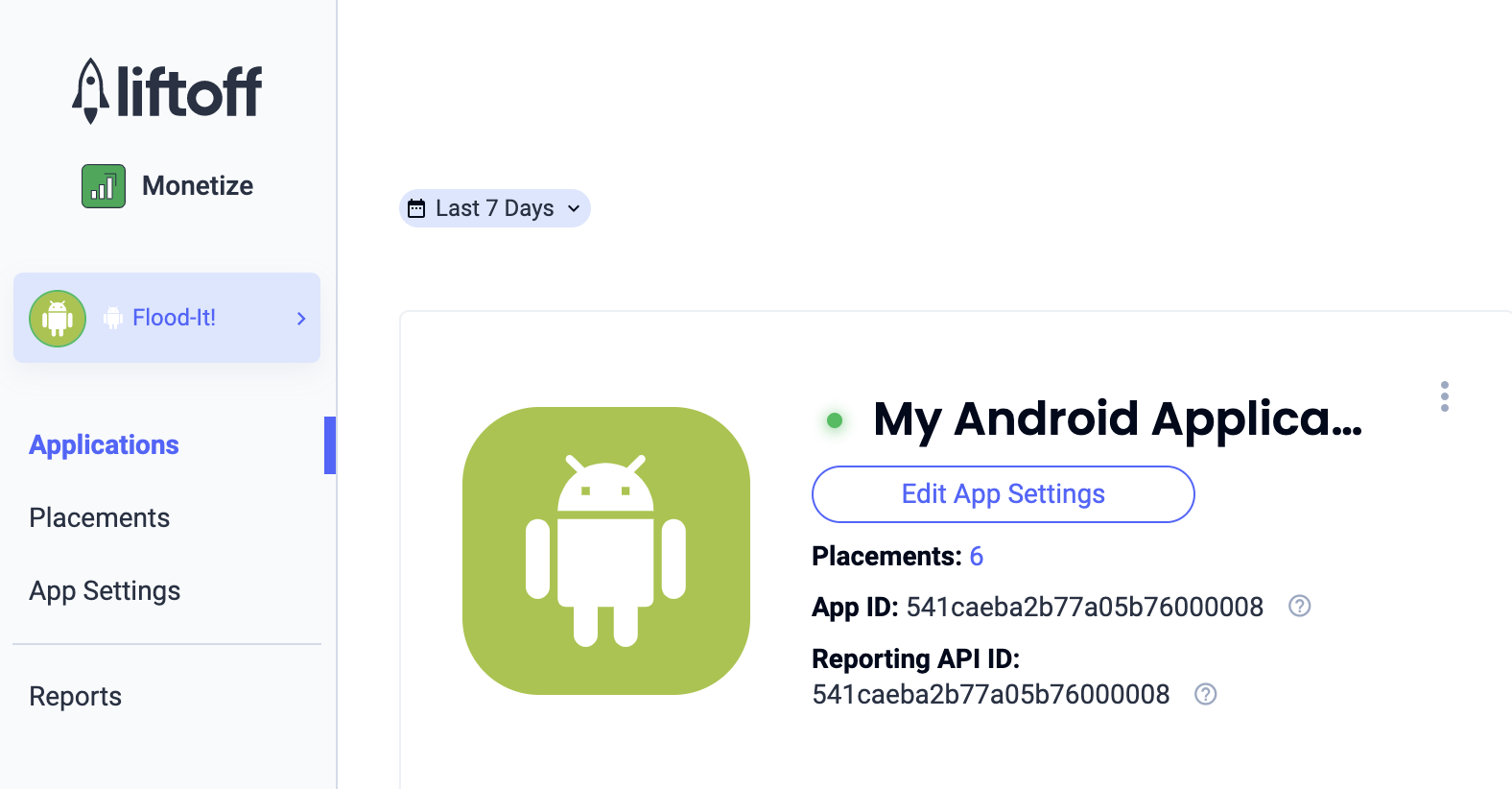
شناسه برنامه را یادداشت کنید.
اضافه کردن مکانهای جدید
برای ایجاد یک جایگاه جدید که قرار است با میانجیگری استفاده شود، به داشبورد Liftoff Monetize Placements بروید، روی دکمه Add Placement کلیک کنید و برنامه خود را از لیست کشویی انتخاب کنید.
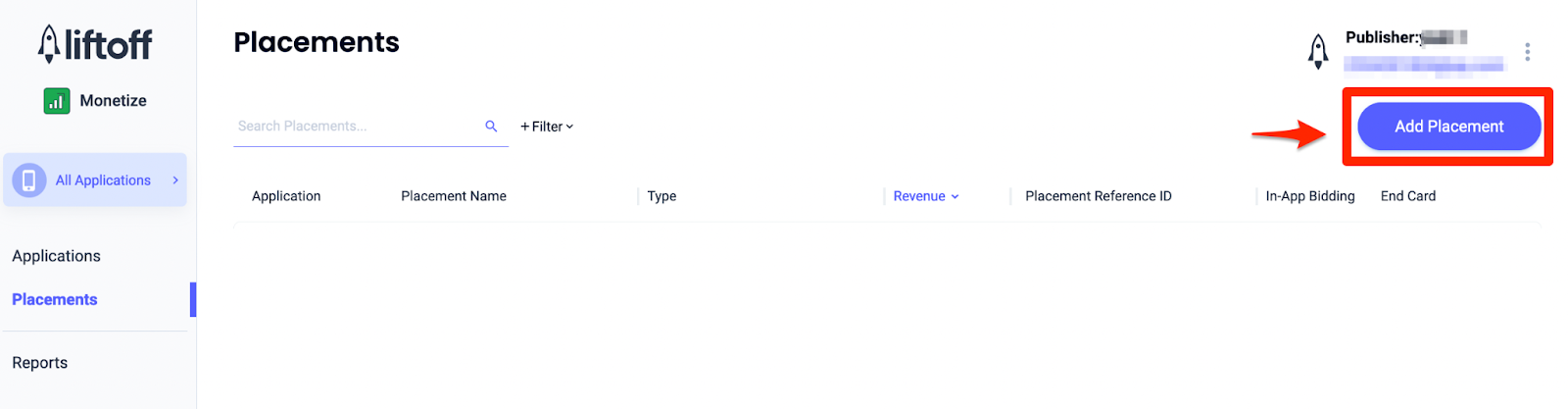
جزئیات مربوط به اضافه کردن مکانهای جدید در زیر آمده است:
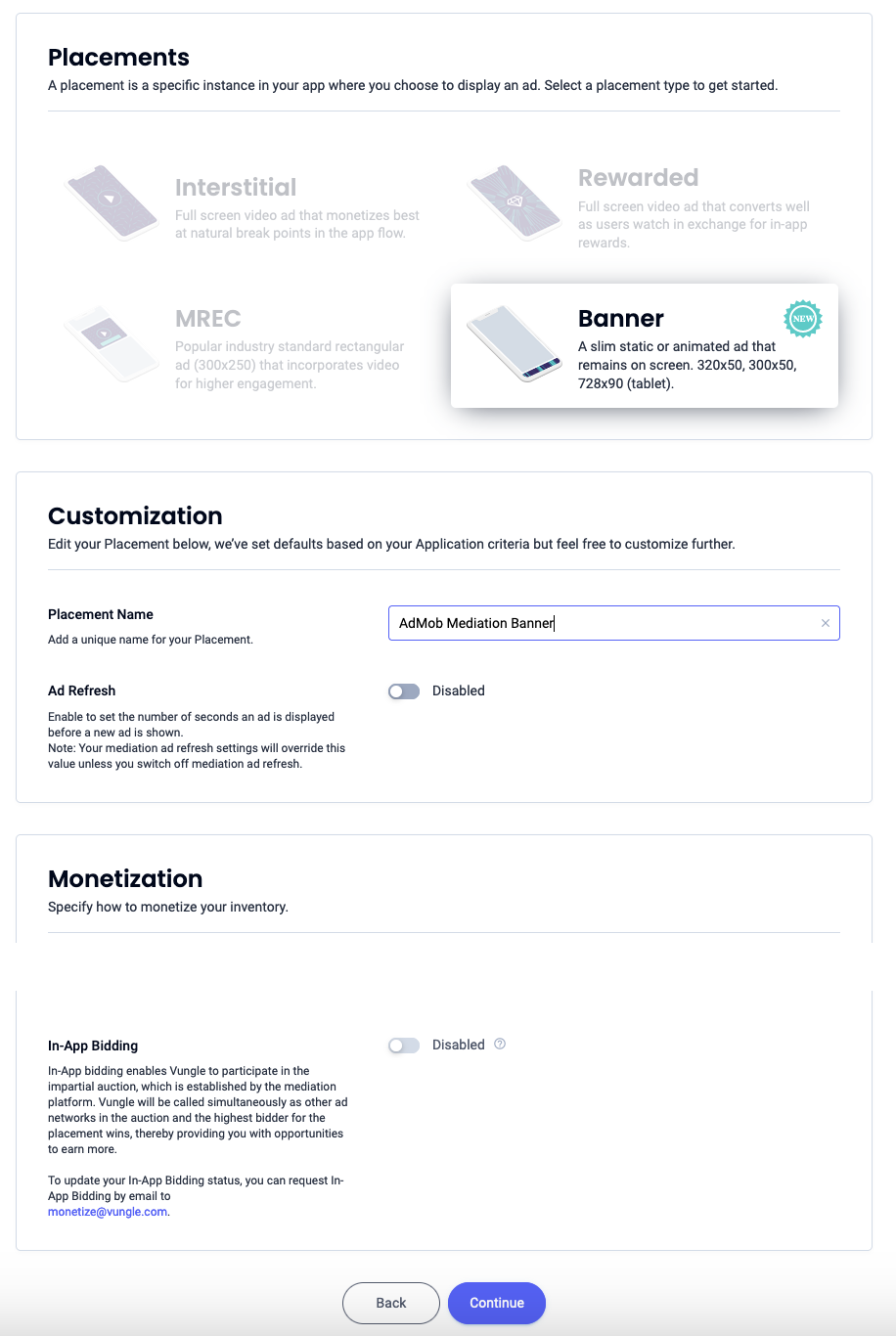
بنر
بنر را انتخاب کنید، نام محل نمایش را وارد کنید و بقیه فرم را پر کنید. [فقط پیشنهاد قیمت] در قسمت کسب درآمد ، گزینه پیشنهاد قیمت درون برنامهای را روی فعال قرار دهید. برای ایجاد محل نمایش، روی دکمه ادامه در پایین صفحه کلیک کنید.
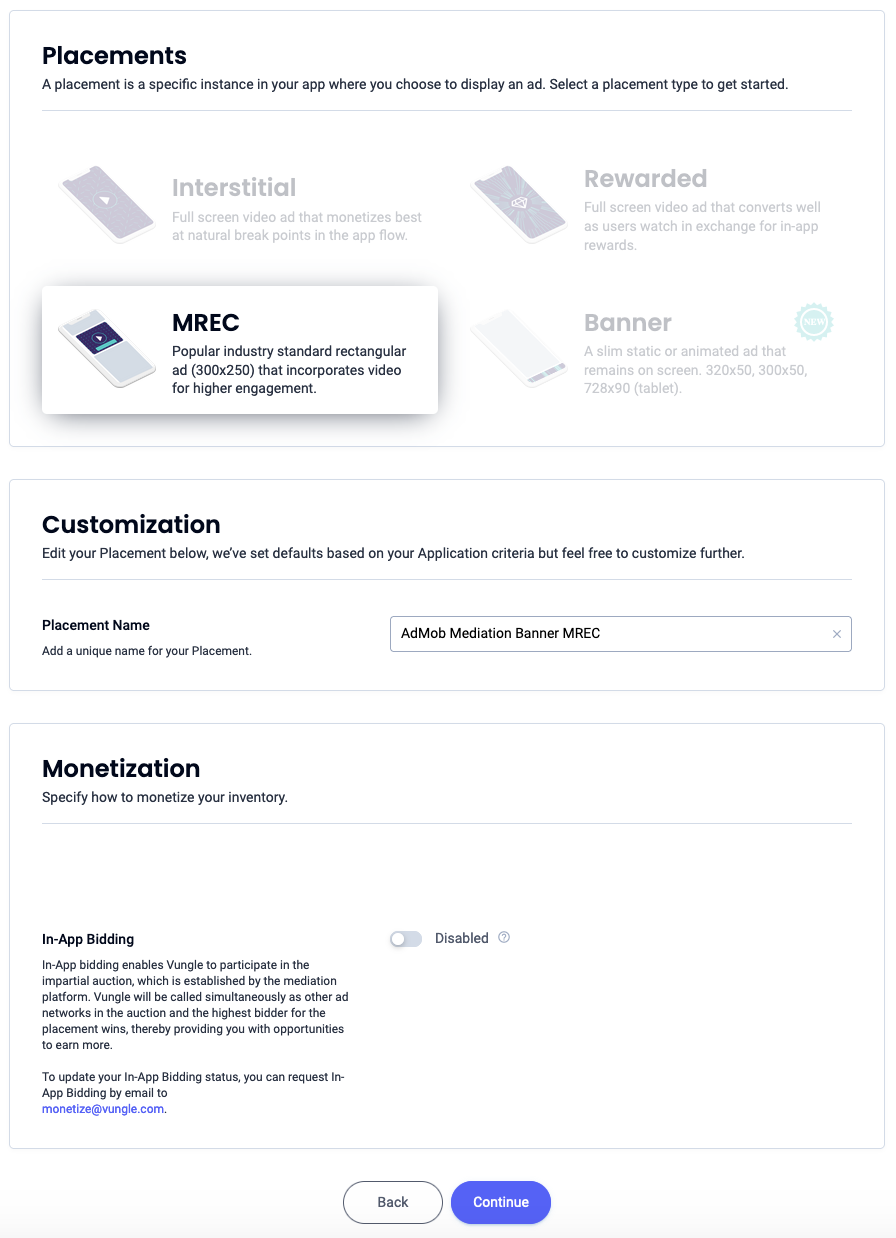
بنر ۳۰۰x۲۵۰
MREC را انتخاب کنید، یک نام برای جایگاه نمایش وارد کنید و بقیه فرم را پر کنید. [فقط پیشنهاد قیمت] در قسمت کسب درآمد ، گزینه پیشنهاد قیمت درون برنامهای را روی فعال قرار دهید. برای ایجاد جایگاه نمایش، روی دکمه ادامه در پایین صفحه کلیک کنید.
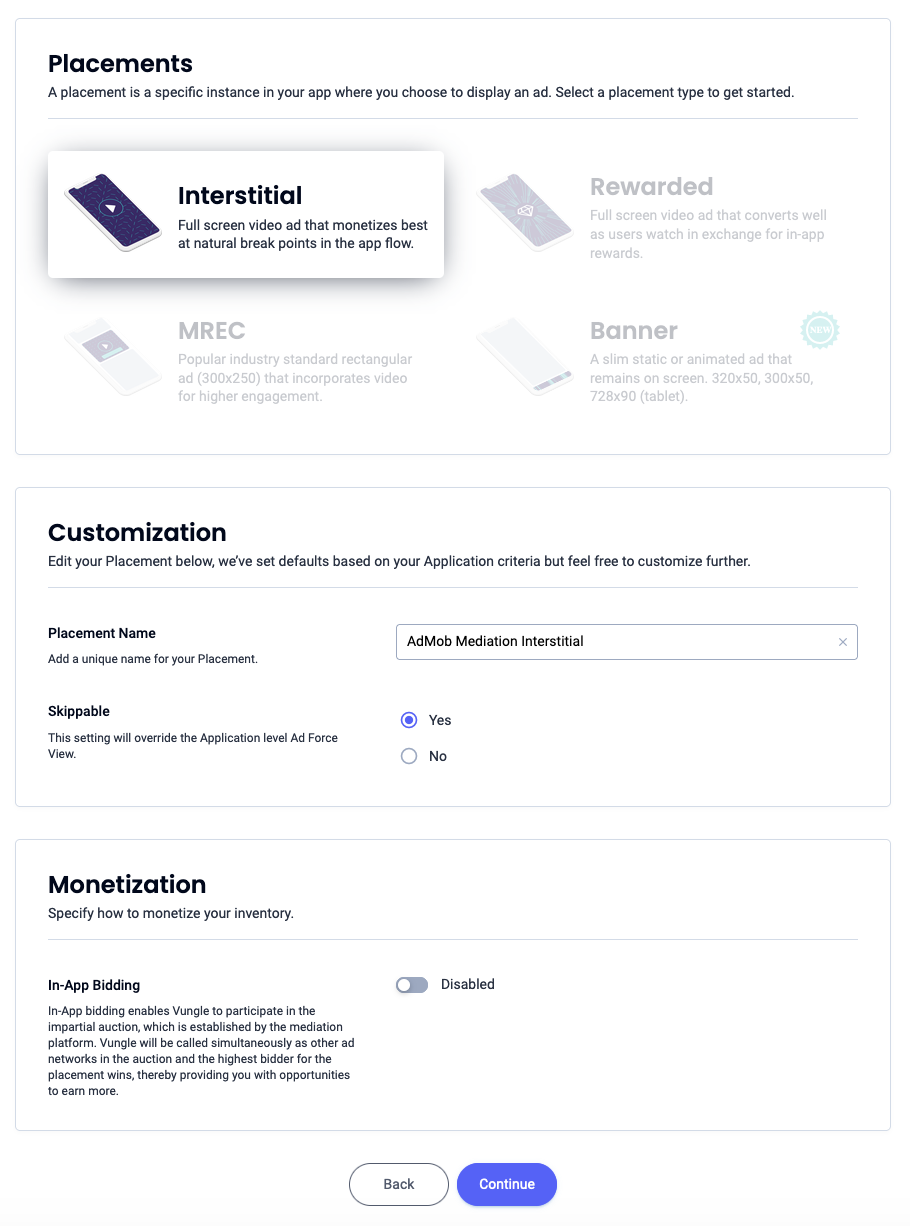
بینابینی
گزینه Interstitial را انتخاب کنید، نام جایگاه را وارد کنید و بقیه فرم را پر کنید. [فقط پیشنهاد قیمت] در قسمت کسب درآمد ، گزینه پیشنهاد قیمت درون برنامهای را روی فعال قرار دهید. برای ایجاد جایگاه، روی دکمه Continue در پایین صفحه کلیک کنید.
پاداش داده شده
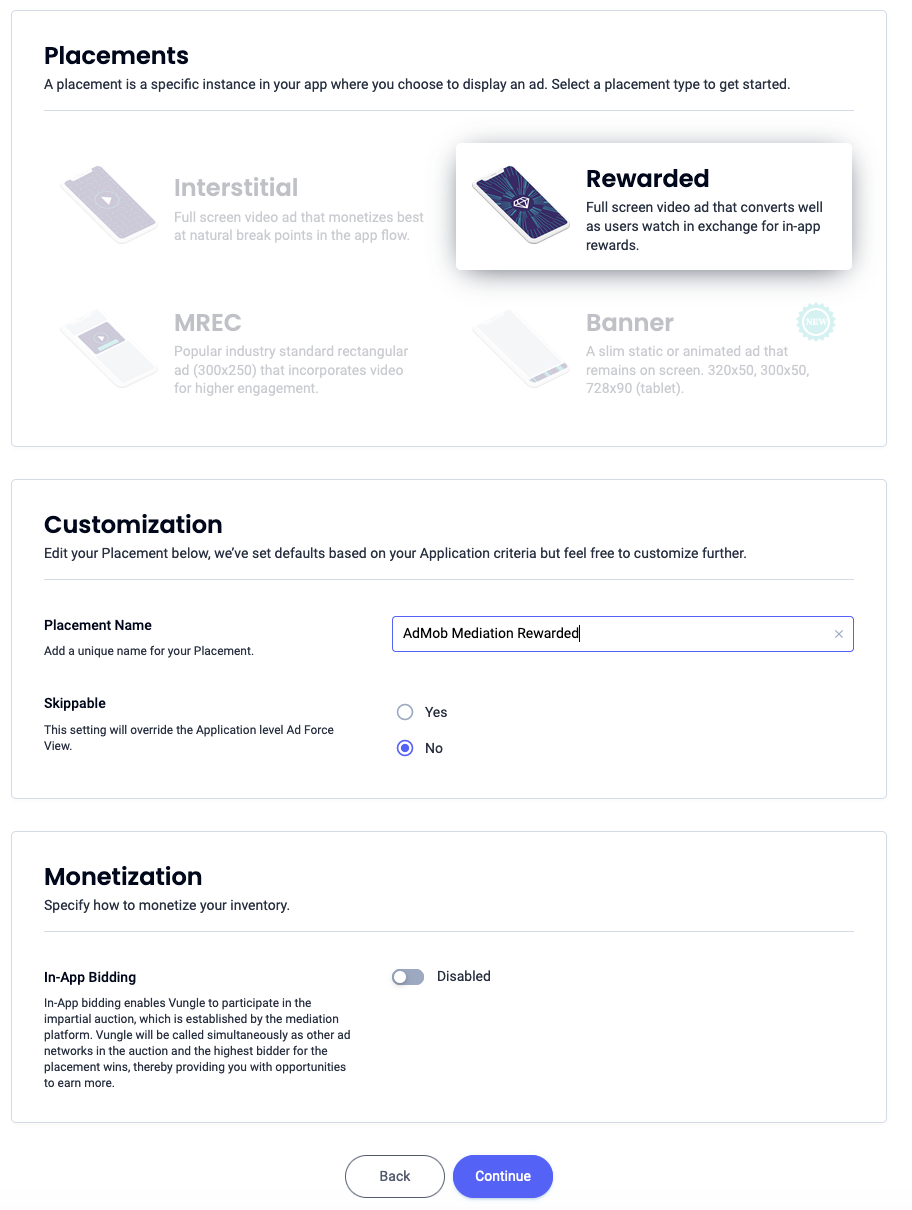
گزینه «Rewarded» را انتخاب کنید، یک نام برای جایگاه نمایش وارد کنید و بقیه فرم را پر کنید. [Bidding only] در قسمت «Monetization» ، گزینه «In-App Bidding» را روی «Enabled» قرار دهید. برای ایجاد جایگاه نمایش، روی دکمه «Continue» در پایین صفحه کلیک کنید.
تبلیغات بینابینی پاداشدار
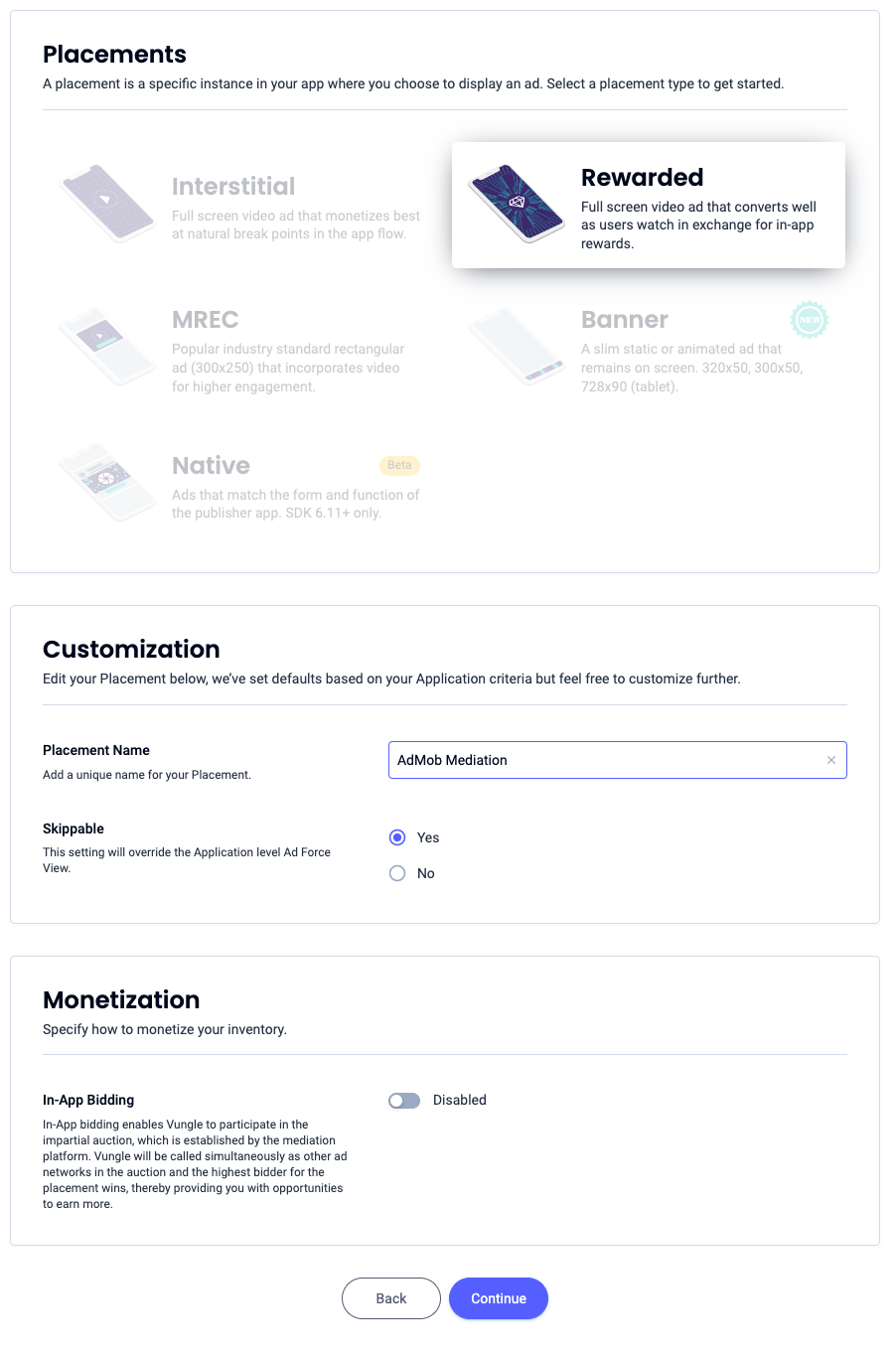
گزینه «Rewarded» را انتخاب کنید. یک نام برای جایگاه تبلیغاتی وارد کنید، گزینه «Skipable» را فعال کنید و بقیه فرم را پر کنید. [Bidding only] در قسمت «Monetization» ، گزینه «In-App Bidding» را روی «Enabled» قرار دهید. برای ایجاد جایگاه تبلیغاتی، روی دکمه «Continue» در پایین صفحه کلیک کنید.
بومی
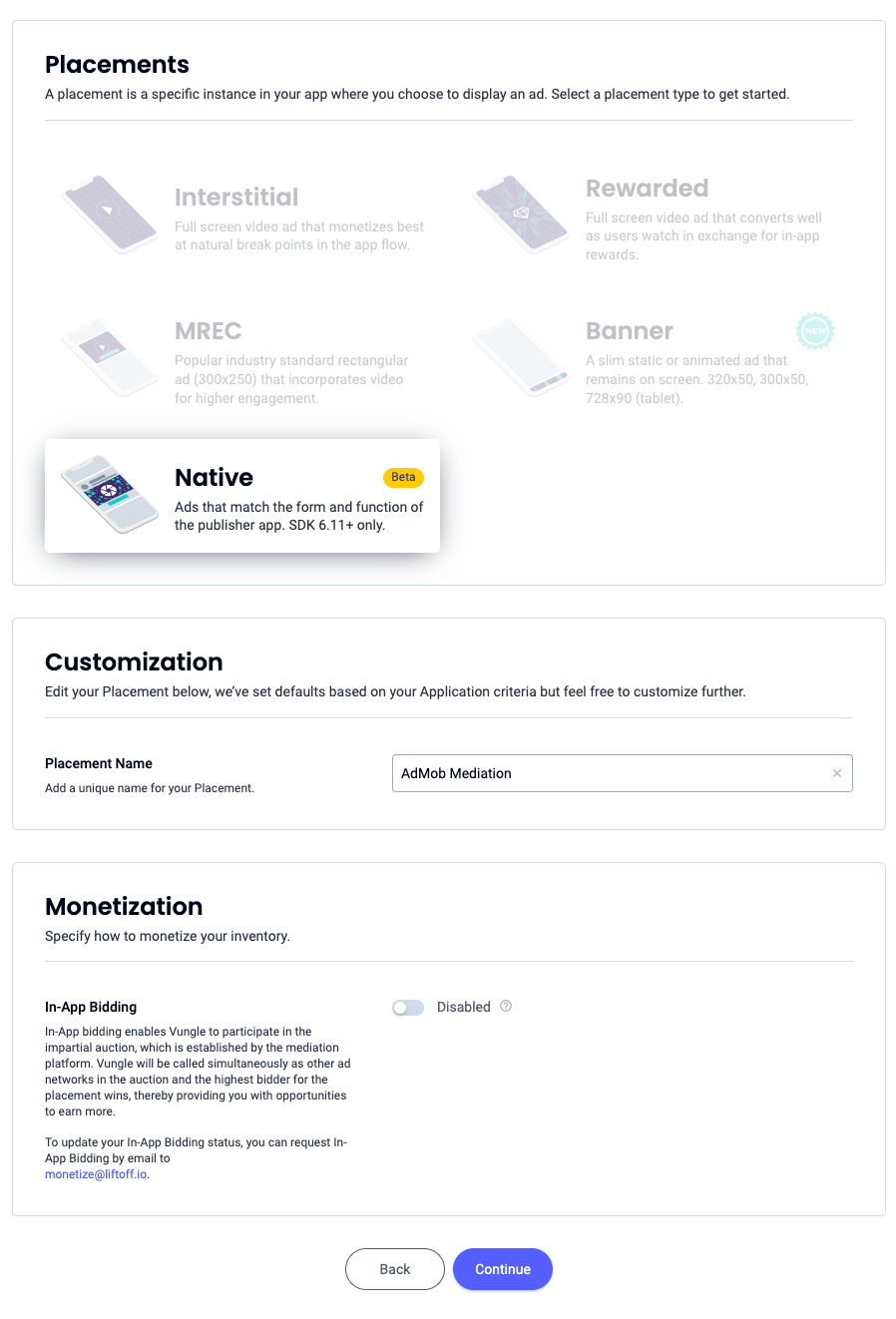
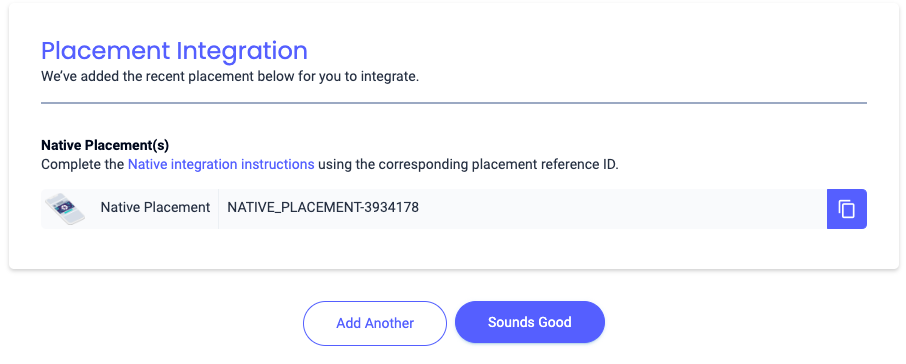
گزینه «بومی» را انتخاب کنید، یک نام برای جایگاه نمایش وارد کنید و بقیه فرم را پر کنید. [فقط پیشنهاد قیمت] در قسمت «کسب درآمد» ، گزینه پیشنهاد قیمت درون برنامهای را روی «فعال» قرار دهید. برای ایجاد جایگاه نمایش، روی دکمه «ادامه» در پایین صفحه کلیک کنید.
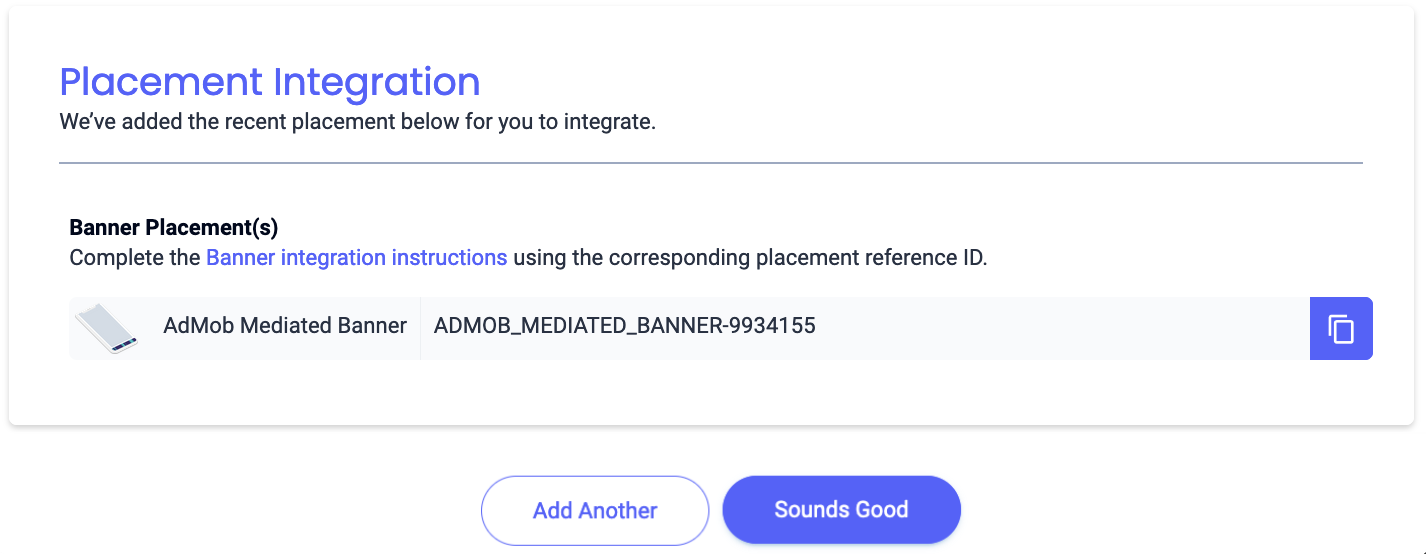
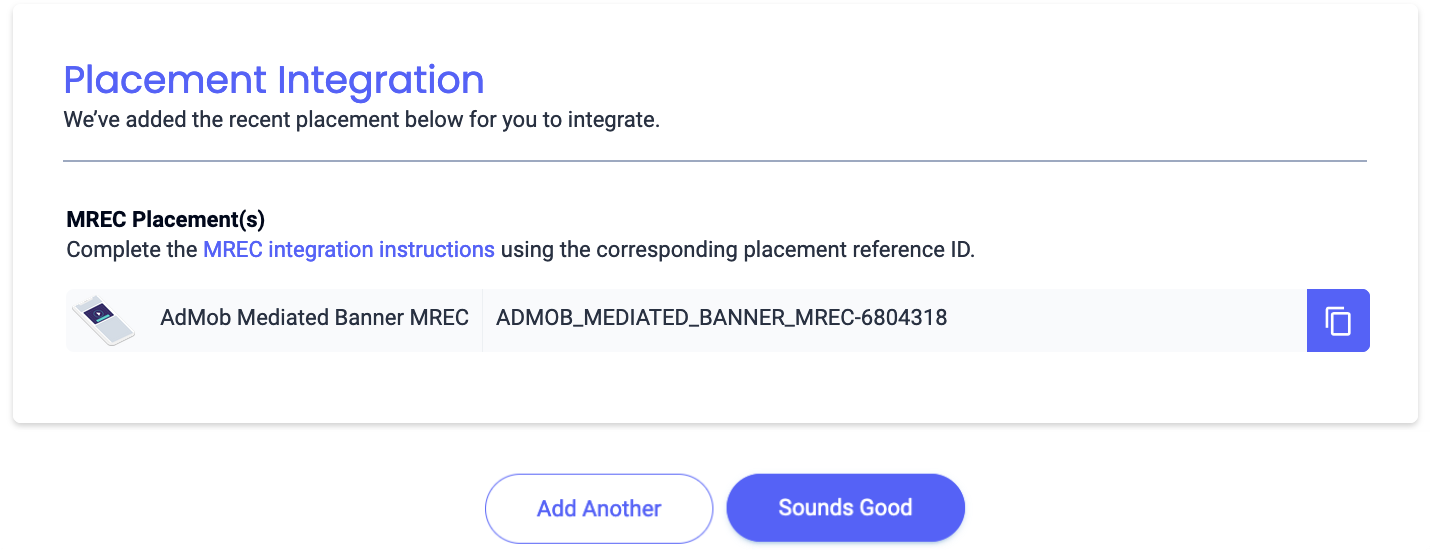
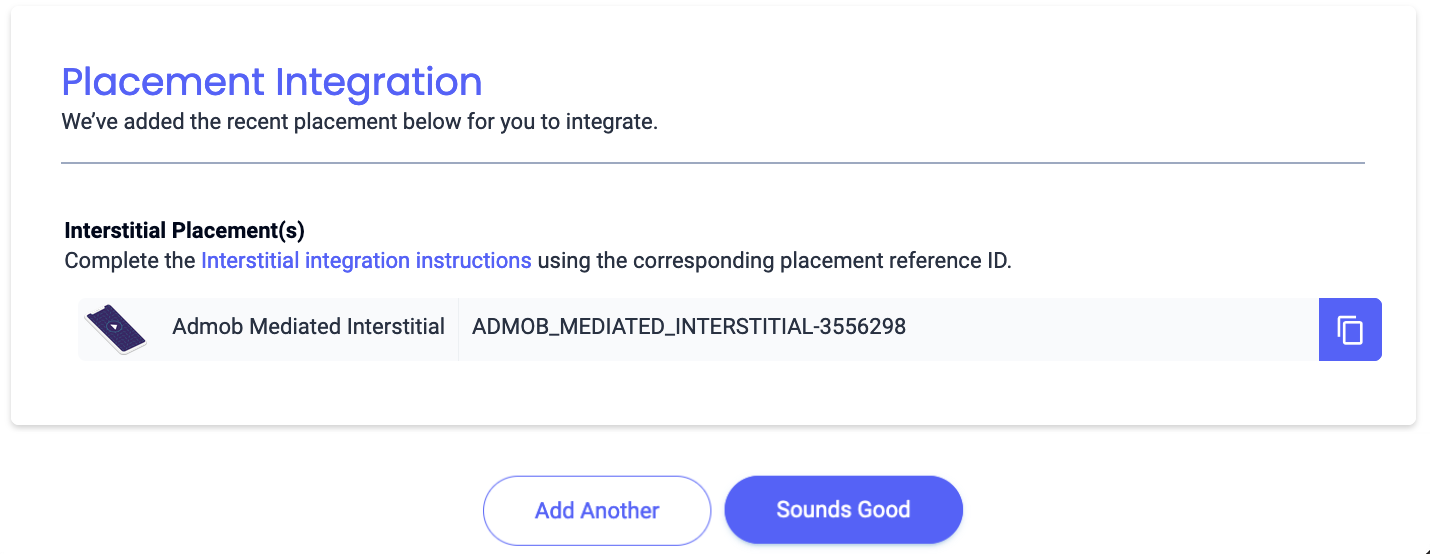
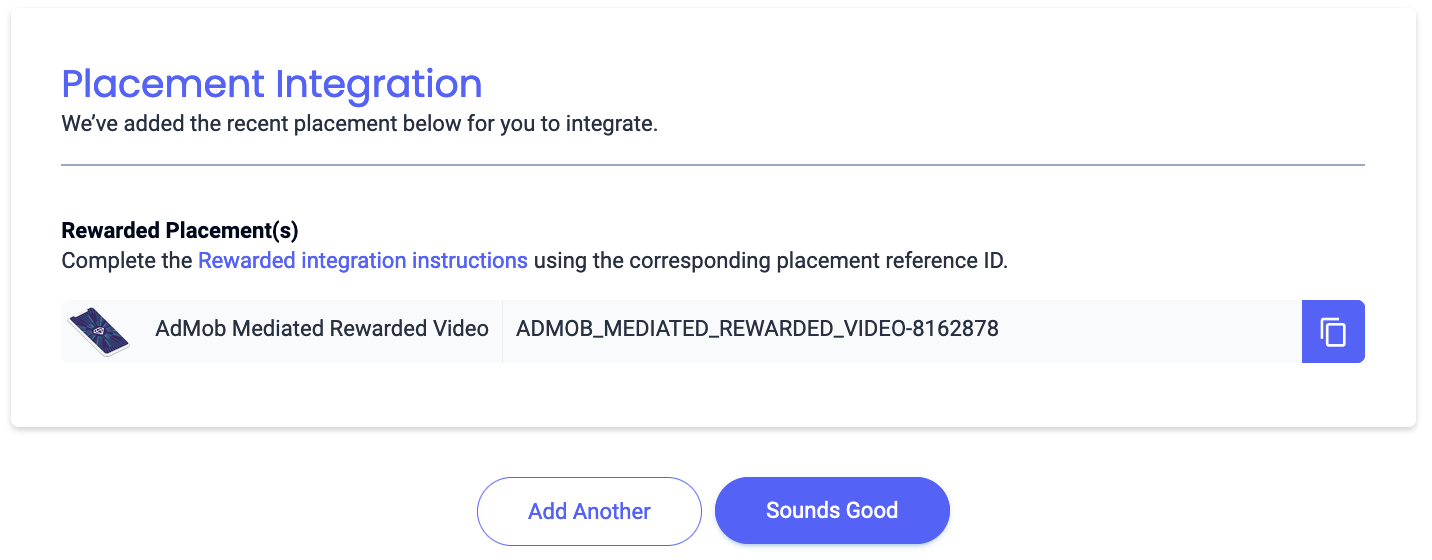
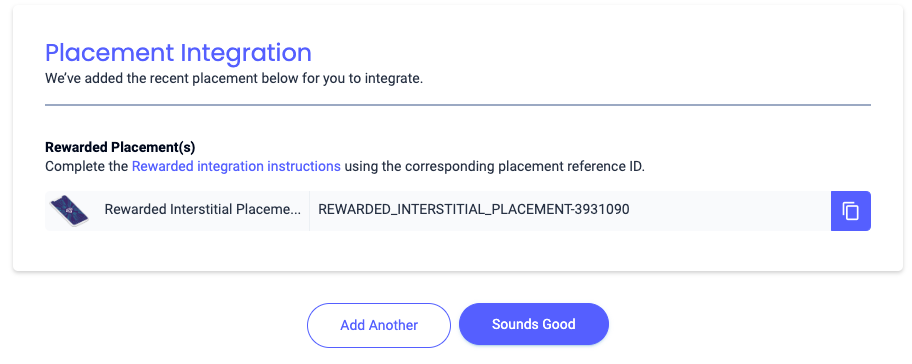
شناسه مرجع را یادداشت کنید و روی «صداها خوب است» کلیک کنید.
بنر
بنر ۳۰۰x۲۵۰
بینابینی
پاداش داده شده
تبلیغات بینابینی پاداشدار
بومی
کلید API گزارشدهی خود را پیدا کنید
مناقصه
این مرحله برای ادغامهای پیشنهاد قیمت لازم نیست.
آبشار
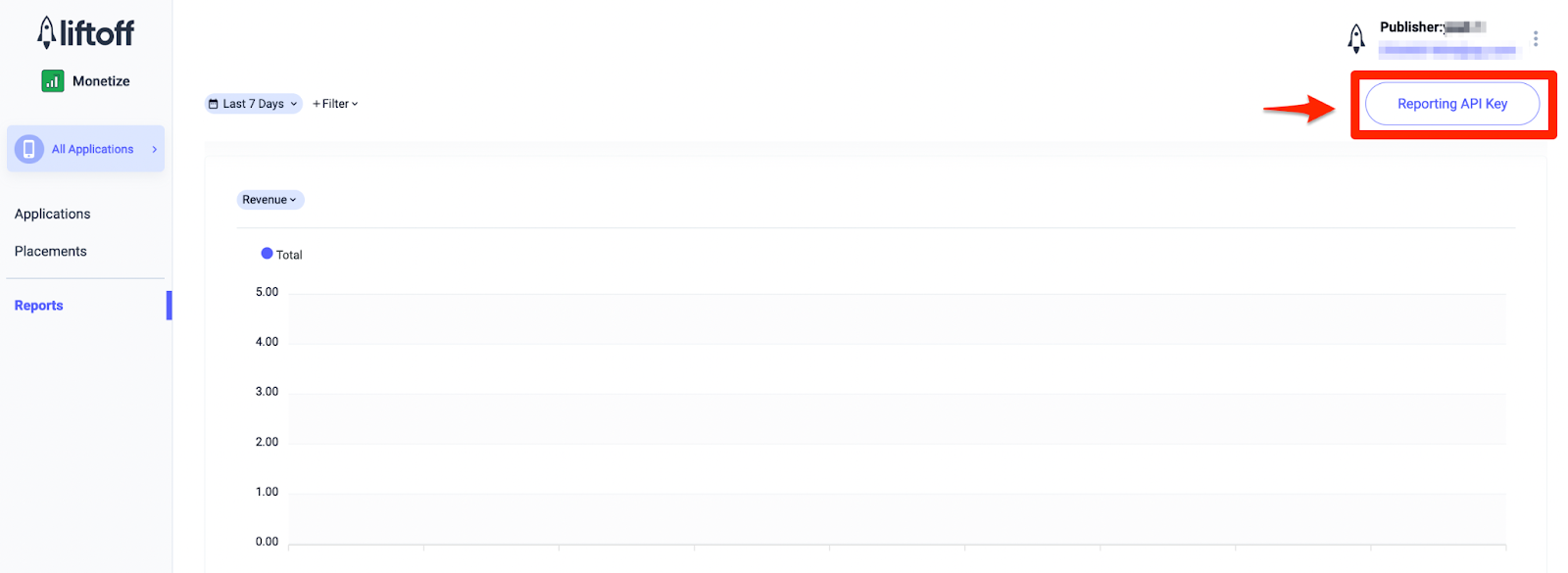
علاوه بر شناسه برنامه و شناسه مرجع ، برای تنظیم شناسه واحد تبلیغاتی Ad Manager خود به کلید API گزارشدهی درآمدزایی Liftoff خود نیز نیاز خواهید داشت. به داشبورد Liftoff Monetize Reports بروید و روی دکمه کلید API گزارشدهی کلیک کنید تا کلید API گزارشدهی خود را مشاهده کنید.
فایل app-ads.txt خود را بهروزرسانی کنید.
فروشندگان مجاز برنامهها app-ads.txt یک ابتکار آزمایشگاه فناوری IAB است که به شما کمک میکند تا موجودی تبلیغات برنامه خود را فقط از طریق کانالهایی که به عنوان مجاز شناسایی کردهاید، به فروش برسانید. برای جلوگیری از کاهش قابل توجه درآمد تبلیغات، باید یک فایل app-ads.txt پیادهسازی کنید. اگر قبلاً این کار را نکردهاید، یک فایل app-ads.txt برای Ad Manager ایجاد کنید .
برای پیادهسازی app-ads.txt برای Liftoff Monetize، ورودیهای app-ads.txt مربوط به Liftoff Monetize را دانلود و به فایل app-ads.txt موجود خود اضافه کنید. برای اطلاعات بیشتر، به app-ads.txt مراجعه کنید.
حالت تست را روشن کنید
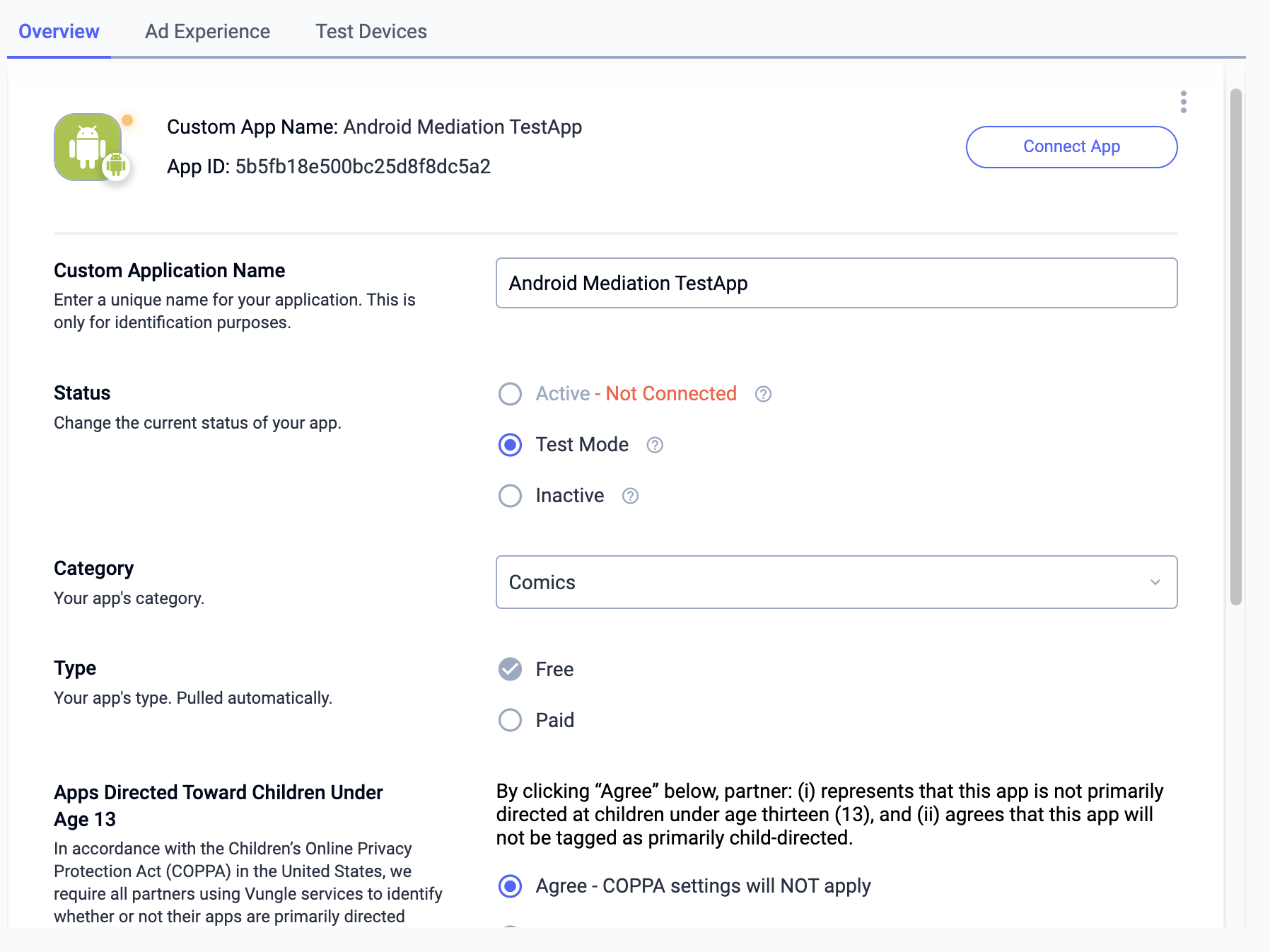
برای فعال کردن تبلیغات آزمایشی، به داشبورد Liftoff Monetize خود بروید و به Applications بروید.
برنامهای را که میخواهید تبلیغات آزمایشی برای آن فعال شود، در بخش «شناسه مرجع قرارگیری» برنامه خود انتخاب کنید. تبلیغات آزمایشی را میتوان با انتخاب «حالت آزمایشی» برای نمایش فقط تبلیغات آزمایشی در بخش «وضعیت» فعال کرد.
مرحله ۲: تنظیم تقاضای کسب درآمد Liftoff در رابط کاربری Ad Manager
وارد حساب مدیر تبلیغات خود شوید.
کسب درآمد از طریق لیفتآف در شرکتها
مناقصه
این مرحله برای ادغامهای پیشنهاد قیمت لازم نیست.
آبشار
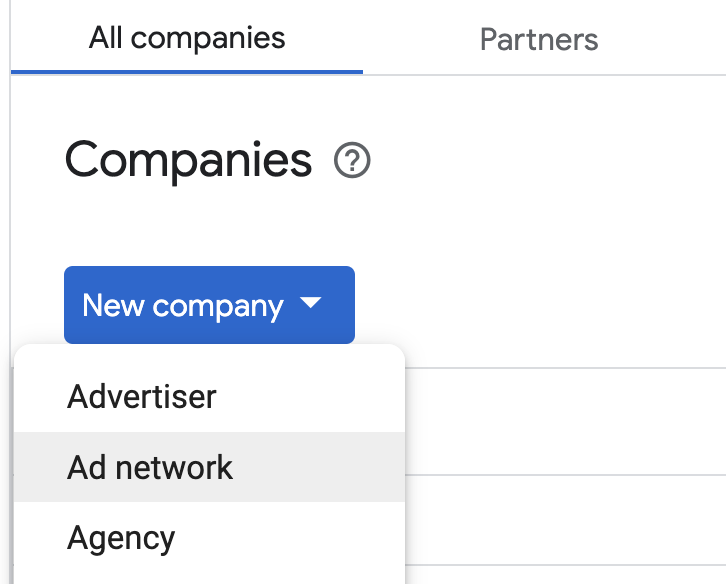
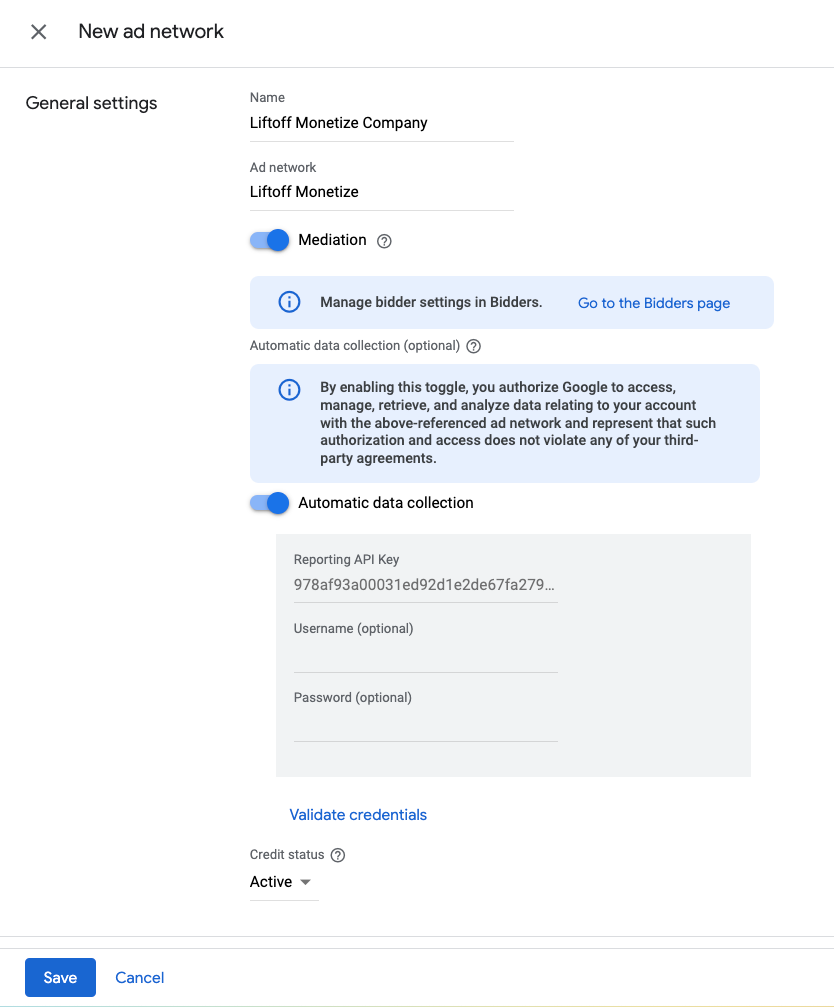
به بخش مدیریت > شرکتها بروید، سپس در تب «همه شرکتها» روی دکمه «شرکت جدید» کلیک کنید. شبکه تبلیغاتی را انتخاب کنید.
Liftoff Monetize را به عنوان شبکه تبلیغاتی انتخاب کنید، یک نام منحصر به فرد وارد کنید و Mediation را فعال کنید. Automatic data collection را فعال کنید و Reporting API Key که در بخش قبل به دست آوردهاید را وارد کنید.
نیازی به وارد کردن نام کاربری یا رمز عبور نیست. پس از اتمام، روی ذخیره کلیک کنید.
فعال کردن اشتراکگذاری امن سیگنال
مناقصه
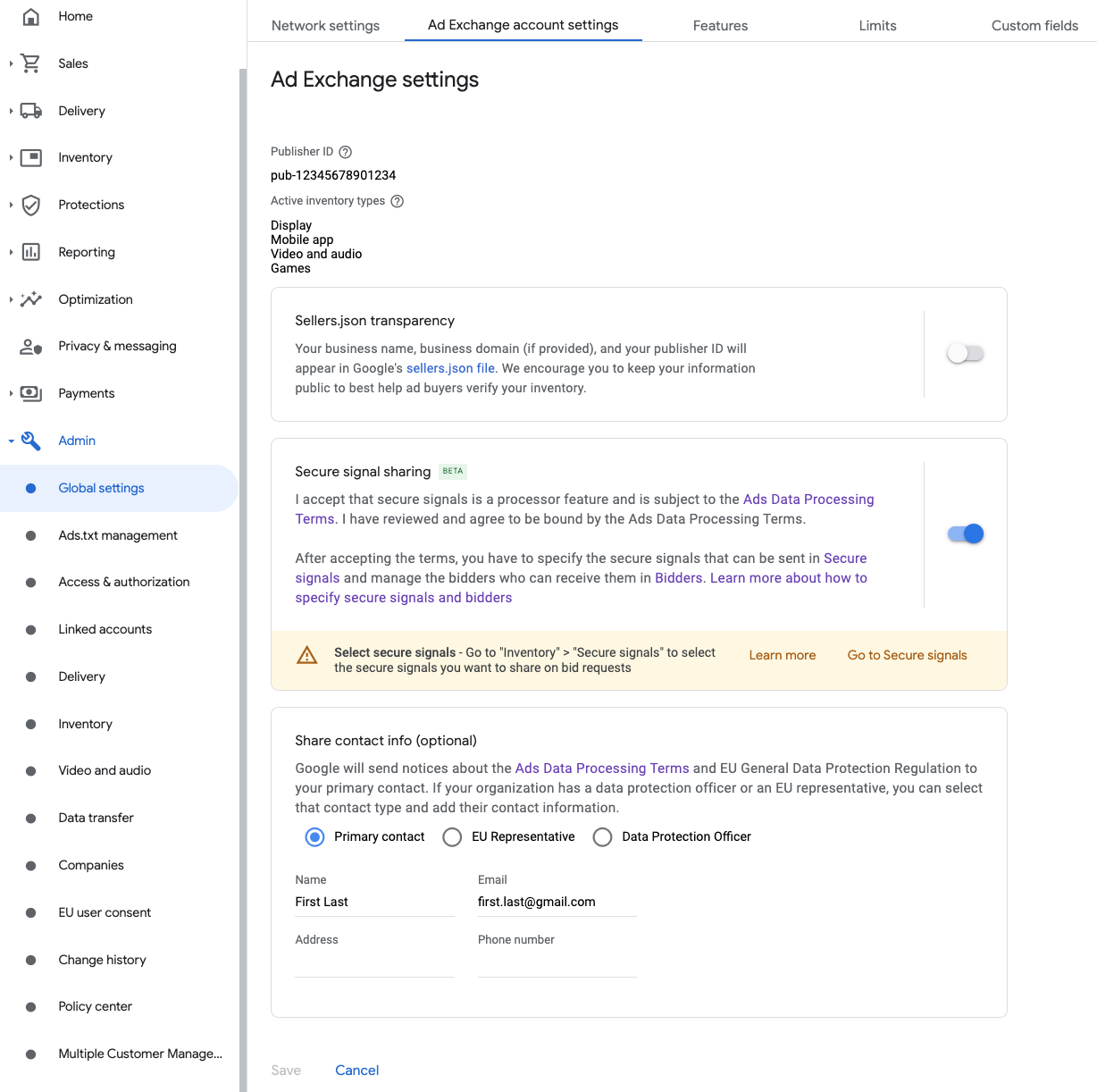
به بخش مدیریت > تنظیمات کلی بروید. به برگه تنظیمات حساب Ad Exchange بروید و اشتراکگذاری امن سیگنال را بررسی و فعال کنید. روی ذخیره کلیک کنید.
آبشار
این مرحله برای ادغامهای آبشاری لازم نیست.
سیگنال امن را در درخواستهای پیشنهاد به اشتراک بگذارید
مناقصه
به Inventory > Secure Signals بروید. در زیر Secure signals ، Liftoff را جستجو کنید و Enable app integration را روشن کنید.
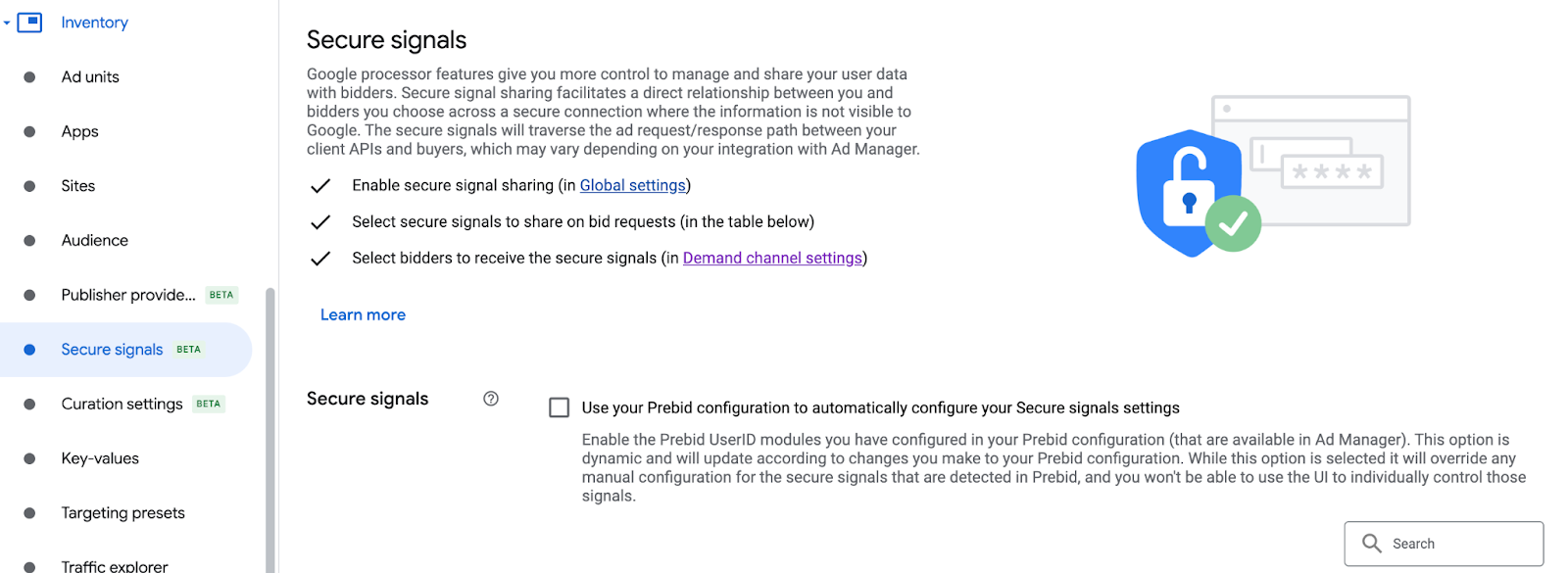
روی ذخیره کلیک کنید.
آبشار
این مرحله برای ادغامهای آبشاری لازم نیست.
امکان اشتراکگذاری امن سیگنال برای مناقصه SDK
مناقصه
به بخش تحویل > تنظیمات کانال تقاضا بروید. در تب تنظیمات پیشفرض ، گزینه «اجازه اشتراکگذاری امن سیگنال برای پیشنهاد SDK» را فعال کنید.
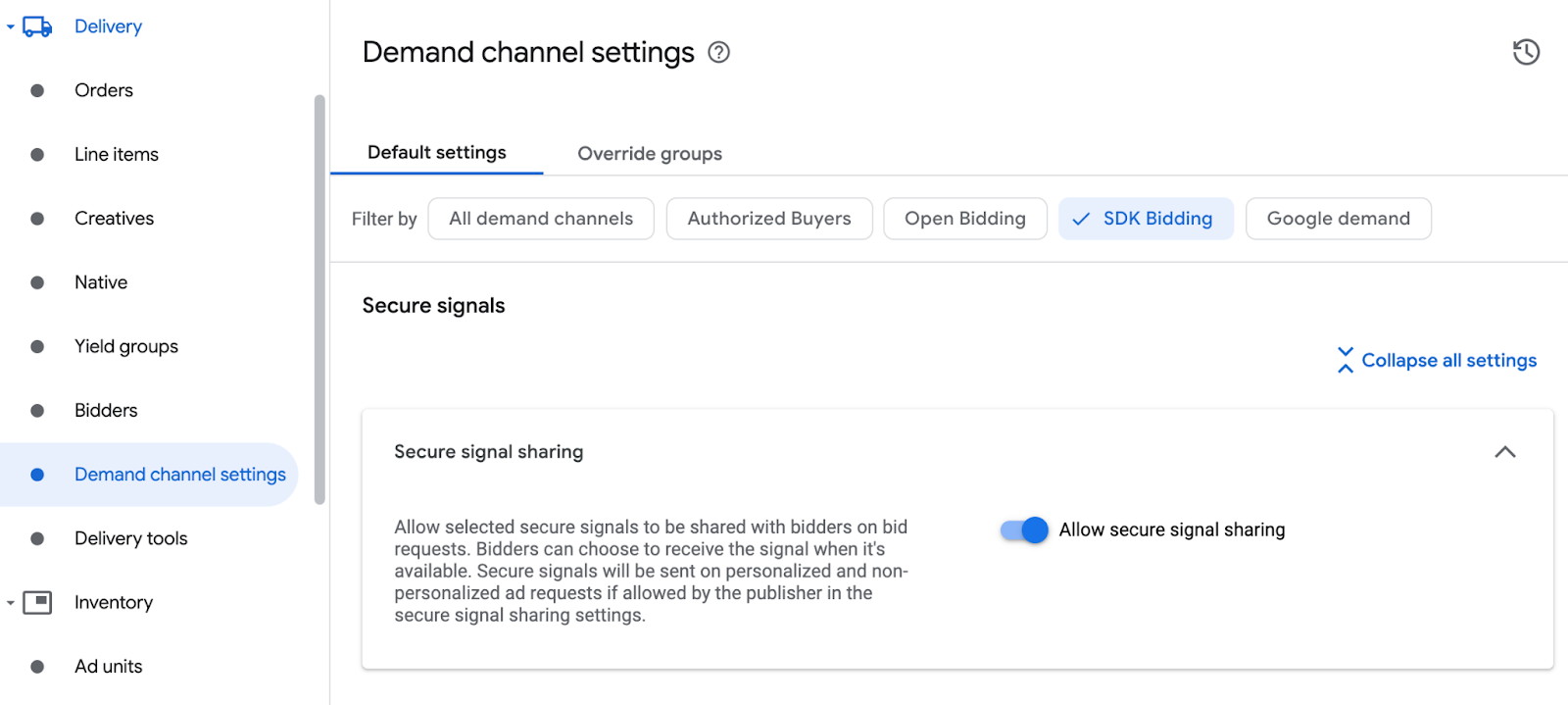
روی ذخیره کلیک کنید.
آبشار
این مرحله برای ادغامهای آبشاری لازم نیست.
پیکربندی Liftoff کسب درآمد از پیشنهاد قیمت
مناقصه
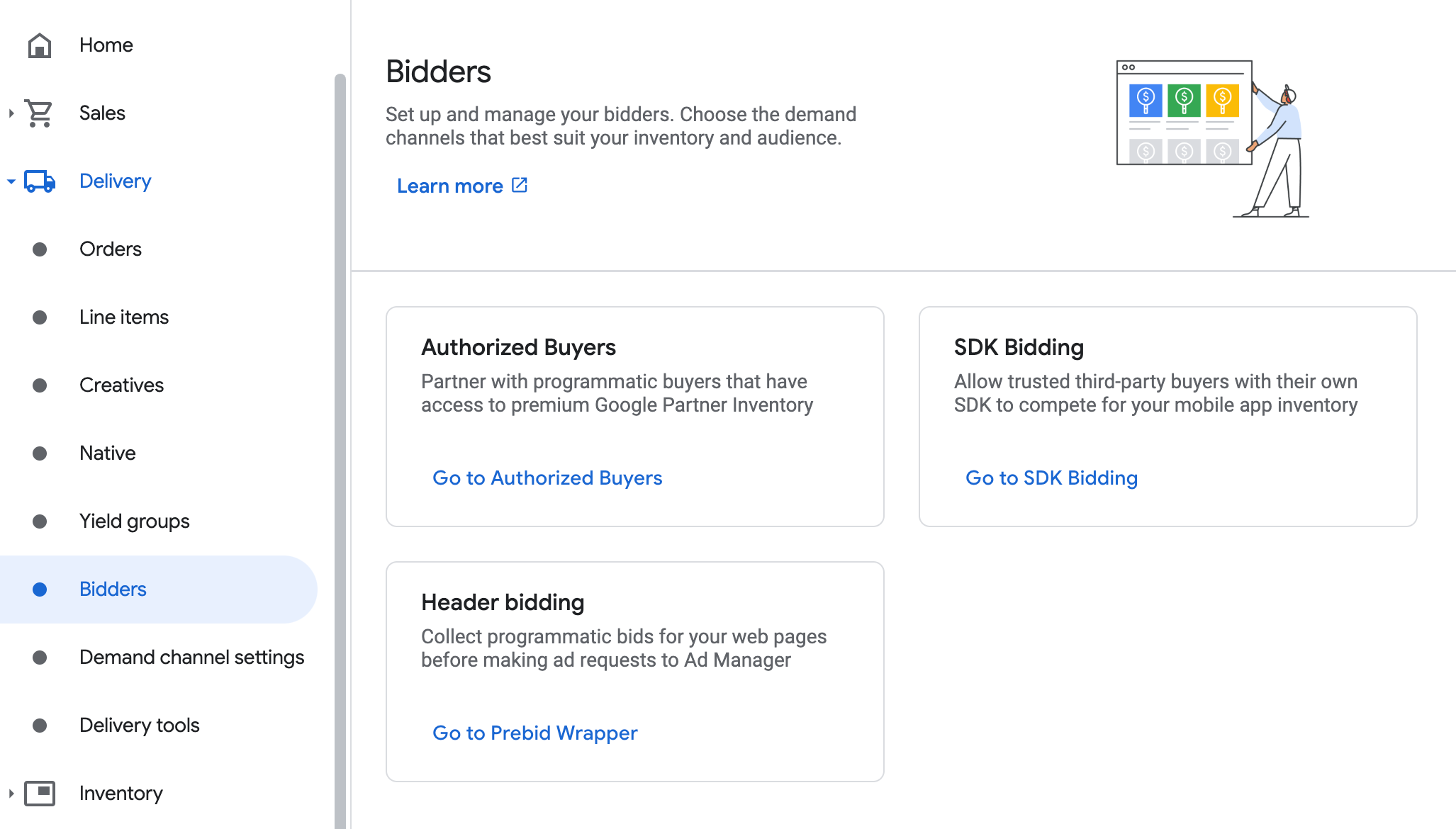
به مسیر Delivery > Bidders بروید و روی Go to SDK Bidding کلیک کنید.
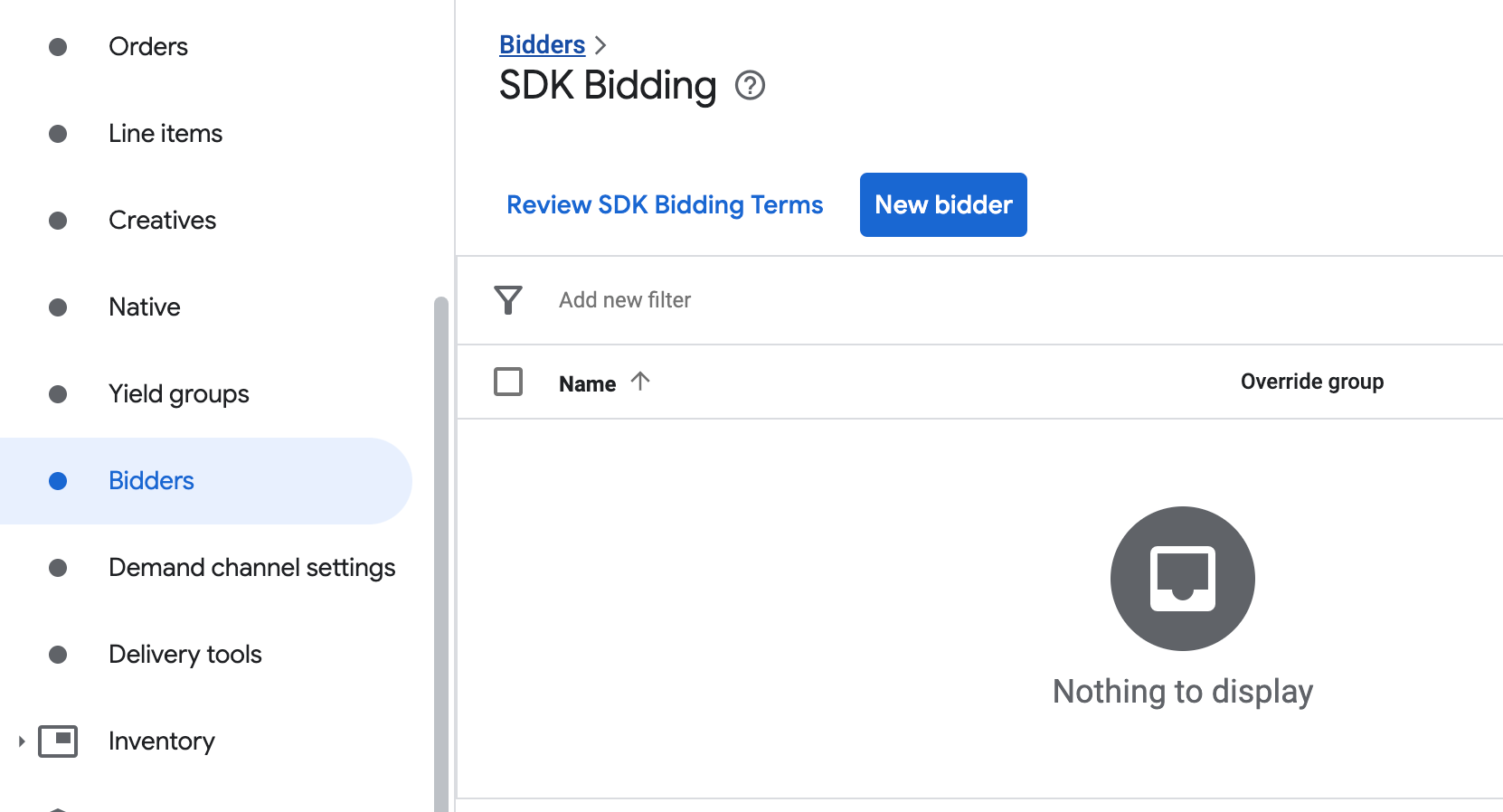
روی پیشنهاددهنده جدید کلیک کنید.
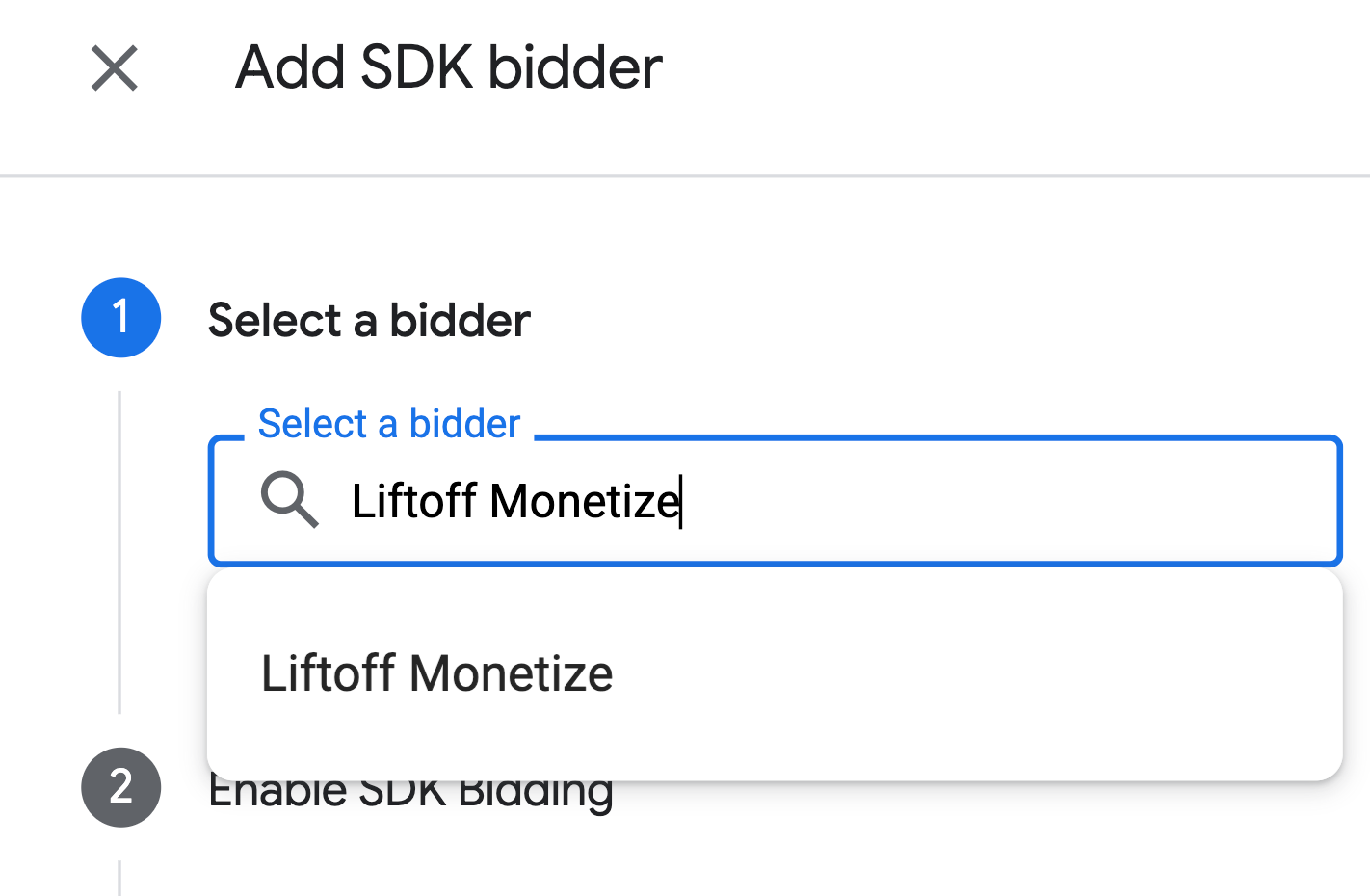
Liftoff Monetize را به عنوان پیشنهاد دهنده انتخاب کنید.
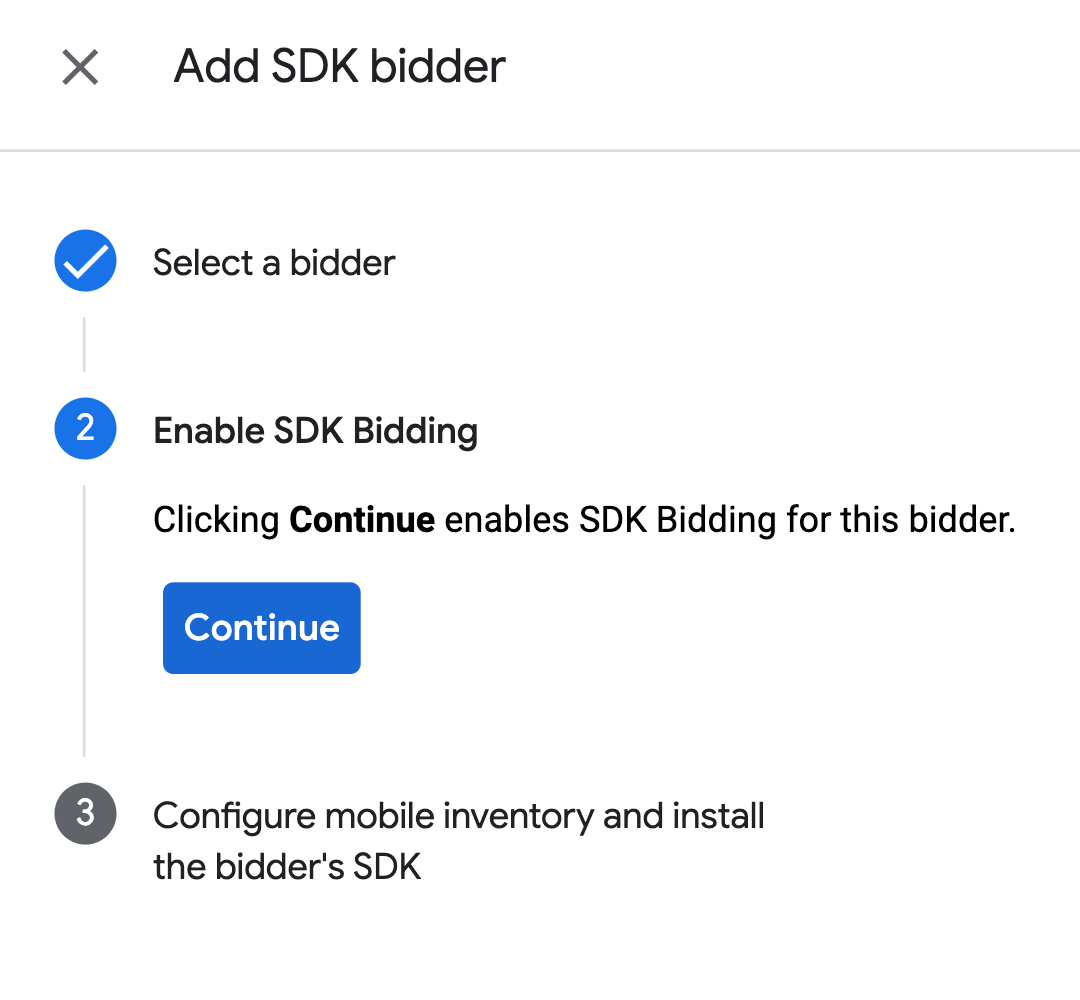
برای فعال کردن پیشنهاد قیمت SDK برای این پیشنهاد دهنده، روی ادامه کلیک کنید.
روی انجام شد کلیک کنید.
آبشار
این مرحله برای ادغامهای آبشاری لازم نیست.
پیکربندی نگاشت واحد تبلیغات
مناقصه
به مسیر Delivery > Bidders بروید و روی Go to SDK Bidding کلیک کنید.
شرکت Liftoff Monetize را انتخاب کنید.
به برگه نگاشت واحد تبلیغات بروید و روی نگاشت واحد تبلیغات جدید کلیک کنید.
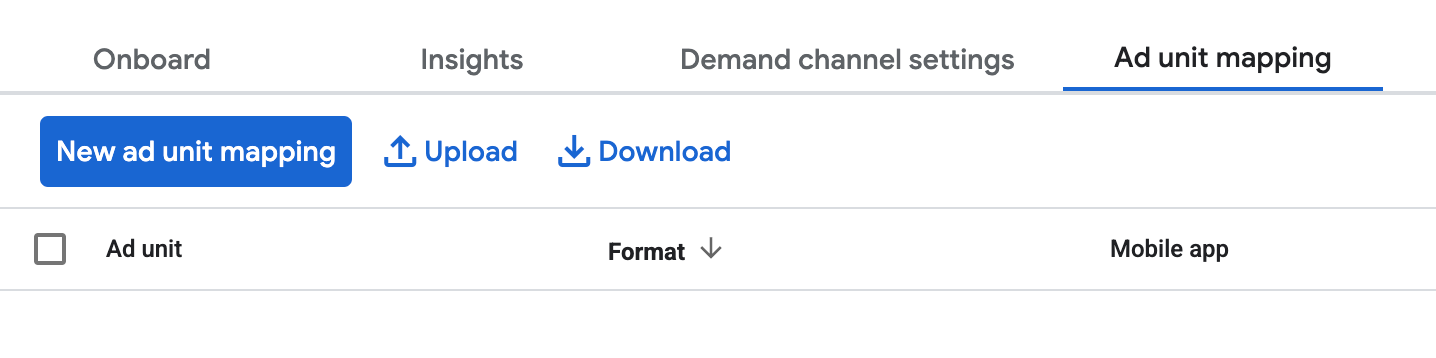
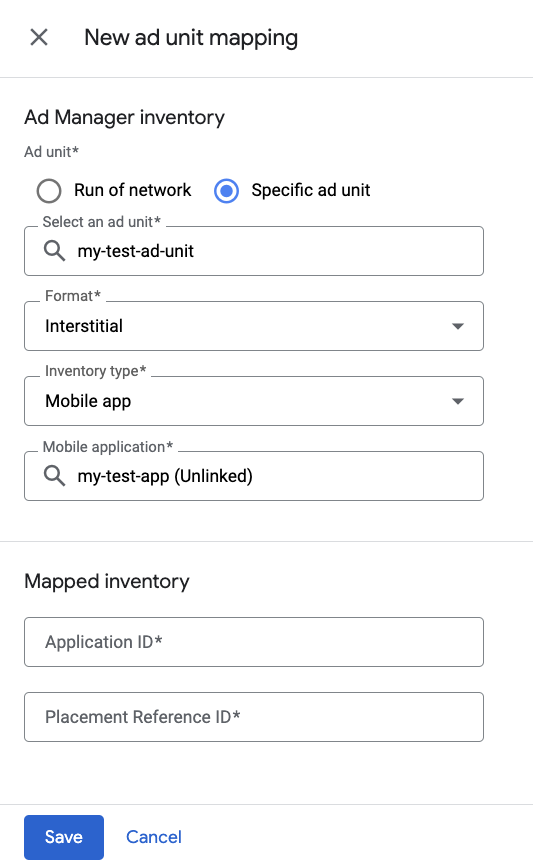
واحد تبلیغاتی خاص را انتخاب کنید. یک واحد تبلیغاتی و قالب آن، برنامه موبایل را به عنوان نوع موجودی و برنامه موبایل خود انتخاب کنید. سپس، شناسه برنامه و شناسه مرجع قرارگیری که در بخش قبل به دست آوردهاید را وارد کنید.
در نهایت، روی ذخیره کلیک کنید.
آبشار
به بخش تحویل > گروههای بازده بروید و روی دکمهی گروه بازده جدید کلیک کنید. موجودی و برنامهی خود را انتخاب کنید.
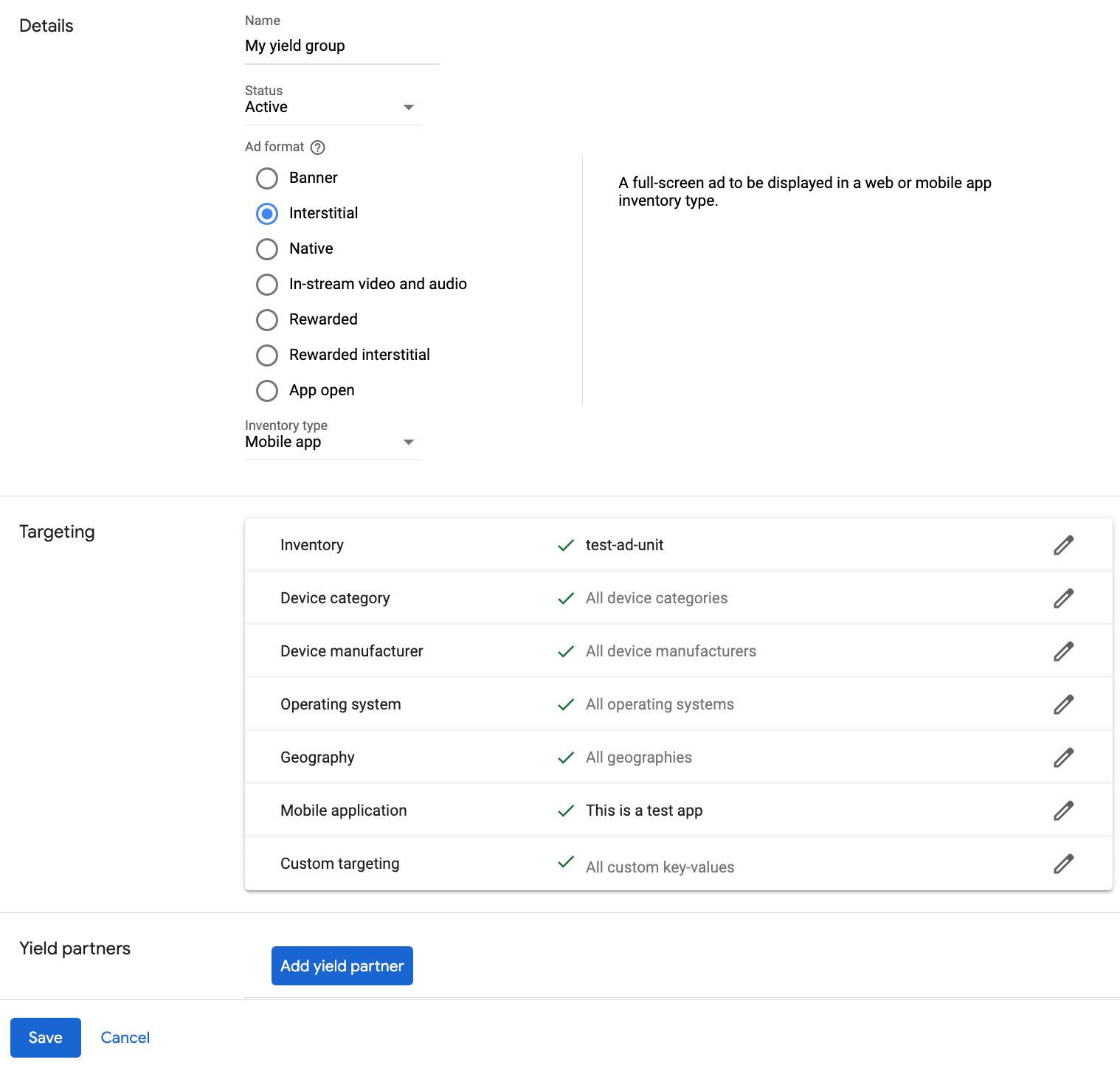
به Yield partners بروید و روی Add Mediation partner کلیک کنید.

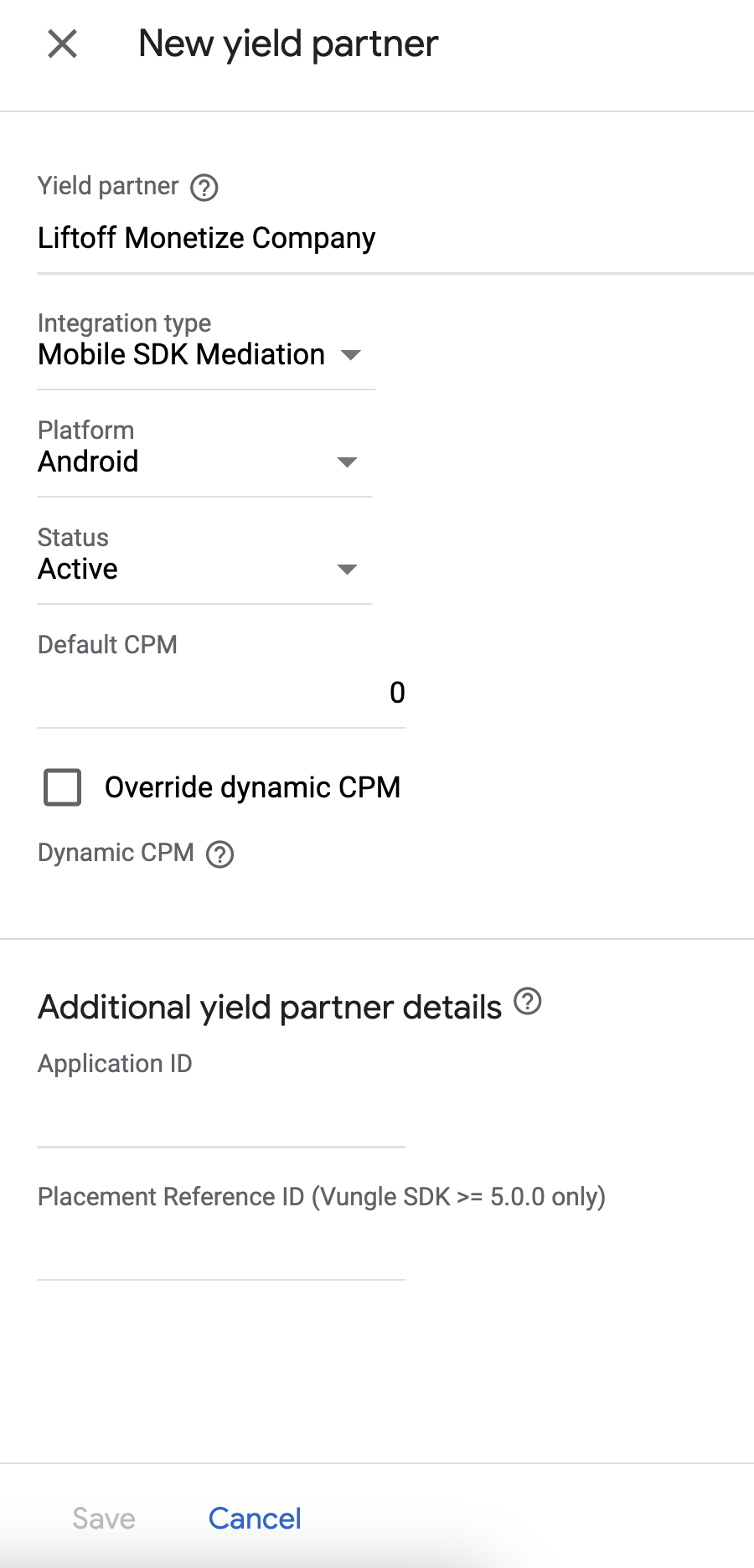
شرکتی را که در بخش قبل برای Liftoff Monetize ایجاد کردید، انتخاب کنید. در قسمت Integration type گزینه Mobile SDK mediation ، در قسمت Platform گزینه Android و در قسمت Status گزینه Active را انتخاب کنید.
شناسه برنامه و شناسه مرجع قرارگیری که در بخش قبل به دست آوردید و مقدار پیشفرض CPM را وارد کنید. روی ذخیره کلیک کنید.
Liftoff را به فهرست شرکای تبلیغاتی GDPR و مقررات ایالتی ایالات متحده اضافه کنید
برای افزودن Liftoff به فهرست شرکای تبلیغاتی مطابق با مقررات ایالتهای اروپا و آمریکا در رابط کاربری Ad Manager، مراحل موجود در تنظیمات مقررات اروپا و تنظیمات مقررات ایالتهای ایالات متحده را دنبال کنید.
مرحله ۳: وارد کردن Vungle SDK و آداپتور Liftoff Monetize
ادغام با اندروید استودیو (توصیه میشود)
در فایل gradle سطح برنامه خود، وابستگیهای پیادهسازی زیر را اضافه کنید:
کاتلین
dependencies {
    implementation("com.google.android.gms:play-services-ads:25.5.0")
    implementation("com.google.ads.mediation:vungle:7.7.8.1")
}
گرووی
dependencies {
    implementation 'com.google.android.gms:play-services-ads:25.5.0'
    implementation 'com.google.ads.mediation:vungle:7.7.8.1'
}
ادغام دستی
آخرین نسخه Vungle Android SDK را دانلود کنید و فایلهای
.aarو JAR را از پوشهlibsاستخراج کرده و به پروژه خود اضافه کنید.به مصنوعات آداپتور Liftoff Monetize در مخزن Maven گوگل بروید. آخرین نسخه را انتخاب کنید، فایل
.aarآداپتور Vungle را دانلود کنید و آن را به پروژه خود اضافه کنید.
مرحله ۴: تنظیمات حریم خصوصی را روی Vungle SDK پیادهسازی کنید
رضایت اتحادیه اروپا و GDPR
برای رعایت سیاست رضایت کاربر Google EU ، شما باید اطلاعات خاصی را در اختیار کاربران خود در منطقه اقتصادی اروپا (EEA)، بریتانیا و سوئیس قرار دهید و رضایت آنها را برای استفاده از کوکیها یا سایر ذخیرهسازیهای محلی در صورت لزوم قانونی، و برای جمعآوری، اشتراکگذاری و استفاده از دادههای شخصی برای شخصیسازی تبلیغات، دریافت کنید. این سیاست منعکسکننده الزامات دستورالعمل حریم خصوصی الکترونیکی اتحادیه اروپا و مقررات عمومی حفاظت از دادهها (GDPR) است. شما مسئول تأیید انتشار رضایت به هر منبع تبلیغاتی در زنجیره میانجیگری خود هستید.
با شروع از نسخه ۷.۴.۱ کیت توسعه نرمافزار Vungle، ابزار Liftoff Monetize بهطور خودکار رضایتنامه GDPR تنظیمشده توسط پلتفرمهای مدیریت رضایتنامه که از مشخصات رضایتنامه اضافی گوگل ، از جمله UMP SDK ، پشتیبانی میکنند را میخواند. برای اطلاعات بیشتر، به دستورالعملهای پیادهسازی توصیهشده GDPR مراجعه کنید.
قوانین حفظ حریم خصوصی ایالتهای آمریکا
قوانین حفظ حریم خصوصی ایالتهای ایالات متحده ، به کاربران حق انصراف از «فروش» «اطلاعات شخصی» خود (همانطور که قانون این اصطلاحات را تعریف میکند) را میدهد، و این انصراف از طریق پیوند برجسته «اطلاعات شخصی من را نفروشید» در صفحه اصلی طرف «فروشنده» ارائه میشود. راهنمای انطباق با قوانین حفظ حریم خصوصی ایالتهای ایالات متحده ، امکان فعال کردن پردازش دادههای محدود برای سرویس تبلیغات گوگل را ارائه میدهد، اما گوگل قادر به اعمال این تنظیم برای هر شبکه تبلیغاتی در زنجیره واسطهگری شما نیست. بنابراین، شما باید هر شبکه تبلیغاتی را در زنجیره واسطهگری خود که ممکن است در فروش اطلاعات شخصی شرکت کند، شناسایی کنید و برای اطمینان از انطباق، از راهنماییهای هر یک از این شبکهها پیروی کنید.
Liftoff Monetize شامل یک API است که به شما امکان میدهد رضایت خود را به Vungle SDK ارسال کنید. نمونه کد زیر نحوه ارسال این اطلاعات رضایت به Vungle SDK را نشان میدهد. اگر تصمیم به فراخوانی این روش دارید، توصیه میشود قبل از درخواست تبلیغات از طریق Google Mobile Ads SDK (Legacy) این کار را انجام دهید.
جاوا
کاتلین
برای جزئیات بیشتر و مقادیری که میتوانند در این روش ارائه شوند ، به پیادهسازی CCPA مراجعه کنید.
مرحله ۵: اضافه کردن کد مورد نیاز
برای ادغام Liftoff Monetize به کد اضافی نیاز نیست.
مرحله ۶: پیادهسازی خود را آزمایش کنید
فعال کردن تبلیغات آزمایشی
مطمئن شوید که دستگاه آزمایشی خود را برای Ad Manager ثبت کردهاید و حالت آزمایشی را در Liftoff Monetize UI فعال کردهاید .
تأیید تبلیغات آزمایشی
برای تأیید اینکه تبلیغات آزمایشی را از Liftoff Monetize دریافت میکنید، آزمایش منبع تبلیغاتی تکی را در بازرس تبلیغات با استفاده از منبع(های) تبلیغاتی Liftoff Monetize (Bidding) و Liftoff Monetize (Waterfall) فعال کنید.
مراحل اختیاری
پارامترهای خاص شبکه
آداپتور Liftoff Monetize از پارامترهای درخواست اضافی زیر که میتوانند به آداپتور ارسال شوند، پشتیبانی میکند:
-
userId - رشتهای که نشاندهندهی شناسهی کاربری تشویقی Liftoff Monetize است.
-
adOrientation - یک عدد صحیح که جهت نمایش تبلیغات تمام صفحه را مشخص میکند.
-
setBackButtonImmediatelyEnabled - یک مقدار بولی برای فعال یا غیرفعال کردن دکمه بازگشت در تبلیغات باز شدن برنامه (App Open ads). برای فعال کردن فوری دکمه بازگشت، آن را روی
trueو در غیر این صورت رویfalseتنظیم کنید. مقدار پیشفرضfalseاست. برای اطلاعات بیشتر به مستندات Liftoff Monetize در مورد نحوه ادغام تبلیغات باز شدن برنامه مراجعه کنید.
در اینجا یک نمونه کد از نحوه ایجاد یک درخواست تبلیغ که این پارامترها را تنظیم میکند، آورده شده است:
جاوا
کاتلین
رندر تبلیغات بومی
آداپتور Liftoff Monetize تبلیغات بومی خود را به عنوان اشیاء NativeAd برمیگرداند. این آداپتور فیلدهای زیر را برای NativeAd پر میکند.
| میدان | داراییهایی که همیشه توسط آداپتور Liftoff Monetize لحاظ میشوند |
|---|---|
| تیتر | |
| تصویر | ۱ |
| نمای رسانه | |
| بدن | |
| آیکون برنامه | |
| فراخوان برای اقدام | |
| رتبهبندی ستارهای | |
| فروشگاه | |
| قیمت |
آداپتور Liftoff Monetize دسترسی مستقیم به تصویر اصلی برای تبلیغات بومی خود را فراهم نمیکند. در عوض ، این آداپتور MediaView را با یک ویدیو یا یک تصویر پر میکند.
کدهای خطا
اگر آداپتور نتواند تبلیغی از Liftoff Monetize دریافت کند، ناشران میتوانند خطای اساسی را از پاسخ تبلیغ با استفاده ResponseInfo.getAdapterResponses() تحت کلاسهای زیر بررسی کنند:
| قالب | نام کلاس |
|---|---|
| برنامه باز است (مناقصه) | com.google.ads.mediation.vungle.VungleMediationAdapter |
| برنامه باز (آبشاری) | com.google.ads.mediation.vungle.VungleMediationAdapter |
| بنر (مناقصه) | com.google.ads.mediation.vungle.VungleMediationAdapter |
| بنر (آبشار) | com.vungle.mediation.VungleInterstitialAdapter |
| تبلیغات بینابینی (مناقصه) | com.google.ads.mediation.vungle.VungleMediationAdapter |
| بینابینی (آبشاری) | com.vungle.mediation.VungleInterstitialAdapter |
| پاداش داده شده (مناقصه) | com.google.ads.mediation.vungle.VungleMediationAdapter |
| پاداش داده شده (آبشار) | com.vungle.mediation.VungleAdapter |
| تبلیغات بینابینی پاداشدار (مناقصه) | com.google.ads.mediation.vungle.VungleMediationAdapter |
| تبلیغات بینابینی پاداشدار (آبشاری) | com.google.ads.mediation.vungle.VungleMediationAdapter |
| بومی (مناقصه) | com.google.ads.mediation.vungle.VungleMediationAdapter |
| بومی (آبشار) | com.google.ads.mediation.vungle.VungleMediationAdapter |
در اینجا کدها و پیامهای همراه که توسط آداپتور Liftoff Monetize هنگام عدم بارگیری یک تبلیغ نمایش داده میشوند، آمده است:
| کد خطا | دامنه | دلیل |
|---|---|---|
| ۱۰۱ | com.google.ads.mediation.vungle | پارامترهای سرور نامعتبر است (مثلاً شناسه برنامه یا شناسه قرارگیری). |
| ۱۰۲ | com.google.ads.mediation.vungle | اندازه بنر درخواستی با اندازه تبلیغات معتبر Liftoff Monetize مطابقت ندارد. |
| ۱۰۳ | com.google.ads.mediation.vungle | Liftoff Monetize برای درخواست تبلیغات به یک زمینه Activity context) نیاز دارد. |
| ۱۰۴ | com.google.ads.mediation.vungle | کیت توسعه نرمافزاری Vungle نمیتواند چندین تبلیغ را برای یک شناسه قرارگیری یکسان بارگذاری کند. |
| ۱۰۵ | com.google.ads.mediation.vungle | SDK وانگِل (Vungle) نتوانست مقداردهی اولیه شود. |
| ۱۰۶ | com.google.ads.mediation.vungle | Vungle SDK یک فراخوانی موفقیتآمیز برای بارگذاری برگرداند، اما Banners.getBanner() یا Vungle.getNativeAd() مقدار null را برمیگردانند. |
| ۱۰۷ | com.google.ads.mediation.vungle | کیت توسعه نرمافزاری وانگل (Vungle SDK) برای پخش تبلیغ آماده نیست. |
| ۱۰۸ | com.google.ads.mediation.vungle | Vungle SDK توکن پیشنهاد قیمت نامعتبر را برگرداند. |
برای خطاهایی که از Vungle SDK ناشی میشوند، به کدهای خطا: Vungle SDK برای iOS و اندروید مراجعه کنید.
لیست تغییرات آداپتور واسطهگری اندروید Liftoff برای کسب درآمد
نسخه ۷.۷.۸.۱
- وابستگی کاتلین آداپتور را به نسخه ۱.۹.۰ (حداقل نسخه کاتلین پشتیبانی شده توسط GMA NextGen SDK) پین کنید.
ساخته و آزمایش شده با:
- نسخه ۲۵.۴.۰ کیت توسعه نرمافزاری تبلیغات موبایلی گوگل.
- نسخه ۱.۴.۰ کیت توسعه نرمافزاری نسل بعدی تبلیغات موبایل گوگل.
- نسخه ۷.۷.۸ از SDK وانگل.
نسخه ۷.۷.۸.۰
- سازگاری تأیید شده با Vungle SDK 7.7.8.
ساخته و آزمایش شده با:
- نسخه ۲۵.۴.۰ کیت توسعه نرمافزاری تبلیغات موبایلی گوگل.
- نسخه ۱.۴.۰ کیت توسعه نرمافزاری نسل بعدی تبلیغات موبایل گوگل.
- نسخه ۷.۷.۸ از SDK وانگل.
نسخه ۷.۷.۷.۰
- بررسی
canPlayAd()قبل از نمایش تبلیغات باز برنامه حذف شد، بنابراین Liftoff SDK حالت آماده نبودن را مدیریت میکند و فراخوانی خطای خود را اجرا میکند. - برنامه را باز و اشیاء تبلیغاتی بینابینی را قابل تهیسازی کرد و قبل از
play()بررسیهای تهی بودن را اضافه کرد. - قابلیت ثبت وقایع با استفاده از
VungleMediationLoggerاضافه شد، زمانی که نمونه تبلیغات باز، بینابینی یا پاداشی (آبشاری و مناقصهای) برنامه در زمان نمایش تهی باشد. - سازگاری تأیید شده با Vungle SDK 7.7.7.
ساخته و آزمایش شده با:
- نسخه ۲۵.۴.۰ کیت توسعه نرمافزاری تبلیغات موبایلی گوگل.
- نسخه ۱.۳.۰ کیت توسعه نرمافزاری نسل بعدی تبلیغات موبایل گوگل.
- نسخه ۷.۷.۷ از SDK وانگل.
نسخه ۷.۷.۶.۰
- سازگاری تأیید شده با Vungle SDK 7.7.6.
ساخته و آزمایش شده با:
- نسخه ۲۵.۴.۰ کیت توسعه نرمافزاری تبلیغات موبایلی گوگل.
- نسخه ۱.۳.۰ کیت توسعه نرمافزاری نسل بعدی تبلیغات موبایل گوگل.
- نسخه ۷.۷.۶ از SDK وانگل.
نسخه ۷.۷.۴.۲
- رفتار
AgeRestrictedTreatmentرا به API COPPA مربوط به Liftoff Monetize نگاشت میکند. - پیادهسازیهای قدیمی API برای قالبهای تبلیغاتی آبشاری زیر حذف شد: بنر، بینابینی.
- آداپتور بهروزرسانی شد تا
loadBannerAdبرای تبلیغات بنری Waterfall وloadInterstitialAdبرای تبلیغات بینابینی Waterfall استفاده کند.
ساخته و آزمایش شده با:
- نسخه ۲۵.۴.۰ کیت توسعه نرمافزاری تبلیغات موبایلی گوگل.
- نسخه ۱.۲.۱ کیت توسعه نرمافزاری نسل بعدی تبلیغات موبایلی گوگل.
- نسخه ۷.۷.۴ از SDK وانگل.
نسخه ۷.۷.۴.۱
- ثبت وقایع با استفاده از
VungleMediationLoggerاضافه شد تا مواردی که چندین شناسه برنامه شناسایی میشوند، برجسته شوند.
ساخته و آزمایش شده با:
- نسخه ۲۵.۳.۰ کیت توسعه نرمافزاری تبلیغات موبایلی گوگل.
- نسخه ۱.۲.۱ کیت توسعه نرمافزاری نسل بعدی تبلیغات موبایلی گوگل.
نسخه ۷.۷.۴.۰
- پیادهسازی
MediationInterstitialAdبه قالب تبلیغات بینابینی اضافه شد. - سازگاری تأیید شده با Vungle SDK 7.7.4.
ساخته و آزمایش شده با:
- نسخه ۲۵.۲.۰ کیت توسعه نرمافزاری تبلیغات موبایلی گوگل.
- نسخه ۷.۷.۴ از SDK وانگل.
نسخه ۷.۷.۲.۰
- ویژگی برای ساخت آداپتور با وابستگی به GMA Next-Gen SDK اضافه شد.
- ثبت وقایع با استفاده از
VungleMediationLoggerبرای عدم تطابق تطبیقی اندازه بنر اضافه شد. - ویژگی
adapterAdFormatرا در BaseAd تنظیم کنید. - سازگاری تأیید شده با Vungle SDK 7.7.2.
ساخته و آزمایش شده با:
- نسخه ۲۵.۰.۰ کیت توسعه نرمافزاری تبلیغات موبایلی گوگل.
- نسخه ۰.۲۵.۰-بتا۰۱ از کیت توسعه نرمافزاری (SDK) تبلیغات موبایلی گوگل.
- نسخه ۷.۷.۲ از SDK وانگل.
نسخه ۷.۷.۱.۰
- سازگاری تأیید شده با Vungle SDK 7.7.1.
ساخته و آزمایش شده با:
- نسخه ۲۵.۰.۰ کیت توسعه نرمافزاری تبلیغات موبایلی گوگل.
- نسخه ۷.۷.۱ از SDK وانگل.
نسخه ۷.۷.۰.۱
- پشتیبانی از ناشران برای پیکربندی
com.vungle.ads.AdConfig.setBackButtonImmediatelyEnabledبرای تبلیغات باز برنامه با استفاده از افزونههای میانجیگری اضافه شد.
ساخته و آزمایش شده با:
- نسخه ۲۴.۹.۰ کیت توسعه نرمافزاری تبلیغات موبایلی گوگل.
- نسخه ۷.۷.۰ کیت توسعه نرمافزار وانگِل.
نسخه ۷.۷.۰.۰
- سازگاری تأیید شده با Vungle SDK 7.7.0.
ساخته و آزمایش شده با:
- نسخه ۲۴.۹.۰ کیت توسعه نرمافزاری تبلیغات موبایلی گوگل.
- نسخه ۷.۷.۰ کیت توسعه نرمافزار وانگِل.
نسخه ۷.۶.۳.۱
- پشتیبانی از ارسال پارامتر tagForUnderAgeOfConsent برای SDK تبلیغات موبایل گوگل به Liftoff Monetize SDK اضافه شد.
ساخته و آزمایش شده با:
- نسخه ۲۴.۹.۰ کیت توسعه نرمافزاری تبلیغات موبایلی گوگل.
- نسخه ۷.۶.۳ از SDK وانگل.
نسخه ۷.۶.۳.۰
- سازگاری تأیید شده با Vungle SDK 7.6.3.
ساخته و آزمایش شده با:
- نسخه ۲۴.۹.۰ کیت توسعه نرمافزاری تبلیغات موبایلی گوگل.
- نسخه ۷.۶.۳ از SDK وانگل.
نسخه ۷.۶.۲.۰
- سازگاری تأیید شده با Vungle SDK 7.6.2.
ساخته و آزمایش شده با:
- نسخه ۲۴.۹.۰ کیت توسعه نرمافزاری تبلیغات موبایلی گوگل.
- نسخه ۷.۶.۲ از SDK وانگل.
نسخه ۷.۶.۱.۰
- سازگاری تأیید شده با Vungle SDK 7.6.1.
ساخته و آزمایش شده با:
- نسخه ۲۴.۷.۰ کیت توسعه نرمافزاری تبلیغات موبایلی گوگل.
- نسخه ۷.۶.۱ از SDK وانگل.
نسخه ۷.۶.۰.۰
- سازگاری تأیید شده با Vungle SDK 7.6.0.
ساخته و آزمایش شده با:
- نسخه ۲۴.۷.۰ کیت توسعه نرمافزاری تبلیغات موبایلی گوگل.
- نسخه ۷.۶.۰ کیت توسعه نرمافزار وانگِل.
نسخه ۷.۵.۱.۱
- ارجاعات سطح کلاس به Context حذف شد. میتواند به کاهش مشکلات نشت حافظه کمک کند.
- پیادهسازی API جدید برای تبلیغ بنری آبشاری اضافه شد.
ساخته و آزمایش شده با:
- نسخه ۲۴.۷.۰ کیت توسعه نرمافزاری تبلیغات موبایلی گوگل.
- نسخه ۷.۵.۱ از SDK وانگل.
نسخه ۷.۵.۱.۰
- سازگاری تأیید شده با Vungle SDK 7.5.1.
ساخته و آزمایش شده با:
- نسخه ۲۴.۵.۰ کیت توسعه نرمافزاری تبلیغات موبایلی گوگل.
- نسخه ۷.۵.۱ از SDK وانگل.
نسخه ۷.۵.۰.۱
-
overrideImpressionRecordingرا برای هر دو نوع تبلیغات بومی آبشاری و RTB روی true تنظیم میکند.
ساخته و آزمایش شده با:
- نسخه ۲۴.۴.۰ کیت توسعه نرمافزاری تبلیغات موبایلی گوگل.
- نسخه ۷.۵.۰ کیت توسعه نرمافزار وانگِل.
نسخه ۷.۵.۰.۰
- سازگاری تأیید شده با Vungle SDK 7.5.0.
ساخته و آزمایش شده با:
- نسخه ۲۴.۲.۰ کیت توسعه نرمافزاری تبلیغات موبایلی گوگل.
- نسخه ۷.۵.۰ کیت توسعه نرمافزار وانگِل.
نسخه ۷.۴.۳.۱
- حداقل سطح API اندروید مورد نیاز به ۲۳ ارتقا یافت.
- حداقل نسخه مورد نیاز SDK تبلیغات موبایلی گوگل به ۲۴.۰.۰ بهروزرسانی شد.
ساخته و آزمایش شده با:
- نسخه ۲۴.۰.۰ کیت توسعه نرمافزاری تبلیغات موبایلی گوگل.
- نسخه ۷.۴.۳ از SDK وانگل.
نسخه ۷.۴.۳.۰
- سازگاری تأیید شده با Vungle SDK 7.4.3.
ساخته و آزمایش شده با:
- نسخه ۲۳.۶.۰ کیت توسعه نرمافزاری تبلیغات موبایلی گوگل.
- نسخه ۷.۴.۳ از SDK وانگل.
نسخه ۷.۴.۲.۰
- سازگاری تأیید شده با Vungle SDK 7.4.2.
ساخته و آزمایش شده با:
- نسخه ۲۳.۵.۰ کیت توسعه نرمافزاری تبلیغات موبایلی گوگل.
- نسخه ۷.۴.۲ از SDK وانگل.
نسخه ۷.۴.۱.۰
- سازگاری تأیید شده با Vungle SDK 7.4.1.
ساخته و آزمایش شده با:
- نسخه ۲۳.۳.۰ کیت توسعه نرمافزاری تبلیغات موبایلی گوگل.
- نسخه ۷.۴.۱ از SDK وانگل.
نسخه ۷.۴.۰.۱
- پشتیبانی از اندازه سفارشی تبلیغ برای تبلیغات بنری آبشاری و مزایدهای اضافه شد.
ساخته و آزمایش شده با:
- نسخه ۲۳.۲.۰ کیت توسعه نرمافزاری تبلیغات موبایلی گوگل.
- نسخه ۷.۴.۰ کیت توسعه نرمافزار وانگِل.
نسخه ۷.۴.۰.۰
- کلاس
VungleInterstitialAdapterرا ازVungleMediationAdapterتوسعه دادیم تا پشتیبانی آبشاری را برای قالب تبلیغات باز برنامه در Google Ad Manager اضافه کنیم. - سازگاری تأیید شده با Vungle SDK 7.4.0.
ساخته و آزمایش شده با:
- نسخه ۲۳.۲.۰ کیت توسعه نرمافزاری تبلیغات موبایلی گوگل.
- نسخه ۷.۴.۰ کیت توسعه نرمافزار وانگِل.
نسخه ۷.۳.۲.۰
- سازگاری تأیید شده با Vungle SDK 7.3.2.
ساخته و آزمایش شده با:
- نسخه ۲۳.۰.۰ کیت توسعه نرمافزاری تبلیغات موبایلی گوگل.
- نسخه ۷.۳.۲ از SDK وانگل.
نسخه ۷.۳.۱.۰
- سازگاری تأیید شده با Vungle SDK 7.3.1.
ساخته و آزمایش شده با:
- نسخه ۲۳.۰.۰ کیت توسعه نرمافزاری تبلیغات موبایلی گوگل.
- نسخه ۷.۳.۱ از SDK وانگل.
نسخه ۷.۳.۰.۰
- حداقل نسخه مورد نیاز SDK تبلیغات موبایلی گوگل به ۲۳.۰.۰ بهروزرسانی شد.
- سازگاری تأیید شده با Vungle SDK 7.3.0.
- پشتیبانی از آبشار و پیشنهاد قیمت برای قالب تبلیغات باز برنامه اضافه شد.
ساخته و آزمایش شده با:
- نسخه ۲۳.۰.۰ کیت توسعه نرمافزاری تبلیغات موبایلی گوگل.
- نسخه ۷.۳.۰ کیت توسعه نرمافزار وانگِل.
نسخه ۷.۱.۰.۰
- سازگاری تأیید شده با Vungle SDK 7.1.0.
ساخته و آزمایش شده با:
- نسخه ۲۲.۳.۰ کیت توسعه نرمافزاری تبلیغات موبایلی گوگل.
- نسخه ۷.۱.۰ کیت توسعه نرمافزار وانگِل.
نسخه ۷.۰.۰.۱
- مشکلی که باعث میشد SDK تبلیغات موبایلی گوگل، نمایشها (impressions) را برای پیشنهاد قیمت تبلیغات بومی ثبت نکند، برطرف شد.
- آداپتور را به نسخه ۲۲.۳.۰ کیت توسعه نرمافزاری تبلیغات موبایل گوگل (Google Mobile Ads SDK) وابسته کردیم.
ساخته و آزمایش شده با:
- نسخه ۲۲.۳.۰ کیت توسعه نرمافزاری تبلیغات موبایلی گوگل.
- نسخه ۷.۰.۰ کیت توسعه نرمافزار وانگِل.
نسخه ۷.۰.۰.۰
- پشتیبانی از بارگذاری چندین تبلیغ با شناسه قرارگیری یکسان برای همه قالبهای تبلیغات آبشاری اضافه شد.
- نام آداپتور از Vungle به Liftoff Monetize تغییر یافت.
- سازگاری تأیید شده با Vungle SDK 7.0.0.
ساخته و آزمایش شده با:
- نسخه ۲۲.۴.۰ کیت توسعه نرمافزاری تبلیغات موبایلی گوگل.
- نسخه ۷.۰.۰ کیت توسعه نرمافزار وانگِل.
نسخه ۶.۱۲.۱.۱
- آداپتور برای استفاده از کلاس
VersionInfoجدید بهروزرسانی شد. - حداقل نسخه مورد نیاز SDK تبلیغات موبایلی گوگل به ۲۲.۰.۰ بهروزرسانی شد.
ساخته و آزمایش شده با:
- نسخه ۲۲.۰.۰ کیت توسعه نرمافزاری تبلیغات موبایلی گوگل.
- نسخه SDK وانگل ۶.۱۲.۱.
نسخه ۶.۱۲.۱.۰
- سازگاری تأیید شده با Vungle SDK 6.12.1.
ساخته و آزمایش شده با:
- نسخه ۲۱.۴.۰ کیت توسعه نرمافزاری تبلیغات موبایلی گوگل.
- نسخه SDK وانگل ۶.۱۲.۱.
نسخه ۶.۱۲.۰.۱
- پشتیبانی از پیشنهاد قیمت برای قالب بنر تبلیغاتی اضافه شد.
- سازگاری تأیید شده با Vungle SDK 6.12.0.
- حداقل نسخه مورد نیاز SDK تبلیغات موبایلی گوگل به ۲۱.۴.۰ بهروزرسانی شد.
ساخته و آزمایش شده با:
- نسخه ۲۱.۴.۰ کیت توسعه نرمافزاری تبلیغات موبایلی گوگل.
- نسخه SDK وانگِل ۶.۱۲.۰.
نسخه ۶.۱۲.۰.۰
- پشتیبانی از میانجیگری آبشاری و پیشنهاد قیمت برای قالب تبلیغات بینابینی پاداشی اضافه شد.
- پشتیبانی از پیشنهاد قیمت برای قالب تبلیغات بومی اضافه شد.
ساخته و آزمایش شده با:
- نسخه ۲۱.۱.۰ کیت توسعه نرمافزاری تبلیغات موبایلی گوگل.
- نسخه SDK وانگِل ۶.۱۲.۰.
نسخه ۶.۱۱.۰.۳
- پشتیبانی از میانجیگری آبشاری برای قالب تبلیغات بومی اضافه شد.
- حداقل نسخه SDK مورد نیاز برای تبلیغات موبایلی گوگل به ۲۱.۱.۰ بهروزرسانی شد.
ساخته و آزمایش شده با:
- نسخه ۲۱.۱.۰ کیت توسعه نرمافزاری تبلیغات موبایلی گوگل.
- نسخه SDK وانگِل ۶.۱۱.۰.
نسخه ۶.۱۱.۰.۲
- پشتیبانی از بارگذاری چندین تبلیغ برای یک شناسه قرارگیری مشابه در تبلیغات جایزهدار اضافه شد.
ساخته و آزمایش شده با:
- نسخه ۲۱.۰.۰ کیت توسعه نرمافزاری تبلیغات موبایلی گوگل.
- نسخه SDK وانگِل ۶.۱۱.۰.
نسخه ۶.۱۱.۰.۱
-
compileSdkVersionوtargetSdkVersionبه API 31 بهروزرسانی شدند. - حداقل نسخه مورد نیاز SDK تبلیغات موبایلی گوگل به ۲۱.۰.۰ بهروزرسانی شد.
- حداقل سطح API اندروید مورد نیاز به ۱۹ ارتقا یافت.
ساخته و آزمایش شده با:
- نسخه ۲۱.۰.۰ کیت توسعه نرمافزاری تبلیغات موبایلی گوگل.
- نسخه SDK وانگِل ۶.۱۱.۰.
نسخه ۶.۱۱.۰.۰
- سازگاری تأیید شده با Vungle SDK 6.11.0.
ساخته و آزمایش شده با:
- نسخه ۲۰.۶.۰ کیت توسعه نرمافزاری تبلیغات موبایلی گوگل.
- نسخه SDK وانگِل ۶.۱۱.۰.
نسخه ۶.۱۰.۵.۰
- سازگاری تأیید شده با Vungle SDK 6.10.5.
- حداقل نسخه SDK مورد نیاز برای تبلیغات موبایلی گوگل به 20.6.0 بهروزرسانی شد.
ساخته و آزمایش شده با:
- نسخه ۲۰.۶.۰ کیت توسعه نرمافزاری تبلیغات موبایلی گوگل.
- نسخه ۶.۱۰.۵ از SDK وانگل.
نسخه ۶.۱۰.۴.۰
- سازگاری تأیید شده با Vungle SDK 6.10.4.
ساخته و آزمایش شده با:
- نسخه ۲۰.۵.۰ کیت توسعه نرمافزاری تبلیغات موبایلی گوگل.
- نسخه SDK وانگِل ۶.۱۰.۴.
نسخه ۶.۱۰.۳.۰
- سازگاری تأیید شده با Vungle SDK 6.10.3.
ساخته و آزمایش شده با:
- نسخه ۲۰.۵.۰ کیت توسعه نرمافزاری تبلیغات موبایلی گوگل.
- نسخه SDK وانگِل ۶.۱۰.۳.
نسخه ۶.۱۰.۲.۱
- سازگاری تأیید شده با Vungle SDK 6.10.2.
- پشتیبانی از پیشنهاد قیمت برای قالبهای تبلیغات بینابینی و پاداشی اضافه شد.
- حداقل نسخه مورد نیاز SDK تبلیغات موبایلی گوگل به 20.5.0 بهروزرسانی شد.
ساخته و آزمایش شده با:
- نسخه ۲۰.۵.۰ کیت توسعه نرمافزاری تبلیغات موبایلی گوگل.
- نسخه SDK وانگِل ۶.۱۰.۲.
نسخه ۶.۱۰.۲.۰
- سازگاری تأیید شده با Vungle SDK 6.10.2.
- با جایگزینی پارامتر
serverParametersباmediationExtrasبرای دریافت پارامترهای خاص شبکه Vungle، هنگام درخواست تبلیغات بنری و بینابینی، مشکل آداپتور برطرف شد.
ساخته و آزمایش شده با:
- نسخه ۲۰.۳.۰ کیت توسعه نرمافزاری تبلیغات موبایلی گوگل.
- نسخه SDK وانگِل ۶.۱۰.۲.
نسخه ۶.۱۰.۱.۰
- سازگاری تأیید شده با Vungle SDK 6.10.1.
- حداقل نسخه SDK مورد نیاز برای تبلیغات موبایلی گوگل به 20.3.0 بهروزرسانی شد.
- تبلیغات MREC اکنون با API بنر Vungle پشتیبانی میشوند.
- کدهای خطا و پیامهای استاندارد بهروزرسانی شدند.
ساخته و آزمایش شده با:
- نسخه ۲۰.۳.۰ کیت توسعه نرمافزاری تبلیغات موبایلی گوگل.
- نسخه ۶.۱۰.۱ از SDK وانگل.
نسخه ۶.۹.۱.۱
- حداقل نسخه مورد نیاز SDK تبلیغات موبایلی گوگل به 20.0.0 بهروزرسانی شد.
ساخته و آزمایش شده با:
- نسخه ۲۰.۰.۰ کیت توسعه نرمافزاری تبلیغات موبایلی گوگل.
- نسخه ۶.۹.۱ از SDK وانگل.
نسخه ۶.۹.۱.۰
- سازگاری تأیید شده با Vungle SDK 6.9.1.
- پشتیبانی از OMSDK اضافه شد.
- رفع اشکالات مختلف.
- پشتیبانی از تبلیغات جایزهدار برای فراخوانی Vungle در AdViewed.
- حداقل نسخه مورد نیاز SDK تبلیغات موبایلی گوگل به ۱۹.۷.۰ بهروزرسانی شد.
ساخته و آزمایش شده با:
- نسخه ۱۹.۷.۰ کیت توسعه نرمافزاری تبلیغات موبایلی گوگل
- نسخه ۶.۹.۱ از SDK وانگل.
نسخه ۶.۸.۱.۱
- حداقل نسخه مورد نیاز SDK تبلیغات موبایلی گوگل به ۱۹.۶.۰ بهروزرسانی شد.
ساخته و آزمایش شده با:
- نسخه ۱۹.۶.۰ کیت توسعه نرمافزاری تبلیغات موبایلی گوگل.
- نسخه ۶.۸.۱ از SDK وانگل.
نسخه ۶.۸.۱.۰
- سازگاری تأیید شده با Vungle SDK 6.8.1.
- حداقل نسخه SDK مورد نیاز برای تبلیغات موبایلی گوگل به ۱۹.۵.۰ بهروزرسانی شد.
ساخته و آزمایش شده با:
- نسخه ۱۹.۵.۰ کیت توسعه نرمافزاری تبلیغات موبایلی گوگل.
- نسخه ۶.۸.۱ از SDK وانگل.
نسخه ۶.۸.۰.۰
- سازگاری تأیید شده با Vungle SDK 6.8.0.
- آداپتور بهروزرسانی شد تا هنگام بهروزرسانی یا از بین رفتن تبلیغات بنری،
onAdClosed() ارسال نشود. -
FlexFeedوFlexViewرا حذف کنید (در Vungle 6.8.0 منسوخ شدهاند). - حداقل نسخه مورد نیاز SDK تبلیغات موبایلی گوگل به ۱۹.۴.۰ بهروزرسانی شد.
ساخته و آزمایش شده با:
- نسخه ۱۹.۴.۰ کیت توسعه نرمافزاری تبلیغات موبایلی گوگل
- نسخه ۶.۸.۰ کیت توسعه نرمافزاری وانگِل.
نسخه ۶.۷.۱.۰
- سازگاری تأیید شده با Vungle SDK 6.7.1.
- اشکالی که باعث میشد اگر تبلیغی با استفاده از یک زمینه برنامه بارگذاری میشد، بارگذاری نشود، برطرف شد.
-
targetSdkVersionبه API 29 بهروزرسانی شد. - حداقل نسخه SDK مورد نیاز برای تبلیغات موبایلی گوگل به ۱۹.۳.۰ بهروزرسانی شد.
ساخته و آزمایش شده با:
- نسخه ۱۹.۳.۰ کیت توسعه نرمافزاری تبلیغات موبایلی گوگل.
- نسخه ۶.۷.۱ از SDK وانگل.
نسخه ۶.۷.۰.۰
- سازگاری تأیید شده با Vungle SDK 6.7.0.
- آداپتور بهروزرسانی شد تا از درخواستهای بنر تطبیقی درونخطی پشتیبانی کند.
- تبلیغات بینابینی و تبلیغات جایزهدار اکنون به طور پیشفرض بیصدا هستند.
- تبلیغات بینابینی اکنون هنگام کلیک، تابع فراخوانی
onAdLeftApplication()را ارسال میکنند. - حداقل نسخه SDK مورد نیاز برای تبلیغات موبایلی گوگل به ۱۹.۲.۰ بهروزرسانی شد.
ساخته و آزمایش شده با:
- نسخه ۱۹.۲.۰ کیت توسعه نرمافزاری تبلیغات موبایلی گوگل.
- نسخه ۶.۷.۰ کیت توسعه نرمافزاری وانگِل.
نسخه ۶.۵.۳.۰
- سازگاری تأیید شده با Vungle SDK 6.5.3.
- پشتیبانی از فرمت بنر جدید Vungle اضافه شد.
- حداقل نسخه SDK مورد نیاز برای تبلیغات موبایلی گوگل به ۱۹.۰.۱ بهروزرسانی شد.
ساخته و آزمایش شده با:
- نسخه ۱۹.۰.۱ کیت توسعه نرمافزاری تبلیغات موبایلی گوگل.
- نسخه ۶.۵.۳ از SDK وانگل.
نسخه ۶.۴.۱۱.۱
- مشکلی که باعث میشد بنرهای تبلیغاتی بهروزرسانی نشوند، برطرف شد.
نسخه ۶.۴.۱۱.۰
- سازگاری تأیید شده با Vungle SDK 6.4.11.
- پشتیبانی از تبلیغات بنری اضافه شد.
- آداپتور را به AndroidX منتقل کردم.
- حداقل نسخه SDK مورد نیاز برای تبلیغات موبایلی گوگل به ۱۸.۲.۰ بهروزرسانی شد.
نسخه ۶.۳.۲۴.۱
- آداپتور بهروزرسانی شده برای پشتیبانی از API پاداشدهی بتای باز جدید.
- حداقل نسخه SDK مورد نیاز برای تبلیغات موبایلی گوگل به ۱۷.۲.۰ بهروزرسانی شد.
نسخه ۶.۳.۲۴.۰
- سازگاری تأیید شده با Vungle SDK 6.3.24.
نسخه ۶.۳.۱۷.۰
- سازگاری تأیید شده با Vungle SDK 6.3.17.
نسخه ۶.۳.۱۲.۰
- سازگاری تأیید شده با Vungle SDK 6.3.12.
نسخه ۶.۲.۵.۱
- آداپتور بهروزرسانی شد تا رویداد تبلیغ
onRewardedVideoComplete()را فراخوانی کند.
نسخه ۶.۲.۵.۰
- سازگاری تأیید شده با Vungle SDK 6.2.5.
نسخه ۵.۳.۲.۱
- آداپتور بهروزرسانی شد تا کلیکها را به درستی به SDK تبلیغات موبایلی گوگل گزارش دهد.
نسخه ۵.۳.۲.۰
- سازگاری تأیید شده با Vungle SDK 5.3.2.
- پروژه Adpater برای اندروید استودیو ۳.۰ بهروزرسانی شد.
- متدهای زیر به کلاس سازندهی بسته (Bundle builder) اضافه شد.
-
setOrdinalViewCount: این فیلد برای ارسال مقدار ترتیبی میانجی، هر زمان که ناشر گزارشهای دادههای ترتیبی را از Vungle دریافت میکند، استفاده میشود. -
setFlexViewCloseTimeInSec: این گزینه برای غیرفعال کردن تبلیغات flex view پس از تعداد ثانیههای مشخصشده استفاده میشود.
-
نسخه ۵.۳.۰.۰
- سازگاری تأیید شده با Vungle SDK 5.3.0.
نسخه ۵.۱.۰.۰
- آداپتور بهروزرسانی شد تا با Vungle SDK 5.1.0 سازگار شود.
- سیستم نامگذاری نسخه به [نسخه Vungle SDK].[نسخه وصله آداپتور] تغییر یافت.
نسخههای پیشین
- پشتیبانی از قالبهای تبلیغات ویدیویی بینابینی و پاداشی اضافه شد.