
Page Summary
-
Merchant specific terms allow you to add custom text and/or a URL for a merchant.
-
The custom text appears in the merchant's overview and booking modal.
-
The URL, linked with "Terms of Service" text, appears at the bottom of the booking modal.
-
These terms are added using the
merchant.terms.textandmerchant.terms.urlfields in the merchant feed.
How to add merchant specific terms
Merchant specific terms allow you to specify text (or localized text) and/or a URL for the merchant's specific terms. These fields are independent of each other:
- Merchant notes (
terms.textorterms.localized_text): A custom note from the merchant. In the booking flow, this note is displayed inside the booking modal under an expandable Important note section (directly above the contact details and booking button), as a View notes from [Merchant Name] link in the dialog notices (which opens a dialog with the note), and on the confirmed booking details screen. Note: Merchant notes are displayed within the booking flow itself; they are not displayed on an overview tab or placesheet header. - Terms of Service link (
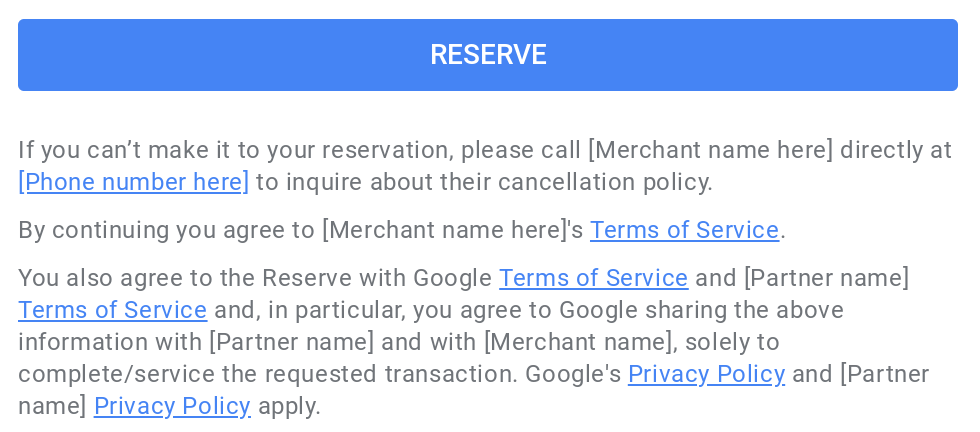
terms.url): A link to the merchant's external terms and conditions. When specified, a link is displayed at the bottom of the create booking modal and will always use the fixed text Terms of Service (this text cannot be changed).
An example of the booking modal showing the merchant note and the Terms of Service link:

The URL will be linked from the bottom of the create booking modal:
These features can be added by specifying the
merchant.terms.text (or merchant.terms.localized_text) and/or the
merchant.terms.url fields.
Localization
For multi-lingual merchants, you can provide localized notes using merchant.terms.localized_text instead of merchant.terms.text:
- Default fallback value (
value): The top-levelvaluefield is required and acts as the default fallback string displayed whenever a user's language does not match any entry inlocalized_value. - BCP 47 language code (
locale): Each entry inlocalized_valuemust specify a valid IETF BCP 47 language code (such asen,fr, orjafor Japanese). Don't use ISO country codes (such asjp).
Formatting and character filtering
- Standard line breaks (
\n) in your text are preserved and converted to line breaks in the UI. - Some characters may be automatically filtered out during ingestion text normalization. For example, emoji, emoticons, and non-standard symbols are not supported and will be automatically removed from the displayed text per our Content Quality Standards.
JSON
    "merchant": [
    {
      "terms": {
        "url": "https://www.google.com",
        "text": "Dress Code: Smart Casual\n\nReservations are accepted daily from 10:00 AM to 6:00 PM."
      }
    }
  ]
JSON (Localized)
    "merchant": [
    {
      "terms": {
        "url": "https://www.google.com",
        "localized_text": {
          "value": "Dress Code: Smart Casual\n\nReservations are accepted daily from 10:00 AM to 6:00 PM.",
          "localized_value": [
            {
              "locale": "en",
              "value": "Dress Code: Smart Casual\n\nReservations are accepted daily from 10:00 AM to 6:00 PM."
            },
            {
              "locale": "fr",
              "value": "Tenue correcte exigée\n\nLes réservations sont acceptées tous les jours de 10h00 à 18h00."
            }
          ]
        }
      }
    }
  ]