

توضّح هذه الصفحة كيف يمكن لمطوّري التطبيقات التابعين لجهات خارجية استخدام خدمة حلّ المشاكل لإنشاء صفحة لتشخيص المشاكل داخل التطبيق خاصة بنشاطهم التجاري.
يمكنك استخدام Accounts API للاطّلاع على المشاكل التي تؤثّر في حساب نشاطك التجاري وأي حساب يمكنك الوصول إليه.
أنت المسؤول عن الالتزام بسياسات إعلانات Shopping والبيانات المجانية. يحتفظ Google Shopping بالحق في فرض هذه السياسات واتّخاذ الإجراءات المناسبة إذا رصدنا محتوًى أو سلوكًا يخالف هذه السياسات.
يمكنك استخدام هذه الخدمة لإنشاء واجهات مستخدم مشابهة لصفحتَي بيانات تشخيص الحساب ومشاكل المنتجات في Merchant Center.
تتوفّر خدمة "حلّ المشاكل" لواجهات المستخدم التابعة لجهات خارجية فقط. يجب أن يتم تشغيل الطلبات عندما يتفاعل نشاط تجاري مع واجهة مستخدم تطبيقك. لأتمتة عمليات التشخيص لحساب نشاطك التجاري، اطّلِع على دليل مشاكل الحساب.
ننصحك بتوفير الصفحات التالية في تطبيقك لمساعدة نشاطك التجاري في تحديد المشاكل وحلّها:
- بيانات تشخيص الحساب
- بيانات تشخيص المنتجات
خيارات مختلفة لتنفيذ صفحة تشخيص
يمكنك تنفيذ صفحة بيانات التشخيص بطرق مختلفة. استنادًا إلى احتياجاتك، اختَر الخيار الذي يحدّد طريقة التعامل مع إجراءات التشخيص المعقّدة. في الطلب، يمكنك ضبط user_input_action_option على أحد الخيارات التالية:
REDIRECT_TO_MERCHANT_CENTER: هذا هو الخيار التلقائي. الإجراءات التي تتطلّب عرض محتوى إضافي أو تلقّي معلومات إضافية من النشاط التجاري غير متاحة بالكامل في تطبيقك، لذا توفّر واجهة برمجة التطبيقات رابطًا لإعادة التوجيه إلى الصفحة ذات الصلة في Merchant Center حيث يمكن للنشاط التجاري تنفيذ الإجراء.BUILT_IN_USER_INPUT_ACTIONS: يمكنك تنفيذ إجراءات معقّدة تتطلّب بيانات أدخلها المستخدم كحلّ داخل التطبيق.
تنفيذ صفحة بيانات التشخيص
يتناول هذا القسم كيفية تنفيذ صفحة بيانات التشخيص. يستخدم هذا الخيار الإعداد التلقائي (البسيط) للتعامل مع الإجراءات المعقّدة كعمليات إعادة توجيه إلى Merchant Center.
التنفيذ
في ما يلي الطريقة التي نقترح أن يظهر بها ترتيب صفحة "بيانات التشخيص":
- تفتح مؤسسة صفحة تشخيص في تطبيقك.
- يطلب تطبيقك بيانات التشخيص من خلال استدعاء خدمة
issueresolution.
إليك نموذج طلب:
POST https://merchantapi.googleapis.com/issueresolution/v1/accounts/{ACCOUNT_ID}:renderaccountissues?timeZone=America/Los_Angeles&languageCode=en-GB { }
استبدِل {ACCOUNT_ID} بالمعرّف الفريد للحساب الذي تريد بدء معالجة الإجراء له.
يعرض تطبيقك بيانات التشخيص والإجراءات المقترَحة من الردّ الذي تلقّيته من المؤسسة. في ما يلي نموذج ردّ:
{
  "renderedIssues": [
    {
      "title": "Misrepresentation",
      "impact": {
        "message": "Prevents all products from showing in all countries",
        "severity": "ERROR",
        "breakdowns": [
          {
            "regions": [
              {
                "code": "001",
                "name": "All countries"
              }
            ],
            "details": [
              "Products not showing organically"
            ]
          }
        ]
      },
      "prerenderedContent": "\u003cdiv class=\"issue-detail\"\u003e\u003cdiv class=\"issue-content\"\u003e\u003cp class=\"content-element\"\u003e\u003cspan class=\"segment\"\u003eBased on the information available about your business, there is reason to believe that customers are being misled on Google. Review the Misrepresentation policy and make changes to your Merchant Center and/or online store.u003c/span\u003e\u003c/p\u003e\u003cp class=\"content-element root-causes-intro\"\u003e\u003cspan class=\"segment\"\u003eMake sure your Merchant Center and online store follow the following best practices / guidelines\u003c/span\u003e\u003c/p\u003e\u003cul class=\"content-element root-causes\"\u003e\u003cli\u003e\u003cp\u003e\u003cspan class=\"segment\"\u003eProvide transparency about your business identity, business model, policies and how your customers can interact with you\u003c/span\u003e\u003c/p\u003e\u003c/li\u003e\u003cli\u003e\u003cp\u003e\u003cspan class=\"segment\"\u003ePromote your online reputation by showing reviews or highlighting any badges or seals of approval\u003c/span\u003e\u003c/p\u003e\u003c/li\u003e\u003cli\u003e\u003cp class=\"tooltip tooltip-style-info\"\u003e\u003cspan class=\"segment\"\u003eUse a professional design for your online store that includes an SSL certificate\u003c/span\u003e\u003cspan class=\"tooltip-icon\"\u003e\u003cbr\u003e\u003c/span\u003e\u003cspan class=\"tooltip-text\"\u003e\u003cspan class=\"segment\"\u003eMake sure it's accessible for all users without any redirects and doesn't have any placeholders for text and images.u003c/span\u003e\u003c/span\u003e\u003c/p\u003e\u003c/li\u003e\u003cli\u003e\u003cp class=\"tooltip tooltip-style-info\"\u003e\u003cspan class=\"segment\"\u003eProvide information in the business information settings in your Merchant Center\u003c/span\u003e\u003cspan class=\"tooltip-icon\"\u003e\u003cbr\u003e\u003c/span\u003e\u003cspan class=\"tooltip-text\"\u003e\u003cspan class=\"segment\"\u003eLink any relevant third-party platforms to your Merchant Center and create a Google Business Profile.u003c/span\u003e\u003c/span\u003e\u003c/p\u003e\u003c/li\u003e\u003cli\u003e\u003cp\u003e\u003cspan class=\"segment\"\u003eFollow SEO guidelines, improve your eligibility for seller ratings and match your product data in your Merchant Center with your online store\u003c/span\u003e\u003c/p\u003e\u003c/li\u003e\u003c/ul\u003e\u003ca href=\"https://support.google.com/merchants/answer/6150127?hl=en-US\" class=\"content-element\"\u003eLearn more about the Misrepresentation policy\u003c/a\u003e\u003c/div\u003e\u003c/div\u003e",
      "actions": [
        {
          "externalAction": {
            "type": "REVIEW_ACCOUNT_ISSUE_IN_MERCHANT_CENTER",
            "uri": "https://merchants.google.com/mc/products/diagnostics/accountissues?a=672911686&hl=en-US"
          },
          "buttonLabel": "Request review",
          "isAvailable": true
        }
      ],
      "prerenderedOutOfCourtDisputeSettlement": "\u003cdetails class=\"ods-section\"\u003e\u003csummary\u003eShow additional options available to you\u003c/summary\u003e\u003cp class=\"ods-description\"\u003e\u003cspan class=\"segment\"\u003eYou may have the option to request an external appeal. You'll also be asked to provide your routing and reference IDs.\u003c/span\u003e \u003ca href=\"https://support.google.com/european-union-digital-services-act-redress-options?hl=en-GB\" target=\"_blank\" class=\"segment\"\u003eLearn more about external appeals\u003c/a\u003e\u003c/p\u003e\u003cp class=\"ods-param ods-routing-id\"\u003e\u003cspan class=\"segment ods-param-header\"\u003eRouting ID:\u003c/span\u003e \u003cspan class=\"segment ods-param-value\"\u003eRDAX\u003c/span\u003e\u003c/p\u003e\u003cp class=\"ods-param ods-reference-id\"\u003e\u003cspan class=\"segment ods-param-header\"\u003eReference ID:\u003c/span\u003e \u003cspan class=\"segment ods-param-value\"\u003e672911686\u003c/span\u003e\u003c/p\u003e\u003c/details\u003e"
    },
    {
      "title": "Adult-oriented content",
      "impact": {
        "message": "Prevents all products from showing in all countries",
        "severity": "ERROR",
        "breakdowns": [
          {
            "regions": [
              {
                "code": "001",
                "name": "All countries"
              }
            ],
            "details": [
              "Products not showing organically"
            ]
          }
        ]
      },
      "prerenderedContent": "\u003cdiv class=\"issue-detail\"\u003e\u003cdiv class=\"callout-banners\"\u003e\u003cdiv class=\"callout-banner callout-banner-info\"\u003e\u003cp\u003e\u003cspan class=\"segment\"\u003eReview requested on Aug 9, 2023. It can take a few days to complete.u003c/span\u003e\u003c/p\u003e\u003c/div\u003e\u003c/div\u003e\u003cdiv class=\"issue-content\"\u003e\u003cp class=\"content-element\"\u003e\u003cspan class=\"segment\"\u003eThere was a problem identified with the sale of prohibited adult products on your online store. In the case that you are intentionally selling adult items, enable Adult content in Settings in your Merchant Center. In your product file, use the \u003c/span\u003e\u003cspan class=\"segment segment-attribute\"\u003eadult\u003c/span\u003e\u003cspan class=\"segment\"\u003e attribute for specific products.u003c/span\u003e\u003c/p\u003e\u003cp class=\"content-element root-causes-intro\"\u003e\u003cspan class=\"segment\"\u003eMake sure the products meet the policy requirements\u003c/span\u003e\u003c/p\u003e\u003cul class=\"content-element root-causes\"\u003e\u003cli\u003e\u003cp class=\"tooltip tooltip-style-info\"\u003e\u003cspan class=\"segment\"\u003eAdult oriented content may be prohibited or restricted depending on the product sold and the country it is sold\u003c/span\u003e\u003cspan class=\"tooltip-icon\"\u003e\u003cbr\u003e\u003c/span\u003e\u003cspan class=\"tooltip-text\"\u003e\u003cspan class=\"segment\"\u003eSee a full list of countries in the HelpCenter\u003c/span\u003e\u003c/span\u003e\u003c/p\u003e\u003c/li\u003e\u003cli\u003e\u003cp class=\"tooltip tooltip-style-info\"\u003e\u003cspan class=\"segment\"\u003eDon't list sexually explicit content that is intended to arouse or includes content such as text, image, audio, or video of graphic sexual acts intended to arouse\u003c/span\u003e\u003cspan class=\"tooltip-icon\"\u003e\u003cbr\u003e\u003c/span\u003e\u003cspan class=\"tooltip-text\"\u003e\u003cspan class=\"segment\"\u003eExamples: Graphic depictions of sexual acts in progress, including hardcore pornography, any type of genital, anal, or oral sexual activity; graphic depictions of masturbation or genital arousal and language explicitly referencing arousal, masturbation, cartoon porn, or hentai\u003c/span\u003e\u003c/span\u003e\u003c/p\u003e\u003c/li\u003e\u003c/ul\u003e\u003ca href=\"https://support.google.com/merchants/answer/6150138?hl=en-US#wycd-restricted-adult-content\" class=\"content-element\"\u003eLearn more about the Adult-oriented content policy\u003c/a\u003e\u003c/div\u003e\u003c/div\u003e"
    },
    {
      "title": "Missing return and refund policy",
      "impact": {
        "message": "Limits visibility of all products in all countries",
        "severity": "ERROR",
        "breakdowns": [
          {
            "regions": [
              {
                "code": "001",
                "name": "All countries"
              }
            ],
            "details": [
              "Limited visibility for products showing organically"
            ]
          }
        ]
      },
      "prerenderedContent": "\u003cdiv class=\"issue-detail\"\u003e\u003cdiv class=\"issue-content\"\u003e\u003cp class=\"content-element\"\u003e\u003cspan class=\"segment\"\u003eThere was a problem identified with the return and/or refund policy of your online store. Update your return or refund policy to provide customers a transparent shopping experience.u003c/span\u003e\u003c/p\u003e\u003cp class=\"content-element root-causes-intro\"\u003e\u003cspan class=\"segment\"\u003eMake sure your products meet the Shopping policy requirements\u003c/span\u003e\u003c/p\u003e\u003cul class=\"content-element root-causes\"\u003e\u003cli\u003e\u003cp class=\"tooltip tooltip-style-info\"\u003e\u003cspan class=\"segment\"\u003eIt's available on your online store\u003c/span\u003e\u003cspan class=\"tooltip-icon\"\u003e\u003cbr\u003e\u003c/span\u003e\u003cspan class=\"tooltip-text\"\u003e\u003cspan class=\"segment\"\u003eWe recommend that you have a separate landing page for your policy and link to it from the other pages on your online store, so that it's easy to find.u003c/span\u003e\u003c/span\u003e\u003c/p\u003e\u003c/li\u003e\u003cli\u003e\u003cp class=\"tooltip tooltip-style-info\"\u003e\u003cspan class=\"segment\"\u003eIt's available in the language of the country you're selling in or in English\u003c/span\u003e\u003cspan class=\"tooltip-icon\"\u003e\u003cbr\u003e\u003c/span\u003e\u003cspan class=\"tooltip-text\"\u003e\u003cspan class=\"segment\"\u003eMake sure that the return and/or refund policy is available in the target language or in English. Ideally, users should be given the option to select the return and/or refund policy in their own language.u003c/span\u003e\u003c/span\u003e\u003c/p\u003e\u003c/li\u003e\u003cli\u003e\u003cp\u003e\u003cspan class=\"segment\"\u003eIt's accessible to everyone visiting your online store, without having to log in, sign up or enter any personal information\u003c/span\u003e\u003c/p\u003e\u003c/li\u003e\u003c/ul\u003e\u003ca href=\"https://support.google.com/merchants/answer/9158778?hl=en-US\" class=\"content-element\"\u003eLearn more about Missing return and refund policy\u003c/a\u003e\u003c/div\u003e\u003c/div\u003e",
      "actions": [
        {
          "externalAction": {
            "type": "REVIEW_ACCOUNT_ISSUE_IN_MERCHANT_CENTER",
            "uri": "https://merchants.google.com/mc/products/diagnostics/accountissues?a=672911686&hl=en-US"
          },
         "buttonLabel": "Request review",
         "isAvailable": true
        }
      ]
    }
  ]
}
ننصحك بعرض المشاكل بالترتيب الذي تم إرجاعها به، مع
titleوimpact.message. ننصحك أيضًا بعرضimpact.breakdownsعند تمرير مؤشر الماوس فوق عنوان المشكلة أو وصفها.ينقر النشاط التجاري على مشكلة من القائمة.
يعرض تطبيقك
impactلكل مشكلة حسبcountryوdestinationوprerendered_contentوprerendered_out_of_court_dispute_settlement، بالإضافة إلى أزرارactionsيمكن للمؤسسة اتّخاذها لحلّ المشكلة. هناك أنواع مختلفة من الإجراءات:- الإجراءات الخارجية: تشير إلى الصفحة الخارجية، مثلاً في Merchant Center، حيث يمكن للنشاط التجاري حلّ المشكلة.
- إجراءات بسيطة مضمّنة: يمكنك الإشارة إلى الصفحة في تطبيقك التي يمكن للمؤسسة من خلالها حلّ المشكلة.
- إجراءات مدمجة لإدخال بيانات المستخدم: فتح مربّع حوار يمكن للمؤسسة من خلاله تقديم المعلومات المطلوبة وطلب تنفيذ الإجراء لا يتوفّر هذا النوع من الإجراءات إلا إذا تم طلب
BUILT_IN_USER_INPUT_ACTIONS.
- يتّبع النشاط التجاري التعليمات لحلّ المشكلة.
- تعيد المؤسسة تحميل صفحة بيانات التشخيص في تطبيقك.
- يرسل تطبيقك طلبًا آخر إلى خدمة
IssueResolution، ويعرض قائمة محدَّثة بالمشاكل.
يمكنك مقارنة المعلومات التي يعرضها تطبيقك بعد الانتهاء من إعداده بصفحات بيانات التشخيص في Merchant Center للتأكّد من صحة عملية التنفيذ.
نماذج محاكاة لواجهة المستخدم
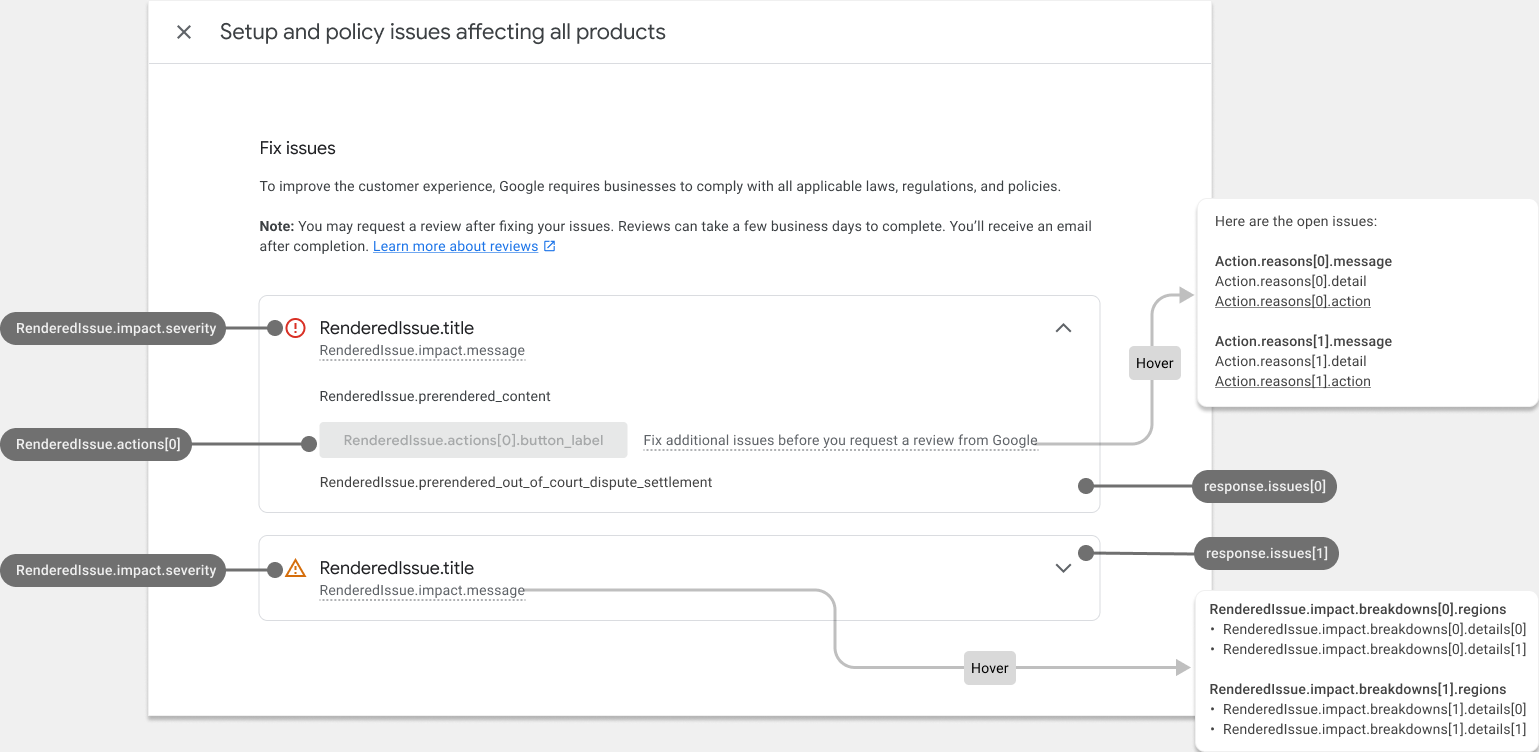
في ما يلي مثال على كيفية عرض المعلومات من الردّ renderaccountissues في صفحة بيانات تشخيص حسابك. يتم ربط العناصر في واجهة المستخدم بحقول واجهة برمجة التطبيقات المقابلة في النموذج التجريبي. يمكنك إنشاء صفحة مشابهة لمشاكل المنتجات.
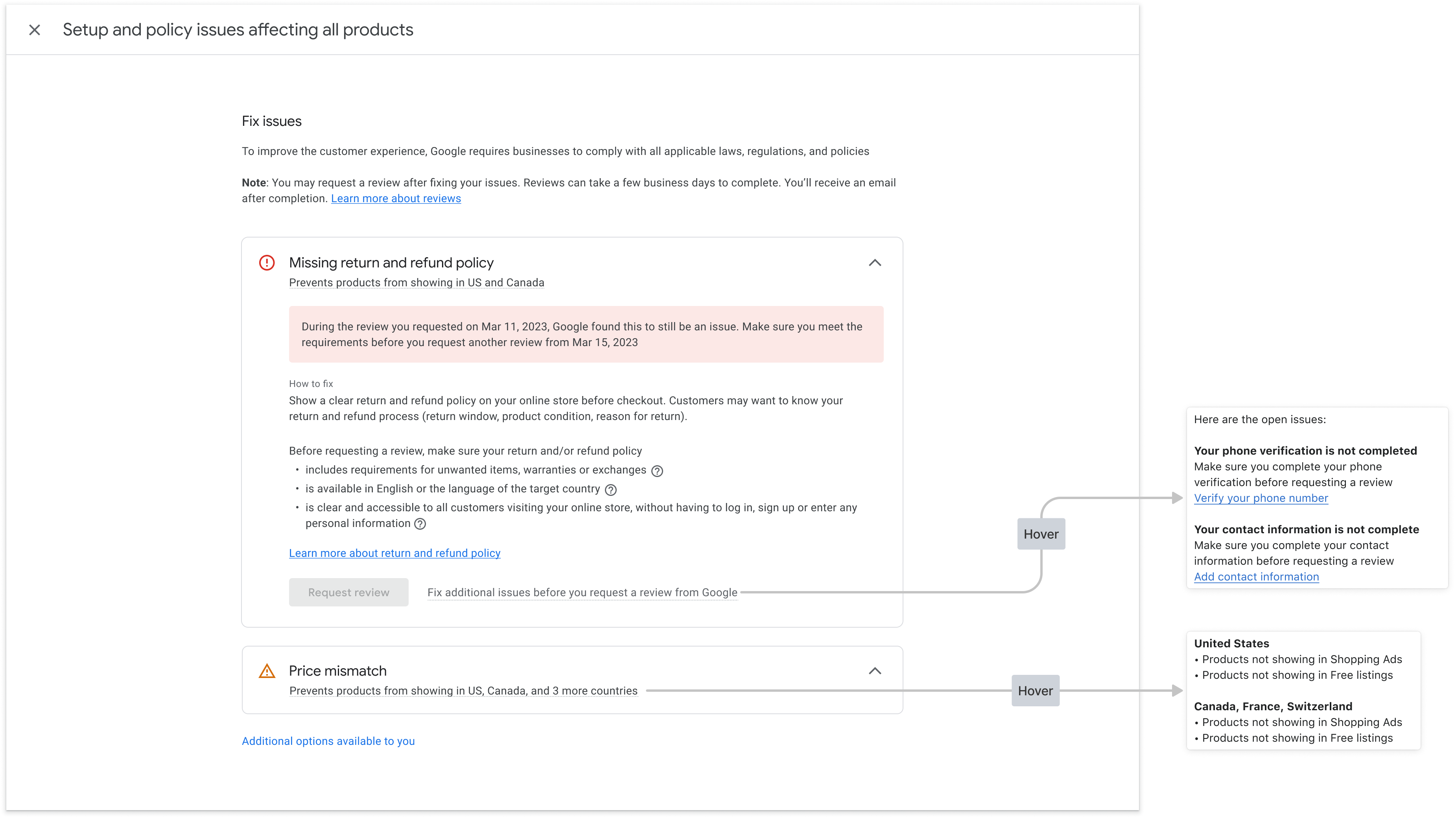
في ما يلي الشكل الذي تظهر به صفحة بيانات تشخيص الحساب بعد ملء البيانات:
رمز HTML المعروض مسبقًا للنمط
تتضمّن الاستجابة من استدعاء خدمة "حلّ المشاكل" الحقل prerendered_content، وهو تفاصيل كل مشكلة بتنسيق HTML. يمكنك تضمين محتوى HTML هذا مباشرةً في واجهة المستخدم لعرض المشكلة بتنسيق قابل للقراءة.
قد تظهر لك عناصر HTML مع الفئة new-element. يتم تطبيق الفئة new-element على العناصر التي تتم إضافتها إلى HTML بعد الدمج مع خدمة IssueResolution. ننصحك بإخفاء العناصر التي تحمل الفئة new-element، حتى تتمكّن من تنسيق هذه العناصر قبل عرضها للمستخدمين في تطبيقك.
إليك مثال على قيمة الحقل prerendered_content:
<div class="issue-detail">
  <div class="callout-banners">
    <div class="callout-banner callout-banner-info"><p><span class="segment">Review requested on Aug 9, 2023. It can take a few days to complete.</span>
    </p></div>
  </div>
  <div class="issue-content"><p class="content-element"><span class="segment">There was a problem identified with the sale of prohibited adult products on your online store. In the case that you are intentionally selling adult items, enable Adult content in Settings in your Merchant Center. In your product file, use the </span><span
      class="segment segment-attribute">adult</span><span class="segment"> attribute for specific products.</span>
  </p>
    <p class="content-element root-causes-intro"><span class="segment">Make sure the products meet the policy requirements</span>
    </p>
    <ul class="content-element root-causes">
      <li><p class="tooltip tooltip-style-info"><span class="segment">Adult oriented content may be prohibited or restricted depending on the product sold and the country it is sold</span><span
          class="tooltip-icon"><br></span><span class="tooltip-text"><span class="segment">See a full list of countries in the HelpCenter</span></span>
      </p></li>
      <li><p class="tooltip tooltip-style-info"><span class="segment">Don't list sexually explicit content that is intended to arouse or includes content such as text, image, audio, or video of graphic sexual acts intended to arouse</span><span
          class="tooltip-icon"><br></span><span class="tooltip-text"><span class="segment">Examples: Graphic depictions of sexual acts in progress, including hardcore pornography, any type of genital, anal, or oral sexual activity; graphic depictions of masturbation or genital arousal and language explicitly referencing arousal, masturbation, cartoon porn, or hentai</span></span>
      </p></li>
    </ul>
    <a href="https://support.google.com/merchants/answer/6150138?hl=en-US#wycd-restricted-adult-content"
       class="content-element">Learn more about the Adult-oriented content policy</a></div>
</div>
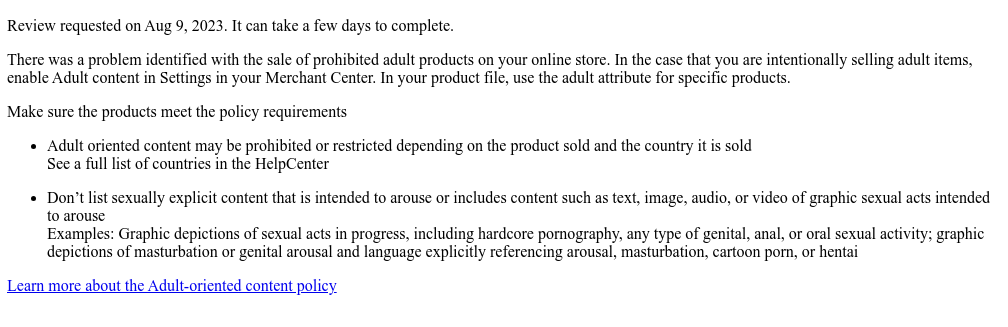
إليك الشكل الذي سيظهر به إذا تضمّنت تطبيقك رمز HTML السابق
prerendered_content بدون أي تنسيق:
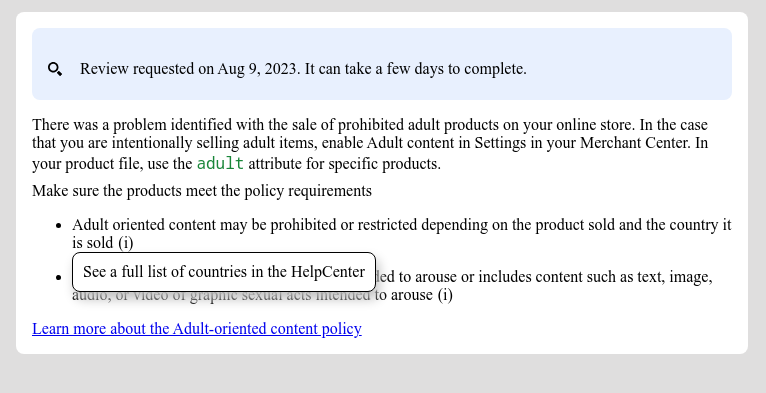
يمكنك استخدام فئات CSS متعددة لتعديل طريقة عرض المحتوى في واجهة المستخدم. إليك نموذج CSS يمكنك استخدامه:
issue-detail {
  text-align: left;
  width: 700px;
  border-radius: 8px;
  background: white;
  margin: 16px;
  padding: 16px;
}

.content-element {
  margin: 8px 0 8px 0;
  display: block;
}

/* callout banners */
.callout-banners {
  margin: 0 0 16px 0;
}

.callout-banner {
  display: block;
  padding: 16px 16px 6px 16px;
  margin: 0 0 8px 0;
  border-radius: 8px;
}

.callout-banner-info {
  background: #e8f0fe;
}

.callout-banner-warning {
  background: #fef7e0;
}

.callout-banner-error {
  background: #fce8e6;
}

/* add an icon to the callout banner */
.callout-banner p {
  background-repeat: no-repeat;
  padding-left: 32px;
}

.callout-banner-error p {
  background-image: url("https://fonts.gstatic.com/s/i/short-term/release/googlesymbols/error/default/20px.svg");
}

.callout-banner-warning p {
  background-image: url("https://fonts.gstatic.com/s/i/short-term/release/googlesymbols/warning/default/20px.svg");
}

.callout-banner-info p {
  background-image: url("https://fonts.gstatic.com/s/i/short-term/release/googlesymbols/search/default/20px.svg");
}

/* segments with style */
.segment-attribute {
  color: #198639;
  font-family: monospace, monospace;
}

.segment-bold {
  font-weight: bold;
}

.segment-italic {
  font-style: italic;
}

/* tooltip */
.tooltip {
  position: relative;
}

.tooltip-style-info .tooltip-icon:before {
  content: '(i)';
  font-style: normal;
  font-weight: normal;
  text-decoration: inherit;
  margin-left: 5px;
}

.tooltip-style-question .tooltip-icon:before {
  content: '(?)';
  font-style: normal;
  font-weight: normal;
  text-decoration: inherit;
  margin-left: 5px;
}

.tooltip .tooltip-text {
  visibility: hidden;
  text-align: left;
  background: white;
  border-radius: 8px;
  padding: 5px 0;
  border: 1px solid;
  padding: 10px;
  box-shadow: 3px 7px 12px #c1c1c1;
  position: absolute;
  z-index: 1;
}

.tooltip:hover .tooltip-text {
  visibility: visible;
}

/* table */
table.content-element {
  margin: 16px 0 16px 0;
  border: 1px solid #ccc;
  border-collapse: collapse;
  margin: 1em 0;
}

table.content-element th {
  background-color: #eee;
}

table.content-element th, table td {
  border: 1px solid #ddd;
  font-size: 0.9em;
  padding: 0.3em 1em;
}

/* hidde elements added in future, until they are supported in your application */
.new-element {
  visibility: hidden;
}
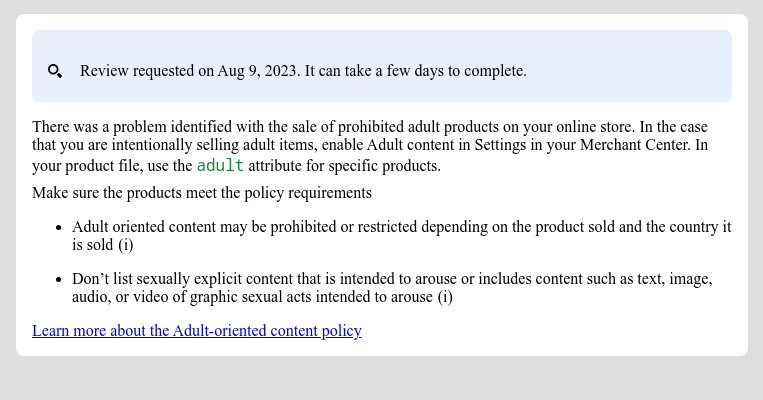
إليك كيف سيبدو المحتوى المعروض إذا استخدمت CSS السابق:
يمكنك أيضًا ضبط وعرض تلميحات الأدوات باستخدام CSS:
تنفيذ إجراء مدمج باستخدام إدخال المستخدم
يتيح لك إجراء مدمج مع بيانات أدخلها المستخدم تقديم إمكانية تشخيص معقّدة كحلّ داخل التطبيق. ننصحك بتنفيذها كحوار يمكن للمؤسسة من خلاله تقديم مدخلاتها وقراءة معلومات إضافية وتأكيد الطلب.
يحتوي كل إجراء على مسار إجراء واحد أو أكثر. بالنسبة إلى بعض الإجراءات، يمكن أن يكون هناك أكثر من مسار واحد. على سبيل المثال، قد تختلف الخطوات عندما تطلب المؤسسة إجراء مراجعة إضافية لأنّها لا توافق على القرار، وقد تختلف الخطوات عندما تكون المؤسسة قد حلّت المشكلة.
لطلب بيانات لتنفيذ إجراءات معقّدة باستخدام إدخال المستخدم، يجب ضبط حقل user_input_action_option على القيمة BUILT_IN_USER_INPUT_ACTIONS.
POST https://merchantapi.googleapis.com/issueresolution/v1/accounts/{ACCOUNT_ID}:renderaccountissues?timeZone=America/Los_Angeles&languageCode=en-GB
{
"user_input_action_option": "BUILT_IN_USER_INPUT_ACTIONS"
}
استبدِل {ACCOUNT_ID} بالمعرّف الفريد للحساب الذي تريد بدء معالجة الإجراء له.
التنفيذ
في ما يلي الطريقة التي نقترح أن يظهر بها مسار صفحة بيانات التشخيص التي تطلب إدخال بيانات من المستخدم:
ينقر المستخدم على زر الإجراء.
- إذا كانت هناك مسارات متعدّدة متاحة، يوفّر تطبيقك جميع هذه المسارات ليتمكّن المستخدم من اختيار أحدها استنادًا إلى نيّته.
- يختار المستخدم سير العمل.
يعرض تطبيقك العنوان والرسالة والوسيلة الإيضاحية ونموذج بيانات أدخلها المستخدم لمسار الإجراء المحدّد. ننصحك بعرض هذه التفاصيل في مربّع حوار.
- يحتوي وسيلة الشرح، إذا كانت متوفرة، على معلومات مهمة تهدف إلى مساعدة المستخدم في فهم طريقة عمل الإجراء وما يجب فعله لتحقيق النجاح. ننصحك بتمييز هذه الرسالة وتنسيقها وفقًا لدرجة خطورة التنبيه.
- إذا كانت هناك أي حقول إدخال في المسار، يجب عرضها ليتمكّن المستخدم من تقديم القيم. إذا تم وضع علامة مطلوب على حقل الإدخال، يجب ألا يسمح تطبيقك للمؤسسة بإرسال الطلب قبل تقديم القيمة.
يقرأ المستخدم المعلومات ويقدّم القيم المطلوبة.
يؤكّد المستخدم طلبه من خلال النقر على الزر.
يؤدي تطبيقك إلى بدء معالجة الإجراء من خلال طلب خدمة حلّ المشاكل. إليك نموذج طلب:
POST https://merchantapi.googleapis.com/issueresolution/v1/accounts/{ACCOUNT_ID}:triggeraction

{
  actionContext: "ActionContextValue=",
  actionInput: { actionFlowId: "flow1",
  inputValues: [
  { input_field_id: "input1", checkbox_input_value: { value: true } }
  ]
}
استبدِل {ACCOUNT_ID} بالمعرّف الفريد للحساب الذي تريد بدء معالجة الإجراء له.
يعرض تطبيقك رسالة التأكيد التي تم إرجاعها من خدمة
IssueResolution.- إذا عرضت الخدمة خطأ في التحقّق من الصحة مع الحالة
INVALID_ARGUMENT، ستتضمّن معلومات مفصّلة ورسالة خطأ مترجَمة يجب عرضها على النشاط التجاري. ننصحك بعرض هذا الخطأ بالقرب من حقل الإدخال المتأثّر. في ما يلي مثال على ردّ نموذجي:
{ "error": { "code": 400, "message": "[actionInput.inputValues] Invalid user input", "status": "INVALID_ARGUMENT", "details": [ { "@type": "type.googleapis.com/google.rpc.ErrorInfo", "reason": "invalid", "domain": "global" }, { "@type": "type.googleapis.com/google.rpc.BadRequest", "fieldViolations": [ { "field": "actionInput.inputValues.input", "description": "The field is required" } ] } ] } }- إذا عرضت الخدمة حالة غير صالحة أو خطأ داخليًا، ويتم الإشارة إلى ذلك من خلال الحالتَين
FAILED_PRECONDITIONوINTERNAL، على التطبيق أن يطلب من النشاط التجاري إعادة تحميل الصفحة أو المحاولة لاحقًا.
- إذا عرضت الخدمة خطأ في التحقّق من الصحة مع الحالة