

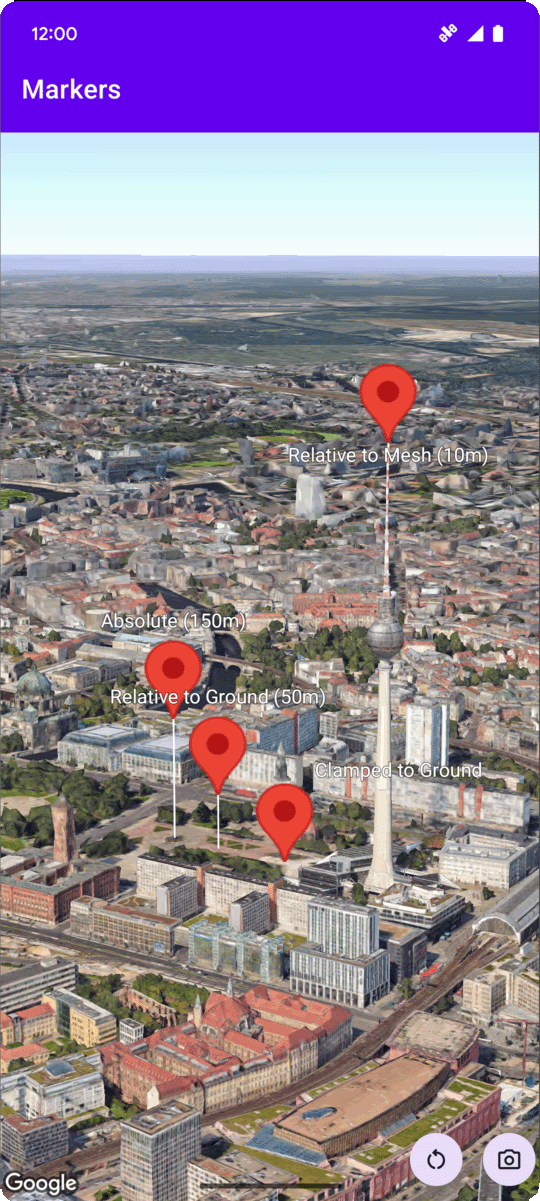
Anda dapat menetapkan
altitude
penanda dengan
menetapkan
properti altitudeMode
ke salah satu nilai berikut:
ABSOLUTERELATIVE_TO_GROUNDCLAMP_TO_GROUNDRELATIVE_TO_MESH
Contoh kode berikut menunjukkan cara menggunakan setiap metode. Untuk menggunakan contoh kode ini, ikuti petunjuk di Penyiapan dan Menambahkan peta 3D ke aplikasi Anda untuk menyiapkan project Android Studio dengan peta 3D dasar. Kemudian, tambahkan kode berikut ke file
MainActivity.kt:
  // Add imports
  import com.google.android.gms.maps3d.model.Map3DMode
  import com.google.android.gms.maps3d.model.latLngAltitude

  ...

  // Add to the onMap3DViewReady method, after the googleMap3D object has been initialized
  googleMap3D.setMapMode(Map3DMode.SATELLITE)

  googleMap3D.setCamera(
      camera {
          center = latLngAltitude {
              latitude = 52.51974795
              longitude = 13.40715553
              altitude = 150.0
          }
          heading = 252.7
          tilt = 79.0
          range = 1500.0
      }
  )


  // Marker 1: Absolute
  googleMap3D.addMarker(markerOptions {
      position = latLngAltitude {
          latitude = 52.519605780912585
          longitude = 13.406867190588198
          altitude = 150.0
      }
      label = "Absolute (150m)"
      altitudeMode = AltitudeMode.ABSOLUTE
      isExtruded = true
      isDrawnWhenOccluded = true
      collisionBehavior = CollisionBehavior.REQUIRED_AND_HIDES_OPTIONAL
  })

  // Marker 2: Relative to Ground
  googleMap3D.addMarker(markerOptions {
      position = latLngAltitude {
          latitude = 52.519882191069016
          longitude = 13.407410777254293
          altitude = 50.0
      }
      label = "Relative to Ground (50m)"
      altitudeMode = AltitudeMode.RELATIVE_TO_GROUND
      isExtruded = true
      isDrawnWhenOccluded = true
  })

  // Marker 3: Clamped to Ground
  googleMap3D.addMarker(markerOptions {
      position = latLngAltitude {
          latitude = 52.52027645136134
          longitude = 13.408271658592406
          altitude = 0.0  // altitude is effectively ignored by CLAMP_TO_GROUND for rendering,
          // but might be relevant if you read the marker's position later.
          // For CLAMP_TO_GROUND, it's often set to 0.0.
      }
      label = "Clamped to Ground"
      altitudeMode = AltitudeMode.CLAMP_TO_GROUND
      isExtruded = true
      isDrawnWhenOccluded = true
  })

  // Marker 4: Relative to Mesh
  googleMap3D.addMarker(markerOptions {
      position = latLngAltitude {
          latitude = 52.520835071144226
          longitude = 13.409426847943774
          altitude = 10.0 // Altitude relative to 3D mesh (buildings, terrain features)
      }
      label = "Relative to Mesh (10m)"
      altitudeMode = AltitudeMode.RELATIVE_TO_MESH
      isExtruded = true
      isDrawnWhenOccluded = true
  })