
To generate an isochrone, provide the API with an origin, a travel mode such as driving, two-wheeler, cycling, or walking, and a time limit. You can also adjust the routing preferences and the visual appearance of the resulting polygon.
Travel modes
Use the required travelMode (travel_mode) parameter to specify the mode of
transportation:
DRIVE: Calculates reachability for a passenger car along drivable roads using posted speed limits, road hierarchy, turn penalties, and (optionally) live traffic conditions.TWO_WHEELER: Calculates reachability for a two-wheeled motorized vehicle (such as a motorcycle or scooter) using mode-specific road access rules and lower modeled speeds thanDRIVEon high-speed roads. As a result, aTWO_WHEELERisochrone typically covers an area larger thanBICYCLEbut smaller thanDRIVEalong high-speed highways.BICYCLE: Calculates reachability for a cyclist along bike-accessible streets, bike lanes, and shared paths, with speeds adjusted for road type and slope, excluding motorways and controlled-access freeways.WALK: Calculates reachability for a pedestrian along sidewalks, footpaths, trails, and pedestrian-accessible streets, with walking speed adjusted for slope. Walking traversal ignores one-way vehicular restrictions.
Time horizon
The primary constraint you provide to the service is the travelDuration
(travel_duration). This defines the time horizon for the calculation.
- Minimum and maximum duration: The duration must be at least
"1s"(1 second). Zero ("0s"), negative durations, and sub-second durations under 1 second (such as"0.5s") return a400 INVALID_ARGUMENTerror. The API supports a maximum travel time of 3,600 seconds (1 hour) for theDRIVEandTWO_WHEELERmodes, and 7,200 seconds (2 hours) for theWALKandBICYCLEmodes. - Minimum polygon floor: Because the API converts reached road segments into spatial grid cells, very short durations return a small polygon covering the grid cells around the snapped origin.
- Performance: Calculation time scales with the duration requested and the travel mode selected. A one-hour driving isochrone covers a significantly larger geographic area and road network than a one-hour walking isochrone, which results in higher latency for the driving request.
- Formatting: Because the API uses
google.protobuf.Duration, the duration must be formatted as a string ending in an"s"(for example,"3600s"), rather than an integer.
Origin points and road snapping
You can specify the starting point for the isochrone in two ways:
- Coordinates (
location): A latitude and longitude pair. Provide bothlatitude(in[-90, 90]) andlongitude(in[-180, 180]). If you omit one of them, the API treats it as0.0, which places the point on the Equator or the prime meridian. If you omit both ({}) or send(0, 0), the API returns a400 INVALID_ARGUMENTerror. - Place IDs (
place): A unique identifier for a specific place on Google Maps. When you provide a place ID, the service resolves the place to its centroid coordinate and snaps that point to the nearest road. Use the resource name format starting withplaces/(for example,places/ChIJIQBpAG2ahYAR_6128GcTUEo); a bare place ID without theplaces/prefix is also accepted. For more information about place IDs, see Place IDs.
Regardless of the input method, the API doesn't calculate travel times from the exact physical point if that point isn't on a road, such as inside a park or a building. To handle this situation, the service uses road snapping. Road snapping has the following features:
- Smart snapping: The service attempts to snap your origin point to the nearest traversable road segment.
- Mode awareness: The snapping logic considers your
travel_mode. If you requestDRIVEorTWO_WHEELER, the API ignores pedestrian-only pathways and looks for the nearest drivable street. If you requestWALK, the API prioritizes walkable paths and sidewalks. - Failure cases: If the API can't find a suitable road segment within
the maximum snapping distance of your origin point (about 200 meters, or
less for
WALKandBICYCLE), the API returns a404 NOT_FOUNDerror. Large geographic features (such as parks, campuses, or scenic viewpoints) might have a place ID centroid farther than the snapping distance from the nearest road usable by the travel mode; in those cases, pass the explicitlocationcoordinates of a road entrance instead.
Travel direction (Inbound versus Outbound)
You can calculate both inbound and outbound reachability using the
travelDirection (travel_direction) parameter:
FROM(Outbound): Calculates the area reachable from the origin point within the specified time limit. This is suitable for use cases like delivery zones or service coverage.TO(Inbound): Calculates the area from which you can travel to the origin point within the specified time limit. This is suitable for determining catchment zones, like where employees can commute from to reach a central office.
Traffic awareness
Control how traffic data influences the generated polygon with the
routingPreference (routing_preference) parameter:
TRAFFIC_UNAWARE(Default): Uses free-flow speed limits and road hierarchy to generate the isochrone polygon. This produces a deterministic shape that doesn't fluctuate based on the time of day. This parameter is ideal for general analysis or baseline scenario planning.TRAFFIC_AWARE: Calculates isochrones using live traffic conditions at the exact time the request is processed (custom future or historical departure or arrival timestamps aren't configurable in v1). This causes the reachable area to shrink during congestion and expand during off-peak hours; under free-flow or off-peak conditions,TRAFFIC_AWAREandTRAFFIC_UNAWAREmight return near-identical polygons. Note: Traffic-aware routing is only supported whentravelModeis set toDRIVEorTWO_WHEELER.
Smoothing and fidelity
You can customize the appearance and precision of the output polygons using the
polygonFidelity (polygon_fidelity) and enableSmoothing
(enable_smoothing) parameters. While these options are independent, they work
together to determine the final shape.
polygonFidelity: Controls the spatial grid cell resolution used to approximate the reachable boundary:LOW: Uses the largest grid cells (several hundred meters across). Best for covering large areas with fewer vertices and without internal gaps, resulting in a generalized shape that can overestimate the reachable area along narrow road corridors.MEDIUM: Balanced precision and vertex count.HIGH: Uses the smallest grid cells (roughly 100-150 meters across). Results in a tighter fit to the reached road network, but can produce interior holes where the road network is sparse.POLYGON_FIDELITY_UNSPECIFIED: If unspecified, the service selects the resolution automatically based on the travel mode and duration, using finer cells for short durations and forWALK, and coarser cells for long durations. To compare isochrones across different durations or travel modes, setpolygonFidelityexplicitly.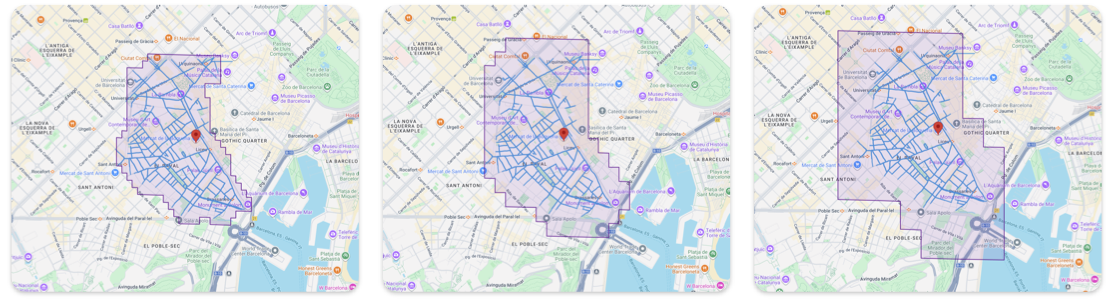
High, medium, and low polygon fidelity
enableSmoothing: Controls whether the stepped edges of the grid cells defined by the fidelity are rounded off.false(Raw): The default. Returns the grid-aligned boundary. Edges appear stepped along the grid cells. Best for analytical accuracy, such as strict point-in-polygon tests.true(Smoothed): Rounds off sharp corners for visual map display while approximately preserving the area of each ring. The boundary no longer follows the grid cells.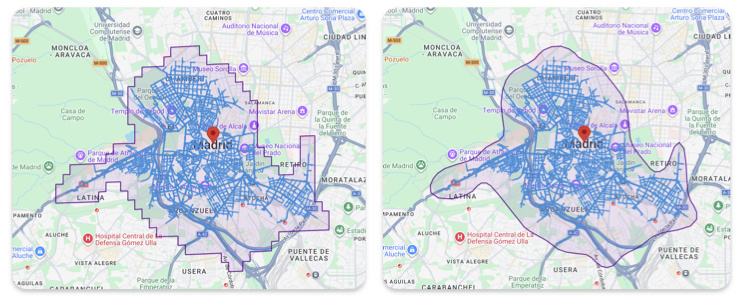
Isochrone with smoothing and without