
條件式費率是一種費率規則,可根據使用者裝置、國家/地區或是否登入 Google 等條件,為行程提供不同的費率。
如果行程或房型套裝組合有多個公開或條件式費率,使用者會看到最低費率。Google 一律會為使用者挑選符合資格的最低費率。
總覽
條件式費率會顯示在標準價格版位中,且只會向搜尋內容符合相關條件式費率條件的使用者顯示。這些條件可依據下列項目設定:
如要啟用條件費率,請修改下列項目:
費率規範 XML 檔案: 定義套用條件式費率的條件。
價格動態饋給:在交易訊息中使用
<Rate>元素設定費率。到達網頁檔案:在深層連結中加入費率規則的特定值。
裝置專屬條件式費率
裝置專屬房價是指只有特定裝置 (例如行動裝置、平板電腦或桌機) 的使用者才能看到並預訂的飯店房價。費率由 Google 合作夥伴提供,使用者可以在合作夥伴的網站上查看並預訂相同的裝置專屬費率。
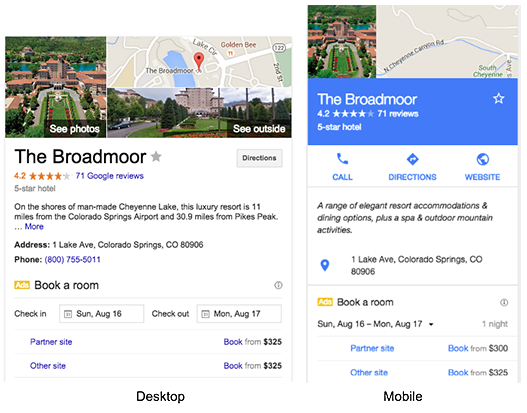
國家/地區專屬條件式費率
特定國家/地區的費率是指只有從特定國家/地區搜尋飯店的使用者,才能看到並預訂的飯店房價。Google 會根據使用者的 IP 位址判斷國家/地區。這些費率由 Google 合作夥伴提供,使用者可以在合作夥伴的國家/地區專用網站上查看並預訂相同的國家/地區專用費率。
語言專屬條件式費率
只有在 Google 中使用特定語言設定搜尋飯店時,使用者才會看到特定語言的房價。語言專屬條件是使用 <LanguageCode> 元素定義。
With Context 查詢要求訊息中未指定語言。因此,如果您在費率規則中指定 <LanguageCode>,則「含情境」回應應包含所有相關的語言專屬費率。
經過降採樣的條件式費率
只有隨機選取的部分合格使用者,才會看到經過降採樣的條件式費率。取樣率是使用 <MaxUsersPercent> 元素定義,並透過下列方式計算:
MaxUsersPercent = (number of users selected to view rate)/(total eligible users)
登入條件式費率
只有登入 Google 帳戶的使用者才能查看登入率。費率由 Google 合作夥伴提供,使用者可以在合作夥伴的網站上查看及預訂費率。登入率是使用 <UserSignedIn> 元素定義。
由於 Google 一律會選取最低的適用費率,因此如果條件式費率高於在<Result>層級設定的價格,系統絕不會選取條件式費率。為避免這種情況,請在<Result>層級移除費率,並為所有費率設定條件。或者,您也可以向客戶技術顧問詢問,是否能為<Result>層級設定的價格使用預設費率規則。
建立費率規範 XML 檔案
條件式費率的費率規範是透過費率規範 XML 檔案定義。詳情請參閱費率規範 XML 參考資料。
更新價格動態饋給
條件式費率是使用交易訊息中的元素設定。
<Rate> 元素也可以做為 <RoomBundle> 或 <Result> 元素中的 <Rates> 多個子項元素。如要將其做為條件式費率,請務必設定 rate_rule_id 屬性的值,使其與您在費率規則 XML 檔案中定義的費率規則 ID 相符。
如果沒有預設的雙人入住公開費率,請將 <Result> 訊息的 <Baserate> 子項元素設為 -1。在此情況下,傳送給 Google 的任何條件式<Rates>都會視為有效。
範例
基本費率 + 條件式
以下範例顯示包含基本費率和條件式費率的交易訊息:
<?xml version="1.0" encoding="UTF-8" ?>
<Transaction timestamp="2023-05-18T16:20:00-04:00" id="42">
  <Result>
    <Property>1234</Property>
    <Checkin>2023-04-10</Checkin>
    <Nights>1</Nights>

    <Baserate currency="USD">200.00</Baserate>
    <Tax currency="USD">20.00</Tax>
    <OtherFees currency="USD">1.00</OtherFees>

    <Rates>
      <!-- The rate_rule_id is required when using conditional rates -->
      <Rate rate_rule_id="mobile">
        <!-- Override base rate and taxes for conditional rates -->
        <Baserate currency="USD">180.00</Baserate>
        <Tax currency="USD">18.00</Tax>
      </Rate>
    </Rates>

  </Result>
</Transaction>
RoomBundle 單一房型
以下範例顯示包含單一<RoomBundle>費率的交易訊息:
<?xml version="1.0" encoding="UTF-8" ?>
<Transaction timestamp="2023-05-18T16:20:00-04:00" id="42">
  <Result>
    <Property>1234</Property>
    <Checkin>2023-04-10</Checkin>
    <Nights>2</Nights>

    <Baserate currency="USD">300.00</Baserate>
    <Tax currency="USD">30.00</Tax>
    <OtherFees currency="USD">2.00</OtherFees>

    <RoomBundle>
      <RoomID>single</RoomID>
      <Baserate currency="USD">300.00</Baserate>
      <Tax currency="USD">30.00</Tax>
      <OtherFees currency="USD">2.00</OtherFees>
    </RoomBundle>

    <RoomBundle>
      <RoomID>3</RoomID>  <!-- Links to data in metadata -->
      <RatePlanID>basic</RatePlanID>
      <Baserate currency="USD">275.00</Baserate>
      <Tax currency="USD">27.50</Tax>
      <ChargeCurrency>web</ChargeCurrency>
      <BreakfastIncluded>1</BreakfastIncluded>

      <Rates>
        <Rate rate_rule_id="mobile">
          <Baserate currency="USD">269.00</Baserate>
          <Tax currency="USD">2.69</Tax>
          <OtherFees currency="USD">1.00</OtherFees>
        </Rates>
      </Rates>

    </RoomBundle>
  </Result>
</Transaction>
RoomBundle multiple
以下範例顯示包含多個<RoomBundle>費率的交易訊息:
<?xml version="1.0" encoding="UTF-8" ?>
<Transaction timestamp="2023-05-18T16:20:00-04:00" id="42">
  <Result>
    <Property>1234</Property>
    <Checkin>2023-04-10</Checkin>
    <Nights>2</Nights>
    <!-- When Google receives new room bundle information for an itinerary, all
    previous room bundle pricing is dropped from Google's cache. Thus, if you
    want to delete a specific room bundle from Google's cache, you may do so
    by simply not providing that specific room bundle in subsequent transaction
    messages. -->
    <RoomBundle>
     ...
      <!-- RoomID is required, PackageID is recommended. -->
      <RoomID>5</RoomID>
      <PackageID>ABC</PackageID>
      <!-- Baserate is required. -->
      <Baserate currency="USD">275.00</Baserate>
      <Tax currency="USD">27.50</Tax>
      <OtherFees currency="USD">2.00</OtherFees>

      <!-- RatePlanID is optional and represents the unique identifier for a
      room and package data combination. We strongly recommend using RatePlanID
      as a variable to build your dynamic landing page (formerly Point of Sale)
      URL and it should be within 50 characters in length for optimal
      performance. For details, see Using Variables and Conditions. -->
      <RatePlanID>5-ABC</RatePlanID>

      <!-- Occupancy is mandatory for RoomBundle elements. -->
      <!-- Elements below will get inherited to nested rate elements. -->
      <Occupancy>2</Occupancy>
      <OccupancyDetails>
        <NumAdults>2</NumAdults>
      </OccupancyDetails>
      <InternetIncluded>1</InternetIncluded>

      <!-- Rate rule "mobile" overrides chargeCurrency, "us_or_gb" doesn't. -->
      <ChargeCurrency>web</ChargeCurrency>

      <Rates>
        <Rate rate_rule_id="mobile">
          <Baserate currency="USD">258.33</Baserate>
          <Tax currency="USD">25.83</Tax>
          <OtherFees currency="USD">1.00</OtherFees>
          <!-- The value below overrides ChargeCurrency from roombundle. -->
          <ChargeCurrency>hotel</ChargeCurrency>
        </Rate>
        <Rate rate_rule_id="us_or_gb">
          <Baserate currency="USD">268.33</Baserate>
          <Tax currency="USD">26.83</Tax>
          <OtherFees currency="USD">1.00</OtherFees>
        </Rate>
      </Rates>
    </RoomBundle>
  </Result>
</Transaction>
不提供雙人房
以下範例顯示包含不含公開雙人入住費率的條件式費率的交易訊息:
<?xml version="1.0" encoding="UTF-8" ?>
<Transaction timestamp="2023-05-18T16:20:00-04:00" id="42">

  <Result>
    <Property>1234</Property>
    <Checkin>2023-04-10</Checkin>
    <Nights>1</Nights>

    <!-- <Unavailable/> should not be specified when available nested rates
    exist. -->
    <Baserate currency="USD">-1</Baserate>
    <Tax currency="USD">0</Tax>
    <OtherFees currency="USD">0</OtherFees>

    <Rates>
      <!-- The rate_rule_id is required when using conditional rates. -->
      <Rate rate_rule_id="mobile">
        <Baserate currency="USD">180.00</Baserate>
        <Tax currency="USD">18.00</Tax>
        <OtherFees currency="USD">1.00</OtherFees>
        <Custom1>ratecode123</Custom1>
      </Rate>
    </Rates>

  </Result>
</Transaction>
更新到達網頁檔案
如要確保符合資格的消費者能透過深層連結預訂折扣房價,請修改到達網頁檔案。預訂網站可能也需要額外實作,才能正確顯示和提供折扣價。
合作夥伴應遵守條件式費率深層連結中顯示的價格。
在動態深層連結中,您可以透過名稱 (<RateRule> 元素的 id 屬性) 納入費率規則,並使用 RATE-RULE-ID 變數。
以下範例會新增費率規範 ID:
https://bookingsite.com/landing.do?id=(PARTNER-HOTEL-ID)&arrival=(CHECKINDAY)-(CHECKINMONTH)-(CHECKINYEAR)&departure=(CHECKOUTDAY)-(CHECKOUTMONTH)-(CHECKOUTYEAR)&lang=(USER-LANGUAGE)¤cy=(USER-CURRENCY)&prid=(RATE-RULE-ID)
到達網頁檔案也支援 IF-RATE-RULE-ID 指令,可讓您根據費率規則是否存在,有條件地定義網址的某些部分:
https://bookingsite.com/(IF-RATE-RULE-ID)privatelanding.do(RATE-RULE-ID)(ELSE)landing.do(ENDIF)?id=(PARTNER-HOTEL-ID)&arrival=(CHECKINDAY)-(CHECKINMONTH)-(CHECKINYEAR)&departure=(CHECKOUTDAY)-(CHECKOUTMONTH)-(CHECKOUTYEAR)&lang=(USER-LANGUAGE)¤cy=(USER-CURRENCY)
這個範例會根據費率規則 ID 是否已設定,選擇兩個到達網頁中的其中一個。
詳情請參閱「使用變數和條件」。