
样式化媒体接收器 (SMR) 可让您的发送设备应用 而无需创建自己的自定义接收器应用。您可以 通过提供自己的 CSS 文件来自定义 SMR 配色方案和品牌信息 。
注册
要为您的应用使用 SMR,请选择 Styled Media Receiver(样式化媒体接收器)选项 添加新应用时 Google Cast SDK 开发者控制台。 如需了解详情,请参阅注册。此选项 包括一个指向预览默认样式表的链接以及 您需要输入样式表的网址。您可以使用默认样式,也可以 提供 CSS 文件的 HTTPS 网址。您可以使用自己的服务器来托管 CSS 文件中。提供 CSS 文件的网址后,您可以点击预览 来查看您的样式在接收设备上的显示效果。
支持的媒体
所有接收器都支持媒体类型,如 支持的媒体。
SMR 支持视频、音频和图片,并且由发送器控制 使用 Cast SDK 媒体渠道来配置应用。SMR 完全符合 有关在 Cast 设备上播放媒体的用户体验指南。
字体
如需查看相关列表,请参阅预安装的字体 接收器中预安装的字体。
CSS
样式化媒体接收器使用以下 CSS 类:
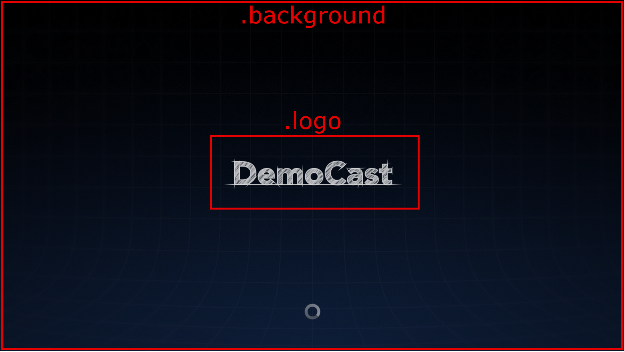
- .background:接收器的背景。
- .logo:接收器启动时显示的徽标。这个类也是 在接收器处于空闲状态且没有 .阻止 声明。
- .progressBar:媒体播放进度条。
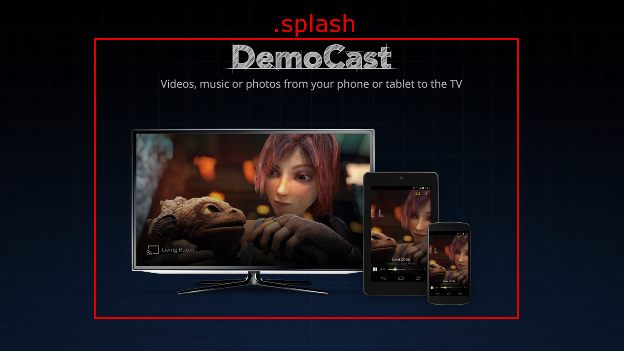
- .splash:接收器处于空闲状态时显示的屏幕。如果 类,则接收方将默认为 .logo 或应用名称。
- .watermark:播放媒体时显示的水印。
以下是使用这些类的示例 CSS 文件:
.background {
  background: center no-repeat url(background.png);
}

.logo {
  background-image: url(logo.png);
}

.progressBar {
  background-color: rgb(238, 255, 65);
}

.splash {
  background-image: url(splash.png);
}

.watermark {
  background-image: url(watermark.png);
  background-size: 57px 57px;
}
下面是使用这些类的一些图示。
视频
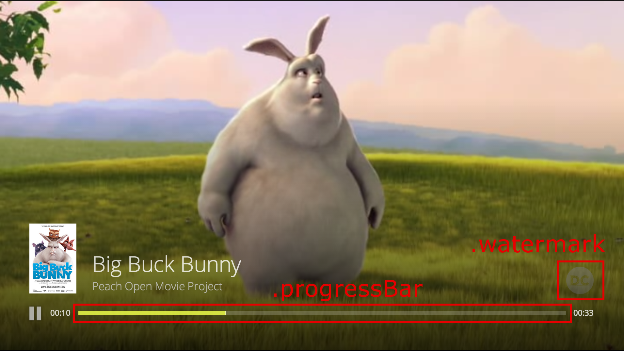
注意:视频图片为 96x143 像素,且图片资源为第一项 与媒体元数据相关联的项目被选中进行显示。图片缩放至 符合预期尺寸。
音频
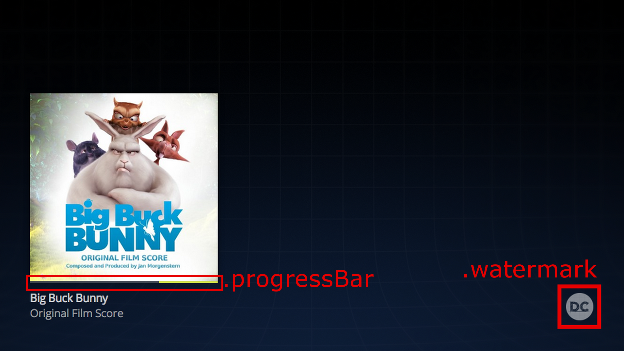
注意:音频专辑封面为 384x384 像素,且第一个图片资源为 与媒体元数据相关联的项目被选中进行显示。图片缩放至 符合预期尺寸。
来自 Big Buck Bunny 的图片:(c) 版权所有 2008, Blender Foundation / www.bigbuckbunny.org
图片来源:Sintel:(c) 版权所有 Blender Foundation / www.sintel.org