
Nếu ứng dụng của bạn sử dụng
để hiển thị nội dung trên web, thì bạn nên định cấu hình để có thể kiếm tiền tối ưu từ nội dung bằng quảng cáo.WebView
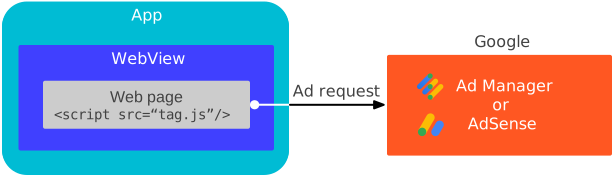
Hướng dẫn này cho bạn biết cách cung cấp thông tin về cách định cấu hình đối tượng WebView.
Bật cookie của bên thứ ba
Để cải thiện trải nghiệm quảng cáo của người dùng và để nhất quán với chính sách cookie của Chrome, hãy bật cookie của bên thứ ba trên thực thể WebView của bạn.
Java
CookieManager.getInstance().setAcceptThirdPartyCookies(webView, true);
Kotlin
CookieManager.getInstance().setAcceptThirdPartyCookies(webView, true)
Cài đặt web
Chế độ cài đặt WebView mặc định chưa được tối ưu hoá cho quảng cáo. Sử dụng các API WebSettings để định cấu hình WebView cho:
- JavaScript
- Quyền truy cập vào bộ nhớ cục bộ
Tự động phát video
Java
import android.webkit.CookieManager;
import android.webkit.WebView;

public class MainActivity extends AppCompatActivity {
  private WebView webView;

  @Override
  protected void onCreate(Bundle savedInstanceState) {
    super.onCreate(savedInstanceState);
    setContentView(R.layout.activity_main);
    webView = findViewById(R.id.webview);

    // Let the web view accept third-party cookies.
    CookieManager.getInstance().setAcceptThirdPartyCookies(webView, true);
    // Let the web view use JavaScript.
    webView.getSettings().setJavaScriptEnabled(true);
    // Let the web view access local storage.
    webView.getSettings().setDomStorageEnabled(true);
    // Let HTML videos play automatically.
    webView.getSettings().setMediaPlaybackRequiresUserGesture(false);
  }
}
Kotlin
import android.webkit.CookieManager
import android.webkit.WebView

class MainActivity : AppCompatActivity() {
  lateinit var webView: WebView

  override fun onCreate(savedInstanceState: Bundle?) {
    super.onCreate(savedInstanceState)
    setContentView(R.layout.activity_main)
    webView = findViewById(R.id.webview)

    // Let the web view accept third-party cookies.
    CookieManager.getInstance().setAcceptThirdPartyCookies(webView, true)
    // Let the web view use JavaScript.
    webView.settings.javaScriptEnabled = true
    // Let the web view access local storage.
    webView.settings.domStorageEnabled = true
    // Let HTML videos play automatically.
    webView.settings.mediaPlaybackRequiresUserGesture = false
  }
}
Tải nội dung khung hiển thị web
Cookie và URL trang rất quan trọng đối với việc kiếm tiền từ chế độ xem web và chỉ hoạt động như mong đợi khi loadUrl() được dùng với một URL dựa trên mạng. Để tối ưu hoá hiệu suất WebView, hãy tải nội dung web trực tiếp từ các URL dựa trên mạng. Tránh sử dụng WebViewAssetLoader, tải tài sản từ thiết bị hoặc tạo nội dung web một cách linh hoạt.
Java
import android.webkit.CookieManager;
import android.webkit.WebView;

public class MainActivity extends AppCompatActivity {
  private WebView webView;

  @Override
  protected void onCreate(Bundle savedInstanceState) {
    super.onCreate(savedInstanceState);
    setContentView(R.layout.activity_main);
    webView = findViewById(R.id.webview);

    // Let the web view accept third-party cookies.
    CookieManager.getInstance().setAcceptThirdPartyCookies(webView, true);
    // Let the web view use JavaScript.
    webView.getSettings().setJavaScriptEnabled(true);
    // Let the web view access local storage.
    webView.getSettings().setDomStorageEnabled(true);
    // Let HTML videos play automatically.
    webView.getSettings().setMediaPlaybackRequiresUserGesture(false);

    // Load the URL for optimized web view performance.
    webView.loadUrl("https://google.github.io/webview-ads/test/");
  }
}
Kotlin
import android.webkit.CookieManager
import android.webkit.WebView

class MainActivity : AppCompatActivity() {
  lateinit var webView: WebView

  override fun onCreate(savedInstanceState: Bundle?) {
    super.onCreate(savedInstanceState)
    setContentView(R.layout.activity_main)
    webView = findViewById(R.id.webview)

    // Let the web view accept third-party cookies.
    CookieManager.getInstance().setAcceptThirdPartyCookies(webView, true)
    // Let the web view use JavaScript.
    webView.settings.javaScriptEnabled = true
    // Let the web view access local storage.
    webView.settings.domStorageEnabled = true
    // Let HTML videos play automatically.
    webView.settings.mediaPlaybackRequiresUserGesture = false

    // Load the URL for optimized web view performance.
    webView.loadUrl("https://google.github.io/webview-ads/test/")
  }
}
Kiểm thử chế độ xem web
Trong quá trình phát triển ứng dụng, bạn nên tải URL thử nghiệm này:
https://google.github.io/webview-ads/test/
để xác minh rằng các chế độ cài đặt này có tác động như dự kiến đối với quảng cáo. URL thử nghiệm có tiêu chí thành công cho một quy trình tích hợp hoàn chỉnh nếu bạn thấy những điều sau:
Cài đặt chế độ xem web
- Cookie của bên thứ ba hoạt động
- Cookie của bên thứ nhất hoạt động
- JavaScript đã bật
- Đã bật bộ nhớ DOM
Quảng cáo dạng video
- Quảng cáo dạng video phát cùng dòng và không mở trong trình phát tích hợp toàn màn hình
- Quảng cáo dạng video tự động phát mà không cần nhấp vào nút phát
- Quảng cáo dạng video có thể phát lại
Sau khi kiểm thử xong, hãy thay thế URL kiểm thử bằng URL mà khung hiển thị web dự định tải.