

این راهنما به شما نشان میدهد که چگونه Google Mobile Ads Unity Plugin برای بارگذاری و نمایش تبلیغات از Moloco با استفاده از میانجیگری استفاده کنید، و ادغامهای پیشنهاد قیمت را پوشش میدهد. این راهنما نحوه اضافه کردن Moloco به پیکربندی میانجیگری یک واحد تبلیغاتی و نحوه ادغام Moloco SDK و آداپتور را در یک برنامه Unity پوشش میدهد.
ادغامها و قالبهای تبلیغاتی پشتیبانیشده
آداپتور میانجیگری Ad Manager برای Moloco قابلیتهای زیر را دارد:
| ادغام | |
|---|---|
| مناقصه | |
| آبشار | |
| قالبها | |
| برنامه باز است | |
| بنر | |
| بینابینی | |
| پاداش داده شده | |
| تبلیغات بینابینی پاداشدار | |
الزامات
- آخرین Google Mobile Ads Unity Plugin
- یونیتی ۵.۶ یا بالاتر
- افزونه Moloco Unity نسخه ۱.۲.۰ یا بالاتر
- برای نصب روی اندروید
- اندروید API سطح ۲۳ یا بالاتر
- برای استقرار در iOS
- هدف استقرار iOS 13.0 یا بالاتر
- یک پروژه یونیتی فعال که با Google Mobile Ads Unity Plugin پیکربندی شده است. برای جزئیات بیشتر به بخش «راهاندازی Google Mobile Ads Unity Plugin مراجعه کنید.
- میانجیگری را تنظیم کنید
مرحله ۱: تنظیمات را در رابط کاربری Moloco انجام دهید
وارد پورتال ناشران Moloco شوید .
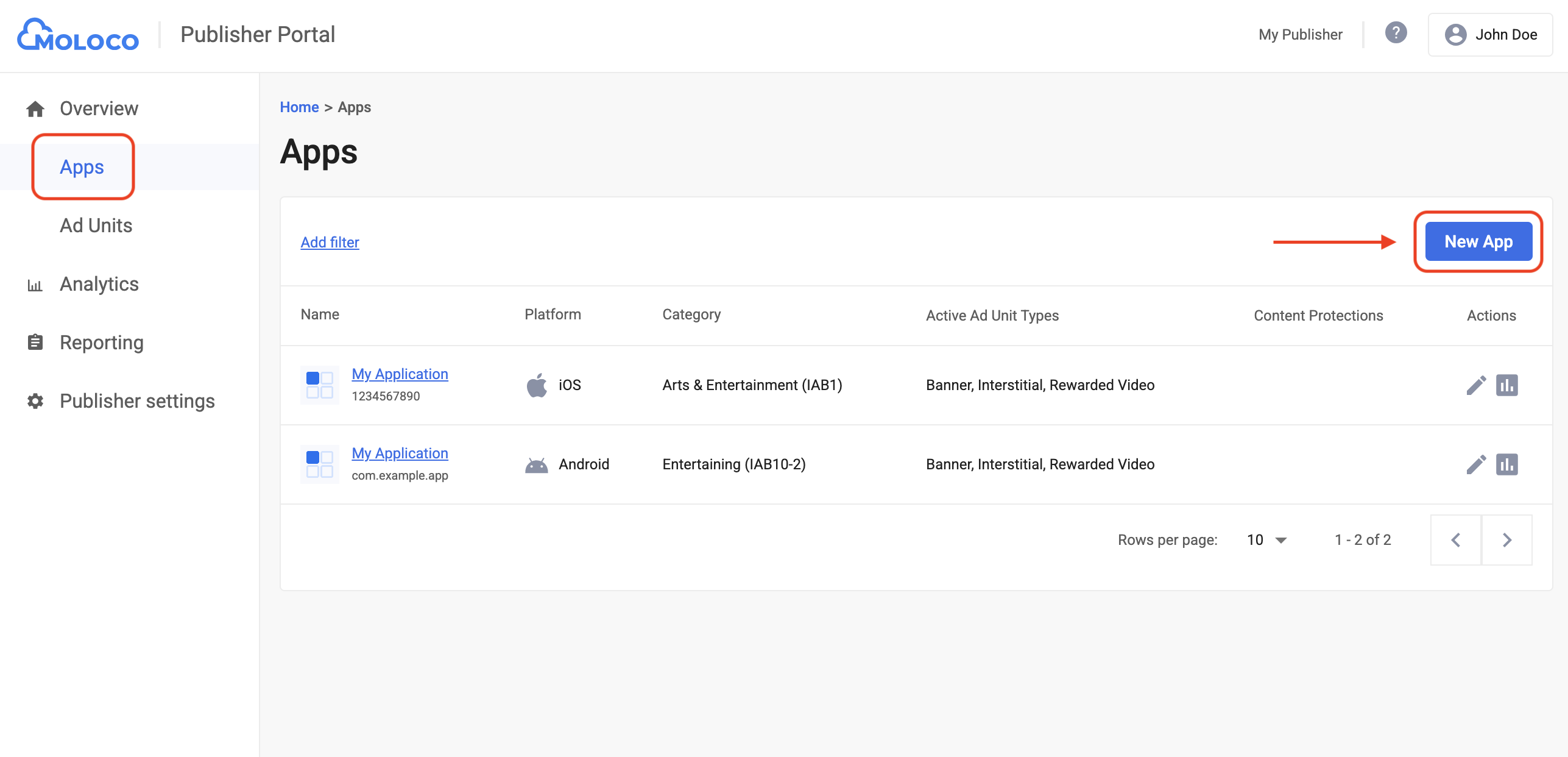
به تب Overview > Apps بروید، سپس برای ایجاد یک برنامه جدید، روی دکمه Add App کلیک کنید.
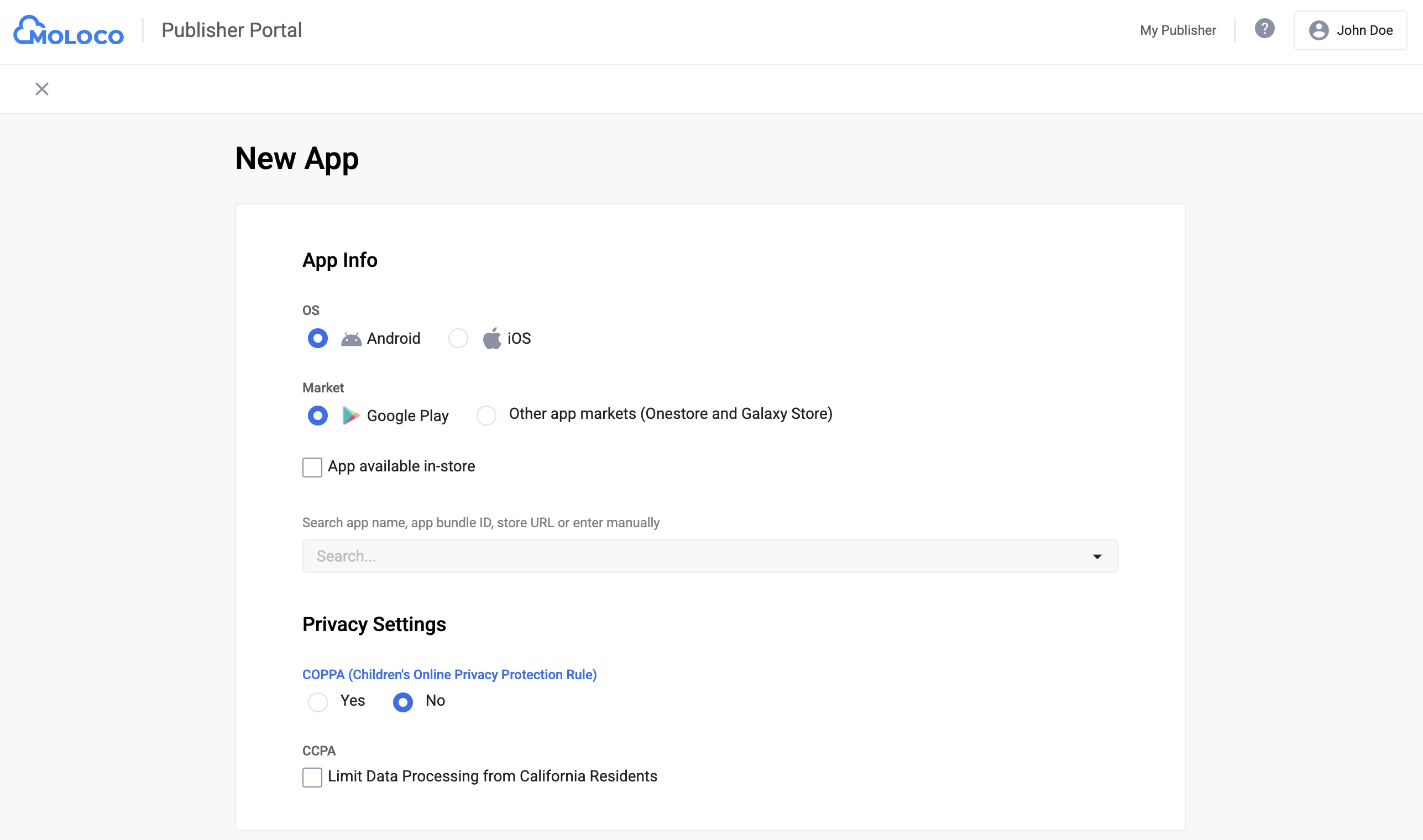
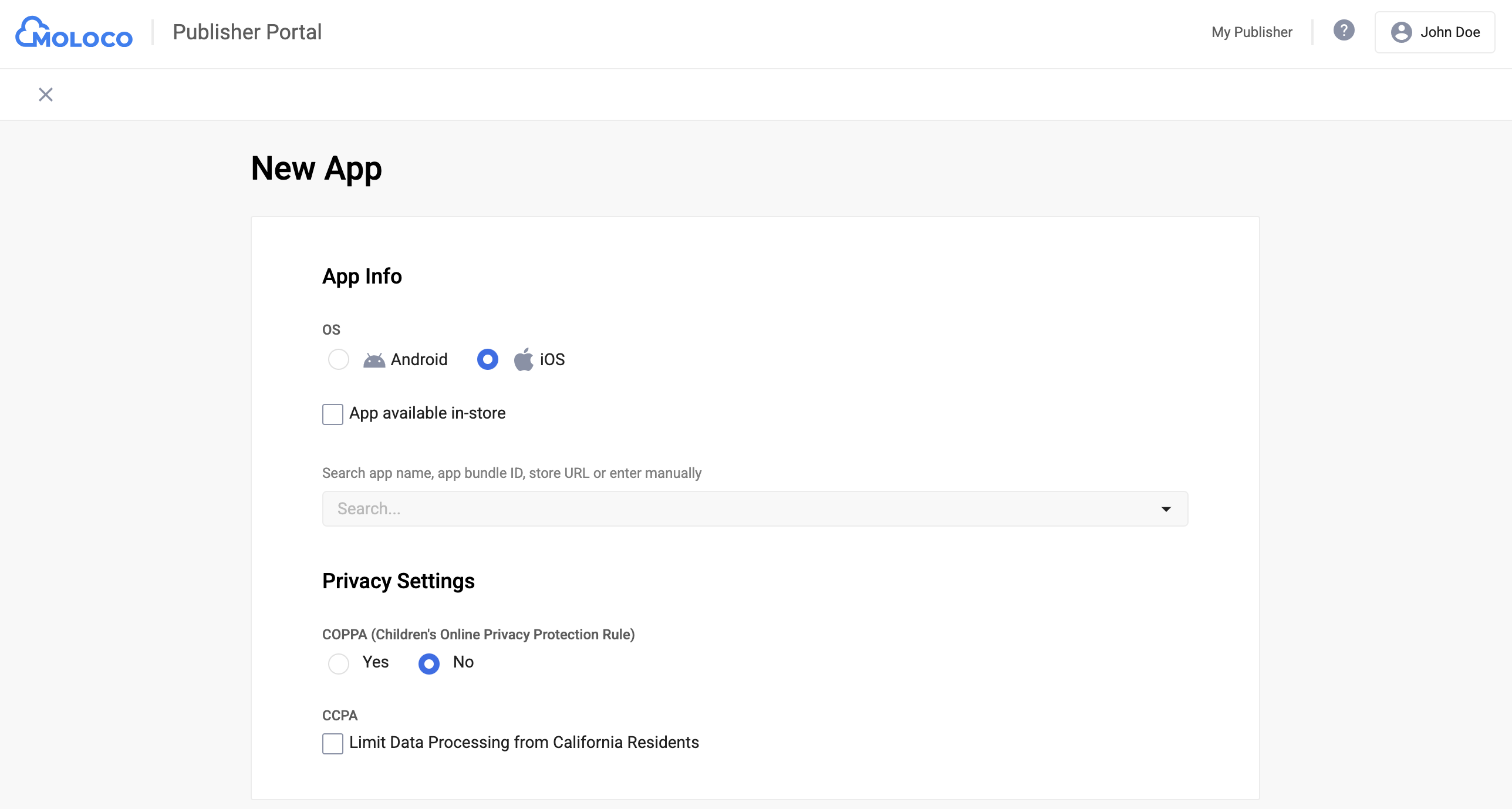
تنظیمات سیستم عامل و حریم خصوصی را برای برنامه خود انتخاب کنید، بقیه فرم را پر کنید و سپس روی ایجاد کلیک کنید.
اندروید
آیاواس
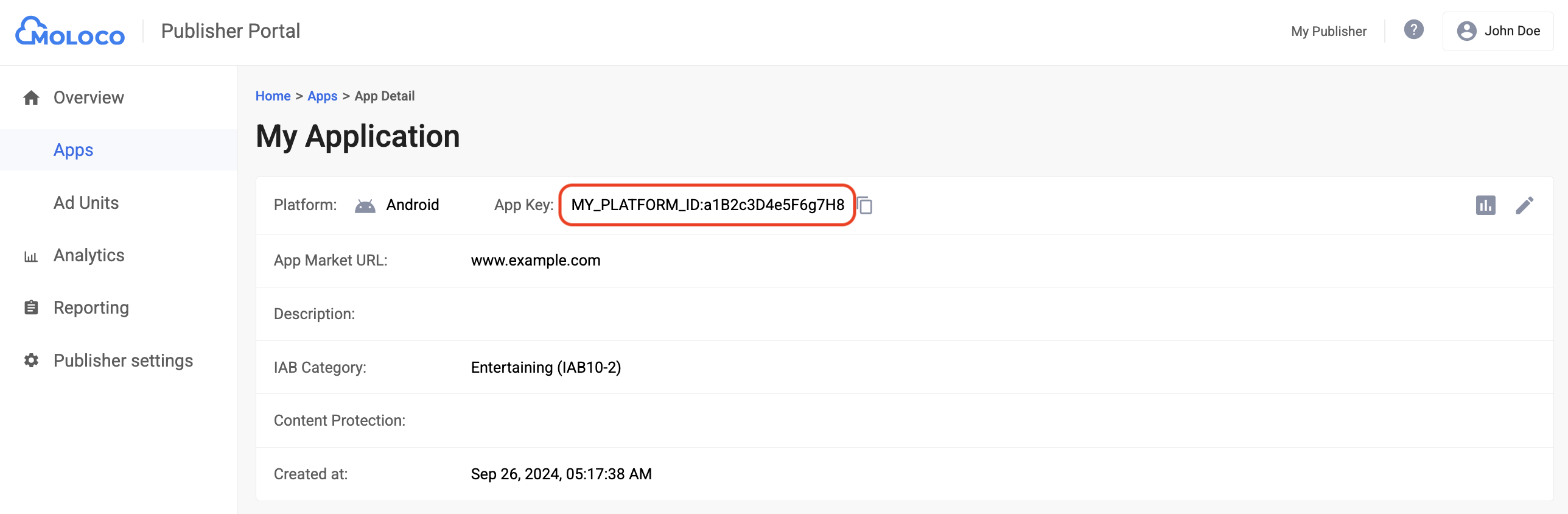
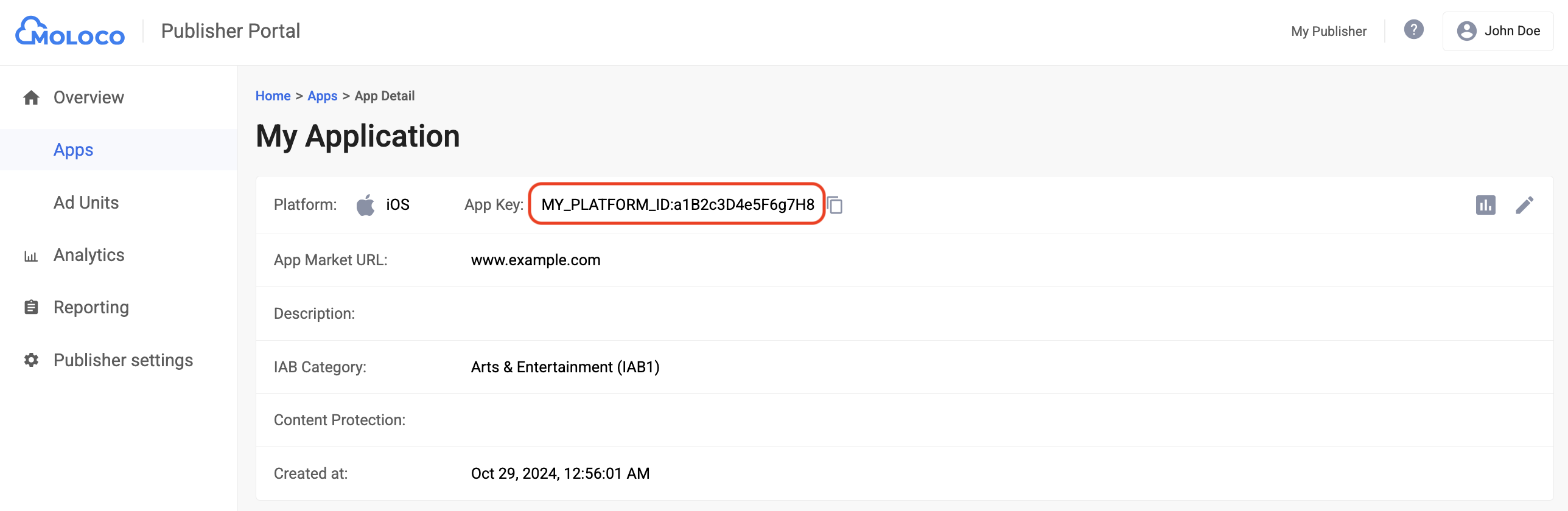
پس از ایجاد برنامه، آن را از تب برنامهها انتخاب کنید تا جزئیات را مشاهده کنید و کلید برنامه (App Key) را یادداشت کنید.
اندروید
آیاواس
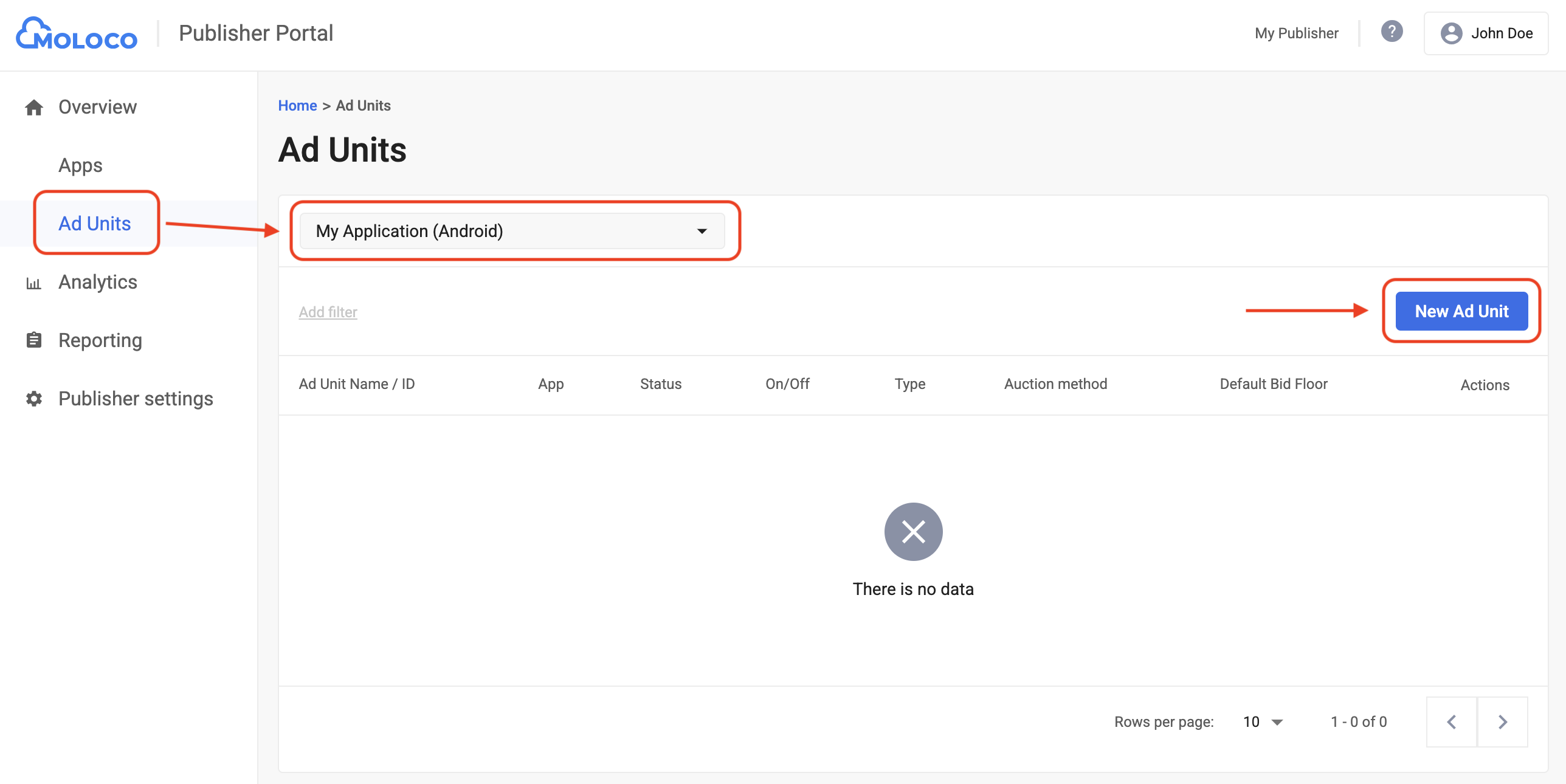
به برگه «نمای کلی» > «واحدهای تبلیغاتی» بروید، برنامه را از منوی کشویی انتخاب کنید و سپس روی «واحد تبلیغاتی جدید» کلیک کنید.
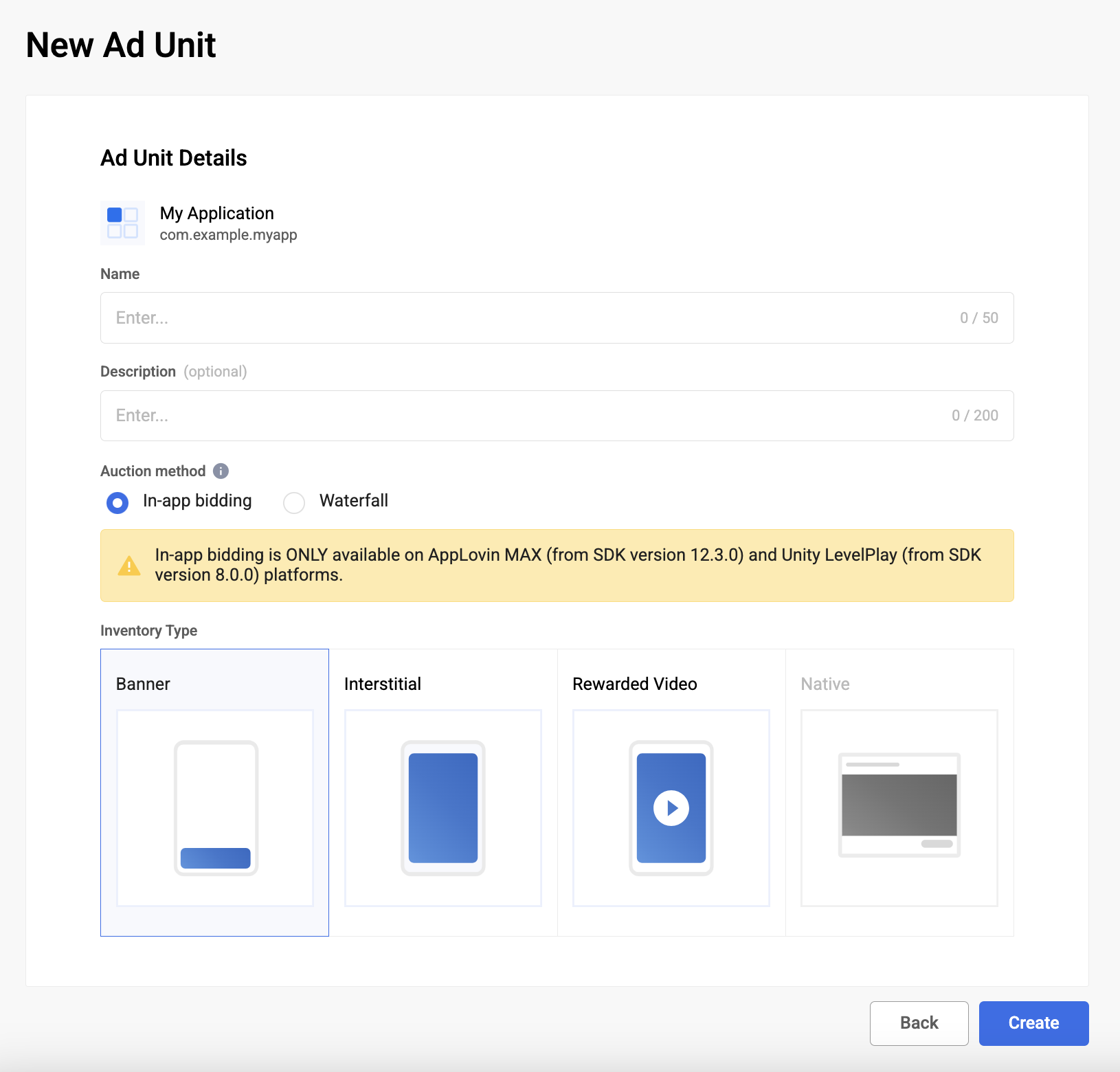
روش مزایده را با انتخاب «قیمتگذاری درونبرنامهای» (In-app bidding) انتخاب کنید و بقیه فرم را پر کنید. سپس روی «ایجاد» (Create) کلیک کنید.
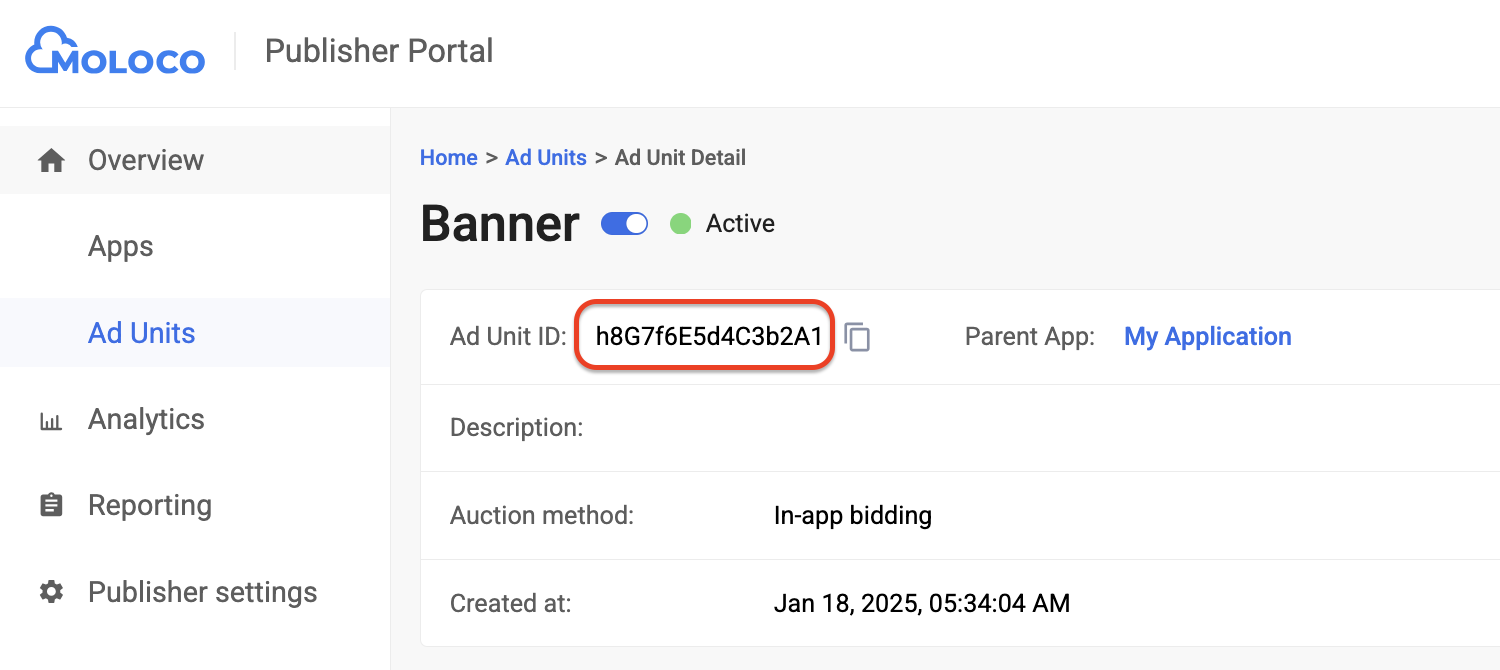
برای مشاهده جزئیات واحد تبلیغاتی تازه ایجاد شده خود، به تب واحدهای تبلیغاتی بروید. شناسه واحد تبلیغاتی (Ad Unit ID) را یادداشت کنید.
مرحله ۲: تنظیم تقاضای Moloco در رابط کاربری Ad Manager
تنظیمات میانجیگری را برای واحد تبلیغاتی خود پیکربندی کنید
اندروید
برای دستورالعملها، به مرحله ۲ در راهنمای اندروید مراجعه کنید.
آیاواس
برای دستورالعملها، به مرحله ۲ در راهنمای iOS مراجعه کنید.
اضافه کردن Moloco Ads به فهرست شرکای تبلیغاتی GDPR و مقررات ایالتی ایالات متحده
برای افزودن Moloco Ads به فهرست شرکای تبلیغاتی مطابق با مقررات ایالتهای اروپا و ایالات متحده در رابط کاربری Ad Manager، مراحل موجود در تنظیمات مقررات اروپا و تنظیمات مقررات ایالتهای ایالات متحده را دنبال کنید.
مرحله ۳: SDK و آداپتور Moloco را وارد کنید
رابط خط فرمان OpenUPM
اگر OpenUPM-CLI را نصب کردهاید، میتوانید افزونهی Google Mobile Ads Moloco Ads SDK Mediation Plugin for Unity را با اجرای دستور زیر از دایرکتوری ریشهی پروژه، روی پروژهی خود نصب کنید:
openupm add com.google.ads.mobile.mediation.molocoاوپنیوپیام
در ویرایشگر پروژه یونیتی خود، گزینه Edit > Project Settings > Package Manager را انتخاب کنید تا تنظیمات Unity Package Manager باز شود.
در زیر تب Scoped Registries ، OpenUPM را به عنوان یک رجیستری Scoped با جزئیات زیر اضافه کنید:
- نام:
OpenUPM - آدرس اینترنتی:
https://package.openupm.com - محدوده(ها):
com.google
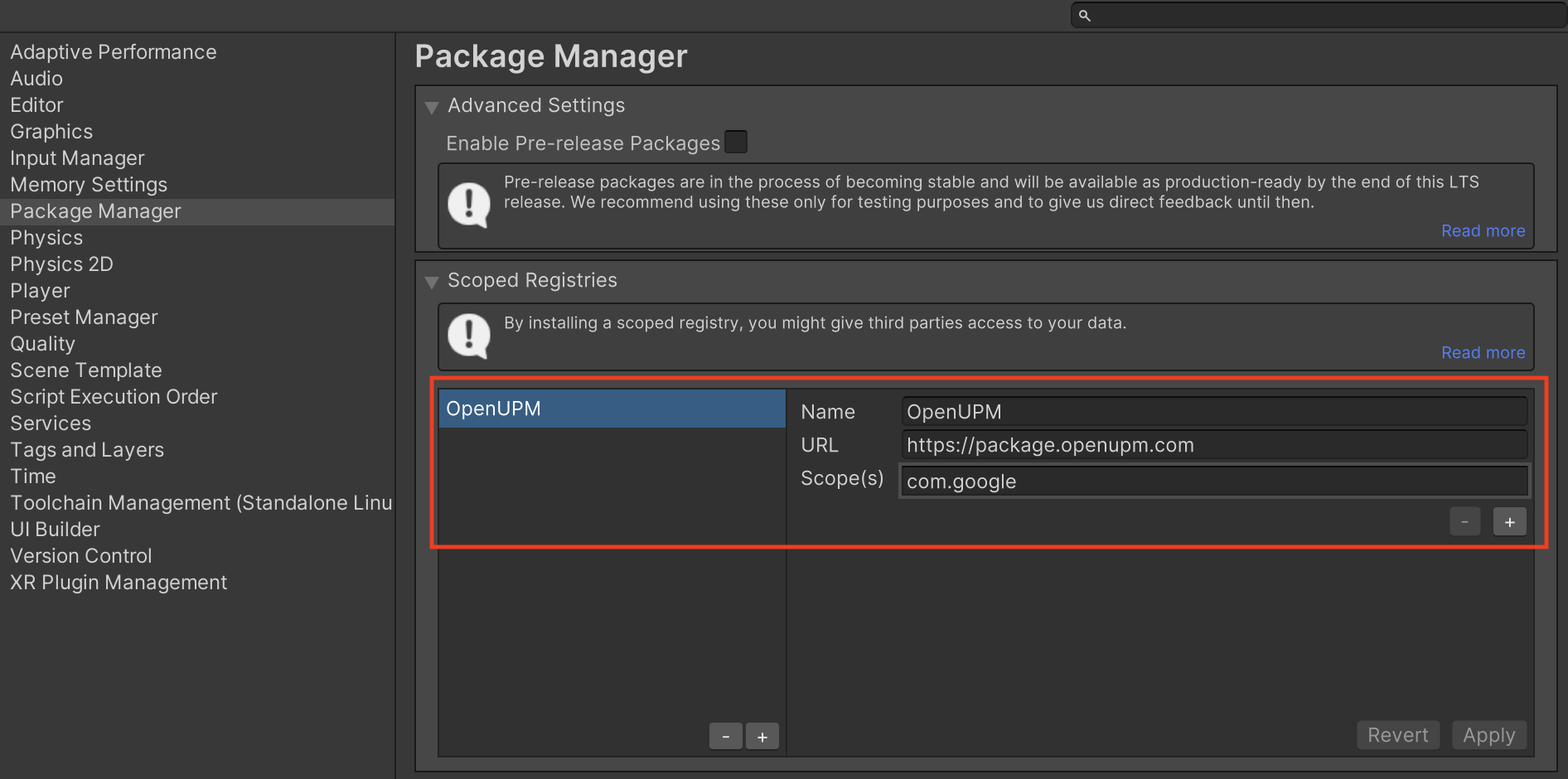
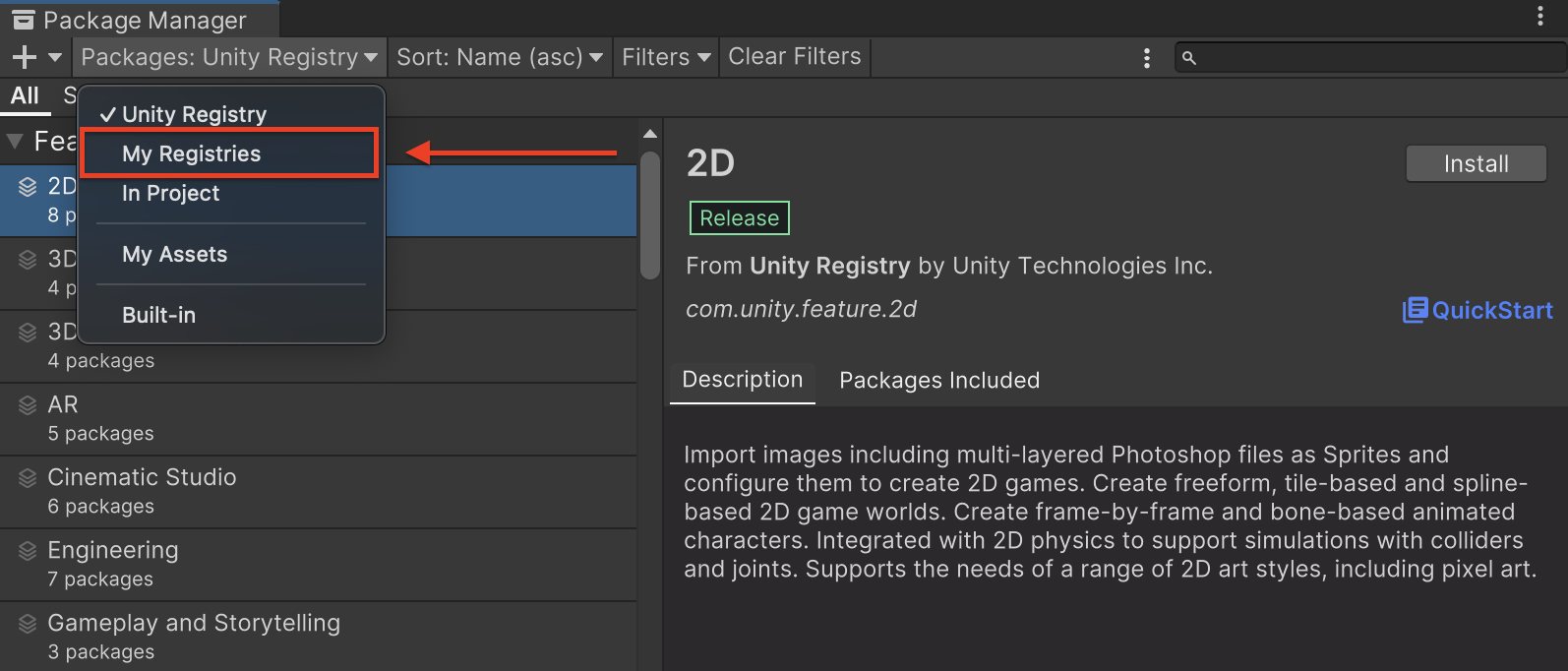
سپس، به مسیر Window > Package Manager بروید تا Unity Package Manager باز شود و از منوی کشویی، My Registrys را انتخاب کنید.
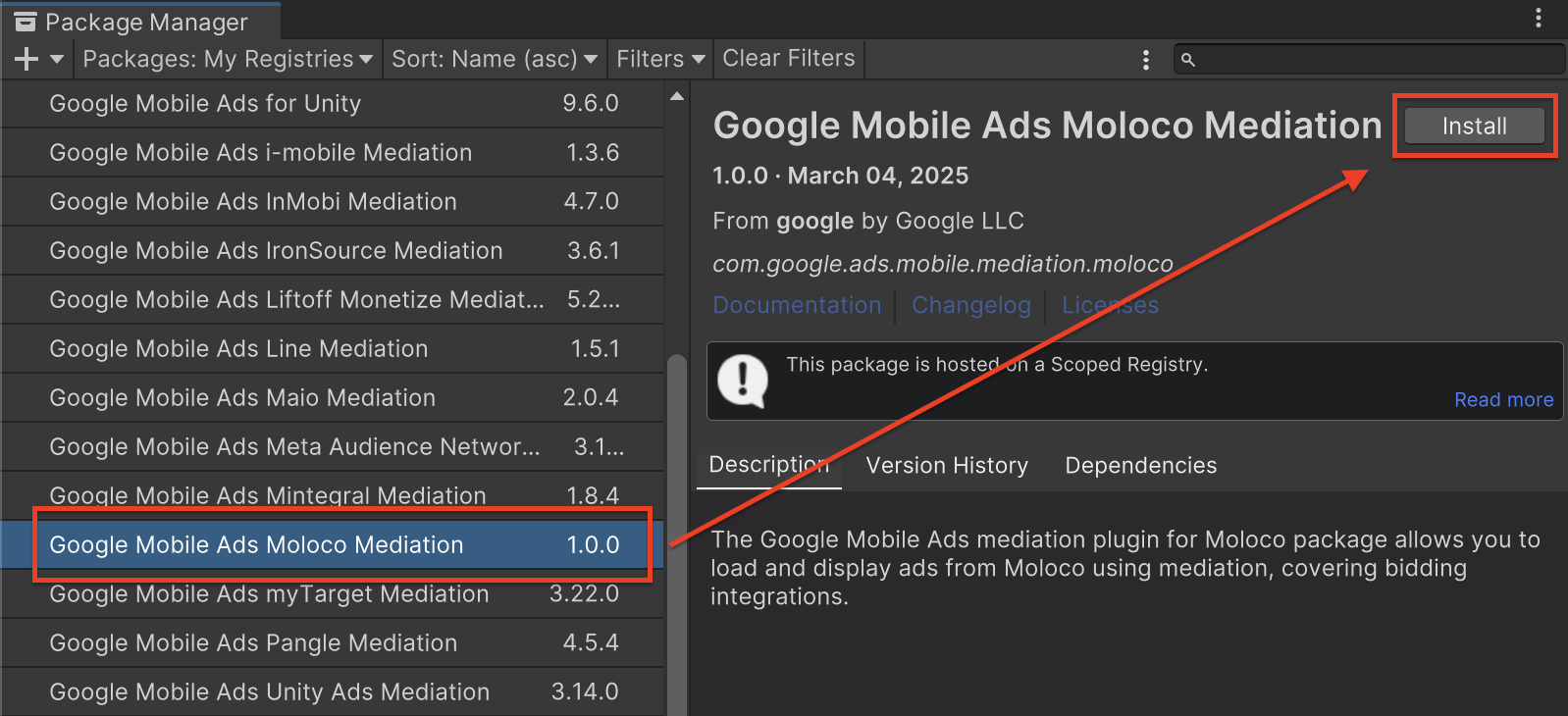
بسته Google Mobile Ads Moloco Mediation را انتخاب کرده و روی نصب کلیک کنید.
بسته یونیتی
آخرین نسخه افزونه میانجیگری تبلیغات موبایل گوگل برای Moloco Ads SDK را از لینک دانلود موجود در Changelog دانلود کنید و بسته GoogleMobileAdsMolocoMediation.unitypackage را از فایل زیپ استخراج کنید.
در ویرایشگر پروژه Unity خود، Assets > Import Package > Custom Package را انتخاب کنید و فایل GoogleMobileAdsMolocoMediation.unitypackage را که دانلود کردهاید، پیدا کنید. مطمئن شوید که همه فایلها انتخاب شدهاند و روی Import کلیک کنید.
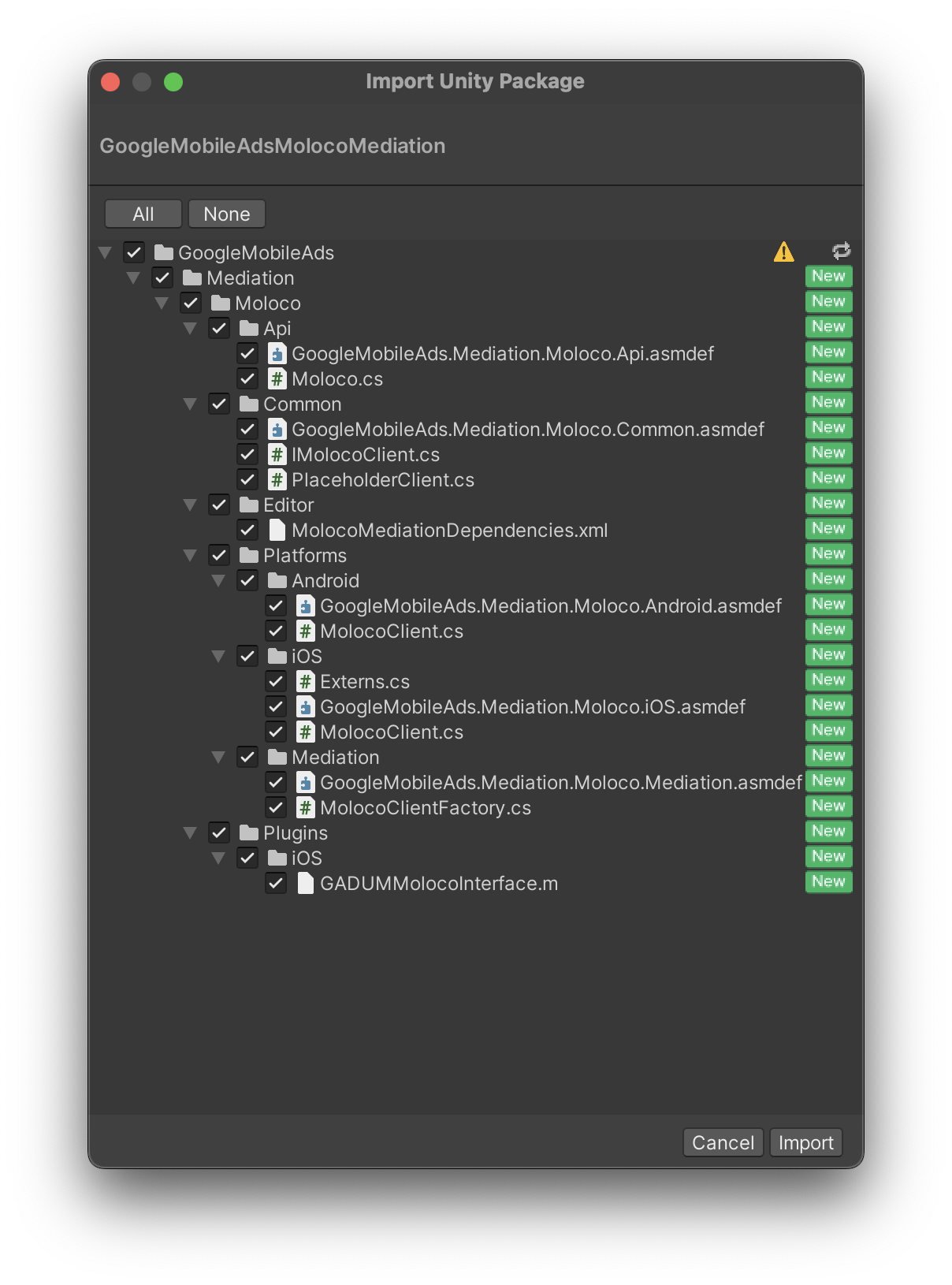
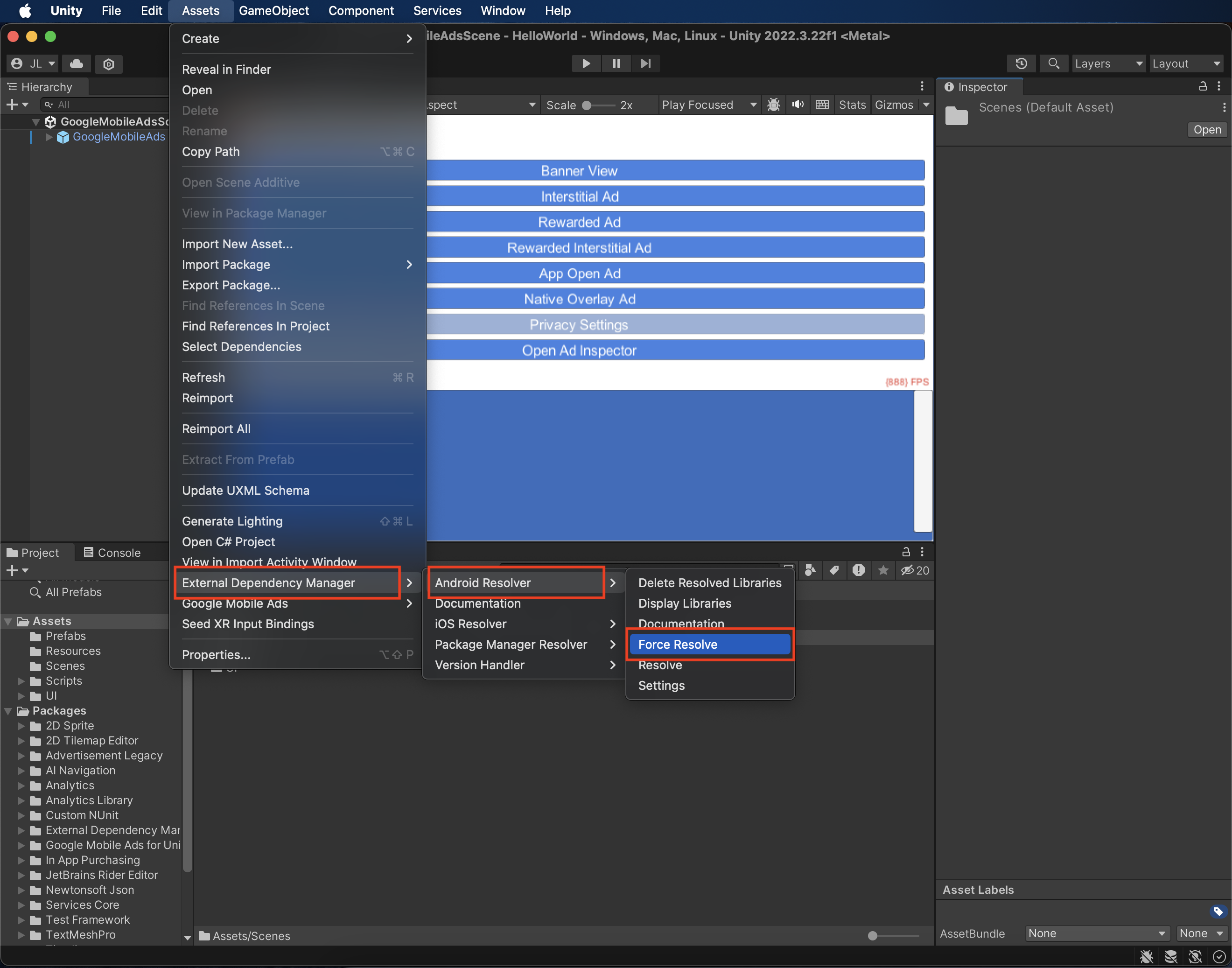
سپس، Assets > External Dependency Manager > Android Resolver > Force Resolve را انتخاب کنید. کتابخانه External Dependency Manager تجزیه و تحلیل وابستگیها را از ابتدا انجام میدهد و وابستگیهای اعلام شده را در پوشه Assets/Plugins/Android برنامه Unity شما کپی میکند.
مرحله ۴: اضافه کردن کد مورد نیاز
برای ادغام Moloco هیچ کد اضافی لازم نیست.
مرحله ۵: پیادهسازی خود را آزمایش کنید
فعال کردن تبلیغات آزمایشی
مطمئن شوید که دستگاه آزمایشی خود را برای Ad Manager ثبت کردهاید .
تأیید تبلیغات آزمایشی
برای تأیید اینکه تبلیغات آزمایشی را از Moloco Ads SDK دریافت میکنید، آزمایش منبع تبلیغاتی واحد را در ad inspector با استفاده از منبع(های ) تبلیغاتی Moloco (پیشنهاد ) فعال کنید.
کدهای خطا
اگر آداپتور نتواند تبلیغی از Moloco دریافت کند، ناشران میتوانند خطای اساسی را از پاسخ تبلیغ با استفاده ResponseInfo تحت کلاسهای زیر بررسی کنند:
اندروید
com.moloco.sdk
com.google.ads.mediation.moloco.MolocoMediationAdapter
آیاواس
MolocoSDK.MolocoError
GADMediationAdapterMoloco
در اینجا کدها و پیامهای همراه که توسط آداپتور Moloco هنگام عدم بارگیری یک تبلیغ نمایش داده میشوند، آمده است:
اندروید
| کد خطا | دامنه | دلیل |
|---|---|---|
| ۱۰۱ | com.google.ads.mediation.moloco | کلید برنامه Moloco موجود نیست یا نامعتبر است. |
| ۱۰۲ | com.google.ads.mediation.moloco | شناسه واحد تبلیغات Moloco موجود نیست یا نامعتبر است. |
| ۱۰۳ | com.google.ads.mediation.moloco | شیء تبلیغاتی Moloco بازگردانده شده تهی (null) بود. |
| ۱- تا ۵۰۰۰ | com.moloco.sdk | Moloco SDK خطایی را برگرداند. برای جزئیات بیشتر به مستندات Moloco مراجعه کنید. |
آیاواس
| کد خطا | دامنه | دلیل |
|---|---|---|
| ۱۰۱ | com.google.ads.mediation.moloco | Moloco SDK از نمایش تبلیغات در iOS 12 و پایینتر پشتیبانی نمیکند. |
| ۱۰۲ | com.google.ads.mediation.moloco | کلید برنامه Moloco موجود نیست یا نامعتبر است. |
| ۱۰۳ | com.google.ads.mediation.moloco | شناسه واحد تبلیغات Moloco موجود نیست یا نامعتبر است. |
| ۱۰۴ | com.google.ads.mediation.moloco | آگهی آماده نمایش نیست. |
| ۱۰۵ | com.google.ads.mediation.moloco | تبلیغ نمایش داده نشد. |
| ۱۰۶ | com.google.ads.mediation.moloco | دادههای رندر برای رندر کردن تبلیغ در دسترس نیست. |
| ۱- تا ۵۰۰۰ | ارسال شده توسط Moloco SDK | Moloco SDK خطایی را برگرداند. برای جزئیات بیشتر به مستندات Moloco مراجعه کنید. |
تأیید سمت سرور با پاداش
اگر فراخوانیهای تأیید سمت سرور (SSV) را اعتبارسنجی کنید ، شناسه منبع تبلیغات برای Moloco 8267622065755668722 خواهد بود.
تغییرات افزونه میانجیگری Moloco Unity
نسخه ۳.۷.۰
- از آداپتور اندروید Moloco نسخه ۴.۹.۰.۰ پشتیبانی میکند.
- از آداپتور iOS Moloco نسخه ۴.۶.۱.۱.۱ پشتیبانی میکند.
- ساخته و آزمایش شده با افزونه Google Mobile Ads Unity نسخه ۱۱.۱.۰.
نسخه ۳.۶.۱
- از آداپتور اندروید Moloco نسخه ۴.۸.۱.۰ پشتیبانی میکند.
- از آداپتور iOS Moloco نسخه ۴.۶.۱.۱ پشتیبانی میکند.
- ساخته و آزمایش شده با افزونه Google Mobile Ads Unity نسخه ۱۱.۱.۰.
نسخه ۳.۶.۰
- از آداپتور اندروید Moloco نسخه ۴.۸.۰.۰ پشتیبانی میکند.
- از آداپتور iOS Moloco نسخه ۴.۶.۰.۰ پشتیبانی میکند.
- ساخته و آزمایش شده با افزونه Google Mobile Ads Unity نسخه ۱۱.۰.۰.
نسخه ۳.۵.۱
- از آداپتور اندروید Moloco نسخه ۴.۷.۰.۰ پشتیبانی میکند.
- از آداپتور iOS Moloco نسخه ۴.۵.۱.۰ پشتیبانی میکند.
- ساخته و آزمایش شده با افزونه Google Mobile Ads Unity نسخه ۱۱.۰.۰.
نسخه ۳.۵.۰
- از آداپتور اندروید Moloco نسخه ۴.۷.۰.۰ پشتیبانی میکند.
- از آداپتور iOS Moloco نسخه ۴.۵.۰.۰ پشتیبانی میکند.
- ساخته و آزمایش شده با افزونه Google Mobile Ads Unity نسخه ۱۱.۰.۰.
نسخه ۳.۴.۱
- از آداپتور اندروید Moloco نسخه ۴.۶.۰.۰ پشتیبانی میکند.
- از آداپتور iOS Moloco نسخه ۴.۴.۱.۰ پشتیبانی میکند.
- ساخته و آزمایش شده با افزونه Google Mobile Ads Unity نسخه ۱۱.۰.۰.
نسخه ۳.۴.۰
- از آداپتور اندروید Moloco نسخه ۴.۶.۰.۰ پشتیبانی میکند.
- از آداپتور iOS Moloco نسخه ۴.۴.۰.۰ پشتیبانی میکند.
- ساخته و آزمایش شده با افزونه Google Mobile Ads Unity نسخه ۱۱.۰.۰.
نسخه ۳.۳.۱
- از آداپتور اندروید Moloco نسخه ۴.۵.۰.۰ پشتیبانی میکند.
- از آداپتور iOS Moloco نسخه ۴.۳.۰.۲ پشتیبانی میکند.
- ساخته و آزمایش شده با افزونه Google Mobile Ads Unity نسخه ۱۱.۰.۰.
نسخه ۳.۳.۰
- از آداپتور اندروید Moloco نسخه ۴.۵.۰.۰ پشتیبانی میکند.
- از آداپتور iOS Moloco نسخه ۴.۳.۰.۰ پشتیبانی میکند.
- ساخته و آزمایش شده با افزونه Google Mobile Ads Unity نسخه ۱۰.۷.۰.
نسخه ۳.۲.۰
- از آداپتور اندروید Moloco نسخه ۴.۴.۰.۰ پشتیبانی میکند.
- از آداپتور iOS Moloco نسخه ۴.۲.۰.۰ پشتیبانی میکند.
- ساخته و آزمایش شده با افزونه Google Mobile Ads Unity نسخه ۱۰.۷.۰.
نسخه ۳.۱.۰
- از آداپتور اندروید Moloco نسخه ۴.۴.۰.۰ پشتیبانی میکند.
- از آداپتور iOS Moloco نسخه ۴.۱.۲.۰ پشتیبانی میکند.
- ساخته و آزمایش شده با افزونه Google Mobile Ads Unity نسخه ۱۰.۶.۰.
نسخه ۳.۰.۰
- از آداپتور اندروید Moloco نسخه ۴.۳.۱.۰ پشتیبانی میکند.
- از آداپتور iOS Moloco نسخه ۴.۱.۰.۰ پشتیبانی میکند.
- ساخته و آزمایش شده با افزونه Google Mobile Ads Unity نسخه ۱۰.۶.۰.
نسخه ۲.۲.۱
- از آداپتور اندروید Moloco نسخه ۴.۲.۱.۰ پشتیبانی میکند.
- از آداپتور iOS Moloco نسخه ۳.۱۳.۰.۰ پشتیبانی میکند.
- ساخته و آزمایش شده با افزونه Google Mobile Ads Unity نسخه ۱۰.۶.۰.
نسخه ۲.۲.۰
- از آداپتور اندروید Moloco نسخه ۴.۲.۰.۰ پشتیبانی میکند.
- از آداپتور iOS Moloco نسخه ۳.۱۳.۰.۰ پشتیبانی میکند.
- ساخته و آزمایش شده با افزونه Google Mobile Ads Unity نسخه ۱۰.۶.۰.
نسخه ۲.۱.۰
- از آداپتور اندروید Moloco نسخه ۴.۱.۰.۰ پشتیبانی میکند.
- از آداپتور iOS Moloco نسخه ۳.۱۳.۰.۰ پشتیبانی میکند.
- ساخته و آزمایش شده با افزونه Google Mobile Ads Unity نسخه ۱۰.۵.۰.
نسخه ۲.۰.۰
- از آداپتور اندروید Moloco نسخه ۴.۰.۰.۰ پشتیبانی میکند.
- از آداپتور iOS Moloco نسخه ۳.۱۳.۰.۰ پشتیبانی میکند.
- ساخته و آزمایش شده با افزونه Google Mobile Ads Unity نسخه ۱۰.۴.۲.
نسخه ۱.۶.۱
- از آداپتور اندروید Moloco نسخه ۳.۱۲.۱.۰ پشتیبانی میکند.
- از آداپتور iOS Moloco نسخه ۳.۱۲.۱.۰ پشتیبانی میکند.
- ساخته و آزمایش شده با افزونه Google Mobile Ads Unity نسخه ۱۰.۴.۱.
نسخه ۱.۶.۰
- از آداپتور اندروید Moloco نسخه ۳.۱۲.۰.۰ پشتیبانی میکند.
- از آداپتور iOS Moloco نسخه ۳.۱۲.۰.۰ پشتیبانی میکند.
- ساخته و آزمایش شده با افزونه Google Mobile Ads Unity نسخه ۱۰.۳.۰.
نسخه ۱.۵.۰
- از آداپتور اندروید Moloco نسخه ۳.۱۱.۰.۰ پشتیبانی میکند.
- از آداپتور iOS Moloco نسخه ۳.۱۱.۰.۰ پشتیبانی میکند.
- ساخته و آزمایش شده با افزونه Google Mobile Ads Unity نسخه ۱۰.۳.۰.
نسخه ۱.۴.۰
- از آداپتور اندروید Moloco نسخه ۳.۱۰.۰.۰ پشتیبانی میکند.
- از آداپتور iOS Moloco نسخه ۳.۱۰.۰.۰ پشتیبانی میکند.
- ساخته و آزمایش شده با افزونه Google Mobile Ads Unity نسخه ۱۰.۲.۰.
نسخه ۱.۳.۱
- از آداپتور اندروید Moloco نسخه ۳.۹.۰.۰ پشتیبانی میکند.
- از آداپتور iOS Moloco نسخه ۳.۹.۱.۰ پشتیبانی میکند.
- ساخته و آزمایش شده با افزونه Google Mobile Ads Unity نسخه ۱۰.۱.۰.
نسخه ۱.۳.۰
- از آداپتور اندروید Moloco نسخه ۳.۹.۰.۰ پشتیبانی میکند.
- از آداپتور iOS Moloco نسخه ۳.۹.۰.۰ پشتیبانی میکند.
- ساخته و آزمایش شده با افزونه Google Mobile Ads Unity نسخه ۱۰.۱.۰.
نسخه ۱.۲.۱
- از آداپتور اندروید Moloco نسخه ۳.۸.۰.۱ پشتیبانی میکند.
- از آداپتور iOS Moloco نسخه ۳.۸.۰.۰ پشتیبانی میکند.
- ساخته و آزمایش شده با افزونه Google Mobile Ads Unity نسخه ۱۰.۰.۰.
نسخه ۱.۲.۰
- از آداپتور اندروید Moloco نسخه ۳.۸.۰.۰ پشتیبانی میکند.
- از آداپتور iOS Moloco نسخه ۳.۸.۰.۰ پشتیبانی میکند.
- ساخته و آزمایش شده با افزونه Google Mobile Ads Unity نسخه ۱۰.۰.۰.
نسخه ۱.۱.۰
- از آداپتور اندروید Moloco نسخه ۳.۷.۲.۰ پشتیبانی میکند.
- از آداپتور iOS Moloco نسخه ۳.۷.۲.۰ پشتیبانی میکند.
- ساخته و آزمایش شده با افزونه Google Mobile Ads Unity نسخه ۱۰.۰.۰.
نسخه ۱.۰.۰
- انتشار اولیه!
- از آداپتور اندروید Moloco نسخه ۳.۷.۰.۰ پشتیبانی میکند.
- از آداپتور iOS Moloco نسخه ۳.۶.۰.۰ پشتیبانی میکند.
- ساخته و آزمایش شده با افزونه Google Mobile Ads Unity نسخه ۹.۶.۰.