

این راهنما به شما نشان میدهد که چگونه از Google Mobile Ads Unity Plugin برای بارگذاری و نمایش تبلیغات از AppLovin با استفاده از میانجیگری استفاده کنید، که شامل ادغامهای مزایدهای و آبشاری میشود. این راهنما نحوه اضافه کردن AppLovin به پیکربندی میانجیگری یک واحد تبلیغاتی و نحوه ادغام SDK و آداپتور AppLovin در یک برنامه Unity را پوشش میدهد.
ادغامها و قالبهای تبلیغاتی پشتیبانیشده
آداپتور میانجیگری Ad Manager برای AppLovin قابلیتهای زیر را دارد:
| ادغام | |
|---|---|
| مناقصه | |
| آبشار | |
| قالبها | |
| برنامه باز است | ۱ |
| بنر | ۲ |
| بینابینی | |
| پاداش داده شده | |
۱. ادغام آبشاری در مرحله بتای بسته است.
آبشاری فقط از اندازههای بنر ۳۲۰x۵۰ و ۷۲۸x۹۰ پشتیبانی میکند. پیشنهاد قیمت از تبلیغات بنری پشتیبانی نمیکند.
الزامات
- آخرین Google Mobile Ads Unity Plugin
- یونیتی ۵.۶ یا بالاتر
- [برای پیشنهاد قیمت]: برای ادغام تمام قالبهای تبلیغاتی پشتیبانیشده در پیشنهاد قیمت، از افزونهی میانجیگری تبلیغات موبایلی گوگل برای AppLovin 4.2.0 یا بالاتر استفاده کنید ( آخرین نسخه توصیه میشود )
- برای نصب روی اندروید
- اندروید API سطح ۲۴ یا بالاتر
- برای استقرار در iOS
- هدف استقرار iOS 13.0 یا بالاتر
- یک پروژه یونیتی فعال که با Google Mobile Ads Unity Plugin پیکربندی شده است. برای جزئیات بیشتر به بخش «راهاندازی Google Mobile Ads Unity Plugin مراجعه کنید.
- میانجیگری را تنظیم کنید .
مرحله ۱: تنظیمات را در AppLovin UI تنظیم کنید
ثبت نام کنید یا وارد حساب AppLovin خود شوید .
برای تنظیم واحد تبلیغاتی Ad Manager خود، به کلید AppLovin SDK و کلید گزارش نیاز دارید. برای یافتن آنها، به AppLovin UI > Account > Keys بروید تا هر دو مقدار را مشاهده کنید.
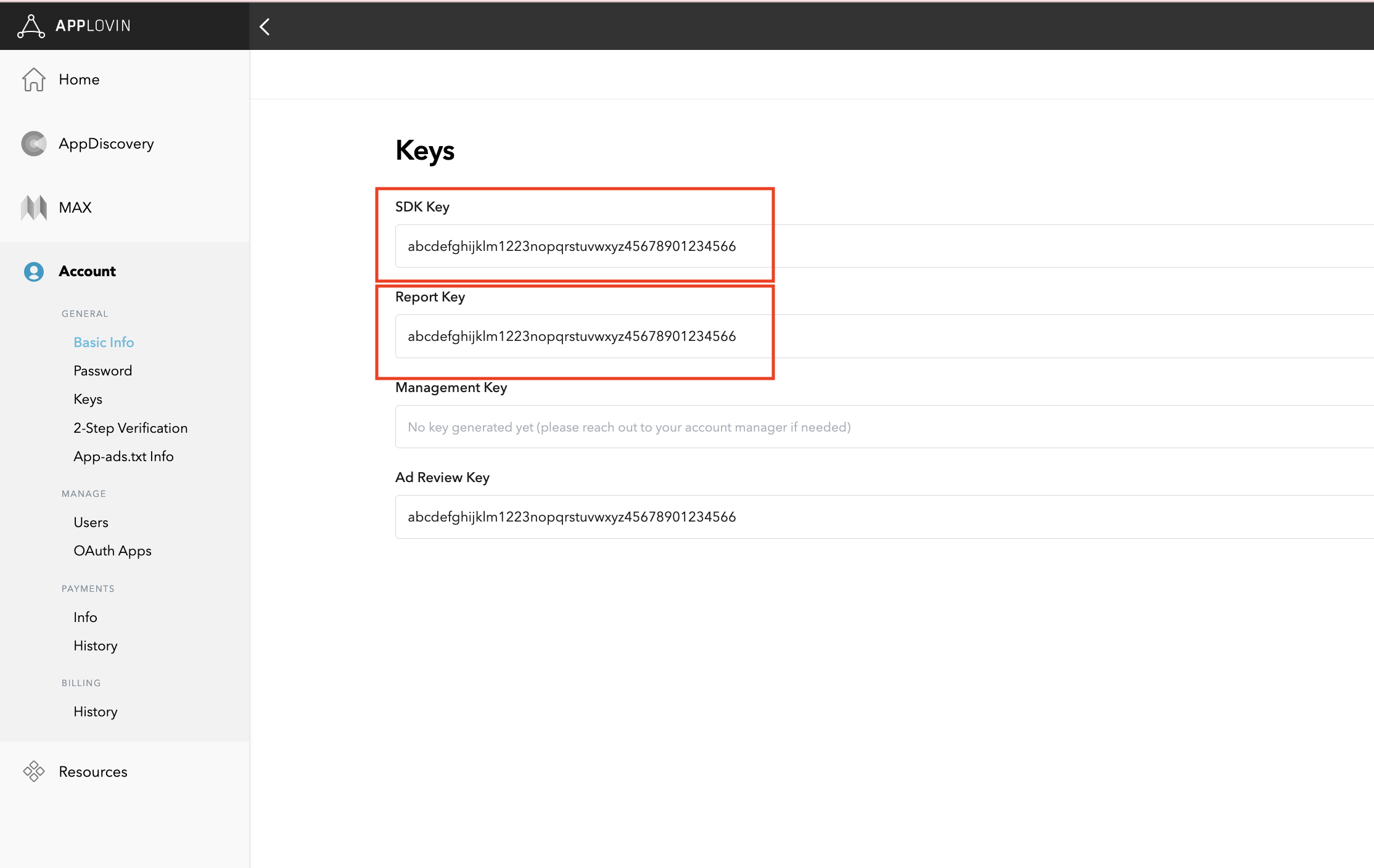
اگر قصد دارید فقط پیشنهاد قیمت را ادغام کنید، میتوانید تنظیمات میانجیگری خود را پیکربندی کنید .
انتخاب برنامه برای میانجیگری
مناقصه
این مرحله برای ادغامهای پیشنهاد قیمت لازم نیست.
آبشار
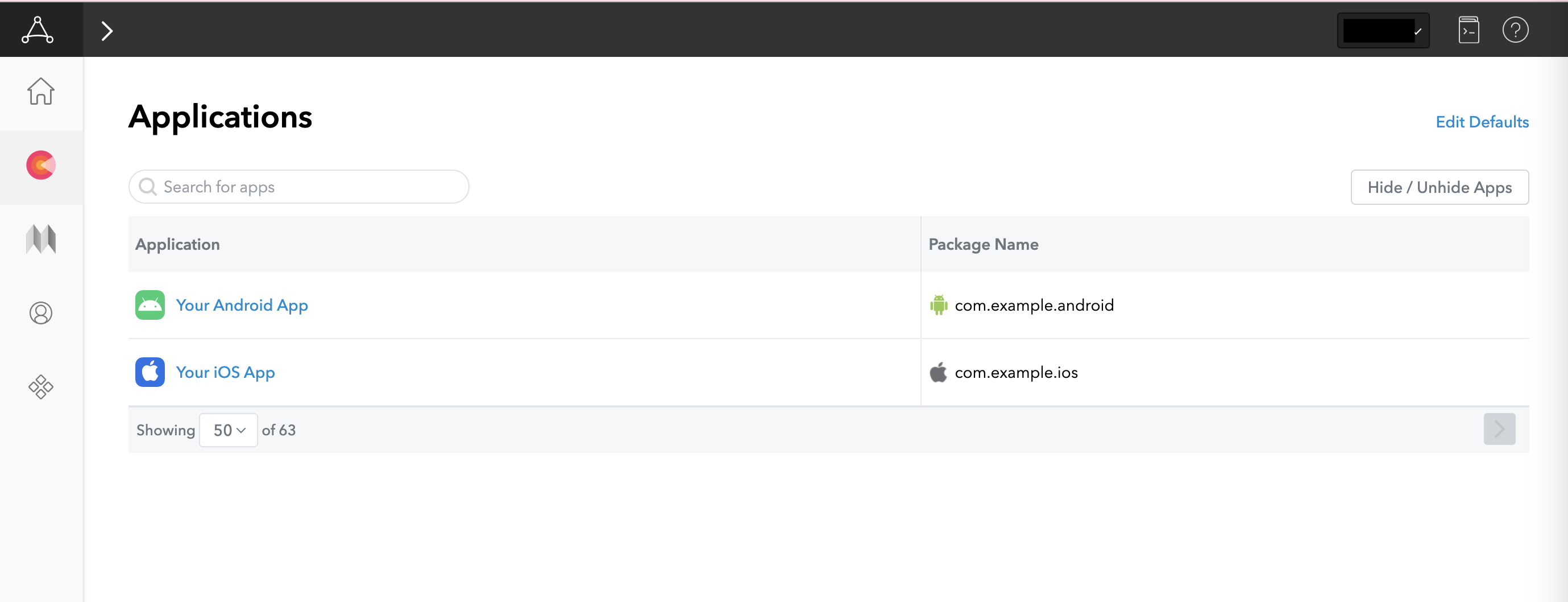
در رابط کاربری AppLovin، در بخش کسب درآمد، گزینه برنامهها (Applications) را انتخاب کنید تا به برنامههای ثبتشده خود دسترسی پیدا کنید. برنامهای را که میخواهید با واسطهگری از آن استفاده کنید، از لیست برنامههای موجود انتخاب کنید.
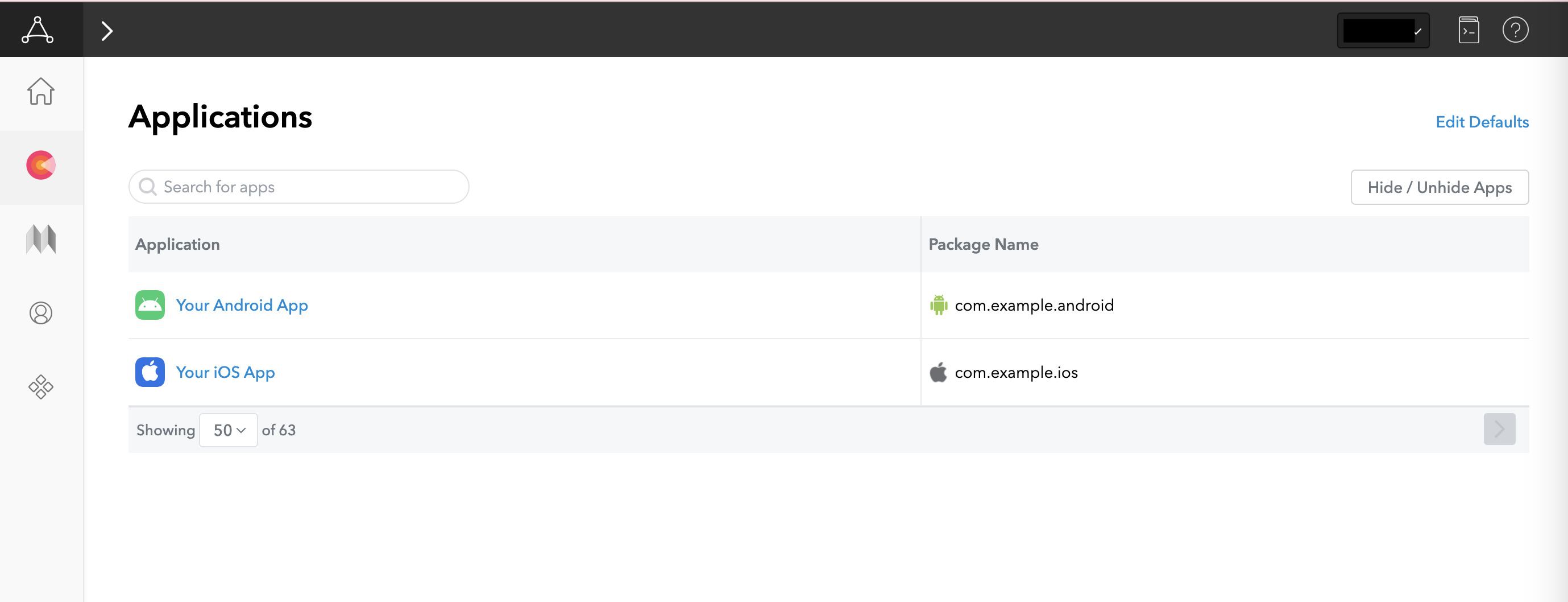
ایجاد یک منطقه
مناقصه
این مرحله برای ادغامهای پیشنهاد قیمت لازم نیست.
آبشار
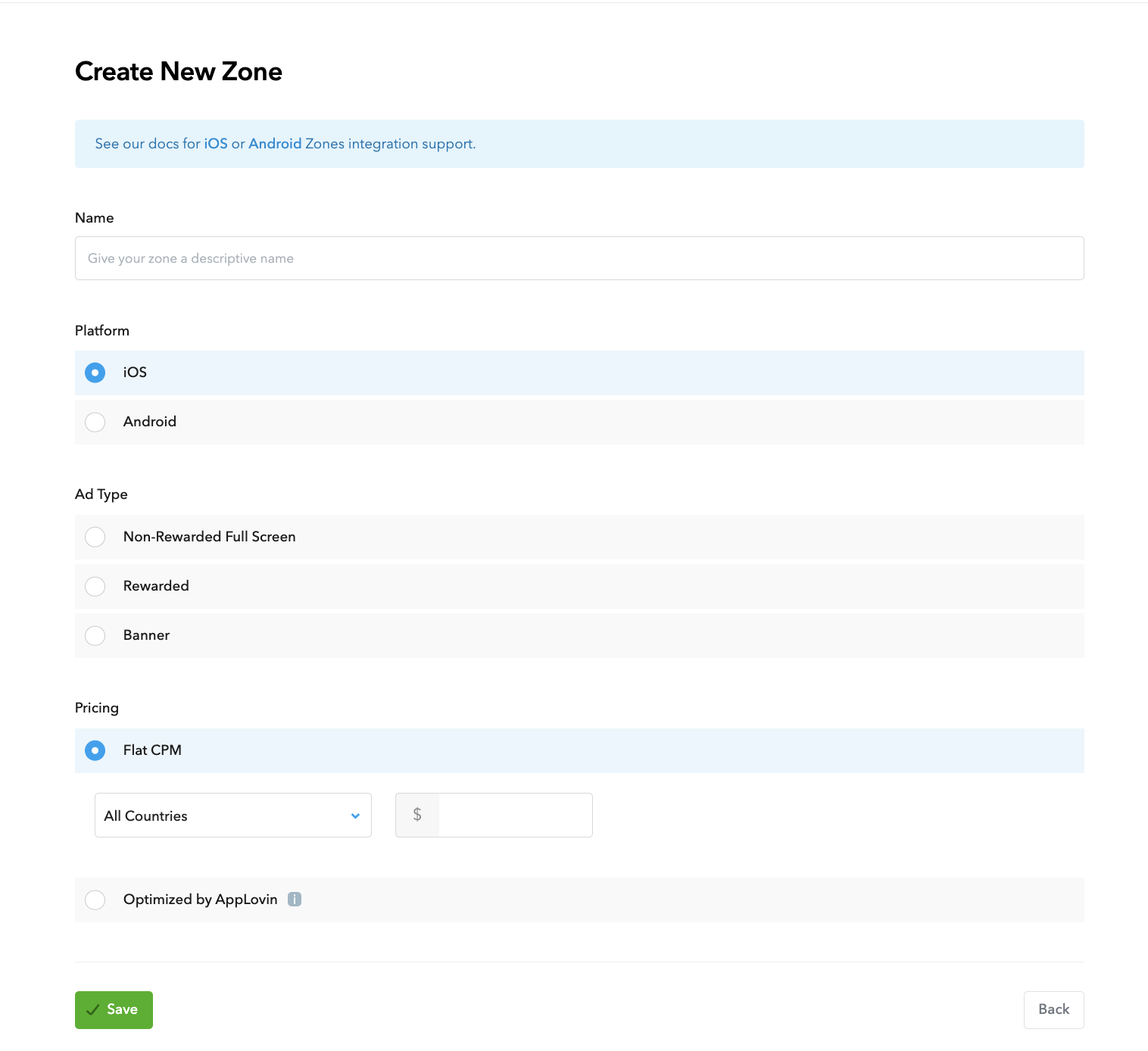
در رابط کاربری AppLovin، در بخش کسب درآمد ، گزینه Zones را انتخاب کنید تا به شناسههای منطقه ثبتشده خود دسترسی پیدا کنید. اگر قبلاً مناطق مورد نیاز برای برنامه خود را ایجاد کردهاید، به مرحله ۲ بروید. برای ایجاد شناسه منطقه جدید، روی Create Zone کلیک کنید.
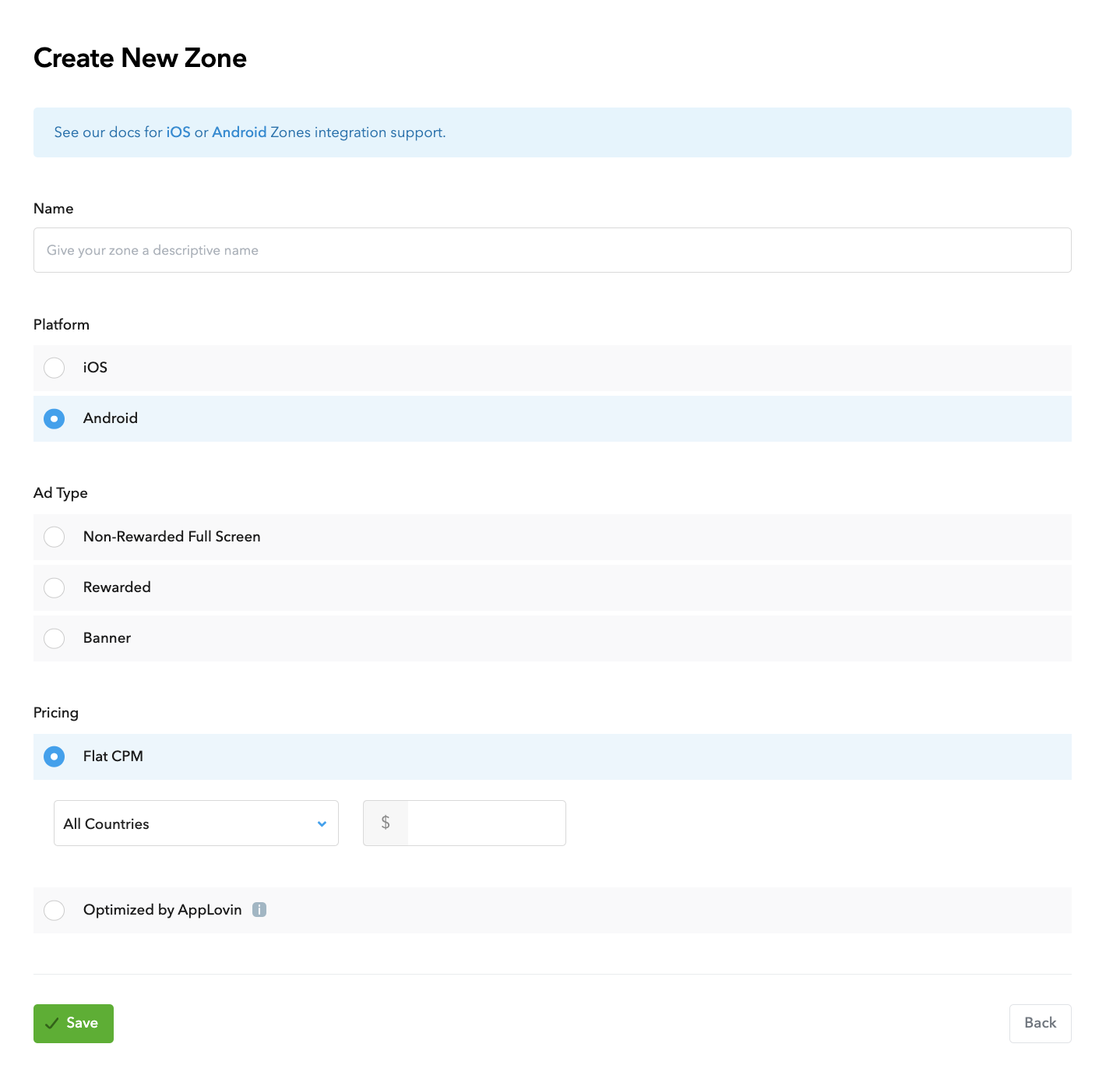
نام Zone ID را وارد کنید، Android را به عنوان Platform انتخاب کنید و Ad Type را انتخاب کنید.
با انتخاب گزینهی «قیمت ثابت برای هر منطقه» یا «بهینهسازی شده توسط AppLovin» ، قیمتگذاری را برای منطقه پیکربندی کنید. برای گزینهی «قیمت ثابت برای هر منطقه» ، میتوان CPMها را بر اساس هر کشور پیکربندی کرد. سپس، روی «ذخیره» کلیک کنید.
اندروید
آیاواس
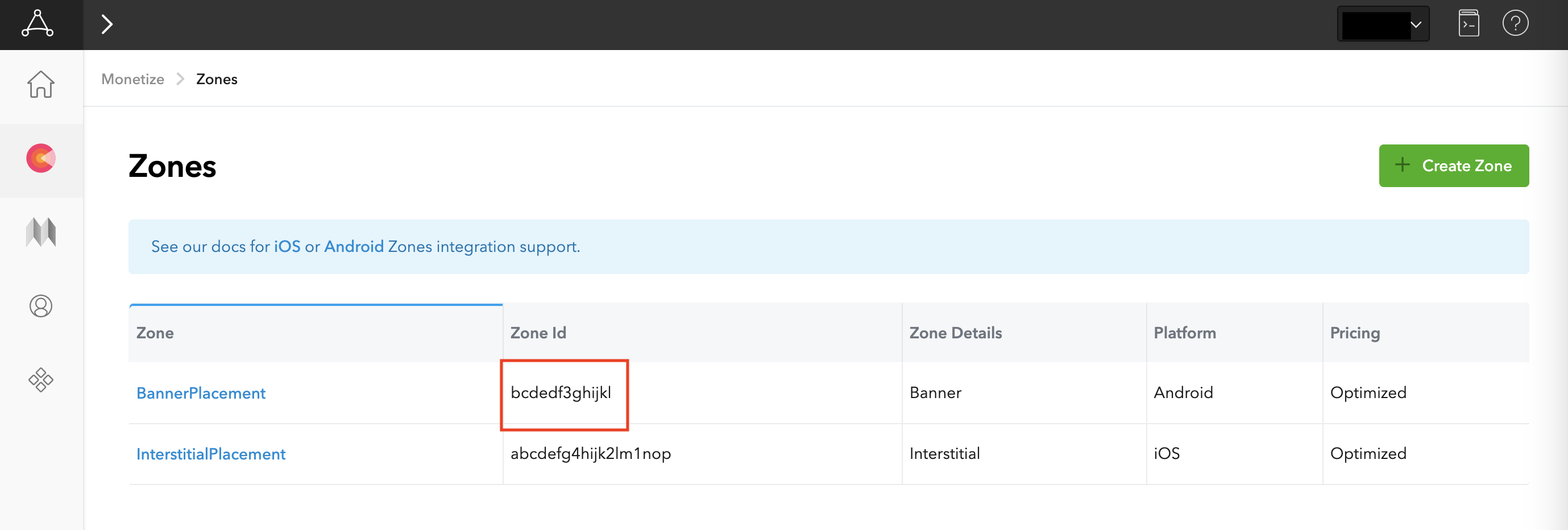
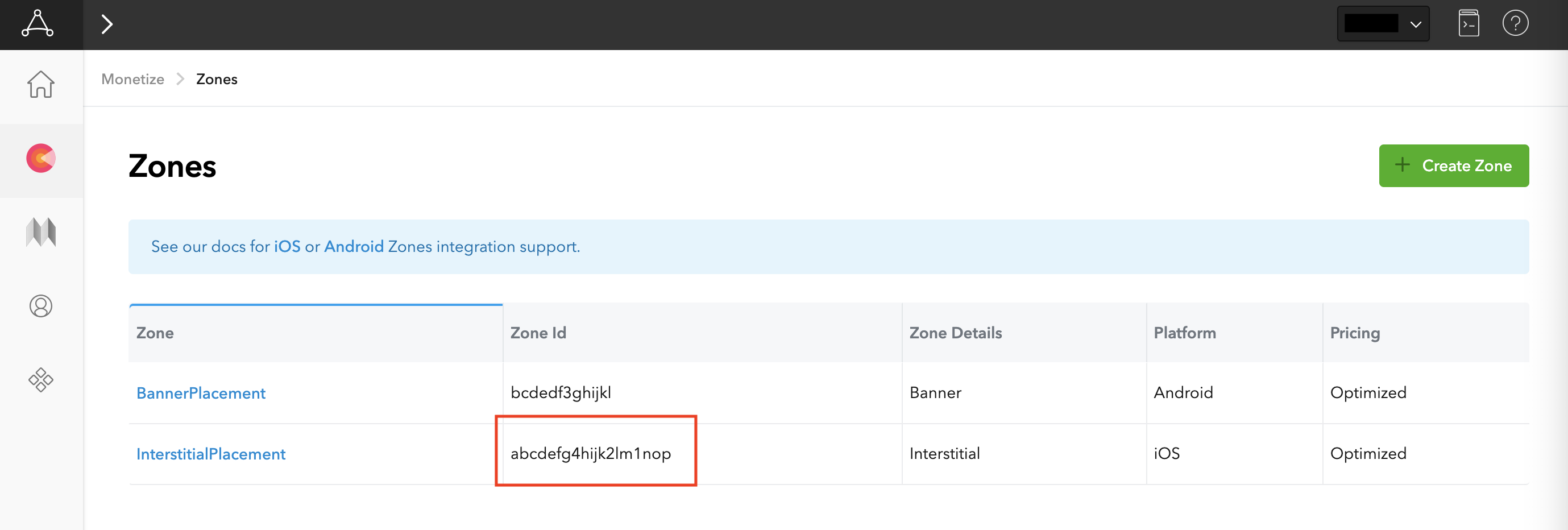
پس از ایجاد منطقه، شناسه منطقه را میتوان در زیر ستون شناسه منطقه یافت.
اندروید
آیاواس
فایل app-ads.txt خود را بهروزرسانی کنید.
فروشندگان مجاز برنامهها app-ads.txt یک ابتکار آزمایشگاه فناوری IAB است که به شما کمک میکند تا موجودی تبلیغات برنامه خود را فقط از طریق کانالهایی که به عنوان مجاز شناسایی کردهاید، به فروش برسانید. برای جلوگیری از کاهش قابل توجه درآمد تبلیغات، باید یک فایل app-ads.txt پیادهسازی کنید. اگر قبلاً این کار را نکردهاید، یک فایل app-ads.txt برای Ad Manager ایجاد کنید .
برای پیادهسازی app-ads.txt برای AppLovin، AppLovin را به فایل app-ads.txt خود اضافه کنید .
حالت تست را روشن کنید
برای فعال کردن تبلیغات آزمایشی AppLovin، دستورالعملهای موجود در راهنمای حالت آزمایشی MAX از AppLovin را دنبال کنید.
مرحله ۲: تنظیم تقاضای AppLovin در رابط کاربری Ad Manager
تنظیمات میانجیگری را برای واحد تبلیغاتی خود پیکربندی کنید
اندروید
برای دستورالعملها، به مرحله ۲ در راهنمای اندروید مراجعه کنید.
آیاواس
برای دستورالعملها، به مرحله ۲ در راهنمای iOS مراجعه کنید.
شرکت AppLovin را به فهرست شرکای تبلیغاتی مقررات GDPR و ایالت ایالات متحده اضافه کنید
برای افزودن شرکت AppLovin به فهرست شرکای تبلیغاتی مقررات ایالتی اروپا و ایالات متحده در رابط کاربری Ad Manager، مراحل موجود در تنظیمات مقررات اروپا و تنظیمات مقررات ایالت ایالات متحده را دنبال کنید.
مرحله ۳: SDK و آداپتور AppLovin را وارد کنید
رابط خط فرمان OpenUPM
اگر OpenUPM-CLI را نصب کردهاید، میتوانید افزونهی Google Mobile Ads AppLovin Mediation را برای Unity با اجرای دستور زیر از دایرکتوری ریشهی پروژهتان، روی پروژهتان نصب کنید:
openupm add com.google.ads.mobile.mediation.applovinاوپنیوپیام
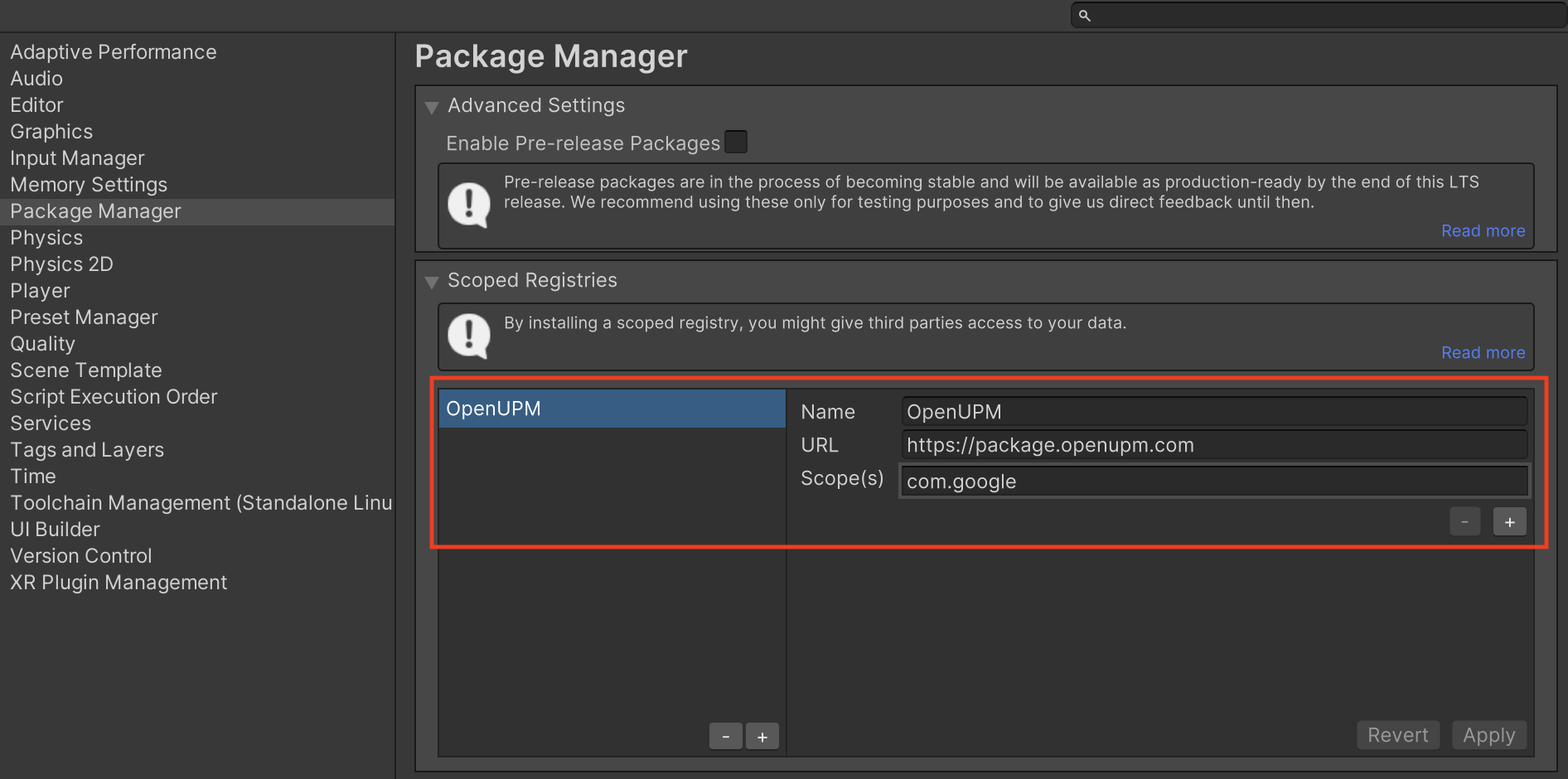
در ویرایشگر پروژه یونیتی خود، گزینه Edit > Project Settings > Package Manager را انتخاب کنید تا تنظیمات Unity Package Manager باز شود.
در زیر تب Scoped Registries ، OpenUPM را به عنوان یک رجیستری Scoped با جزئیات زیر اضافه کنید:
- نام:
OpenUPM - آدرس اینترنتی:
https://package.openupm.com - محدوده(ها):
com.google
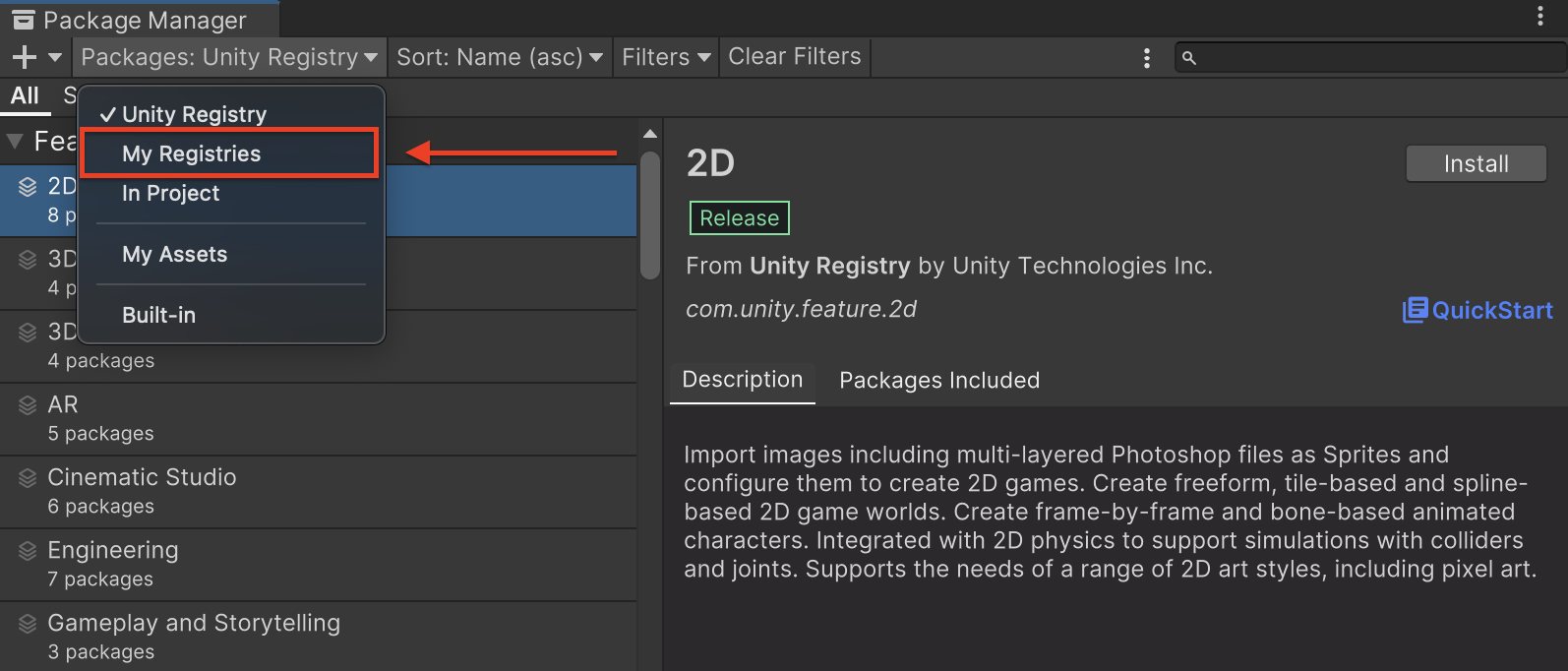
سپس، به مسیر Window > Package Manager بروید تا Unity Package Manager باز شود و از منوی کشویی، My Registrys را انتخاب کنید.
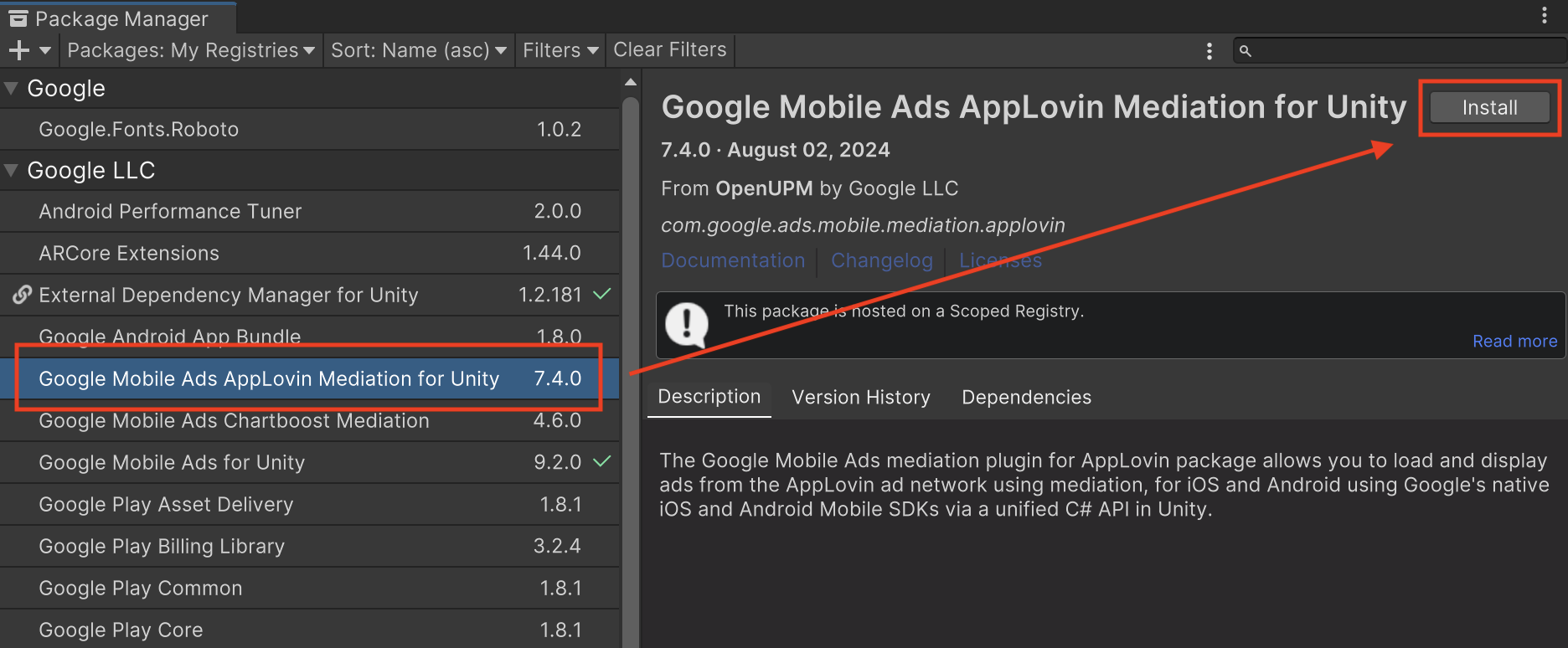
بسته Google Mobile Ads Applovin Mediation را انتخاب کرده و روی نصب کلیک کنید.
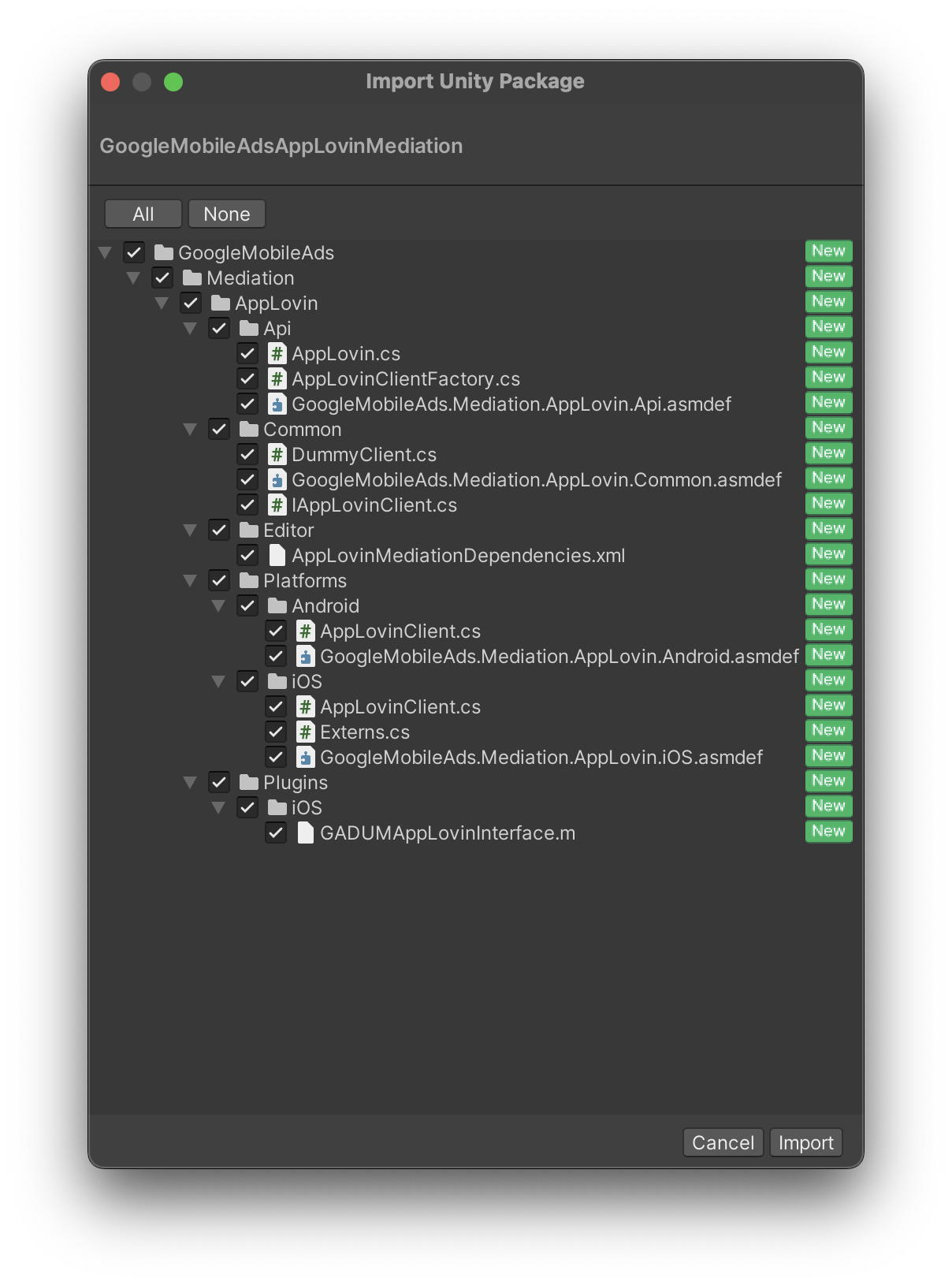
بسته یونیتی
آخرین نسخه افزونه میانجیگری تبلیغات موبایلی گوگل برای AppLovin را از لینک دانلود موجود در Changelog دانلود کنید و بسته GoogleMobileAdsApplovinMediation.unitypackage را از فایل زیپ استخراج کنید.
در ویرایشگر پروژه Unity خود، Assets > Import Package > Custom Package را انتخاب کنید و فایل GoogleMobileAdsApplovinMediation.unitypackage را که دانلود کردهاید، پیدا کنید. مطمئن شوید که همه فایلها انتخاب شدهاند و روی Import کلیک کنید.
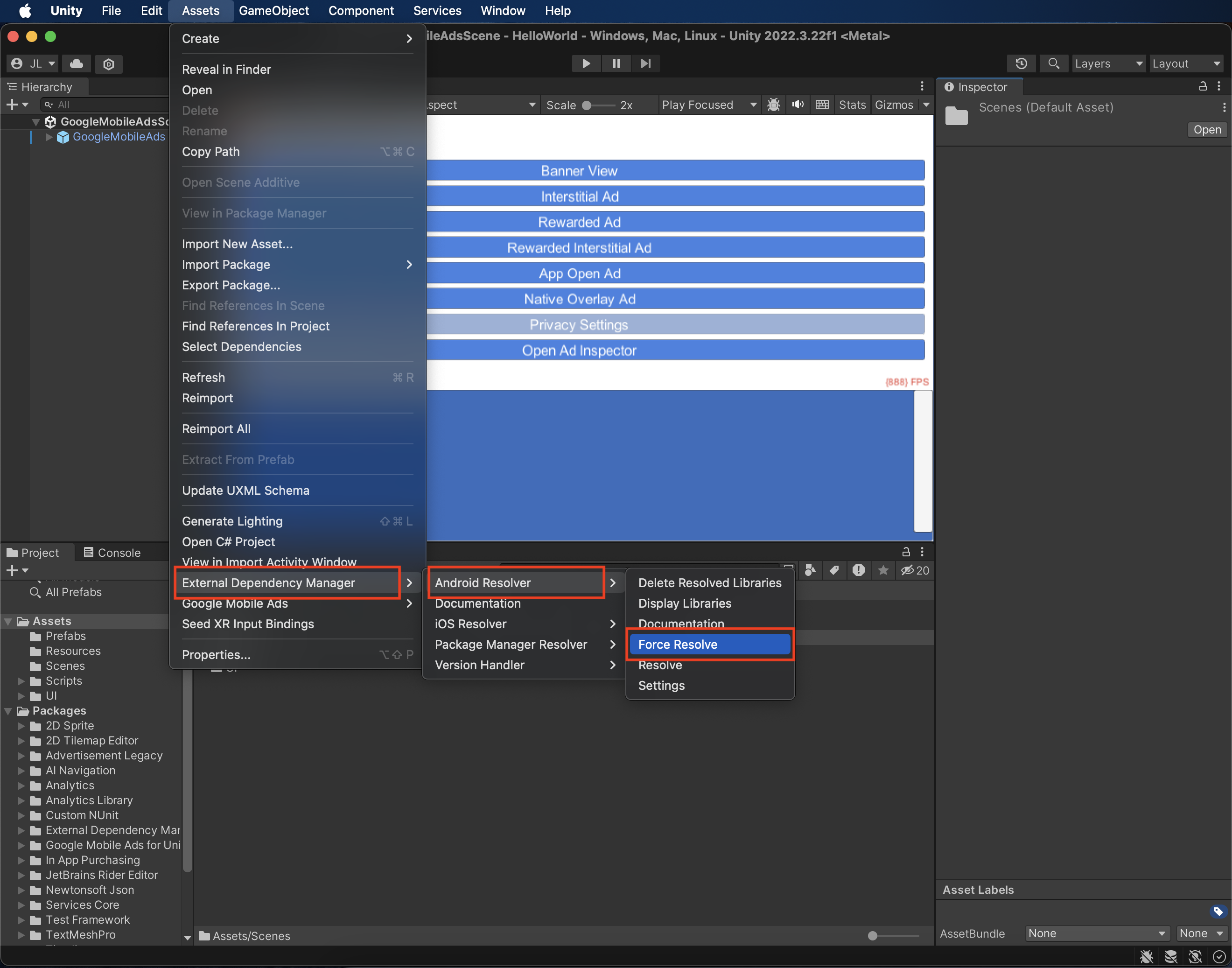
سپس، Assets > External Dependency Manager > Android Resolver > Force Resolve را انتخاب کنید. کتابخانه External Dependency Manager تجزیه و تحلیل وابستگیها را از ابتدا انجام میدهد و وابستگیهای اعلام شده را در پوشه Assets/Plugins/Android برنامه Unity شما کپی میکند.
مرحله ۴: تنظیمات حریم خصوصی را روی AppLovin SDK پیادهسازی کنید
رضایت اتحادیه اروپا و GDPR
برای رعایت سیاست رضایت کاربر اتحادیه اروپا گوگل ، شما باید اطلاعات خاصی را در اختیار کاربران خود در منطقه اقتصادی اروپا (EEA)، بریتانیا و سوئیس قرار دهید و رضایت آنها را برای استفاده از کوکیها یا سایر ذخیرهسازیهای محلی در صورت لزوم قانونی، و برای جمعآوری، اشتراکگذاری و استفاده از دادههای شخصی برای شخصیسازی تبلیغات، دریافت کنید. این سیاست منعکسکننده الزامات دستورالعمل حریم خصوصی الکترونیکی اتحادیه اروپا و مقررات عمومی حفاظت از دادهها (GDPR) است. شما مسئول تأیید انتشار رضایت به هر منبع تبلیغاتی در زنجیره واسطهگری خود هستید. گوگل قادر نیست رضایت کاربر را به طور خودکار به چنین شبکههایی منتقل کند.
از زمان انتشار نسخه ۷.۰.۰ افزونه میانجیگری تبلیغات موبایلی گوگل، AppLovin از خواندن رشته رضایت از تنظیمات برگزیده مشترک و تنظیم وضعیت رضایت بر اساس آن پشتیبانی میکند. اگر از افزونه میانجیگری تبلیغات موبایل گوگل برای Applovin نسخه ۷.۰.۰+ استفاده نمیکنید یا از CMP که رشته رضایت را در تنظیمات مشترک مینویسد استفاده نمیکنید، میتوانید از متدهای AppLovin.SetHasUserConsent() و AppLovin.SetIsAgeRestrictedUser() استفاده کنید. کد نمونه زیر نحوه ارسال اطلاعات رضایت به AppLovin SDK را نشان میدهد. این گزینهها باید قبل از مقداردهی اولیه Google Mobile Ads Unity Plugin تنظیم شوند تا از ارسال صحیح آنها به AppLovin SDK اطمینان حاصل شود.
using GoogleMobileAds.Api.Mediation.AppLovin;
// ...

AppLovin.SetHasUserConsent(true);
علاوه بر این، اگر کاربر در یک دسته سنی با محدودیت سنی قرار دارد، میتوانید پرچم زیر را روی true تنظیم کنید.
AppLovin.SetIsAgeRestrictedUser(true);
برای اطلاعات بیشتر به تنظیمات حریم خصوصی AppLovin مراجعه کنید.
اعلام کاربران کودک
از AppLovin SDK نسخه ۱۳.۰.۰ به بعد، AppLovin دیگر از پرچمهای کاربر با محدودیت سنی پشتیبانی نمیکند و شما نمیتوانید AppLovin SDK را در ارتباط با یک "کودک" طبق تعریف قوانین مربوطه، راهاندازی یا استفاده کنید. برای اطلاعات بیشتر، به مستندات AppLovin در مورد "ممنوعیت استفاده از دادههای کودکان یا استفاده از خدمات برای کودکان یا برنامههای منحصراً هدفمند برای کودکان" برای اندروید یا iOS مراجعه کنید.
نسخه 8.0.2 یا بالاتر از افزونه میانجیگری Google Mobile Ads Unity برای AppLovin، میانجیگری AppLovin را برای برنامههایی که هر یک از تنظیمات زیر را با Google Mobile Ads Unity Plugin اعلام میکنند، بهطور خودکار غیرفعال میکند:
قوانین حفظ حریم خصوصی ایالتهای آمریکا
قوانین حفظ حریم خصوصی ایالتهای ایالات متحده ، به کاربران حق انصراف از «فروش» «اطلاعات شخصی» خود (همانطور که قانون این اصطلاحات را تعریف میکند) را میدهد، و این انصراف از طریق پیوند برجسته «اطلاعات شخصی من را نفروشید» در صفحه اصلی طرف «فروشنده» ارائه میشود. راهنمای انطباق با قوانین حفظ حریم خصوصی ایالتهای ایالات متحده ، امکان فعال کردن پردازش دادههای محدود برای سرویس تبلیغات گوگل را ارائه میدهد، اما گوگل قادر به اعمال این تنظیم برای هر شبکه تبلیغاتی در زنجیره واسطهگری شما نیست. بنابراین، شما باید هر شبکه تبلیغاتی را در زنجیره واسطهگری خود که ممکن است در فروش اطلاعات شخصی شرکت کند، شناسایی کنید و برای اطمینان از انطباق، از راهنماییهای هر یک از این شبکهها پیروی کنید.
افزونه میانجیگری تبلیغات موبایل گوگل برای AppLovin نسخه ۶.۳.۱ شامل متد AppLovin.SetDoNotSell() است. کد نمونه زیر نحوه ارسال اطلاعات رضایت به AppLovin SDK را نشان میدهد. این گزینهها باید قبل از مقداردهی اولیه Google Mobile Ads SDK تنظیم شوند تا از ارسال صحیح آنها به AppLovin SDK اطمینان حاصل شود.
using GoogleMobileAds.Api.Mediation.AppLovin;
// ...

AppLovin.SetDoNotSell(true);
برای اطلاعات بیشتر به مستندات حریم خصوصی AppLovin مراجعه کنید.
مرحله ۵: اضافه کردن کد مورد نیاز
اندروید
برای ادغام AppLovin هیچ کد اضافی لازم نیست.
آیاواس
ادغام شبکه SKAd
برای افزودن شناسههای SKAdNetwork به فایل Info.plist` پروژه خود ، مستندات AppLovin را دنبال کنید.
مرحله ۶: پیادهسازی خود را آزمایش کنید
فعال کردن تبلیغات آزمایشی
مطمئن شوید که دستگاه آزمایشی خود را برای Ad Manager ثبت کردهاید و حالت آزمایشی را در AppLovin UI فعال کردهاید .
تأیید تبلیغات آزمایشی
برای تأیید اینکه تبلیغات آزمایشی را از AppLovin دریافت میکنید، آزمایش منبع تبلیغاتی واحد را در بازرس تبلیغات با استفاده از منبع(های) تبلیغاتی AppLovin (پیشنهاد) و AppLovin (آبشاری ) فعال کنید.
مراحل اختیاری
بهینهسازیها
اضافه کردن فراخوانی AppLovin.Initialize() به اکتیویتی راهاندازی، به AppLovin این امکان را میدهد که رویدادها را به محض شروع برنامه ردیابی کند.
کدهای خطا
اگر آداپتور نتواند تبلیغی از AppLovin دریافت کند، ناشران میتوانند خطای اساسی را از پاسخ تبلیغ با استفاده ResponseInfo تحت کلاسهای زیر بررسی کنند:
اندروید
com.google.ads.mediation.applovin.mediation.ApplovinAdapter
com.google.ads.mediation.applovin.AppLovinMediationAdapter
آیاواس
GADMAdapterAppLovin
GADMAdapterAppLovinRewardBasedVideoAd
GADMediationAdapterAppLovin
در اینجا کدها و پیامهای همراه که توسط آداپتور AppLovin هنگام عدم بارگیری یک تبلیغ نمایش داده میشوند، آمده است:
اندروید
| کد خطا | دلیل |
|---|---|
| -۱۰۰۹ تا -۱، ۲۰۴ | AppLovin SDK خطایی را برگرداند. برای جزئیات بیشتر به مستندات AppLovin مراجعه کنید. |
| ۱۰۱ | اندازه آگهی درخواستی با اندازه بنر پشتیبانی شده توسط AppLovin مطابقت ندارد. |
| ۱۰۳ | زمینه تهی است. |
| ۱۰۴ | توکن پیشنهاد AppLovin خالی است. |
| ۱۰۵ | درخواست چندین تبلیغ برای یک منطقه. AppLovin فقط میتواند در هر منطقه، یک تبلیغ را بارگذاری کند. |
| ۱۰۶ | آگهی آماده نمایش نیست. |
| ۱۰۸ | آداپتور AppLovin از قالب تبلیغاتی که درخواست شده است پشتیبانی نمیکند. |
| ۱۰۹ | Context یک نمونه Activity نیست. |
| ۱۱۰ | کلید SDK گم شده است. |
| ۱۱۲ | کاربر کودک است. |
| ۱۱۳ | شناسه واحد تبلیغ موجود نیست. |
آیاواس
| کد خطا | دلیل |
|---|---|
| -۱۰۰۹ تا -۱، ۲۰۴ | AppLovin SDK خطایی را برگرداند. برای جزئیات بیشتر به مستندات AppLovin مراجعه کنید. |
| ۱۰۱ | اندازه آگهی درخواستی با اندازه بنر پشتیبانی شده توسط AppLovin مطابقت ندارد. |
| ۱۰۲ | پارامترهای سرور AppLovin که در رابط کاربری Ad Manager پیکربندی شدهاند، وجود ندارند/نامعتبر هستند. |
| ۱۰۳ | نمایش تبلیغ AppLovin ناموفق بود. |
| ۱۰۴ | درخواست چندین تبلیغ برای یک منطقه. AppLovin فقط میتواند در هر منطقه، یک تبلیغ را بارگذاری کند. |
| ۱۰۵ | کلید SDK مربوط به AppLovin پیدا نشد. |
| ۱۰۷ | توکن پیشنهاد قیمت خالی است. |
| ۱۰۸ | آداپتور AppLovin از قالب تبلیغاتی که درخواست شده است پشتیبانی نمیکند. |
| ۱۱۰ | AppLovin یک فراخوانی موفقیتآمیز ارسال کرد اما هیچ تبلیغی را بارگذاری نکرد. |
| ۱۱۱ | قادر به بازیابی نمونهی AppLovin SDK نیست. |
| ۱۱۲ | کاربر کودک است. |
| ۱۱۳ | نمونه اشتراکی AppLovin SDK مقداردهی اولیه نشده است. |
| ۱۱۴ | SDK مربوط به AppLovin نتوانست توکن پیشنهاد قیمت را برگرداند. |
| ۱۱۵ | شناسه واحد تبلیغ وجود ندارد. نمیتوان تبلیغ را بارگیری کرد. |
| ۱۱۶ | آگهی آماده نیست. نمیتوان آگهی را نمایش داد. |
تغییرات افزونه میانجیگری AppLovin Unity
نسخه ۸.۷.۳
- از آداپتور اندروید AppLovin نسخه ۱۳.۶.۲.۰ پشتیبانی میکند.
- از آداپتور iOS نسخه ۱۳.۶.۲.۰ از AppLovin پشتیبانی میکند.
- ساخته و آزمایش شده با افزونه Google Mobile Ads Unity نسخه ۱۱.۰.۰.
نسخه ۸.۷.۲
- از آداپتور اندروید AppLovin نسخه ۱۳.۶.۲.۰ پشتیبانی میکند.
- از آداپتور iOS نسخه ۱۳.۶.۱.۰ از AppLovin پشتیبانی میکند.
- ساخته و آزمایش شده با افزونه Google Mobile Ads Unity نسخه ۱۱.۰.۰.
نسخه ۸.۷.۱
- از آداپتور اندروید AppLovin نسخه ۱۳.۶.۱.۰ پشتیبانی میکند.
- از آداپتور iOS نسخه ۱۳.۶.۱.۰ از AppLovin پشتیبانی میکند.
- ساخته و آزمایش شده با افزونه Google Mobile Ads Unity نسخه ۱۱.۰.۰.
نسخه ۸.۷.۰
- از آداپتور اندروید AppLovin نسخه ۱۳.۶.۰.۰ پشتیبانی میکند.
- از آداپتور iOS نسخه ۱۳.۶.۰.۰ از AppLovin پشتیبانی میکند.
- ساخته و آزمایش شده با افزونه Google Mobile Ads Unity نسخه ۱۱.۰.۰.
نسخه ۸.۶.۰
- از آداپتور اندروید AppLovin نسخه ۱۳.۵.۱.۰ پشتیبانی میکند.
- از آداپتور iOS نسخه ۱۳.۶.۰.۰ از AppLovin پشتیبانی میکند.
- ساخته و آزمایش شده با افزونه Google Mobile Ads Unity نسخه ۱۱.۰.۰.
نسخه ۸.۵.۲
- از آداپتور اندروید AppLovin نسخه ۱۳.۵.۱.۰ پشتیبانی میکند.
- از آداپتور iOS نسخه ۱۳.۵.۱.۰ از AppLovin پشتیبانی میکند.
- ساخته و آزمایش شده با افزونه Google Mobile Ads Unity نسخه ۱۱.۰.۰.
نسخه ۸.۵.۱
- از آداپتور اندروید AppLovin نسخه ۱۳.۵.۱.۰ پشتیبانی میکند.
- از آداپتور iOS نسخه ۱۳.۵.۰.۰ از AppLovin پشتیبانی میکند.
- ساخته و آزمایش شده با افزونه Google Mobile Ads Unity نسخه ۱۰.۶.۰.
نسخه ۸.۵.۰
- از آداپتور اندروید AppLovin نسخه ۱۳.۵.۰.۰ پشتیبانی میکند.
- از آداپتور iOS نسخه ۱۳.۵.۰.۰ از AppLovin پشتیبانی میکند.
- ساخته و آزمایش شده با افزونه Google Mobile Ads Unity نسخه ۱۰.۶.۰.
نسخه ۸.۴.۱
- از آداپتور اندروید AppLovin نسخه ۱۳.۴.۰.۱ پشتیبانی میکند.
- از آداپتور iOS نسخه ۱۳.۴.۰.۰ از AppLovin پشتیبانی میکند.
- ساخته و آزمایش شده با افزونه Google Mobile Ads Unity نسخه ۱۰.۵.۰.
نسخه ۸.۴.۰
- از آداپتور اندروید AppLovin نسخه ۱۳.۴.۰.۰ پشتیبانی میکند.
- از آداپتور iOS نسخه ۱۳.۴.۰.۰ از AppLovin پشتیبانی میکند.
- ساخته و آزمایش شده با افزونه Google Mobile Ads Unity نسخه ۱۰.۴.۲.
نسخه ۸.۳.۲
- از آداپتور اندروید AppLovin نسخه ۱۳.۳.۱.۱ پشتیبانی میکند.
- از آداپتور iOS نسخه ۱۳.۳.۱.۰ از AppLovin پشتیبانی میکند.
- ساخته و آزمایش شده با افزونه Google Mobile Ads Unity نسخه ۱۰.۲.۰.
نسخه ۸.۳.۱
- از آداپتور اندروید AppLovin نسخه ۱۳.۳.۱.۰ پشتیبانی میکند.
- از آداپتور iOS نسخه ۱۳.۳.۱.۰ از AppLovin پشتیبانی میکند.
- ساخته و آزمایش شده با افزونه Google Mobile Ads Unity نسخه ۱۰.۲.۰.
نسخه ۸.۳.۰
- از آداپتور اندروید AppLovin نسخه ۱۳.۳.۰.۰ پشتیبانی میکند.
- از آداپتور iOS نسخه ۱۳.۳.۰.۰ از AppLovin پشتیبانی میکند.
- ساخته و آزمایش شده با افزونه Google Mobile Ads Unity نسخه ۱۰.۲.۰.
نسخه ۸.۲.۱
- از آداپتور اندروید AppLovin نسخه ۱۳.۲.۰.۱ پشتیبانی میکند.
- از آداپتور iOS نسخه ۱۳.۲.۰.۰ از AppLovin پشتیبانی میکند.
- ساخته و آزمایش شده با افزونه Google Mobile Ads Unity نسخه ۱۰.۰.۰.
نسخه ۸.۲.۰
- از آداپتور اندروید AppLovin نسخه ۱۳.۲.۰.۰ پشتیبانی میکند.
- از آداپتور iOS نسخه ۱۳.۲.۰.۰ از AppLovin پشتیبانی میکند.
- ساخته و آزمایش شده با افزونه Google Mobile Ads Unity نسخه ۱۰.۰.۰.
نسخه ۸.۱.۱
- افزونه بهروزرسانی شد تا چارچوب پویای
AppLovinSDKرا برای همه اهداف iOS در بر بگیرد. - از آداپتور اندروید AppLovin نسخه ۱۳.۱.۰.۱ پشتیبانی میکند.
- از آداپتور iOS نسخه ۱۳.۱.۰.۱ از AppLovin پشتیبانی میکند.
- ساخته و آزمایش شده با افزونه Google Mobile Ads Unity نسخه ۱۰.۰.۰.
نسخه ۸.۱.۰
- از آداپتور اندروید AppLovin نسخه ۱۳.۱.۰.۰ پشتیبانی میکند.
- از آداپتور iOS نسخه ۱۳.۱.۰.۰ از AppLovin پشتیبانی میکند.
- ساخته و آزمایش شده با افزونه Google Mobile Ads Unity نسخه ۹.۶.۰.
نسخه ۸.۰.۴
- از آداپتور اندروید AppLovin نسخه ۱۳.۰.۱.۱ پشتیبانی میکند.
- از آداپتور iOS نسخه ۱۳.۰.۱.۱ از AppLovin پشتیبانی میکند.
- ساخته و آزمایش شده با افزونه Google Mobile Ads Unity نسخه ۹.۵.۰.
نسخه ۸.۰.۳
- از آداپتور اندروید AppLovin نسخه ۱۳.۰.۱.۰ پشتیبانی میکند.
- از آداپتور iOS نسخه ۱۳.۰.۱.۰ از AppLovin پشتیبانی میکند.
- ساخته و آزمایش شده با افزونه Google Mobile Ads Unity نسخه ۹.۴.۰.
نسخه ۸.۰.۲
- متدهای زیر از کلاس
AppLovinحذف شدند:-
Initialize() -
SetIsAgeRestrictedUser(bool)
-
- از آداپتور اندروید AppLovin نسخه ۱۳.۰.۱.۰ پشتیبانی میکند.
- از آداپتور iOS نسخه ۱۳.۰.۰.۲ از AppLovin پشتیبانی میکند.
- ساخته و آزمایش شده با افزونه Google Mobile Ads Unity نسخه ۹.۳.۰.
نسخه ۷.۴.۱
- از آداپتور اندروید AppLovin نسخه ۱۲.۶.۱.۰ پشتیبانی میکند.
- از آداپتور iOS نسخه 12.6.1.0 از AppLovin پشتیبانی میکند.
- ساخته و آزمایش شده با افزونه Google Mobile Ads Unity نسخه ۹.۲.۰.
نسخه ۷.۴.۰
- از آداپتور اندروید AppLovin نسخه ۱۲.۶.۰.۰ پشتیبانی میکند.
- از آداپتور iOS نسخه 12.6.0.0 از AppLovin پشتیبانی میکند.
- ساخته و آزمایش شده با افزونه Google Mobile Ads Unity نسخه ۹.۲.۰.
نسخه ۷.۳.۱
- از آداپتور اندروید AppLovin نسخه ۱۲.۵.۰.۱ پشتیبانی میکند.
- از آداپتور iOS نسخه 12.5.0.0 از AppLovin پشتیبانی میکند.
- ساخته و آزمایش شده با افزونه Google Mobile Ads Unity نسخه ۹.۱.۰.
نسخه ۷.۳.۰
- از آداپتور اندروید AppLovin نسخه ۱۲.۵.۰.۰ پشتیبانی میکند.
- از آداپتور iOS نسخه 12.5.0.0 از AppLovin پشتیبانی میکند.
- ساخته و آزمایش شده با افزونه Google Mobile Ads Unity نسخه ۹.۱.۰.
نسخه ۷.۲.۲
- از آداپتور اندروید AppLovin نسخه ۱۲.۴.۳.۰ پشتیبانی میکند.
- از آداپتور iOS نسخه 12.4.2.0 از AppLovin پشتیبانی میکند.
- ساخته و آزمایش شده با افزونه Google Mobile Ads Unity نسخه ۹.۱.۰.
نسخه ۷.۲.۱
- از آداپتور اندروید AppLovin نسخه ۱۲.۴.۲.۰ پشتیبانی میکند.
- از آداپتور iOS نسخه 12.4.1.0 از AppLovin پشتیبانی میکند.
- ساخته و آزمایش شده با افزونه Google Mobile Ads Unity نسخه ۹.۰.۰.
نسخه ۷.۲.۰
- از آداپتور اندروید AppLovin نسخه ۱۲.۴.۰.۰ پشتیبانی میکند.
- از آداپتور iOS نسخه 12.4.0.0 از AppLovin پشتیبانی میکند.
- ساخته و آزمایش شده با افزونه Google Mobile Ads Unity نسخه ۹.۰.۰.
نسخه ۷.۱.۰
- از آداپتور اندروید AppLovin نسخه ۱۲.۳.۰.۰ پشتیبانی میکند.
- از آداپتور iOS نسخه 12.2.1.0 از AppLovin پشتیبانی میکند.
- ساخته و آزمایش شده با افزونه Google Mobile Ads Unity نسخه ۹.۰.۰.
نسخه ۷.۰.۱
- افزونه دیگر کلید AppLovin SDK را از فایل
Info.plistوAndroidManifest.xmlبررسی نمیکند. - از آداپتور اندروید AppLovin نسخه ۱۲.۱.۰.۱ پشتیبانی میکند.
- از آداپتور iOS نسخه 12.1.0.1 از AppLovin پشتیبانی میکند.
- ساخته و آزمایش شده با افزونه Google Mobile Ads Unity نسخه ۸.۷.۰.
نسخه ۷.۰.۰
- افزونه دیگر کلید AppLovin SDK را از فایل
Info.plistوAndroidManifest.xmlبررسی نمیکند. - از آداپتور اندروید AppLovin نسخه ۱۲.۱.۰.۰ پشتیبانی میکند.
- از آداپتور iOS نسخه 12.1.0.0 از AppLovin پشتیبانی میکند.
- ساخته و آزمایش شده با افزونه Google Mobile Ads Unity نسخه ۸.۶.۰.
نسخه ۶.۹.۱
- از آداپتور اندروید AppLovin نسخه 11.11.3.0 پشتیبانی میکند.
- از آداپتور iOS نسخه 11.11.3.0 از AppLovin پشتیبانی میکند.
- ساخته و آزمایش شده با افزونه Google Mobile Ads Unity نسخه ۸.۵.۲.
نسخه ۶.۹.۰
- از آداپتور اندروید AppLovin نسخه 11.11.2.0 پشتیبانی میکند.
- از آداپتور iOS نسخه 11.11.2.0 از AppLovin پشتیبانی میکند.
- ساخته و آزمایش شده با افزونه Google Mobile Ads Unity نسخه ۸.۵.۲.
نسخه ۶.۸.۰
- از آداپتور اندروید AppLovin نسخه ۱۱.۱۰.۱.۰ پشتیبانی میکند.
- از آداپتور iOS نسخه 11.10.1.0 از AppLovin پشتیبانی میکند.
- ساخته و آزمایش شده با افزونه Google Mobile Ads Unity نسخه ۸.۳.۰.
نسخه ۶.۷.۰
- از آداپتور اندروید AppLovin نسخه ۱۱.۹.۰.۰ پشتیبانی میکند.
- از آداپتور iOS نسخه 11.9.0.0 از AppLovin پشتیبانی میکند.
- ساخته و آزمایش شده با افزونه Google Mobile Ads Unity نسخه ۸.۱.۰.
- محتوای آداپتور به
GoogleMobileAds/Mediation/AppLovin/منتقل شد. - فضای نام آداپتور برای استفاده از
GoogleMobileAds.Mediation.AppLovinبازسازی شده است.
نسخه ۶.۶.۰
- از آداپتور اندروید AppLovin نسخه ۱۱.۷.۱.۰ پشتیبانی میکند.
- از آداپتور iOS نسخه 11.7.1.0 از AppLovin پشتیبانی میکند.
- ساخته و آزمایش شده با افزونه Google Mobile Ads Unity نسخه ۷.۴.۱.
نسخه ۶.۵.۱
- از آداپتور اندروید AppLovin نسخه ۱۱.۶.۱.۰ پشتیبانی میکند.
- از آداپتور iOS نسخه 11.6.1.0 از AppLovin پشتیبانی میکند.
- ساخته و آزمایش شده با افزونه Google Mobile Ads Unity نسخه ۷.۳.۱.
نسخه ۶.۵.۰
- از آداپتور اندروید AppLovin نسخه ۱۱.۶.۰.۰ پشتیبانی میکند.
- از آداپتور iOS نسخه 11.6.0.0 از AppLovin پشتیبانی میکند.
- ساخته و آزمایش شده با افزونه Google Mobile Ads Unity نسخه ۷.۳.۱.
نسخه ۶.۴.۳
- از آداپتور اندروید AppLovin نسخه ۱۱.۵.۵.۰ پشتیبانی میکند.
- از آداپتور iOS نسخه 11.5.5.0 از AppLovin پشتیبانی میکند.
- ساخته و آزمایش شده با افزونه Google Mobile Ads Unity نسخه ۷.۳.۱.
نسخه ۶.۴.۲
- از آداپتور اندروید AppLovin نسخه ۱۱.۵.۴.۰ پشتیبانی میکند.
- از آداپتور iOS نسخه 11.5.4.0 از AppLovin پشتیبانی میکند.
- ساخته و آزمایش شده با افزونه Google Mobile Ads Unity نسخه ۷.۳.۰.
نسخه ۶.۴.۱
- از آداپتور اندروید AppLovin نسخه ۱۱.۵.۳.۱ پشتیبانی میکند.
- از آداپتور iOS نسخه 11.5.3.0 از AppLovin پشتیبانی میکند.
- ساخته و آزمایش شده با افزونه Google Mobile Ads Unity نسخه ۷.۳.۰.
نسخه ۶.۴.۰
- از آداپتور اندروید AppLovin نسخه ۱۱.۵.۲.۰ پشتیبانی میکند.
- از آداپتور iOS نسخه 11.5.1.0 از AppLovin پشتیبانی میکند.
- ساخته و آزمایش شده با افزونه Google Mobile Ads Unity نسخه ۷.۲.۰.
نسخه ۶.۳.۱
- برای پشتیبانی از الزامات CCPA، متد
AppLovin.SetDoNotSell(bool)اضافه شد. - از آداپتور اندروید AppLovin نسخه ۱۱.۴.۴.۰ پشتیبانی میکند.
- از آداپتور iOS نسخه 11.4.3.0 از AppLovin پشتیبانی میکند.
- ساخته و آزمایش شده با افزونه Google Mobile Ads Unity نسخه ۷.۱.۰.
نسخه ۶.۳.۰
- از آداپتور اندروید AppLovin نسخه ۱۱.۴.۳.۰ پشتیبانی میکند.
- از آداپتور iOS نسخه 11.4.2.0 از AppLovin پشتیبانی میکند.
- ساخته و آزمایش شده با افزونه Google Mobile Ads Unity نسخه ۷.۰.۲.
نسخه ۶.۲.۱
- از آداپتور اندروید AppLovin نسخه ۱۱.۳.۳.۰ پشتیبانی میکند.
- از آداپتور iOS نسخه 11.3.3.0 از AppLovin پشتیبانی میکند.
- ساخته و آزمایش شده با افزونه Google Mobile Ads Unity نسخه ۷.۰.۰.
نسخه ۶.۲.۰
- از آداپتور اندروید AppLovin نسخه ۱۱.۳.۱.۰ پشتیبانی میکند.
- از آداپتور iOS نسخه 11.3.1.0 از AppLovin پشتیبانی میکند.
- ساخته و آزمایش شده با افزونه Google Mobile Ads Unity نسخه ۷.۰.۰.
نسخه ۶.۱.۰
- از آداپتور اندروید AppLovin نسخه ۱۱.۲.۱.۰ پشتیبانی میکند.
- از آداپتور iOS نسخه 11.2.1.0 از AppLovin پشتیبانی میکند.
- ساخته و آزمایش شده با افزونه Google Mobile Ads Unity نسخه ۷.۰.۰.
نسخه ۶.۰.۰
- از آداپتور اندروید AppLovin نسخه ۱۱.۰.۰.۰ پشتیبانی میکند.
- از آداپتور iOS نسخه 11.0.0.0 AppLovin پشتیبانی میکند.
نسخه ۵.۱.۳
- از آداپتور اندروید AppLovin نسخه 10.3.5.0 پشتیبانی میکند.
- از آداپتور iOS نسخه 10.3.7.0 از AppLovin پشتیبانی میکند.
نسخه ۵.۱.۲
- از آداپتور اندروید AppLovin نسخه 10.3.4.0 پشتیبانی میکند.
- از آداپتور iOS نسخه 10.3.6.0 از AppLovin پشتیبانی میکند.
نسخه ۵.۱.۱
- از آداپتور اندروید AppLovin نسخه 10.3.2.0 پشتیبانی میکند.
- از آداپتور iOS نسخه 10.3.4.0 از AppLovin پشتیبانی میکند.
نسخه ۵.۱.۰
- از آداپتور اندروید AppLovin نسخه 10.3.1.0 پشتیبانی میکند.
- از آداپتور iOS نسخه 10.3.2.0 از AppLovin پشتیبانی میکند.
نسخه ۵.۰.۰
- از آداپتور اندروید AppLovin نسخه 10.1.2.0 پشتیبانی میکند.
- از آداپتور iOS نسخه 10.2.1.0 از AppLovin پشتیبانی میکند.
نسخه ۴.۸.۱
- از آداپتور اندروید AppLovin نسخه 9.14.6.0 پشتیبانی میکند.
- از آداپتور iOS نسخه 6.14.6.0 از AppLovin پشتیبانی میکند.
نسخه ۴.۸.۰
- از آداپتور اندروید AppLovin نسخه 9.14.5.0 پشتیبانی میکند.
- از آداپتور iOS نسخه 6.14.5.0 از AppLovin پشتیبانی میکند.
نسخه ۴.۷.۰
- از آداپتور اندروید AppLovin نسخه 9.14.4.0 پشتیبانی میکند.
- از آداپتور iOS نسخه 6.14.4.0 از AppLovin پشتیبانی میکند.
نسخه ۴.۶.۲
- از آداپتور اندروید AppLovin نسخه 9.13.4.0 پشتیبانی میکند.
- از آداپتور iOS نسخه 6.13.4.1 از AppLovin پشتیبانی میکند.
نسخه ۴.۶.۱
- از آداپتور اندروید AppLovin نسخه 9.13.1.0 پشتیبانی میکند.
- از آداپتور iOS نسخه 6.13.1.0 از AppLovin پشتیبانی میکند.
نسخه ۴.۶.۰
- از آداپتور اندروید AppLovin نسخه ۹.۱۳.۰.۰ پشتیبانی میکند.
- از آداپتور iOS نسخه 6.13.0.0 از AppLovin پشتیبانی میکند.
نسخه ۴.۵.۸
- از آداپتور اندروید AppLovin نسخه 9.12.8.0 پشتیبانی میکند.
- از آداپتور iOS نسخه 6.12.8.0 از AppLovin پشتیبانی میکند.
نسخه ۴.۵.۷
- از آداپتور اندروید AppLovin نسخه 9.12.7.0 پشتیبانی میکند.
- از آداپتور iOS نسخه 6.12.7.0 از AppLovin پشتیبانی میکند.
نسخه ۴.۵.۶
- از آداپتور اندروید AppLovin نسخه 9.12.6.1 پشتیبانی میکند.
- از آداپتور iOS نسخه 6.12.6.0 از AppLovin پشتیبانی میکند.
نسخه ۴.۵.۵
- از آداپتور اندروید AppLovin نسخه 9.12.5.0 پشتیبانی میکند.
- از آداپتور iOS نسخه 6.12.5.0 از AppLovin پشتیبانی میکند.
نسخه ۴.۵.۴
- از آداپتور اندروید AppLovin نسخه 9.12.4.0 پشتیبانی میکند.
- از آداپتور iOS نسخه 6.12.4.0 از AppLovin پشتیبانی میکند.
نسخه ۴.۵.۳
- از آداپتور اندروید AppLovin نسخه 9.12.3.0 پشتیبانی میکند.
- از آداپتور iOS نسخه 6.12.3.0 از AppLovin پشتیبانی میکند.
نسخه ۴.۵.۲
- از آداپتور اندروید AppLovin نسخه 9.12.2.0 پشتیبانی میکند.
- از آداپتور iOS نسخه 6.12.2.0 از AppLovin پشتیبانی میکند.
نسخه ۴.۵.۱
- از آداپتور اندروید AppLovin نسخه 9.12.1.0 پشتیبانی میکند.
- از آداپتور iOS نسخه 6.12.1.0 از AppLovin پشتیبانی میکند.
نسخه ۴.۵.۰
- از آداپتور اندروید AppLovin نسخه 9.12.0.0 پشتیبانی میکند.
- از آداپتور iOS نسخه 6.12.0.0 از AppLovin پشتیبانی میکند.
نسخه ۴.۴.۱
- از آداپتور اندروید AppLovin نسخه 9.11.4.0 پشتیبانی میکند.
- از آداپتور iOS نسخه 6.11.4.0 از AppLovin پشتیبانی میکند.
نسخه ۴.۴.۰
- از آداپتور اندروید AppLovin نسخه 9.11.1.0 پشتیبانی میکند.
- از آداپتور iOS نسخه 6.11.1.0 از AppLovin پشتیبانی میکند.
نسخه ۴.۳.۰
- از آداپتور اندروید AppLovin نسخه 9.9.1.0 پشتیبانی میکند.
- از آداپتور iOS نسخه 6.9.5.0 از AppLovin پشتیبانی میکند.
نسخه ۴.۲.۰
- از آداپتور اندروید AppLovin نسخه ۹.۴.۲.۰ پشتیبانی میکند.
- از آداپتور iOS نسخه 6.6.1.0 از AppLovin پشتیبانی میکند.
نسخه ۴.۱.۰
- افزونه برای پشتیبانی از API پاداشدهی بتای باز جدید بهروزرسانی شد.
- از آداپتور اندروید AppLovin نسخه 9.2.1.1 پشتیبانی میکند.
- از آداپتور iOS نسخه 6.3.0.0 از AppLovin پشتیبانی میکند.
نسخه ۴.۰.۰
- از آداپتور اندروید AppLovin نسخه ۹.۲.۱.۰ پشتیبانی میکند.
- از آداپتور iOS نسخه 6.2.0.0 از AppLovin پشتیبانی میکند.
نسخه ۳.۱.۲
- از آداپتور اندروید AppLovin نسخه ۸.۱.۴.۰ پشتیبانی میکند.
- از آداپتور iOS نسخه ۵.۱.۲.۰ از AppLovin پشتیبانی میکند.
نسخه ۳.۱.۱
- از آداپتور اندروید AppLovin نسخه ۸.۱.۰.۰ پشتیبانی میکند.
- از آداپتور iOS نسخه ۵.۱.۱.۰ از AppLovin پشتیبانی میکند.
نسخه ۳.۱.۰
- از آداپتور اندروید AppLovin نسخه ۸.۱.۰.۰ پشتیبانی میکند.
- از آداپتور iOS نسخه ۵.۱.۰.۰ AppLovin پشتیبانی میکند.
نسخه ۳.۰.۳
- از آداپتور اندروید AppLovin نسخه ۸.۰.۲.۱ پشتیبانی میکند.
- از آداپتور iOS نسخه ۵.۰.۲.۰ از AppLovin پشتیبانی میکند.
نسخه ۳.۰.۲
- از AppLovin Android SDK نسخه ۸.۰.۱ پشتیبانی میکند.
- از AppLovin iOS SDK نسخه ۵.۰.۱ پشتیبانی میکند.
نسخه ۳.۰.۱
- از AppLovin Android SDK نسخه ۸.۰.۰ پشتیبانی میکند.
- از AppLovin iOS SDK نسخه ۵.۰.۱ پشتیبانی میکند.
- متد
AppLovin.SetIsAgeRestrictedUser()اضافه شده است تا نشان دهد که آیا کاربر در یک دسته بندی با محدودیت سنی قرار دارد یا خیر.
نسخه ۳.۰.۰
- از AppLovin Android SDK نسخه ۸.۰.۰ پشتیبانی میکند.
- از AppLovin iOS SDK نسخه ۵.۰.۱ پشتیبانی میکند.
- متد
AppLovin.SetHasUserConsent()برای ارسال پرچم رضایت کاربر به AppLovin SDK اضافه شد.
نسخه ۲.۰.۰
- از AppLovin Android SDK نسخه ۷.۸.۶ پشتیبانی میکند.
- از AppLovin iOS SDK نسخه ۵.۰.۱ پشتیبانی میکند.
نسخه ۱.۲.۱
- از AppLovin Android SDK نسخه ۷.۸.۶ پشتیبانی میکند.
- از AppLovin iOS SDK نسخه ۴.۸.۳ پشتیبانی میکند.
نسخه ۱.۲.۰
- از AppLovin Android SDK نسخه ۷.۸.۵ پشتیبانی میکند.
- از AppLovin iOS SDK نسخه ۴.۸.۳ پشتیبانی میکند.
نسخه ۱.۱.۰
- از AppLovin Android SDK نسخه ۷.۷.۰ پشتیبانی میکند.
- از AppLovin iOS SDK نسخه ۴.۷.۰ پشتیبانی میکند.
نسخه ۱.۰.۰
- اولین انتشار!
- از AppLovin Android SDK نسخه ۷.۴.۱ پشتیبانی میکند.
- از AppLovin iOS SDK نسخه ۴.۴.۱ پشتیبانی میکند.