
Troubleshoot your design outputs by understanding MDE requirements. This guide helps you verify your design metrics against historical data and adjust your study parameters when the results don't meet your measurement goals.
Deep dive on minimum detectable effect (MDE)
The output of each design comes with a minimum detectable effect (MDE). The MDE represents the smallest lift percentage that your experiment is statistically capable of measuring. To ensure your test is sufficiently powered, you should ensure that the MDE is less than the actual lift you expect your campaign to generate. One common pitfall in practice is designing and running a Meridian GeoX with an oversized MDE. If you're unsure of your campaign's expected performance, it's recommended that you stay conservative by choosing a smaller MDE. This ensures that the experiment is sensitive enough to detect even subtle changes.
When you're testing your existing campaigns under the go-dark or heavy-up testing options, if your historical incremental studies have similar setups or a marketing mix model (MMM) for your marketing segments is available, you can verify if your chosen MDE is realistic. You can do this by comparing the "design-implied CpIC" against the "estimated CpIC".
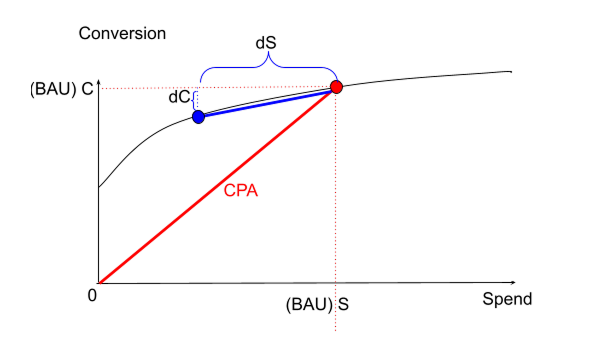
To simplify this comparison, consider these three core metrics (also illustrated in the following diagram), which indicates that your media spend and response follow a concave ads return curve:
- Cost-per-action (CPA): Your standard cost per conversion, equals Spend ($S$) / Conversions ($C$). Note that the total conversion here includes both incremental and non-incremental conversions. For example, organic conversion events without any paid media.
- Elasticity: Equals \(\frac{\Delta C / C}{\Delta S / S}\) in the diagram.
It's a measure of how sensitive your conversions are to the changes in spend,
which can be inferred from historical studies or MMM.
- For go-dark studies where $\Delta S = -100\% * S$, the Elasticity essentially becomes $-\Delta C / C$, the expected relative lift of your study.
- Cost-per-Incremental-Conversion (CpIC): Equals $\Delta S / \Delta C$. It means the actual cost of each incremental conversion generated by the incremental spend change due to your marketing intervention.
A well-designed test ensures that your design-implied CpIC, which is calculated as budget divided by the minimum required incremental conversions, is aligned with your theoretical CpIC, which is calculated as CPA divided by elasticity. Ideally, the design-implied CpIC shouldn't be lower than the estimated CpIC to ensure the test is sufficiently powered.
Extract the design-implied CpIC for the chosen single-cell experiment design:
select_design = single_cell_design_set.designs[single_cell_selected_design_id]
select_design.designs['cell_1'].design_implied_cpic
Understand the relationship between budget, MDE, and design-implied CpIC
A common point of confusion is how adjusting the budget affects the sensitivity of the test.
- MDE is independent of budget: The statistical MDE (the minimum percentage
change in conversions that the experiment can detect) is determined solely by
historical volatility and geo matching. Changing the budget in
Constraintsalone doesn't alter this statistical limit. - Budget determines design-implied CpIC: While the MDE (the required
percentage lift) remains constant, the design-implied CpIC changes
proportionally with the budget:
- Higher budget: Leads to a higher (less efficient) design-implied CpIC. This increases the likelihood of a conclusive test for campaigns with moderate performance.
- Lower budget: Restricts the design to a very low (highly efficient) design-implied CpIC. If actual campaign performance is moderate instead of being highly efficient, the test might be inconclusive.
When no design output fits your measurement goal
It's possible that even with our design optimization, the lowest MDE of top
design candidates is still oversized for your case. Usually, this indicates that
your test campaigns don't run under a sufficient budget to power GeoX, based on
your specified study setups and the inherent level of noise in your KPI data.
First, you should increase the parameter budget explicitly in
geox.Constraints(). Then, you might need to adjust the study setups after you
increase the experiment budget using either of these two options:
- You can choose to increase the duration of the study by changing
experiment_durationingeox.DesignConfig(). - You can choose to keep the existing duration, but increase the
parameter
max_conversions_percentingeox.Constraints(), which means a higher percentage of geos will be affected by your intervention.
With either approach, you can aim to gain a higher volume of incremental conversions by updating the study setups. You might also consider designing your test to include other shallower conversion objectives, such as page views or add-to-carts, assuming these shallow conversions also affected by your campaigns. This can provide a higher volume of data, which can lead to a lower MDE.
Directly increasing the daily campaign budget is another option, although it's not recommended to raise the budget directly in the experiment because it breaks the assumption that control geos should be always under BAU. If your case requires you to increase the campaign budget, it's recommended that you raise the budget first, then wait until you have sufficient pre-test design data under the new BAU before running a new study design and moving forward with the actual GeoX.
Optimize experiments for seasonal spikes
Running GeoX during seasonal spikes, such as Q4 holidays or major sales events, introduces challenges like high volatility and commercial constraints (for example, "untouchable" periods where media can't be turned off). Here are guidelines on how to structure your studies around these periods.
Handling "untouchable" peak periods or commercial constraints
If your business cannot afford to turn off advertising (go-dark) in key markets during a peak sales period:
- Use a heavy-up strategy instead of go-dark:
- Instead of testing the value of spend versus zero spend (go-dark), test the marginal impact of additional spend.
- Keep control geos at your planned baseline budget (BAU), and further increase spend in treatment geos (for example, +20% to +50%). This lets you capture peak demand across all markets while still measuring the incremental lift of the extra investment.
- Use partial go-dark to minimize risk:
- Sometimes referred to as go-dim, partial go-dark tests the marginal efficiency—the ROI of your last or top slice of spend with a partial reduction (for example, reduce spend by 20% in treatment geos). This minimizes revenue risk during peaks while still measuring the incrementality of that specific budget slice. Note that this won't measure the total baseline efficiency, which compares BAU spend against zero spend and requires a full go-dark test.
Manage pre-test and post-test windows during seasonal spikes
The transition into and out of a seasonal peak is often characterized by rapid changes in user behavior and platform bidding dynamics. To ensure model stability:
- Avoid test transitions during spikes: Try to ensure the test start date
and end date don't fall directly in the middle of a sharp transition (for
example, starting the test the day before Black Friday). The model is most
stable when the relationship between treatment and control geos is consistent.
- Start the test early: Implement the budget splits (go-dark or heavy-up) a few weeks before the seasonal transition begins. This gives the ad platform's bidding algorithm time to stabilize under the new geo-budgets before the peak volume hits.
- End the test late: Maintain the test through the peak and only transition back to BAU after the peak volume has subsided and stabilized back to normal levels.
- Extend pre-test data for validation: For highly seasonal businesses, the minimally required \( 3N \) pre-test data is usually insufficient. Prepare at least one year of historical data to validate your design.
- Validate the design on historical peaks (placebo testing):
- Before executing the test, run the design search using historical data from the same seasonal peak in the previous year as a validation period.
- Ensure that the candidate design passes A/A placebo tests (p-value \( \ge \alpha \)) and maintains a good fit (\( R^2 \ge 0.8 \)) during that historical peak. If it fails, the relationship between your geos becomes unstable during high-volume periods, and you should avoid testing during the peak.