
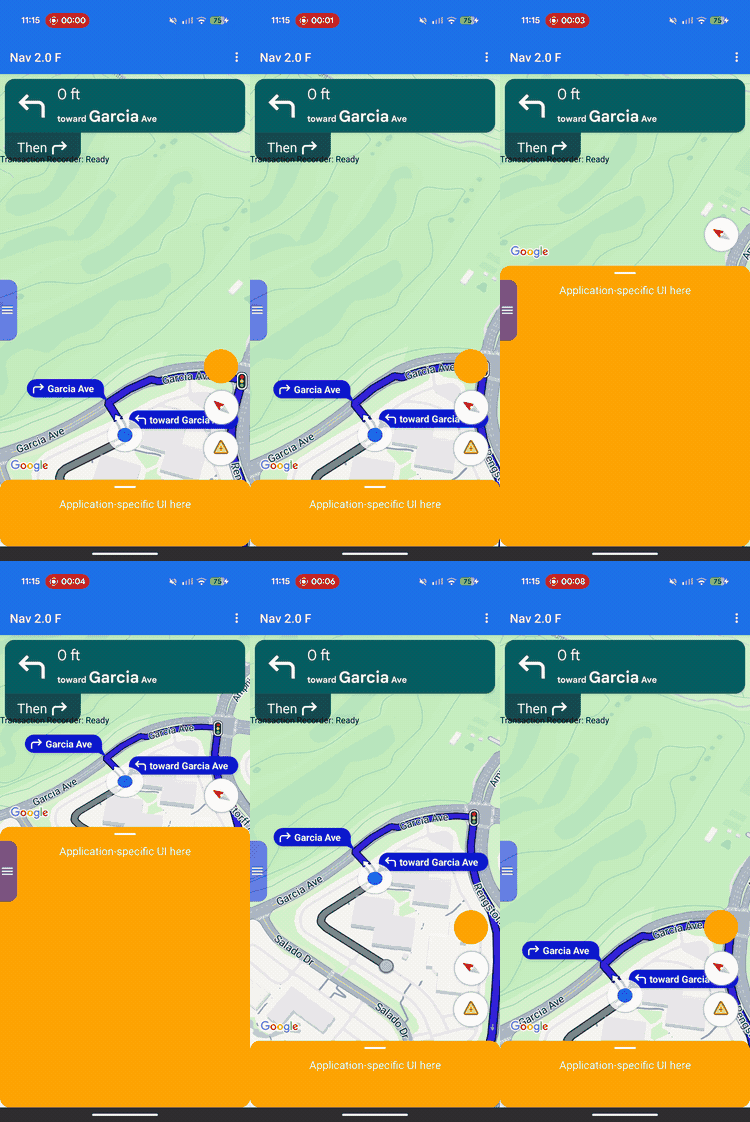
Use layout customization to control the view hierarchy and screen placement for both Google-provided views and your own custom business views.
Instead of adding custom views into predefined header or footer slots, implement
a layout delegate to manage the layout for the entire screen. During navigation
state transitions, your layout delegate receives the Google-provided
components, such as the turn card, ETA card, and buttons. Position these
elements alongside your own custom content using standard Android layout systems like ConstraintLayout, CoordinatorLayout, or LinearLayout.
Use this framework to position custom business information—such as order status or pickup instructions—precisely on the screen while preventing your views from overlapping.
How layout customization works
Layout customization uses a delegation design pattern. Instead of automatically drawing or positioning UI components on the screen, the SDK passes them directly to a custom class that you write: the layout delegate.
To customize your layout, create a class that extends the abstractNavigationLayoutDelegate class and assign an instance to your NavigationView
or SupportNavigationFragment. Whenever the navigation state transitions—such
as moving from the base map into active turn-by-turn guidance—the SDK executes
the callback methods on your delegate and provides the UI components available
for that specific state.
To provide a seamless, integrated user experience, this framework establishes a clear separation of responsibility between your app and the SDK. Use the layout delegate to customize the following:
- Build the view hierarchy: Choose exactly which Google components and custom business views to add to the screen for each UI state.
- Position every element: Set precise screen anchors, margins, and layout placement. Avoid applying custom width or height constraints to Google components because Google components calculate their own internal dimensions.
- Frame the base map: Define the visible boundaries of the map camera using the coordinates of the viewport component.
- Layer the screen: Decide whether custom views float above, below, or alongside Google's built-in controls.
Meanwhile, you can't customize the following Google components with the layout delegate:
- Component dimensions: The size and internal dimensions of Google-provided components, which the SDK calculates automatically.
- Trigger conditions: When dynamic alerts or prompts appear based on real-time route data.
Implementation principles
When writing a layout delegate, keep the following rules in mind to prevent layout bugs or runtime crashes:
- The default is an empty screen: Google-provided components only appear if your delegate explicitly adds them to the view hierarchy and positions them.
- Legacy APIs aren't supported: Properties and methods that control the legacy slot-based layout model won't be supported and may not behave as expected when a custom delegate is active.
- Don't modify internal view structures:
Don't use methods like
findViewById()to traverse or modify the view hierarchies of Google-provided components (such as the turn card or ETA card). Because these internal view hierarchies are underlying implementation details, they're subject to change across SDK releases. Modifying them can cause your layout to break during future SDK updates.
Legacy API compatibility
For reliable layout behavior when using a custom layout delegate, avoid using the following legacy slot-based APIs, which are planned for deprecation. To migrate an existing app, replace your usage of these APIs with code in your custom layout delegate:
Show legacy slot-based APIs
| Legacy API | Layout Delegate replacement |
|---|---|
setCustomControl(View, CustomControlPosition) |
Add your views directly to your ConstraintLayout or other view group. |
removeCustomControl(View) |
Remove views directly from your view hierarchy. |
setEtaCardEnabled(boolean) |
Read the etaCard view in onEnterActiveGuidance. |
setHeaderEnabled(boolean) |
Read the turnCard view in onEnterActiveGuidance. |
setReportIncidentButtonEnabled(boolean) |
Locate the REPORTING button in getActiveGuidanceButtons(). |
setTripProgressBarEnabled(boolean) |
Read the tripProgressBar view in onEnterActiveGuidance. |
addOnNavigationUiChangedListener(...) |
Rely on your NavigationLayoutDelegate state transition callbacks. |
removeOnNavigationUiChangedListener(...) |
Manage layout state transitions directly using the delegate. |
addPromptVisibilityChangedListener(...) |
Rely on your NavigationLayoutDelegate prompt callbacks (like onShowPrompt()). |
removePromptVisibilityChangedListener(...) |
Manage prompt display logic directly using the delegate. |
setCompassEnabled(boolean) |
Locate the compass in getNavigationReadyButtons() or getActiveGuidanceButtons(). |
Essentials checklist
Follow these essential steps and requirements to implement your layout delegate successfully:
-
Initialize the delegate before creating the UI: Call
setLayoutDelegate()before the SDK initializes the navigation UI. See the following code implementation examples to verify the exact setup timing for your application structure. Initializing the delegate after UI creation triggers anApiIllegalStateException.Kotlin
// For SupportNavigationFragment
override fun onCreate(savedInstanceState: Bundle?) {
    super.onCreate(savedInstanceState)
    setContentView(R.layout.activity_main)
    val navFragment = supportFragmentManager.findFragmentById(R.id.nav_fragment) as SupportNavigationFragment
    navFragment.setLayoutDelegate(MyLayoutDelegate())
}

// For a programmatic NavigationView
val navigationView = NavigationView(context)
navigationView.setLayoutDelegate(MyLayoutDelegate())
navigationView.onCreate(savedInstanceState)
Java
// For SupportNavigationFragment
@Override
protected void onCreate(Bundle savedInstanceState) {
    super.onCreate(savedInstanceState);
    setContentView(R.layout.activity_main);
    SupportNavigationFragment navFragment = (SupportNavigationFragment) getSupportFragmentManager().findFragmentById(R.id.nav_fragment);
    navFragment.setLayoutDelegate(new MyLayoutDelegate());
}

// For a programmatic NavigationView
NavigationView navigationView = new NavigationView(context);
navigationView.setLayoutDelegate(new MyLayoutDelegate());
navigationView.onCreate(savedInstanceState);
-
Build your own layout container: Create a custom view group—such as a
ConstraintLayout—to hold your custom UI elements and the Google-provided views. -
Attach mandatory views: You must add the Google logo (
getGoogleLogo()) and the Viewport (getViewport()) to your layout container in all navigation states. Failing to include both of these views triggers a runtimeApiIllegalStateExceptionand crashes the app. -
Respect fixed dimensions: The SDK determines the dimensions for several Google-provided components. Don't apply custom width or height constraints to the following elements:
- Turn card
- ETA card
- Incoming prompts
- Google logo
- Speed widget
-
Attach your layout to the view: Call
navigationView.setNavigationLayout()inside youronEnterNavigationReady()andonEnterActiveGuidance()callbacks to attach your container to the map view hierarchy. -
Clean up on state exit: Call
navigationView.removeNavigationLayout()and remove your custom views inside youronLeavecallbacks to prevent memory leaks and overlapping UI states. -
Avoid legacy layout APIs: Don't call deprecated slot-based APIs like
setCustomControl()orsetHeaderEnabled()while a custom delegate is active. The SDK may ignore these legacy calls when a custom delegate is attached.
UI states and Google components
When a navigation state transition occurs, the SDK passes a read-only
UiState object to your delegate callback. This object bundles the current
layout configuration flags with the Google components (e.g., View instances) that
you need to render the screen.
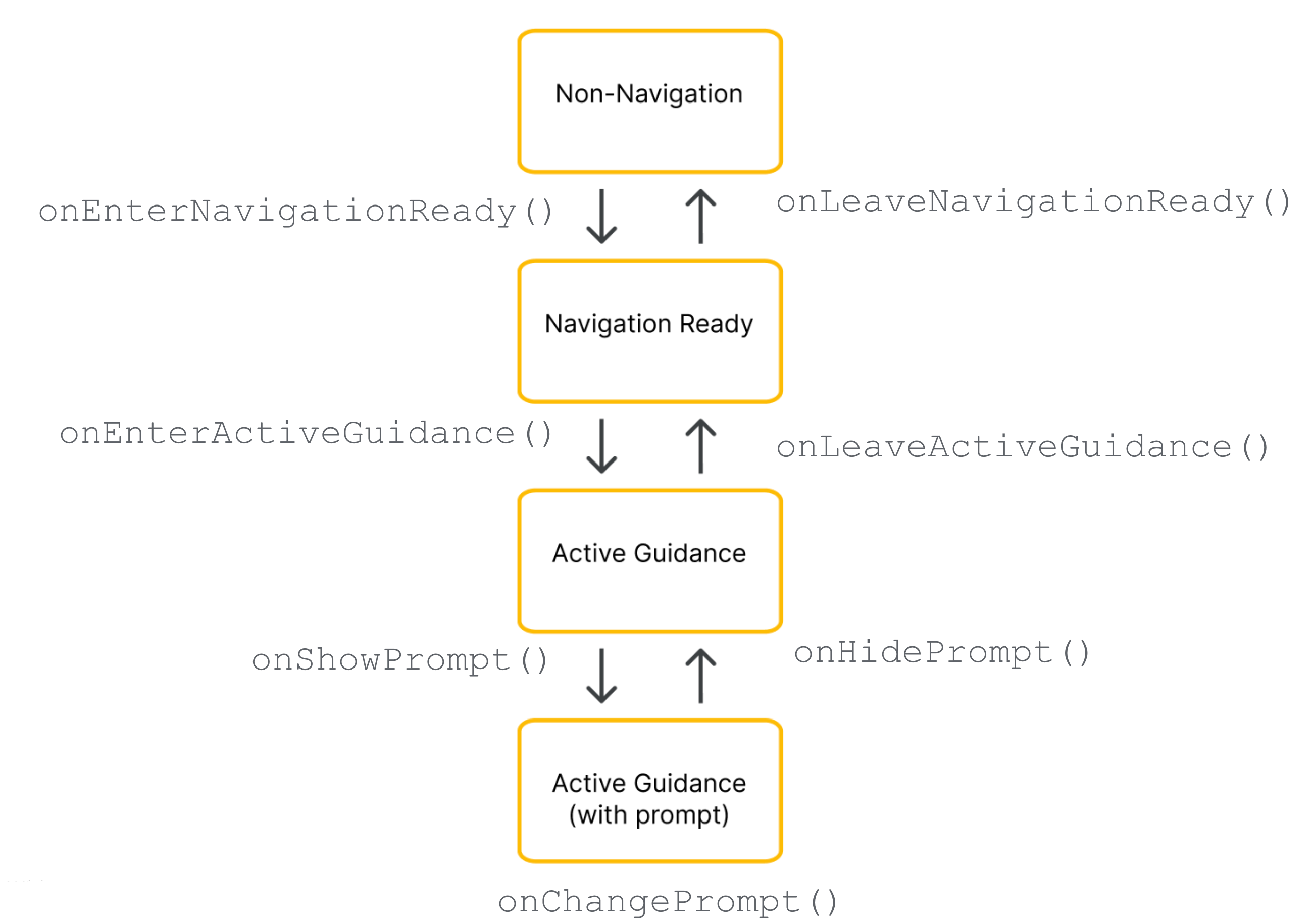
The layout delegate manages the view hierarchy across four operational states. The following state diagram illustrates how the SDK transitions between navigation states and which callback methods it executes on your delegate:
The specific Google components provided to your delegate depend on the current phase of the navigation lifecycle.
Required components (all navigation states)
Regardless of the current navigation phase, you must include, position, and keep the following Google components visible in your view hierarchy:
Google Logo (
getGoogleLogo()): This component displays the mandatory Google Maps logo. If the Re-center button is enabled, the logo automatically transforms into this button when the driver scrolls the map away from their vehicle. As a result, your placement of the logo dictates where the Re-center button appears. It's recommended to place the logo in the bottom-start (bottom-left) corner of your layout to match standard map UI expectations.Viewport (
getViewport()): An invisibleViewthat defines the camera's framing boundaries. Your placement of the viewport dictates exactly where the SDK centers the vehicle chevron and draws the active route line. Position the viewport so it covers the open, unobscured area of your screen, safely avoiding opaque overlays like custom bottom sheets.
Navigation-ready components
During the navigation-ready state, the UI remains minimal to keep the focus on
the base map. Your NavigationReadyUiState object provides access to the following:
- getNavigationReadyButtons(): A list of floating action views configured for the base
map (typically just the Compass button). Because Google may add or reorder
buttons in future SDK releases, avoid relying on fixed
list indexes. Instead, iterate through the
list, read each button's type by comparing
getType()toButtonKnownType.COMPASS, and extract the physical view by callinggetView(). Note that the exact buttons in this list differ from those available during active guidance.
Active guidance components
When turn-by-turn guidance begins, the SDK unlocks the full suite of navigation
controls. Your ActiveGuidanceUiState object provides access to the following Google
components:
getTurnCard(): The primary header banner displaying upcoming maneuver directions, distance measurements, and lane guidance. Place it at the top of your layout to establish a familiar navigation hierarchy and anchor your custom views around it.getEtaCard(): The footer banner displaying the estimated arrival time, remaining journey time, and remaining distance to the destination. Place it along the bottom edge of your screen, or integrate its coordinates with your custom task-management sheets.getTripProgressBar(): A vertical progress bar that shows the driver how far they have traveled along the current route. Unlike legacy layouts that fixed this strictly to the map edge, you have total freedom to anchor it anywhere—for example, along a side edge of your custom container.getSpeedWidget(): A floating control for the speedometer and posted speed limits. Depending on your API settings and data availability, this view dynamically resizes between four visual states at runtime (displaying nothing, the current speed only, the speed limit only, or both readings). Because the widget can shift between these sizes without notice, always anchor surrounding views using constraints so your layout automatically adapts to prevent spatial overlaps.
getActiveGuidanceButtons(): An expanded list of floating action views for the active guidance state (typically including both the Compass and the Incident Reporting button). Just as in the navigation-ready state, you can locate and extract individual button views by filtering the list byButtonKnownType(COMPASSorREPORTING) and extracting the view usinggetView(). You can then position them independently or use a layout likeAutoHidingLinearLayoutto stack the array safely without spatial conflicts.
Dynamic Prompt components
Prompts, such as incident alerts or safety camera warnings, trigger independently during active guidance.
When a prompt is ready to be displayed, the SDK calls your delegate's
onShowPrompt() callback and passes a newPrompt view. Your delegate is responsible for smoothly positioning
this prompt over your layout (typically anchored to the bottom edge of your
map container).
Because the incoming prompt covers the lower portion of the screen, you must update your layout to prevent the prompt from overlapping the viewport, the Google logo, or any bottom-aligned buttons.
Handling screen size and wide mode
To handle changes in map dimensions and screen orientation, the layout delegate uses the following features:
View resizing: Adjusts your layout whenever the physical size of the map changes.
Wide mode: Swaps to a wide-format layout variant when the map is wide enough.
Responding to view resizing
Whenever the physical dimensions of the map container change, the SDK executes theonSizeChanged() callback. Split-screen layouts, layout sliders, and device
rotation commonly trigger the onSizeChanged() callback. Use this callback to
make general responsive adjustments to your custom UI. Implement
onSizeChanged() to reposition custom elements for a new screen aspect ratio,
apply your own custom width or height breakpoints, and detect when a resize
event toggles wide mode to safely swap layout variants.
Understanding wide mode
Wide mode activates when the map container is wide enough to display UI components side-by-side.
Read the isWideMode() boolean from the state object to reposition your custom
UI elements and keep the center of the map clear for the driver. Because
Google-provided components like the turn card and ETA card automatically shrink
and reshape in wide mode, reading this boolean ensures your layout adapts at
the exact same moment that the Google components update.
Consider the following examples for positioning your layout components in standard and wide modes:
Standard portrait mode: Position the turn card at the top of the screen and the ETA card at the bottom.
Wide mode: Move the turn card to the start side of the screen and the ETA card to the end side.
Checking wide mode during state transitions
If your layout supports a wide-mode variation, evaluate the isWideMode()
boolean inside every state transition callback, rather than relying only on
onSizeChanged().
onEnterNavigationReady() and
onEnterActiveGuidance() to handle initial app launches in landscape mode. This
approach protects your layout against Android system lifecycle events—such as
default Activity re-creation—that bypass the resizing callback entirely,
ensuring that the correct standard or wide layout variant activates the moment
a new navigation state begins.
Aligning to Google styling
To help your custom UI match Google's visual rhythm, the SDK provides the
StyleValues utility class. You can read these values in density-independent
pixels (dp) to align your views perfectly with Google components.
For example, if you want to place a custom button in the top corner of the
screen opposite the turn card, you can call StyleValues.headerTopPaddingDp()
and assign the returned value as your button's top margin. This ensures your
custom button visually aligns with the top edge of the turn card, maintaining
screen symmetry.
Available style paddings and measurements include:
StyleValues.headerNominalHeightDp()StyleValues.headerTopPaddingDp()StyleValues.headerFooterSidePaddingDp()StyleValues.mapControlSidePaddingDp()StyleValues.buttonMapControlSidePaddingDp()
Example: Constraint-based layout implementation
The following example demonstrates a basic layout delegate that manages state
transitions using programmatic ConstraintLayout and ConstraintSet
definitions.
Although this example builds view constraints in code, layout delegates can also inflate standard Android XML layouts.
Kotlin
/*
 * Copyright 2026 Google LLC
 *
 * Licensed under the Apache License, Version 2.0 (the "License");
 * you may not use this file except in compliance with the License.
 * You may obtain a copy of the License at
 *
 *     http://www.apache.org/licenses/LICENSE-2.0
 *
 * Unless required by applicable law or agreed to in writing, software
 * distributed under the License is distributed on an "AS IS" BASIS,
 * WITHOUT WARRANTIES OR CONDITIONS OF ANY KIND, either express or implied.
 * See the License for the specific language governing permissions and
 * limitations under the License.
 */

@file:Suppress("PackageName")

package com.example.navigationapidemo.layoutdelegate

import android.content.Context
import android.util.TypedValue
import android.view.View
import android.view.ViewGroup
import androidx.constraintlayout.widget.ConstraintLayout
import androidx.constraintlayout.widget.ConstraintSet
import com.google.android.libraries.navigation.layoutcustomization.ActiveGuidanceUiState
import com.google.android.libraries.navigation.layoutcustomization.AutoHidingVerticalLayout
import com.google.android.libraries.navigation.layoutcustomization.NavigationLayoutDelegate
import com.google.android.libraries.navigation.layoutcustomization.NavigationReadyUiState
import com.google.android.libraries.navigation.layoutcustomization.NavigationUiButton.ButtonKnownType.COMPASS
import com.google.android.libraries.navigation.layoutcustomization.NavigationUiParent
import com.google.android.libraries.navigation.layoutcustomization.StyleValues.headerNominalHeightDp

/** Kotlin equivalent of StandardUiElementsLayoutDelegate. */
class StandardUiElementsLayoutDelegateKt : NavigationLayoutDelegate() {

  private val layoutId = View.generateViewId()
  private val buttonsContainerId = View.generateViewId()

  private var layout: ConstraintLayout? = null
  private var buttonsContainer: AutoHidingVerticalLayout? = null

  private var navigationReadyConstraintSet: ConstraintSet? = null
  private var activeGuidanceConstraintSet: ConstraintSet? = null
  private var activeGuidanceWithPromptConstraintSet: ConstraintSet? = null

  private var activeGuidanceUiState: ActiveGuidanceUiState? = null

  override fun onEnterNavigationReady(
    navigationUiParent: NavigationUiParent,
    newState: NavigationReadyUiState,
  ) {
    val context = navigationUiParent.viewContext

    var currentLayout = layout
    if (currentLayout == null) {
      currentLayout =
        ConstraintLayout(context).apply {
          layoutParams =
            ViewGroup.LayoutParams(
              ViewGroup.LayoutParams.MATCH_PARENT,
              ViewGroup.LayoutParams.MATCH_PARENT,
            )
          id = layoutId
        }
      layout = currentLayout
    }

    removeFromParentView(newState.viewport)
    currentLayout.addView(
      newState.viewport,
      ViewGroup.LayoutParams(
        ViewGroup.LayoutParams.MATCH_PARENT,
        ViewGroup.LayoutParams.MATCH_PARENT,
      ),
    )

    removeFromParentView(newState.googleLogo)
    currentLayout.addView(
      newState.googleLogo,
      ViewGroup.LayoutParams(
        ViewGroup.LayoutParams.MATCH_PARENT,
        ViewGroup.LayoutParams.WRAP_CONTENT,
      ),
    )

    var currentButtonsContainer = buttonsContainer
    if (currentButtonsContainer == null) {
      currentButtonsContainer = AutoHidingVerticalLayout(context).apply { id = buttonsContainerId }
      buttonsContainer = currentButtonsContainer
    }

    removeFromParentView(currentButtonsContainer)
    currentLayout.addView(
      currentButtonsContainer,
      ViewGroup.LayoutParams(
        ViewGroup.LayoutParams.WRAP_CONTENT,
        ConstraintLayout.LayoutParams.MATCH_CONSTRAINT,
      ),
    )

    for (button in newState.navigationReadyButtons) {
      removeFromParentView(button.view)
      currentButtonsContainer.addView(button.view)
    }

    if (navigationReadyConstraintSet == null) {
      navigationReadyConstraintSet = buildNavigationReadyConstraintSet(newState)
    }
    navigationReadyConstraintSet?.applyTo(currentLayout)

    navigationUiParent.removeNavigationLayout(currentLayout)
    navigationUiParent.setNavigationLayout(currentLayout)
  }

  private fun buildNavigationReadyConstraintSet(uiState: NavigationReadyUiState): ConstraintSet {
    return ConstraintSet().apply {
      clone(layout)

      connect(
        uiState.viewport.id,
        ConstraintSet.START,
        ConstraintSet.PARENT_ID,
        ConstraintSet.START,
      )
      connect(uiState.viewport.id, ConstraintSet.TOP, ConstraintSet.PARENT_ID, ConstraintSet.TOP)
      connect(uiState.viewport.id, ConstraintSet.END, ConstraintSet.PARENT_ID, ConstraintSet.END)
      connect(
        uiState.viewport.id,
        ConstraintSet.BOTTOM,
        ConstraintSet.PARENT_ID,
        ConstraintSet.BOTTOM,
      )

      connect(
        uiState.googleLogo.id,
        ConstraintSet.BOTTOM,
        ConstraintSet.PARENT_ID,
        ConstraintSet.BOTTOM,
      )
      connect(
        uiState.googleLogo.id,
        ConstraintSet.START,
        ConstraintSet.PARENT_ID,
        ConstraintSet.START,
      )

      constrainButtonsToBottomEnd()
    }
  }

  override fun onLeaveNavigationReady(
    navigationUiParent: NavigationUiParent,
    oldState: NavigationReadyUiState,
  ) {
    buttonsContainer?.removeAllViews()
    layout?.removeAllViews()
    layout?.let { navigationUiParent.removeNavigationLayout(it) }
  }

  override fun onEnterActiveGuidance(
    navigationUiParent: NavigationUiParent,
    oldState: NavigationReadyUiState,
    newState: ActiveGuidanceUiState,
  ) {
    activeGuidanceUiState = newState
    val context = navigationUiParent.viewContext
    val currentLayout = checkNotNull(layout) { "layout must be initialized" }
    val currentButtonsContainer =
      checkNotNull(buttonsContainer) { "buttonsContainer must be initialized" }

    removeFromParentView(newState.turnCard)
    currentLayout.addView(
      newState.turnCard,
      ViewGroup.LayoutParams(
        ViewGroup.LayoutParams.WRAP_CONTENT,
        ViewGroup.LayoutParams.WRAP_CONTENT,
      ),
    )

    removeFromParentView(newState.etaCard)
    currentLayout.addView(
      newState.etaCard,
      ViewGroup.LayoutParams(
        ViewGroup.LayoutParams.WRAP_CONTENT,
        ViewGroup.LayoutParams.WRAP_CONTENT,
      ),
    )

    for (button in oldState.navigationReadyButtons) {
      removeFromParentView(button.view)
    }

    for (button in newState.activeGuidanceButtons) {
      val buttonLayoutParams =
        AutoHidingVerticalLayout.LayoutParams(
          ViewGroup.LayoutParams.WRAP_CONTENT,
          ViewGroup.LayoutParams.WRAP_CONTENT,
        )
      if (button.type == COMPASS) {
        buttonLayoutParams.isHighPriority = true
      }
      removeFromParentView(button.view)
      currentButtonsContainer.addView(button.view, buttonLayoutParams)
    }

    if (activeGuidanceConstraintSet == null) {
      activeGuidanceConstraintSet = buildActiveGuidanceConstraintSet(context, newState)
    }

    activeGuidanceConstraintSet?.applyTo(currentLayout)
  }

  override fun onLeaveActiveGuidance(
    navigationUiParent: NavigationUiParent,
    oldState: ActiveGuidanceUiState,
    newState: NavigationReadyUiState,
  ) {
    removeFromParentView(oldState.etaCard)
    removeFromParentView(oldState.turnCard)
    buttonsContainer?.removeAllViews()

    val currentButtonsContainer =
      checkNotNull(buttonsContainer) { "buttonsContainer must be initialized" }
    for (button in newState.navigationReadyButtons) {
      currentButtonsContainer.addView(
        button.view,
        ViewGroup.LayoutParams(
          ViewGroup.LayoutParams.WRAP_CONTENT,
          ViewGroup.LayoutParams.WRAP_CONTENT,
        ),
      )
    }

    navigationReadyConstraintSet?.applyTo(layout)
  }

  private fun buildActiveGuidanceConstraintSet(
    context: Context,
    uiState: ActiveGuidanceUiState,
  ): ConstraintSet {
    return ConstraintSet().apply {
      clone(layout)

      connect(uiState.turnCard.id, ConstraintSet.TOP, ConstraintSet.PARENT_ID, ConstraintSet.TOP)
      connect(
        uiState.turnCard.id,
        ConstraintSet.START,
        ConstraintSet.PARENT_ID,
        ConstraintSet.START,
      )

      clear(uiState.viewport.id)
      connect(
        uiState.viewport.id,
        ConstraintSet.START,
        ConstraintSet.PARENT_ID,
        ConstraintSet.START,
      )
      connect(uiState.viewport.id, ConstraintSet.TOP, ConstraintSet.PARENT_ID, ConstraintSet.TOP)
      setMargin(uiState.viewport.id, ConstraintSet.TOP, dpToPx(headerNominalHeightDp(), context))
      connect(uiState.viewport.id, ConstraintSet.END, ConstraintSet.PARENT_ID, ConstraintSet.END)
      connect(uiState.viewport.id, ConstraintSet.BOTTOM, uiState.etaCard.id, ConstraintSet.TOP)

      clear(uiState.googleLogo.id, ConstraintSet.BOTTOM)
      constrainLogoToTopOfEtaCard(uiState)
      constrainEtaCardToBottomStart(uiState)
      constrainButtonsToTopOfEtaCard(context, uiState)
    }
  }

  private fun ConstraintSet.constrainEtaCardToBottomStart(uiState: ActiveGuidanceUiState) {
    connect(uiState.etaCard.id, ConstraintSet.START, ConstraintSet.PARENT_ID, ConstraintSet.START)
    connect(uiState.etaCard.id, ConstraintSet.BOTTOM, ConstraintSet.PARENT_ID, ConstraintSet.BOTTOM)
  }

  private fun ConstraintSet.constrainLogoToTopOfEtaCard(uiState: ActiveGuidanceUiState) {
    connect(uiState.googleLogo.id, ConstraintSet.BOTTOM, uiState.etaCard.id, ConstraintSet.TOP)
  }

  private fun ConstraintSet.constrainButtonsToBottomEnd() {
    clear(buttonsContainerId, ConstraintSet.BOTTOM)
    clear(buttonsContainerId, ConstraintSet.TOP)
    connect(buttonsContainerId, ConstraintSet.TOP, ConstraintSet.PARENT_ID, ConstraintSet.TOP)
    connect(buttonsContainerId, ConstraintSet.BOTTOM, ConstraintSet.PARENT_ID, ConstraintSet.BOTTOM)
    connect(buttonsContainerId, ConstraintSet.END, ConstraintSet.PARENT_ID, ConstraintSet.END)
  }

  private fun ConstraintSet.constrainButtonsToTopOfEtaCard(
    context: Context,
    uiState: ActiveGuidanceUiState,
  ) {
    clear(buttonsContainerId, ConstraintSet.BOTTOM)
    clear(buttonsContainerId, ConstraintSet.TOP)
    connect(buttonsContainerId, ConstraintSet.BOTTOM, uiState.etaCard.id, ConstraintSet.TOP)
    connect(buttonsContainerId, ConstraintSet.TOP, ConstraintSet.PARENT_ID, ConstraintSet.TOP)
    connect(buttonsContainerId, ConstraintSet.END, ConstraintSet.PARENT_ID, ConstraintSet.END)
    setMargin(buttonsContainerId, ConstraintSet.TOP, dpToPx(headerNominalHeightDp(), context))
  }

  override fun onShowPrompt(navigationUiParent: NavigationUiParent, newPrompt: View) {
    val context = navigationUiParent.viewContext
    layout?.addView(newPrompt)

    if (activeGuidanceUiState != null) {
      activeGuidanceWithPromptConstraintSet =
        buildActiveGuidanceWithPromptConstraintSet(context, newPrompt)
      activeGuidanceWithPromptConstraintSet?.applyTo(layout)
    }
  }

  override fun onChangePrompt(
    navigationUiParent: NavigationUiParent,
    oldPrompt: View,
    newPrompt: View,
  ) {
    val context = navigationUiParent.viewContext
    activeGuidanceWithPromptConstraintSet?.clear(oldPrompt.id)

    val currentLayout = checkNotNull(layout) { "layout must be initialized" }
    currentLayout.removeView(oldPrompt)
    currentLayout.addView(newPrompt)

    if (activeGuidanceUiState != null) {
      activeGuidanceWithPromptConstraintSet =
        buildActiveGuidanceWithPromptConstraintSet(context, newPrompt)
      activeGuidanceWithPromptConstraintSet?.applyTo(currentLayout)
    }
  }

  override fun onHidePrompt(navigationUiParent: NavigationUiParent, oldPrompt: View) {
    activeGuidanceWithPromptConstraintSet?.clear(oldPrompt.id)
    layout?.removeView(oldPrompt)

    activeGuidanceConstraintSet?.applyTo(layout)
  }

  private fun buildActiveGuidanceWithPromptConstraintSet(
    context: Context,
    prompt: View,
  ): ConstraintSet {
    return ConstraintSet().apply {
      clone(layout)

      val state =
        checkNotNull(activeGuidanceUiState) { "activeGuidanceUiState must be initialized" }

      clear(state.viewport.id)
      connect(state.viewport.id, ConstraintSet.START, ConstraintSet.PARENT_ID, ConstraintSet.START)
      connect(state.viewport.id, ConstraintSet.TOP, ConstraintSet.PARENT_ID, ConstraintSet.TOP)
      setMargin(state.viewport.id, ConstraintSet.TOP, dpToPx(headerNominalHeightDp(), context))
      connect(state.viewport.id, ConstraintSet.END, ConstraintSet.PARENT_ID, ConstraintSet.END)
      connect(state.viewport.id, ConstraintSet.BOTTOM, prompt.id, ConstraintSet.TOP)

      clear(state.googleLogo.id, ConstraintSet.BOTTOM)
      connect(state.googleLogo.id, ConstraintSet.BOTTOM, prompt.id, ConstraintSet.TOP)

      connect(prompt.id, ConstraintSet.START, ConstraintSet.PARENT_ID, ConstraintSet.START)
      connect(prompt.id, ConstraintSet.BOTTOM, ConstraintSet.PARENT_ID, ConstraintSet.BOTTOM)
    }
  }

  private fun removeFromParentView(view: View?) {
    if (view?.parent != null) {
      (view.parent as ViewGroup).removeView(view)
    }
  }

  private fun dpToPx(dp: Int, context: Context): Int {
    return TypedValue.applyDimension(
        TypedValue.COMPLEX_UNIT_DIP,
        dp.toFloat(),
        context.resources.displayMetrics,
      )
      .toInt()
  }
}
Java
/*
 * Copyright 2026 Google LLC
 *
 * Licensed under the Apache License, Version 2.0 (the "License");
 * you may not use this file except in compliance with the License.
 * You may obtain a copy of the License at
 *
 *     http://www.apache.org/licenses/LICENSE-2.0
 *
 * Unless required by applicable law or agreed to in writing, software
 * distributed under the License is distributed on an "AS IS" BASIS,
 * WITHOUT WARRANTIES OR CONDITIONS OF ANY KIND, either express or implied.
 * See the License for the specific language governing permissions and
 * limitations under the License.
 */

package com.example.navigationapidemo.layoutdelegate;

import static android.view.ViewGroup.LayoutParams.MATCH_PARENT;
import static android.view.ViewGroup.LayoutParams.WRAP_CONTENT;
import static androidx.constraintlayout.widget.ConstraintLayout.LayoutParams.MATCH_CONSTRAINT;
import static com.google.android.libraries.navigation.layoutcustomization.NavigationUiButton.ButtonKnownType.COMPASS;

import android.content.Context;
import android.util.TypedValue;
import android.view.View;
import android.view.ViewGroup;
import android.view.ViewGroup.LayoutParams;
import androidx.constraintlayout.widget.ConstraintLayout;
import androidx.constraintlayout.widget.ConstraintSet;
import com.google.android.libraries.navigation.layoutcustomization.ActiveGuidanceUiState;
import com.google.android.libraries.navigation.layoutcustomization.AutoHidingVerticalLayout;
import com.google.android.libraries.navigation.layoutcustomization.NavigationLayoutDelegate;
import com.google.android.libraries.navigation.layoutcustomization.NavigationReadyUiState;
import com.google.android.libraries.navigation.layoutcustomization.NavigationUiButton;
import com.google.android.libraries.navigation.layoutcustomization.NavigationUiParent;
import com.google.android.libraries.navigation.layoutcustomization.StyleValues;

/**
 * A sample implementation of {@link NavigationLayoutDelegate} demonstrating a basic,
 * portrait-optimized layout using {@link ConstraintLayout}.
 *
 * <p><b>Understanding the Layout Delegate State Machine:</b> Navigation SDK transitions through
 * distinct states, each calling corresponding lifecycle methods on this delegate:
 *
 * <ul>
 *   <li><b>Navigation Ready:</b> Initiated by {@link #onEnterNavigationReady}. We initialize the
 *       layout here and add non-guidance views, then pass it to {@link NavigationUiParent} as the
 *       navigation layout.
 *   <li><b>Active Guidance (Turn-by-Turn Mode):</b> Initiated by {@link #onEnterActiveGuidance}. We
 *       set up the layout for Active Guidance, adding elements such as the turn card and ETA card.
 *   <li><b>Prompts:</b> Prompts (e.g., incident alerts) may be triggered during Active Guidance
 *       mode and can be added to the layout via {@link #onShowPrompt}.
 * </ul>
 *
 * This class caches its {@link ConstraintSet}s to ensure smooth transitions without needing to
 * recreate or inflate layouts continuously.
 */
public class StandardUiElementsLayoutDelegate extends NavigationLayoutDelegate {
  private final int layoutId;
  private final int buttonsContainerId;

  private ConstraintLayout layout;
  private AutoHidingVerticalLayout buttonsContainer;

  // We cache our ConstraintSet definitions to avoid cloning or rebuilding
  // constraint configurations programmatically on every transition. This optimization
  // keeps UI state switches (such as entering active guidance or popping up prompts) highly
  // performant.
  private ConstraintSet navigationReadyConstraintSet;
  private ConstraintSet activeGuidanceConstraintSet;
  private ConstraintSet activeGuidanceWithPromptConstraintSet;

  private ActiveGuidanceUiState activeGuidanceUiState;

  public StandardUiElementsLayoutDelegate() {
    layoutId = View.generateViewId();
    buttonsContainerId = View.generateViewId();
  }

  @Override
  public void onEnterNavigationReady(
      NavigationUiParent navigationUiParent, NavigationReadyUiState newState) {
    Context context = navigationUiParent.getViewContext();

    // Implementation Tip: For simplicity, this sample instantiates views and constraints
    // programmatically. In a production application, you can safely inflate standard XML
    // layout templates to build your layout hierarchies and define base UI constraints.

    // Create the root layout
    if (layout == null) {
      layout = new ConstraintLayout(context);
      LayoutParams layoutParams = new LayoutParams(MATCH_PARENT, MATCH_PARENT);
      layout.setLayoutParams(layoutParams);
      layout.setId(layoutId);
    }

    // Add the Viewport (REQUIRED):
    // The viewport is an invisible bounding box used by Nav SDK to frame the vehicle
    // chevron and the upcoming route line. We want to position this view such that it avoids
    // being obscured by fully-opaque UI elements (like the turn card or the ETA card).
    removeFromParentView(newState.getViewport());
    LayoutParams viewportLayoutParams = new LayoutParams(MATCH_PARENT, MATCH_PARENT);
    layout.addView(newState.getViewport(), viewportLayoutParams);

    // Add the Google Logo / Re-center Button (REQUIRED):
    // This view displays the Google logo during guidance and may transition into a
    // "Re-center" button if the user scrolls away from the vehicle chevron. It must
    // be added to the view hierarchy in all states.
    removeFromParentView(newState.getGoogleLogo());
    LayoutParams googleLogoLayoutParams = new LayoutParams(MATCH_PARENT, WRAP_CONTENT);
    layout.addView(newState.getGoogleLogo(), googleLogoLayoutParams);

    // Add the container for UI buttons
    if (buttonsContainer == null) {
      // We use AutoHidingVerticalLayout to create an adaptive vertical button container that
      // automatically hides or shows child views based on available screen height.
      buttonsContainer = new AutoHidingVerticalLayout(context);
      buttonsContainer.setId(buttonsContainerId);
    }
    removeFromParentView(buttonsContainer);
    LayoutParams buttonsContainerLayoutParams = new LayoutParams(WRAP_CONTENT, MATCH_CONSTRAINT);
    layout.addView(buttonsContainer, buttonsContainerLayoutParams);

    // Add UI buttons to the container
    for (NavigationUiButton button : newState.getNavigationReadyButtons()) {
      removeFromParentView(button.getView());
      buttonsContainer.addView(button.getView());
    }

    // Build constraint set for Navigation Ready state
    if (navigationReadyConstraintSet == null) {
      navigationReadyConstraintSet = buildNavigationReadyConstraintSet(newState);
    }

    // Apply the constraints
    navigationReadyConstraintSet.applyTo(layout);

    // Set the layout in NavigationUiParent
    navigationUiParent.removeNavigationLayout(layout);
    navigationUiParent.setNavigationLayout(layout);
  }

  private ConstraintSet buildNavigationReadyConstraintSet(NavigationReadyUiState uiState) {
    ConstraintSet constraintSet = new ConstraintSet();
    constraintSet.clone(layout);

    // Constrain viewport to the edges of its parent
    constraintSet.connect(
        uiState.getViewport().getId(),
        ConstraintSet.START,
        ConstraintSet.PARENT_ID,
        ConstraintSet.START);
    constraintSet.connect(
        uiState.getViewport().getId(),
        ConstraintSet.TOP,
        ConstraintSet.PARENT_ID,
        ConstraintSet.TOP);
    constraintSet.connect(
        uiState.getViewport().getId(),
        ConstraintSet.END,
        ConstraintSet.PARENT_ID,
        ConstraintSet.END);
    constraintSet.connect(
        uiState.getViewport().getId(),
        ConstraintSet.BOTTOM,
        ConstraintSet.PARENT_ID,
        ConstraintSet.BOTTOM);

    // Constrain the logo to the bottom start corner
    constraintSet.connect(
        uiState.getGoogleLogo().getId(),
        ConstraintSet.BOTTOM,
        ConstraintSet.PARENT_ID,
        ConstraintSet.BOTTOM);
    constraintSet.connect(
        uiState.getGoogleLogo().getId(),
        ConstraintSet.START,
        ConstraintSet.PARENT_ID,
        ConstraintSet.START);

    constrainButtonsToBottomEnd(constraintSet);

    return constraintSet;
  }

  @Override
  public void onLeaveNavigationReady(
      NavigationUiParent navigationUiParent, NavigationReadyUiState oldState) {
    buttonsContainer.removeAllViews();
    layout.removeAllViews();
    navigationUiParent.removeNavigationLayout(layout);
  }

  @Override
  public void onEnterActiveGuidance(
      NavigationUiParent navigationUiParent,
      NavigationReadyUiState oldState,
      ActiveGuidanceUiState newState) {
    activeGuidanceUiState = newState;

    Context context = navigationUiParent.getViewContext();

    // Sizing Guideline: The turn card and ETA card are internally configured to adapt and size
    // themselves dynamically based on the layout width (non-wideMode vs. wideMode). Forcing fixed
    // widths or heights on these elements via layouts is unsupported. Always use WRAP_CONTENT to
    // let the elements determine their optimal proportions.

    // Add the turn card
    removeFromParentView(newState.getTurnCard());
    LayoutParams turnCardLayoutParams = new LayoutParams(WRAP_CONTENT, WRAP_CONTENT);
    layout.addView(newState.getTurnCard(), turnCardLayoutParams);

    // Add the ETA card
    removeFromParentView(newState.getEtaCard());
    LayoutParams etaCardLayoutParams = new LayoutParams(WRAP_CONTENT, WRAP_CONTENT);
    layout.addView(newState.getEtaCard(), etaCardLayoutParams);

    // Remove the Navigation Ready UI buttons
    for (NavigationUiButton button : oldState.getNavigationReadyButtons()) {
      removeFromParentView(button.getView());
    }

    // By adding all buttons to the AutoHidingVerticalLayout, we can easily incorporate the latest
    // set of buttons when upgrading without any code changes required
    for (NavigationUiButton button : newState.getActiveGuidanceButtons()) {
      AutoHidingVerticalLayout.LayoutParams buttonLayoutParams =
          new AutoHidingVerticalLayout.LayoutParams(
              ViewGroup.LayoutParams.WRAP_CONTENT, ViewGroup.LayoutParams.WRAP_CONTENT);

      // Mark critical buttons (such as the compass) as high priority so they are the last to be
      // hidden by AutoHidingVerticalLayout when layout space is limited.
      if (button.getType() == COMPASS) {
        buttonLayoutParams.isHighPriority = true;
      }

      removeFromParentView(button.getView());
      buttonsContainer.addView(button.getView(), buttonLayoutParams);
    }

    // Build constraint set for Active Guidance state
    if (activeGuidanceConstraintSet == null) {
      activeGuidanceConstraintSet = buildActiveGuidanceConstraintSet(context, newState);
    }

    // Apply the constraints
    activeGuidanceConstraintSet.applyTo(layout);
  }

  @Override
  public void onLeaveActiveGuidance(
      NavigationUiParent navigationUiParent,
      ActiveGuidanceUiState oldState,
      NavigationReadyUiState newState) {

    // Remove Active Guidance UI elements
    removeFromParentView(oldState.getEtaCard());
    removeFromParentView(oldState.getTurnCard());
    buttonsContainer.removeAllViews();

    // Add Navigation Ready UI buttons
    for (NavigationUiButton button : newState.getNavigationReadyButtons()) {
      LayoutParams buttonLayoutParams = new LayoutParams(WRAP_CONTENT, WRAP_CONTENT);
      buttonsContainer.addView(button.getView(), buttonLayoutParams);
    }

    navigationReadyConstraintSet.applyTo(layout);
  }

  private ConstraintSet buildActiveGuidanceConstraintSet(
      Context context, ActiveGuidanceUiState uiState) {
    ConstraintSet constraintSet = new ConstraintSet();
    constraintSet.clone(layout);

    // Constrain turn card to top start corner
    constraintSet.connect(
        uiState.getTurnCard().getId(),
        ConstraintSet.TOP,
        ConstraintSet.PARENT_ID,
        ConstraintSet.TOP);
    constraintSet.connect(
        uiState.getTurnCard().getId(),
        ConstraintSet.START,
        ConstraintSet.PARENT_ID,
        ConstraintSet.START);

    // Constrain viewport to top of ETA card
    constraintSet.clear(uiState.getViewport().getId());
    constraintSet.connect(
        uiState.getViewport().getId(),
        ConstraintSet.START,
        ConstraintSet.PARENT_ID,
        ConstraintSet.START);
    constraintSet.connect(
        uiState.getViewport().getId(),
        ConstraintSet.TOP,
        ConstraintSet.PARENT_ID,
        ConstraintSet.TOP);

    // Instead of constraining the viewport's top directly to the bottom of the turn card
    // (which varies in height and would trigger jumpy camera framing updates), we use a fixed
    // nominal height to estimate the height of the turncard.
    constraintSet.setMargin(
        uiState.getViewport().getId(),
        ConstraintSet.TOP,
        dpToPx(StyleValues.headerNominalHeightDp(), context));

    constraintSet.connect(
        uiState.getViewport().getId(),
        ConstraintSet.END,
        ConstraintSet.PARENT_ID,
        ConstraintSet.END);
    constraintSet.connect(
        uiState.getViewport().getId(),
        ConstraintSet.BOTTOM,
        uiState.getEtaCard().getId(),
        ConstraintSet.TOP);

    constraintSet.clear(uiState.getGoogleLogo().getId(), ConstraintSet.BOTTOM);
    constrainLogoToTopOfEtaCard(uiState, constraintSet);

    constrainEtaCardToBottomStart(uiState, constraintSet);

    constrainButtonsToTopOfEtaCard(context, uiState, constraintSet);

    return constraintSet;
  }

  private static void constrainEtaCardToBottomStart(
      ActiveGuidanceUiState uiState, ConstraintSet constraintSet) {
    constraintSet.connect(
        uiState.getEtaCard().getId(),
        ConstraintSet.START,
        ConstraintSet.PARENT_ID,
        ConstraintSet.START);
    constraintSet.connect(
        uiState.getEtaCard().getId(),
        ConstraintSet.BOTTOM,
        ConstraintSet.PARENT_ID,
        ConstraintSet.BOTTOM);
  }

  private static void constrainLogoToTopOfEtaCard(
      ActiveGuidanceUiState uiState, ConstraintSet constraintSet) {
    constraintSet.connect(
        uiState.getGoogleLogo().getId(),
        ConstraintSet.BOTTOM,
        uiState.getEtaCard().getId(),
        ConstraintSet.TOP);
  }

  private void constrainButtonsToBottomEnd(ConstraintSet constraintSet) {
    constraintSet.clear(buttonsContainerId, ConstraintSet.BOTTOM);
    constraintSet.clear(buttonsContainerId, ConstraintSet.TOP);
    constraintSet.connect(
        buttonsContainerId, ConstraintSet.TOP, ConstraintSet.PARENT_ID, ConstraintSet.TOP);
    constraintSet.connect(
        buttonsContainerId, ConstraintSet.BOTTOM, ConstraintSet.PARENT_ID, ConstraintSet.BOTTOM);
    constraintSet.connect(
        buttonsContainerId, ConstraintSet.END, ConstraintSet.PARENT_ID, ConstraintSet.END);
  }

  private void constrainButtonsToTopOfEtaCard(
      Context context, ActiveGuidanceUiState uiState, ConstraintSet constraintSet) {
    constraintSet.clear(buttonsContainerId, ConstraintSet.BOTTOM);
    constraintSet.clear(buttonsContainerId, ConstraintSet.TOP);
    constraintSet.connect(
        buttonsContainerId, ConstraintSet.BOTTOM, uiState.getEtaCard().getId(), ConstraintSet.TOP);
    constraintSet.connect(
        buttonsContainerId, ConstraintSet.TOP, ConstraintSet.PARENT_ID, ConstraintSet.TOP);
    constraintSet.connect(
        buttonsContainerId, ConstraintSet.END, ConstraintSet.PARENT_ID, ConstraintSet.END);
    constraintSet.setMargin(
        buttonsContainerId,
        ConstraintSet.TOP,
        dpToPx(StyleValues.headerNominalHeightDp(), context));
  }

  @Override
  public void onShowPrompt(NavigationUiParent navigationUiParent, View newPrompt) {
    Context context = navigationUiParent.getViewContext();

    layout.addView(newPrompt);

    // When a prompt is displayed at the bottom of the screen, we update our active constraints so
    // that the invisible Viewport sits entirely above the prompt. This automatically forces the
    // Nav SDK camera to adjust its zoom and framing so that the route chevron is always visible to
    // the driver.
    activeGuidanceWithPromptConstraintSet =
        buildActiveGuidanceWithPromptConstraintSet(context, newPrompt);
    activeGuidanceWithPromptConstraintSet.applyTo(layout);
  }

  @Override
  public void onChangePrompt(
      NavigationUiParent navigationUiParent, View oldPrompt, View newPrompt) {
    Context context = navigationUiParent.getViewContext();

    activeGuidanceWithPromptConstraintSet.clear(oldPrompt.getId());

    layout.removeView(oldPrompt);
    layout.addView(newPrompt);

    // When a prompt is displayed at the bottom of the screen, we update our active constraints so
    // that the invisible Viewport sits entirely above the prompt. This automatically forces the
    // Nav SDK camera to adjust its zoom and framing so that the route chevron is always visible to
    // the driver.
    activeGuidanceWithPromptConstraintSet =
        buildActiveGuidanceWithPromptConstraintSet(context, newPrompt);
    activeGuidanceWithPromptConstraintSet.applyTo(layout);
  }

  @Override
  public void onHidePrompt(NavigationUiParent navigationUiParent, View oldPrompt) {
    activeGuidanceWithPromptConstraintSet.clear(oldPrompt.getId());

    layout.removeView(oldPrompt);

    activeGuidanceConstraintSet.applyTo(layout);
  }

  private ConstraintSet buildActiveGuidanceWithPromptConstraintSet(Context context, View prompt) {
    ConstraintSet constraintSet = new ConstraintSet();
    constraintSet.clone(layout);

    // Constrain viewport to top of prompt
    constraintSet.clear(activeGuidanceUiState.getViewport().getId());
    constraintSet.connect(
        activeGuidanceUiState.getViewport().getId(),
        ConstraintSet.START,
        ConstraintSet.PARENT_ID,
        ConstraintSet.START);
    constraintSet.connect(
        activeGuidanceUiState.getViewport().getId(),
        ConstraintSet.TOP,
        ConstraintSet.PARENT_ID,
        ConstraintSet.TOP);
    constraintSet.setMargin(
        activeGuidanceUiState.getViewport().getId(),
        ConstraintSet.TOP,
        dpToPx(StyleValues.headerNominalHeightDp(), context));
    constraintSet.connect(
        activeGuidanceUiState.getViewport().getId(),
        ConstraintSet.END,
        ConstraintSet.PARENT_ID,
        ConstraintSet.END);
    constraintSet.connect(
        activeGuidanceUiState.getViewport().getId(),
        ConstraintSet.BOTTOM,
        prompt.getId(),
        ConstraintSet.TOP);

    // Constrain prompt to bottom start corner
    constraintSet.connect(
        prompt.getId(), ConstraintSet.START, ConstraintSet.PARENT_ID, ConstraintSet.START);
    constraintSet.connect(
        prompt.getId(), ConstraintSet.BOTTOM, ConstraintSet.PARENT_ID, ConstraintSet.BOTTOM);

    return constraintSet;
  }

  private void removeFromParentView(View view) {
    if (view != null && view.getParent() != null) {
      ((ViewGroup) view.getParent()).removeView(view);
    }
  }

  private static int dpToPx(int dp, Context context) {
    return (int)
        TypedValue.applyDimension(
            TypedValue.COMPLEX_UNIT_DIP, dp, context.getResources().getDisplayMetrics());
  }
}