

ส่วนนี้จะอธิบายวิธีใช้ Navigation SDK กับคลังแอป Android สำหรับรถยนต์เพื่อแสดงประสบการณ์การนำทางของแอปในเครื่องเล่นวิทยุในแดชบอร์ด หากระบบในแผงหน้าปัดของ ผู้ใช้รองรับ Android Auto ผู้ใช้จะใช้แอปของคุณได้โดยตรง บนจอแสดงผลของรถยนต์โดยการเชื่อมต่อโทรศัพท์กับยูนิต การนำทางด้วยเสียง จะเล่นผ่านลำโพงของรถด้วย
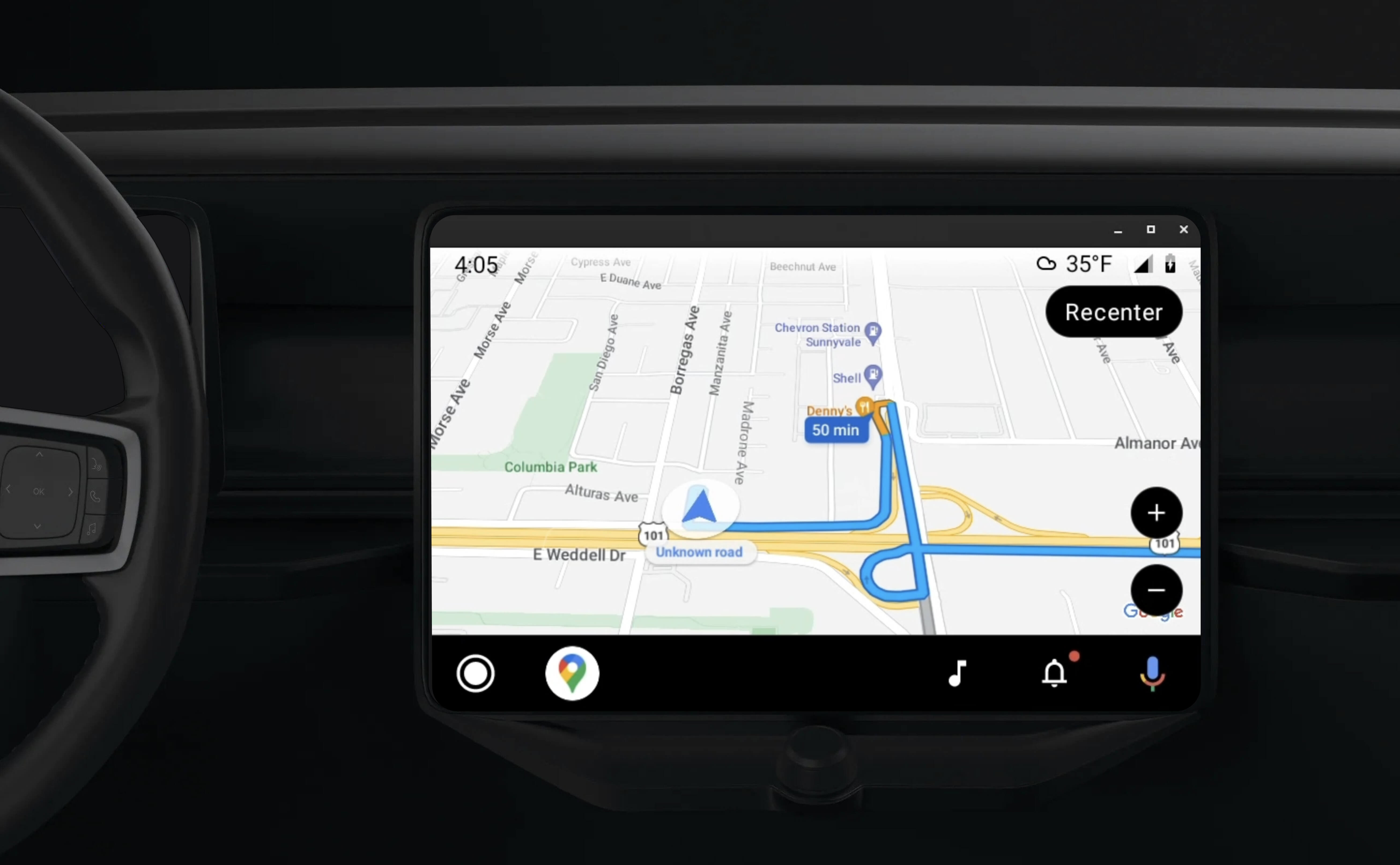
ไลบรารีแอป Android สำหรับรถยนต์ ช่วยให้แอปพลิเคชัน Android ทำงานบน Android Auto ได้โดยการจัดชุดเทมเพลตภาพ ที่ได้รับอนุมัติเพื่อความปลอดภัยของผู้ขับขี่ เทมเพลตเหล่านี้จํากัดการควบคุม UI ในแดชบอร์ดจากโทรศัพท์โดยมีจุดประสงค์เพื่อลดสิ่งรบกวนผู้ขับขี่
เมื่อเปิดใช้แอปที่ขับเคลื่อนด้วย Navigation SDK ให้ทำงานกับ Android Auto คุณจะมอบมุมมองเพิ่มเติมสำหรับประสบการณ์การนำทาง
ซึ่งจะช่วยให้มีมุมมองแผนที่ 2 แบบ ได้แก่ มุมมองสำหรับโทรศัพท์และมุมมองสำหรับเครื่องเล่นวิทยุ ทั้ง 2 จอจะได้รับคำแนะนำจาก Navigator.java ซึ่งเป็น Singleton
ระบบในแดชบอร์ดจะแสดงองค์ประกอบแบบอินเทอร์แอกทีฟที่ผ่านการรับรองด้านความปลอดภัยเพื่อให้ผู้ใช้ไปยังปลายทางได้อย่างปลอดภัยโดยไม่ถูกรบกวนมากเกินไป นอกจากนี้ ผู้ใช้ยังโต้ตอบกับฟังก์ชันการทำงานเฉพาะของแอปได้ด้วย เช่น การยอมรับหรือปฏิเสธคำสั่งซื้อ หรือดูตำแหน่งของลูกค้าบนแผนที่ นอกจากนี้ การอัปเดตสถานะการสั่งซื้อยังอาจ ปรากฏในหน่วยในแดชบอร์ดด้วย
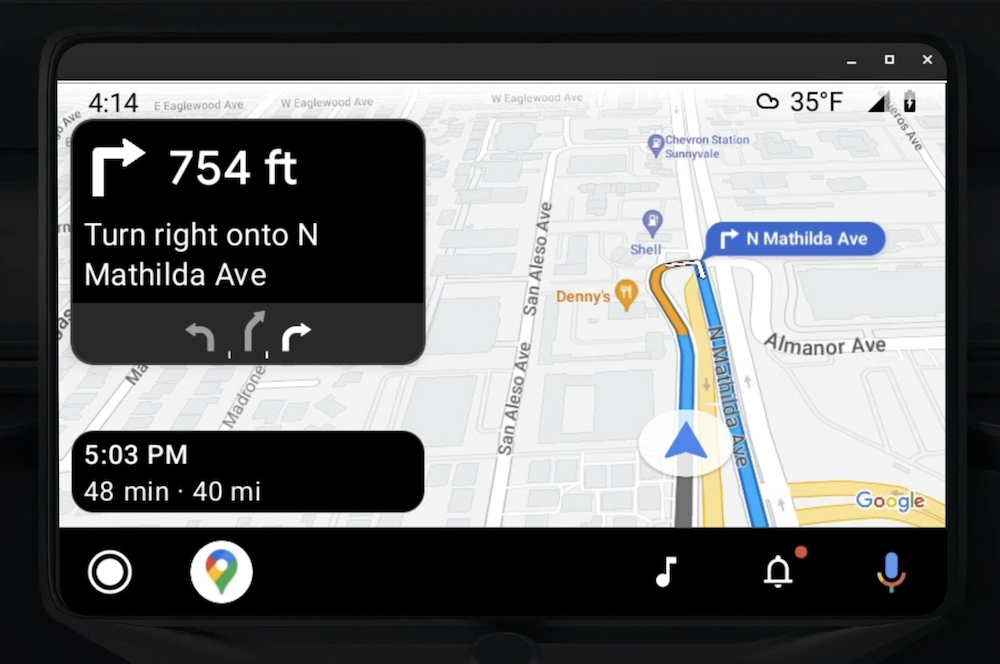
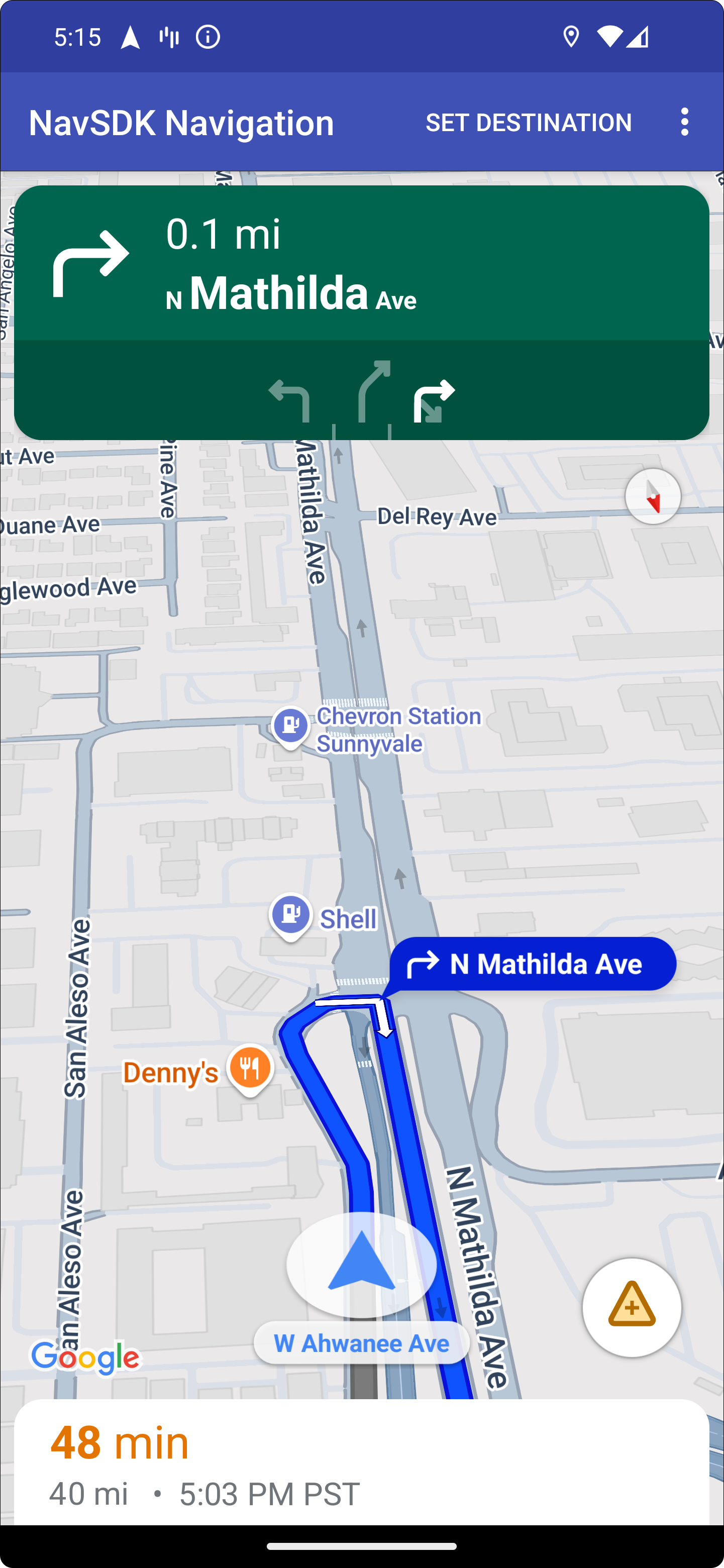
โทรศัพท์ที่เชื่อมต่อจะยังคงแสดงประสบการณ์ SDK การนำทางมาตรฐานหรือมุมมองหรือเวิร์กโฟลว์อื่นๆ ในแอปพลิเคชันของคุณได้ ฟีเจอร์นี้ช่วยให้คุณยังคงมอบฟังก์ชันการทำงานที่กำหนดเอง ซึ่งอาจทำงานได้ไม่ดีบนหน้าจอรถยนต์ต่อไปได้
ตั้งค่า
ส่วนแรกของการทำให้แอปทำงานร่วมกับ Android Auto ได้เกี่ยวข้องกับการตั้งค่าบริการในรถยนต์ด้วย Android Auto แล้วจึงเปิดใช้ไลบรารี TurnByTurn ในแอป Navigation SDK
เริ่มต้นใช้งาน Android Auto
ก่อนที่จะเริ่มใช้ฟีเจอร์ Navigation SDK ที่ออกแบบมาให้ทำงานร่วมกับ Android Auto คุณต้องตั้งค่าบริการในรถยนต์สำหรับ แอปเพื่อให้ Android Auto ค้นพบได้
ทำตามขั้นตอนต่อไปนี้ ซึ่งทั้งหมดอยู่ในเอกสารประกอบสำหรับนักพัฒนาแอป Android for Cars
- ทำความคุ้นเคย กับฟีเจอร์พื้นฐานของ Android Auto
- ติดตั้ง ไลบรารีแอป Android สำหรับรถยนต์
- กำหนดค่า ไฟล์ Manifest ของแอปให้มี Android Auto
- ประกาศ ระดับแอปในรถยนต์ขั้นต่ำเป็น 1 ในไฟล์ Manifest
- สร้าง
CarAppServiceและเซสชัน
ตั้งค่า Navigation SDK
เมื่อสร้างบริการแอปในรถยนต์แล้ว คุณก็พร้อมที่จะใช้ Navigation SDK
- สร้างโปรเจ็กต์ หากยังไม่ได้ผสานรวม Navigation SDK เข้ากับแอป
- เปิดใช้ฟีดคำแนะนำแบบเลี้ยวต่อเลี้ยวสำหรับแอป
- ไม่บังคับ ใช้ไอคอนที่สร้างขึ้น จาก Navigation SDK
- วาดแผนที่
โดยใช้คลาส
NavigationViewForAutoใน Surface ของ Android Auto ที่ระบุ ในคลาสScreen - ป้อนข้อมูลลงในเทมเพลตการนำทางของ Android Auto ด้วยข้อมูลจากไลบรารี TurnbyTurn
ตอนนี้คุณมีบริการที่ลงทะเบียนไว้สำหรับให้ข้อมูลการนำทางแก่แอปของคุณแล้ว และแอปของคุณก็เชื่อมต่อกับ Android Auto ได้ คุณจึงพร้อมที่จะสร้างองค์ประกอบการนำทางที่เหลือซึ่งจำเป็นต่อการทำงานของแอปกับ Android Auto อย่างถูกต้อง
- วาด UI ของแผนที่และการนำทาง
- เปิดใช้การโต้ตอบกับแผนที่
- แสดงเส้นทางการนำทาง
- ตรวจสอบว่าประเภทการเลี้ยวถูกต้อง
วาด UI ของแผนที่และการนำทาง
คลาส NavigationViewForAuto แสดงผลแผนที่และ UI การนำทางบนหน้าจอ Android
Auto โดยมีฟังก์ชันการทำงานส่วนใหญ่เหมือนกับ NavigationView
สำหรับโทรศัพท์ แต่มีการโต้ตอบที่จำกัด ใช้ NavigationViewForAuto เพื่อวาด
บน
Surface
ที่ Android Auto จัดเตรียมไว้
private boolean isSurfaceReady(SurfaceContainer surfaceContainer) {
  return surfaceContainer.getSurface() != null
        && surfaceContainer.getDpi() != 0
        && surfaceContainer.getHeight() != 0
        && surfaceContainer.getWidth() != 0;
}

@Override
public void onSurfaceAvailable(@NonNull SurfaceContainer surfaceContainer) {
  if (!isSurfaceReady(surfaceContainer)) {
    return;
   }
  virtualDisplay =
      getCarContext()
          .getSystemService(DisplayManager.class)
          .createVirtualDisplay(
            VIRTUAL_DISPLAY_NAME,
            surfaceContainer.getWidth(),
            surfaceContainer.getHeight(),
            surfaceContainer.getDpi(),
            surfaceContainer.getSurface(),
            DisplayManager.VIRTUAL_DISPLAY_FLAG_OWN_CONTENT_ONLY);
    presentation = new Presentation(getCarContext(), virtualDisplay.getDisplay());

    navigationView = new NavigationViewForAuto(getCarContext());
    navigationView.onCreate(null);
    navigationView.onStart();
    navigationView.onResume();

    presentation.setContentView(navigationView);
    presentation.show();

    navigationView.getMapAsync(googleMap -> this.googleMap = googleMap);
  }

@Override
public void onSurfaceDestroyed(@NonNull SurfaceContainer surfaceContainer) {
  navigationView.onPause();
  navigationView.onStop();
  navigationView.onDestroy();

  presentation.dismiss();
  virtualDisplay.release();
}
เปิดใช้การโต้ตอบกับแผนที่
Android Auto จำกัดการโต้ตอบกับพื้นผิวของหน้าจอไว้ที่ชุดเมธอด SurfaceCallback เพื่อความปลอดภัยของผู้ขับขี่ ใช้การเรียกกลับเหล่านี้เพื่อรองรับการโต้ตอบของคนขับกับแผนที่แบบจำกัด
บนหน้าจอในแดชบอร์ด ตัวอย่างเช่น onClick และ onScale สอดคล้องกับท่าทางสัมผัสแตะ
และบีบนิ้วจากผู้ใช้ การเรียกกลับของการโต้ตอบต้องใช้ map
action
strip
ดังนี้
หากต้องการรับการเรียกกลับแบบอินเทอร์แอกทีฟของแผนที่ แอปต้องใช้ปุ่ม Action.PAN
หากต้องการรองรับการดำเนินการอื่นๆ ของผู้ใช้ ให้เพิ่มปุ่มลงในแถบการทำงานบนแผนที่
เปิดใช้การเรียกกลับของ Surface
@NonNull
@Override
public Template onGetTemplate() {
  return new NavigationTemplate.Builder()
    .setActionStrip(new ActionStrip.Builder().build())
    .setMapActionStrip(new ActionStrip.Builder().addAction(Action.PAN).build())
    .build();
}
ซูมด้วยการบีบนิ้ว
@Override
public void onScale(float focusX, float focusY, float scaleFactor) {
  CameraUpdate update =
      CameraUpdateFactory.zoomBy((scaleFactor - 1),
                                  new Point((int) focusX, (int) focusY));
  googleMap.animateCamera(update); // map is set in onSurfaceAvailable.
}
การแพน
@Override
public void onScroll(float distanceX, float distanceY) {
  googleMap.moveCamera(CameraUpdateFactory.scrollBy(distanceX, distanceY));
}
แสดงเส้นทางการนำทาง
ส่วนนี้ครอบคลุมวิธีตั้งค่า Observer สำหรับโพสต์การนำทางและ ป้อนข้อมูลเส้นทางการนำทางในเทมเพลตการ์ดเลี้ยว
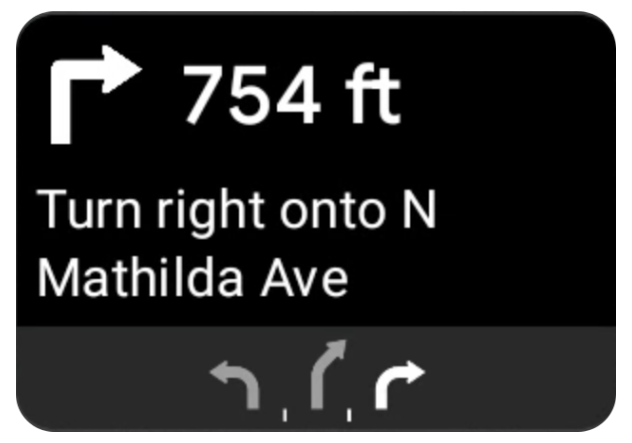
เทมเพลตการนำทางของ Android Auto มีการ์ดเลี้ยวที่แสดงข้อมูลการนำทางที่เกี่ยวข้องกับการเดินทางปัจจุบัน ไลบรารี TurnByTurn ใน Navigation SDK จะให้ข้อมูลการนำทางนี้ ซึ่งโค้ดของคุณใช้เพื่อป้อนข้อมูลเทมเพลตการนำทางของ Android Auto
ตั้งค่าผู้สังเกตการณ์
ในตัวอย่างต่อไปนี้ SampleApplication คือคลาสแอปพลิเคชันที่กำหนดเองซึ่ง
รักษาออบเจ็กต์ MutableLiveData<NavInfo> เมื่อ Observer ได้รับการอัปเดตจากออบเจ็กต์ Navigator ก็จะโพสต์ออบเจ็กต์ NavInfo นี้ไปยัง NavInfoMutableLiveData ที่ดูแลโดยคลาส SampleApplication
ตัวอย่างต่อไปนี้จะลงทะเบียน Observer สำหรับออบเจ็กต์นี้ในการ ติดตั้งใช้งาน Screen ของ Android Auto
public SampleAndroidAutoNavigationScreen(@NonNull CarContext carContext,
                                     SampleApplication application) {
  super(carContext);
  getCarContext().getCarService(AppManager.class).setSurfaceCallback(this);
  application.getNavInfoMutableLiveData().observe(this, this::processNextStep);
}
ป้อนข้อมูลการนำทาง
ข้อมูลโค้ดต่อไปนี้แสดงวิธีป้อนข้อมูลเทมเพลต Android Auto ด้วย ข้อมูลการกำหนดเส้นทางปัจจุบัน ซึ่งรวมถึงขั้นตอน ระยะทาง และไอคอน คุณดูข้อมูลเพิ่มเติมเกี่ยวกับองค์ประกอบ Display เหล่านี้ได้ในป้อนข้อมูลฟีด Display
ขยายเพื่อดูตัวอย่างโค้ด
private RoutingInfo currentRoutingInfo;

@NonNull
@Override
public Template onGetTemplate() {
NavigationTemplate.Builder navigationTemplateBuilder =
  new NavigationTemplate.Builder()
    .setActionStrip(...)
    .setMapActionStrip(...)
  if (currentRoutingInfo != null) {
    navigationTemplateBuilder.setNavigationInfo(currentRoutingInfo);
  }
  return navigationTemplateBuilder.build();
}

private void processNextStep(NavInfo navInfo) {
  if (navInfo == null || navinfo.getCurrentStep() == null) {
    return;
  }

/**
*   Converts data received from the Navigation data feed
*   into Android-Auto compatible data structures. For more information
*   see the "Ensure correct maneuver types" below.
*/
  Step currentStep = buildStepFromStepInfo(navInfo.getCurrentStep());
  Distance distanceToStep =
              buildDistanceFromMeters(navInfo.getDistanceToCurrentStepMeters());

  currentRoutingInfo =
     new RoutingInfo.Builder().setCurrentStep(currentStep, distanceToStep).build();

  // Invalidate the current template which leads to another onGetTemplate call.
  invalidate();
}

private Step buildStepFromStepInfo(StepInfo stepInfo) {
  IconCompat maneuverIcon =
               IconCompat.createWithBitmap(stepInfo.getManeuverBitmap());
  Maneuver.Builder
            maneuverBuilder = newManeuver.Builder(
                  ManeuverConverter
                          .getAndroidAutoManeuverType(stepInfo.getManeuver()));
  CarIcon maneuverCarIcon = new CarIcon.Builder(maneuverIcon).build();
  maneuverBuilder.setIcon(maneuverCarIcon);
  Step.Builder stepBuilder =
    new Step.Builder()
       .setRoad(stepInfo.getFullRoadName())
       .setCue(stepInfo.getFullInstructionText())
       .setManeuver(maneuverBuilder.build());

  if (stepInfo.getLanes() != null
           && stepInfo.getLanesBitmap() != null) {
    for (Lane lane : buildAndroidAutoLanesFromStep(stepInfo)) {
      stepBuilder.addLane(lane);
    }
    IconCompat lanesIcon =
               IconCompat.createWithBitmap(stepInfo.getLanesBitmap());
    CarIcon lanesImage = new CarIcon.Builder(lanesIcon).build();
    stepBuilder.setLanesImage(lanesImage);
  }
    return stepBuilder.build();
}

/*
*   Constructs a {@code Distance} object in imperial measurement units.
*   In a real world scenario, units would be based on locale.
*/
private Distance buildDistanceFromMeters(int distanceMeters) {

// Distance can be negative so set the min distance to 0.
  int remainingFeet = (int) max(0, distanceMeters * DistanceConstants.FEET_PER_METER);
  double remainingMiles = ((double) remainingFeet) / DistanceConstants.FEET_PER_MILE;

// Only use the tenths place digit if distance is less than 10 miles and show
// feet if distance is less than 0.25 miles.

  if (remainingMiles >= DistanceConstants.MIN_MILES_TO_SHOW_INTEGER) {
    return Distance.create((int) round(remainingMiles), Distance.UNIT_MILES);
  } else if (remainingMiles >= 0.25) {
    return Distance.create((int) remainingMiles, Distance.UNIT_MILES);
  } else {
    return Distance.create(remainingFeet, Distance.UNIT_FEET);
  }
}
ยืนยันประเภทการเลี้ยวที่ถูกต้อง
การเลี้ยวที่ใช้ในไลบรารีรถยนต์ของ Android Auto จะสอดคล้อง แบบหนึ่งต่อหนึ่งกับการเลี้ยวที่ไลบรารี TurnByTurn มีให้ อย่างไรก็ตาม คุณต้อง แปลงการเลี้ยวของ Navigation SDK เป็น การประกาศที่ถูกต้องในไลบรารีรถยนต์ของ Android Auto ตารางต่อไปนี้แสดง การจับคู่สำหรับฟิลด์บางส่วน ตามด้วยยูทิลิตีตัวแปลงตัวอย่าง เพื่อความสะดวกของคุณ
| การเลี้ยวต่อเลี้ยวในห้องสมุด | Android Auto Maneuver |
|---|---|
DEPART |
TYPE_DEPART |
DESTINATION |
TYPE_DESTINATION |
DESTINATION_LEFT |
TYPE_DESTINATION_LEFT |
DESTINATION_RIGHT |
TYPE_DESTINATION_RIGHT |
TURN_U_TURN_CLOCKWISE |
TYPE_U_TURN_RIGHT |
ON_RAMP_LEFT |
TYPE_ON_RAMP_NORMAL_LEFT |
ON_RAMP_RIGHT |
TYPE_ON_RAMP_NORMAL_RIGHT |
ON_RAMP_SLIGHT_LEFT |
TYPE_ON_RAMP_SLIGHT_LEFT |
FORK_RIGHT |
TYPE_FORK_RIGHT |
ขยายเพื่อดูตัวอย่างโค้ด
import com.google.android.libraries.mapsplatform.turnbyturn.model.Maneuver;
import com.google.common.collect.ImmutableMap;
import javax.annotation.Nullable;

/** Converter that converts between turn-by-turn and Android Auto Maneuvers. */
public final class ManeuverConverter {
  private ManeuverConverter() {}

  // Map from turn-by-turn Maneuver to Android Auto Maneuver.Type.
  private static final ImmutableMap<Integer, Integer> MANEUVER_TO_ANDROID_AUTO_MANEUVER_TYPE =
      ImmutableMap.<Integer, Integer>builder()
          .put(Maneuver.DEPART, androidx.car.app.navigation.model.Maneuver.TYPE_DEPART)
          .put(Maneuver.DESTINATION, androidx.car.app.navigation.model.Maneuver.TYPE_DESTINATION)
          .put(
              Maneuver.DESTINATION_LEFT,
              androidx.car.app.navigation.model.Maneuver.TYPE_DESTINATION_LEFT)
          .put(
              Maneuver.DESTINATION_RIGHT,
              androidx.car.app.navigation.model.Maneuver.TYPE_DESTINATION_RIGHT)
          .put(Maneuver.STRAIGHT, androidx.car.app.navigation.model.Maneuver.TYPE_STRAIGHT)
          .put(Maneuver.TURN_LEFT, androidx.car.app.navigation.model.Maneuver.TYPE_TURN_NORMAL_LEFT)
          .put(
              Maneuver.TURN_RIGHT,
              androidx.car.app.navigation.model.Maneuver.TYPE_TURN_NORMAL_RIGHT)
          .put(Maneuver.TURN_KEEP_LEFT, androidx.car.app.navigation.model.Maneuver.TYPE_KEEP_LEFT)
          .put(Maneuver.TURN_KEEP_RIGHT, androidx.car.app.navigation.model.Maneuver.TYPE_KEEP_RIGHT)
          .put(
              Maneuver.TURN_SLIGHT_LEFT,
              androidx.car.app.navigation.model.Maneuver.TYPE_TURN_SLIGHT_LEFT)
          .put(
              Maneuver.TURN_SLIGHT_RIGHT,
              androidx.car.app.navigation.model.Maneuver.TYPE_TURN_SLIGHT_RIGHT)
          .put(
              Maneuver.TURN_SHARP_LEFT,
              androidx.car.app.navigation.model.Maneuver.TYPE_TURN_SHARP_LEFT)
          .put(
              Maneuver.TURN_SHARP_RIGHT,
              androidx.car.app.navigation.model.Maneuver.TYPE_ON_RAMP_SHARP_RIGHT)
          .put(
              Maneuver.TURN_U_TURN_CLOCKWISE,
              androidx.car.app.navigation.model.Maneuver.TYPE_U_TURN_RIGHT)
          .put(
              Maneuver.TURN_U_TURN_COUNTERCLOCKWISE,
              androidx.car.app.navigation.model.Maneuver.TYPE_U_TURN_LEFT)
          .put(
              Maneuver.MERGE_UNSPECIFIED,
              androidx.car.app.navigation.model.Maneuver.TYPE_MERGE_SIDE_UNSPECIFIED)
          .put(Maneuver.MERGE_LEFT, androidx.car.app.navigation.model.Maneuver.TYPE_MERGE_LEFT)
          .put(Maneuver.MERGE_RIGHT, androidx.car.app.navigation.model.Maneuver.TYPE_MERGE_RIGHT)
          .put(Maneuver.FORK_LEFT, androidx.car.app.navigation.model.Maneuver.TYPE_FORK_LEFT)
          .put(Maneuver.FORK_RIGHT, androidx.car.app.navigation.model.Maneuver.TYPE_FORK_RIGHT)
          .put(
              Maneuver.ON_RAMP_UNSPECIFIED,
              androidx.car.app.navigation.model.Maneuver.TYPE_ON_RAMP_NORMAL_RIGHT)
          .put(
              Maneuver.ON_RAMP_LEFT,
              androidx.car.app.navigation.model.Maneuver.TYPE_ON_RAMP_NORMAL_LEFT)
          .put(
              Maneuver.ON_RAMP_RIGHT,
              androidx.car.app.navigation.model.Maneuver.TYPE_ON_RAMP_NORMAL_RIGHT)
          .put(
              Maneuver.ON_RAMP_KEEP_LEFT,
              androidx.car.app.navigation.model.Maneuver.TYPE_ON_RAMP_NORMAL_LEFT)
          .put(
              Maneuver.ON_RAMP_KEEP_RIGHT,
              androidx.car.app.navigation.model.Maneuver.TYPE_ON_RAMP_NORMAL_RIGHT)
          .put(
              Maneuver.ON_RAMP_SLIGHT_LEFT,
              androidx.car.app.navigation.model.Maneuver.TYPE_ON_RAMP_SLIGHT_LEFT)
          .put(
              Maneuver.ON_RAMP_SLIGHT_RIGHT,
              androidx.car.app.navigation.model.Maneuver.TYPE_ON_RAMP_SLIGHT_RIGHT)
          .put(
              Maneuver.ON_RAMP_SHARP_LEFT,
              androidx.car.app.navigation.model.Maneuver.TYPE_ON_RAMP_SHARP_LEFT)
          .put(
              Maneuver.ON_RAMP_SHARP_RIGHT,
              androidx.car.app.navigation.model.Maneuver.TYPE_ON_RAMP_SHARP_RIGHT)
          .put(
              Maneuver.ON_RAMP_U_TURN_CLOCKWISE,
              androidx.car.app.navigation.model.Maneuver.TYPE_ON_RAMP_U_TURN_RIGHT)
          .put(
              Maneuver.ON_RAMP_U_TURN_COUNTERCLOCKWISE,
              androidx.car.app.navigation.model.Maneuver.TYPE_ON_RAMP_U_TURN_LEFT)
          .put(
              Maneuver.OFF_RAMP_LEFT,
              androidx.car.app.navigation.model.Maneuver.TYPE_OFF_RAMP_NORMAL_LEFT)
          .put(
              Maneuver.OFF_RAMP_RIGHT,
              androidx.car.app.navigation.model.Maneuver.TYPE_OFF_RAMP_NORMAL_RIGHT)
          .put(
              Maneuver.OFF_RAMP_KEEP_LEFT,
              androidx.car.app.navigation.model.Maneuver.TYPE_OFF_RAMP_SLIGHT_LEFT)
          .put(
              Maneuver.OFF_RAMP_KEEP_RIGHT,
              androidx.car.app.navigation.model.Maneuver.TYPE_OFF_RAMP_SLIGHT_RIGHT)
          .put(
              Maneuver.OFF_RAMP_SLIGHT_LEFT,
              androidx.car.app.navigation.model.Maneuver.TYPE_OFF_RAMP_SLIGHT_LEFT)
          .put(
              Maneuver.OFF_RAMP_SLIGHT_RIGHT,
              androidx.car.app.navigation.model.Maneuver.TYPE_OFF_RAMP_SLIGHT_RIGHT)
          .put(
              Maneuver.OFF_RAMP_SHARP_LEFT,
              androidx.car.app.navigation.model.Maneuver.TYPE_OFF_RAMP_NORMAL_LEFT)
          .put(
              Maneuver.OFF_RAMP_SHARP_RIGHT,
              androidx.car.app.navigation.model.Maneuver.TYPE_OFF_RAMP_NORMAL_RIGHT)
          .put(
              Maneuver.ROUNDABOUT_CLOCKWISE,
              androidx.car.app.navigation.model.Maneuver.TYPE_ROUNDABOUT_ENTER_AND_EXIT_CW)
          .put(
              Maneuver.ROUNDABOUT_COUNTERCLOCKWISE,
              androidx.car.app.navigation.model.Maneuver.TYPE_ROUNDABOUT_ENTER_AND_EXIT_CCW)
          .put(
              Maneuver.ROUNDABOUT_STRAIGHT_CLOCKWISE,
              androidx.car.app.navigation.model.Maneuver.TYPE_ROUNDABOUT_ENTER_CW)
          .put(
              Maneuver.ROUNDABOUT_STRAIGHT_COUNTERCLOCKWISE,
              androidx.car.app.navigation.model.Maneuver.TYPE_ROUNDABOUT_ENTER_CCW)
          .put(
              Maneuver.ROUNDABOUT_LEFT_CLOCKWISE,
              androidx.car.app.navigation.model.Maneuver
                  .TYPE_ROUNDABOUT_ENTER_AND_EXIT_CW_WITH_ANGLE)
          .put(
              Maneuver.ROUNDABOUT_LEFT_COUNTERCLOCKWISE,
              androidx.car.app.navigation.model.Maneuver
                  .TYPE_ROUNDABOUT_ENTER_AND_EXIT_CCW_WITH_ANGLE)
          .put(
              Maneuver.ROUNDABOUT_RIGHT_CLOCKWISE,
              androidx.car.app.navigation.model.Maneuver
                  .TYPE_ROUNDABOUT_ENTER_AND_EXIT_CW_WITH_ANGLE)
          .put(
              Maneuver.ROUNDABOUT_RIGHT_COUNTERCLOCKWISE,
              androidx.car.app.navigation.model.Maneuver
                  .TYPE_ROUNDABOUT_ENTER_AND_EXIT_CCW_WITH_ANGLE)
          .put(
              Maneuver.ROUNDABOUT_SLIGHT_LEFT_CLOCKWISE,
              androidx.car.app.navigation.model.Maneuver
                  .TYPE_ROUNDABOUT_ENTER_AND_EXIT_CW_WITH_ANGLE)
          .put(
              Maneuver.ROUNDABOUT_SLIGHT_LEFT_COUNTERCLOCKWISE,
              androidx.car.app.navigation.model.Maneuver
                  .TYPE_ROUNDABOUT_ENTER_AND_EXIT_CCW_WITH_ANGLE)
          .put(
              Maneuver.ROUNDABOUT_SLIGHT_RIGHT_CLOCKWISE,
              androidx.car.app.navigation.model.Maneuver
                  .TYPE_ROUNDABOUT_ENTER_AND_EXIT_CW_WITH_ANGLE)
          .put(
              Maneuver.ROUNDABOUT_SLIGHT_RIGHT_COUNTERCLOCKWISE,
              androidx.car.app.navigation.model.Maneuver
                  .TYPE_ROUNDABOUT_ENTER_AND_EXIT_CCW_WITH_ANGLE)
          .put(
              Maneuver.ROUNDABOUT_SHARP_LEFT_CLOCKWISE,
              androidx.car.app.navigation.model.Maneuver
                  .TYPE_ROUNDABOUT_ENTER_AND_EXIT_CW_WITH_ANGLE)
          .put(
              Maneuver.ROUNDABOUT_SHARP_LEFT_COUNTERCLOCKWISE,
              androidx.car.app.navigation.model.Maneuver
                  .TYPE_ROUNDABOUT_ENTER_AND_EXIT_CCW_WITH_ANGLE)
          .put(
              Maneuver.ROUNDABOUT_SHARP_RIGHT_CLOCKWISE,
              androidx.car.app.navigation.model.Maneuver
                  .TYPE_ROUNDABOUT_ENTER_AND_EXIT_CW_WITH_ANGLE)
          .put(
              Maneuver.ROUNDABOUT_SHARP_RIGHT_COUNTERCLOCKWISE,
              androidx.car.app.navigation.model.Maneuver
                  .TYPE_ROUNDABOUT_ENTER_AND_EXIT_CCW_WITH_ANGLE)
          .put(
              Maneuver.ROUNDABOUT_U_TURN_CLOCKWISE,
              androidx.car.app.navigation.model.Maneuver
                  .TYPE_ROUNDABOUT_ENTER_AND_EXIT_CW_WITH_ANGLE)
          .put(
              Maneuver.ROUNDABOUT_U_TURN_COUNTERCLOCKWISE,
              androidx.car.app.navigation.model.Maneuver
                  .TYPE_ROUNDABOUT_ENTER_AND_EXIT_CCW_WITH_ANGLE)
          .put(
              Maneuver.ROUNDABOUT_EXIT_CLOCKWISE,
              androidx.car.app.navigation.model.Maneuver.TYPE_ROUNDABOUT_EXIT_CW)
          .put(
              Maneuver.ROUNDABOUT_EXIT_COUNTERCLOCKWISE,
              androidx.car.app.navigation.model.Maneuver.TYPE_ROUNDABOUT_EXIT_CCW)
          .put(Maneuver.FERRY_BOAT, androidx.car.app.navigation.model.Maneuver.TYPE_FERRY_BOAT)
          .put(Maneuver.FERRY_TRAIN, androidx.car.app.navigation.model.Maneuver.TYPE_FERRY_TRAIN)
          .put(Maneuver.NAME_CHANGE, androidx.car.app.navigation.model.Maneuver.TYPE_NAME_CHANGE)
          .buildOrThrow();

  /** Represents the roundabout turn angle for a slight turn in either right or left directions. */
  private static final int ROUNDABOUT_ANGLE_SLIGHT = 10;

  /** Represents the roundabout turn angle for a normal turn in either right or left directions. */
  private static final int ROUNDABOUT_ANGLE_NORMAL = 45;

  /** Represents the roundabout turn angle for a sharp turn in either right or left directions. */
  private static final int ROUNDABOUT_ANGLE_SHARP = 135;

  /** Represents the roundabout turn angle for a u-turn in either right or left directions. */
  private static final int ROUNDABOUT_ANGLE_U_TURN = 180;

  /**
   * Returns the corresponding {@link androidx.car.app.navigation.model.Maneuver.Type} for the given
   * direction {@link Maneuver}
   *
   * @throws {@link IllegalArgumentException} if the given maneuver does not have a corresponding
   *     Android Auto Maneuver type.
   */
  public static int getAndroidAutoManeuverType(@Maneuver int maneuver) {
    if (MANEUVER_TO_ANDROID_AUTO_MANEUVER_TYPE.containsKey(maneuver)) {
      return MANEUVER_TO_ANDROID_AUTO_MANEUVER_TYPE.get(maneuver);
    }
    throw new IllegalArgumentException(
        String.format(
            "Given turn-by-turn Maneuver %d cannot be converted to an Android Auto equivalent.",
            maneuver));
  }

  /**
   * Returns the corresponding Android Auto roundabout angle for the given turn {@link Maneuver}.
   * Returns {@code null} if given maneuver does not involve a roundabout with a turn.
   */
  @Nullable
  public static Integer getAndroidAutoRoundaboutAngle(@Maneuver int maneuver) {
    if (maneuver == Maneuver.ROUNDABOUT_LEFT_CLOCKWISE
        || maneuver == Maneuver.ROUNDABOUT_RIGHT_CLOCKWISE
        || maneuver == Maneuver.ROUNDABOUT_LEFT_COUNTERCLOCKWISE
        || maneuver == Maneuver.ROUNDABOUT_RIGHT_COUNTERCLOCKWISE) {
      return ROUNDABOUT_ANGLE_NORMAL;
    }
    if (maneuver == Maneuver.ROUNDABOUT_SHARP_LEFT_CLOCKWISE
        || maneuver == Maneuver.ROUNDABOUT_SHARP_RIGHT_CLOCKWISE
        || maneuver == Maneuver.ROUNDABOUT_SHARP_LEFT_COUNTERCLOCKWISE
        || maneuver == Maneuver.ROUNDABOUT_SHARP_RIGHT_COUNTERCLOCKWISE) {
      return ROUNDABOUT_ANGLE_SHARP;
    }
    if (maneuver == Maneuver.ROUNDABOUT_SLIGHT_LEFT_CLOCKWISE
        || maneuver == Maneuver.ROUNDABOUT_SLIGHT_RIGHT_CLOCKWISE
        || maneuver == Maneuver.ROUNDABOUT_SLIGHT_LEFT_COUNTERCLOCKWISE
        || maneuver == Maneuver.ROUNDABOUT_SLIGHT_RIGHT_COUNTERCLOCKWISE) {
      return ROUNDABOUT_ANGLE_SLIGHT;
    }
    if (maneuver == Maneuver.ROUNDABOUT_U_TURN_CLOCKWISE
        || maneuver == Maneuver.ROUNDABOUT_U_TURN_COUNTERCLOCKWISE) {
      return ROUNDABOUT_ANGLE_U_TURN;
    }
    return null;
  }
}
เอกสารประกอบที่เกี่ยวข้อง
- เปิดใช้ฟีดคำแนะนำแบบเลี้ยวต่อเลี้ยว: ผสานรวมฟังก์ชันการทำงานแบบเลี้ยวต่อเลี้ยวก่อนเพื่อให้แอปทำงานร่วมกับ Android Auto ได้
- แสดงฟีด: เข้าถึงฟิลด์ข้อมูลสำหรับข้อมูลคำแนะนำและใช้ไอคอน