Tworzenie opiekunów i zarządzanie nimi

Zasób Guardianresource reprezentuje użytkownika, np. rodzica, który otrzymuje informacje o kursach i zadaniach ucznia. Opiekun, który zwykle nie jest członkiem domeny Classroom ucznia, musi zostać zaproszony za pomocą swojego adresu e-mail.

Zaproszenia są reprezentowane przez zasób GuardianInvitation. Zaproszony użytkownik otrzymuje e-maila z prośbą o przyjęcie zaproszenia. Jeśli adres e-mail nie jest powiązany z kontem Google, użytkownik zostanie poproszony o jego utworzenie przed zaakceptowaniem zaproszenia.

Gdy użytkownik zostanie zaproszony, ale nie zaakceptuje zaproszenia, zasób GuardianInvitation ma stan PENDING. Gdy użytkownik zaakceptuje zaproszenie, zasób GuardianInvitation zostanie oznaczony jako COMPLETED i zostanie utworzony zasób Guardian.

Stan GuardianInvitation może też zostać zmieniony na COMPLETED, jeśli wygaśnie lub jeśli autoryzowany użytkownik je anuluje (np. za pomocą metody PatchGuardianInvitation). Relację opiekuna może też zerwać opiekun, nauczyciel Classroom lub administrator za pomocą aplikacji internetowej Classroom albo metody DeleteGuardian.

Kto może zarządzać opiekunami

W tabeli poniżej opisano działania, które można wykonywać w odniesieniu do opiekunów, w zależności od typu uwierzytelnionego użytkownika:
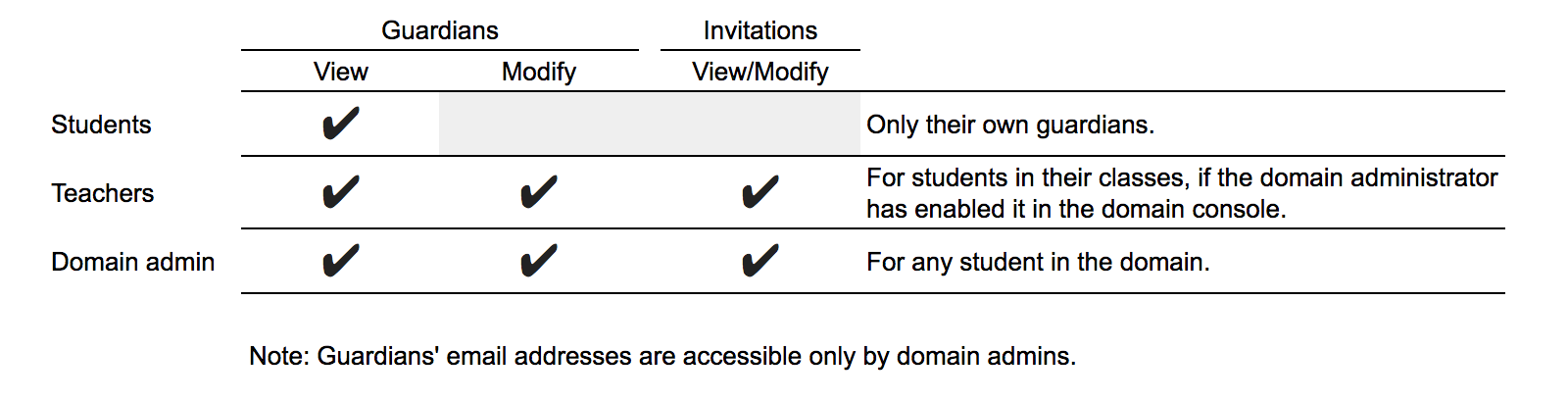
Tabela list kontroli dostępu związanych z opiekunem według typu użytkownika

Zakresy

Dostępne są 3 zakresy, które umożliwiają zarządzanie opiekunami:

  • https://www.googleapis.com/auth/classroom.guardianlinks.me.readonly: wyświetlanie opiekunów użytkownika.
  • https://www.googleapis.com/auth/classroom.guardianlinks.students.readonly: wyświetlanie opiekunów i zaproszeń dla opiekunów uczniów, których uczy lub którymi zarządza użytkownik.
  • https://www.googleapis.com/auth/classroom.guardianlinks.students: wyświetlanie opiekunów i zaproszeń dla opiekunów uczniów, których uczy lub którymi zarządza użytkownik, oraz zarządzanie nimi.

Typowe działania

W tej sekcji opisujemy niektóre typowe działania związane z opiekunami, które możesz wykonywać za pomocą interfejsu Google Classroom API.

Tworzenie zaproszenia dla opiekuna

Poniższy przykład pokazuje, jak utworzyć zaproszenie dla opiekuna za pomocą metody userProfiles.guardianInvitations.create():

Java

classroom/snippets/src/main/java/CreateGuardianInvitation.java
GuardianInvitation guardianInvitation = null;

/* Create a GuardianInvitation object with state set to PENDING. See
https://developers.google.com/classroom/reference/rest/v1/userProfiles.guardianInvitations#guardianinvitationstate
for other possible states of guardian invitations. */
GuardianInvitation content =
    new GuardianInvitation()
        .setStudentId(studentId)
        .setInvitedEmailAddress(guardianEmail)
        .setState("PENDING");
try {
  guardianInvitation =
      service.userProfiles().guardianInvitations().create(studentId, content).execute();

  System.out.printf("Invitation created: %s\n", guardianInvitation.getInvitationId());
} catch (GoogleJsonResponseException e) {
  // TODO (developer) - handle error appropriately
  GoogleJsonError error = e.getDetails();
  if (error.getCode() == 404) {
    System.out.printf("There is no record of studentId: %s", studentId);
  } else {
    throw e;
  }
} catch (Exception e) {
  throw e;
}
return guardianInvitation;

Python

guardianInvitation = {
  'invitedEmailAddress': 'guardian@gmail.com',
}
guardianInvitation = service.userProfiles().guardianInvitations().create(
                      studentId='student@mydomain.edu',
                          body=guardianInvitation).execute()
print("Invitation created with id: {0}".format(guardianInvitation.get('invitationId')))

Odpowiedź zawiera identyfikator przypisany przez serwer, którego można użyć do odwoływania się do GuardianInvitation.

Anulowanie zaproszenia dla opiekuna

Aby anulować zaproszenie, zmień jego stan z PENDING na COMPLETE wywołując metodę userProfiles.guardianInvitations.patch(). Jest to jedyny sposób na usunięcie zaproszenia.

Java

classroom/snippets/src/main/java/CancelGuardianInvitation.java
GuardianInvitation guardianInvitation = null;

try {
  /* Change the state of the GuardianInvitation from PENDING to COMPLETE. See
  https://developers.google.com/classroom/reference/rest/v1/userProfiles.guardianInvitations#guardianinvitationstate
  for other possible states of guardian invitations. */
  GuardianInvitation content =
      service.userProfiles().guardianInvitations().get(studentId, invitationId).execute();
  content.setState("COMPLETE");

  guardianInvitation =
      service
          .userProfiles()
          .guardianInvitations()
          .patch(studentId, invitationId, content)
          .set("updateMask", "state")
          .execute();

  System.out.printf(
      "Invitation (%s) state set to %s\n.",
      guardianInvitation.getInvitationId(), guardianInvitation.getState());
} catch (GoogleJsonResponseException e) {
  // TODO (developer) - handle error appropriately
  GoogleJsonError error = e.getDetails();
  if (error.getCode() == 404) {
    System.out.printf(
        "There is no record of studentId (%s) or invitationId (%s).", studentId, invitationId);
  } else {
    throw e;
  }
} catch (Exception e) {
  throw e;
}
return guardianInvitation;

Python

guardian_invite = {
     'state': 'COMPLETE'
}
guardianInvitation = service.userProfiles().guardianInvitations().patch(
  studentId='student@mydomain.edu',
  invitationId=1234, # Replace with the invitation ID of the invitation you want to cancel
  updateMask='state',
  body=guardianInvitation).execute()

Wyświetlanie zaproszeń dla konkretnego ucznia

Listę wszystkich zaproszeń wysłanych do konkretnego ucznia możesz uzyskać za pomocą metody userProfiles.guardianInvitations.list(). Domyślnie zwracane są tylko zaproszenia w stanie PENDING. Administrator domeny może też pobierać zaproszenia w stanie COMPLETED, podając parametr states.

Java

classroom/snippets/src/main/java/ListGuardianInvitationsByStudent.java
List<GuardianInvitation> guardianInvitations = new ArrayList<>();
String pageToken = null;

try {
  do {
    ListGuardianInvitationsResponse response =
        service
            .userProfiles()
            .guardianInvitations()
            .list(studentId)
            .setPageToken(pageToken)
            .execute();

    /* Ensure that the response is not null before retrieving data from it to avoid errors. */
    if (response.getGuardianInvitations() != null) {
      guardianInvitations.addAll(response.getGuardianInvitations());
      pageToken = response.getNextPageToken();
    }
  } while (pageToken != null);

  if (guardianInvitations.isEmpty()) {
    System.out.println("No guardian invitations found.");
  } else {
    for (GuardianInvitation invitation : guardianInvitations) {
      System.out.printf("Guardian invitation id: %s\n", invitation.getInvitationId());
    }
  }
} catch (GoogleJsonResponseException e) {
  GoogleJsonError error = e.getDetails();
  if (error.getCode() == 404) {
    System.out.printf("There is no record of studentId (%s).", studentId);
  } else {
    throw e;
  }
} catch (Exception e) {
  throw e;
}
return guardianInvitations;

Python

guardian_invites = []
page_token = None

while True:
    response = service.userProfiles().guardianInvitations().list(
                                      studentId='student@mydomain.edu').execute()
    guardian_invites.extend(response.get('guardian_invites', []))
    page_token = response.get('nextPageToken', None)
    if not page_token:
        break

if not courses:
    print('No guardians invited for this {0}.'.format(response.get('studentId')))
else:
    print('Guardian Invite:')
    for guardian in guardian_invites:
        print('An invite was sent to '.format(guardian.get('id'),
                                              guardian.get('guardianId')))

Wyświetlanie aktywnych opiekunów

Aby sprawdzić, którzy użytkownicy są aktywnymi opiekunami konkretnego ucznia, użyj metody userProfiles.guardians.list(). Aktywni opiekunowie to opiekunowie, którzy zaakceptowali zaproszenie.

Java

classroom/snippets/src/main/java/ListGuardians.java
List<Guardian> guardians = new ArrayList<>();
String pageToken = null;

try {
  do {
    ListGuardiansResponse response =
        service.userProfiles().guardians().list(studentId).setPageToken(pageToken).execute();

    /* Ensure that the response is not null before retrieving data from it to avoid errors. */
    if (response.getGuardians() != null) {
      guardians.addAll(response.getGuardians());
      pageToken = response.getNextPageToken();
    }
  } while (pageToken != null);

  if (guardians.isEmpty()) {
    System.out.println("No guardians found.");
  } else {
    for (Guardian guardian : guardians) {
      System.out.printf(
          "Guardian name: %s, guardian id: %s, guardian email: %s\n",
          guardian.getGuardianProfile().getName().getFullName(),
          guardian.getGuardianId(),
          guardian.getInvitedEmailAddress());
    }
  }

} catch (GoogleJsonResponseException e) {
  GoogleJsonError error = e.getDetails();
  if (error.getCode() == 404) {
    System.out.printf("There is no record of studentId (%s).", studentId);
  } else {
    throw e;
  }
} catch (Exception e) {
  throw e;
}
return guardians;

Python

guardian_invites = []
page_token = None

while True:
    response = service.userProfiles().guardians().list(studentId='student@mydomain.edu').execute()
    guardian_invites.extend(response.get('guardian_invites', []))
    page_token = response.get('nextPageToken', None)
    if not page_token:
        break

if not courses:
    print('No guardians invited for this {0}.'.format(response.get('studentId')))
else:
    print('Guardian Invite:')
    for guardian in guardian_invites:
        print('An invite was sent to '.format(guardian.get('id'),
                                              guardian.get('guardianId')))

Usuwanie opiekunów

Możesz też usunąć opiekuna ucznia za pomocą metody userProfiles.guardians.delete():

Java

classroom/snippets/src/main/java/DeleteGuardian.java
try {
  service.userProfiles().guardians().delete(studentId, guardianId).execute();
  System.out.printf("The guardian with id %s was deleted.\n", guardianId);
} catch (GoogleJsonResponseException e) {
  GoogleJsonError error = e.getDetails();
  if (error.getCode() == 404) {
    System.out.printf("There is no record of guardianId (%s).", guardianId);
  }
}

Python

service.userProfiles().guardians().delete(studentId='student@mydomain.edu',
                                        guardianId='guardian@gmail.com').execute()