
products
资源可以帮助您灵活管理 60 多个商品属性。有一些字段是必填字段,如果缺少这些字段,商品将不能获准在 Google 购物上展示。
根据商家的位置、商品类型、商品款式和捆绑商品等不同的使用情况,有一些可选字段可能会变成必填字段。有关可以为商品配置的 60 多个可选参数的详情,请参阅商品数据
规范。
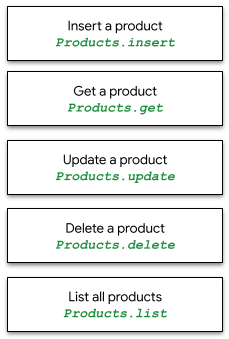
products 资源可让您一次 insert、get、update 和 delete 一件商品,并 list 商家中心数据库中的所有商品。
productstatuses
资源可用于查看特定
商品在平台上的批准或未获批准状态。有关哪些
商品可能存在数据质量问题以及可能存在哪些问题的详情,请参阅商品状态
指南。
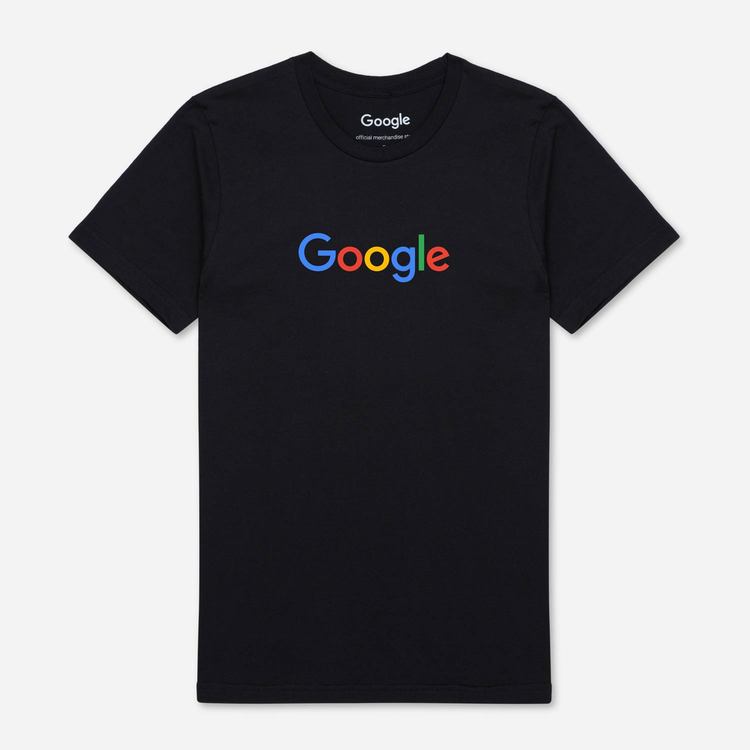
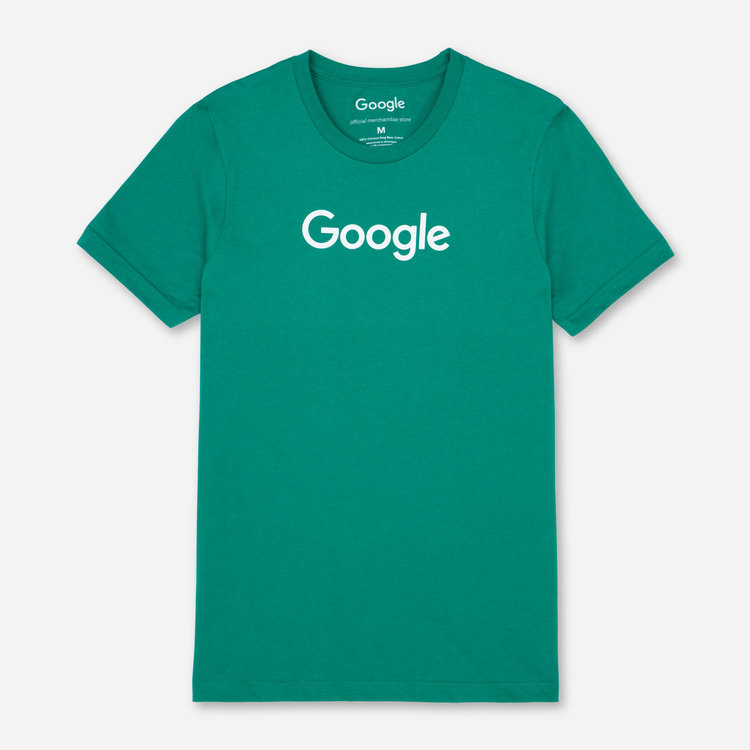
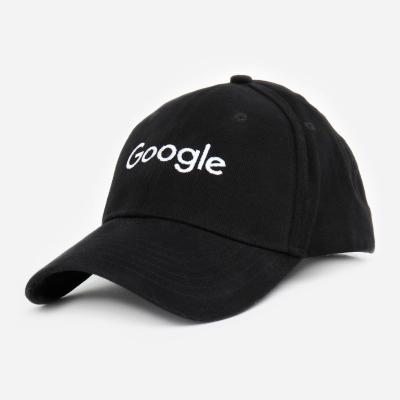
在我们的 API 示例中,我们使用了三件商品,即两件 Google T 恤和一顶 Google 帽子。我们使用最小的商品数据集(如下表所示)来执行
products 资源调用,以插入、获取、更新、列出和删除单件商品和整批商品。
我们建议在账号级别而不是商品级别配置运费和税费信息。
对于购物平台的多卖家子账号,所有商品都必须
包含 external_seller_id 字段。如需了解详情,请参阅
商品 ID。
 |
 |
 |
|
| id | online:en:US:1111111111 | online:en:US:2222222222 | online:en:US:3333333333 |
| offerId | 1111111111 | 2222222222 | 3333333333 |
| title | The Black Google Tee | Google Tee Green | Google Twill Cap |
| description | The Black Google Tee | 100% cotton Google t-shirt | Classic Google cap |
| item group ID | google_tee | google_tee | |
| link | http://my.site.com/blacktee | http://my.site.com/greentee | http://my.site.com/blackhat |
| condition | New | 新 | New |
| price | 21.99 USD | 21.99 USD | 10.99 USD |
| availability | In Stock | In Stock | In Stock |
| imageLink | https://shop.example.com/ |
https://shop.example.com/ |
https://shop.example.com/ |
| gtin | 9504000059422 | 9504000059446 | 9504000059452 |
| mpn | 00638NIC | 00638ANG | 00638ABC |
| brand | |||
| Google product category | Apparel & Accessories > Clothing | Apparel & Accessories > Clothing | Apparel & Accessories > Clothing Accessories > Hats |
| color | black | green | black |
| size | L | M | M |
| age_group | adult | adult | adult |
| gender | male | male | unisex |
| included_destination | Shopping Actions,购物广告 | Shopping Actions,购物广告 | Shopping Actions |
products.insert
要插入单件商品,请使用以下请求网址(指定商家 ID)和示例 JSON 正文。插入操作将创建一件新商品。如果指定商品的属性
channel、contentLanguage、offerId 和 feedLabel 已经具有值,则此方法会更新该条目,并替换来自指定商品的先前
API 调用的所有数据。
从所有平台中排除超过 7 天的商品将自动删除。
显示的示例会向可用的商品中插入新的“黑色 Google T 恤”。
POST https://shoppingcontent.googleapis.com/content/v2.1/{merchantId}/products
针对 products.insert 的示例请求正文调用:
{
 "kind": "content#product",
 "offerId": "1111111111",
 "title": "Google Tee Black",
 "description": "The Black Google Tee is available in unisex sizing.",
 "link": "http://my.site.com/blacktee/",
 "imageLink": "https://shop.example.com/.../images/GGOEGXXX1100.jpg",
 "contentLanguage": "en",
 "targetCountry": "US",
 "feedLabel": "US",
 "channel": "online",
 "ageGroup": "adult",
 "availability": "in stock",
 "availabilityDate": "2019-01-25T13:00:00-08:00",
 "brand": "Google",
 "color": "black",
 "condition": "new",
 "gender": "male",
 "googleProductCategory": "1604",
 "gtin": "608802531656",
 "itemGroupId": "google_tee",
 "mpn": "608802531656",
 "price": {
  "value": "21.99",
  "currency": "USD"
 },
 "sizes": [
  "Large"
 ]
}
商品还可在 JSON 正文内设置自定义属性。例如,我们可以为单件商品设置 purchase_quantity_limit,以限制客户可以订购的商品数量:
"customAttributes": [
 {
   "name": "purchase_quantity_limit",
   "value": "4"
 }
]
请注意,purchase_quantity_limit 自定义属性会将每个客户订单的购买上限设置为商品定义,并且 Feed 也支持该属性。该属性目前处于测试阶段,直到获得
API 的完全支持为止。商家可以添加任何其他自定义属性,但是 API 不会进行任何特定处理。
调用成功后,将返回 HTTP 200 代码,并且在响应正文中返回插入的商品资源,其中仅填充了 id、offerId、contentLanguage、feedLabel
和 channel:
{
 "kind": "content#product",
 "id": "online:en:US:1111111111",
 "offerId": "1111111111",
 "contentLanguage": "en",
 "targetCountry": "US",
 "feedLabel": "US",
 "channel": "online"
}
products.get
要获取有关 Merchant Center 数据库中特定商品的信息,请使用 products.get。可能需要几分钟时间才能通过此调用获得新插入的商品。
使用以下 HTTP 请求网址和参数、商家 ID 以及要获取的商品的 ID(REST ID 格式):
GET https://shoppingcontent.googleapis.com/content/v2.1/{merchantId}/products/{productId}
调用成功后,将返回 HTTP 200 并且在响应正文中返回“商品资源”。以下是从 ID 为 online:en:US:1111111111 的商品检索到的示例商品数据:
{
 "kind": "content#product",
 "id": "online:en:US:1111111111",
 "offerId": "1111111111",
 "source": "api",
 "title": "Google Tee Black",
 "description": "The Black Google Tee is available in unisex sizing.",
 "link": "http://my.site.com/blacktee/",
 "imageLink": "https://shop.example.com/.../images/GGOEGXXX1100.jpg",
 "contentLanguage": "en",
 "targetCountry": "US",
 "feedLabel": "US",
 "channel": "online",
 "ageGroup": "adult",
 "availability": "in stock",
 "availabilityDate": "2019-01-25T13:00:00-08:00",
 "brand": "Google",
 "color": "black",
 "condition": "new",
 "gender": "male",
 "googleProductCategory": "1604",
 "gtin": "608802531656",
 "itemGroupId": "google_tee",
 "mpn": "608802531656",
 "price": {
  "value": "21.99",
  "currency": "USD"
 },
 "sizes": [
  "Large"
 ]
}
products.update
要更新单件商品,请使用以下请求网址(使用 PATCH 方法),指定商家 ID、商品 ID 和 JSON
正文(其中包含您要为商品更新的数据)。与需要提供所有适用字段的 products.insert 不同,products.update
仅要求您指定要更改的字段。
如需添加或修改属性,请在 JSON 正文中指定包含新值的字段。显示的示例将使用请求正文中提供的商品数据更新现有“黑色 Google
T 恤”的 title 和 description,而所有其他字段将保持不变。
PATCH https://shoppingcontent.googleapis.com/content/v2.1/{merchantId}/products/{productId}
针对 products.update 的示例请求正文调用:
{
 "title": "Google Tee Black Limited Edition",
 "description": "The Limited Edition Tee is available in unisex sizing and features a retail fit."
}
只能通过 products.update 请求更新顶级字段。
如果您要更新嵌套字段,则必须提供整个顶级对象。
显示的示例将使用请求正文中提供的商品数据更新顶级 salePrice 对象(包括现有商品的嵌套字段),而所有其他字段将保持不变。
PATCH https://shoppingcontent.googleapis.com/content/v2.1/{merchantId}/products/{productId}
{
 "salePrice": {
  "value": "17.99",
  "currency": "USD"
 }
}
如需选择要更新的某些字段,而不更改请求正文中包含的其他字段,您可以指定 updateMask。此查询字符串参数应是以英文逗号分隔的您要修改的字段列表。
如果您想断言仅更新指定的字段,则
updateMask 非常有用。不指定 updateMask 等同于将请求中的所有字段标记为要更新的字段,如上例所示。
显示的示例将使用请求正文中提供的相应商品数据仅 更新现有“黑色 Google T 恤”的 description 和
availability,而所有其他字段(包括 title)将保持不变。
PATCH https://shoppingcontent.googleapis.com/content/v2.1/{merchantId}/products/{productId}?updateMask=description,availability
针对 products.update 的示例请求正文调用:
{
 "title": "Google Tee Black",
 "description": "This Limited Edition is out of print.",
 "availability": "out of stock"
}
如果在 updateMask 列表中提供了某个字段,但未在请求正文中提供该字段,则该字段将从 Product 资源中删除(如果存在)。
显示的示例将使用 updateMask 移除字段 salePrice 的值。
PATCH https://shoppingcontent.googleapis.com/content/v2.1/{merchantId}/products/{productId}?updateMask=salePrice
示例请求正文不应 包含 salePrice 字段,以便将其删除。您也可以不提供正文或提供空正文。只要其他字段未出现在
updateMask 中,它们将保持不变。
如需在 products.custombatch 请求中使用 updateMask,应在请求正文中指定 updateMask。
显示的示例将使用 products.custombatch 和批次条目中提供的商品数据更新现有“黑色 Google T 恤”的 price 和
availability,而所有其他字段(包括 title 和 description)将保持不变。
POST https://shoppingcontent.googleapis.com/content/v2.1/products/batch
{
  "entries": [{
    "batchId": 1,
    "merchantId": "MERCHANT_ID",
    "productId": "online:en:US:1111111111",
    "method": "update",
    "product": {
      "title": "Google Tee Black",
      "description": "The Black Google Tee is available in unisex sizing.",
      "availability": "in stock",
      "price": {
        "value": "19.99",
        "currency": "USD"
      }
    },
    "updateMask": "availability,price"
  }]
}
products.delete
要删除单件商品,请将 products.delete 与示例 HTTP 请求网址、商家 ID,以及您要删除的商品的 ID(REST ID 格式,例如
online:en:US:1111111111)配合使用:
DELETE https://shoppingcontent.googleapis.com/content/v2.1/{merchantId}/products/{productId}
成功的响应会返回 HTTP Status 204,并且不包含响应正文。
products.list
products.list 会列出商家在商家中心数据库中拥有的所有商品。请使用以下请求网址:
GET https://shoppingcontent.googleapis.com/content/v2.1/{merchantId}/products
调用成功后,将返回 HTTP 200 和“resources”键中商品的 JSON 数据。
系统会返回以下三个示例商品:
{
 "kind": "content#productsListResponse",
 "resources": [
  {
   "kind": "content#product",
   "id": "online:en:US:1111111111",
   "offerId": "1111111111",
   "source": "api",
   "title": "Google Tee Black",
   "description": "The Black Google Tee is available in unisex sizing.",
   "link": "http://my.site.com/blacktee/",
   "imageLink": "https://shop.example.com/.../images/GGOEGXXX1100.jpg",
   "contentLanguage": "en",
   "targetCountry": "US",
   "feedLabel": "US",
   "channel": "online",
   "ageGroup": "adult",
   "availability": "in stock",
   "availabilityDate": "2019-01-25T13:00:00-08:00",
   "brand": "Google",
   "color": "black",
   "condition": "new",
   "gender": "male",
   "googleProductCategory": "1604",
   "gtin": "608802531656",
   "itemGroupId": "google_tee",
   "mpn": "608802531656",
   "price": {
    "value": "21.99",
    "currency": "USD"
   },
   "sizes": [
    "Large"
   ]
  },
  {
   "kind": "content#product",
   "id": "online:en:US:2222222222",
   "offerId": "2222222222",
   "source": "api",
   "title": "Google Tee Green",
   "description": "100% cotton jersey fabric sets this Google t-shirt above the crowd.
    Features the google logo across the chest. Unisex sizing.",
   "link": "http://my.site.com/greentee/",
   "imageLink": "https://shop.example.com/.../images/GGOEGXXX0906.jpg",
   "contentLanguage": "en",
   "targetCountry": "US",
   "feedLabel": "US",
   "channel": "online",
   "ageGroup": "adult",
   "availability": "in stock",
   "availabilityDate": "2019-01-25T13:00:00-08:00",
   "brand": "Google",
   "color": "green",
   "condition": "new",
   "gender": "male",
   "googleProductCategory": "1604",
   "gtin": "608802531649",
   "itemGroupId": "google_tee",
   "mpn": "608802531649",
   "price": {
    "value": "21.99",
    "currency": "USD"
   },
   "sizes": [
    "Medium"
   ]
  },
  {
   "kind": "content#product",
   "id": "online:en:US:3333333333",
   "offerId": "3333333333",
   "source": "api",
   "title": "Google Twill Cap",
   "description": "Classic urban styling distinguishes this Google cap.
    Retains its shape, even when not being worn.",
   "link": "http://my.site.com/blackhat/",
   "imageLink": "https://shop.example.com/.../images/GGOEGHPB071610.jpg",
   "contentLanguage": "en",
   "targetCountry": "US",
   "feedLabel": "US",
   "channel": "online",
   "ageGroup": "adult",
   "availability": "in stock",
   "availabilityDate": "2019-01-07T13:00:00-08:00",
   "brand": "Google",
   "color": "black",
   "condition": "new",
   "gender": "male",
   "googleProductCategory": "173",
   "gtin": "689355417246",
   "mpn": "689355417246",
   "price": {
    "value": "10.99",
    "currency": "USD"
   },
   "sizes": [
    "Medium"
   ]
  }
 ]
}