
products
리소스를 사용하면 60개가 넘는 제품 속성을 매우 유연하게 관리할 수 있습니다.Google 쇼핑에 표시하려면 필수 필드를 포함해야 합니다.
위치, 제품 유형, 제품 옵션, 제품 번들과 같은 다양한 조건에 따라 필수 필드가 될 수 있는 선택적 필드가 여러 개 있습니다. 제품에 구성할 수 있는 60개가 넘는 선택적 매개변수에 대한 자세한 내용은 제품 데이터
사양을 참고하세요.
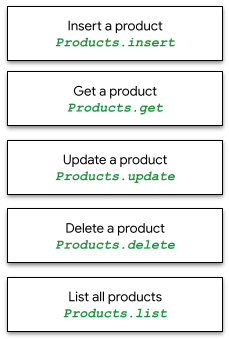
products 리소스를 사용하면 제품을 한 번에 하나씩 insert, get, update, delete할 수 있으며 판매자 센터 데이터베이스의 모든 제품을 list할 수 있습니다.
productstatuses
리소스를 사용하면 대상 유형의 특정
제품에 대한 승인 또는 비승인 상태를 확인할 수 있습니다. 데이터 품질 문제가 있을 수 있는 제품과 이러한 문제가 무엇인지에 대한 자세한 내용은 제품 상태
가이드를 참고하세요.
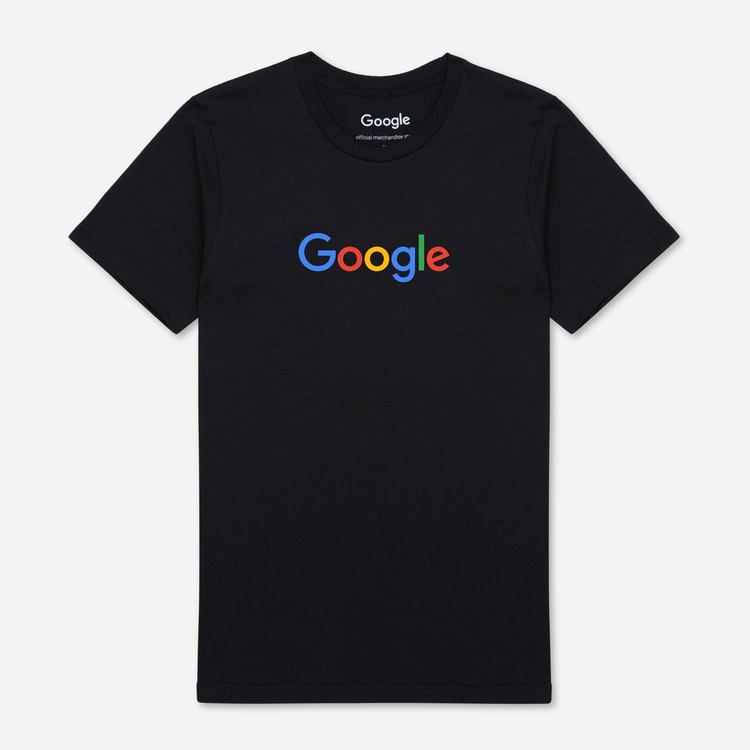
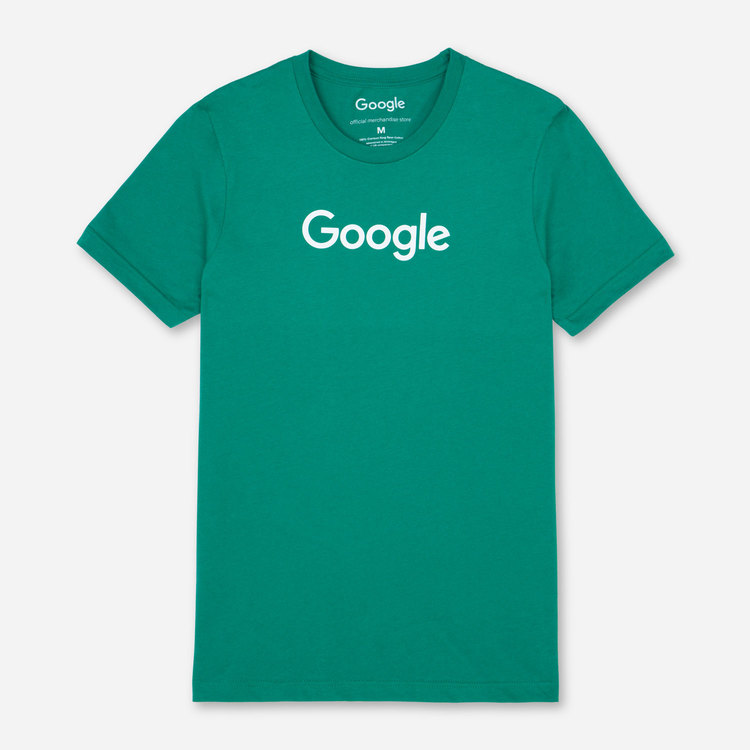
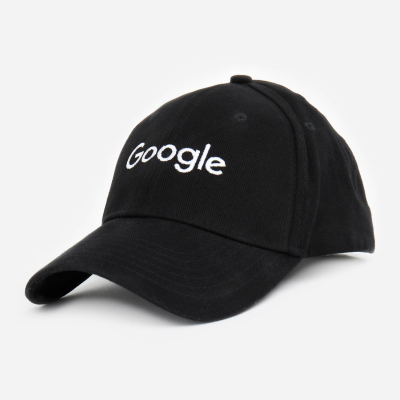
API 예시에서는 Google 티셔츠 2개와 Google 모자 1개, 총 3개의 제품을 사용합니다. 아래 표에 표시된 최소한의 제품 데이터를 사용하여 products 리소스 호출을 통해 개별 제품과 제품 일괄 작업을 삽입, 가져오기, 업데이트, 나열, 삭제합니다.
배송비 및 세금 정보는 제품 수준이 아닌 계정 수준에서 구성하는 것이 좋습니다.
마켓의 다중 판매자 하위 계정의 경우 모든 제품에
마켓 필드가 포함되어야 합니다.
external_seller_id 자세한 내용은
제품 ID를 참고하세요.
 |
 |
 |
|
| id | online:en:US:1111111111 | online:en:US:2222222222 | online:en:US:3333333333 |
| offerId | 1111111111 | 2222222222 | 3333333333 |
| 제목 | 검은색 Google 티셔츠 | Google 티셔츠 녹색 | Google 트윌 모자 |
| 설명 | 검은색 Google 티셔츠 | 100% 면 Google 티셔츠 | 기본 Google 모자 |
| 상품 그룹 ID | google_tee | google_tee | |
| 링크 | http://my.site.com/blacktee | http://my.site.com/greentee | http://my.site.com/blackhat |
| 상태 | 신규 | 신규 | 신규 |
| 가격 | 미화 21.99달러 | 미화 21.99달러 | 미화 10.99달러 |
| availability | 재고 있음 | 재고 있음 | 재고 있음 |
| imageLink | https://shop.example.com/ |
https://shop.example.com/ |
https://shop.example.com/ |
| gtin | 9504000059422 | 9504000059446 | 9504000059452 |
| MPN | 00638NIC | 00638ANG | 00638ABC |
| brand | |||
| Google 제품 카테고리 | 의류 및 액세서리 > 의류 | 의류 및 액세서리 > 의류 | 의류 및 액세서리 > 의류 액세서리 > 모자 |
| 색상 | 검은색 | 녹색 | 검은색 |
| 크기 | L | M | M |
| age_group | 성인 | 성인 | 성인 |
| gender | 남성 | 남성 | unisex |
| included_destination | Shopping Actions, 쇼핑 광고 | Shopping Actions, 쇼핑 광고 | Shopping Actions |
products.insert
단일 제품을 삽입하려면 판매자 ID와 샘플 JSON 본문을 지정하여 다음 요청 URL을 사용하세요. 삽입하면 새 제품이 생성됩니다. 특정 제품의 channel, contentLanguage, offerId, feedLabel 속성에 값이 있는 경우 이 메서드는 해당 항목을 업데이트하고 지정된 제품의 이전 API 호출에서 모든 데이터를 대체합니다.
모든 대상 유형에서 7일 이상 제외되는 제품은 자동으로 삭제됩니다.
표시된 예시에서는 사용 가능한 제품에 새 '검은색 Google 티셔츠'를 삽입합니다.
POST https://shoppingcontent.googleapis.com/content/v2.1/{merchantId}/products
products.insert의 샘플 요청 본문 호출:
{
 "kind": "content#product",
 "offerId": "1111111111",
 "title": "Google Tee Black",
 "description": "The Black Google Tee is available in unisex sizing.",
 "link": "http://my.site.com/blacktee/",
 "imageLink": "https://shop.example.com/.../images/GGOEGXXX1100.jpg",
 "contentLanguage": "en",
 "targetCountry": "US",
 "feedLabel": "US",
 "channel": "online",
 "ageGroup": "adult",
 "availability": "in stock",
 "availabilityDate": "2019-01-25T13:00:00-08:00",
 "brand": "Google",
 "color": "black",
 "condition": "new",
 "gender": "male",
 "googleProductCategory": "1604",
 "gtin": "608802531656",
 "itemGroupId": "google_tee",
 "mpn": "608802531656",
 "price": {
  "value": "21.99",
  "currency": "USD"
 },
 "sizes": [
  "Large"
 ]
}
제품에는 JSON 본문 내에 설정된 커스텀 속성이 있을 수도 있습니다. 예를 들어 고객이 주문할 수 있는 상품 수를 제한하기 위해 단일 제품에 purchase_quantity_limit를 설정할 수 있습니다.
"customAttributes": [
 {
   "name": "purchase_quantity_limit",
   "value": "4"
 }
]
purchase_quantity_limit 커스텀 속성은 고객 주문당 구매 한도를 제품 정의에 설정하며 피드에서도 지원됩니다. 이 속성은 현재 API에서 완전히 지원될 때까지 베타 버전으로 제공됩니다. 판매자가 추가 커스텀 속성을 추가할 수 있지만 API에서 특정 처리가 발생하지는 않습니다.
호출이 성공하면 HTTP 200 코드와 id, offerId, contentLanguage, feedLabel, channel만 채워진 삽입된 제품 리소스가 포함된 응답 본문이 반환됩니다.
{
 "kind": "content#product",
 "id": "online:en:US:1111111111",
 "offerId": "1111111111",
 "contentLanguage": "en",
 "targetCountry": "US",
 "feedLabel": "US",
 "channel": "online"
}
products.get
판매자 센터 데이터베이스의 특정 제품에 대한 정보를 가져오려면 products.get을 사용하세요. 새로 삽입된 제품이 이 호출을 통해 제공되려면 몇 분 정도 걸릴 수 있습니다.
다음 HTTP 요청 URL 및 매개변수, 판매자 ID, 가져오려는 제품의 제품 ID (REST ID 형식)를 사용하세요.
GET https://shoppingcontent.googleapis.com/content/v2.1/{merchantId}/products/{productId}
호출이 성공하면 응답 본문에 HTTP 200 및 '제품 리소스'가 반환됩니다. 다음은 ID가 online:en:US:1111111111인 제품에서 검색된 샘플 제품 데이터입니다.
{
 "kind": "content#product",
 "id": "online:en:US:1111111111",
 "offerId": "1111111111",
 "source": "api",
 "title": "Google Tee Black",
 "description": "The Black Google Tee is available in unisex sizing.",
 "link": "http://my.site.com/blacktee/",
 "imageLink": "https://shop.example.com/.../images/GGOEGXXX1100.jpg",
 "contentLanguage": "en",
 "targetCountry": "US",
 "feedLabel": "US",
 "channel": "online",
 "ageGroup": "adult",
 "availability": "in stock",
 "availabilityDate": "2019-01-25T13:00:00-08:00",
 "brand": "Google",
 "color": "black",
 "condition": "new",
 "gender": "male",
 "googleProductCategory": "1604",
 "gtin": "608802531656",
 "itemGroupId": "google_tee",
 "mpn": "608802531656",
 "price": {
  "value": "21.99",
  "currency": "USD"
 },
 "sizes": [
  "Large"
 ]
}
products.update
단일 제품을 업데이트하려면 PATCH 메서드와 함께 다음 요청 URL을 사용하고 판매자 ID, 제품 ID, 제품에 대해 업데이트하려는 데이터가 포함된 JSON 본문을 지정하세요. 적용 가능한 모든 필드를 제공해야 하는 products.insert와 달리 products.update에서는 변경하려는 필드만 지정하면 됩니다.
속성을 추가하거나 수정하려면 JSON 본문에 새 값이 있는 필드를 지정하세요. 표시된 예시에서는 요청 본문에 제공된 제품 데이터로 기존 '검은색 Google 티셔츠'의 title과 description을 업데이트하고 다른 모든 필드는 그대로 둡니다.
PATCH https://shoppingcontent.googleapis.com/content/v2.1/{merchantId}/products/{productId}
products.update의 샘플 요청 본문 호출:
{
 "title": "Google Tee Black Limited Edition",
 "description": "The Limited Edition Tee is available in unisex sizing and features a retail fit."
}
products.update 요청을 통해 최상위 필드만 업데이트할 수 있습니다.
중첩된 필드를 업데이트하려면 전체 최상위 객체를 제공해야 합니다.
표시된 예시에서는 요청 본문에 제공된 제품 데이터로 기존 제품의 중첩된 필드를 포함한 최상위 salePrice 객체를 업데이트하고 다른 모든 필드는 그대로 둡니다.
PATCH https://shoppingcontent.googleapis.com/content/v2.1/{merchantId}/products/{productId}
{
 "salePrice": {
  "value": "17.99",
  "currency": "USD"
 }
}
요청 본문에 포함된 다른 필드를 변경하지 않고 업데이트할 특정 필드를 선택하려면 updateMask를 지정하면 됩니다. 이 쿼리 문자열 매개변수는 수정하려는 필드의 쉼표로 구분된 목록이어야 합니다.
updateMask는 지정된 필드만 업데이트되도록 어설션하려는 경우에 유용합니다. updateMask를 지정하지 않으면 위의 예시와 같이 요청의 모든 필드를 업데이트하도록 표시하는 것과 같습니다.
표시된 예시에서는 요청 본문에 제공된 각 제품 데이터로 기존 '검은색 Google 티셔츠'의 description과 availability만 업데이트하고 title을 포함한 다른 모든 필드는 그대로 둡니다.
PATCH https://shoppingcontent.googleapis.com/content/v2.1/{merchantId}/products/{productId}?updateMask=description,availability
products.update의 샘플 요청 본문 호출:
{
 "title": "Google Tee Black",
 "description": "This Limited Edition is out of print.",
 "availability": "out of stock"
}
필드가 updateMask 목록에 제공되었지만 요청 본문에는 제공되지 않은 경우 해당 필드가 Product 리소스에서 삭제됩니다(있는 경우).
표시된 예시에서는 updateMask를 사용하여 salePrice 필드의 값을 삭제합니다.
PATCH https://shoppingcontent.googleapis.com/content/v2.1/{merchantId}/products/{productId}?updateMask=salePrice
샘플 요청 본문에는 salePrice 필드를 삭제하기 위해 포함해서는 안 됩니다. 본문이 없거나 빈 본문을 제공할 수도 있습니다. updateMask에 표시되지 않는 한 다른 필드는 그대로 유지됩니다.
products.custombatch 요청 내에서 updateMask를 사용하려면 updateMask를 요청 본문에 지정해야 합니다.
표시된 예시에서는 일괄 작업 항목에 제공된 제품 데이터로 products.custombatch를 사용하여 기존 '검은색 Google 티셔츠'의 price와 availability를 업데이트하고 title과 description을 포함한 다른 모든 필드는 그대로 둡니다.
POST https://shoppingcontent.googleapis.com/content/v2.1/products/batch
{
  "entries": [{
    "batchId": 1,
    "merchantId": "MERCHANT_ID",
    "productId": "online:en:US:1111111111",
    "method": "update",
    "product": {
      "title": "Google Tee Black",
      "description": "The Black Google Tee is available in unisex sizing.",
      "availability": "in stock",
      "price": {
        "value": "19.99",
        "currency": "USD"
      }
    },
    "updateMask": "availability,price"
  }]
}
products.delete
단일 제품을 삭제하려면 샘플 HTTP 요청 URL, 판매자 ID, 삭제하려는 제품의 제품 ID (online:en:US:1111111111과 같은 REST ID 형식)와 함께 products.delete를 사용하세요.
DELETE https://shoppingcontent.googleapis.com/content/v2.1/{merchantId}/products/{productId}
응답이 성공하면 응답 본문 없이 HTTP Status 204가 반환됩니다.
products.list
products.list 는 판매자가 판매자 센터 데이터베이스에 보유한 모든 제품을 나열합니다. 다음 요청 URL을 사용하세요.
GET https://shoppingcontent.googleapis.com/content/v2.1/{merchantId}/products
호출이 성공하면 HTTP 200 및 'resources' 키의 제품에 대한 JSON 데이터가 반환됩니다.
다음 세 가지 제품 예시가 반환됩니다.
{
 "kind": "content#productsListResponse",
 "resources": [
  {
   "kind": "content#product",
   "id": "online:en:US:1111111111",
   "offerId": "1111111111",
   "source": "api",
   "title": "Google Tee Black",
   "description": "The Black Google Tee is available in unisex sizing.",
   "link": "http://my.site.com/blacktee/",
   "imageLink": "https://shop.example.com/.../images/GGOEGXXX1100.jpg",
   "contentLanguage": "en",
   "targetCountry": "US",
   "feedLabel": "US",
   "channel": "online",
   "ageGroup": "adult",
   "availability": "in stock",
   "availabilityDate": "2019-01-25T13:00:00-08:00",
   "brand": "Google",
   "color": "black",
   "condition": "new",
   "gender": "male",
   "googleProductCategory": "1604",
   "gtin": "608802531656",
   "itemGroupId": "google_tee",
   "mpn": "608802531656",
   "price": {
    "value": "21.99",
    "currency": "USD"
   },
   "sizes": [
    "Large"
   ]
  },
  {
   "kind": "content#product",
   "id": "online:en:US:2222222222",
   "offerId": "2222222222",
   "source": "api",
   "title": "Google Tee Green",
   "description": "100% cotton jersey fabric sets this Google t-shirt above the crowd.
    Features the google logo across the chest. Unisex sizing.",
   "link": "http://my.site.com/greentee/",
   "imageLink": "https://shop.example.com/.../images/GGOEGXXX0906.jpg",
   "contentLanguage": "en",
   "targetCountry": "US",
   "feedLabel": "US",
   "channel": "online",
   "ageGroup": "adult",
   "availability": "in stock",
   "availabilityDate": "2019-01-25T13:00:00-08:00",
   "brand": "Google",
   "color": "green",
   "condition": "new",
   "gender": "male",
   "googleProductCategory": "1604",
   "gtin": "608802531649",
   "itemGroupId": "google_tee",
   "mpn": "608802531649",
   "price": {
    "value": "21.99",
    "currency": "USD"
   },
   "sizes": [
    "Medium"
   ]
  },
  {
   "kind": "content#product",
   "id": "online:en:US:3333333333",
   "offerId": "3333333333",
   "source": "api",
   "title": "Google Twill Cap",
   "description": "Classic urban styling distinguishes this Google cap.
    Retains its shape, even when not being worn.",
   "link": "http://my.site.com/blackhat/",
   "imageLink": "https://shop.example.com/.../images/GGOEGHPB071610.jpg",
   "contentLanguage": "en",
   "targetCountry": "US",
   "feedLabel": "US",
   "channel": "online",
   "ageGroup": "adult",
   "availability": "in stock",
   "availabilityDate": "2019-01-07T13:00:00-08:00",
   "brand": "Google",
   "color": "black",
   "condition": "new",
   "gender": "male",
   "googleProductCategory": "173",
   "gtin": "689355417246",
   "mpn": "689355417246",
   "price": {
    "value": "10.99",
    "currency": "USD"
   },
   "sizes": [
    "Medium"
   ]
  }
 ]
}