
products
リソースを使用すると、60 以上の商品属性を柔軟に管理できます。Google ショッピングに表示するには、いくつかの必須フィールドを含める必要があります。
また、地域、商品の種類、商品のバリエーション、商品バンドルなどの条件に応じて、必須となるオプション フィールドもあります。商品に設定できる 60 以上のオプション パラメータについて詳しくは、商品データ
仕様をご覧ください。
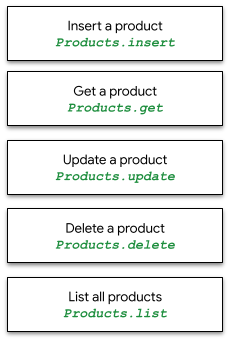
products リソースを使用すると、商品を 1 つずつ insert、get、update、delete できます。また、Merchant Center データベース内のすべての商品を list できます。
productstatuses
リソースを使用すると、特定の掲載先における特定の
商品に対する承認ステータスまたは不承認ステータスを確認できます。データ品質の問題が発生する可能性がある商品と、その問題の内容について詳しくは、商品ステータス
ガイドをご覧ください。
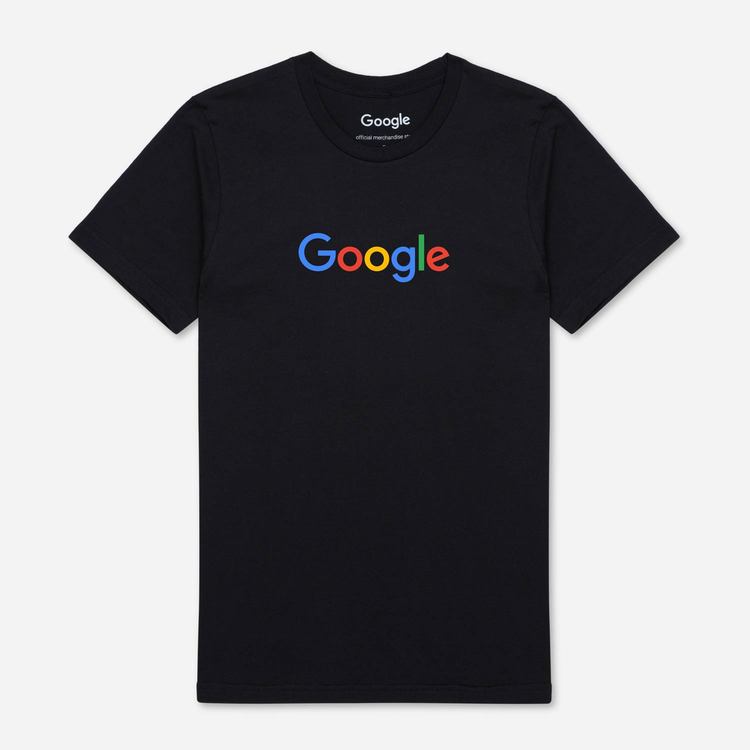
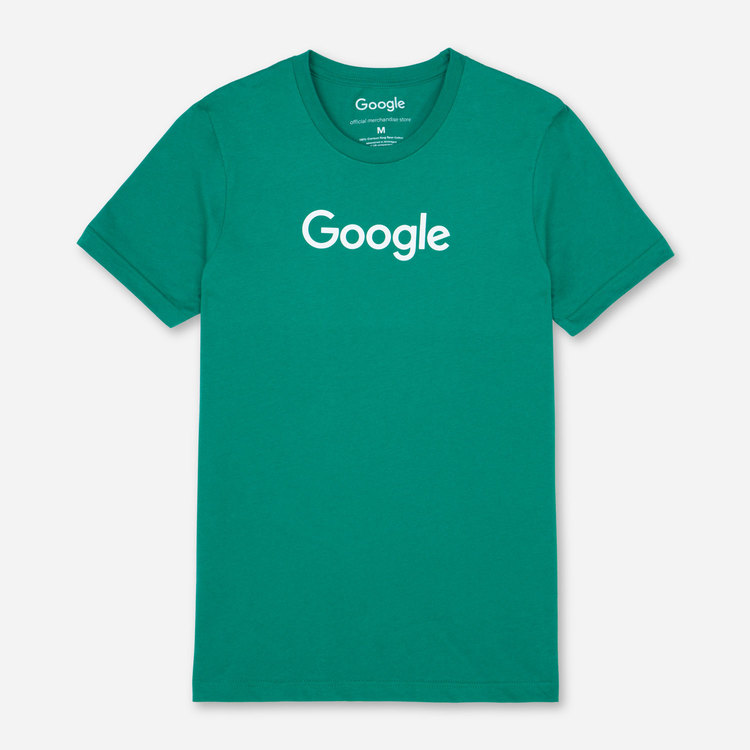
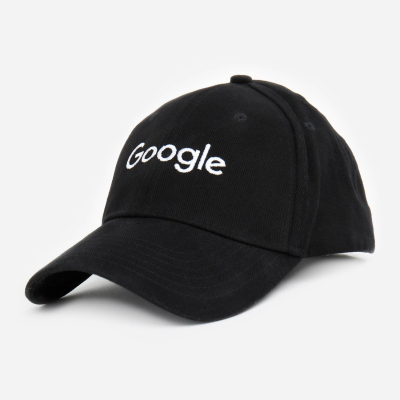
API の例では、Google の T シャツ 2 枚と Google のキャップ 1 つの 3 つの商品を使用します。以下の表に示す最小限の商品データを使用して、products リソースを呼び出し、個々の商品と商品のバッチを挿入、取得、更新、一覧表示、削除します。
送料と税金に関する情報は、商品レベルではなく アカウント レベルで設定することをおすすめします。
ショッピングモールの複数販売者サブアカウントの場合、すべての商品に
Marketplacesフィールドを含める必要があります。external_seller_id詳しくは、
商品 ID をご覧ください。
 |
 |
 |
|
| id | online:en:US:1111111111 | online:en:US:2222222222 | online:en:US:3333333333 |
| offerId | 1111111111 | 2222222222 | 3333333333 |
| title | The Black Google Tee | Google Tee Green | Google Twill Cap |
| 説明 | The Black Google Tee | 100% cotton Google t-shirt | Classic Google cap |
| 商品グループ ID | google_tee | google_tee | |
| リンク | http://my.site.com/blacktee | http://my.site.com/greentee | http://my.site.com/blackhat |
| 状態 | 新規 | 新規 | 新規 |
| 価格 | 21.99 USD | 21.99 USD | 10.99 USD |
| availability | 在庫あり | 在庫あり | 在庫あり |
| imageLink | https://shop.example.com/ |
https://shop.example.com/ |
https://shop.example.com/ |
| gtin | 9504000059422 | 9504000059446 | 9504000059452 |
| mpn(製品番号) | 00638NIC | 00638ANG | 00638ABC |
| brand | |||
| Google 商品カテゴリ | アパレルとアクセサリー > 衣料品 | アパレルとアクセサリー > 衣料品 | アパレルとアクセサリー > 衣料品アクセサリー > 帽子 |
| 色 | Black | 緑 | Black |
| サイズ | L | M | M |
| age_group | アダルト | アダルト | アダルト |
| gender | 男性 | 男性 | unisex |
| included_destination | ショッピング アクション、ショッピング広告 | ショッピング アクション、ショッピング広告 | ショッピング アクション |
products.insert
単一の商品を挿入するには、次のリクエスト URL を使用して、販売者 ID とサンプル JSON 本文を指定します。挿入すると、新しい商品が作成されます。特定の商品に対して channel、contentLanguage、offerId、feedLabel の属性に値が存在する場合、このメソッドはそのエントリを更新し、その商品の以前の API 呼び出しのすべてのデータを置き換えます。
すべての掲載先から 8 日以上除外されている商品は自動的に削除されます。
次の例では、利用可能な商品に新しい「Black Google Tee」を挿入します。
POST https://shoppingcontent.googleapis.com/content/v2.1/{merchantId}/products
products.insert のリクエスト本文の呼び出し例:
{
 "kind": "content#product",
 "offerId": "1111111111",
 "title": "Google Tee Black",
 "description": "The Black Google Tee is available in unisex sizing.",
 "link": "http://my.site.com/blacktee/",
 "imageLink": "https://shop.example.com/.../images/GGOEGXXX1100.jpg",
 "contentLanguage": "en",
 "targetCountry": "US",
 "feedLabel": "US",
 "channel": "online",
 "ageGroup": "adult",
 "availability": "in stock",
 "availabilityDate": "2019-01-25T13:00:00-08:00",
 "brand": "Google",
 "color": "black",
 "condition": "new",
 "gender": "male",
 "googleProductCategory": "1604",
 "gtin": "608802531656",
 "itemGroupId": "google_tee",
 "mpn": "608802531656",
 "price": {
  "value": "21.99",
  "currency": "USD"
 },
 "sizes": [
  "Large"
 ]
}
商品には、JSON 本文内でカスタム属性を設定することもできます。たとえば、顧客が注文できる商品アイテムの数を制限するために、単一の商品に purchase_quantity_limit を設定できます。
"customAttributes": [
 {
   "name": "purchase_quantity_limit",
   "value": "4"
 }
]
purchase_quantity_limit カスタム属性は、顧客の注文あたりの購入制限を商品定義に設定し、フィードでもサポートされています。この属性は、API で完全にサポートされるまでベータ版です。販売者はカスタム属性を追加できますが、API による特別な処理は行われません。
呼び出しが成功すると、HTTP 200 コードと、挿入された商品リソースを含むレスポンス本文が返されます。このレスポンス本文には、id、offerId、contentLanguage、feedLabel、channel のみが入力されます。
{
 "kind": "content#product",
 "id": "online:en:US:1111111111",
 "offerId": "1111111111",
 "contentLanguage": "en",
 "targetCountry": "US",
 "feedLabel": "US",
 "channel": "online"
}
products.get
Merchant Center データベース内の特定の商品に関する情報を取得するには、products.get を使用します。この呼び出しで、新しく挿入された商品が利用可能になるまでに数分かかることがあります。
取得する商品の HTTP リクエスト URL とパラメータ、販売者 ID、商品 ID(REST ID 形式)は次のとおりです。
GET https://shoppingcontent.googleapis.com/content/v2.1/{merchantId}/products/{productId}
呼び出しが成功すると、HTTP 200 と、レスポンス本文に「商品リソース」が返されます。ID が online:en:US:1111111111 の商品から取得した商品データの例を次に示します。
{
 "kind": "content#product",
 "id": "online:en:US:1111111111",
 "offerId": "1111111111",
 "source": "api",
 "title": "Google Tee Black",
 "description": "The Black Google Tee is available in unisex sizing.",
 "link": "http://my.site.com/blacktee/",
 "imageLink": "https://shop.example.com/.../images/GGOEGXXX1100.jpg",
 "contentLanguage": "en",
 "targetCountry": "US",
 "feedLabel": "US",
 "channel": "online",
 "ageGroup": "adult",
 "availability": "in stock",
 "availabilityDate": "2019-01-25T13:00:00-08:00",
 "brand": "Google",
 "color": "black",
 "condition": "new",
 "gender": "male",
 "googleProductCategory": "1604",
 "gtin": "608802531656",
 "itemGroupId": "google_tee",
 "mpn": "608802531656",
 "price": {
  "value": "21.99",
  "currency": "USD"
 },
 "sizes": [
  "Large"
 ]
}
products.update
単一の商品を更新するには、PATCH メソッドで次のリクエスト URL を使用して、販売者 ID、商品 ID、商品に対して更新するデータを含む JSON 本文を指定します。products.insert とは異なり、products.update では、変更するフィールドのみを指定する必要があります。
属性を追加または変更するには、JSON 本文で新しい値を持つフィールドを指定します。次の例では、リクエスト本文で指定された商品データを使用して、既存の「Black Google Tee」の title と description を更新し、他のフィールドはそのままにします。
PATCH https://shoppingcontent.googleapis.com/content/v2.1/{merchantId}/products/{productId}
products.update のリクエスト本文の呼び出し例:
{
 "title": "Google Tee Black Limited Edition",
 "description": "The Limited Edition Tee is available in unisex sizing and features a retail fit."
}
リクエストで更新できるのは、最上位のフィールドのみです。products.updateネストされたフィールドを更新する場合は、最上位のオブジェクト全体を指定する必要があります。
次の例では、リクエスト本文で指定された商品データを使用して、既存の商品のネストされたフィールドを含む最上位の salePrice オブジェクトを更新し、他のフィールドはそのままにします。
PATCH https://shoppingcontent.googleapis.com/content/v2.1/{merchantId}/products/{productId}
{
 "salePrice": {
  "value": "17.99",
  "currency": "USD"
 }
}
リクエストの本文に含まれる他のフィールドを変更せずに、更新するフィールドを選択するには、updateMask を指定します。このクエリ文字列パラメータは、変更するフィールドのカンマ区切りのリストにする必要があります。
updateMask は、指定したフィールドのみが更新されることを確認する場合に便利です。updateMask を指定しない場合は、上の例に示すように、リクエスト内のすべてのフィールドを更新対象としてマークするのと同じです。
次の例では、リクエスト本文で指定されたそれぞれのプロダクト データを使用して、既存の「Black Google Tee」の description と availability のみ を更新し、title を含む他のフィールドはそのままにします。
PATCH https://shoppingcontent.googleapis.com/content/v2.1/{merchantId}/products/{productId}?updateMask=description,availability
products.update のリクエスト本文の呼び出し例:
{
 "title": "Google Tee Black",
 "description": "This Limited Edition is out of print.",
 "availability": "out of stock"
}
フィールドが updateMask リストに指定されていても、リクエストの本文に指定されていない場合、そのフィールドは Product リソースから削除されます(存在する場合)。
次の例では、updateMask を使用して、フィールド salePrice の値を削除します。
PATCH https://shoppingcontent.googleapis.com/content/v2.1/{merchantId}/products/{productId}?updateMask=salePrice
削除するには、リクエストの本文に salePrice フィールドを含めない でください。本文を指定しないか、空の本文を指定することもできます。updateMask に表示されない他のフィールドはそのままになります。
products.custombatch リクエスト内で updateMask を使用するには、リクエストの本文で updateMask を指定する必要があります。
次の例では、products.custombatch を使用して、バッチエントリで指定された商品データを使用して、既存の「Black Google Tee」の price と availability を更新し、title や description などの他のフィールドはそのままにします。
POST https://shoppingcontent.googleapis.com/content/v2.1/products/batch
{
  "entries": [{
    "batchId": 1,
    "merchantId": "MERCHANT_ID",
    "productId": "online:en:US:1111111111",
    "method": "update",
    "product": {
      "title": "Google Tee Black",
      "description": "The Black Google Tee is available in unisex sizing.",
      "availability": "in stock",
      "price": {
        "value": "19.99",
        "currency": "USD"
      }
    },
    "updateMask": "availability,price"
  }]
}
products.delete
単一の商品を削除するには、サンプルの HTTP リクエスト URL、販売者 ID、削除する商品の商品 ID(online:en:US:1111111111 などの REST ID 形式)を指定して、products.delete を使用します。
DELETE https://shoppingcontent.googleapis.com/content/v2.1/{merchantId}/products/{productId}
成功すると、レスポンス本文のない HTTP Status 204 が返されます。
products.list
products.list は、販売者が Merchant Center データベースに登録しているすべての商品を一覧表示します。次のリクエスト URL を使用します。
GET https://shoppingcontent.googleapis.com/content/v2.1/{merchantId}/products
呼び出しが成功すると、HTTP 200 と、[resources] キーの商品に関する JSON データが返されます。
次の 3 つの商品の例が返されます。
{
 "kind": "content#productsListResponse",
 "resources": [
  {
   "kind": "content#product",
   "id": "online:en:US:1111111111",
   "offerId": "1111111111",
   "source": "api",
   "title": "Google Tee Black",
   "description": "The Black Google Tee is available in unisex sizing.",
   "link": "http://my.site.com/blacktee/",
   "imageLink": "https://shop.example.com/.../images/GGOEGXXX1100.jpg",
   "contentLanguage": "en",
   "targetCountry": "US",
   "feedLabel": "US",
   "channel": "online",
   "ageGroup": "adult",
   "availability": "in stock",
   "availabilityDate": "2019-01-25T13:00:00-08:00",
   "brand": "Google",
   "color": "black",
   "condition": "new",
   "gender": "male",
   "googleProductCategory": "1604",
   "gtin": "608802531656",
   "itemGroupId": "google_tee",
   "mpn": "608802531656",
   "price": {
    "value": "21.99",
    "currency": "USD"
   },
   "sizes": [
    "Large"
   ]
  },
  {
   "kind": "content#product",
   "id": "online:en:US:2222222222",
   "offerId": "2222222222",
   "source": "api",
   "title": "Google Tee Green",
   "description": "100% cotton jersey fabric sets this Google t-shirt above the crowd.
    Features the google logo across the chest. Unisex sizing.",
   "link": "http://my.site.com/greentee/",
   "imageLink": "https://shop.example.com/.../images/GGOEGXXX0906.jpg",
   "contentLanguage": "en",
   "targetCountry": "US",
   "feedLabel": "US",
   "channel": "online",
   "ageGroup": "adult",
   "availability": "in stock",
   "availabilityDate": "2019-01-25T13:00:00-08:00",
   "brand": "Google",
   "color": "green",
   "condition": "new",
   "gender": "male",
   "googleProductCategory": "1604",
   "gtin": "608802531649",
   "itemGroupId": "google_tee",
   "mpn": "608802531649",
   "price": {
    "value": "21.99",
    "currency": "USD"
   },
   "sizes": [
    "Medium"
   ]
  },
  {
   "kind": "content#product",
   "id": "online:en:US:3333333333",
   "offerId": "3333333333",
   "source": "api",
   "title": "Google Twill Cap",
   "description": "Classic urban styling distinguishes this Google cap.
    Retains its shape, even when not being worn.",
   "link": "http://my.site.com/blackhat/",
   "imageLink": "https://shop.example.com/.../images/GGOEGHPB071610.jpg",
   "contentLanguage": "en",
   "targetCountry": "US",
   "feedLabel": "US",
   "channel": "online",
   "ageGroup": "adult",
   "availability": "in stock",
   "availabilityDate": "2019-01-07T13:00:00-08:00",
   "brand": "Google",
   "color": "black",
   "condition": "new",
   "gender": "male",
   "googleProductCategory": "173",
   "gtin": "689355417246",
   "mpn": "689355417246",
   "price": {
    "value": "10.99",
    "currency": "USD"
   },
   "sizes": [
    "Medium"
   ]
  }
 ]
}