
एक एपीआई कॉल में, एक साथ कई प्रॉडक्ट को insert, get या delete करने के लिए, custombatch का इस्तेमाल किया जा सकता है.
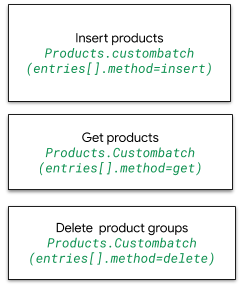
कस्टम बैच एपीआई को कॉल करने के लिए, यहां दिया गया अनुरोध यूआरएल इस्तेमाल करें:
POST https://shoppingcontent.googleapis.com/content/v2.1/products/batch
अनुरोध के मुख्य हिस्से में, ये पैरामीटर शामिल होते हैं: batchId, merchantID, और method.
अगर आपको कोई प्रॉडक्ट पाना है या उसे मिटाना है, तो ही productId का इस्तेमाल करें. custombatch के लिए, `insert` एपीआई कॉल में productId की ज़रूरत नहीं होती.
custombatch:insert
products.custombatch method=insert को कॉल करने के लिए, यहां दिया गया अनुरोध यूआरएल इस्तेमाल करें
POST https://shoppingcontent.googleapis.com/content/v2.1/products/batch
दो नए प्रॉडक्ट जोड़ने के लिए, हर प्रॉडक्ट के लिए batchId, एपीआई कॉल करने की अनुमति वाले कारोबारी का
merchantId, और तरीका
insert तय करें.
यहां दिए गए उदाहरण में, batchId की वैल्यू क्रमशः 1111 और 1112 हैं. ये हर प्रॉडक्ट के लिए यूनीक आइडेंटिफ़ायर हैं. merchantId:
1234567 वह कारोबारी है जिसके पास एपीआई कॉल करने की अनुमति है. वहीं, तरीका
है get, delete या insert.
insert से एक नया प्रॉडक्ट बनता है. अगर किसी प्रॉडक्ट के लिए, channel, contentLanguage, offerId, और feedLabel एट्रिब्यूट की वैल्यू मौजूद हैं, तो यह तरीका एंट्री को अपडेट करता है. साथ ही, प्रॉडक्ट के लिए, पहले किए गए एपीआई कॉल से मिले सभी डेटा को बदल देता है.
यहां JSON फ़ॉर्मैट में एक सैंपल दिया गया है. इसकी मदद से, एक एपीआई कॉल करके Merchant Center के डेटाबेस में दो टी-शर्ट insert की जा सकती हैं:
{
  "entries": [
    {
      "batchId": 1111,
      "merchantId": 1234567,
      "method": "insert",
      "product": {
        "kind": "content#product",
        "offerId": "1111111111",

        "title": "Google Tee Black",
        "description": "The Black Google Tee is available in unisex sizing and
        features a retail fit.",
        "link": "http://my.site.com/blacktee/",
        "imageLink": "https://shop.example.com/.../images/GGOEGXXX1100.jpg",
        "contentLanguage": "en",
        "targetCountry": "US",
        "feedLabel": "US",
        "channel": "online",
        "ageGroup": "adult",
        "availability": "in stock",
        "availabilityDate": "2019-01-25T13:00:00-08:00",
        "brand": "Google",
        "color": "black",
        "condition": "new",
        "gender": "male",
        "googleProductCategory": "1604",
        "gtin": "608802531656",
        "itemGroupId": "google_tee",
        "mpn": "608802531656",
        "price": {
          "value": "21.99",
          "currency": "USD"
        },
        "sizes": [
          "Large"
        ],
        "includedDestination": [
          "Shopping"
        ]
      }
    },
    {
      "batchId": 1112,
      "merchantId": 1234567,
      "method": "insert",
      "product": {
        "kind": "content#product",
        "offerId": "2222222222",

        "title": "Google Tee Green",
        "description": "100% cotton jersey fabric sets  this Google t-shirt above
        the crowd. Features the google logo across the chest. Unisex sizing.",
        "link": "http://my.site.com/greentee/",
        "imageLink": "https://shop.example.com/.../images/GGOEGXXX0906.jpg",
        "contentLanguage": "en",
        "targetCountry": "US",
        "feedLabel": "US",
        "channel": "online",
        "ageGroup": "adult",
        "availability": "in stock",
        "availabilityDate": "2019-01-25T13:00:00-08:00",
        "brand": "Google",
        "color": "green",
        "condition": "new",
        "gender": "male",
        "googleProductCategory": "1604",
        "gtin": "608802531649",
        "itemGroupId": "google_tee",
        "mpn": "608802531649",
        "price": {
          "value": "21.99",
          "currency": "USD"
        },
        "sizes": [
          "Medium"
        ],
        "includedDestination": [
          "Shopping"
        ]
      }
    }
  ]
}
एपीआई कॉल के पूरा होने पर, HTTP 200 कोड और JSON फ़ॉर्मैट में रिस्पॉन्स मिलता है. इसमें जोड़े गए प्रॉडक्ट शामिल होते हैं. JSON फ़ॉर्मैट में मिलने वाला रिस्पॉन्स, यहां दिए गए फ़ॉर्मैट जैसा होता है:
{
 "kind": "content#productsCustomBatchResponse",
 "entries": [
  {
   "kind": "content#productsCustomBatchResponseEntry",
   "batchId": 1111,
   "product": {
    "kind": "content#product",
    "id": "online:en:US:1111111111",
    "offerId": "1111111111",
    "title": "Google Tee Black",
    "description": "The Black Google Tee is available in unisex sizing and
    features a retail fit.",
    "link": "http://my.site.com/blacktee/",
    "imageLink": "https://shop.example.com/.../images/GGOEGXXX1100.jpg",
    "contentLanguage": "en",
    "targetCountry": "US",
    "feedLabel": "US",
    "channel": "online",
    "ageGroup": "adult",
    "availability": "in stock",
    "availabilityDate": "2019-01-25T13:00:00-08:00",
    "brand": "Google",
    "color": "black",
    "condition": "new",
    "gender": "male",
    "googleProductCategory": "1604",
    "gtin": "608802531656",
    "itemGroupId": "google_tee",
    "mpn": "608802531656",
    "price": {
     "value": "21.99",
     "currency": "USD"
    },
    "sizes": [
     "Large"
    ],
    "includedDestination": [
      "Shopping"
    ]
   }
  },
  {
   "kind": "content#productsCustomBatchResponseEntry",
   "batchId": 1112,
   "product": {
    "kind": "content#product",
    "id": "online:en:US:2222222222",
    "offerId": "2222222222",
    "title": "Google Tee Green",
    "description": "100% cotton jersey fabric sets this Google t-shirt above
    the crowd. Features the google logo across the chest. Unisex sizing.",
    "link": "http://my.site.com/greentee/",
    "imageLink": "https://shop.example.com/.../images/GGOEGXXX0906.jpg",
    "contentLanguage": "en",
    "targetCountry": "US",
    "feedLabel": "US",
    "channel": "online",
    "ageGroup": "adult",
    "availability": "in stock",
    "availabilityDate": "2019-01-25T13:00:00-08:00",
    "brand": "Google",
    "color": "green",
    "condition": "new",
    "gender": "male",
    "googleProductCategory": "1604",
    "gtin": "608802531649",
    "itemGroupId": "google_tee",
    "mpn": "608802531649",
    "price": {
     "value": "21.99",
     "currency": "USD"
    },
    "sizes": [
     "Medium"
    ],
    "includedDestination": [
      "Shopping"
    ]
   }
  }
 ]
}
custombatch:get
यहां दिए गए अनुरोध यूआरएल से, method=get के साथ products.custombatch कॉल किया जाता है:
POST https://shoppingcontent.googleapis.com/content/v2.1/products/batch
किसी प्रॉडक्ट को पाने के लिए, एपीआई कॉल के लिए प्रॉडक्ट का यूनीक batchId, एपीआई कॉल करने की अनुमति वाले कारोबारी का merchantId, get तरीका, और वापस पाया जा रहा प्रॉडक्ट का productId तय करें.
यहां JSON फ़ॉर्मैट में एक सैंपल दिया गया है. इसकी मदद से, productId की वैल्यू तय करके, custombatch:insert के पिछले उदाहरण का इस्तेमाल करके जोड़े गए दो प्रॉडक्ट वापस पाए जा सकते हैं. सूची में मौजूद हर आइटम के लिए, batchId यूनीक होता है:
{
  "entries": [
    {
      "batchId": 1113,
      "merchantId": 1234567,
      "method": "get",
      "productId": "online:en:US:1111111111"
    },
    {
      "batchId": 1114,
      "merchantId": 1234567,
      "method": "get",
      "productId": "online:en:US:2222222222"
    }
  ]
}
इस कॉल से, HTTP 200 कोड और JSON फ़ॉर्मैट में यह रिस्पॉन्स मिलता है:
{
 "kind": "content#productsCustomBatchResponse",
 "entries": [
  {
   "kind": "content#productsCustomBatchResponseEntry",
   "batchId": 1113,
   "product": {
    "kind": "content#product",
    "id": "online:en:US:1111111111",
    "offerId": "1111111111",
    "title": "Google Tee Black",
    "description": "The Black Google Tee is available in unisex sizing and features a retail fit.",
    "link": "http://my.site.com/blacktee/",
    "imageLink": "https://shop.example.com/.../images/GGOEGXXX1100.jpg",
    "contentLanguage": "en",
    "targetCountry": "US",
    "feedLabel": "US",
    "channel": "online",
    "ageGroup": "adult",
    "availability": "in stock",
    "availabilityDate": "2019-01-25T13:00:00-08:00",
    "brand": "Google",
    "color": "black",
    "condition": "new",
    "gender": "male",
    "googleProductCategory": "1604",
    "gtin": "608802531656",
    "itemGroupId": "google_tee",
    "mpn": "608802531656",
    "price": {
     "value": "21.99",
     "currency": "USD"
    },
    "sizes": [
     "Large"
    ],
    "includedDestination": [
      "Shopping"
    ]
   }
  },
  {
   "kind": "content#productsCustomBatchResponseEntry",
   "batchId": 1114,
   "product": {
    "kind": "content#product",
    "id": "online:en:US:2222222222",
    "offerId": "2222222222",
    "title": "Google Tee Green",
    "description": "100% cotton jersey fabric sets this Google t-shirt above the crowd.
    Features the google logo across the chest. Unisex sizing.",
    "link": "http://my.site.com/greentee/",
    "imageLink": "https://shop.example.com/.../images/GGOEGXXX0906.jpg",
    "contentLanguage": "en",
    "targetCountry": "US",
    "feedLabel": "US",
    "channel": "online",
    "ageGroup": "adult",
    "availability": "in stock",
    "availabilityDate": "2019-01-25T13:00:00-08:00",
    "brand": "Google",
    "color": "green",
    "condition": "new",
    "gender": "male",
    "googleProductCategory": "1604",
    "gtin": "608802531649",
    "itemGroupId": "google_tee",
    "mpn": "608802531649",
    "price": {
     "value": "21.99",
     "currency": "USD"
    },
    "sizes": [
     "Medium"
    ],
    "includedDestination": [
      "Shopping"
    ]
   }
  }
 ]
}
custombatch:delete
method=delete के साथ products.custombatch को कॉल करने के लिए, यहां दिया गया अनुरोध यूआरएल इस्तेमाल करें:
POST https://shoppingcontent.googleapis.com/content/v2.1/products/batch
किसी प्रॉडक्ट को मिटाने के लिए, इस एपीआई कॉल के लिए प्रॉडक्ट का यूनीक batchId, इस एपीआई कॉल को करने की अनुमति वाले कारोबारी का merchantId, delete तरीका, और मिटाया जा रहा प्रॉडक्ट का productId तय करें.
{
  "entries": [
    {
      "batchId": 1115,
      "merchantId": 1234567,
      "method": "delete",
      "productId": "online:en:US:1111111111"
    },
    {
      "batchId": 1116,
      "merchantId": 1234567,
      "method": "delete",
      "productId": "online:en:US:2222222222"
    }
  ]
}
इस कॉल से, HTTP 200 कोड और मिटाए गए
आइटम की batchId वैल्यू मिलती हैं:
{
 "kind": "content#productsCustomBatchResponse",
 "entries": [
  {
   "kind": "content#productsCustomBatchResponseEntry",
   "batchId": 1115
  },
  {
   "kind": "content#productsCustomBatchResponseEntry",
   "batchId": 1116
  }
 ]
}