
限定価格は、ユーザーのデバイス、国、Google にログインしているかどうかなどの条件に基づいて、旅行プランに異なる料金を提示できるようにする料金ルールのタイプです。
旅行プランや条件の組み合わせに対して複数の公開料金または条件付き料金がある場合、ユーザーには最低料金が表示されます。Google では常に、ユーザーが利用資格のある最低料金を選択します。
概要
限定価格は、標準の料金スロットに表示されますが、関連付けられている限定価格の条件を満たす検索を行うユーザーにのみ表示されます。これらの条件は、以下に基づきます。
限定価格を有効にするには、次のように変更します。
料金ルールの XML ファイル: 限定価格が適用される条件を定義します。
料金フィード: Transaction メッセージの
<Rate>要素を使用して料金を設定します。ランディング ページ ファイル: 料金ルールに固有の値をディープリンクに追加します。
デバイス固有の限定価格
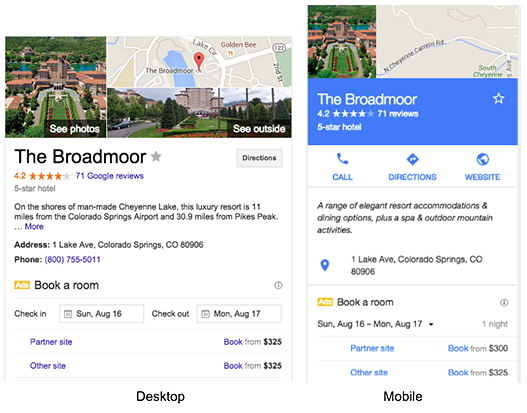
デバイス固有の料金は、特定のデバイス(モバイル、タブレット、パソコンなど)のユーザーのみが表示して予約することができるホテル料金です。料金は Google のパートナーから提示されます。エンドユーザーは、パートナーのサイトで同じデバイス固有の料金を表示して予約できます。
国固有の限定価格
国固有の宿泊料金は、特定の国からホテルを検索するユーザーのみが表示して予約することができる宿泊料金です。Google は、エンドユーザーの IP アドレスを使用して国を判定します。料金は Google のパートナーから提示されます。エンドユーザーは、パートナー独自の国固有のサイトで同じ国固有の料金を表示して予約できます。
言語固有の限定価格
言語固有の料金は、Google で特定の言語設定を使用してホテルを検索するユーザーにのみ表示されます。言語固有の条件は、<LanguageCode> 要素を使用して定義します。
コンテキスト付きクエリのリクエスト メッセージで言語が指定されていません。そのため、レートルールで <LanguageCode> を指定すると、コンテキスト付きのレスポンスには、関連する言語固有のレートがすべて含まれます。
ダウンサンプリング済み限定価格
ダウンサンプリング済み限定価格は、対象となるすべてのユーザーからランダムに選択されたサブセットにのみ表示されます。サンプリング レートは、<MaxUsersPercent> 要素を使用して定義され、次の式で計算されます。
MaxUsersPercent = (number of users selected to view rate)/(total eligible users)
ログイン済みユーザー限定価格
ログイン済みユーザーの価格は、Google アカウントでログインしているユーザーにのみ表示されます。料金は Google のパートナーから提示されます。ユーザーは、パートナー独自のサイトで料金を表示して予約できます。ログイン済みユーザーの価格は、<UserSignedIn> 要素を使用して定義します。
Google は常に最も低い料金を選択するため、条件付き料金が <Result> レベルで設定された価格よりも高い場合、条件付き料金が選択されることはありません。これを避けるには、<Result> レベルの料金を削除し、すべての料金に条件を付けます。または、テクニカル アカウント マネージャーに、<Result> レベルで設定されている料金に関するデフォルトの料金ルールの使用法を問い合わせてください。
料金ルール XML ファイルを作成する
限定価格用の料金ルールは、料金ルール XML ファイルを使用して定義します。詳細については、料金ルール XML リファレンスをご覧ください。
料金フィードを更新する
限定価格は、トランザクション メッセージの要素を使用して設定します。
<Rate> 要素は、<RoomBundle> 要素または <Result> 要素内の <Rates> の複数の子要素としても使用できます。これを限定価格として使用するには、料金ルール XML ファイルで定義した料金ルール ID と一致するように rate_rule_id 属性の値を設定する必要があります。
デフォルトである公開の 2 人部屋の料金がない場合は、<Result> メッセージの <Baserate> 子要素を -1 に設定します。この場合に Google に送信されるすべての条件 <Rates> が有効と見なされます。
例
ベースラインと条件付き
次の例は、基本レートと限定価格を指定するトランザクション メッセージを示しています。
<?xml version="1.0" encoding="UTF-8" ?>
<Transaction timestamp="2023-05-18T16:20:00-04:00" id="42">
  <Result>
    <Property>1234</Property>
    <Checkin>2023-04-10</Checkin>
    <Nights>1</Nights>

    <Baserate currency="USD">200.00</Baserate>
    <Tax currency="USD">20.00</Tax>
    <OtherFees currency="USD">1.00</OtherFees>

    <Rates>
      <!-- The rate_rule_id is required when using conditional rates -->
      <Rate rate_rule_id="mobile">
        <!-- Override base rate and taxes for conditional rates -->
        <Baserate currency="USD">180.00</Baserate>
        <Tax currency="USD">18.00</Tax>
      </Rate>
    </Rates>

  </Result>
</Transaction>
RoomBundle single
次の例は、<RoomBundle> の下に 1 つのレートを含む Transaction メッセージを示しています。
<?xml version="1.0" encoding="UTF-8" ?>
<Transaction timestamp="2023-05-18T16:20:00-04:00" id="42">
  <Result>
    <Property>1234</Property>
    <Checkin>2023-04-10</Checkin>
    <Nights>2</Nights>

    <Baserate currency="USD">300.00</Baserate>
    <Tax currency="USD">30.00</Tax>
    <OtherFees currency="USD">2.00</OtherFees>

    <RoomBundle>
      <RoomID>single</RoomID>
      <Baserate currency="USD">300.00</Baserate>
      <Tax currency="USD">30.00</Tax>
      <OtherFees currency="USD">2.00</OtherFees>
    </RoomBundle>

    <RoomBundle>
      <RoomID>3</RoomID>  <!-- Links to data in metadata -->
      <RatePlanID>basic</RatePlanID>
      <Baserate currency="USD">275.00</Baserate>
      <Tax currency="USD">27.50</Tax>
      <ChargeCurrency>web</ChargeCurrency>
      <BreakfastIncluded>1</BreakfastIncluded>

      <Rates>
        <Rate rate_rule_id="mobile">
          <Baserate currency="USD">269.00</Baserate>
          <Tax currency="USD">2.69</Tax>
          <OtherFees currency="USD">1.00</OtherFees>
        </Rates>
      </Rates>

    </RoomBundle>
  </Result>
</Transaction>
RoomBundle 複数
次の例は、<RoomBundle> の下に複数の料金を含む Transaction メッセージを示しています。
<?xml version="1.0" encoding="UTF-8" ?>
<Transaction timestamp="2023-05-18T16:20:00-04:00" id="42">
  <Result>
    <Property>1234</Property>
    <Checkin>2023-04-10</Checkin>
    <Nights>2</Nights>
    <!-- When Google receives new room bundle information for an itinerary, all
    previous room bundle pricing is dropped from Google's cache. Thus, if you
    want to delete a specific room bundle from Google's cache, you may do so
    by simply not providing that specific room bundle in subsequent transaction
    messages. -->
    <RoomBundle>
     ...
      <!-- RoomID is required, PackageID is recommended. -->
      <RoomID>5</RoomID>
      <PackageID>ABC</PackageID>
      <!-- Baserate is required. -->
      <Baserate currency="USD">275.00</Baserate>
      <Tax currency="USD">27.50</Tax>
      <OtherFees currency="USD">2.00</OtherFees>

      <!-- RatePlanID is optional and represents the unique identifier for a
      room and package data combination. We strongly recommend using RatePlanID
      as a variable to build your dynamic landing page (formerly Point of Sale)
      URL and it should be within 50 characters in length for optimal
      performance. For details, see Using Variables and Conditions. -->
      <RatePlanID>5-ABC</RatePlanID>

      <!-- Occupancy is mandatory for RoomBundle elements. -->
      <!-- Elements below will get inherited to nested rate elements. -->
      <Occupancy>2</Occupancy>
      <OccupancyDetails>
        <NumAdults>2</NumAdults>
      </OccupancyDetails>
      <InternetIncluded>1</InternetIncluded>

      <!-- Rate rule "mobile" overrides chargeCurrency, "us_or_gb" doesn't. -->
      <ChargeCurrency>web</ChargeCurrency>

      <Rates>
        <Rate rate_rule_id="mobile">
          <Baserate currency="USD">258.33</Baserate>
          <Tax currency="USD">25.83</Tax>
          <OtherFees currency="USD">1.00</OtherFees>
          <!-- The value below overrides ChargeCurrency from roombundle. -->
          <ChargeCurrency>hotel</ChargeCurrency>
        </Rate>
        <Rate rate_rule_id="us_or_gb">
          <Baserate currency="USD">268.33</Baserate>
          <Tax currency="USD">26.83</Tax>
          <OtherFees currency="USD">1.00</OtherFees>
        </Rate>
      </Rates>
    </RoomBundle>
  </Result>
</Transaction>
公開されている 2 人部屋料金がない
次の例は、公開されている 2 人部屋の座席利用率がない限定価格を指定するトランザクション メッセージを示しています。
<?xml version="1.0" encoding="UTF-8" ?>
<Transaction timestamp="2023-05-18T16:20:00-04:00" id="42">

  <Result>
    <Property>1234</Property>
    <Checkin>2023-04-10</Checkin>
    <Nights>1</Nights>

    <!-- <Unavailable/> should not be specified when available nested rates
    exist. -->
    <Baserate currency="USD">-1</Baserate>
    <Tax currency="USD">0</Tax>
    <OtherFees currency="USD">0</OtherFees>

    <Rates>
      <!-- The rate_rule_id is required when using conditional rates. -->
      <Rate rate_rule_id="mobile">
        <Baserate currency="USD">180.00</Baserate>
        <Tax currency="USD">18.00</Tax>
        <OtherFees currency="USD">1.00</OtherFees>
        <Custom1>ratecode123</Custom1>
      </Rate>
    </Rates>

  </Result>
</Transaction>
ランディング ページ ファイルを更新する
対象のエンドユーザーがディープリンクを通じて割引料金を予約できるようにするには、ランディング ページ ファイルを変更します。割引料金を適切に表示して提供するため、予約ウェブサイトで追加の実装が必要になる場合もあります。
Google では、限定価格のディープリンクに表示される料金をパートナー様が適用すると想定しています。
動的ディープリンクでは、RATE-RULE-ID 変数を使用すると、料金ルールを名前(<RateRule> 要素の id 属性)により含めることができます。
次の例では、料金ルール ID を追加します。
https://bookingsite.com/landing.do?id=(PARTNER-HOTEL-ID)&arrival=(CHECKINDAY)-(CHECKINMONTH)-(CHECKINYEAR)&departure=(CHECKOUTDAY)-(CHECKOUTMONTH)-(CHECKOUTYEAR)&lang=(USER-LANGUAGE)¤cy=(USER-CURRENCY)&prid=(RATE-RULE-ID)
ランディング ページ ファイルは IF-RATE-RULE-ID ディレクティブもサポートしているため、料金ルールが存在するかどうかに基づいて URL の一部を条件付きで定義できます。
https://bookingsite.com/(IF-RATE-RULE-ID)privatelanding.do(RATE-RULE-ID)(ELSE)landing.do(ENDIF)?id=(PARTNER-HOTEL-ID)&arrival=(CHECKINDAY)-(CHECKINMONTH)-(CHECKINYEAR)&departure=(CHECKOUTDAY)-(CHECKOUTMONTH)-(CHECKOUTYEAR)&lang=(USER-LANGUAGE)¤cy=(USER-CURRENCY)
この例では、料金ルール ID が設定されているかどうかに応じて、2 つのランディング ページから選択します。
詳細については、変数と条件の使用方法をご覧ください。