
สร้างและอัปโหลดฟีดการดำเนินการ
เมื่อสร้างและอัปโหลดฟีดการดำเนินการ ให้ทำตามวิธีการต่อไปนี้
- ทำตามข้อกำหนดที่อธิบายไว้ใน
ฟีดการดำเนินการ
สำหรับไฟล์ข้อมูลการดำเนินการ เราขอแนะนำให้ใช้ชื่อไฟล์ข้อมูลการดำเนินการที่ไม่ซ้ำกันสำหรับการอัปโหลดแต่ละครั้ง
ใส่การประทับเวลาในชื่อไฟล์ เช่น
action_1633621547.json - ในตัวอธิบายชุดไฟล์ ให้ตั้งค่าช่อง
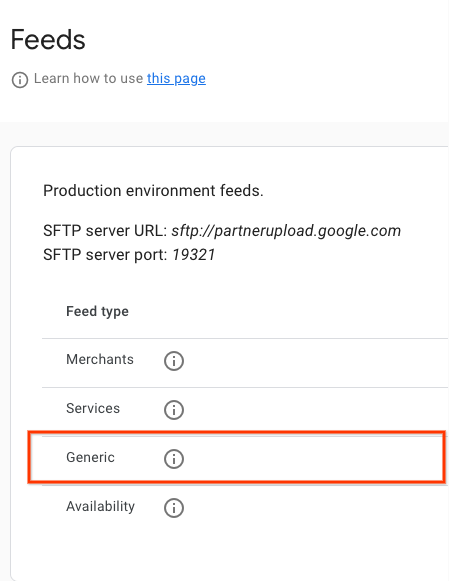
nameเป็นreservewithgoogle.action.v2ดูตัวอย่างไฟล์ตัวอธิบายได้ที่ตัวอย่าง JSON เราขอแนะนำให้ใช้ชื่อไฟล์ตัวอธิบายที่ไม่ซ้ำกันสำหรับการอัปโหลดแต่ละครั้ง ใส่การประทับเวลาในชื่อไฟล์ เช่นaction_1633621547.filesetdesc.jsonคุณต้องอัปโหลดไฟล์ตัวอธิบายไปยังเซิร์ฟเวอร์ SFTP ทั่วไป - อัปโหลดฟีดไปยังเซิร์ฟเวอร์ SFTP ทั่วไปทุกวันเป็นการรีเฟรชแบบเต็ม
- คุณดูรายละเอียดเซิร์ฟเวอร์ SFTP ได้ในส่วน การกำหนดค่า > ฟีดของ Partner Portal
- ดูสถานะการนำเข้าฟีดได้ในส่วน ฟีด > ประวัติของพอร์ทัลพาร์ทเนอร์
คำจำกัดความ
คำจำกัดความของ ActionFeed
message ActionFeed {
  repeated ActionDetail data = 1;
}
คำจำกัดความของ ActionDetail
message ActionDetail {
  string entity_id = 2;
  string link_id = 3;

  // Deep link for action detail
  string url = 4;

  // The actions that can be performed using this deep link. At least one
  // Action must be specified.
  repeated Action actions = 1;
}
คำจำกัดความของ Action
// Information about an Action which could be performed.
message Action {
  // Deprecated fields not to be reused.
  reserved 1;

  oneof action_info {
    AppointmentInfo appointment_info = 2;
  }
}
คำจำกัดความของ AppointmentInfo
// Indicates that the parent Action is for booking an appointment.
// In v2 of the Action feed, the deep link URL is specified on ActionDetail.url,
// so this message has no fields and should be set as an empty object
// (for example, "appointment_info": {} in JSON).
message AppointmentInfo {
}
ตัวอย่างฟีดการดำเนินการ
ฟีดการดำเนินการ
{
  "data": [
    {
      "entity_id": "appointments-merchant-1",
      "link_id": "appointment-link-1",
      "url": "https://www.partnerwebsite.com/appointment/appointment-partner-1",
      "actions":[
        {
          "appointment_info": {}
        }
      ]
    }
  ]
}
ไฟล์ตัวอธิบาย
{
  "generation_timestamp": 1677540395,
  "name": "reservewithgoogle.action.v2",
  "data_file": [
    "action_1677540395_0001.json",
    "action_1677540395_0002.json"

  ]
}