Познакомьтесь с концепциями Media API
Оптимизируйте свои подборки
Сохраняйте и классифицируйте контент в соответствии со своими настройками.
The Google Meet Media API lets your app join a Google Meet conference and consume real-time media streams.
Clients use WebRTC to communicate with Meet servers. The provided reference clients ( C++ , TypeScript ) demonstrate recommended practices and you are encouraged to build directly upon them.
However, you may also build fully custom WebRTC clients that adhere to the Meet Media API's technical requirements .
This page outlines key WebRTC concepts required for a successful Meet Media API session.
Сигнализация «предложение-ответ»
WebRTC — это пиринговая (P2P) платформа, в которой участники обмениваются сигналами. Для начала сессии инициирующий участник отправляет SDP-предложение удалённому участнику. Это предложение содержит следующие важные данные:
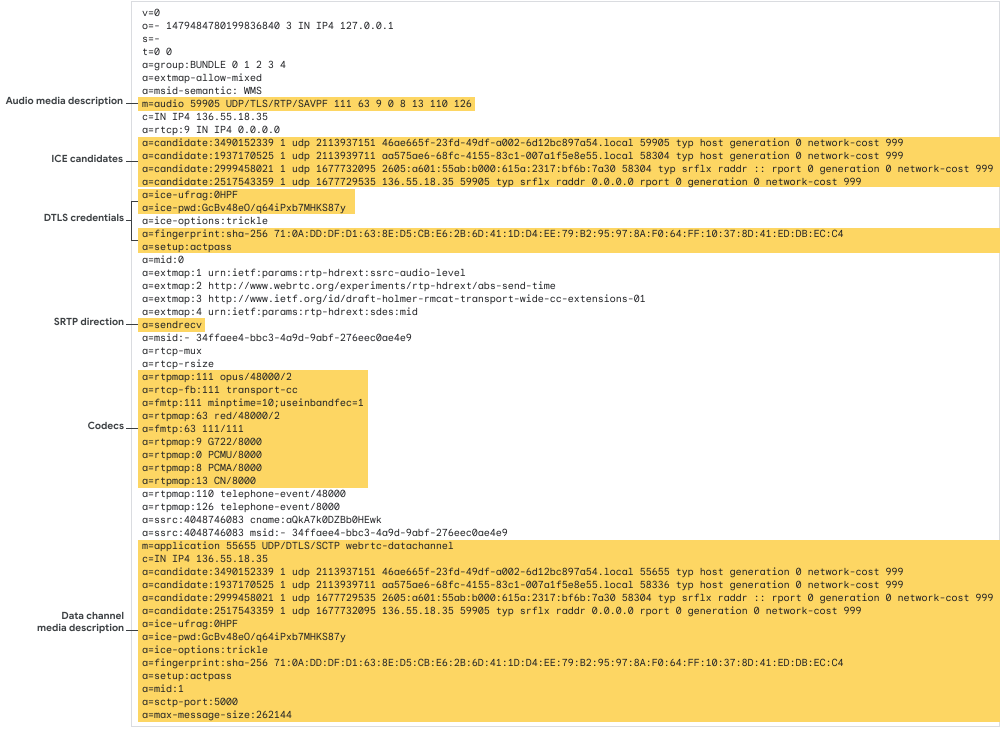
Описание медиафайлов для аудио и видео.
Media descriptions indicate what's communicated during P2P sessions. Three types of descriptions exist: audio, video, and data.
Для обозначения n аудиопотоков, поставщик включает в предложение n описаний аудиомедиа. То же самое относится и к видео. Однако будет максимум одно описание медиаданных .
Направленность
Каждое аудио- или видеоописание описывает отдельные потоки протокола Secure Real-time Transport Protocol (SRTP), регулируемые RFC 3711 Эти потоки являются двунаправленными, позволяя двум участникам передавать и получать медиафайлы по одному и тому же соединению.
Because of this, each media description (in both the offer and answer) contains one of three attributes describing how the stream should be used:
sendonly : Отправляет медиафайлы только от партнера, предоставляющего медиаконтент. Удаленный партнер не будет отправлять медиафайлы по этому потоку.
recvonly : Only receives media from the remote peer. The offering peer won't send media on this stream.
sendrecv : Both peers may send and receive on this stream.
Кодеки
В каждом описании медиафайла также указываются кодеки, поддерживаемые партнером. В случае с API Meet Media, предложения клиентов отклоняются, если они не поддерживают (как минимум) кодеки, указанные в технических требованиях .
рукопожатие DTLS
Потоки SRTP защищены первоначальным рукопожатием в соответствии с протоколом безопасности транспортного уровня дейтаграмм (DTLS), RFC 9147 , между участниками. DTLS традиционно является протоколом «клиент-сервер»; в процессе сигнализации один участник соглашается выступать в роли сервера, а другой — в роли участника.
Because each SRTP stream might have its own dedicated DTLS connection, each media description specifies one of three attributes to indicate the peer's role in the DTLS handshake:
a=setup:actpass : The offering peer defers to the choice of the remote peer.
a=setup:active : Этот узел выступает в роли клиента.
a=setup:passive : Этот узел выступает в роли сервера.
Описание медиафайлов приложения
Каналы данных ( RFC 8831 ) представляют собой абстракцию протокола управления потоком передачи данных («SCTP», RFC 9260 ).
Для открытия каналов передачи данных на начальном этапе сигнализации предложение должно содержать описание медиафайлов приложения . В отличие от описаний аудио- и видеофайлов, описания приложений не указывают направление или кодеки.
кандидаты ICE
A peer's Interactive Connectivity Establishment ("ICE", RFC 8445 ) candidates are a list of routes that a remote peer may use to establish a connection.
The cartesian product of the two peers' lists, known as the candidate pairs , represents the potential routes between two peers. These pairs are tested to determine the optimal route.
importcom.google.api.core.ApiFuture;importcom.google.apps.meet.v2beta.ConnectActiveConferenceRequest;importcom.google.apps.meet.v2beta.ConnectActiveConferenceResponse;importcom.google.apps.meet.v2beta.SpaceName;importcom.google.apps.meet.v2beta.SpacesServiceClient;publicclassAsyncConnectActiveConference{publicstaticvoidmain(String[]args)throwsException{asyncConnectActiveConference();}publicstaticvoidasyncConnectActiveConference()throwsException{// This snippet has been automatically generated and should be regarded as a code template only.// It will require modifications to work:// - It may require correct/in-range values for request initialization.// - It may require specifying regional endpoints when creating the service client as shown in// https://cloud.google.com/java/docs/setup#configure_endpoints_for_the_client_librarytry(SpacesServiceClientspacesServiceClient=SpacesServiceClient.create()){ConnectActiveConferenceRequestrequest=ConnectActiveConferenceRequest.newBuilder().setName(SpaceName.of("[SPACE]").toString()).setOffer("offer105650780").build();ApiFuture<ConnectActiveConferenceResponse>future=spacesServiceClient.connectActiveConferenceCallable().futureCall(request);// Do something.ConnectActiveConferenceResponseresponse=future.get();}}}
usingGoogle.Apps.Meet.V2Beta;usingSystem.Threading.Tasks;publicsealedpartialclassGeneratedSpacesServiceClientSnippets{/// <summary>Snippet for ConnectActiveConferenceAsync</summary>/// <remarks>/// This snippet has been automatically generated and should be regarded as a code template only./// It will require modifications to work:/// - It may require correct/in-range values for request initialization./// - It may require specifying regional endpoints when creating the service client as shown in/// https://cloud.google.com/dotnet/docs/reference/help/client-configuration#endpoint./// </remarks>publicasyncTaskConnectActiveConferenceAsync(){// Create clientSpacesServiceClientspacesServiceClient=awaitSpacesServiceClient.CreateAsync();// Initialize request argument(s)stringname="spaces/[SPACE]";// Make the requestConnectActiveConferenceResponseresponse=awaitspacesServiceClient.ConnectActiveConferenceAsync(name);}}
/** * This snippet has been automatically generated and should be regarded as a code template only. * It will require modifications to work. * It may require correct/in-range values for request initialization. * TODO(developer): Uncomment these variables before running the sample. *//** * Required. Resource name of the space. * Format: spaces/{spaceId} */// const name = 'abc123'/** * Required. WebRTC SDP (Session Description Protocol) offer from the client. * The format is defined by RFC * 8866 (https://www.rfc-editor.org/rfc/rfc8866) with mandatory keys defined * by RFC 8829 (https://www.rfc-editor.org/rfc/rfc8829). This is the standard * SDP format generated by a peer connection's createOffer() and * createAnswer() methods. */// const offer = 'abc123'// Imports the Meet libraryconst{SpacesServiceClient}=require('@google-apps/meet').v2beta;// Instantiates a clientconstmeetClient=newSpacesServiceClient();asyncfunctioncallConnectActiveConference(){// Construct requestconstrequest={name,offer,};// Run requestconstresponse=awaitmeetClient.connectActiveConference(request);console.log(response);}callConnectActiveConference();
# This snippet has been automatically generated and should be regarded as a# code template only.# It will require modifications to work:# - It may require correct/in-range values for request initialization.# - It may require specifying regional endpoints when creating the service# client as shown in:# https://googleapis.dev/python/google-api-core/latest/client_options.htmlfromgoogle.appsimportmeet_v2betaasyncdefsample_connect_active_conference():# Create a clientclient=meet_v2beta.SpacesServiceAsyncClient()# Initialize request argument(s)request=meet_v2beta.ConnectActiveConferenceRequest(name="name_value",offer="offer_value",)# Make the requestresponse=awaitclient.connect_active_conference(request=request)# Handle the responseprint(response)
Пример схемы подключения
Вот предложение с аудиоописанием:
Рисунок 1. Пример предложения с аудиоописанием.
Удаленный узел отвечает SDP-ответом , содержащим такое же количество строк описания медиафайлов. Каждая строка указывает, какие медиафайлы, если таковые имеются, удаленный узел отправляет обратно клиенту-поставщику через потоки SRTP. Удаленный узел также может отклонять определенные потоки от поставщика, установив для этой записи описания медиафайлов значение recvonly .
При использовании Meet Media API клиенты всегда отправляют предложение SDP для установления соединения. Meet никогда не выступает в роли инициатора.
This behavior is managed internally by the reference clients ( C++ , TypeScript ), but developers of custom clients can use WebRTC's PeerConnectionInterface to generate an offer.
To connect to Meet Meet, the offer must adhere to specific requirements :
The client must always act as the client in the DTLS handshake, so every media description in the offer must specify either a=setup:actpass or a=setup:active .
Each media description line must support all required codecs for that media type:
Аудио:Opus
Видео:VP8 , VP9 , AV1
Для приема аудиосообщений предложение должно содержать ровно 3 описания аудиофайлов, предназначенных только для приема. Это можно сделать, установив параметры приемопередатчиков в объекте подключения к партнеру.
C++
// ...rtc::scoped_refptr<webrtc::PeerConnectionInterface>peer_connection;for(inti=0;i < 3;++i){webrtc::RtpTransceiverInitaudio_init;audio_init.direction=webrtc::RtpTransceiverDirection::kRecvOnly;audio_init.stream_ids={absl::StrCat("audio_stream_",i)};webrtc::RTCErrorOr<rtc::scoped_refptr<webrtc::RtpTransceiverInterface>>
audio_result=peer_connection->AddTransceiver(cricket::MediaType::MEDIA_TYPE_AUDIO,audio_init);if(!audio_result.ok()){returnabsl::InternalError(absl::StrCat("Failed to add audio transceiver: ",audio_result.error().message()));}}
JavaScript
pc=newRTCPeerConnection();// Configure client to receive audio from Meet servers.pc.addTransceiver('audio',{'direction':'recvonly'});pc.addTransceiver('audio',{'direction':'recvonly'});pc.addTransceiver('audio',{'direction':'recvonly'});
Для приема видеосообщений предложение должно содержать 1–3 описания видеофайлов, предназначенных только для приема. Это можно сделать, установив параметры приемопередатчиков в объекте подключения к партнеру.
C++
// ...rtc::scoped_refptr<webrtc::PeerConnectionInterface>peer_connection;for(uint32_ti=0;i < configurations.receiving_video_stream_count;++i){webrtc::RtpTransceiverInitvideo_init;video_init.direction=webrtc::RtpTransceiverDirection::kRecvOnly;video_init.stream_ids={absl::StrCat("video_stream_",i)};webrtc::RTCErrorOr<rtc::scoped_refptr<webrtc::RtpTransceiverInterface>>
video_result=peer_connection->AddTransceiver(cricket::MediaType::MEDIA_TYPE_VIDEO,video_init);if(!video_result.ok()){returnabsl::InternalError(absl::StrCat("Failed to add video transceiver: ",video_result.error().message()));}}
JavaScript
pc=newRTCPeerConnection();// Configure client to receive video from Meet servers.pc.addTransceiver('video',{'direction':'recvonly'});pc.addTransceiver('video',{'direction':'recvonly'});pc.addTransceiver('video',{'direction':'recvonly'});
The offer must always include data channels. At minimum, the session-control and media-stats channels should always be open. All data channels must be ordered .
C++
// ...// All data channels must be ordered.constexprwebrtc::DataChannelInitkDataChannelConfig={.ordered=true};rtc::scoped_refptr<webrtc::PeerConnectionInterface>peer_connection;// Signal session-control data channel.webrtc::RTCErrorOr<rtc::scoped_refptr<webrtc::DataChannelInterface>>
session_create_result=peer_connection->CreateDataChannelOrError("session-control",&kDataChannelConfig);if(!session_create_result.ok()){returnabsl::InternalError(absl::StrCat("Failed to create data channel ",data_channel_label,": ",session_create_result.error().message()));}// Signal media-stats data channel.webrtc::RTCErrorOr<rtc::scoped_refptr<webrtc::DataChannelInterface>>
stats_create_result=peer_connection->CreateDataChannelOrError("media-stats",&kDataChannelConfig);if(!stats_create_result.ok()){returnabsl::InternalError(absl::StrCat("Failed to create data channel ",data_channel_label,": ",stats_create_result.error().message()));}
JavaScript
// ...pc=newRTCPeerConnection();// All data channels must be ordered.constdataChannelConfig={ordered:true,};// Signal session-control data channel.sessionControlChannel=pc.createDataChannel('session-control',dataChannelConfig);sessionControlChannel.onopen=()=>console.log("data channel is now open");sessionControlChannel.onclose=()=>console.log("data channel is now closed");sessionControlChannel.onmessage=async(e)=>{console.log("data channel message",e.data);};// Signal media-stats data channel.mediaStatsChannel=pc.createDataChannel('media-stats',dataChannelConfig);mediaStatsChannel.onopen=()=>console.log("data channel is now open");mediaStatsChannel.onclose=()=>console.log("data channel is now closed");mediaStatsChannel.onmessage=async(e)=>{console.log("data channel message",e.data);};
Пример предложения и ответа SDP
Вот полный пример действительного предложения SDP и соответствующего ответа SDP. Это предложение устанавливает сеанс Meet Media API с аудиопотоком и одним видеопотоком.
Обратите внимание, что имеется три описания аудиофайлов, одно описание видеофайлов и обязательное описание приложения.
[[["Прост для понимания","easyToUnderstand","thumb-up"],["Помог мне решить мою проблему","solvedMyProblem","thumb-up"],["Другое","otherUp","thumb-up"]],[["Отсутствует нужная мне информация","missingTheInformationINeed","thumb-down"],["Слишком сложен/слишком много шагов","tooComplicatedTooManySteps","thumb-down"],["Устарел","outOfDate","thumb-down"],["Проблема с переводом текста","translationIssue","thumb-down"],["Проблемы образцов/кода","samplesCodeIssue","thumb-down"],["Другое","otherDown","thumb-down"]],["Последнее обновление: 2026-04-01 UTC."],[],[]]