
The Google Docs API lets you programmatically create, insert, update, read, and manage dropdown chips within Google Docs documents.
What are dropdown chips?
Dropdown chips in Google Docs provide users with an interactive, customizable selection menu inline within document text. Users can click a dropdown chip to select from a predefined list of options, each with its own display text and color styling. Dropdown chips are frequently used for project tracking, status updates, review workflows, and approval stages.
Through the Docs API, you can:
- Define reusable dropdown templates with customized titles, option names, and colors.
- Insert dropdown chips at a valid character location.
- Update the selected option of an individual dropdown chip instance.
- Modify shared dropdown definitions in place, updating all referencing chips simultaneously.
- Safely replace or retire options while maintaining referential integrity across existing chips.
- Delete unused dropdown templates.
Architecture: definitions and instances
In the Docs API, dropdown chips have definitions and instances. A definition sets options for a dropdown instance. A dropdown instance is a dropdown that people can interact with, and it saves information about selections.
The Docs API separates the dropdown template configuration from the inline dropdown chip instances:
- DropdownDefinition: A tab-level template that defines the dropdown title and the collection of selectable choices (
DropdownOption). It does not reside at a specific character offset in the document; instead, it is stored in the tab's definition map:document.tabs[].documentTab.dropdownDefinitions. - Dropdown: An individual chip instance embedded inline within a paragraph element (
ParagraphElement.dropdown). Each dropdown instance references adropdownDefinitionIdand stores its own activeselectedOptionId.
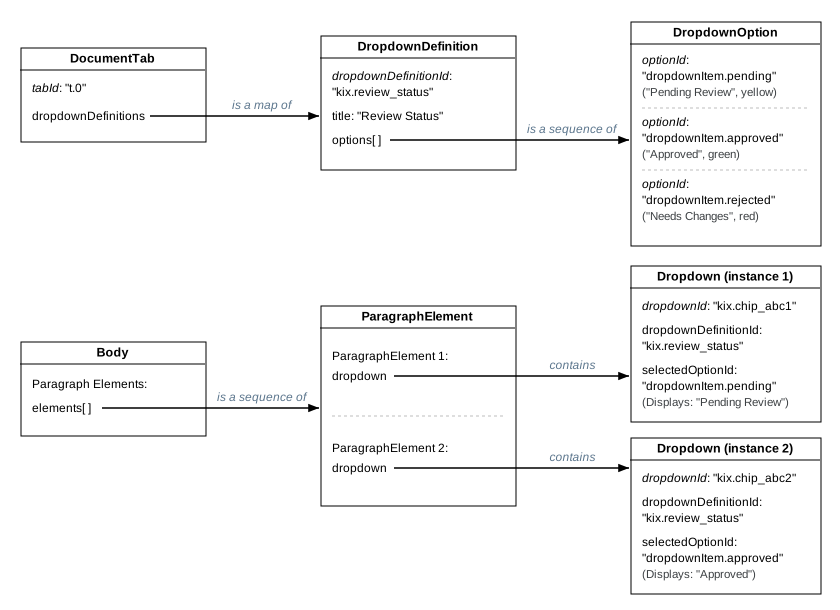
Modifying a DropdownDefinition (e.g., adding an option or renaming the title) updates all referencing chips across the tab without requiring updates to every individual element.
Each Dropdown instance tracks its own selectedOptionId. Mutating an individual chip's selected value affects only that specific instance.
ID format and validation rules
User-provided IDs must adhere to strict format, prefix, and length specifications:
| Identifier | Mandatory Prefix | Validation regular expression | Length Limit | Example |
|---|---|---|---|---|
Dropdown definition ID (dropdownDefinitionId) |
kix. |
^kix\.[a-zA-Z0-9_-]{2,14}$ |
6–18 characters | kix.review_status |
Dropdown option ID (optionId) |
dropdownItem. |
^dropdownItem\.[a-zA-Z0-9_-]{2,14}$ |
15–27 characters | dropdownItem.pending |
Generate user-provided IDs
To generate IDs that adhere to the mandatory prefix and regular expression requirements, use the following helper functions. These helpers generate lowercase base-36 alphanumeric suffixes, matching the format generated by the Google Docs UI:
Python
import random
import string

def generate_dropdown_definition_id(suffix_len: int = 8) -> str:
    """Generates a valid user-provided DropdownDefinition ID (6-18 chars, starting with 'kix.')."""
    chars = string.ascii_lowercase + string.digits
    suffix = "".join(random.choices(chars, k=max(2, min(suffix_len, 14))))
    return f"kix.{suffix}"

def generate_dropdown_option_id(suffix_len: int = 8) -> str:
    """Generates a valid user-provided DropdownOption ID (15-27 chars, starting with 'dropdownItem.')."""
    chars = string.ascii_lowercase + string.digits
    suffix = "".join(random.choices(chars, k=max(2, min(suffix_len, 14))))
    return f"dropdownItem.{suffix}"
Java
import java.security.SecureRandom;

public final class DropdownIdGenerator {
  private static final String BASE36_CHARS =
      "abcdefghijklmnopqrstuvwxyz0123456789";
  private static final SecureRandom RANDOM = new SecureRandom();

  private DropdownIdGenerator() {}

  /** Generates a valid user-provided DropdownDefinition ID (6-18 chars, starting with "kix."). */
  public static String generateDefinitionId(int suffixLength) {
    int length = Math.max(2, Math.min(suffixLength, 14));
    StringBuilder sb = new StringBuilder("kix.");
    for (int i = 0; i < length; i++) {
      sb.append(BASE36_CHARS.charAt(RANDOM.nextInt(BASE36_CHARS.length())));
    }
    return sb.toString();
  }

  /** Generates a valid user-provided DropdownOption ID (15-27 chars, starting with "dropdownItem."). */
  public static String generateOptionId(int suffixLength) {
    int length = Math.max(2, Math.min(suffixLength, 14));
    StringBuilder sb = new StringBuilder("dropdownItem.");
    for (int i = 0; i < length; i++) {
      sb.append(BASE36_CHARS.charAt(RANDOM.nextInt(BASE36_CHARS.length())));
    }
    return sb.toString();
  }
}
Create and insert dropdown chips
Single-batch creation (recommended)
The most efficient pattern combines CreateDropdownDefinitionRequest and InsertDropdownRequest in one documents.batchUpdate call.
The following code sample creates a "Review Status" dropdown definition with three color-coded choices using user-provided IDs, and inserts an instance at the end of the document:
Python
requests = [
    {
        "createDropdownDefinition": {
            "dropdownDefinition": {
                "dropdownDefinitionId": "kix.review_status",
                "dropdownDefinitionProperties": {
                    "title": "Review Status",
                    "options": [
                        {
                            "optionId": "dropdownItem.pending",
                            "displayValue": "Pending Review",
                            "textStyle": {
                                "backgroundColor": {
                                    "color": {"rgbColor": {"red": 0.99, "green": 0.90, "blue": 0.65}}
                                },
                                "foregroundColor": {
                                    "color": {"rgbColor": {"red": 0.45, "green": 0.30, "blue": 0.0}}
                                },
                            },
                        },
                        {
                            "optionId": "dropdownItem.approved",
                            "displayValue": "Approved",
                            "textStyle": {
                                "backgroundColor": {
                                    "color": {"rgbColor": {"red": 0.85, "green": 0.95, "blue": 0.85}}
                                },
                                "foregroundColor": {
                                    "color": {"rgbColor": {"red": 0.08, "green": 0.40, "blue": 0.15}}
                                },
                            },
                        },
                        {
                            "optionId": "dropdownItem.rejected",
                            "displayValue": "Needs Changes",
                            "textStyle": {
                                "backgroundColor": {
                                    "color": {"rgbColor": {"red": 0.98, "green": 0.84, "blue": 0.84}}
                                },
                                "foregroundColor": {
                                    "color": {"rgbColor": {"red": 0.65, "green": 0.10, "blue": 0.10}}
                                },
                            },
                        },
                    ],
                },
            }
        }
    },
    {
        "insertDropdown": {
            "endOfSegmentLocation": {},
            "dropdownDefinitionId": "kix.review_status",
            "selectedOptionId": "dropdownItem.pending",
        }
    },
]

result = service.documents().batchUpdate(
    documentId=DOCUMENT_ID,
    body={"requests": requests}
).execute()
Java
List<Request> requests = new ArrayList<>();

List<DropdownOption> options = Arrays.asList(
    new DropdownOption()
        .setOptionId("dropdownItem.pending")
        .setDisplayValue("Pending Review")
        .setTextStyle(new TextStyle()
            .setBackgroundColor(new OptionalColor().setColor(
                new Color().setRgbColor(new RgbColor().setRed(0.99f).setGreen(0.90f).setBlue(0.65f))))
            .setForegroundColor(new OptionalColor().setColor(
                new Color().setRgbColor(new RgbColor().setRed(0.45f).setGreen(0.30f).setBlue(0.0f))))),
    new DropdownOption()
        .setOptionId("dropdownItem.approved")
        .setDisplayValue("Approved")
        .setTextStyle(new TextStyle()
            .setBackgroundColor(new OptionalColor().setColor(
                new Color().setRgbColor(new RgbColor().setRed(0.85f).setGreen(0.95f).setBlue(0.85f))))
            .setForegroundColor(new OptionalColor().setColor(
                new Color().setRgbColor(new RgbColor().setRed(0.08f).setGreen(0.40f).setBlue(0.15f))))),
    new DropdownOption()
        .setOptionId("dropdownItem.rejected")
        .setDisplayValue("Needs Changes")
        .setTextStyle(new TextStyle()
            .setBackgroundColor(new OptionalColor().setColor(
                new Color().setRgbColor(new RgbColor().setRed(0.98f).setGreen(0.84f).setBlue(0.84f))))
            .setForegroundColor(new OptionalColor().setColor(
                new Color().setRgbColor(new RgbColor().setRed(0.65f).setGreen(0.10f).setBlue(0.10f))))));

DropdownDefinition definition = new DropdownDefinition()
    .setDropdownDefinitionId("kix.review_status")
    .setDropdownDefinitionProperties(new DropdownDefinitionProperties()
        .setTitle("Review Status")
        .setOptions(options));

requests.add(new Request().setCreateDropdownDefinition(
    new CreateDropdownDefinitionRequest().setDropdownDefinition(definition)));

requests.add(new Request().setInsertDropdown(
    new InsertDropdownRequest()
        .setEndOfSegmentLocation(new EndOfSegmentLocation())
        .setDropdownDefinitionId("kix.review_status")
        .setSelectedOptionId("dropdownItem.pending")));

BatchUpdateDocumentRequest body = new BatchUpdateDocumentRequest().setRequests(requests);
BatchUpdateDocumentResponse response = docsService.documents()
    .batchUpdate(DOCUMENT_ID, body)
    .execute();
Dropdown validation rules and limits
When creating or modifying dropdown definitions, the following constraints apply:
- Option Count: A dropdown definition must have between 2 and 50 options.
- Title Length: The definition
titlecannot be empty and must not exceed 200 characters. - Display Value Length: Each option's
displayValuecannot be empty and must not exceed 200 characters. - Option Styling: Only
foregroundColorandbackgroundColorare supported inDropdownOption.textStyle. Setting other style properties returns a400 Bad Requesterror. - Default Selection: In
InsertDropdownRequest, ifselectedOptionIdis omitted, the chip defaults to the first option defined in theDropdownDefinition.
Update an individual dropdown chip selection
To change the selected option of an existing dropdown chip instance without altering its template or other chips, use UpdateDropdownPropertiesRequest:
dropdownId: (Required) The ID of the specific dropdown chip instance to update.tabId: The ID of the tab containing the dropdown (defaults to the first tab if omitted).fields: Set to"selectedOptionId".
The following code sample updates the active selection of a dropdown chip to "dropdownItem.approved":
Python
requests = [
    {
        "updateDropdownProperties": {
            "dropdownId": "kix.chip_abc1",
            "tabId": "t.0",
            "dropdownProperties": {
                "selectedOptionId": "dropdownItem.approved",
            },
            "fields": "selectedOptionId",
        }
    }
]

result = service.documents().batchUpdate(
    documentId=DOCUMENT_ID,
    body={"requests": requests}
).execute()
Java
List<Request> requests = new ArrayList<>();
requests.add(new Request().setUpdateDropdownProperties(
    new UpdateDropdownPropertiesRequest()
        .setDropdownId("kix.chip_abc1")
        .setTabId("t.0")
        .setDropdownProperties(new DropdownProperties()
            .setSelectedOptionId("dropdownItem.approved"))
        .setFields("selectedOptionId")));

BatchUpdateDocumentRequest body = new BatchUpdateDocumentRequest().setRequests(requests);
BatchUpdateDocumentResponse response = docsService.documents()
    .batchUpdate(DOCUMENT_ID, body)
    .execute();
Update dropdown definitions and options
To modify the template itself (title, options list, display labels, or colors), use UpdateDropdownDefinitionPropertiesRequest. Updating a definition automatically updates all dropdown chips referencing it across the tab.
Full list replacement for options
When dropdownDefinitionProperties.options is included in the fields mask, the request performs a full list replacement. You must supply the complete list of options in the chosen order. The server diffs the incoming list against the current definition:
- New option: Including an option without an
optionId(or with a new user-providedoptionId) adds it to the definition. - Updated option: Providing an existing
optionIdwith modifieddisplayValueortextStyleupdates that option in place. - Reordered options: The options list is saved in the exact sequence supplied in the request.
- Deleted option: Omitting an existing
optionIddeletes that option from the definition.
Referential integrity and option replacement
If an option being deleted is selected in any dropdown chip within the document, you must supply a mapping in selectedOptionIdReplacements (map<string, string>). The keys are the IDs of the options being deleted, and the values are the IDs of the replacement options.
The following code sample demonstrates how to update a dropdown definition with option replacements:
Python
requests = [
    {
        "updateDropdownDefinitionProperties": {
            "dropdownDefinitionId": "kix.review_status",
            "tabId": "t.0",
            "dropdownDefinitionProperties": {
                "title": "Editorial Review Status",
                "options": [
                    {
                        "optionId": "dropdownItem.approved",
                        "displayValue": "Approved",
                        "textStyle": {
                            "backgroundColor": {
                                "color": {"rgbColor": {"red": 0.85, "green": 0.95, "blue": 0.85}}
                            },
                            "foregroundColor": {
                                "color": {"rgbColor": {"red": 0.08, "green": 0.40, "blue": 0.15}}
                            },
                        },
                    },
                    {
                        "optionId": "dropdownItem.rejected",
                        "displayValue": "Changes Requested",
                        "textStyle": {
                            "backgroundColor": {
                                "color": {"rgbColor": {"red": 0.98, "green": 0.84, "blue": 0.84}}
                            },
                            "foregroundColor": {
                                "color": {"rgbColor": {"red": 0.65, "green": 0.10, "blue": 0.10}}
                            },
                        },
                    },
                ],
            },
            "selectedOptionIdReplacements": {
                "dropdownItem.pending": "dropdownItem.rejected"
            },
            "fields": "title,options",
        }
    }
]

result = service.documents().batchUpdate(
    documentId=DOCUMENT_ID,
    body={"requests": requests}
).execute()
Java
List<DropdownOption> updatedOptions = Arrays.asList(
    new DropdownOption()
        .setOptionId("dropdownItem.approved")
        .setDisplayValue("Approved")
        .setTextStyle(new TextStyle()
            .setBackgroundColor(new OptionalColor().setColor(
                new Color().setRgbColor(new RgbColor().setRed(0.85f).setGreen(0.95f).setBlue(0.85f))))
            .setForegroundColor(new OptionalColor().setColor(
                new Color().setRgbColor(new RgbColor().setRed(0.08f).setGreen(0.40f).setBlue(0.15f))))),
    new DropdownOption()
        .setOptionId("dropdownItem.rejected")
        .setDisplayValue("Changes Requested")
        .setTextStyle(new TextStyle()
            .setBackgroundColor(new OptionalColor().setColor(
                new Color().setRgbColor(new RgbColor().setRed(0.98f).setGreen(0.84f).setBlue(0.84f))))
            .setForegroundColor(new OptionalColor().setColor(
                new Color().setRgbColor(new RgbColor().setRed(0.65f).setGreen(0.10f).setBlue(0.10f))))));

Map<String, String> replacements = new HashMap<>();
replacements.put("dropdownItem.pending", "dropdownItem.rejected");

List<Request> requests = new ArrayList<>();
requests.add(new Request().setUpdateDropdownDefinitionProperties(
    new UpdateDropdownDefinitionPropertiesRequest()
        .setDropdownDefinitionId("kix.review_status")
        .setTabId("t.0")
        .setDropdownDefinitionProperties(new DropdownDefinitionProperties()
            .setTitle("Editorial Review Status")
            .setOptions(updatedOptions))
        .setSelectedOptionIdReplacements(replacements)
        .setFields("title,options")));

BatchUpdateDocumentRequest body = new BatchUpdateDocumentRequest().setRequests(requests);
BatchUpdateDocumentResponse response = docsService.documents()
    .batchUpdate(DOCUMENT_ID, body)
    .execute();
Delete a dropdown definition
To remove an unused dropdown template, use DeleteDropdownDefinitionRequest.
The following code sample demonstrates how to delete a dropdown definition:
Python
requests = [
    {
        "deleteDropdownDefinition": {
            "dropdownDefinitionId": "kix.review_status",
            "tabId": "t.0",
        }
    }
]

result = service.documents().batchUpdate(
    documentId=DOCUMENT_ID,
    body={"requests": requests}
).execute()
Java
List<Request> requests = new ArrayList<>();
requests.add(new Request().setDeleteDropdownDefinition(
    new DeleteDropdownDefinitionRequest()
        .setDropdownDefinitionId("kix.review_status")
        .setTabId("t.0")));

BatchUpdateDocumentRequest body = new BatchUpdateDocumentRequest().setRequests(requests);
BatchUpdateDocumentResponse response = docsService.documents()
    .batchUpdate(DOCUMENT_ID, body)
    .execute();
Error handling and troubleshooting
Common error conditions and resolutions:
| Status Code | Cause | Resolution |
|---|---|---|
400 INVALID_ARGUMENT |
Invalid ID prefix or regular expression format. | Ensure dropdownDefinitionId begins with kix. (6–18 chars) and optionId begins with dropdownItem. (15–27 chars). |
400 INVALID_ARGUMENT |
Option count out of bounds. | A dropdown definition must contain between 2 and 50 options. |
400 INVALID_ARGUMENT |
Title or display value is empty or exceeds 200 characters. | Provide a non-empty string between 1 and 200 characters. |
400 INVALID_ARGUMENT |
Unsupported text style property in option. | Only foregroundColor and backgroundColor are supported on dropdown options. Remove font, size, or other attributes. |
400 INVALID_ARGUMENT |
Missing option replacement mapping on delete. | When deleting an option that is selected by any chip, provide a valid replacement in selectedOptionIdReplacements. |
400 INVALID_ARGUMENT |
Attempted to delete a definition in use. | Delete or retarget all dropdown chip instances referencing the definition before deleting it. |
400 INVALID_ARGUMENT |
Duplicate user-provided ID. | Ensure user-provided IDs are unique within the document tab. |