

Индекс
-
ChatService(интерфейс) -
AccessoryWidget(message) -
ActionResponse(сообщение) -
ActionResponse.ResponseType(enum) -
ActionResponse.SelectionItems(message) -
ActionResponse.UpdatedWidget(message) -
ActionStatus(message) -
Annotation(сообщение) -
AnnotationType(enum) -
AppCommandMetadata(message) -
AppCommandMetadata.AppCommandType(enum) -
AttachedGif(сообщение) -
Attachment(сообщение) -
Attachment.Source(enum) -
AttachmentDataRef(message) -
CalendarEventLinkData(message) -
CardWithId(message) -
ChatSpaceLinkData(сообщение) -
CompleteImportSpaceRequest(message) -
CompleteImportSpaceResponse(message) -
ContextualAddOnMarkup(message) -
ContextualAddOnMarkup.Card(message) -
ContextualAddOnMarkup.Card.CardAction(message) -
ContextualAddOnMarkup.Card.CardHeader(message) -
ContextualAddOnMarkup.Card.CardHeader.ImageStyle(enum) -
ContextualAddOnMarkup.Card.Section(message) -
CreateCustomEmojiRequest(message) -
CreateMembershipRequest(message) -
CreateMessageRequest(message) -
CreateMessageRequest.MessageReplyOption(enum) -
CreateReactionRequest(message) -
CreateSectionRequest(message) -
CreateSpaceRequest(message) -
CustomEmoji(сообщение) -
CustomEmoji.CustomEmojiPayload(message) -
CustomEmojiMetadata(message) -
DeleteCustomEmojiRequest(message) -
DeleteMembershipRequest(message) -
DeleteMessageRequest(message) -
DeleteReactionRequest(message) -
DeleteSectionRequest(message) -
DeleteSpaceRequest(message) -
DeletionMetadata(message) -
DeletionMetadata.DeletionType(enum) -
Dialog(сообщение) -
DialogAction(message) -
DriveDataRef(message) -
DriveLinkData(сообщение) -
Emoji(сообщение) -
EmojiReactionSummary(message) -
FindDirectMessageRequest(message) -
FindGroupChatsRequest(message) -
FindGroupChatsResponse(message) -
ForwardedMetadata(message) -
GetAttachmentRequest(message) -
GetCustomEmojiRequest(message) -
GetMembershipRequest(message) -
GetMessageRequest(message) -
GetSpaceEventRequest(message) -
GetSpaceNotificationSettingRequest(message) -
GetSpaceReadStateRequest(message) -
GetSpaceRequest(message) -
GetThreadReadStateRequest(message) -
Group(сообщение) -
HistoryState(enum) -
ListCustomEmojisRequest(message) -
ListCustomEmojisResponse(message) -
ListMembershipsRequest(message) -
ListMembershipsResponse(message) -
ListMessagesRequest(message) -
ListMessagesResponse(message) -
ListReactionsRequest(message) -
ListReactionsResponse(message) -
ListSectionItemsRequest(message) -
ListSectionItemsResponse(message) -
ListSectionsRequest(message) -
ListSectionsResponse(message) -
ListSpaceEventsRequest(message) -
ListSpaceEventsResponse(message) -
ListSpacesRequest(message) -
ListSpacesResponse(message) -
MatchedUrl(message) -
MeetSpaceLinkData(сообщение) -
MeetSpaceLinkData.HuddleStatus(enum) -
MeetSpaceLinkData.Type(enum) -
Membership(сообщение) -
Membership.MembershipRole(enum) -
Membership.MembershipState(enum) -
MembershipBatchCreatedEventData(message) -
MembershipBatchDeletedEventData(message) -
MembershipBatchUpdatedEventData(message) -
MembershipCreatedEventData(message) -
MembershipDeletedEventData(message) -
MembershipUpdatedEventData(message) -
Message(message) -
MessageBatchCreatedEventData(message) -
MessageBatchDeletedEventData(message) -
MessageBatchUpdatedEventData(message) -
MessageCreatedEventData(message) -
MessageDeletedEventData(message) -
MessageUpdatedEventData(message) -
MoveSectionItemRequest(message) -
MoveSectionItemResponse(message) -
PositionSectionRequest(message) -
PositionSectionRequest.Position(enum) -
PositionSectionResponse(message) -
QuotedMessageMetadata(message) -
QuotedMessageMetadata.QuoteType(enum) -
QuotedMessageSnapshot(message) -
Reaction(сообщение) -
ReactionBatchCreatedEventData(message) -
ReactionBatchDeletedEventData(message) -
ReactionCreatedEventData(message) -
ReactionDeletedEventData(message) -
ReplaceMessageCardsRequest(message) -
ReplaceMessageCardsResponse(message) -
RichLinkMetadata(message) -
RichLinkMetadata.RichLinkType(enum) -
SearchSpacesRequest(message) -
SearchSpacesResponse(message) -
Section(сообщение) -
Section.SectionType(enum) -
SectionItem(message) -
SetUpSpaceRequest(message) -
SlashCommand(message) -
SlashCommandMetadata(сообщение) -
SlashCommandMetadata.Type(перечисление) -
Space(сообщение) -
Space.AccessSettings(message) -
Space.AccessSettings.AccessState(enum) -
Space.MembershipCount(message) -
Space.PermissionSetting(message) -
Space.PermissionSettings(message) -
Space.PredefinedPermissionSettings(enum) -
Space.SpaceDetails(message) -
Space.SpaceThreadingState(enum) -
Space.SpaceType(enum) -
Space.Type(enum) -
SpaceBatchUpdatedEventData(message) -
SpaceEvent(сообщение) -
SpaceNotificationSetting(message) -
SpaceNotificationSetting.MuteSetting(enum) -
SpaceNotificationSetting.NotificationSetting(enum) -
SpaceReadState(message) -
SpaceUpdatedEventData(message) -
SpaceView(enum) -
Thread(сообщение) -
ThreadReadState(message) -
UpdateMembershipRequest(message) -
UpdateMessageRequest(message) -
UpdateSectionRequest(message) -
UpdateSpaceNotificationSettingRequest(message) -
UpdateSpaceReadStateRequest(message) -
UpdateSpaceRequest(message) -
User(сообщение) -
User.Type(enum) -
UserMentionMetadata(message) -
UserMentionMetadata.Type(enum) -
WidgetMarkup(message) -
WidgetMarkup.Button(message) -
WidgetMarkup.FormAction(message) -
WidgetMarkup.FormAction.ActionParameter(message) -
WidgetMarkup.Icon(enum) -
WidgetMarkup.Image(message) -
WidgetMarkup.ImageButton(message) -
WidgetMarkup.KeyValue(message) -
WidgetMarkup.OnClick(message) -
WidgetMarkup.OpenLink(сообщение) -
WidgetMarkup.TextButton(message) -
WidgetMarkup.TextParagraph(сообщение)
Чат-сервис
Позволяет разработчикам создавать приложения для чата и интеграции на платформе Google Chat.
| CompleteImportSpace |
|---|
Завершает процесс импорта указанного пространства и делает его видимым для пользователей. Требуется аутентификация пользователя и делегирование полномочий в масштабе домена с указанием области авторизации :
Для получения дополнительной информации см. раздел «Разрешить приложениям Google Chat импортировать данные» .
|
| Создать пользовательские эмодзи |
|---|
Создаёт пользовательский эмодзи. Пользовательские эмодзи доступны только для учетных записей Google Workspace, и администратор должен включить их использование для всей организации. Для получения дополнительной информации см. разделы « Узнайте больше о пользовательских эмодзи в Google Chat» и «Управление разрешениями на использование пользовательских эмодзи» . Требуется аутентификация пользователя с указанием области авторизации :
|
| Создать членство |
|---|
Создает членство для вызывающего чат-приложения, пользователя или группы Google. Создание членств для других чат-приложений не поддерживается. При создании членства, если у указанного участника отключена политика автоматического принятия приглашений, он получает приглашение и должен принять приглашение в пространство, прежде чем присоединиться. В противном случае, создание членства добавляет участника непосредственно в указанное пространство. Поддерживаются следующие типы аутентификации :
Аутентификация приложений не поддерживается в следующих случаях:
Примеры использования см. в:
|
| Создать сообщение |
|---|
Создает сообщение в чате Google. Пример см. в разделе «Отправка сообщения» . Поддерживаются следующие типы аутентификации :
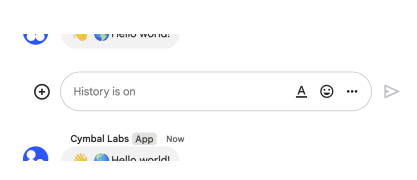
В зависимости от типа аутентификации, используемого в запросе, чат по-разному определяет отправителя сообщения. На следующем изображении показано, как Chat присваивает сообщениям атрибуты при использовании аутентификации приложения. Chat отображает приложение Chat в качестве отправителя сообщения. Содержимое сообщения может включать текст (
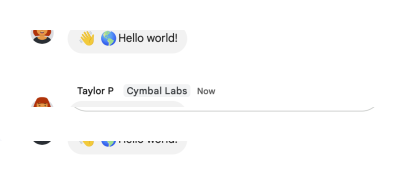
На следующем изображении показано, как Chat присваивает сообщениям атрибуты при использовании аутентификации пользователя. Chat отображает пользователя как отправителя сообщения и присваивает сообщению имя приложения Chat. Содержимое сообщения может содержать только текст (
Максимальный размер сообщения, включая его содержимое, составляет 32 000 байт. В случае запросов через веб-перехватчик ответ не содержит полного сообщения. В ответ, помимо информации, содержащейся в запросе, заполняются только поля
|
| Создать реакцию |
|---|
Создает реакцию и добавляет ее к сообщению. Пример см. в разделе «Добавление реакции к сообщению» . Требуется аутентификация пользователя с использованием одной из следующих областей авторизации :
|
| СоздатьСекцию |
|---|
Создает раздел в Google Chat. Разделы помогают пользователям группировать беседы и настраивать список разделов, отображаемых на панели навигации чата. Можно создавать только разделы типа Требуется аутентификация пользователя с указанием области авторизации :
|
| CreateSpace |
|---|
Создает пространство. Может использоваться для создания именованного пространства или группового чата в Поддерживаются следующие типы аутентификации :
При аутентификации в качестве приложения поле При аутентификации в качестве приложения приложение «Чат» добавляется в качестве участника пространства. Однако, в отличие от аутентификации человека, приложение «Чат» не добавляется в качестве менеджера пространства. По умолчанию приложение «Чат» может быть удалено из пространства всеми участниками пространства. Чтобы разрешить удаление приложения из пространства только менеджерам пространства, установите Состав участников пространства при его создании зависит от того, создано ли пространство в
Если при создании пространства вы получаете сообщение об ошибке
|
| DeleteCustomEmoji |
|---|
Удаляет созданный пользователем эмодзи. По умолчанию пользователи могут удалять только созданные ими самими эмодзи. Менеджеры эмодзи , назначенные администратором, могут удалять любые созданные ими эмодзи в организации. См. раздел «Подробнее о созданных пользователем эмодзи в Google Chat» . Пользовательские эмодзи доступны только для учетных записей Google Workspace, и администратор должен включить их использование для всей организации. Для получения дополнительной информации см. разделы « Узнайте больше о пользовательских эмодзи в Google Chat» и «Управление разрешениями на использование пользовательских эмодзи» . Требуется аутентификация пользователя с указанием области авторизации :
|
| Удалить членство |
|---|
Удаляет членство. Пример см. в разделе «Удаление пользователя или приложения Google Chat из пространства» . Поддерживаются следующие типы аутентификации :
Аутентификация приложений не поддерживается в следующих случаях:
Для удаления членства для администраторов пространства запрашивающий должен быть администратором пространства. Если вы используете аутентификацию через приложение, то приложение «Чат» должно быть создано пользователем пространства.
|
| Удалить сообщение |
|---|
Удаляет сообщение. Пример см. в разделе «Удаление сообщения» . Поддерживаются следующие типы аутентификации :
При использовании аутентификации приложения запросы могут удалять только сообщения, созданные вызывающим приложением чата.
|
| DeleteReaction |
|---|
Удаляет реакцию на сообщение. Пример см. в разделе «Удаление реакции» . Требуется аутентификация пользователя с использованием одной из следующих областей авторизации :
|
| Удалить раздел |
|---|
Удаляет раздел типа Если раздел содержит такие элементы, как пробелы, эти элементы перемещаются в разделы по умолчанию Google Chat и не удаляются. Подробнее см. раздел «Создание и организация разделов в Google Chat» . Требуется аутентификация пользователя с указанием области авторизации :
|
| DeleteSpace |
|---|
Удаляет именованное пространство. Всегда выполняет каскадное удаление, что означает, что дочерние ресурсы пространства — такие как сообщения, опубликованные в пространстве, и членство в пространстве — также удаляются. Пример см. в разделе «Удаление пространства» . Поддерживаются следующие типы аутентификации :
|
| FindDirectMessage |
|---|
Возвращает существующее личное сообщение с указанным пользователем. Если место для личных сообщений не найдено, возвращает ошибку При использовании аутентификации приложения возвращается пространство для прямых сообщений между указанным пользователем и вызывающим приложением чата. При аутентификации пользователя возвращается пространство прямых сообщений между указанным пользователем и аутентифицированным пользователем. Поддерживаются следующие типы аутентификации :
|
| FindGroupChats |
|---|
Возвращает все пространства с Если вызывающий пользователь блокирует или сам блокируется некоторыми пользователями, и не найдено ни одного пространства, содержащего весь указанный набор пользователей, этот метод возвращает пространства, которые не включают заблокированных или блокирующих пользователей. Указанный набор пользователей должен содержать только данные о пользователях-людях (не приложениях). Запрос, содержащий данные о пользователях-нелюдях, не возвращает никаких пробелов. Требуется аутентификация пользователя с использованием одной из следующих областей авторизации :
|
| Получить вложение |
|---|
Получает метаданные вложения сообщения. Данные вложения извлекаются с помощью API мультимедиа . Пример см. в разделе «Получение метаданных о вложении сообщения» . Требуется аутентификация приложения с указанием области авторизации :
|
| GetCustomEmoji |
|---|
Возвращает подробную информацию о пользовательском эмодзи. Пользовательские эмодзи доступны только для учетных записей Google Workspace, и администратор должен включить их использование для всей организации. Для получения дополнительной информации см. разделы « Узнайте больше о пользовательских эмодзи в Google Chat» и «Управление разрешениями на использование пользовательских эмодзи» . Требуется аутентификация пользователя с использованием одной из следующих областей авторизации :
|
| GetMembership |
|---|
Возвращает подробную информацию о членстве. Пример см. в разделе «Получение подробной информации о членстве пользователя или приложения Google Chat» . Поддерживаются следующие типы аутентификации :
|
| GetMessage |
|---|
Возвращает подробную информацию о сообщении. Пример см. в разделе «Получение подробной информации о сообщении» . Поддерживаются следующие типы аутентификации :
Примечание: Возможно, ответ будет получен от заблокированного пользователя или сообщества.
|
| GetSpace |
|---|
Возвращает подробную информацию о пространстве. Пример см. в разделе «Получение подробной информации о пространстве» . Поддерживаются следующие типы аутентификации :
Аутентификация приложений имеет следующие ограничения:
|
| GetSpaceEvent |
|---|
Возвращает событие из пространства Google Чата. Полезная нагрузка события содержит самую последнюю версию ресурса, которая изменилась. Например, если вы запрашиваете событие о новом сообщении, но сообщение позже было обновлено, сервер возвращает обновленный ресурс Примечание: Поле Поддерживаются следующие типы аутентификации с областью авторизации , соответствующей чтению запрашиваемых данных:
Для подключения к мероприятию авторизованный абонент должен быть членом данного пространства. В качестве примера см. раздел «Получение подробной информации о событии из пространства Google Chat» .
|
| GetSpaceNotificationSetting |
|---|
Получает настройки уведомлений о наличии свободного места. Пример см. в разделе «Получение настроек уведомлений о наличии свободного места для вызывающего абонента» . Требуется аутентификация пользователя с указанием области авторизации :
|
| GetSpaceReadState |
|---|
Возвращает подробную информацию о состоянии чтения пользователя в пространстве, используемую для идентификации прочитанных и непрочитанных сообщений. Пример см. в разделе «Получение подробной информации о состоянии чтения пользователя в пространстве» . Требуется аутентификация пользователя с использованием одной из следующих областей авторизации :
|
| GetThreadReadState |
|---|
Возвращает подробную информацию о состоянии чтения пользователя в потоке, используемую для идентификации прочитанных и непрочитанных сообщений. Пример см. в разделе «Получение подробной информации о состоянии чтения пользователя в потоке» . Требуется аутентификация пользователя с использованием одной из следующих областей авторизации :
|
| ListCustomEmojis |
|---|
Отображает список пользовательских эмодзи, видимых авторизованному пользователю. Пользовательские эмодзи доступны только для учетных записей Google Workspace, и администратор должен включить их использование для всей организации. Для получения дополнительной информации см. разделы « Узнайте больше о пользовательских эмодзи в Google Chat» и «Управление разрешениями на использование пользовательских эмодзи» . Требуется аутентификация пользователя с использованием одной из следующих областей авторизации :
|
| ListMemberships |
|---|
Отображает список участников в пространстве. Например, см. раздел «Список пользователей и приложений Google Chat в пространстве» . Отображение списка участников с аутентификацией приложения отображает участников в пространствах, к которым имеет доступ приложение Chat, но исключает участников самого приложения Chat, включая его собственное. Отображение списка участников с аутентификацией пользователя отображает участников в пространствах, к которым имеет доступ авторизованный пользователь. Поддерживаются следующие типы аутентификации :
|
| ListMessages |
|---|
Выводит список сообщений в пространстве, членом которого является вызывающий абонент, включая сообщения от заблокированных участников и пространств. Системные сообщения, например, сообщения о новых участниках пространства, не включаются. Если вы выводите список сообщений из пространства, в котором нет сообщений, ответ будет пустым объектом. При использовании интерфейса REST/HTTP ответ содержит пустой JSON-объект Поддерживаются следующие типы аутентификации :
|
| ListReactions |
|---|
Выводит список реакций на сообщение. Пример см. в разделе «Список реакций на сообщение» . Требуется аутентификация пользователя с использованием одной из следующих областей авторизации :
|
| ListSectionItems |
|---|
Отображает список товаров в разделе. В качестве элементов раздела могут выступать только пробелы. Подробнее см. раздел «Создание и организация разделов в Google Chat» . Требуется аутентификация пользователя с указанием области авторизации :
|
| ListSections |
|---|
Отображает разделы, доступные пользователю чата. Разделы помогают пользователям группировать свои беседы и настраивать список разделов, отображаемых на панели навигации чата. Подробнее см. раздел «Создание и организация разделов в Google Chat» . Требуется аутентификация пользователя с указанием области авторизации :
|
| ListSpaceEvents |
|---|
Отображает список событий из пространства Google Chat. Для каждого события полезная нагрузка содержит самую последнюю версию ресурса Chat. Например, если вы перечисляете события о новых участниках пространства, сервер возвращает ресурсы Поддерживаются следующие типы аутентификации с областью авторизации , соответствующей чтению запрашиваемых данных:
Для отображения списка событий авторизованный звонящий должен быть участником данного пространства. В качестве примера см. раздел «Список событий из пространства Google Chat» .
|
| ListSpaces |
|---|
Отображает список сообществ, в которых состоит звонящий. Групповые чаты и личные сообщения отображаются только после отправки первого сообщения. Пример см. в разделе «Список сообществ» . Поддерживаются следующие типы аутентификации :
Чтобы получить список всех именованных пространств по организации Google Workspace, используйте метод
|
| Переместить элемент секции |
|---|
Перемещает элемент из одного раздела в другой. Например, если раздел содержит пробелы, этот метод можно использовать для перемещения пробела в другой раздел. Подробнее см. раздел «Создание и организация разделов в Google Chat» . Требуется аутентификация пользователя с указанием области авторизации :
|
| Раздел позиции |
|---|
Изменяет порядок сортировки раздела. Подробнее см. раздел «Создание и организация разделов в Google Chat» . Требуется аутентификация пользователя с указанием области авторизации :
|
| ReplaceMessageCards |
|---|
Заменяет карточки, включенные в сообщение. Приложение для чата может заменить карточки в сообщении, созданном человеком, только в том случае, если сообщение уже содержит карточки, и эти карточки были созданы приложением. Если приложение заменяет карточки пустым списком, карточки удаляются. После удаления карточек приложение не может добавить их обратно в сообщение. Требуется аутентификация приложения с использованием следующего разрешения : -
|
| SearchSpaces |
|---|
Возвращает список пространств в организации Google Workspace на основе поиска администратора. В запросе установите Требуется аутентификация пользователя с правами администратора и одной из следующих областей авторизации :
|
| SetUpSpace |
|---|
Создает пространство и добавляет в него указанных пользователей. Вызывающий пользователь автоматически добавляется в пространство и не должен указываться в запросе как член группы. Пример см. в разделе «Настройка пространства с первоначальным составом участников» . Чтобы указать, каких пользователей следует добавить, добавьте членство с соответствующим параметром Чтобы указать группы Google для добавления, добавьте участников с соответствующим параметром В случае именованного пространства или группового чата, если звонящий блокирует или блокируется некоторыми участниками, или не имеет разрешения на добавление некоторых участников, то эти участники не добавляются в созданное пространство. Для создания личного сообщения (ЛС) между вызывающим пользователем и другим пользователем необходимо указать ровно одно членство, представляющее этого пользователя. Если один пользователь блокирует другого, запрос не выполняется, и ЛС не создается. Чтобы создать личное сообщение между вызывающим пользователем и вызывающим приложением, установите Если между двумя пользователями уже существует личное сообщение, даже если один пользователь блокирует другого в момент отправки запроса, то возвращается существующее личное сообщение. Пространства с цепочками ответов не поддерживаются. Если при настройке пространства вы получаете сообщение об ошибке Требуется аутентификация пользователя с использованием одной из следующих областей авторизации :
|
| Обновить членство |
|---|
Обновляет данные о членстве. Пример см. в разделе «Обновление данных пользователя в пространстве» . Поддерживаются следующие типы аутентификации :
|
| Обновление сообщения |
|---|
Обновляет сообщение. Существует разница между методами Поддерживаются следующие типы аутентификации :
При использовании аутентификации приложения запросы могут обновлять только сообщения, созданные вызывающим приложением чата.
|
| UpdateSection |
|---|
Обновляет раздел. Обновлять можно только разделы типа Требуется аутентификация пользователя с указанием области авторизации :
|
| ОбновлениеПространства |
|---|
Обновляет пространство. Пример см. в разделе «Обновить пространство» . Если при обновлении поля Поддерживаются следующие типы аутентификации :
Аутентификация приложений имеет следующие ограничения:
|
| UpdateSpaceNotificationSetting |
|---|
Обновляет настройку уведомлений о свободном доступе. Пример см. в разделе «Обновление настройки уведомлений о свободном доступе для вызывающего абонента» . Требуется аутентификация пользователя с указанием области авторизации :
|
| UpdateSpaceReadState |
|---|
Обновляет состояние чтения пользователя в пространстве, используется для идентификации прочитанных и непрочитанных сообщений. Пример см. в разделе «Обновление состояния чтения пространства пользователя» . Требуется аутентификация пользователя с указанием области авторизации :
|
AccessoryWidget
Один или несколько интерактивных виджетов, которые отображаются внизу сообщения. Подробнее см. раздел «Добавление интерактивных виджетов внизу сообщения» .
| Поля | |
|---|---|
Полевые action профсоюза. Тип действия. action может быть только одним из следующих: | |
button_list | Список кнопок. |
ДействиеОтвет
Параметры, которые приложение чата может использовать для настройки способа отправки ответа.
| Поля | |
|---|---|
type | Только ввод. Тип ответа приложения для чата. |
url | Только для ввода. URL-адрес для аутентификации или настройки пользователей. (Только для типов ответов |
dialog_action | Только ввод. Ответ на событие взаимодействия, связанное с диалогом . Должен сопровождаться |
updated_widget | Только ввод данных. Ответ обновленного виджета. |
Тип ответа
Тип ответа приложения для чата.
| Перечисления | |
|---|---|
TYPE_UNSPECIFIED | Тип по умолчанию, обрабатываемый как NEW_MESSAGE . |
NEW_MESSAGE | Опубликовать как новое сообщение в этой теме. |
UPDATE_MESSAGE | Обновить сообщение в чате. Это разрешено только при событии CARD_CLICKED , где тип отправителя сообщения — BOT . |
UPDATE_USER_MESSAGE_CARDS | Обновить карточки в сообщении пользователя. Это разрешено только в ответ на событие MESSAGE с соответствующим URL-адресом или событие CARD_CLICKED , где тип отправителя сообщения — HUMAN . Текст игнорируется. |
REQUEST_CONFIG | Запросить у пользователя дополнительную аутентификацию или настройку в частном порядке. |
DIALOG | Представляет диалог . |
UPDATE_WIDGET | Варианты автозаполнения текста виджета. |
Элементы выбора
Список результатов автозаполнения виджета.
| Поля | |
|---|---|
items[] | Массив объектов SelectionItem. |
Обновленный виджет
Для виджетов selectionInput возвращаются подсказки автозаполнения для меню с множественным выбором.
| Поля | |
|---|---|
widget | Идентификатор обновляемого виджета. Идентификатор должен совпадать с идентификатором виджета, который инициировал запрос на обновление. |
Поле объединения updated_widget . Виджет обновляется в ответ на действие пользователя. updated_widget может принимать только одно из следующих значений: | |
suggestions | Список результатов автозаполнения виджета |
ActionStatus
Отображает статус запроса на запуск или отправку диалога .
| Поля | |
|---|---|
status_code | Код состояния. |
user_facing_message | Сообщение, которое необходимо отправить пользователям о статусе их запроса. Если параметр не задан, отправляется стандартное сообщение, основанное на |
Аннотация
Только для вывода. Аннотации могут быть связаны с текстовым телом сообщения или с фрагментами, которые ссылаются на ресурсы Google Workspace, такие как Google Docs или Google Sheets, с start_index и length 0. Чтобы добавить базовое форматирование к текстовому сообщению, см. раздел «Форматирование текстовых сообщений» .
Пример текста сообщения в открытом виде:
Hello @FooBot how are you!"
Соответствующие метаданные аннотаций:
"annotations":[{
  "type":"USER_MENTION",
  "startIndex":6,
  "length":7,
  "userMention": {
    "user": {
      "name":"users/{user}",
      "displayName":"FooBot",
      "avatarUrl":"https://goo.gl/aeDtrS",
      "type":"BOT"
    },
    "type":"MENTION"
   }
}]
| Поля | |
|---|---|
type | Тип данной аннотации. |
length | Длина подстроки в текстовом теле сообщения, которой соответствует эта аннотация. Если отсутствует, указывается длина 0. |
start_index | Эта аннотация соответствует начальному индексу (начиная с 0 включительно) в текстовом теле сообщения. |
metadata поля объединения. Дополнительные метаданные об аннотации. metadata могут быть только одним из следующих типов: | |
user_mention | Метаданные упоминания пользователя. |
slash_command | Метаданные для команды с косой чертой. |
rich_link_metadata | Метаданные для расширенной ссылки. |
custom_emoji_metadata | Метаданные для пользовательского эмодзи. |
AnnotationType
Тип аннотации.
| Перечисления | |
|---|---|
ANNOTATION_TYPE_UNSPECIFIED | Значение по умолчанию для перечисления. Не использовать. |
USER_MENTION | Упоминается пользователь. |
SLASH_COMMAND | Выполняется команда с косой чертой. |
RICH_LINK | Расширенная аннотация ссылок. |
CUSTOM_EMOJI | Пользовательская аннотация в виде эмодзи. |
AppCommandMetadata
Метаданные о команде приложения чата .
| Поля | |
|---|---|
app_command_id | Идентификатор команды, указанной в конфигурации API чата. |
app_command_type | Тип команды приложения «Чат». |
AppCommandType
Тип команды приложения «Чат». Подробнее см. раздел «Типы команд приложения «Чат»» .
| Перечисления | |
|---|---|
APP_COMMAND_TYPE_UNSPECIFIED | Значение по умолчанию. Не указано. |
SLASH_COMMAND | Команда, состоящая из двух символов (слэша). Пользователь отправляет команду в сообщении чата. |
QUICK_COMMAND | Быстрая команда. Пользователь выбирает команду из меню чата в области ответа на сообщение. |
AttachedGif
GIF-изображение, заданное URL-адресом.
| Поля | |
|---|---|
uri | Только вывод. URL-адрес, на котором размещено GIF-изображение. |
Вложение
Вложение в Google Чате.
| Поля | |
|---|---|
name | Идентификатор. Имя ресурса вложения. Формат: |
content_name | Только вывод. Исходное имя файла с содержимым, а не полный путь. |
content_type | Только вывод. Тип содержимого (MIME-тип) файла. |
thumbnail_uri | Только для вывода. URL-адрес миниатюры, который следует использовать для предварительного просмотра вложения пользователем. Приложения для чата не должны использовать этот URL-адрес для загрузки содержимого вложений. |
download_uri | Только для вывода. URL-адрес для загрузки, который должен использоваться для того, чтобы пользователь мог загрузить вложение. Приложения для чата не должны использовать этот URL-адрес для загрузки содержимого вложений. |
source | Только вывод. Источник вложения. |
Поле объединения data_ref . Ссылка на данные вложения. data_ref может принимать только одно из следующих значений: | |
attachment_data_ref | Необязательно. Ссылка на данные вложений. Это поле используется для создания или обновления сообщений с вложениями, либо для загрузки данных вложений через API мультимедиа. |
drive_data_ref | Только для вывода. Ссылка на вложение в Google Диск. Это поле используется с API Google Диска. |
Источник
Источник вложения.
| Перечисления | |
|---|---|
SOURCE_UNSPECIFIED | Сдержанный. |
DRIVE_FILE | Это файл из Google Диска. |
UPLOADED_CONTENT | Файл загружен в чат. |
AttachmentDataRef
Ссылка на прикрепленные данные.
| Поля | |
|---|---|
resource_name | Необязательно. Имя ресурса данных вложения. Это поле используется с API для работы с медиафайлами для загрузки данных вложения. |
attachment_upload_token | Необязательный параметр. Непрозрачный токен, содержащий ссылку на загруженное вложение. Клиенты обрабатывают его как непрозрачную строку и используют для создания или обновления сообщений чата с вложениями. |
CalendarEventLinkData
Данные для ссылок на события календаря.
| Поля | |
|---|---|
calendar_id | Идентификатор календаря , к которому ведет ссылка. |
event_id | Идентификатор события связанного события календаря. |
CardWithId
Карточка в сообщении Google Chat.
Приложения для чата могут создавать карточки с аутентификацией приложения . В рамках программы предварительного просмотра для разработчиков , если ваше приложение для чата проходит аутентификацию как пользователь , оно может создавать сообщения в виде карточек. Если ваше приложение для чата не участвует в программе предварительного просмотра для разработчиков, оно не может создавать карточки с аутентификацией пользователя.
Чтобы узнать, как создать сообщение, содержащее карточки, см. раздел «Отправить сообщение» .
Создавайте и просматривайте карточки с помощью конструктора карточек.
Откройте конструктор карточек.| Поля | |
|---|---|
card_id | Обязательно, если сообщение содержит несколько карточек. Уникальный идентификатор для карточки в сообщении. |
card | Карта памяти. Максимальный размер — 32 КБ. |
ChatSpaceLinkData
Данные для ссылок в чате.
| Поля | |
|---|---|
space | Пространство связанного ресурса чата. Формат: |
thread | Обсуждение в связанном чате. Формат: |
message | Сообщение, содержащееся в связанном ресурсе чата. Формат: |
CompleteImportSpaceRequest
Запрос на завершение процесса импорта пространства.
| Поля | |
|---|---|
name | Обязательно. Имя ресурса пространства режима импорта. Формат: |
CompleteImportSpaceResponse
Сообщение об успешном завершении процесса импорта пространства.
| Поля | |
|---|---|
space | Пространство режимов импорта. |
ContextualAddOnMarkup
Этот тип не содержит полей.
Разметка, позволяющая разработчикам указывать содержимое контекстного дополнения.
Карта
Карточка — это элемент пользовательского интерфейса, который может содержать виджеты пользовательского интерфейса, такие как текст и изображения.
| Поля | |
|---|---|
header | Заголовок карточки. Заголовок обычно содержит название и изображение. |
sections[] | Разделы обозначены разделительной линией. |
card_actions[] | Действия этой карты. |
name | Название карты. |
CardAction
Действие, выполняемое с помощью карты, — это действие, связанное с данной картой. Для карты счета-фактуры типичным действием может быть: удалить счет-фактуру, отправить счет-фактуру по электронной почте или открыть счет-фактуру в браузере.
Не поддерживается приложениями Google Chat.
| Поля | |
|---|---|
action_label | Ранее эта метка отображалась в пункте меню действий. |
on_click | Действие по клику для этого элемента действия. |
CardHeader
| Поля | |
|---|---|
title | Необходимо указать заголовок. Высота верхнего колонтитула фиксирована: если указаны и заголовок, и подзаголовок, каждый занимает одну строку. Если указан только заголовок, он занимает обе строки. |
subtitle | Подзаголовок заголовка карточки. |
image_style | Тип изображения (например, квадратная или круглая рамка). |
image_url | URL изображения в заголовке карточки. |
ImageStyle
| Перечисления | |
|---|---|
IMAGE_STYLE_UNSPECIFIED | |
IMAGE | Квадратная рамка. |
AVATAR | Круглая граница. |
Раздел
Раздел содержит набор виджетов, которые отображаются (вертикально) в том порядке, в котором они указаны. На всех платформах карточки имеют узкую фиксированную ширину, поэтому в настоящее время нет необходимости в свойствах компоновки (например, float).
| Поля | |
|---|---|
header | Заголовок раздела. Поддерживается форматированный текст. Для получения дополнительной информации о форматировании текста см. разделы «Форматирование текста в приложениях Google Chat» и «Форматирование текста в надстройках Google Workspace». |
widgets[] | Раздел должен содержать как минимум один виджет. |
CreateCustomEmojiRequest
Запрос на создание пользовательского эмодзи.
| Поля | |
|---|---|
custom_emoji | Обязательно. Пользовательский эмодзи для создания. |
Создать запрос на членство
Запрос на создание членства.
| Поля | |
|---|---|
parent | Обязательно. Название ресурса пространства, для которого необходимо создать членство. Формат: пробелы/{пробел} |
membership | Обязательно. Необходимо указать связь членства. Поле Когда приложение для чата создает связь членства для пользователя, оно должно использовать определенные области авторизации и устанавливать конкретные значения для определенных полей:
Для приглашения пользователей, не входящих в организацию Workspace, которой принадлежит данное пространство, требуется аутентификация пользователя . Когда приложение чата создает для себя связь членства, оно должно пройти аутентификацию как пользователь и использовать область |
use_admin_access | Необязательный параметр. Если Звонящий пользователь должен быть администратором Google Workspace с правами управления чатами и обсуждениями в пространстве . Требуется область действия OAuth 2.0 Создание членства в приложениях или создание членства для пользователей за пределами организации Google Workspace администратора не поддерживается с использованием прав администратора. |
CreateMessageRequest
Создаёт сообщение.
| Поля | |
|---|---|
parent | Обязательно. Имя ресурса пространства, в котором будет создано сообщение. Формат: |
message | Обязательно. Текст сообщения. |
thread_key | Необязательный параметр. Устарело: используйте |
request_id | Необязательно. Уникальный идентификатор запроса для этого сообщения. Указание существующего идентификатора запроса возвращает сообщение, созданное с этим идентификатором, вместо создания нового сообщения. |
message_reply_option | Необязательный параметр. Указывает, начинает ли сообщение обсуждение или отвечает на него. Поддерживается только в именованных пространствах. При ответе на действия пользователя это поле игнорируется. Для взаимодействий в рамках одной ветки обсуждения ответ создается в той же ветке. В противном случае ответ создается в новой ветке обсуждения. |
message_id | Необязательно. Пользовательский идентификатор для сообщения. Позволяет приложениям чата получать, обновлять или удалять сообщения без необходимости хранить присвоенный системой идентификатор в имени ресурса сообщения (представленном в поле Значение этого поля должно соответствовать следующим требованиям:
Подробности см. в разделе «Назовите сообщение» . |
MessageReplyOption
Указывает, как ответить на сообщение. В будущем могут быть добавлены и другие состояния.
| Перечисления | |
|---|---|
MESSAGE_REPLY_OPTION_UNSPECIFIED | По умолчанию. Запускает новый поток. Использование этой опции игнорирует любой thread ID или |
REPLY_MESSAGE_FALLBACK_TO_NEW_THREAD | Создает сообщение в качестве ответа на ветку обсуждения, указанную по thread ID или |
REPLY_MESSAGE_OR_FAIL | Создает сообщение в качестве ответа на ветку обсуждения, указанную по thread ID или thread_key , создается новая ветка. Если создание сообщения не удается, возвращается ошибка NOT_FOUND . |
CreateReactionRequest
Создает реакцию на сообщение.
| Поля | |
|---|---|
parent | Обязательно. Сообщение, в котором создается реакция. Формат: |
reaction | Необходимо. Реакция, необходимая для создания. |
CreateSectionRequest
Запрос на создание раздела.
| Поля | |
|---|---|
parent | Обязательно. Имя родительского ресурса, в котором создан раздел. Формат: |
section | Обязательно. Раздел для создания. |
CreateSpaceRequest
Запрос на создание именованного пространства без участников.
| Поля | |
|---|---|
space | Обязательно. Поля Если вы получили сообщение об ошибке |
request_id | Необязательно. Уникальный идентификатор для этого запроса. Рекомендуется использовать случайный UUID. Указание существующего идентификатора запроса возвращает пространство, созданное с этим идентификатором, вместо создания нового пространства. Указание существующего идентификатора запроса из того же приложения чата с другим авторизованным пользователем приводит к ошибке. |
Пользовательские эмодзи
Представляет собой пользовательский эмодзи .
| Поля | |
|---|---|
name | Идентификатор. Имя ресурса пользовательского эмодзи, присвоенное сервером. Формат: |
uid | Только для вывода. Уникальный ключ для ресурса пользовательских эмодзи. |
emoji_name | Необязательно. Неизменяемо. Пользовательское имя для пользовательского эмодзи, уникальное в рамках организации. Этот параметр обязателен при создании пользовательского эмодзи, в противном случае он только выводится. Названия эмодзи должны начинаться и заканчиваться двоеточием, быть написаны строчными буквами и содержать только буквенно-цифровые символы, дефисы и подчеркивания. Дефисы и подчеркивания используются для разделения слов и не могут использоваться подряд. Пример: |
temporary_image_uri | Только для вывода. Временный URL-адрес изображения для пользовательского эмодзи, действительный как минимум 10 минут. Обратите внимание, что этот адрес не заполняется в ответе при создании пользовательского эмодзи. |
payload | Необязательно. Только для ввода. Данные полезной нагрузки. Обязательно при создании пользовательского эмодзи. |
CustomEmojiPayload
Данные полезной нагрузки для пользовательских эмодзи.
| Поля | |
|---|---|
file_content | Обязательно. Только для ввода. Изображение, используемое для пользовательского эмодзи. Размер полезной нагрузки не должен превышать 256 КБ, а размер изображения должен быть квадратным и составлять от 64 до 500 пикселей. Ограничения могут быть изменены. |
filename | Обязательно. Только для ввода. Имя файла изображения. Поддерживаемые расширения файлов: |
CustomEmojiMetadata
Метаданные аннотаций для пользовательских эмодзи.
| Поля | |
|---|---|
custom_emoji | Пользовательские эмодзи. |
DeleteCustomEmojiRequest
Запрос на удаление пользовательского эмодзи.
| Поля | |
|---|---|
name | Обязательно. Имя ресурса пользовательского эмодзи для удаления. Формат: Вы можете использовать имя эмодзи в качестве псевдонима для |
DeleteMembershipRequest
Запрос на удаление членства в пространстве.
| Поля | |
|---|---|
name | Обязательно. Имя ресурса для удаления членства. Приложения для чата могут удалять членства пользователей или свои собственные. Приложения для чата не могут удалять членства других приложений. При удалении пользователя из группы требуется область видимости При удалении членства в приложении требуется область видимости Формат: |
use_admin_access | Необязательный параметр. Если Звонящий пользователь должен быть администратором Google Workspace с правами управления чатами и обсуждениями в пространстве . Требуется область действия OAuth 2.0 Удаление членства в приложении в рамках пространства не поддерживается с использованием прав администратора. |
DeleteMessageRequest
Запрос на удаление сообщения.
| Поля | |
|---|---|
name | Обязательно. Имя ресурса сообщения. Формат: Если вы задали собственный идентификатор для своего сообщения, вы можете использовать значение из поля |
force | Необязательный параметр. Если Применяется только при аутентификации в качестве пользователя . Не оказывает никакого эффекта при аутентификации в качестве приложения чата . |
DeleteReactionRequest
Удаляет реакцию на сообщение.
| Поля | |
|---|---|
name | Обязательно. Название реакции, которую нужно удалить. Формат: |
DeleteSectionRequest
Сообщение с запросом на удаление раздела.
| Поля | |
|---|---|
name | Обязательно. Название раздела для удаления. Формат: |
DeleteSpaceRequest
Запрос на удаление пробела.
| Поля | |
|---|---|
name | Обязательно. Имя ресурса пространства, которое нужно удалить. Формат: |
use_admin_access | Необязательный параметр. Если Звонящий пользователь должен быть администратором Google Workspace с правами управления чатами и обсуждениями в пространстве . Требуется область действия OAuth 2.0 |
Метаданные удаления
Информация об удалённом сообщении. Сообщение удаляется, когда задано значение параметра delete_time .
| Поля | |
|---|---|
deletion_type | Указывает, кто удалил сообщение. |
Тип удаления
Кто удалил сообщение и как оно было удалено. В будущем могут быть добавлены дополнительные параметры. Подробную информацию о том, когда можно удалять сообщения, см. в разделе «Редактирование или удаление сообщения в Google Chat» .
| Перечисления | |
|---|---|
DELETION_TYPE_UNSPECIFIED | Это значение не используется. |
CREATOR | Пользователь удалил своё собственное сообщение. |
SPACE_OWNER | Сообщение удалил владелец или управляющий. |
ADMIN | Администратор Google Workspace удалил сообщение. Администраторы могут удалять любые сообщения в пространстве, включая сообщения, отправленные любым участником пространства или приложением чата. |
APP_MESSAGE_EXPIRY | Приложение для чата удаляло собственное сообщение по истечении срока его действия. |
CREATOR_VIA_APP | Приложение для чата удалило сообщение от имени его автора (используя аутентификацию пользователя). |
SPACE_OWNER_VIA_APP | Приложение для чата удалило сообщение от имени администратора помещения (используя аутентификацию пользователя). |
SPACE_MEMBER | Один из участников сообщества удалил сообщение. Пользователи могут удалять сообщения, отправленные через приложения. |
Диалог
Оболочка вокруг основного содержимого диалогового окна.
| Поля | |
|---|---|
body | Только ввод. Тело диалогового окна, которое отображается в модальном окне. Приложения Google Chat не поддерживают следующие сущности карточек: |
DialogAction
Содержит диалоговое окно и код состояния запроса.
| Поля | |
|---|---|
action_status | Только ввод. Статус запроса на запуск или отправку диалогового окна . При необходимости отображает статус и сообщение для пользователей. Например, в случае ошибки или успеха. |
Полевая action профсоюза. Действие по выполнению. action может быть только одним из следующих: | |
dialog | Только ввод данных. Диалоговое окно для запроса. |
DriveDataRef
Ссылка на данные подключенного накопителя.
| Поля | |
|---|---|
drive_file_id | Идентификатор файла на диске. Используется с API Google Диска. |
DriveLinkData
Данные для ссылок Google Диска.
| Поля | |
|---|---|
drive_data_ref | Объект DriveDataRef , который ссылается на файл в Google Диске. |
mime_type | MIME-тип связанного ресурса Google Drive. |
Эмодзи
Эмодзи, используемый в качестве реакции на сообщение.
| Поля | |
|---|---|
Поле объединения content . Обязательно. Содержимое эмодзи. content может быть только одним из следующих: | |
unicode | Необязательно. Базовый эмодзи, представленный строкой Юникода. |
custom_emoji | Пользовательский эмодзи. |
EmojiReactionSummary
Количество людей, отреагировавших на сообщение определенным эмодзи.
| Поля | |
|---|---|
emoji | Только вывод. Эмодзи, связанные с реакциями. |
reaction_count | Только вывод. Общее количество реакций с использованием соответствующих эмодзи. |
FindDirectMessageRequest
Запрос на выделение места для личных сообщений на основе пользовательских ресурсов.
| Поля | |
|---|---|
name | Обязательно. Имя ресурса пользователя, с которым нужно найти личное сообщение. Формат: |
FindGroupChatsRequest
Запрос на создание групповых чатов на основе ресурсов пользователей.
| Поля | |
|---|---|
users[] | Необязательно. Имена ресурсов всех пользователей, участвующих в групповом чате с вызывающим пользователем. Приложения для чата в запрос не включаются. Максимальное количество пользователей, которое можно указать в одном запросе, составляет Формат: |
page_size | Необязательный параметр. Максимальное количество возвращаемых символов. Сервис может вернуть меньшее значение. Если не указано иное, возвращается не более 100 символов. Максимальное значение — 1000. Если вы укажете значение больше 1000, оно автоматически изменится на 1000. Отрицательные значения приводят к ошибке |
page_token | Необязательный параметр. Токен страницы, полученный из предыдущего запроса на поиск групповых чатов. Укажите этот параметр, чтобы получить следующую страницу. При использовании пагинации все остальные параметры должны соответствовать вызову, который предоставил токен. Передача других значений может привести к неожиданным результатам. |
space_view | Запрашиваемый тип представления пространства. Если не задано, по умолчанию используется |
FindGroupChatsResponse
Ответ, содержащий разделы группового чата с указанием имени вызывающего пользователя и запрошенных пользователей.
| Поля | |
|---|---|
spaces[] | Список пробелов на запрошенной (или первой) странице. |
next_page_token | Токен, который можно отправить в качестве |
ForwardedMetadata
Метаданные об исходном пространстве, из которого было переслано сообщение.
| Поля | |
|---|---|
space | Только вывод. Имя ресурса исходного пространства. Формат: spaces/{space} |
space_display_name | Только для вывода. Отображаемое имя исходного пространства или личного сообщения на момент пересылки. Для |
GetAttachmentRequest
Запрос на прикрепление файла.
| Поля | |
|---|---|
name | Обязательно. Имя ресурса вложения в формате |
GetCustomEmojiRequest
Запрос на возврат одного пользовательского эмодзи.
| Поля | |
|---|---|
name | Обязательно. Имя ресурса пользовательского эмодзи. Формат: Вы можете использовать имя эмодзи в качестве псевдонима для |
GetMembershipRequest
Запрос на получение членства в данном пространстве.
| Поля | |
|---|---|
name | Обязательно. Название ресурса, по которому необходимо получить информацию о членстве. Чтобы получить доступ к приложению через аутентификацию пользователя , вы можете дополнительно использовать Формат: Вы можете использовать электронную почту пользователя в качестве псевдонима для |
use_admin_access | Необязательный параметр. Если Звонящий пользователь должен быть администратором Google Workspace с правами управления чатами и обсуждениями в пространстве . Требуется наличие области действия OAuth 2.0 Получение членства в приложении в рамках пространства не поддерживается при использовании административного доступа. |
GetMessageRequest
Запросить получение сообщения.
| Поля | |
|---|---|
name | Обязательно. Имя ресурса сообщения. Формат: Если вы задали собственный идентификатор для своего сообщения, вы можете использовать значение из поля |
GetSpaceEventRequest
Запрос сообщения для получения информации о космическом событии.
| Поля | |
|---|---|
name | Обязательно. Название ресурса космического события. Формат: |
GetSpaceNotificationSettingRequest
Запрос сообщения для получения настроек уведомлений о свободном месте. Поддерживается получение настроек уведомлений только для вызывающего пользователя.
| Поля | |
|---|---|
name | Обязательно. Формат: users/{user}/spaces/{space}/spaceNotificationSetting
|
GetSpaceReadStateRequest
Запрос сообщения для API GetSpaceReadState.
| Поля | |
|---|---|
name | Обязательно. Имя ресурса пространства, в котором необходимо получить данные о состоянии чтения. Поддерживается только получение состояния чтения для вызывающего пользователя. Чтобы сослаться на вызывающего пользователя, установите один из следующих параметров:
Формат: users/{user}/spaces/{space}/spaceReadState |
GetSpaceRequest
Запрос на возврат одного пробела.
| Поля | |
|---|---|
name | Обязательно. Имя ресурса пространства в формате Формат: |
use_admin_access | Необязательный параметр. Если Звонящий пользователь должен быть администратором Google Workspace с правами управления чатами и обсуждениями в пространстве . Требуется наличие области действия OAuth 2.0 |
GetThreadReadStateRequest
Сообщение запроса для API GetThreadReadStateRequest.
| Поля | |
|---|---|
name | Обязательно. Имя ресурса, состояние чтения которого необходимо получить из потока. Поддерживается только получение состояния чтения для вызывающего пользователя. Чтобы сослаться на вызывающего пользователя, установите один из следующих параметров:
Формат: users/{user}/spaces/{space}/threads/{thread}/threadReadState |
Группа
Группа Google в Google Chat.
| Поля | |
|---|---|
name | Название ресурса для группы Google. Представляет группу в API Cloud Identity Groups. Формат: groups/{group} |
ИсторияШтата
История сообщений и пространств. Указывает, как долго сообщения и цепочки бесед сохраняются после создания.
| Перечисления | |
|---|---|
HISTORY_STATE_UNSPECIFIED | Значение по умолчанию. Не использовать. |
HISTORY_OFF | История сообщений отключена. Сообщения и ветки обсуждений сохраняются в течение 24 часов . |
HISTORY_ON | История продолжается. Правила хранения данных в хранилище организации определяют, как долго хранятся сообщения и переписки. |
ListCustomEmojisRequest
Запрос на возврат списка пользовательских эмодзи.
| Поля | |
|---|---|
page_size | Необязательный параметр. Максимальное количество возвращаемых пользовательских эмодзи. Сервис может возвращать меньшее количество пользовательских эмодзи, чем это значение. Если параметр не указан, используется значение по умолчанию — 25. Максимальное значение — 200; значения выше 200 изменяются на 200. |
page_token | Необязательно. (Если возобновляется выполнение предыдущего запроса.) Токен страницы, полученный из предыдущего вызова функции добавления пользовательских эмодзи в список. Предоставьте его, чтобы получить доступ к следующей странице. При постраничной навигации значение фильтра должно соответствовать запросу, предоставившему токен страницы. Передача другого значения может привести к неожиданным результатам. |
filter | Необязательно. Фильтр запроса. Поддерживается фильтрация по автору. Для фильтрации по автору необходимо указать допустимое значение. В настоящее время для фильтрации пользовательских эмодзи по признаку того, были ли они созданы вызывающим пользователем или нет принимаются только значения Например, следующий запрос возвращает пользовательские эмодзи, созданные вызывающей стороной: Некорректные запросы отклоняются с ошибкой |
ListCustomEmojisResponse
Ответ для списка пользовательских эмодзи.
| Поля | |
|---|---|
custom_emojis[] | Неупорядоченный список. Список пользовательских эмодзи. |
next_page_token | Токен, который можно отправить в качестве |
Запрос на добавление в список участников
Запрос на добавление членства в список.
| Поля | |
|---|---|
parent | Обязательно. Имя ресурса пространства, для которого необходимо получить список участников. Формат: пробелы/{пробел} |
page_size | Необязательный параметр. Максимальное количество возвращаемых данных о членстве. Сервис может вернуть меньшее значение. Если не указано иное, возвращается не более 100 заявок на членство. Максимальное значение — 1000. Если вы укажете значение больше 1000, оно автоматически изменится на 1000. Отрицательные значения приводят к ошибке |
page_token | Необязательный параметр. Токен страницы, полученный из предыдущего вызова для отображения списка участников. Укажите этот параметр, чтобы получить следующую страницу. При использовании пагинации все остальные параметры должны соответствовать вызову, предоставившему токен страницы. Передача других значений другим параметрам может привести к неожиданным результатам. |
filter | Необязательно. Фильтр запроса. Вы можете фильтровать членство по роли ( Для фильтрации по роли установите для Для фильтрации по типу установите Для фильтрации по роли и типу используйте оператор Если Например, следующие запросы являются допустимыми: Следующие запросы недействительны: Сервер отклоняет некорректные запросы с ошибкой |
show_groups | Необязательный параметр. Если |
show_invited | Необязательный параметр. Если В настоящее время требуется аутентификация пользователя . |
use_admin_access | Необязательный параметр. Если Звонящий пользователь должен быть администратором Google Workspace с правами управления чатами и обсуждениями в пространстве . Требуется либо область действия OAuth 2.0 Отображение членства в приложениях в пространстве не поддерживается при использовании прав администратора. |
Ответ участников списка
Ответ на запрос о предоставлении списка членов данного пространства.
| Поля | |
|---|---|
memberships[] | Неупорядоченный список. Список членств на запрошенной (или первой) странице. |
next_page_token | Токен, который можно отправить в качестве |
ListMessagesRequest
Lists messages in the specified space, that the user is a member of.
| Поля | |
|---|---|
parent | Required. The resource name of the space to list messages from. Format: |
page_size | Optional. The maximum number of messages returned. The service might return fewer messages than this value. If unspecified, at most 25 are returned. The maximum value is 1000. If you use a value more than 1000, it's automatically changed to 1000. Negative values return an |
page_token | Optional. A page token received from a previous list messages call. Provide this parameter to retrieve the subsequent page. When paginating, all other parameters provided should match the call that provided the page token. Passing different values to the other parameters might lead to unexpected results. |
filter | Optional. A query filter. You can filter messages by date ( To filter messages by the date they were created, specify the To filter by thread, specify the To filter by both thread and date, use the For example, the following queries are valid: Invalid queries are rejected by the server with an |
order_by | Optional. How the list of messages is ordered. Specify a value to order by an ordering operation. Valid ordering operation values are as follows:
The default ordering is |
show_deleted | Optional. Whether to include deleted messages. Deleted messages include deleted time and metadata about their deletion, but message content is unavailable. |
ListMessagesResponse
Response message for listing messages.
| Поля | |
|---|---|
messages[] | List of messages. |
next_page_token | You can send a token as |
ListReactionsRequest
Lists reactions to a message.
| Поля | |
|---|---|
parent | Required. The message users reacted to. Format: |
page_size | Optional. The maximum number of reactions returned. The service can return fewer reactions than this value. If unspecified, the default value is 25. The maximum value is 200; values above 200 are changed to 200. |
page_token | Optional. (If resuming from a previous query.) A page token received from a previous list reactions call. Provide this to retrieve the subsequent page. When paginating, the filter value should match the call that provided the page token. Passing a different value might lead to unexpected results. |
filter | Optional. A query filter. You can filter reactions by emoji (either To filter reactions for multiple emojis or users, join similar fields with the To filter reactions by emoji and user, use the If your query uses both For example, the following queries are valid: The following queries are invalid: Invalid queries are rejected with an |
ListReactionsResponse
Response to a list reactions request.
| Поля | |
|---|---|
reactions[] | List of reactions in the requested (or first) page. |
next_page_token | Continuation token to retrieve the next page of results. It's empty for the last page of results. |
ListSectionItemsRequest
Request message for listing section items.
| Поля | |
|---|---|
parent | Required. The parent, which is the section resource name that owns this collection of section items. Only supports listing section items for the calling user. When you're filtering by space, use the wildcard Format: |
page_size | Optional. The maximum number of section items to return. The service may return fewer than this value. If unspecified, at most 10 section items will be returned. The maximum value is 100. If you use a value more than 100, it's automatically changed to 100. Negative values return an |
page_token | Optional. A page token, received from a previous list section items call. Provide this to retrieve the subsequent page. When paginating, all other parameters provided should match the call that provided the page token. Passing different values to the other parameters might lead to unexpected results. |
filter | Optional. A query filter. Currently only supports filtering by space. For example, Invalid queries are rejected with an |
ListSectionItemsResponse
Response message for listing section items.
| Поля | |
|---|---|
section_items[] | The section items from the specified section. |
next_page_token | A token, which can be sent as |
ListSectionsRequest
Request message for listing sections.
| Поля | |
|---|---|
parent | Required. The parent, which is the user resource name that owns this collection of sections. Only supports listing sections for the calling user. To refer to the calling user, set one of the following:
Формат: |
page_size | Optional. The maximum number of sections to return. The service may return fewer than this value. If unspecified, at most 10 sections will be returned. The maximum value is 100. If you use a value more than 100, it's automatically changed to 100. Negative values return an |
page_token | Optional. A page token, received from a previous list sections call. Provide this to retrieve the subsequent page. When paginating, all other parameters provided should match the call that provided the page token. Passing different values to the other parameters might lead to unexpected results. |
ListSectionsResponse
Response message for listing sections.
| Поля | |
|---|---|
sections[] | The sections from the specified user. |
next_page_token | A token, which can be sent as |
ListSpaceEventsRequest
Request message for listing space events.
| Поля | |
|---|---|
parent | Required. Resource name of the Google Chat space where the events occurred. Format: |
page_size | Optional. The maximum number of space events returned. The service might return fewer than this value. Negative values return an |
page_token | Optional. A page token, received from a previous list space events call. Provide this to retrieve the subsequent page. When paginating, all other parameters provided to list space events must match the call that provided the page token. Passing different values to the other parameters might lead to unexpected results. |
filter | Required. A query filter. You must specify at least one event type ( Optionally, you can also filter by start time (
To specify a start or end time, use the equals For example, the following queries are valid: The following queries are invalid: Invalid queries are rejected by the server with an |
ListSpaceEventsResponse
Response message for listing space events.
| Поля | |
|---|---|
space_events[] | Results are returned in chronological order (oldest event first). Note: The |
next_page_token | Continuation token used to fetch more events. If this field is omitted, there are no subsequent pages. |
ListSpacesRequest
A request to list the spaces the caller is a member of.
| Поля | |
|---|---|
page_size | Optional. The maximum number of spaces to return. The service might return fewer than this value. If unspecified, at most 100 spaces are returned. The maximum value is 1000. If you use a value more than 1000, it's automatically changed to 1000. Negative values return an |
page_token | Optional. A page token, received from a previous list spaces call. Provide this parameter to retrieve the subsequent page. When paginating, the filter value should match the call that provided the page token. Passing a different value may lead to unexpected results. |
filter | Optional. A query filter. You can filter spaces by the space type ( To filter by space type, you must specify valid enum value, such as For example, the following queries are valid: Invalid queries are rejected by the server with an |
ListSpacesResponse
The response for a list spaces request.
| Поля | |
|---|---|
spaces[] | List of spaces in the requested (or first) page. Note: The |
next_page_token | You can send a token as |
MatchedUrl
A matched URL in a Chat message. Chat apps can preview matched URLs. For more information, see Preview links .
| Поля | |
|---|---|
url | Output only. The URL that was matched. |
MeetSpaceLinkData
Data for Meet space links.
| Поля | |
|---|---|
meeting_code | Meeting code of the linked Meet space. |
type | Indicates the type of the Meet space. |
huddle_status | Optional. Output only. If the Meet is a Huddle, indicates the status of the huddle. Otherwise, this is unset. |
HuddleStatus
The status of the huddle
| Перечисления | |
|---|---|
HUDDLE_STATUS_UNSPECIFIED | Default value for the enum. Don't use. |
STARTED | The huddle has started. |
ENDED | The huddle has ended. In this case the Meet space URI and identifiers will no longer be valid. |
MISSED | The huddle has been missed. In this case the Meet space URI and identifiers will no longer be valid. |
Тип
The type of the Meet space.
| Перечисления | |
|---|---|
TYPE_UNSPECIFIED | Default value for the enum. Don't use. |
MEETING | The Meet space is a meeting. |
HUDDLE | The Meet space is a huddle. |
Членство
Represents a membership relation in Google Chat, such as whether a user or Chat app is invited to, part of, or absent from a space.
| Поля | |
|---|---|
name | Identifier. Resource name of the membership, assigned by the server. Format: |
state | Output only. State of the membership. |
role | Optional. User's role within a Chat space, which determines their permitted actions in the space. This field can only be used as input in |
create_time | Optional. Immutable. The creation time of the membership, such as when a member joined or was invited to join a space. This field is output only, except when used to import historical memberships in import mode spaces. |
delete_time | Optional. Immutable. The deletion time of the membership, such as when a member left or was removed from a space. This field is output only, except when used to import historical memberships in import mode spaces. |
Union field memberType . Member associated with this membership. Other member types might be supported in the future. memberType can be only one of the following: | |
member | Optional. The Google Chat user or app the membership corresponds to. If your Chat app authenticates as a user , the output populates the user |
group_member | Optional. The Google Group the membership corresponds to. Reading or mutating memberships for Google Groups requires user authentication . |
MembershipRole
Represents a user's permitted actions in a Chat space. More enum values might be added in the future.
| Перечисления | |
|---|---|
MEMBERSHIP_ROLE_UNSPECIFIED | Default value. For users : they aren't a member of the space, but can be invited. For Google Groups : they're always assigned this role (other enum values might be used in the future). |
ROLE_MEMBER | A member of the space. In the Chat UI, this role is called Member. The user has basic permissions, like sending messages to the space. Managers and owners can grant members additional permissions in a space, including:
In direct messages and unnamed group conversations, everyone has this role. |
ROLE_MANAGER | A space owner. In the Chat UI, this role is called Owner. The user has the complete set of space permissions to manage the space, including:
Only supported in To learn more, see Learn more about your role as a space owner or manager . |
ROLE_ASSISTANT_MANAGER | A space manager. In the Chat UI, this role is called Manager. The user has all basic permissions of
By default, managers permissions include but aren't limited to:
Only supported in To learn more, see Manage space settings . |
MembershipState
Specifies the member's relationship with a space. Other membership states might be supported in the future.
| Перечисления | |
|---|---|
MEMBERSHIP_STATE_UNSPECIFIED | Default value. Don't use. |
JOINED | The user is added to the space, and can participate in the space. |
INVITED | The user is invited to join the space, but hasn't joined it. |
NOT_A_MEMBER | The user doesn't belong to the space and doesn't have a pending invitation to join the space. |
MembershipBatchCreatedEventData
Event payload for multiple new memberships.
Event type: google.workspace.chat.membership.v1.batchCreated
| Поля | |
|---|---|
memberships[] | A list of new memberships. |
MembershipBatchDeletedEventData
Event payload for multiple deleted memberships.
Event type: google.workspace.chat.membership.v1.batchDeleted
| Поля | |
|---|---|
memberships[] | A list of deleted memberships. |
MembershipBatchUpdatedEventData
Event payload for multiple updated memberships.
Event type: google.workspace.chat.membership.v1.batchUpdated
| Поля | |
|---|---|
memberships[] | A list of updated memberships. |
MembershipCreatedEventData
Event payload for a new membership.
Event type: google.workspace.chat.membership.v1.created .
| Поля | |
|---|---|
membership | The new membership. |
MembershipDeletedEventData
Event payload for a deleted membership.
Event type: google.workspace.chat.membership.v1.deleted
| Поля | |
|---|---|
membership | The deleted membership. Only the |
MembershipUpdatedEventData
Event payload for an updated membership.
Event type: google.workspace.chat.membership.v1.updated
| Поля | |
|---|---|
membership | The updated membership. |
Сообщение
A message in a Google Chat space.
| Поля | |
|---|---|
name | Identifier. Resource name of the message. Format: Where If you set a custom ID when you create a message, you can use this ID to specify the message in a request by replacing |
sender | Output only. The user who created the message. If your Chat app authenticates as a user , the output populates the user |
create_time | Optional. Immutable. For spaces created in Chat, the time at which the message was created. This field is output only, except when used in import mode spaces. For import mode spaces, set this field to the historical timestamp at which the message was created in the source in order to preserve the original creation time. |
last_update_time | Output only. The time at which the message was last edited by a user. If the message has never been edited, this field is empty. |
delete_time | Output only. The time at which the message was deleted in Google Chat. If the message is never deleted, this field is empty. |
text | Optional. Plain-text body of the message. The first link to an image, video, or web page generates a preview chip . You can also @mention a Google Chat user , or everyone in the space. To learn about creating text messages, see Send a message . |
formatted_text | Output only. Contains the message
For more information, see View text formatting sent in a message |
cards[] | Deprecated: Use Rich, formatted, and interactive cards that you can use to display UI elements such as: formatted texts, buttons, and clickable images. Cards are normally displayed below the plain-text body of the message. |
cards_v2[] | Optional. An array of cards . Chat apps can create cards with app authentication . As part of the Developer Preview Program , if your Chat app authenticates as a user , it can create card messages. If your Chat app is not part of Developer Preview Program, it can't create cards with user authentication. To learn how to create a message that contains cards, see Send a message . Design and preview cards with the Card Builder. Откройте конструктор карточек. |
annotations[] | Output only. Annotations can be associated with the plain-text body of the message or with chips that link to Google Workspace resources like Google Docs or Sheets with |
thread | The thread the message belongs to. For example usage, see Start or reply to a message thread . |
space | Output only. If your Chat app authenticates as a user , the output only populates the space |
fallback_text | Optional. A plain-text description of the message's cards, used when the actual cards can't be displayed—for example, mobile notifications. |
action_response | Input only. Parameters that a Chat app can use to configure how its response is posted. |
argument_text | Output only. Plain-text body of the message with all Chat app mentions stripped out. |
slash_command | Output only. Slash command information, if applicable. |
attachment[] | Optional. User-uploaded attachment. |
matched_url | Output only. A URL in |
thread_reply | Output only. When If the space doesn't support reply in threads, this field is always |
client_assigned_message_id | Optional. A custom ID for the message. You can use field to identify a message, or to get, delete, or update a message. To set a custom ID, specify the |
emoji_reaction_summaries[] | Output only. The list of emoji reaction summaries on the message. |
private_message_viewer | Optional. Immutable. Input for creating a message, otherwise output only. The user that can view the message. When set, the message is private and only visible to the specified user and the Chat app. To include this field in your request, you must call the Chat API using app authentication and omit the following: For details, see Send a message privately . |
deletion_metadata | Output only. Information about a deleted message. A message is deleted when |
quoted_message_metadata | Optional. Information about a message that another message quotes. When you create a message, you can quote messages within the same thread, or quote a root message to create a new root message. However, you can't quote a message reply from a different thread. When you update a message, you can't add or replace the For example usage, see Quote another message . |
attached_gifs[] | Output only. GIF images that are attached to the message. |
accessory_widgets[] | Optional. One or more interactive widgets that appear at the bottom of a message. You can add accessory widgets to messages that contain text, cards, or both text and cards. Not supported for messages that contain dialogs. For details, see Add interactive widgets at the bottom of a message . Creating a message with accessory widgets requires app authentication . |
MessageBatchCreatedEventData
Event payload for multiple new messages.
Event type: google.workspace.chat.message.v1.batchCreated
| Поля | |
|---|---|
messages[] | A list of new messages. |
MessageBatchDeletedEventData
Event payload for multiple deleted messages.
Event type: google.workspace.chat.message.v1.batchDeleted
| Поля | |
|---|---|
messages[] | A list of deleted messages. |
MessageBatchUpdatedEventData
Event payload for multiple updated messages.
Event type: google.workspace.chat.message.v1.batchUpdated
| Поля | |
|---|---|
messages[] | A list of updated messages. |
MessageCreatedEventData
Event payload for a new message.
Event type: google.workspace.chat.message.v1.created
| Поля | |
|---|---|
message | The new message. |
MessageDeletedEventData
Event payload for a deleted message.
Event type: google.workspace.chat.message.v1.deleted
| Поля | |
|---|---|
message | The deleted message. Only the |
MessageUpdatedEventData
Event payload for an updated message.
Event type: google.workspace.chat.message.v1.updated
| Поля | |
|---|---|
message | The updated message. |
MoveSectionItemRequest
Request message for moving a section item across sections.
| Поля | |
|---|---|
name | Required. The resource name of the section item to move. Format: |
target_section | Required. The resource name of the section to move the section item to. Format: |
MoveSectionItemResponse
Response message for moving a section item.
| Поля | |
|---|---|
section_item | The updated section item. |
PositionSectionRequest
Request message for positioning a section.
| Поля | |
|---|---|
name | Required. The resource name of the section to position. Format: |
Union field position . Required. The new position of the section. position can be only one of the following: | |
sort_order | Optional. The absolute position of the section in the list of sections. The position must be greater than 0. If the position is greater than the number of sections, the section will be appended to the end of the list. This operation inserts the section at the given position and shifts the original section at that position, and those below it, to the next position. |
relative_position | Optional. The relative position of the section in the list of sections. |
Позиция
The position of the section.
| Перечисления | |
|---|---|
POSITION_UNSPECIFIED | Unspecified position. |
START | Start of the list of sections. |
END | End of the list of sections. |
PositionSectionResponse
Response message for positioning a section.
| Поля | |
|---|---|
section | The updated section. |
QuotedMessageMetadata
Information about a message that another message quotes.
When you create a message, you can quote messages within the same thread, or quote a root message to create a new root message. However, you can't quote a message reply from a different thread.
When you update a message, you can't add or replace the quotedMessageMetadata field, but you can remove it.
For example usage, see Quote another message .
| Поля | |
|---|---|
name | Required. Resource name of the message that is quoted. Format: |
last_update_time | Required. The timestamp when the quoted message was created or when the quoted message was last updated. If the message was edited, use this field, If |
quote_type | Optional. Specifies the quote type. If not set, defaults to REPLY in the message read/write path for backward compatibility. |
quoted_message_snapshot | Output only. A snapshot of the quoted message's content. |
forwarded_metadata | Output only. Metadata about the source space of the quoted message. Populated only for FORWARD quote type. |
QuoteType
The quote type of the quoted message.
| Перечисления | |
|---|---|
QUOTE_TYPE_UNSPECIFIED | Reserved. This value is unused. |
REPLY | If quote_type is
You can't quote a message reply from a different thread. |
QuotedMessageSnapshot
Provides a snapshot of the content of the quoted message at the time of quoting or forwarding
| Поля | |
|---|---|
sender | Output only. The quoted message's author name. Populated for both REPLY & FORWARD quote types. |
text | Output only. Snapshot of the quoted message's text content. |
formatted_text | Output only. Contains the quoted message |
annotations[] | Output only. Annotations parsed from the text body of the quoted message. Populated only for FORWARD quote type. |
attachments[] | Output only. Attachments that were part of the quoted message. These are copies of the quoted message's attachment metadata. Populated only for FORWARD quote type. |
Реакция
A reaction to a message.
| Поля | |
|---|---|
name | Identifier. The resource name of the reaction. Format: |
user | Output only. The user who created the reaction. |
emoji | Required. The emoji used in the reaction. |
ReactionBatchCreatedEventData
Event payload for multiple new reactions.
Event type: google.workspace.chat.reaction.v1.batchCreated
| Поля | |
|---|---|
reactions[] | A list of new reactions. |
ReactionBatchDeletedEventData
Event payload for multiple deleted reactions.
Event type: google.workspace.chat.reaction.v1.batchDeleted
| Поля | |
|---|---|
reactions[] | A list of deleted reactions. |
ReactionCreatedEventData
Event payload for a new reaction.
Event type: google.workspace.chat.reaction.v1.created
| Поля | |
|---|---|
reaction | The new reaction. |
ReactionDeletedEventData
Event payload for a deleted reaction.
Type: google.workspace.chat.reaction.v1.deleted
| Поля | |
|---|---|
reaction | The deleted reaction. |
ReplaceMessageCardsRequest
Request message for ReplaceMessageCards API method.
| Поля | |
|---|---|
name | Required. The resource name of the message. Format: |
cards_v2[] | Optional. An array of cards to be included in the message. These cards will replace the existing cards of the message. If empty, the original cards included in the message will be cleared. |
ReplaceMessageCardsResponse
Этот тип не содержит полей.
Response message for ReplaceMessageCards API.
RichLinkMetadata
A rich link to a resource. Rich links can be associated with the plain-text body of the message or represent chips that link to Google Workspace resources like Google Docs or Sheets with start_index and length of 0.
| Поля | |
|---|---|
uri | The URI of this link. |
rich_link_type | The rich link type. |
Union field data . Data for the linked resource. data can be only one of the following: | |
drive_link_data | Data for a drive link. |
chat_space_link_data | Data for a chat space link. |
meet_space_link_data | Data for a Meet space link. |
calendar_event_link_data | Data for a Calendar event link. |
RichLinkType
The rich link type. More types might be added in the future.
| Перечисления | |
|---|---|
RICH_LINK_TYPE_UNSPECIFIED | Default value for the enum. Don't use. |
DRIVE_FILE | A Google Drive rich link type. |
CHAT_SPACE | A Chat space rich link type. For example, a space smart chip. |
GMAIL_MESSAGE | A Gmail message rich link type. Specifically, a Gmail chip from Share to Chat . The API only supports reading messages with GMAIL_MESSAGE rich links. |
MEET_SPACE | A Meet message rich link type. For example, a Meet chip. |
CALENDAR_EVENT | A Calendar message rich link type. For example, a Calendar chip. |
SearchSpacesRequest
Request to search for a list of spaces based on a query.
| Поля | |
|---|---|
use_admin_access | When The calling user must be a Google Workspace administrator with the manage chat and spaces conversations privilege . Requires either the This method currently only supports admin access, thus only |
page_size | The maximum number of spaces to return. The service may return fewer than this value. If unspecified, at most 100 spaces are returned. The maximum value is 1000. If you use a value more than 1000, it's automatically changed to 1000. |
page_token | A token, received from the previous search spaces call. Provide this parameter to retrieve the subsequent page. When paginating, all other parameters provided should match the call that provided the page token. Passing different values to the other parameters might lead to unexpected results. |
query | Required. A search query. You can search by using the following parameters:
Across different fields, only Among the same field, The following example queries are valid: |
order_by | Optional. How the list of spaces is ordered. Supported attributes to order by are:
Valid ordering operation values are:
The supported syntax are:
|
SearchSpacesResponse
Response with a list of spaces corresponding to the search spaces request.
| Поля | |
|---|---|
spaces[] | A page of the requested spaces. |
next_page_token | A token that can be used to retrieve the next page. If this field is empty, there are no subsequent pages. |
total_size | The total number of spaces that match the query, across all pages. If the result is over 10,000 spaces, this value is an estimate. |
Раздел
Represents a section in Google Chat. Sections help users organize their spaces. There are two types of sections:
System Sections: These are predefined sections managed by Google Chat. Their resource names are fixed, and they cannot be created, deleted, or have their
display_namemodified. Examples include:-
users/{user}/sections/default-direct-messages -
users/{user}/sections/default-spaces -
users/{user}/sections/default-apps
-
Custom Sections: These are sections created and managed by the user. Creating a custom section using
CreateSectionrequires adisplay_name. Custom sections can be updated usingUpdateSectionand deleted usingDeleteSection.
| Поля | |
|---|---|
name | Identifier. Resource name of the section. For system sections, the section ID is a constant string:
Format: |
display_name | Optional. The section's display name. Only populated for sections of type |
sort_order | Output only. The order of the section in relation to other sections. Sections with a lower |
type | Required. The type of the section. |
SectionType
Section types.
| Перечисления | |
|---|---|
SECTION_TYPE_UNSPECIFIED | Unspecified section type. |
CUSTOM_SECTION | Custom section. |
DEFAULT_DIRECT_MESSAGES | Default section containing DIRECT_MESSAGE between two human users or GROUP_CHAT spaces that don't belong to any custom section. |
DEFAULT_SPACES | Default spaces that don't belong to any custom section. |
DEFAULT_APPS | Default section containing a user's installed apps. |
SectionItem
A user's defined section item. This is used to represent section items, such as spaces, grouped under a section.
| Поля | |
|---|---|
name | Identifier. The resource name of the section item. Format: |
Union field item . Required. The section item. item can be only one of the following: | |
space | Optional. The space resource name. Format: |
SetUpSpaceRequest
Request to create a space and add specified users to it.
| Поля | |
|---|---|
space | Required. The To create a space, set To create a group chat, set To create a 1:1 conversation between humans, set To create an 1:1 conversation between a human and the calling Chat app, set If a |
request_id | Optional. A unique identifier for this request. A random UUID is recommended. Specifying an existing request ID returns the space created with that ID instead of creating a new space. Specifying an existing request ID from the same Chat app with a different authenticated user returns an error. |
memberships[] | Optional. The Google Chat users or groups to invite to join the space. Omit the calling user, as they are added automatically. The set currently allows up to 49 memberships (in addition to the caller). For human membership, the For Google group membership, the Optional when setting Required when setting Required when setting Must be empty when creating a 1:1 conversation between a human and the calling Chat app (when setting |
SlashCommand
Metadata about a slash command in Google Chat.
| Поля | |
|---|---|
command_id | The ID of the slash command. |
SlashCommandMetadata
Annotation metadata for slash commands (/).
| Поля | |
|---|---|
bot | The Chat app whose command was invoked. |
type | The type of slash command. |
command_name | The name of the invoked slash command. |
command_id | The command ID of the invoked slash command. |
triggers_dialog | Indicates whether the slash command is for a dialog. |
Тип
| Перечисления | |
|---|---|
TYPE_UNSPECIFIED | Default value for the enum. Don't use. |
ADD | Add Chat app to space. |
INVOKE | Invoke slash command in space. |
Космос
A space in Google Chat. Spaces are conversations between two or more users or 1:1 messages between a user and a Chat app.
| Поля | |
|---|---|
name | Identifier. Resource name of the space. Format: Where |
type | Output only. Deprecated: Use |
space_type | Optional. The type of space. Required when creating a space or updating the space type of a space. Output only for other usage. |
single_user_bot_dm | Optional. Whether the space is a DM between a Chat app and a single human. |
threaded | Output only. Deprecated: Use |
display_name | Optional. The space's display name. Required when creating a space with a For direct messages, this field might be empty. Supports up to 128 characters. |
external_user_allowed | Optional. Immutable. Whether this space permits any Google Chat user as a member. Input when creating a space in a Google Workspace organization. Omit this field when creating spaces in the following conditions:
For existing spaces, this field is output only. |
space_threading_state | Output only. The threading state in the Chat space. |
space_details | Optional. Details about the space including description and rules. |
space_history_state | Optional. The message history state for messages and threads in this space. |
import_mode | Optional. Whether this space is created in Creating a space in |
create_time | Optional. Immutable. For spaces created in Chat, the time the space was created. This field is output only, except when used in import mode spaces. For import mode spaces, set this field to the historical timestamp at which the space was created in the source in order to preserve the original creation time. Only populated in the output when |
last_active_time | Output only. Timestamp of the last message in the space. |
admin_installed | Output only. For direct message (DM) spaces with a Chat app, whether the space was created by a Google Workspace administrator. Administrators can install and set up a direct message with a Chat app on behalf of users in their organization. To support admin install, your Chat app must feature direct messaging. |
membership_count | Output only. The count of joined memberships grouped by member type. Populated when the |
access_settings | Optional. Specifies the access setting of the space. Only populated when the |
space_uri | Output only. The URI for a user to access the space. |
import_mode_expire_time | Output only. The time when the space will be automatically deleted by the system if it remains in import mode. Each space created in import mode must exit this mode before this expire time using This field is only populated for spaces that were created with import mode. |
customer | Optional. Immutable. The customer id of the domain of the space. Required only when creating a space with app authentication and In the format This field isn't populated for direct messages (DMs) or when the space is created by non-Google Workspace users. |
Union field space_permission_settings . Represents the permission settings of a space. Only populated when the space_type is SPACE . space_permission_settings can be only one of the following: | |
predefined_permission_settings | Optional. Input only. Predefined space permission settings, input only when creating a space. If the field is not set, a collaboration space is created. After you create the space, settings are populated in the Setting predefined permission settings supports:
|
permission_settings | Optional. Space permission settings for existing spaces. Input for updating exact space permission settings, where existing permission settings are replaced. Output lists current permission settings. Reading and updating permission settings supports:
|
AccessSettings
Represents the access setting of the space.
| Поля | |
|---|---|
access_state | Output only. Indicates the access state of the space. |
audience | Optional. The resource name of the target audience who can discover the space, join the space, and preview the messages in the space. If unset, only users or Google Groups who have been individually invited or added to the space can access it. For details, see Make a space discoverable to a target audience . Format: To use the default target audience for the Google Workspace organization, set to Reading the target audience supports:
This field is not populated when using the Setting the target audience requires user authentication . |
AccessState
Represents the access state of the space.
| Перечисления | |
|---|---|
ACCESS_STATE_UNSPECIFIED | Access state is unknown or not supported in this API. |
PRIVATE | Only users or Google Groups that have been individually added or invited by other users or Google Workspace administrators can discover and access the space. |
DISCOVERABLE | A space manager has granted a target audience access to the space. Users or Google Groups that have been individually added or invited to the space can also discover and access the space. To learn more, see Make a space discoverable to specific users . Creating discoverable spaces requires user authentication . |
MembershipCount
Represents the count of memberships of a space, grouped into categories.
| Поля | |
|---|---|
joined_direct_human_user_count | Output only. Count of human users that have directly joined the space, not counting users joined by having membership in a joined group. |
joined_group_count | Output only. Count of all groups that have directly joined the space. |
PermissionSetting
Represents a space permission setting.
| Поля | |
|---|---|
managers_allowed | Optional. Whether space owners ( |
members_allowed | Optional. Whether basic space members ( |
assistant_managers_allowed | Optional. Whether space managers |
PermissionSettings
Permission settings that you can specify when updating an existing named space.
To set permission settings when creating a space, specify the PredefinedPermissionSettings field in your request.
| Поля | |
|---|---|
manage_members_and_groups | Optional. Setting for managing members and groups in a space. |
modify_space_details | Optional. Setting for updating space name, avatar, description and guidelines. |
toggle_history | Optional. Setting for toggling space history on and off. |
use_at_mention_all | Optional. Setting for using @all in a space. |
manage_apps | Optional. Setting for managing apps in a space. |
manage_webhooks | Optional. Setting for managing webhooks in a space. |
post_messages | Output only. Setting for posting messages in a space. |
reply_messages | Optional. Setting for replying to messages in a space. |
PredefinedPermissionSettings
Predefined permission settings that you can only specify when creating a named space. More settings might be added in the future. For details about permission settings for named spaces, see Learn about spaces .
| Перечисления | |
|---|---|
PREDEFINED_PERMISSION_SETTINGS_UNSPECIFIED | Unspecified. Don't use. |
COLLABORATION_SPACE | Setting to make the space a collaboration space where all members can post messages. |
ANNOUNCEMENT_SPACE | Setting to make the space an announcement space where only space managers can post messages. |
SpaceDetails
Details about the space including description and rules.
| Поля | |
|---|---|
description | Optional. A description of the space. For example, describe the space's discussion topic, functional purpose, or participants. Supports up to 150 characters. |
guidelines | Optional. The space's rules, expectations, and etiquette. Supports up to 5,000 characters. |
SpaceThreadingState
Specifies the type of threading state in the Chat space.
| Перечисления | |
|---|---|
SPACE_THREADING_STATE_UNSPECIFIED | Сдержанный. |
THREADED_MESSAGES | Named spaces that support message threads. When users respond to a message, they can reply in-thread, which keeps their response in the context of the original message. |
GROUPED_MESSAGES | Named spaces where the conversation is organized by topic. Topics and their replies are grouped together. |
UNTHREADED_MESSAGES | Direct messages (DMs) between two people and group conversations between 3 or more people. |
SpaceType
The type of space. Required when creating or updating a space. Output only for other usage.
| Перечисления | |
|---|---|
SPACE_TYPE_UNSPECIFIED | Сдержанный. |
SPACE | A place where people send messages, share files, and collaborate. A SPACE can include Chat apps. |
GROUP_CHAT | Group conversations between 3 or more people. A GROUP_CHAT can include Chat apps. |
DIRECT_MESSAGE | 1:1 messages between two humans or a human and a Chat app. |
Тип
Deprecated: Use SpaceType instead.
| Перечисления | |
|---|---|
TYPE_UNSPECIFIED | Сдержанный. |
ROOM | Conversations between two or more humans. |
DM | 1:1 Direct Message between a human and a Chat app, where all messages are flat. Note that this doesn't include direct messages between two humans. |
SpaceBatchUpdatedEventData
Event payload for multiple updates to a space.
Event type: google.workspace.chat.space.v1.batchUpdated
| Поля | |
|---|---|
spaces[] | A list of updated spaces. |
SpaceEvent
An event that represents a change or activity in a Google Chat space. To learn more, see Work with events from Google Chat .
| Поля | |
|---|---|
name | Resource name of the space event. Формат: |
event_time | Time when the event occurred. |
event_type | Type of space event. Each event type has a batch version, which represents multiple instances of the event type that occur in a short period of time. For Supported event types for messages :
Supported event types for memberships :
Supported event types for reactions :
Supported event types about the space :
|
Union field | |
message_created_event_data | Event payload for a new message. Event type: |
message_updated_event_data | Event payload for an updated message. Event type: |
message_deleted_event_data | Event payload for a deleted message. Event type: |
message_batch_created_event_data | Event payload for multiple new messages. Event type: |
message_batch_updated_event_data | Event payload for multiple updated messages. Event type: |
message_batch_deleted_event_data | Event payload for multiple deleted messages. Event type: |
space_updated_event_data | Event payload for a space update. Event type: |
space_batch_updated_event_data | Event payload for multiple updates to a space. Event type: |
membership_created_event_data | Event payload for a new membership. Event type: |
membership_updated_event_data | Event payload for an updated membership. Event type: |
membership_deleted_event_data | Event payload for a deleted membership. Event type: |
membership_batch_created_event_data | Event payload for multiple new memberships. Event type: |
membership_batch_updated_event_data | Event payload for multiple updated memberships. Event type: |
membership_batch_deleted_event_data | Event payload for multiple deleted memberships. Event type: |
reaction_created_event_data | Event payload for a new reaction. Event type: |
reaction_deleted_event_data | Event payload for a deleted reaction. Event type: |
reaction_batch_created_event_data | Event payload for multiple new reactions. Event type: |
reaction_batch_deleted_event_data | Event payload for multiple deleted reactions. Event type: |
SpaceNotificationSetting
The notification setting of a user in a space.
| Поля | |
|---|---|
name | Identifier. The resource name of the space notification setting. Format: |
notification_setting | The notification setting. |
mute_setting | The space notification mute setting. |
MuteSetting
The space notification mute setting types.
| Перечисления | |
|---|---|
MUTE_SETTING_UNSPECIFIED | Сдержанный. |
UNMUTED | The user will receive notifications for the space based on the notification setting. |
MUTED | The user will not receive any notifications for the space, regardless of the notification setting. |
NotificationSetting
The notification setting types. Other types might be supported in the future.
| Перечисления | |
|---|---|
NOTIFICATION_SETTING_UNSPECIFIED | Сдержанный. |
ALL | Notifications are triggered by @mentions, followed threads, first message of new threads. All new threads are automatically followed, unless manually unfollowed by the user. |
MAIN_CONVERSATIONS | The notification is triggered by @mentions, followed threads, first message of new threads. Not available for 1:1 direct messages. |
FOR_YOU | The notification is triggered by @mentions, followed threads. Not available for 1:1 direct messages. |
OFF | Notification is off. |
SpaceReadState
A user's read state within a space, used to identify read and unread messages.
| Поля | |
|---|---|
name | Resource name of the space read state. Format: |
last_read_time | Optional. The time when the user's space read state was updated. Usually this corresponds with either the timestamp of the last read message, or a timestamp specified by the user to mark the last read position in a space. |
SpaceUpdatedEventData
Event payload for an updated space.
Event type: google.workspace.chat.space.v1.updated
| Поля | |
|---|---|
space | The updated space. |
SpaceView
A view that specifies which fields should be populated on the Space resource. To ensure compatibility with future releases, we recommend that your code account for additional values.
| Перечисления | |
|---|---|
SPACE_VIEW_UNSPECIFIED | The default / unset value. |
SPACE_VIEW_RESOURCE_NAME_ONLY | Populates only the Space resource name. |
SPACE_VIEW_EXPANDED | Populates Space resource fields. Note: the permissionSettings field will not be populated. Requests that specify SPACE_VIEW_EXPANDED must include scopes that allow reading space data, for example, https://www.googleapis.com/auth/chat.spaces or https://www.googleapis.com/auth/chat.spaces.readonly . |
Нить
A thread in a Google Chat space. For example usage, see Start or reply to a message thread .
If you specify a thread when creating a message, you can set the messageReplyOption field to determine what happens if no matching thread is found.
| Поля | |
|---|---|
name | Identifier. Resource name of the thread. Example: |
thread_key | Optional. Input for creating or updating a thread. Otherwise, output only. ID for the thread. Supports up to 4000 characters. This ID is unique to the Chat app that sets it. For example, if multiple Chat apps create a message using the same thread key, the messages are posted in different threads. To reply in a thread created by a person or another Chat app, specify the thread |
ThreadReadState
A user's read state within a thread, used to identify read and unread messages.
| Поля | |
|---|---|
name | Resource name of the thread read state. Format: |
last_read_time | The time when the user's thread read state was updated. Usually this corresponds with the timestamp of the last read message in a thread. |
UpdateMembershipRequest
Request message for updating a membership.
| Поля | |
|---|---|
membership | Required. The membership to update. Only fields specified by |
update_mask | Required. The field paths to update. Separate multiple values with commas or use Currently supported field paths:
|
use_admin_access | Optional. When The calling user must be a Google Workspace administrator with the manage chat and spaces conversations privilege . Requires the |
UpdateMessageRequest
Request to update a message.
| Поля | |
|---|---|
message | Required. Message with fields updated. |
update_mask | Required. The field paths to update. Separate multiple values with commas or use Currently supported field paths:
|
allow_missing | Optional. If |
UpdateSectionRequest
Request message for updating a section.
| Поля | |
|---|---|
section | Required. The section to update. |
update_mask | Required. The mask to specify which fields to update. Currently supported field paths:
|
UpdateSpaceNotificationSettingRequest
Request to update the space notification settings. Only supports updating notification setting for the calling user.
| Поля | |
|---|---|
space_notification_setting | Required. The resource name for the space notification settings must be populated in the form of |
update_mask | Required. Supported field paths:
|
UpdateSpaceReadStateRequest
Request message for UpdateSpaceReadState API.
| Поля | |
|---|---|
space_read_state | Required. The space read state and fields to update. Only supports updating read state for the calling user. To refer to the calling user, set one of the following:
Format: users/{user}/spaces/{space}/spaceReadState |
update_mask | Required. The field paths to update. Currently supported field paths:
When the To mark the space as read, set |
UpdateSpaceRequest
A request to update a single space.
| Поля | |
|---|---|
space | Required. Space with fields to be updated. |
update_mask | Required. The updated field paths, comma separated if there are multiple. You can update the following fields for a space:
|
use_admin_access | Optional. When The calling user must be a Google Workspace administrator with the manage chat and spaces conversations privilege . Requires the Some |
Пользователь
A user in Google Chat. When returned as an output from a request, if your Chat app authenticates as a user , the output for a User resource only populates the user's name and type .
| Поля | |
|---|---|
name | Resource name for a Google Chat Format: For
|
display_name | Output only. The user's display name. |
domain_id | Unique identifier of the user's Google Workspace domain. |
type | User type. |
is_anonymous | Output only. When |
Тип
| Перечисления | |
|---|---|
TYPE_UNSPECIFIED | Default value for the enum. DO NOT USE. |
HUMAN | Human user. |
BOT | Chat app user. |
UserMentionMetadata
Annotation metadata for user mentions (@).
| Поля | |
|---|---|
user | The user mentioned. |
type | The type of user mention. |
Тип
| Перечисления | |
|---|---|
TYPE_UNSPECIFIED | Default value for the enum. Don't use. |
ADD | Add user to space. |
MENTION | Mention user in space. |
WidgetMarkup
A widget is a UI element that presents text and images.
| Поля | |
|---|---|
buttons[] | A list of buttons. Buttons is also |
Union field data . A WidgetMarkup can only have one of the following items. You can use multiple WidgetMarkup fields to display more items. data can be only one of the following: | |
text_paragraph | Display a text paragraph in this widget. |
image | Display an image in this widget. |
key_value | Display a key value item in this widget. |
Кнопка
A button. Can be a text button or an image button.
| Поля | |
|---|---|
Union field | |
text_button | A button with text and |
image_button | A button with image and |
FormAction
A form action describes the behavior when the form is submitted. For example, you can invoke Apps Script to handle the form.
| Поля | |
|---|---|
action_method_name | The method name is used to identify which part of the form triggered the form submission. This information is echoed back to the Chat app as part of the card click event. You can use the same method name for several elements that trigger a common behavior. |
parameters[] | List of action parameters. |
ActionParameter
List of string parameters to supply when the action method is invoked. For example, consider three snooze buttons: snooze now, snooze one day, snooze next week. You might use action method = snooze() , passing the snooze type and snooze time in the list of string parameters.
| Поля | |
|---|---|
key | The name of the parameter for the action script. |
value | The value of the parameter. |
Икона
The set of supported icons.
| Перечисления | |
|---|---|
ICON_UNSPECIFIED | |
AIRPLANE | |
BOOKMARK | |
BUS | |
CAR | |
CLOCK | |
CONFIRMATION_NUMBER_ICON | |
DOLLAR | |
DESCRIPTION | |
EMAIL | |
EVENT_PERFORMER | |
EVENT_SEAT | |
FLIGHT_ARRIVAL | |
FLIGHT_DEPARTURE | |
HOTEL | |
HOTEL_ROOM_TYPE | |
INVITE | |
MAP_PIN | |
MEMBERSHIP | |
MULTIPLE_PEOPLE | |
OFFER | |
PERSON | |
PHONE | |
RESTAURANT_ICON | |
SHOPPING_CART | |
STAR | |
STORE | |
TICKET | |
TRAIN | |
VIDEO_CAMERA | |
VIDEO_PLAY | |
Изображение
An image that's specified by a URL and can have an onclick action.
| Поля | |
|---|---|
image_url | The URL of the image. |
on_click | The |
aspect_ratio | The aspect ratio of this image (width and height). This field lets you reserve the right height for the image while waiting for it to load. It's not meant to override the built-in aspect ratio of the image. If unset, the server fills it by prefetching the image. |
ImageButton
An image button with an onclick action.
| Поля | |
|---|---|
on_click | The |
name | The name of this |
Union field icons . The icon can be specified by an Icon enum or a URL. icons can be only one of the following: | |
icon | The icon specified by an |
icon_url | The icon specified by a URL. |
KeyValue
A UI element contains a key (label) and a value (content). This element can also contain some actions such as onclick button.
| Поля | |
|---|---|
top_label | The text of the top label. Formatted text supported. For more information about formatting text, see Formatting text in Google Chat apps and Formatting text in Google Workspace Add-ons . |
content | The text of the content. Formatted text supported and always required. For more information about formatting text, see Formatting text in Google Chat apps and Formatting text in Google Workspace Add-ons . |
content_multiline | If the content should be multiline. |
bottom_label | The text of the bottom label. Formatted text supported. For more information about formatting text, see Formatting text in Google Chat apps and Formatting text in Google Workspace Add-ons . |
on_click | The |
Union field icons . At least one of icons, top_label and bottom_label must be defined. icons can be only one of the following: | |
icon | An enum value that's replaced by the Chat API with the corresponding icon image. |
icon_url | The icon specified by a URL. |
Union field control . A control widget. You can set either button or switch_widget , but not both. control can be only one of the following: | |
button | A button that can be clicked to trigger an action. |
OnClick
An onclick action (for example, open a link).
| Поля | |
|---|---|
Union field | |
action | A form action is triggered by this |
open_link | This |
OpenLink
A link that opens a new window.
| Поля | |
|---|---|
url | The URL to open. |
TextButton
A button with text and onclick action.
| Поля | |
|---|---|
text | The text of the button. |
on_click | The |
TextParagraph
A paragraph of text. Formatted text supported. For more information about formatting text, see Formatting text in Google Chat apps and Formatting text in Google Workspace Add-ons .
| Поля | |
|---|---|
text | |