
작업 피드 만들기 및 업로드하기
작업 피드를 만들고 업로드할 때는 다음 안내를 따르세요.
- 작업 데이터 파일의 작업 피드에 설명된 사양을 따릅니다. 업로드할 때마다 고유한 액션 데이터 파일 이름을 사용하는 것이 좋습니다.
파일 이름에 타임스탬프를 포함합니다(예:
action_1633621547.json). - 파일 세트 설명자에서
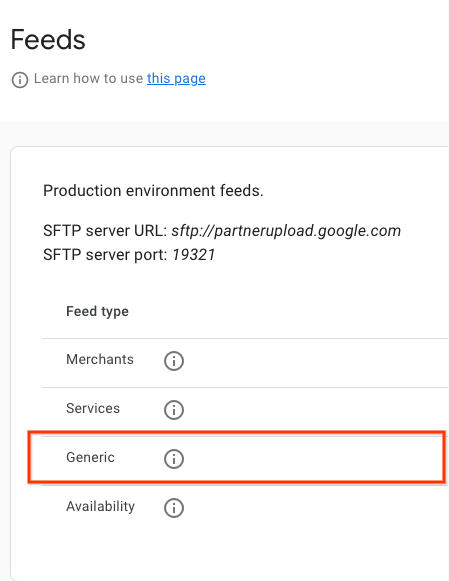
name필드를reservewithgoogle.action.v2로 설정합니다. 설명자 파일의 예는 JSON 샘플을 참고하세요. 업로드할 때마다 고유한 설명자 파일 이름을 사용하는 것이 좋습니다. 파일 이름에 타임스탬프를 포함합니다(예:action_1633621547.filesetdesc.json). 설명자 파일을 일반 SFTP 서버에 업로드해야 합니다. - 피드를 일반 SFTP 서버에 매일 전체 새로고침으로 업로드합니다.
- SFTP 서버 세부정보는 파트너 포털의 구성 > 피드 섹션에서 확인할 수 있습니다.
- 파트너 포털의 처리 > 기록 섹션에서 피드 처리 상태를 확인합니다.
정의
ActionFeed 정의
message ActionFeed {
  option features.(pb.java).nest_in_file_class = YES;

  repeated ActionDetail data = 1;
}
ActionDetail 정의
message ActionDetail {
  option features.(pb.java).nest_in_file_class = YES;

  string entity_id = 2;
  string link_id = 3;

  // Deep link for action detail
  string url = 4;

  // The actions that can be performed using this deep link. At least one
  // Action must be specified.
  repeated Action actions = 1;
}
작업 정의
// Information about an Action which could be performed.
message Action {
  option features.(pb.java).nest_in_file_class = YES;

  // Deprecated fields not to be reused.
  reserved 1;

  oneof action_info {
    AppointmentInfo appointment_info = 2;

  }
}
AppointmentInfo 정의
// Indicates that the parent Action is for booking an appointment.
// In v2 of the Action feed, the deep link URL is specified on ActionDetail.url,
// so this message has no fields and should be set as an empty object
// (for example, "appointment_info": {} in JSON).
message AppointmentInfo {
  option features.(pb.java).nest_in_file_class = YES;

}
작업 피드 샘플
Action Feed
{
  "data": [
    {
      "entity_id": "appointments-merchant-1",
      "link_id": "appointment-link-1",
      "url": "https://www.partnerwebsite.com/appointment/appointment-partner-1",
      "actions":[
        {
          "appointment_info": {}
        }
      ]
    }
  ]
}
설명자 파일
{
  "generation_timestamp": 1677540395,
  "name": "reservewithgoogle.action.v2",
  "data_file": [
    "action_1677540395_0001.json",
    "action_1677540395_0002.json"

  ]
}