
You can organize tasks in a specific order to suit the user's needs and preferences.
You can move a task under another task (parent task) or
to be after another task (previous).
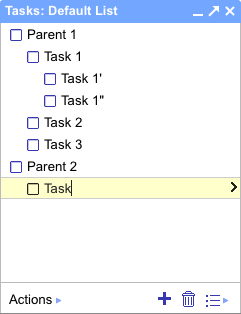
To move a task, send an authenticated POST request to the following
URL with the following special parameters:
- The
parentparameter - Specifies the ID of the parent task under which the new task should be inserted; omitting this parameter places the task in the top level of the list.
- The
previousparameter - Specifies the ID of the task after which the new task should be inserted; omitting this parameter places the task in the first position of the sublist.
The URL has the following format:
https://www.googleapis.com/tasks/v1/lists/taskListID/tasks/taskID/move?parent=parentTaskID&previous=previousTaskID
With the appropriate values in place of taskListID,
taskID, parentTaskID, and
previousTaskID.
Note: The special taskListID
value @default can be used to refer to the authenticated user's default
task list.
If successful, the server responds with an HTTP 200 OK status code
and the new task data.
Example
Protocol
Request:
POST /tasks/v1/lists/@default/tasks/taskID/move?parent=parentTaskID\
&previous=previousTaskID
Response:
HTTP/1.1 200 OK

{
  id: "taskID",
  kind: "tasks#task",
  selfLink: "https://www.googleapis.com/tasks/v1/lists/@default/tasks/\
taskID",
  etag: "newETag",
  title: "New Task",
  notes: "Please complete me",
  updated: "2010-10-15T11:30:00.000Z",
  ...,
  parent: "parentTaskID",
  position: "newPosition",
  ...
}
Java
import com.google.api.services.tasks.v1.Tasks.TasksOperations.Move;
...

Move move = service.tasks.move("@default", "taskID");
move.setParent("parentTaskID");
move.setPrevious("previousTaskID");
Task result = move.execute();

// Print the new values.
System.out.println(result.getParent());
System.out.println(result.getPosition());
Python
result = service.tasks().move(tasklist='@default', task='taskID',\
                              parent='parentTaskID',\
                              previous='previousTaskID').execute()

# Print the new values.
print result['parent']
print result['position']
PHP
$result = $service->moveTasks('taskID', '@default', null, 'parentTaskID', 'previousTaskID');

/*
 * Print the new values.
 */
echo $result->getParent();
echo $result->getPosition();
.NET
Task result = service.Tasks.Move("@default", "taskID",
                                 parent: "parentTaskID", previous: "previousTaskID").Fetch();
// Print the new values.
Console.WriteLine(result.Parent);
Console.WriteLine(result.Position);
Note: The parent and previous parameters
can also be used while creating a new task.