

広告用のウェブビュー API を使用すると、WKWebView のタグでアプリシグナルが利用できるようになり、コンテンツを提供したパブリッシャーの収益を増やしたり、広告主をスパムから保護したりできます。アプリ ID やアプリのバージョンなどのアプリ シグナルは、アプリ トラフィックでのみ利用可能なレポートとアプリ内ブラウザのインベントリをターゲットに設定するユースケースを有効にするために役立ちます。
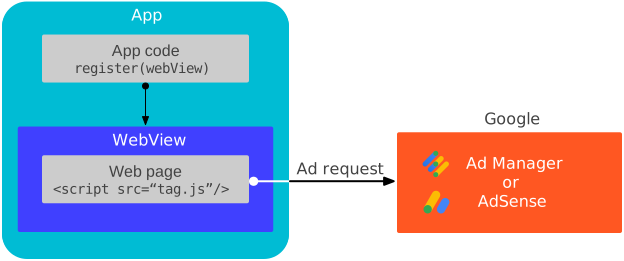
仕組み
Google Mobile Ads SDK との通信は、次のいずれかによってトリガーされた広告イベントへの応答でのみ行われます。
SDK は登録された WKWebView にメッセージ ハンドラを追加して、これらの広告イベントをリッスンします。この仕組みをより詳しく理解するには、テストページのソースコードをご覧ください。
前提条件
- Google Mobile Ads SDK バージョン 9.6.0 以降。
次のキーと文字列値で
Info.plistファイルを更新します。これにより、ウェブビューの外部で広告を実装するデベロッパーに適用されるGADApplicationIdentifier値に対して Google Mobile Ads SDK が行うチェックがバイパスされます。この手順を行わず、GADApplicationIdentifierを指定しなかった場合、アプリの起動時に Google Mobile Ads SDK によりGADInvalidInitializationExceptionがスローされます。<!-- Indicate Google Mobile Ads SDK usage is only for web view APIs for ads --> <key>GADIntegrationManager</key> <string>webview</string>
ウェブビューを登録する
メインスレッドで register(_:) を呼び出して、各 WKWebView インスタンス内の AdSense コードまたは Google パブリッシャー タグの JavaScript ハンドラとの接続を確立します。これは、たとえばビュー コントローラの viewDidLoad メソッドなどの、できるだけ早い段階で行う必要があります。
Swift
import WebKit

class ViewController: UIViewController {

  var webView: WKWebView!

  override func viewDidLoad() {
    super.viewDidLoad()

    // Initialize a WKWebViewConfiguration object.
    let webViewConfiguration = WKWebViewConfiguration()
    // Let HTML videos with a "playsinline" attribute play inline.
    webViewConfiguration.allowsInlineMediaPlayback = true
    // Let HTML videos with an "autoplay" attribute play automatically.
    webViewConfiguration.mediaTypesRequiringUserActionForPlayback = []

    // Initialize the WKWebView with your WKWebViewConfiguration object.
    webView = WKWebView(frame: view.frame, configuration: webViewConfiguration)
    view.addSubview(webView)

    // Register the web view.
    MobileAds.shared.register(webView)
  }
}
Objective-C
@import WebKit;

#import "ViewController.h"

@interface ViewController ()

@property(nonatomic, strong) WKWebView *webView;

@end

@implementation ViewController

- (void)viewDidLoad {
  [super viewDidLoad];

  // Initialize a WKWebViewConfiguration object.
  WKWebViewConfiguration *webViewConfiguration = [[WKWebViewConfiguration alloc] init];
  // Let HTML videos with a "playsinline" attribute play inline.
  webViewConfiguration.allowsInlineMediaPlayback = YES;
  // Let HTML videos with an "autoplay" attribute play automatically.
  webViewConfiguration.mediaTypesRequiringUserActionForPlayback = WKAudiovisualMediaTypeNone;

  // Initialize the WKWebView with your WKWebViewConfiguration object.
  self.webView = [[WKWebView alloc] initWithFrame:self.view.frame configuration:webViewConfiguration];
  [self.view addSubview:self.webView];

  // Register the web view.
  [GADMobileAds.sharedInstance registerWebView:self.webView];
}
統合をテストする
独自の URL を使用する前に、次の URL を読み込んで統合をテストすることをおすすめします。
https://google.github.io/webview-ads/test/#api-for-ads-tests
次の条件が満たされている場合、テスト URL には統合が問題なく完了したことを示す緑色のステータスバーが表示されます。
WKWebViewが Google Mobile Ads SDK に接続されている
次のステップ
WKWebViewで同意を取得します。広告用のウェブビュー API は、IAB TCF v2.3 または IAB CCPA コンプライアンス フレームワークを使用してモバイルアプリのコンテキストで収集された同意を、ウェブビューのタグに反映しません。WKWebViewと、それに対応する収益化対象のウェブ コンテンツの両方のオーナーであり、単一の同意フローを実装したい場合は、同意管理プラットフォームと連携して、WKWebViewのコンテキストで同意を取得します。