

এই পৃষ্ঠায় আপনার বিজ্ঞাপন উৎসগুলির সাথে যুক্ত অ্যাডাপ্টারগুলি দেখা এবং যাচাই করার ধাপগুলি বর্ণনা করা হয়েছে।
পূর্বশর্ত
চালিয়ে যাওয়ার আগে, নিম্নলিখিতগুলি করুন:
- একটি অ্যাড ম্যানেজার অ্যাকাউন্ট তৈরি করতে, আপনার টেস্ট ডিভাইস সেট করতে, Google Mobile Ads SDK ইনিশিয়ালাইজ করতে এবং সর্বশেষ সংস্করণটি ইনস্টল করতে প্রাথমিক পূর্বশর্তের সমস্ত আইটেম সম্পূর্ণ করুন।
- বিজ্ঞাপন পরিদর্শক চালু করুন ।
আপনার অ্যাপে কনফিগার করা বিজ্ঞাপন উৎসগুলোর সাথে যুক্ত সমস্ত অ্যাডাপ্টারের একটি তালিকা আপনি দেখতে পারেন। তালিকাটি দেখতে, নিম্নলিখিত ধাপগুলো সম্পন্ন করুন:
- অ্যাড ইন্সপেক্টর পেজে, অ্যাডাপ্টার্স- এ ক্লিক করুন।
প্রারম্ভিক অবস্থা এবং অ্যাডাপ্টার ও তৃতীয় পক্ষের SDK সংস্করণগুলো দেখতে কার্ডগুলো প্রসারিত করুন।
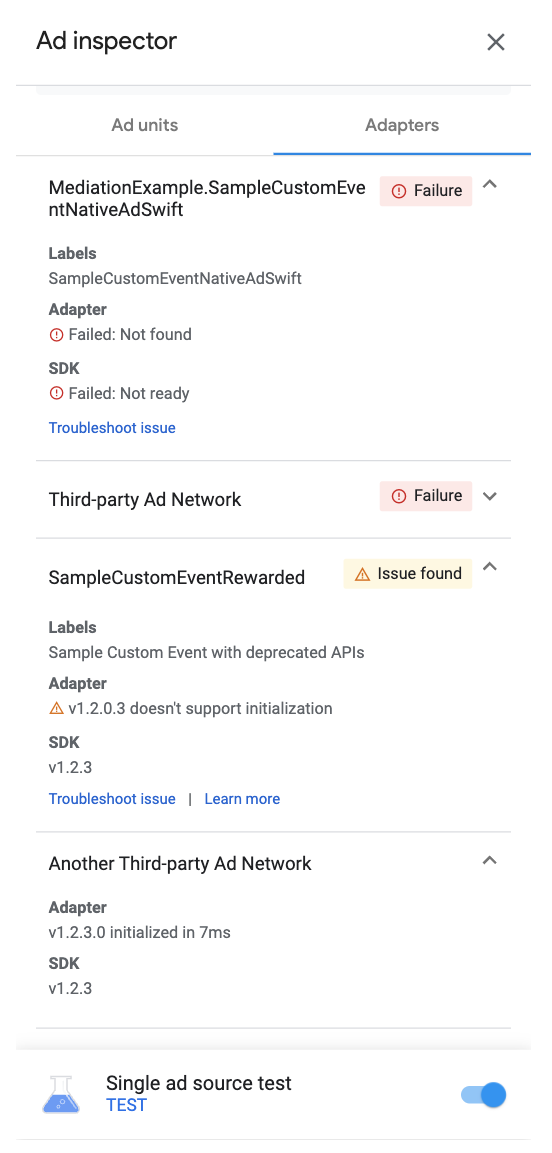
যদি অ্যাডাপ্টারটি খুঁজে না পাওয়া যায় বা চালু হতে ব্যর্থ হয়, তাহলে Ad inspector দেখুন।
কাস্টম ইভেন্ট অ্যাডাপ্টারগুলি দেখুন
আপনি কাস্টম ইভেন্ট অ্যাডাপ্টারগুলোও দেখতে পারেন। কাস্টম ইভেন্ট আপনাকে এমন একটি অ্যাড সোর্সের জন্য ওয়াটারফল মিডিয়েশন সেট আপ করতে দেয় যা অ্যাড ম্যানেজার সমর্থন করে না। অ্যাডাপ্টার তালিকায়, কাস্টম ইভেন্টগুলো অনন্য ক্লাস নেম দ্বারা স্বতন্ত্রভাবে চিহ্নিত করা হয়। ক্লাস নেম প্রদান করার পাশাপাশি, অ্যাড ইন্সপেক্টর অ্যাড ম্যানেজার UI-তে সেই কাস্টম ইভেন্টগুলোতে নির্ধারিত লেবেলগুলোও প্রদর্শন করে। কাস্টম ইভেন্ট সম্পর্কে আরও বিস্তারিত জানতে, সেটআপ দেখুন।
কাস্টম ইভেন্টের পূর্ববর্তী ইমপ্লিমেন্টেশন, যেমন Google Mobile Ads SDK ভার্সন 9.0.0-এর আগের সংস্করণগুলো, এমন ডেপ্রিকেটেড সাবক্লাস ব্যবহার করতে পারে যা ইনিশিয়ালাইজেশন সাপোর্ট করে না এবং অ্যাড ইন্সপেক্টরে ' Issue found' ত্রুটি দেখায়। যদি আপনি ' Issue found' সতর্কতাটি দেখতে পান এবং আপনার কাস্টম ইভেন্ট ইন্টিগ্রেশন প্রত্যাশিতভাবে কাজ করে, তবে পরীক্ষা করে দেখুন আপনার অ্যাপটি কোনো ডেপ্রিকেটেড ইন্টারফেস ব্যবহার করছে কিনা এবং সেই ইন্টারফেসটিকে একটি অ্যাডাপ্টার ক্লাস দিয়ে প্রতিস্থাপন করুন। বিস্তারিত জানতে, GADMediationAdapter দেখুন।