
账号关联采用行业标准的 OAuth 2.0 授权代码流程。
适用于代理的 OAuth 2.1 和 PKCE
对于无状态 AI 智能体和多模态流水线,建议强制执行 OAuth 2.1。
- PKCE(用于代码交换的证明密钥):必须用于保护授权代码流程,防止拦截攻击。
- 无隐式流程:隐式流程会在网址中公开访问令牌,这对于代理环境而言是一种安全风险。
您的服务必须支持符合 OAuth 2.0/2.1 标准的授权和令牌交换端点。
创建项目
如需创建项目以使用账号关联,请执行以下操作:
- 前往 Google API 控制台。
- 点击 Create project 。
- 输入名称或接受生成的建议。
- 确认或修改任何剩余字段。
- 点击创建 。
如需查看项目 ID,请执行以下操作:
- 前往 Google API 控制台。
- 在着陆页的表格中找到您的项目。项目 ID 会显示在 ID 列中。
配置 OAuth 权限请求页面
Google 账号关联过程包含一个权限请求页面,该页面会告知用户请求访问其数据的应用、应用请求的数据类型以及适用的条款。您需要先配置 OAuth 权限请求页面,然后才能生成 Google API 客户端 ID。
- 打开 Google API 控制台的 OAuth 权限请求页面 页面。
- 如果系统提示您选择项目,请选择您刚刚创建的项目。
在“OAuth 权限请求页面”上,填写表单,然后点击“保存”按钮。
应用名称 :向用户征求同意的应用的名称。该名称应准确反映您的应用,并且与用户在其他位置看到的应用名称保持一致。应用名称将显示在账号关联权限请求页面上。
应用徽标:权限请求页面上显示的一张图片,用以让用户认出您的应用。徽标会显示在账号关联权限请求页面和账号设置中
支持邮箱 :用户用于针对其同意问题与您联系的邮箱。
Google API 的范围 :范围允许您的应用访问用户的私有 Google 数据。对于 Google 账号关联用例,默认范围(邮箱、个人资料、openid)就足够了,您无需添加任何敏感范围。通常,最佳做法是在需要访问权限时逐步请求范围,而不是提前请求。了解详情。
已获授权的网域 :为了保护您和您的用户,Google 只允许使用 OAuth 进行身份验证的应用使用已获授权的网域。您应用的链接必须托管在已获授权的网域上。了解详情。
应用首页链接 :应用的首页。必须托管在已获授权的网域上。
应用隐私权政策链接 :显示在 Google 账号关联权限请求页面上。必须托管在已获授权的网域上。
应用服务条款链接(可选) :必须托管在已获授权的网域上。
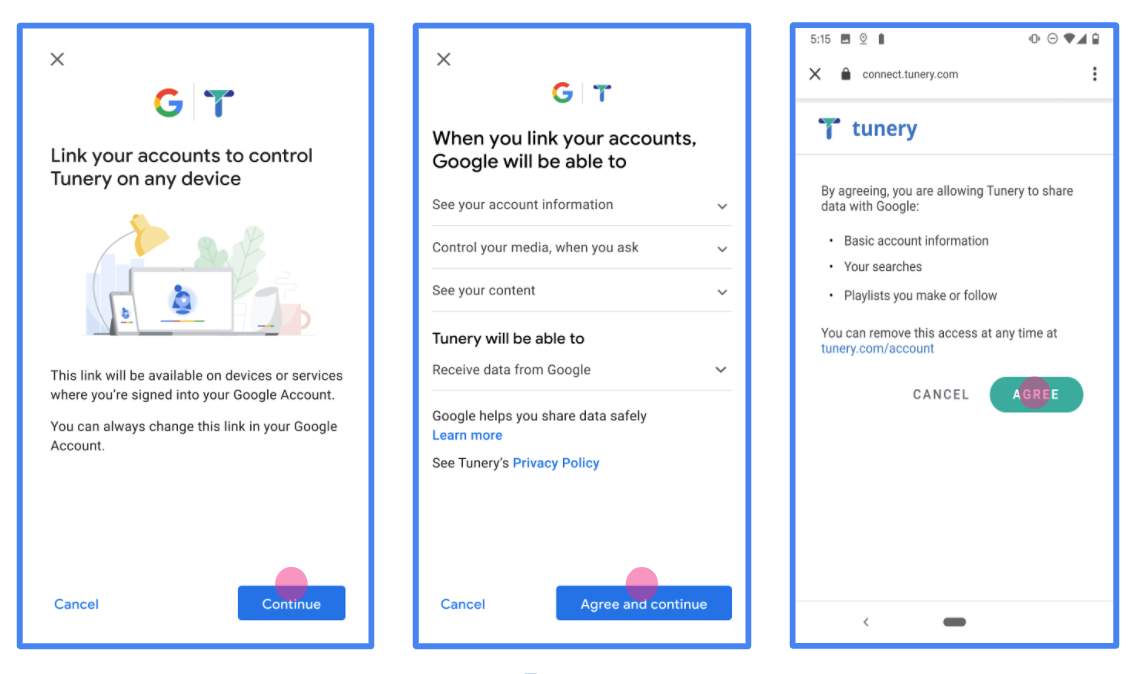
图 1. 虚构应用 Tunery 的 Google 账号关联权限请求页面
查看“验证状态”,如果您的应用需要验证,请点击“提交以进行验证”按钮,提交应用以进行验证。如需了解详情,请参阅 OAuth 验证要求。
实现 OAuth 服务器
授权代码流程的 OAuth 2.0 服务器实现包含两个端点,您的服务通过 HTTPS 提供这两个端点。第一个端点是授权端点,负责查找或征得用户同意以访问数据。授权端点会向尚未登录的用户显示登录界面,并记录用户对所请求访问权限的同意情况。第二个端点是令牌交换端点,用于获取加密字符串(称为令牌),这些令牌可授权用户访问您的服务。
当 Google 应用需要调用您某项服务的 API 时,Google 会同时使用这些端点来征得用户同意,以便代表用户调用这些 API。
Google 账号关联:OAuth 授权代码流程
以下序列图详细说明了用户、Google 和您服务的端点之间的互动。
角色和职责
下表定义了 Google 账号关联 (GAL) OAuth 流中各个参与者的角色和职责。请注意,在 GAL 中,Google 充当 OAuth 客户端,而您的服务充当身份/服务提供方。
| 执行者 / 组件 | GAL 角色 | 职责 |
|---|---|---|
| Google 应用 / 服务器 | OAuth 客户端 | 启动流程,接收授权代码,将其换成令牌,并安全地存储这些令牌以访问服务的 API。 |
| 您的授权端点 | 授权服务器 | 对用户进行身份验证,并征得用户同意,允许 Google 访问其数据。 |
| 您的令牌交换端点 | 授权服务器 | 验证授权代码和刷新令牌,并向 Google 服务器发放访问令牌。 |
| Google 重定向 URI | 回调端点 | 从您的授权服务接收包含 code 和 state 值的用户重定向。 |
由 Google 发起的 OAuth 2.0 授权代码流程会话具有以下流程:
- Google 会在用户的浏览器中打开您的授权端点。如果流程在仅支持语音的设备上针对某项操作启动,Google 会将执行转移到手机。
- 用户登录(如果尚未登录),并授予 Google 权限以通过您的 API 访问其数据(如果尚未授予权限)。
- 您的服务会创建授权代码并将其返回给 Google。为此,请将用户的浏览器重定向回 Google,并在请求中附上授权代码。
- Google 会将授权代码发送到您的令牌交换端点,该端点会验证代码的真实性,并返回访问令牌和刷新令牌。访问令牌是一种短期有效的令牌,您的服务会将其作为访问 API 的凭据来接受。刷新令牌是一种长期有效的令牌,Google 可以存储该令牌,并在访问令牌过期时使用该令牌获取新的访问令牌。
- 用户完成账号关联流程后,Google 发送的每个后续请求都包含一个访问令牌。
实施方案
请按照以下步骤实现授权代码流程。
第 1 步:处理授权请求
当 Google 启动账号关联时,会将用户重定向到您的授权端点。如需详细了解协议合约和参数要求,请参阅授权端点。
如需处理此请求,请执行以下操作:
验证请求:
- 确认
client_id与分配给 Google 的客户端 ID 一致。 - 确认
redirect_uri与预期的 Google 重定向网址一致:- Prod:
https://oauth-redirect.googleusercontent.com/r/YOUR_PARTNER_ID - 沙盒:
https://oauth-redirect-sandbox.googleusercontent.com/r/YOUR_PARTNER_ID
- Prod:
- 验证
response_type是否为code。
- 确认
对用户进行身份验证:
- 检查用户是否已登录您的服务。
- 如果用户未登录,请提示他们完成登录或注册流程。
生成授权代码:
- 创建与用户和客户端关联的唯一且无法猜测的授权代码。
- 将验证码的失效时间设置为大约 10 分钟。
重定向回 Google:
- 将浏览器重定向到
redirect_uri中提供的网址。 - 附加以下查询参数:
code:您生成的授权代码。state:从 Google 收到的未修改的状态值。
- 将浏览器重定向到
第 2 步:处理令牌交换请求
您的令牌交换端点会处理两种类型的请求:将代码换成令牌,以及刷新过期的访问令牌。如需详细了解协议合约和参数要求,请参阅令牌交换端点。
A. 将授权代码兑换为令牌
当 Google 收到授权代码时,会调用您的令牌交换端点 (POST) 以检索令牌。
验证请求:
- 验证
client_id和client_secret。 - 验证授权代码是否有效且未过期。
- 确认
redirect_uri与第 1 步中使用的值一致。 - 如果验证失败,则返回带有
{"error": "invalid_grant"}的 HTTP400 Bad Request。
- 验证
发放令牌:
- 生成长期有效的
refresh_token和短期有效的access_token(通常为 1 小时)。 - 返回包含标准 JSON 令牌响应的 HTTP
200 OK。
- 生成长期有效的
B. 刷新访问令牌
当访问令牌过期时,Google 会使用刷新令牌请求新的访问令牌。
验证请求:
- 验证
client_id、client_secret和refresh_token。 - 如果验证失败,则返回带有
{"error": "invalid_grant"}的 HTTP400 Bad Request。
- 验证
签发新的访问令牌:
- 生成新的短期
access_token。 - 返回包含 JSON 令牌响应(可以选择性地包含新的刷新令牌)的 HTTP
200 OK。
- 生成新的短期
处理 userinfo 请求
userinfo 端点是受 OAuth 2.0 保护的资源,会返回关联用户的声明。实现和托管 userinfo 端点是可选的,但以下用例除外:
从您的令牌端点成功检索到访问令牌后,Google 会向您的 userinfo 端点发送请求,以检索关联用户的基本个人资料信息。
| userinfo 端点请求标头 | |
|---|---|
Authorization header |
Bearer 类型的访问令牌。 |
例如,如果您的 userinfo 端点可通过
https://myservice.example.com/userinfo 时,请求可能如下所示:
GET /userinfo HTTP/1.1
Host: myservice.example.com
Authorization: Bearer ACCESS_TOKEN
为了让 userinfo 端点能够处理请求,请执行以下步骤:
- 从 Authorization 标头中提取访问令牌,并返回与访问令牌相关联的用户的信息。
- 如果访问令牌无效,则使用
WWW-Authenticate响应标头返回 HTTP 401 Unauthorized 错误。下面是一个 userinfo 错误响应示例:HTTP/1.1 401 Unauthorized WWW-Authenticate: error="invalid_token", error_description="The Access Token expired"
如果访问令牌有效,则返回 HTTPS 正文中包含以下 JSON 对象的 HTTP 200 响应 回答:
{ "sub": "USER_UUID", "email": "EMAIL_ADDRESS", "given_name": "FIRST_NAME", "family_name": "LAST_NAME", "name": "FULL_NAME", "picture": "PROFILE_PICTURE", }userinfo 端点响应 sub系统中用于识别用户的唯一 ID。 email用户的电子邮件地址。 given_name可选:用户的名字。 family_name可选:用户的姓氏。 name可选:用户的全名。 picture可选:用户的个人资料照片。
验证您的实现
您可以使用 OAuth 2.0 Playground 工具验证您的实现。
在该工具中,执行以下步骤:
- 点击配置 以打开“OAuth 2.0 配置”窗口。
- 在 OAuth flow(OAuth 流程)字段中,选择 Client-side(客户端)。
- 在 OAuth Endpoints 字段中,选择 Custom。
- 在相应字段中指定您的 OAuth 2.0 端点以及您分配给 Google 的客户端 ID。
- 在第 1 步部分中,请勿选择任何 Google 范围。请将此字段留空,或输入适用于您服务器的范围(如果您不使用 OAuth 范围,则输入任意字符串)。完成后,点击 Authorize APIs。
- 在第 2 步和第 3 步部分中,完成 OAuth 2.0 流程,并验证每个步骤是否按预期运行。
您可以使用 Google 账号关联演示工具验证您的实现。
在该工具中,执行以下步骤:
- 点击使用 Google 账号登录按钮。
- 选择您要关联的账号。
- 输入服务 ID。
- (可选)输入您将请求访问的一个或多个范围。
- 点击开始演示。
- 当系统提示时,请确认您可以同意或拒绝关联请求。
- 确认您已重定向到相应平台。