
Page Summary
-
Issue requests to send events or manage audience members.
-
Check the overall status of each request, modifying and resending if unsuccessful.
-
Send a RetrieveRequestStatus request for successful requests using the captured request_id.
-
Review the RetrieveRequestStatusResponse to confirm uploads are working and identify data issues.
-
Correct data issues and repeat the process until all issues are resolved.
Here's the recommended workflow to verify the health of your event and audience uploads and identify issues with your data.
Issue requests to send events or send or remove audience members.
Check the overall status of each request. A successful request has a
Statuswithcodeequal to0(enum valueOK, HTTP response200 OK), and returns aIngestEventsResponse,IngestAudienceMembersResponse, orRemoveAudienceMembersResponse.If a request isn't successful, modify the request to address the error and send the request again.
If a request succeeds, capture the response's
request_idso you can use it to retrieve diagnostics in the next step.Wait for 30 minutes, then send a
RetrieveRequestStatusrequest for each successfulrequest_id.Periodically repeat this step for each
request_iduntil the destination status for each destination reachesSUCCESS,PARTIAL_SUCCESS, orFAILURE. Use an exponential backoff algorithm to wait between each request.Review each
RetrieveRequestStatusResponseto confirm your uploads are working properly and identify any issues with your data.Correct data issues.
Go back to step 1 and repeat until you've addressed all issues with your uploads.
Send requests
A RetrieveRequestStatusRequest requires a single
request_id value. Send a separate status request for each request ID you
captured from a successful ingestion request.
Authorization
A RetrieveRequestStatusRequest doesn't accept destination
accounts or request headers. Instead, the Data Manager API identifies the
destinations from the original ingestion request associated with the
request_id and verifies that the caller has access to the operating_account
on each Destination.
To check the status of a request, the credentials used in a
RetrieveRequestStatusRequest must satisfy the following
requirements for the operating_account of each destination from the original
ingestion request:
Identical access path: The credentials must have access to each
operating_accountusing the exact same access path specified in the original ingestion request.For example, if an ingestion request for a Google Ads
operating_accountspecified a parent manager account as thelogin_account, the credentials must also have access to theoperating_accountthrough that same manager account. Even if the Google Account associated with the credentials has direct access to the childoperating_account, the request fails with aPERMISSION_DENIEDerror if that account lacks access through thelogin_accountmanager account specified during ingestion.Sufficient access level: The Google Account associated with the credentials must have an access level or role with permission to ingest data into the
operating_account.For example, in Google Ads, the Google Account must have the Admin or Standard access level. A request with credentials for an account with the Read-only access level fails with a
PERMISSION_DENIEDerror.
Polling strategy
Periodically send the RetrieveRequestStatusRequest
using an exponential backoff algorithm until the request_status reaches
SUCCESS, FAILURE, or PARTIAL_SUCCESS for every destination in the original
request. This may take up to 24 hours, although the Data Manager API may finish
processing some requests in as little as 30 minutes.
Here's an example of a reasonable initial wait time and retry configuration that balances liveness and quota usage:
| Setting | Value |
|---|---|
| Wait time before first diagnostics request (minutes) | 30 |
| Backoff multiplier | 1.3 |
| Maximum backoff (minutes) | 60 (1 hour) |
| Maximum total time (minutes) | 1440 (24 hours) |
Here's a sequence of requests and elapsed time with this configuration:
Graph
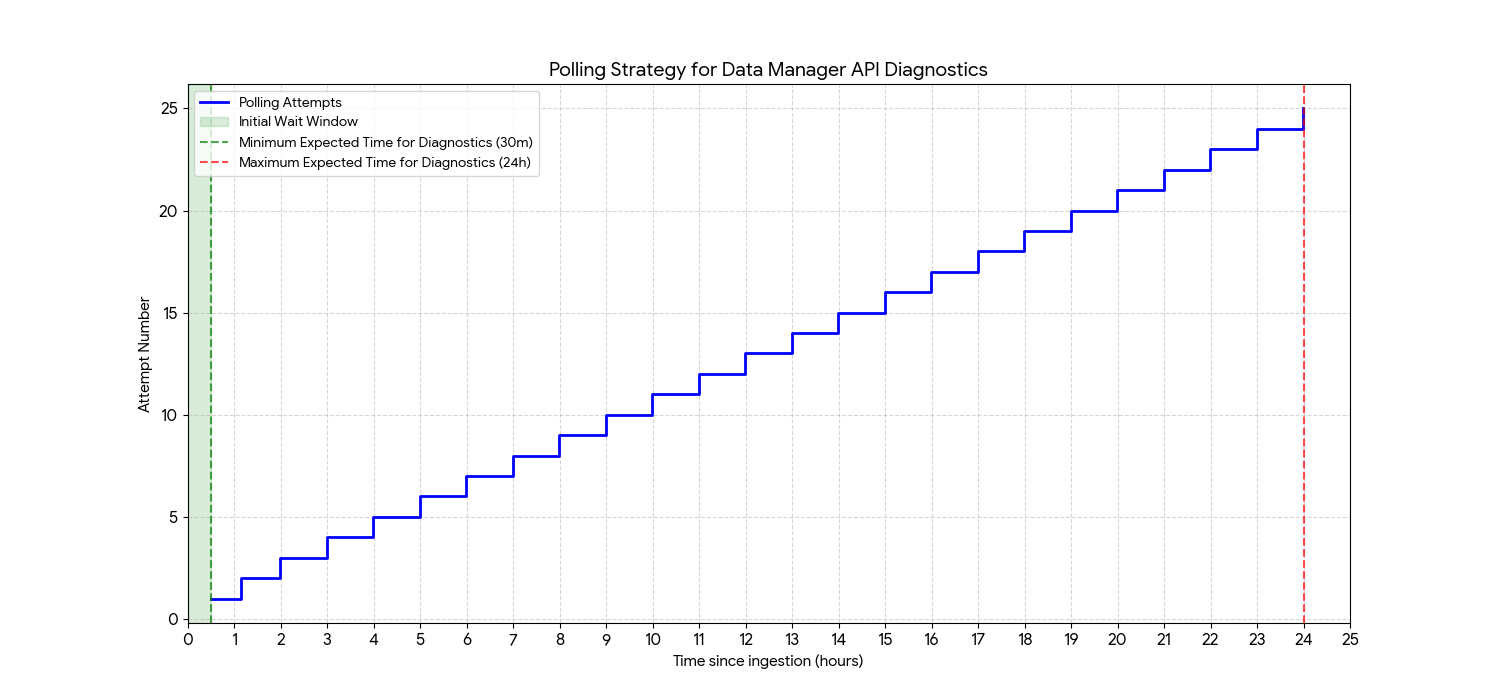
Data
| Attempt | Time Since Ingestion Request (hh:mm) | Delay Before Attempt | Notes |
|---|---|---|---|
| 1 | 00:30 | 30.0 min | First check for status availability |
| 2 | 01:09 | 39.0 min | |
| 3 | 01:59 | 50.7 min | |
| 4 | 02:59 | 60.0 min | Delay is now capped at 1 hour |
| 5 | 03:59 | 60.0 min | |
| 6 | 04:59 | 60.0 min | |
| 7 | 05:59 | 60.0 min | |
| 8 | 06:59 | 60.0 min | |
| 9 | 07:59 | 60.0 min | |
| 10 | 08:59 | 60.0 min | |
| 11 | 09:59 | 60.0 min | |
| 12 | 10:59 | 60.0 min | |
| 13 | 11:59 | 60.0 min | 12-hour mark |
| 14 | 12:59 | 60.0 min | |
| 15 | 13:59 | 60.0 min | |
| 16 | 14:59 | 60.0 min | |
| 17 | 15:59 | 60.0 min | |
| 18 | 16:59 | 60.0 min | |
| 19 | 17:59 | 60.0 min | |
| 20 | 18:59 | 60.0 min | |
| 21 | 19:59 | 60.0 min | |
| 22 | 20:59 | 60.0 min | |
| 23 | 21:59 | 60.0 min | |
| 24 | 22:59 | 60.0 min | |
| 25 | 23:59 | 60.0 min | Last request before the 24 hour maximum total time |
Add a small random amount of jitter to the backoff delays to prevent the "thundering herd" problem where many clients retry simultaneously.
Review responses
The request_status_per_destination in a
RetrieveRequestStatusResponse contains a separate entry for
each destination in the corresponding ingestion request.
For example, if your IngestAudienceMembersRequest
contained 3 entries in the destinations list to send data to 3 different
audiences, then the status response would contain 3 entries in
request_status_per_destination (one entry per audience).
Check overall destination status
As a first step, check the request_status field to determine if the
Data Manager API has finished processing the data for the destination of the
RequestStatusPerDestination.
Here are the possible values of request_status:
PROCESSING: The data for the destination is still being processed. The warnings and errors aren't populated for the destination at this stage.SUCCESS: Request processing for the destination completed without any errors. Check for warnings flagged during processing.FAILURE: All of the records for the destination failed due to errors. Check for warnings and errors to determine why all records failed. Also check for warnings flagged during processing.PARTIAL_SUCCESS: Some of the records for the destination succeeded, but others failed due to errors. Check for errors to determine why some records failed. Also check for warnings flagged during processing.
Check event or audience status per destination
Inspect the status field that corresponds to the type of ingestion request. Only
one of the following fields is set on each RequestStatusPerDestination:
Events ingestion status
The events_ingestion_status field is populated if the request was an
IngestEventsRequest.
Check the record_count of the IngestEventStatus
to confirm that the total number of records received matches your
expectations. The record_count includes both successful and failed
records.
Audience members ingestion status
The audience_members_ingestion_status field is populated if the request was an
IngestAudienceMembersRequest. Here's the
IngestAudienceMembersStatus field to check for
each type of audience data. Only one of these fields is set.
composite_data_ingestion_statusCheck the
record_countof theIngestCompositeDataStatusto confirm that the total number of records received matches your expectations. Therecord_countincludes both successful and failed records.Check the
data_type_countsto confirm that the number of identifiers matches your expectations. This list provides a breakdown of all identifiers received (such as email address, phone number, physical address, and IP address) byDataType.If the request had a sufficient number of records, the
upload_match_rate_rangecontains the match rate range for records in the request.google_user_id_data_ingestion_statusCheck the
record_countof theIngestGoogleUserIdDataStatusto confirm that the total number of records received matches your expectations. Therecord_countincludes both successful and failed records.Check the
google_user_id_countto confirm the number of Google user IDs received matches your expectations.mobile_data_ingestion_statusCheck the
record_countof theIngestMobileDataStatusto confirm that the total number of records received matches your expectations. Therecord_countincludes both successful and failed records.Check the
mobile_id_countto confirm the number of mobile IDs received matches your expectations.pair_data_ingestion_statusCheck the
record_countof theIngestPairDataStatusto confirm that the total number of records received matches your expectations. Therecord_countincludes both successful and failed records.Check the
pair_id_countto confirm the number of PAIR IDs received matches your expectations.partner_provided_id_data_ingestion_statusCheck the
record_countof theIngestPartnerProvidedIdDataStatusto confirm that the total number of records received matches your expectations. Therecord_countincludes both successful and failed records.Check the
partner_provided_id_countto confirm the number of partner provided IDs received matches your expectations.ppid_data_ingestion_statusCheck the
record_countof theIngestPpidDataStatusto confirm that the total number of records received matches your expectations. Therecord_countincludes both successful and failed records.Check the
ppid_countto confirm the number of PPIDs received matches your expectations.user_data_ingestion_statusCheck the
record_countof theIngestUserDataStatusto confirm that the total number of records received matches your expectations. Therecord_countincludes both successful and failed records.Check the
user_identifier_countto confirm the number of user identifiers received matches your expectations.If the request had a sufficient number of records, the
upload_match_rate_rangecontains the match rate range for records in the request.user_id_data_ingestion_statusCheck the
record_countof theIngestUserIdDataStatusto confirm that the total number of records received matches your expectations. Therecord_countincludes both successful and failed records.Check the
user_id_countto confirm the number of user IDs received matches your expectations.
Audience members removal status
The audience_members_removal_status field is populated if the request was a
RemoveAudienceMembersRequest. Here's the
RemoveAudienceMembersStatus field to check for each
type of audience data. Only one of these fields is set.
composite_data_removal_status- Removal status for Composite data
google_user_id_data_removal_status- Removal status for Google user ID data
mobile_data_removal_status- Removal status for mobile data.
pair_data_removal_status- Removal status for PAIR data.
partner_provided_id_data_removal_status- Removal status for Partner provided ID data
ppid_data_removal_status- Removal status for PPID data.
user_data_removal_status- Removal status for user data.
user_id_data_removal_status- Removal status for User ID data
Check the record_count to confirm that the total number of records
received matches your expectations. The record_count includes both
successful and failed records.
In addition, check the user_identifier_count, mobile_id_count,
pair_id_count, ppid_count, user_id_count, google_user_id_count, or
partner_provided_id_count to confirm the total count of
identifiers received.
For composite data, check the data_type_counts to confirm that the number of
identifiers matches your expectations. This list provides a breakdown of all
identifiers received (such as email address, phone number, physical address, and
IP address) by DataType.
Check warnings and errors
In addition to the status fields for the destination and request type, the
RetrieveRequestStatusResponse contains a breakdown of
warnings and errors for the request.
- An error indicates that the API completely rejected the record.
- A warning indicates that the API didn't reject the record, but it had to ignore portions of the record's data.
For example, if an Event contains encrypted
UserIdentifier data and
AdIdentifiers such as gclid, and the
UserIdentifier data can't be decrypted, the Data Manager API still processes the
record using the AdIdentifiers but returns the warning
PROCESSING_WARNING_REASON_USER_IDENTIFIER_DECRYPTION_ERROR.
However, if the Event doesn't contain AdIdentifiers and the UserIdentifier
data can't be decrypted, the Data Manager API rejects the entire record and
reports the error PROCESSING_ERROR_REASON_USER_IDENTIFIER_DECRYPTION_ERROR
because a valid Event must have at least one of ad_identifiers or
user_data.
Here are the response fields that contain warning and error information. These
fields are populated when the overall destination status
reaches SUCCESS, PARTIAL_SUCCESS, or FAILURE.
warning_infoA list of
WarningCountobjects. EachWarningCountcontains areasonwith the type of warning, and arecord_countindicating the number of records that had that type of warning.Check the
warning_infoeven if the overall destination status isSUCCESS.error_infoA list of
ErrorCountobjects. EachErrorCountcontains areasonwith the type of error, and arecord_countindicating the number of records that failed due to that type of error.