

Google Analytics Data API v1 ช่วยให้คุณสร้างรายงาน Funnel ได้ การสำรวจ Funnel จะช่วยให้คุณได้เห็นภาพขั้นตอนต่างๆ ที่ผู้ใช้ใช้ในการดำเนินงาน และดูว่าจะประสบความสำเร็จหรือล้มเหลวในแต่ละขั้นตอนได้อย่างรวดเร็ว
ฟีเจอร์ที่ใช้ร่วมกันกับรายงานหลัก
คำขอการรายงาน Funnel มีความหมายเหมือนกับคำขอรายงานหลักสำหรับฟีเจอร์ที่ใช้ร่วมกันหลายรายการ ตัวอย่างเช่น การแบ่งหน้า ตัวกรองมิติข้อมูล และพร็อพเพอร์ตี้ผู้ใช้ทำงานเหมือนกันในรายงาน Funnel และรายงานหลัก คู่มือนี้จะเน้นที่ฟีเจอร์การรายงาน Funnel หากต้องการทำความคุ้นเคยกับ ฟังก์ชันการรายงานหลักของ Data API v1 โปรดอ่านคู่มือข้อมูลเบื้องต้นเกี่ยวกับการรายงาน รวมถึงคู่มือกรณีการใช้งานขั้นสูง
วิธีการรายงาน Funnel
Data API v1 รองรับความสามารถในการรายงาน Funnel ในเมธอด runFunnelReport
เมธอดนี้จะแสดงผลรายงาน Funnel ที่กําหนดเองของข้อมูลเหตุการณ์ Google Analytics ของคุณ
การเลือกเอนทิตีการรายงาน
เมธอดทั้งหมดของ Data API v1 กำหนดให้ระบุตัวระบุพร็อพเพอร์ตี้ Google Analytics
ภายในเส้นทางคำขอ URL ในรูปแบบ
properties/GA_PROPERTY_ID เช่น
POST https://analyticsdata.googleapis.com/v1alpha/properties/GA_PROPERTY_ID:runFunnelReport
ระบบจะสร้างรายงานที่ได้ตามข้อมูลเหตุการณ์ Google Analytics ที่รวบรวมในพร็อพเพอร์ตี้ Google Analytics ที่ระบุ
หากคุณใช้ไลบรารีของไคลเอ็นต์ Data API รายการใดรายการหนึ่ง ก็
ไม่จำเป็นต้องจัดการเส้นทาง URL ของคำขอด้วยตนเอง ไคลเอ็นต์ API ส่วนใหญ่มีพารามิเตอร์ property ที่คาดหวังสตริงในรูปแบบ properties/GA_PROPERTY_ID ดูตัวอย่างการใช้ไลบรารีของไคลเอ็นต์ได้ในคู่มือเริ่มใช้งานฉบับย่อ
คำขอรายงาน Funnel
หากต้องการขอรายงาน Funnel คุณสามารถสร้างRunFunnelReportRequest
ออบเจ็กต์ได้ เราขอแนะนำให้เริ่มต้นด้วยพารามิเตอร์คำขอต่อไปนี้
รายการที่ถูกต้องในช่อง
dateRangesการระบุ Funnel ที่ถูกต้องในช่อง
funnel
การระบุ Funnel
การระบุ Funnel ในfunnel
ช่องของRunFunnelReportRequest
ออบเจ็กต์จะกำหนดเส้นทางของผู้ใช้ที่คุณต้องการวัดโดยอธิบายsteps
ของ Funnel นี้
ขั้นตอนของ Funnel มีเงื่อนไขอย่างน้อย 1 รายการที่ผู้ใช้ต้องทำตามเพื่อให้อยู่ในขั้นตอนของเส้นทางใน Funnel นั้น คุณสามารถอธิบายเงื่อนไขสำหรับการรวมไว้ในแต่ละ
ขั้นตอนได้ใน
filterExpression
ช่องของแต่ละขั้นตอน
นิพจน์ตัวกรอง Funnel แต่ละรายการเป็นการรวมตัวกรอง 2 ประเภท ได้แก่
funnelFieldFilterสร้างตัวกรองสำหรับมิติข้อมูลหรือเมตริกfunnelEventFilterสร้างตัวกรองที่ตรงกับเหตุการณ์ที่มีชื่อเหตุการณ์เดียว หากมีการระบุช่องที่ไม่บังคับfunnelParameterFilterExpressionระบบจะจับคู่ตัวกรองเหตุการณ์นี้เฉพาะเหตุการณ์ที่เป็นชุดย่อยของเหตุการณ์ที่ตรงกับทั้งชื่อเหตุการณ์เดียว และนิพจน์ตัวกรองพารามิเตอร์
คุณสามารถรวมตัวกรองเข้าด้วยกันโดยใช้ AND,
OR
กลุ่ม รวมถึงปฏิเสธโดยใช้ NOTนิพจน์
ระบบจะแบ่งผลลัพธ์ของรายงานสำหรับแต่ละขั้นตอนของ Funnel ตามมิติข้อมูล
และระบุไว้ใน
funnelBreakdown
ช่อง
ตัวอย่างรายงาน Funnel
ตัวอย่างต่อไปนี้ใช้ Google Analytics Data API v1 เพื่อสร้างรายงาน Funnel เริ่มต้นที่ระบุไว้ในเทมเพลตการสำรวจ Funnel ของอินเทอร์เฟซเว็บ Google Analytics
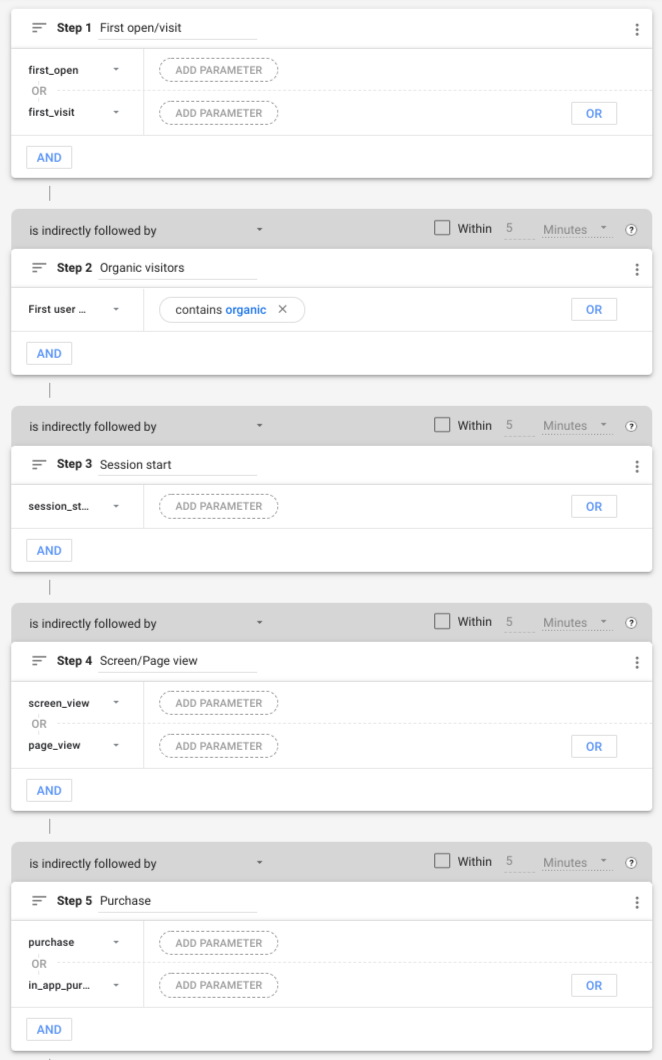
ขั้นตอนของ Funnel
การกำหนดค่า Funnel ก่อนหน้ามีขั้นตอนต่อไปนี้
| # | ชื่อขั้นตอน | เงื่อนไข |
|---|---|---|
| 1 | เปิดครั้งแรก/เข้าชม | ชื่อเหตุการณ์คือ first_open หรือ first_visit |
| 2 | ผู้เข้าชมทั่วไป | มิติข้อมูล firstUserMedium มีคำว่า "ทั่วไป" |
| 3 | การเริ่มต้นเซสชัน | ชื่อเหตุการณ์คือ session_start |
| 4 | การดูหน้าจอ/หน้าเว็บ | ชื่อเหตุการณ์คือ screen_view หรือ page_view |
| 5 | ซื้อ | ชื่อเหตุการณ์คือ purchase หรือ in_app_purchase |
ขั้นตอนที่ 1 (เปิดครั้งแรก/การเข้าชม) ของ Funnel จะรวมผู้ใช้ทั้งหมดหลังจากการโต้ตอบครั้งแรกกับเว็บไซต์หรือแอปพลิเคชัน เช่น ผู้ใช้ที่เรียกให้แสดงเหตุการณ์ first_open หรือ first_visit
หากต้องการใช้ลักษณะการทำงานนี้ ตัวอย่างโค้ดต่อไปนี้จะระบุออบเจ็กต์ FunnelStep ที่มีช่อง
filterExpression
ช่องนิพจน์ตัวกรองคือออบเจ็กต์ FunnelFilterExpression
ที่สร้างขึ้นโดยการรวมเอนทิตี
FunnelEventFilter
2 รายการเข้าด้วยกันโดยใช้กลุ่ม OR
  {
    "name": "Purchase",
    "filterExpression": {
      "orGroup": {
        "expressions": [
          {
            "funnelEventFilter": {
              "eventName": "first_open"
            }
          },
          {
            "funnelEventFilter": {
              "eventName": "first_visit"
            }
          }
        ]
      }
    }
  }
ขั้นตอนที่ 2 (ผู้เข้าชมทั่วไป) ของ Funnel จะรวมผู้ใช้ที่มีสื่อแรกซึ่ง
มีคำว่า "ทั่วไป" ในตัวอย่างโค้ดต่อไปนี้ fieldName
ของ FunnelFieldFilter
จะสั่งให้ตัวกรองจับคู่มิติข้อมูล firstUserMedium
ช่อง stringFilter
field มีเงื่อนไขให้รวมเฉพาะค่าของ
มิติข้อมูลที่มีคำว่า "ทั่วไป"
  {
    "name": "Organic visitors",
    "filterExpression": {
      "funnelFieldFilter": {
        "fieldName": "firstUserMedium",
        "stringFilter": {
          "matchType": "CONTAINS",
          "caseSensitive": false,
          "value": "organic"
        }
      }
    }
  }
คุณสามารถระบุขั้นตอนที่เหลือของ Funnel ได้ในลักษณะเดียวกัน
มิติข้อมูลรายละเอียด
คุณสามารถระบุมิติข้อมูลรายละเอียดที่ไม่บังคับ (deviceCategory ในตัวอย่างนี้) ได้โดย
ใช้FunnelBreakdown
ออบเจ็กต์ดังนี้
  "funnelBreakdown": {
    "breakdownDimension": {
      "name": "deviceCategory"
    }
  }
โดยค่าเริ่มต้น ระบบจะรวมเฉพาะค่าที่ไม่ซ้ำกัน 5 ค่าแรกของมิติข้อมูลรายละเอียดไว้ในรายงาน คุณสามารถใช้limit
ช่องของออบเจ็กต์ FunnelBreakdown เพื่อลบล้างลักษณะการทำงานนี้
คําค้นหารายงาน Funnel ที่สมบูรณ์
ต่อไปนี้คือคําค้นหาที่สมบูรณ์ซึ่งสร้างรายงาน Funnel
HTTP
POST https://analyticsdata.googleapis.com/v1alpha/properties/GA_PROPERTY_ID:runFunnelReport
{
  "dateRanges": [
    {
      "startDate": "30daysAgo",
      "endDate": "today"
    }
  ],
  "funnelBreakdown": {
    "breakdownDimension": {
      "name": "deviceCategory"
    }
  },
  "funnel": {
    "steps": [
      {
        "name": "First open/visit",
        "filterExpression": {
          "orGroup": {
            "expressions": [
              {
                "funnelEventFilter": {
                  "eventName": "first_open"
                }
              },
              {
                "funnelEventFilter": {
                  "eventName": "first_visit"
                }
              }
            ]
          }
        }
      },
      {
        "name": "Organic visitors",
        "filterExpression": {
          "funnelFieldFilter": {
            "fieldName": "firstUserMedium",
            "stringFilter": {
              "matchType": "CONTAINS",
              "caseSensitive": false,
              "value": "organic"
            }
          }
        }
      },
      {
        "name": "Session start",
        "filterExpression": {
          "funnelEventFilter": {
            "eventName": "session_start"
          }
        }
      },
      {
        "name": "Screen/Page view",
        "filterExpression": {
          "orGroup": {
            "expressions": [
              {
                "funnelEventFilter": {
                  "eventName": "screen_view"
                }
              },
              {
                "funnelEventFilter": {
                  "eventName": "page_view"
                }
              }
            ]
          }
        }
      },
      {
        "name": "Purchase",
        "filterExpression": {
          "orGroup": {
            "expressions": [
              {
                "funnelEventFilter": {
                  "eventName": "purchase"
                }
              },
              {
                "funnelEventFilter": {
                  "eventName": "in_app_purchase"
                }
              }
            ]
          }
        }
      }
    ]
  }
}
การตอบกลับของรายงาน
การตอบกลับของรายงาน Funnel
จากคำขอ API รายงาน Funnel ประกอบด้วย 2 ส่วนหลัก ซึ่งทั้ง 2 ส่วนจะแสดงผล
เป็นออบเจ็กต์ FunnelSubReport
ได้แก่ การแสดงภาพ Funnel และ ตาราง Funnel
การแสดงภาพ Funnel
การแสดงภาพ Funnel ซึ่งแสดงผลในfunnelVisualization
ช่องของการตอบกลับของรายงาน Funnel,
จะมีภาพรวมระดับสูงของรายงาน Funnel ซึ่งมีประโยชน์สำหรับการแสดงภาพรายงาน Funnel ที่สร้างขึ้นอย่างรวดเร็วตามชื่อ
แต่ละแถวของตารางการแสดงภาพ Funnel จะมีช่องต่อไปนี้บางส่วนหรือทั้งหมด
ชื่อขั้นตอนของ Funnel (มิติข้อมูล
funnelStepName)จำนวนผู้ใช้ที่ใช้งานอยู่ (เมตริก
activeUsers)กลุ่ม (มิติข้อมูล
segment) จะแสดงก็ต่อเมื่อSegmentมีการระบุในคําค้นหา Funnelวันที่ (มิติข้อมูล
date) จะแสดงก็ต่อเมื่อมีการระบุประเภทการแสดงภาพTRENDED_FUNNELในคําค้นหามิติข้อมูลการดำเนินการถัดไป (มิติข้อมูล
funnelStepNextAction) จะแสดงก็ต่อเมื่อมีการระบุFunnelNextActionในคําค้นหา Funnel
อินเทอร์เฟซเว็บ Google Analytics จะแสดงส่วนการแสดงภาพ Funnel ของรายงานตัวอย่างในคู่มือนี้ดังนี้

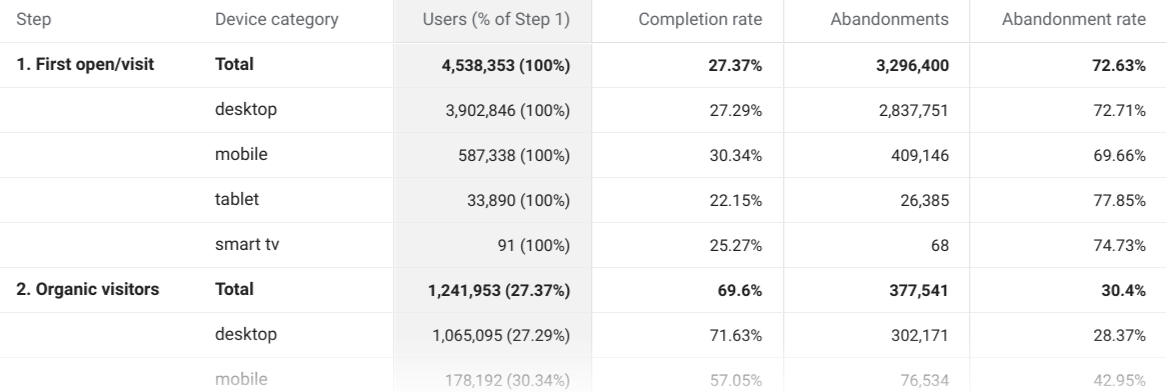
ตาราง Funnel
ตาราง Funnel ซึ่งแสดงผลในfunnelTable
ช่องของการตอบกลับของรายงาน Funnel,
จะแสดงส่วนหลักของรายงาน แต่ละแถวของตารางจะแสดงช่องต่อไปนี้บางส่วนหรือทั้งหมด
ชื่อขั้นตอนของ Funnel (มิติข้อมูล
funnelStepName)มิติข้อมูลรายละเอียด
จำนวนผู้ใช้ที่ใช้งานอยู่ (เมตริก
activeUsers)อัตราการดำเนินการขั้นตอนเสร็จสมบูรณ์ (เมตริก
funnelStepCompletionRate)จำนวนการละทิ้งขั้นตอน (เมตริก
funnelStepAbandonments)อัตราการละทิ้งขั้นตอน (เมตริก
funnelStepAbandonmentRate)ชื่อกลุ่ม (มิติข้อมูล
segment) จะแสดงก็ต่อเมื่อSegmentมีการระบุในคําค้นหา Funnel
ระบบจะแสดงผลค่ารวมในแถวแยกต่างหากซึ่งมี RESERVED_TOTAL เป็นค่ามิติข้อมูลรายละเอียด
ต่อไปนี้คือตัวอย่างตาราง Funnel ที่แสดงในอินเทอร์เฟซเว็บ Google Analytics
การตอบกลับที่เป็นข้อมูลดิบ
ตัวอย่างโค้ดต่อไปนี้แสดงตัวอย่างข้อมูลดิบที่แสดงผลเพื่อตอบสนองต่อคําค้นหา runFunnelReport
รายงานตัวอย่างจะแสดงผลรายงานต่อไปนี้ซึ่งแสดงจำนวนผู้ใช้ที่ใช้งานอยู่ซึ่งรวมอยู่ในแต่ละขั้นตอนของ Funnel โดยขึ้นอยู่กับข้อมูลที่พร็อพเพอร์ตี้รวบรวม
{
  "funnelTable": {
    "dimensionHeaders": [
      {
        "name": "funnelStepName"
      },
      {
        "name": "deviceCategory"
      }
    ],
    "metricHeaders": [
      {
        "name": "activeUsers",
        "type": "TYPE_INTEGER"
      },
      {
        "name": "funnelStepCompletionRate",
        "type": "TYPE_INTEGER"
      },
      {
        "name": "funnelStepAbandonments",
        "type": "TYPE_INTEGER"
      },
      {
        "name": "funnelStepAbandonmentRate",
        "type": "TYPE_INTEGER"
      }
    ],
    "rows": [
      {
        "dimensionValues": [
          {
            "value": "1. First open/visit"
          },
          {
            "value": "RESERVED_TOTAL"
          }
        ],
        "metricValues": [
          {
            "value": "4621565"
          },
          {
            "value": "0.27780178359495106"
          },
          {
            "value": "3337686"
          },
          {
            "value": "0.72219821640504889"
          }
        ]
      },
      {
        "dimensionValues": [
          {
            "value": "1. First open/visit"
          },
          {
            "value": "desktop"
          }
        ],
        "metricValues": [
          {
            "value": "4015959"
          },
          {
            "value": "0.27425279989163237"
          },
          {
            "value": "2914571"
          },
          {
            "value": "0.72574720010836768"
          }
        ]
      },
      {
        "dimensionValues": [
          {
            "value": "1. First open/visit"
          },
          {
            "value": "mobile"
          }
        ],
        "metricValues": [
          {
            "value": "595760"
          },
          {
            "value": "0.29156035987646034"
          },
          {
            "value": "422060"
          },
          {
            "value": "0.70843964012353966"
          }
        ]
      },
      {
        "dimensionValues": [
          {
            "value": "1. First open/visit"
          },
          {
            "value": "tablet"
          }
        ],
        "metricValues": [
          {
            "value": "33638"
          },
          {
            "value": "0.205571080325822"
          },
          {
            "value": "26723"
          },
          {
            "value": "0.79442891967417806"
          }
        ]
      },

...

    ],
    "metadata": {
      "samplingMetadatas": [
        {
          "samplesReadCount": "9917254",
          "samplingSpaceSize": "1162365416"
        }
      ]
    }
  },

  "funnelVisualization": {
    "dimensionHeaders": [
      {
        "name": "funnelStepName"
      }
    ],
    "metricHeaders": [
      {
        "name": "activeUsers",
        "type": "TYPE_INTEGER"
      }
    ],
    "rows": [
      {
        "dimensionValues": [
          {
            "value": "1. First open/visit"
          }
        ],
        "metricValues": [
          {
            "value": "4621565"
          }
        ]
      },

...

    ],
    "metadata": {
      "samplingMetadatas": [
        {
          "samplesReadCount": "9917254",
          "samplingSpaceSize": "1162365416"
        }
      ]
    }
  },
  "kind": "analyticsData#runFunnelReport"
}
ไลบรารีของไคลเอ็นต์
ดูคำอธิบายเกี่ยวกับ วิธีติดตั้งและกำหนดค่าไลบรารีของไคลเอ็นต์ได้ในคู่มือเริ่มใช้งานฉบับย่อ
ต่อไปนี้คือตัวอย่างการใช้ไลบรารีของไคลเอ็นต์ที่เรียกใช้คําค้นหา Funnel และพิมพ์การตอบกลับ
Java
import com.google.analytics.data.v1alpha.AlphaAnalyticsDataClient; import com.google.analytics.data.v1alpha.DateRange; import com.google.analytics.data.v1alpha.Dimension; import com.google.analytics.data.v1alpha.DimensionHeader; import com.google.analytics.data.v1alpha.FunnelBreakdown; import com.google.analytics.data.v1alpha.FunnelEventFilter; import com.google.analytics.data.v1alpha.FunnelFieldFilter; import com.google.analytics.data.v1alpha.FunnelFilterExpression; import com.google.analytics.data.v1alpha.FunnelFilterExpressionList; import com.google.analytics.data.v1alpha.FunnelStep; import com.google.analytics.data.v1alpha.FunnelSubReport; import com.google.analytics.data.v1alpha.MetricHeader; import com.google.analytics.data.v1alpha.Row; import com.google.analytics.data.v1alpha.RunFunnelReportRequest; import com.google.analytics.data.v1alpha.RunFunnelReportResponse; import com.google.analytics.data.v1alpha.SamplingMetadata; import com.google.analytics.data.v1alpha.StringFilter; import com.google.analytics.data.v1alpha.StringFilter.MatchType; /** * Google Analytics Data API sample application demonstrating the creation of a funnel report. * * <p>See * https://developers.google.com/analytics/devguides/reporting/data/v1/rest/v1alpha/properties/runFunnelReport * for more information. * * <p>Before you start the application, please review the comments starting with "TODO(developer)" * and update the code to use correct values. * * <p>To run this sample using Maven: * * <pre>{@code * cd google-analytics-data * mvn compile exec:java -Dexec.mainClass="com.google.analytics.data.samples.RunFunnelReportSample" * }</pre> */ public class RunFunnelReportSample { public static void main(String... args) throws Exception { /** * TODO(developer): Replace this variable with your Google Analytics 4 property ID before * running the sample. */ String propertyId = "YOUR-GA4-PROPERTY-ID"; sampleRunFunnelReport(propertyId); } /** * Runs a funnel query to build a report with 5 funnel steps. * * <ol> * <li>First open/visit (event name is `first_open` or `first_visit`). * <li>Organic visitors (`firstUserMedium` dimension contains the term "organic"). * <li>Session start (event name is `session_start`). * <li>Screen/Page view (event name is `screen_view` or `page_view`). * <li>Purchase (event name is `purchase` or `in_app_purchase`). * </ol> * * The report configuration reproduces the default funnel report provided in the Funnel * Exploration template of the Google Analytics UI. See more at * https://support.google.com/analytics/answer/9327974 */ static void sampleRunFunnelReport(String propertyId) throws Exception { // Using a default constructor instructs the client to use the credentials // specified in GOOGLE_APPLICATION_CREDENTIALS environment variable. try (AlphaAnalyticsDataClient analyticsData = AlphaAnalyticsDataClient.create()) { RunFunnelReportRequest.Builder requestBuilder = RunFunnelReportRequest.newBuilder() .setProperty("properties/" + propertyId) .addDateRanges(DateRange.newBuilder().setStartDate("30daysAgo").setEndDate("today")) .setFunnelBreakdown( FunnelBreakdown.newBuilder() .setBreakdownDimension(Dimension.newBuilder().setName("deviceCategory"))); // Adds each step of the funnel. requestBuilder .getFunnelBuilder() .addSteps( FunnelStep.newBuilder() .setName("First open/visit") .setFilterExpression( FunnelFilterExpression.newBuilder() .setOrGroup( FunnelFilterExpressionList.newBuilder() .addExpressions( FunnelFilterExpression.newBuilder() .setFunnelEventFilter( FunnelEventFilter.newBuilder() .setEventName("first_open"))) .addExpressions( FunnelFilterExpression.newBuilder() .setFunnelEventFilter( FunnelEventFilter.newBuilder() .setEventName("first_visit")))))); requestBuilder .getFunnelBuilder() .addSteps( FunnelStep.newBuilder() .setName("Organic visitors") .setFilterExpression( FunnelFilterExpression.newBuilder() .setFunnelFieldFilter( FunnelFieldFilter.newBuilder() .setFieldName("firstUserMedium") .setStringFilter( StringFilter.newBuilder() .setMatchType(MatchType.CONTAINS) .setCaseSensitive(false) .setValue("organic"))))); requestBuilder .getFunnelBuilder() .addSteps( FunnelStep.newBuilder() .setName("Session start") .setFilterExpression( FunnelFilterExpression.newBuilder() .setFunnelEventFilter( FunnelEventFilter.newBuilder().setEventName("session_start")))); requestBuilder .getFunnelBuilder() .addSteps( FunnelStep.newBuilder() .setName("Screen/Page view") .setFilterExpression( FunnelFilterExpression.newBuilder() .setOrGroup( FunnelFilterExpressionList.newBuilder() .addExpressions( FunnelFilterExpression.newBuilder() .setFunnelEventFilter( FunnelEventFilter.newBuilder() .setEventName("screen_view"))) .addExpressions( FunnelFilterExpression.newBuilder() .setFunnelEventFilter( FunnelEventFilter.newBuilder() .setEventName("page_view")))))); requestBuilder .getFunnelBuilder() .addSteps( FunnelStep.newBuilder() .setName("Purchase") .setFilterExpression( FunnelFilterExpression.newBuilder() .setOrGroup( FunnelFilterExpressionList.newBuilder() .addExpressions( FunnelFilterExpression.newBuilder() .setFunnelEventFilter( FunnelEventFilter.newBuilder() .setEventName("purchase"))) .addExpressions( FunnelFilterExpression.newBuilder() .setFunnelEventFilter( FunnelEventFilter.newBuilder() .setEventName("in_app_purchase")))))); // Make the request. RunFunnelReportResponse response = analyticsData.runFunnelReport(requestBuilder.build()); printRunFunnelReportResponse(response); } } /** Prints results of a runFunnelReport call. */ static void printRunFunnelReportResponse(RunFunnelReportResponse response) { System.out.println("Report result:"); System.out.println("=== FUNNEL VISUALIZATION ==="); printFunnelSubReport(response.getFunnelVisualization()); System.out.println("=== FUNNEL TABLE ==="); printFunnelSubReport(response.getFunnelTable()); } /** Prints the contents of a FunnelSubReport object. */ private static void printFunnelSubReport(FunnelSubReport funnelSubReport) { System.out.println("Dimension headers:"); for (DimensionHeader dimensionHeader : funnelSubReport.getDimensionHeadersList()) { System.out.println(dimensionHeader.getName()); } System.out.println(); System.out.println("Metric headers:"); for (MetricHeader metricHeader : funnelSubReport.getMetricHeadersList()) { System.out.println(metricHeader.getName()); } System.out.println(); System.out.println("Dimension and metric values for each row in the report:"); for (int rowIndex = 0; rowIndex < funnelSubReport.getRowsCount(); rowIndex++) { Row row = funnelSubReport.getRows(rowIndex); for (int fieldIndex = 0; fieldIndex < row.getDimensionValuesCount(); fieldIndex++) { System.out.printf( "%s: '%s'%n", funnelSubReport.getDimensionHeaders(fieldIndex).getName(), row.getDimensionValues(fieldIndex).getValue()); } for (int fieldIndex = 0; fieldIndex < row.getMetricValuesCount(); fieldIndex++) { System.out.printf( "%s: '%s'%n", funnelSubReport.getMetricHeaders(fieldIndex).getName(), row.getMetricValues(fieldIndex).getValue()); } } System.out.println(); System.out.println("Sampling metadata for each date range:"); for (int metadataIndex = 0; metadataIndex < funnelSubReport.getMetadata().getSamplingMetadatasCount(); metadataIndex++) { SamplingMetadata samplingMetadata = funnelSubReport.getMetadata().getSamplingMetadatas(metadataIndex); System.out.printf( "Sampling metadata for date range #%d: samplesReadCount=%d, samplingSpaceSize=%d%n", metadataIndex, samplingMetadata.getSamplesReadCount(), samplingMetadata.getSamplingSpaceSize()); } } }
PHP
use Google\Analytics\Data\V1alpha\Client\AlphaAnalyticsDataClient; use Google\Analytics\Data\V1alpha\DateRange; use Google\Analytics\Data\V1alpha\Dimension; use Google\Analytics\Data\V1alpha\FunnelBreakdown; use Google\Analytics\Data\V1alpha\FunnelEventFilter; use Google\Analytics\Data\V1alpha\FunnelFieldFilter; use Google\Analytics\Data\V1alpha\FunnelFilterExpression; use Google\Analytics\Data\V1alpha\FunnelFilterExpressionList; use Google\Analytics\Data\V1alpha\FunnelStep; use Google\Analytics\Data\V1alpha\Funnel; use Google\Analytics\Data\V1alpha\FunnelSubReport; use Google\Analytics\Data\V1alpha\RunFunnelReportRequest; use Google\Analytics\Data\V1alpha\RunFunnelReportResponse; use Google\Analytics\Data\V1alpha\StringFilter; use Google\Analytics\Data\V1alpha\StringFilter\MatchType; /** * Runs a funnel query to build a report with 5 funnel steps. * * Step 1: First open/visit (event name is `first_open` or `first_visit`). * Step 2: Organic visitors (`firstUserMedium` dimension contains the term "organic"). * Step 3: Session start (event name is `session_start`). * Step 4: Screen/Page view (event name is `screen_view` or `page_view`). * Step 5: Purchase (event name is `purchase` or `in_app_purchase`). * * The report configuration reproduces the default funnel report provided in the Funnel * Exploration template of the Google Analytics UI. See more at * https://support.google.com/analytics/answer/9327974 * * @param string $propertyId Your GA-4 Property ID */ function run_funnel_report(string $propertyId) { // Create an instance of the Google Analytics Data API client library. $client = new AlphaAnalyticsDataClient(); // Create the funnel report request. $request = (new RunFunnelReportRequest()) ->setProperty('properties/' . $propertyId) ->setDateRanges([ new DateRange([ 'start_date' => '30daysAgo', 'end_date' => 'today', ]), ]) ->setFunnelBreakdown( new FunnelBreakdown([ 'breakdown_dimension' => new Dimension([ 'name' => 'deviceCategory' ]) ]) ) ->setFunnel(new Funnel()); // Add funnel steps to the funnel. // 1. Add first open/visit step. $request->getFunnel()->getSteps()[] = new FunnelStep([ 'name' => 'First open/visit', 'filter_expression' => new FunnelFilterExpression([ 'or_group' => new FunnelFilterExpressionList([ 'expressions' => [ new FunnelFilterExpression([ 'funnel_event_filter' => new FunnelEventFilter([ 'event_name' => 'first_open', ]) ]), new FunnelFilterExpression([ 'funnel_event_filter' => new FunnelEventFilter([ 'event_name' => 'first_visit' ]) ]) ] ]) ]) ]); // 2. Add organic visitors step. $request->getFunnel()->getSteps()[] = new FunnelStep([ 'name' => 'Organic visitors', 'filter_expression' => new FunnelFilterExpression([ 'funnel_field_filter' => new FunnelFieldFilter([ 'field_name' => 'firstUserMedium', 'string_filter' => new StringFilter([ 'match_type' => MatchType::CONTAINS, 'case_sensitive' => false, 'value' => 'organic', ]) ]) ]) ]); // 3. Add session start step. $request->getFunnel()->getSteps()[] = new FunnelStep([ 'name' => 'Session start', 'filter_expression' => new FunnelFilterExpression([ 'funnel_event_filter' => new FunnelEventFilter([ 'event_name' => 'session_start', ]) ]) ]); // 4. Add screen/page view step. $request->getFunnel()->getSteps()[] = new FunnelStep([ 'name' => 'Screen/Page view', 'filter_expression' => new FunnelFilterExpression([ 'or_group' => new FunnelFilterExpressionList([ 'expressions' => [ new FunnelFilterExpression([ 'funnel_event_filter' => new FunnelEventFilter([ 'event_name' => 'screen_view', ]) ]), new FunnelFilterExpression([ 'funnel_event_filter' => new FunnelEventFilter([ 'event_name' => 'page_view' ]) ]) ] ]) ]) ]); // 5. Add purchase step. $request->getFunnel()->getSteps()[] = new FunnelStep([ 'name' => 'Purchase', 'filter_expression' => new FunnelFilterExpression([ 'or_group' => new FunnelFilterExpressionList([ 'expressions' => [ new FunnelFilterExpression([ 'funnel_event_filter' => new FunnelEventFilter([ 'event_name' => 'purchase', ]) ]), new FunnelFilterExpression([ 'funnel_event_filter' => new FunnelEventFilter([ 'event_name' => 'in_app_purchase' ]) ]) ] ]) ]) ]); // Make an API call. $response = $client->runFunnelReport($request); printRunFunnelReportResponse($response); } /** * Print results of a runFunnelReport call. * @param RunFunnelReportResponse $response */ function printRunFunnelReportResponse(RunFunnelReportResponse $response) { print 'Report result: ' . PHP_EOL; print '=== FUNNEL VISUALIZATION ===' . PHP_EOL; printFunnelSubReport($response->getFunnelVisualization()); print '=== FUNNEL TABLE ===' . PHP_EOL; printFunnelSubReport($response->getFunnelTable()); } /** * Print the contents of a FunnelSubReport object. * @param FunnelSubReport $subReport */ function printFunnelSubReport(FunnelSubReport $subReport) { print 'Dimension headers:' . PHP_EOL; foreach ($subReport->getDimensionHeaders() as $dimensionHeader) { print $dimensionHeader->getName() . PHP_EOL; } print PHP_EOL . 'Metric headers:' . PHP_EOL; foreach ($subReport->getMetricHeaders() as $metricHeader) { print $metricHeader->getName() . PHP_EOL; } print PHP_EOL . 'Dimension and metric values for each row in the report:'; foreach ($subReport->getRows() as $rowIndex => $row) { print PHP_EOL . 'Row #' . $rowIndex . PHP_EOL; foreach ($row->getDimensionValues() as $dimIndex => $dimValue) { $dimName = $subReport->getDimensionHeaders()[$dimIndex]->getName(); print $dimName . ": '" . $dimValue->getValue() . "'" . PHP_EOL; } foreach ($row->getMetricValues() as $metricIndex => $metricValue) { $metricName = $subReport->getMetricHeaders()[$metricIndex]->getName(); print $metricName . ": '" . $metricValue->getValue() . "'" . PHP_EOL; } } print PHP_EOL . 'Sampling metadata for each date range:' . PHP_EOL; foreach ($subReport->getMetadata()->getSamplingMetadatas() as $metadataIndex => $metadata) { printf('Sampling metadata for date range #%d: samplesReadCount=%d' . 'samplingSpaceSize=%d%s', $metadataIndex, $metadata->getSamplesReadCount(), $metadata->getSamplingSpaceSize(), PHP_EOL); } }
Python
from google.analytics.data_v1alpha import AlphaAnalyticsDataClient from google.analytics.data_v1alpha.types import ( DateRange, Dimension, Funnel, FunnelBreakdown, FunnelEventFilter, FunnelFieldFilter, FunnelFilterExpression, FunnelFilterExpressionList, FunnelStep, RunFunnelReportRequest, StringFilter, ) def run_sample(): """Runs the sample.""" # TODO(developer): Replace this variable with your Google Analytics 4 # property ID before running the sample. property_id = "YOUR-GA4-PROPERTY-ID" run_funnel_report(property_id) def run_funnel_report(property_id="YOUR-GA4-PROPERTY-ID"): """Runs a funnel query to build a report with 5 funnel steps. Step 1: First open/visit (event name is `first_open` or `first_visit`). Step 2: Organic visitors (`firstUserMedium` dimension contains the term "organic"). Step 3: Session start (event name is `session_start`). Step 4: Screen/Page view (event name is `screen_view` or `page_view`). Step 5: Purchase (event name is `purchase` or `in_app_purchase`). The report configuration reproduces the default funnel report provided in the Funnel Exploration template of the Google Analytics UI. See more at https://support.google.com/analytics/answer/9327974 """ client = AlphaAnalyticsDataClient() request = RunFunnelReportRequest( property=f"properties/{property_id}", date_ranges=[DateRange(start_date="30daysAgo", end_date="today")], funnel_breakdown=FunnelBreakdown( breakdown_dimension=Dimension(name="deviceCategory") ), funnel=Funnel( steps=[ FunnelStep( name="First open/visit", filter_expression=FunnelFilterExpression( or_group=FunnelFilterExpressionList( expressions=[ FunnelFilterExpression( funnel_event_filter=FunnelEventFilter( event_name="first_open" ) ), FunnelFilterExpression( funnel_event_filter=FunnelEventFilter( event_name="first_visit" ) ), ] ) ), ), FunnelStep( name="Organic visitors", filter_expression=FunnelFilterExpression( funnel_field_filter=FunnelFieldFilter( field_name="firstUserMedium", string_filter=StringFilter( match_type=StringFilter.MatchType.CONTAINS, case_sensitive=False, value="organic", ), ) ), ), FunnelStep( name="Session start", filter_expression=FunnelFilterExpression( funnel_event_filter=FunnelEventFilter( event_name="session_start" ) ), ), FunnelStep( name="Screen/Page view", filter_expression=FunnelFilterExpression( or_group=FunnelFilterExpressionList( expressions=[ FunnelFilterExpression( funnel_event_filter=FunnelEventFilter( event_name="screen_view" ) ), FunnelFilterExpression( funnel_event_filter=FunnelEventFilter( event_name="page_view" ) ), ] ) ), ), FunnelStep( name="Purchase", filter_expression=FunnelFilterExpression( or_group=FunnelFilterExpressionList( expressions=[ FunnelFilterExpression( funnel_event_filter=FunnelEventFilter( event_name="purchase" ) ), FunnelFilterExpression( funnel_event_filter=FunnelEventFilter( event_name="in_app_purchase" ) ), ] ) ), ), ] ), ) response = client.run_funnel_report(request) print_run_funnel_report_response(response) def print_funnel_sub_report(funnel_sub_report): """Prints the contents of a FunnelSubReport object.""" print("Dimension headers:") for dimension_header in funnel_sub_report.dimension_headers: print(dimension_header.name) print("\nMetric headers:") for metric_header in funnel_sub_report.metric_headers: print(metric_header.name) print("\nDimensions and metric values for each row in the report:") for row_idx, row in enumerate(funnel_sub_report.rows): print("\nRow #{}".format(row_idx)) for field_idx, dimension_value in enumerate(row.dimension_values): dimension_name = funnel_sub_report.dimension_headers[field_idx].name print("{}: '{}'".format(dimension_name, dimension_value.value)) for field_idx, metric_value in enumerate(row.metric_values): metric_name = funnel_sub_report.metric_headers[field_idx].name print("{}: '{}'".format(metric_name, metric_value.value)) print("\nSampling metadata for each date range:") for metadata_idx, metadata in enumerate( funnel_sub_report.metadata.sampling_metadatas ): print( "Sampling metadata for date range #{}: samplesReadCount={}, " "samplingSpaceSize={}".format( metadata_idx, metadata.samples_read_count, metadata.sampling_space_size ) ) def print_run_funnel_report_response(response): """Prints results of a runFunnelReport call.""" print("Report result:") print("=== FUNNEL VISUALIZATION ===") print_funnel_sub_report(response.funnel_visualization) print("=== FUNNEL TABLE ===") print_funnel_sub_report(response.funnel_table)