

Google Analytics Data API v1 ช่วยให้คุณสร้างรายงาน Funnel ได้ การสํารวจ Funnel จะช่วยให้คุณได้เห็นภาพขั้นตอนต่างๆ ที่ผู้ใช้ใช้ในการดำเนินงาน และดูว่าจะประสบความสําเร็จหรือล้มเหลวในแต่ละขั้นตอนได้อย่างรวดเร็ว
ฟีเจอร์ที่แชร์กับรายงานหลัก
คำขอการรายงาน Funnel มีความหมายเหมือนกับคำขอรายงานหลักสำหรับฟีเจอร์ที่ใช้ร่วมกันหลายรายการ เช่น การแบ่งหน้า ตัวกรองมิติข้อมูล และพร็อพเพอร์ตี้ผู้ใช้ จะทํางานในรายงาน Funnel เหมือนกับในรายงานหลัก คำแนะนำนี้จะเน้นที่ฟีเจอร์การรายงาน Funnel หากต้องการทำความคุ้นเคยกับฟังก์ชันการรายงานหลักของ Data API v1 โปรดอ่านคู่มือพื้นฐานการรายงาน รวมถึงคู่มือกรณีการใช้งานขั้นสูง
วิธีการรายงาน Funnel
Data API v1 รองรับความสามารถในการรายงาน Funnel ในเมธอด runFunnelReport
วิธีนี้จะส่งคืนรายงาน Funnel ที่กําหนดเองของข้อมูลเหตุการณ์ Google Analytics ของคุณ
การเลือกหน่วยงานรายงาน
เมธอดทั้งหมดของ Data API v1 กําหนดให้ต้องระบุตัวระบุพร็อพเพอร์ตี้ Google Analytics
ภายในเส้นทางการขอ URL ในรูปแบบของ
properties/GA_PROPERTY_ID เช่น
POST https://analyticsdata.googleapis.com/v1alpha/properties/GA_PROPERTY_ID:runFunnelReport
ระบบจะสร้างรายงานผลลัพธ์โดยอิงตามข้อมูลเหตุการณ์ Google Analytics ที่รวบรวมในพร็อพเพอร์ตี้ Google Analytics ที่ระบุ
หากคุณใช้ไลบรารีของไคลเอ็นต์ Data API รายการใดรายการหนึ่ง คุณไม่จำเป็นต้องจัดการเส้นทาง URL ของคำขอด้วยตนเอง ไคลเอ็นต์ API ส่วนใหญ่
มีพารามิเตอร์ property ที่คาดหวังสตริงในรูปแบบ
properties/GA_PROPERTY_ID ดูตัวอย่างการใช้ไลบรารีของไคลเอ็นต์ได้ในคู่มือเริ่มใช้งานฉบับย่อ
คำขอรายงาน Funnel
หากต้องการขอรายงาน Funnel คุณสามารถสร้างออบเจ็กต์ RunFunnelReportRequest
ได้ เราขอแนะนำให้เริ่มจากพารามิเตอร์คำขอต่อไปนี้
รายการที่ถูกต้องในฟิลด์
dateRangesข้อกําหนด Funnel ที่ถูกต้องในฟิลด์
funnel
ข้อกำหนดของ Funnel
ข้อกําหนด Funnel ในฟิลด์ funnel
ของออบเจ็กต์ RunFunnelReportRequest
จะกําหนดเส้นทางของผู้ใช้ที่คุณต้องการวัดโดยอธิบายsteps
ของ Funnel นี้
ขั้นตอนของ Funnel มีเงื่อนไขอย่างน้อย 1 รายการที่ผู้ใช้ต้องทำตามเพื่อให้อยู่ในขั้นตอนของเส้นทางใน Funnel นั้น คุณอธิบายเงื่อนไขในการรวมไว้ในแต่ละขั้นตอนได้ในฟิลด์
filterExpression
ของแต่ละขั้นตอน
นิพจน์ตัวกรอง Funnel แต่ละรายการเป็นการรวมตัวกรอง 2 ประเภท ได้แก่
funnelFieldFilterสร้างตัวกรองสําหรับมิติข้อมูลหรือเมตริกfunnelEventFilterสร้างตัวกรองที่ตรงกับเหตุการณ์ของชื่อเหตุการณ์เดียว หากระบุฟิลด์ที่ไม่บังคับfunnelParameterFilterExpressionระบบจะกรองเฉพาะชุดย่อยของเหตุการณ์ที่ตรงกับทั้งชื่อเหตุการณ์เดียว และนิพจน์ตัวกรองพารามิเตอร์เท่านั้นที่ตรงกับตัวกรองเหตุการณ์นี้
คุณสามารถรวมตัวกรองโดยใช้กลุ่ม AND
OR
รวมถึงปฏิเสธโดยใช้NOTนิพจน์
ระบบจะแบ่งผลลัพธ์ของรายงานสําหรับแต่ละขั้นตอนของ Funnel ตามมิติข้อมูล
และระบุไว้ในฟิลด์
funnelBreakdown
ตัวอย่างรายงาน Funnel
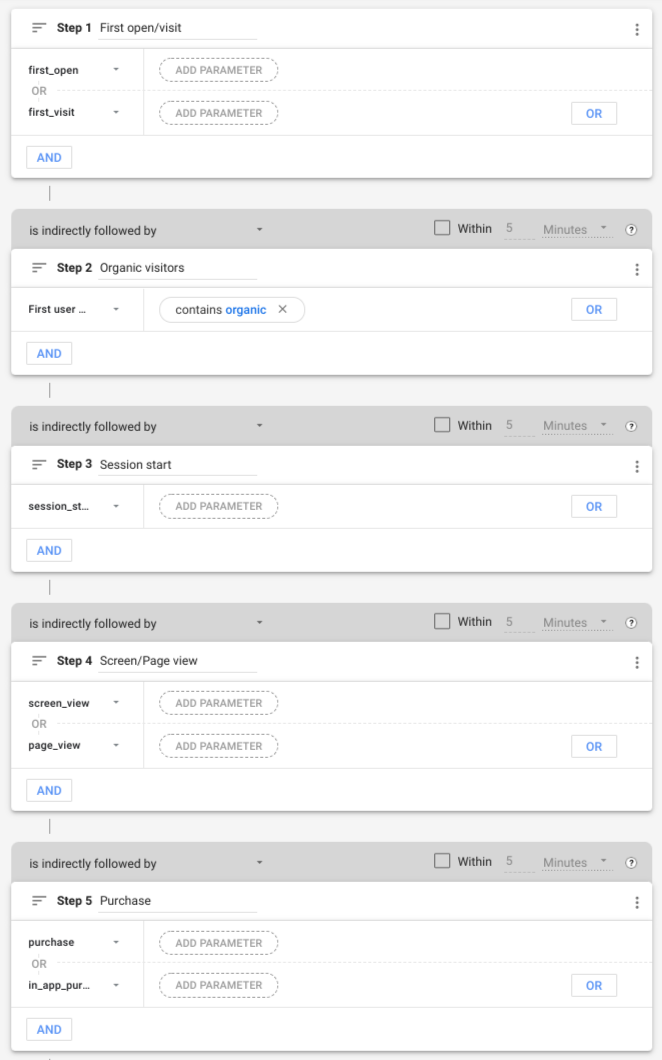
ตัวอย่างต่อไปนี้ใช้ Google Analytics Data API v1 เพื่อสร้างรายงาน Funnel เริ่มต้นซ้ำ ที่ระบุไว้ในเทมเพลตการสํารวจ Funnel ของ อินเทอร์เฟซเว็บของ Google Analytics
ขั้นตอนของ Funnel
การกำหนดค่า Funnel ก่อนหน้ามีขั้นตอนต่อไปนี้
| # | ชื่อขั้นตอน | เงื่อนไข |
|---|---|---|
| 1 | การเปิด/เข้าชมครั้งแรก | ชื่อเหตุการณ์คือ first_open หรือ first_visit |
| 2 | ผู้เข้าชมทั่วไป | มิติข้อมูล firstUserMedium มีคำว่า "Organic" |
| 3 | การเริ่มต้นเซสชัน | ชื่อเหตุการณ์คือ session_start |
| 4 | การดูหน้าจอ/หน้าเว็บ | ชื่อเหตุการณ์คือ screen_view หรือ page_view |
| 5 | ซื้อ | ชื่อเหตุการณ์คือ purchase หรือ in_app_purchase |
ขั้นตอนที่ 1 (การเปิด/เข้าชมครั้งแรก) ของ Funnel จะรวมผู้ใช้ทั้งหมดหลังจากที่โต้ตอบกับเว็บไซต์หรือแอปพลิเคชันเป็นครั้งแรก เช่น ผู้ใช้ที่ทริกเกอร์เหตุการณ์ first_open หรือ first_visit
หากต้องการใช้ลักษณะการทำงานนี้ ข้อมูลโค้ดต่อไปนี้จะระบุออบเจ็กต์ FunnelStep ที่มีฟิลด์
filterExpression
ฟิลด์นิพจน์ตัวกรองคือออบเจ็กต์ FunnelFilterExpression
ที่สร้างขึ้นโดยการรวมเอนทิตี FunnelEventFilter
2 รายการโดยใช้กลุ่ม OR
  {
    "name": "Purchase",
    "filterExpression": {
      "orGroup": {
        "expressions": [
          {
            "funnelEventFilter": {
              "eventName": "first_open"
            }
          },
          {
            "funnelEventFilter": {
              "eventName": "first_visit"
            }
          }
        ]
      }
    }
  }
ขั้นตอนที่ 2 (ผู้เข้าชมทั่วไป) ของ Funnel จะรวมผู้ใช้ที่มีสื่อแรก
ซึ่งมีคำว่า "ทั่วไป" ในข้อมูลโค้ดต่อไปนี้ ฟิลด์ fieldName
ของ FunnelFieldFilter
จะสั่งให้ตัวกรองจับคู่มิติข้อมูล firstUserMedium
ฟิลด์ stringFilter
มีเงื่อนไขที่จะรวมเฉพาะค่าของ
มิติข้อมูลที่มีคำว่า "ทั่วไป"
  {
    "name": "Organic visitors",
    "filterExpression": {
      "funnelFieldFilter": {
        "fieldName": "firstUserMedium",
        "stringFilter": {
          "matchType": "CONTAINS",
          "caseSensitive": false,
          "value": "organic"
        }
      }
    }
  }
คุณระบุขั้นตอนของ Funnel ที่เหลือได้ในลักษณะเดียวกัน
มิติข้อมูลรายละเอียด
สามารถระบุมิติข้อมูลรายละเอียดที่ไม่บังคับ (deviceCategory ในตัวอย่างนี้) ได้โดยใช้ออบเจ็กต์ FunnelBreakdown
ดังนี้
  "funnelBreakdown": {
    "breakdownDimension": {
      "name": "deviceCategory"
    }
  }
โดยค่าเริ่มต้น ระบบจะรวมค่าที่ไม่ซ้ำกัน 5 ค่าแรกของมิติข้อมูลรายละเอียดไว้ในรายงานเท่านั้น คุณใช้ฟิลด์ limit
ของออบเจ็กต์ FunnelBreakdown เพื่อลบล้างลักษณะการทำงานนี้ได้
ข้อความค้นหารายงาน Funnel ที่สมบูรณ์
นี่คือการค้นหาที่สมบูรณ์ซึ่งสร้างรายงาน Funnel
HTTP
POST https://analyticsdata.googleapis.com/v1alpha/properties/GA_PROPERTY_ID:runFunnelReport
{
  "dateRanges": [
    {
      "startDate": "30daysAgo",
      "endDate": "today"
    }
  ],
  "funnelBreakdown": {
    "breakdownDimension": {
      "name": "deviceCategory"
    }
  },
  "funnel": {
    "steps": [
      {
        "name": "First open/visit",
        "filterExpression": {
          "orGroup": {
            "expressions": [
              {
                "funnelEventFilter": {
                  "eventName": "first_open"
                }
              },
              {
                "funnelEventFilter": {
                  "eventName": "first_visit"
                }
              }
            ]
          }
        }
      },
      {
        "name": "Organic visitors",
        "filterExpression": {
          "funnelFieldFilter": {
            "fieldName": "firstUserMedium",
            "stringFilter": {
              "matchType": "CONTAINS",
              "caseSensitive": false,
              "value": "organic"
            }
          }
        }
      },
      {
        "name": "Session start",
        "filterExpression": {
          "funnelEventFilter": {
            "eventName": "session_start"
          }
        }
      },
      {
        "name": "Screen/Page view",
        "filterExpression": {
          "orGroup": {
            "expressions": [
              {
                "funnelEventFilter": {
                  "eventName": "screen_view"
                }
              },
              {
                "funnelEventFilter": {
                  "eventName": "page_view"
                }
              }
            ]
          }
        }
      },
      {
        "name": "Purchase",
        "filterExpression": {
          "orGroup": {
            "expressions": [
              {
                "funnelEventFilter": {
                  "eventName": "purchase"
                }
              },
              {
                "funnelEventFilter": {
                  "eventName": "in_app_purchase"
                }
              }
            ]
          }
        }
      }
    ]
  }
}
รายงานคำตอบ
การตอบกลับของรายงาน Funnel
ของคำขอ API รายงาน Funnel ประกอบด้วย 2 ส่วนหลัก ซึ่งทั้ง 2 ส่วนจะแสดงผล
เป็นออบเจ็กต์ FunnelSubReport
ได้แก่ ภาพ Funnel และตาราง Funnel
การแสดงภาพ Funnel
การแสดงภาพ Funnel ซึ่งแสดงในฟิลด์ funnelVisualization
ของการตอบกลับของรายงาน Funnel
มีภาพรวมระดับสูงของรายงาน Funnel ซึ่งมีประโยชน์เนื่องจาก
ชื่อระบุไว้สำหรับการแสดงภาพรายงาน Funnel ที่สร้างขึ้นอย่างรวดเร็ว
แต่ละแถวของตารางภาพข้อมูล Funnel จะมีฟิลด์ต่อไปนี้บางส่วนหรือทั้งหมด
ชื่อขั้นตอนของ Funnel (มิติข้อมูล
funnelStepName)จํานวนผู้ใช้ที่ใช้งานอยู่ (
activeUsersเมตริก)กลุ่ม (มิติข้อมูล
segment) แสดงเฉพาะในกรณีที่ระบุSegmentไว้ในการค้นหา Funnelวันที่ (มิติข้อมูล
date) แสดงเฉพาะในกรณีที่ระบุประเภทภาพTRENDED_FUNNELในคำค้นหามิติข้อมูลการดำเนินการถัดไป (มิติข้อมูล
funnelStepNextAction) แสดงเฉพาะในกรณีที่ระบุFunnelNextActionไว้ในการค้นหา Funnel
อินเทอร์เฟซเว็บของ Google Analytics จะแสดงส่วนภาพข้อมูลช่องทางของรายงานตัวอย่างในคำแนะนำนี้ดังนี้

ตาราง Funnel
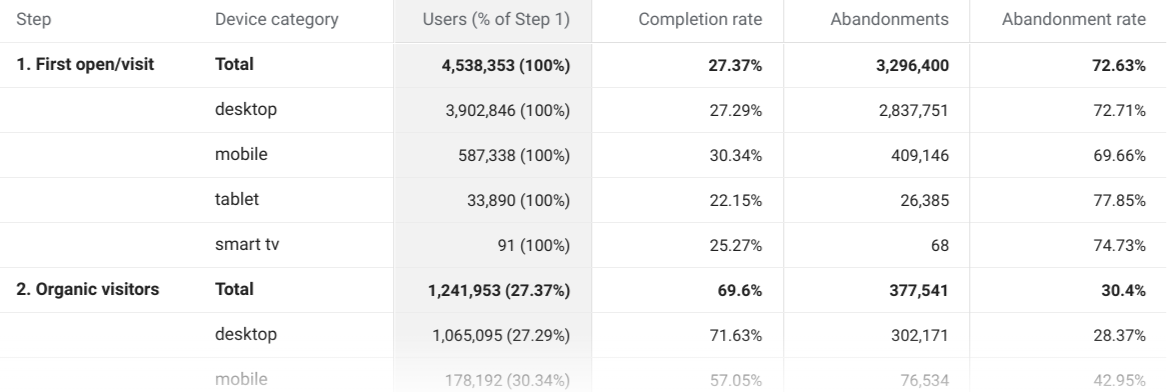
ตาราง Funnel ที่แสดงในฟิลด์ funnelTable
ของการตอบกลับรายงาน Funnel
แสดงส่วนหลักของรายงาน แต่ละแถวของตาราง
จะมีฟิลด์ต่อไปนี้บางส่วนหรือทั้งหมด
ชื่อขั้นตอนของ Funnel (มิติข้อมูล
funnelStepName)มิติข้อมูลรายละเอียด
จํานวนผู้ใช้ที่ใช้งานอยู่ (
activeUsersเมตริก)อัตราความสำเร็จของขั้นตอน (เมตริก
funnelStepCompletionRate)จำนวนการละทิ้งขั้นตอน (เมตริก
funnelStepAbandonments)อัตราการหยุดกลางคันของขั้นตอน (เมตริก
funnelStepAbandonmentRate)ชื่อกลุ่ม (มิติข้อมูล
segment) แสดงเฉพาะในกรณีที่ระบุSegmentไว้ในการค้นหา Funnel
ระบบจะแสดงมูลค่ารวมในแถวแยกต่างหากซึ่งมี RESERVED_TOTAL เป็นค่ามิติข้อมูลการแบ่งย่อย
ตัวอย่างตาราง Funnel ที่แสดงในอินเทอร์เฟซเว็บของ Google Analytics มีดังนี้
คำตอบแบบดิบ
ข้อมูลโค้ดต่อไปนี้แสดงตัวอย่างข้อมูลดิบที่ส่งคืนในการตอบกลับคำค้นหา runFunnelReport
รายงานตัวอย่างจะแสดงรายงานต่อไปนี้ซึ่งแสดงจํานวนผู้ใช้ที่ใช้งานอยู่ที่รวมอยู่ในแต่ละขั้นตอนของ Funnel โดยขึ้นอยู่กับการเก็บรวบรวมข้อมูลที่พร็อพเพอร์ตี้ของคุณรวบรวม
{
  "funnelTable": {
    "dimensionHeaders": [
      {
        "name": "funnelStepName"
      },
      {
        "name": "deviceCategory"
      }
    ],
    "metricHeaders": [
      {
        "name": "activeUsers",
        "type": "TYPE_INTEGER"
      },
      {
        "name": "funnelStepCompletionRate",
        "type": "TYPE_INTEGER"
      },
      {
        "name": "funnelStepAbandonments",
        "type": "TYPE_INTEGER"
      },
      {
        "name": "funnelStepAbandonmentRate",
        "type": "TYPE_INTEGER"
      }
    ],
    "rows": [
      {
        "dimensionValues": [
          {
            "value": "1. First open/visit"
          },
          {
            "value": "RESERVED_TOTAL"
          }
        ],
        "metricValues": [
          {
            "value": "4621565"
          },
          {
            "value": "0.27780178359495106"
          },
          {
            "value": "3337686"
          },
          {
            "value": "0.72219821640504889"
          }
        ]
      },
      {
        "dimensionValues": [
          {
            "value": "1. First open/visit"
          },
          {
            "value": "desktop"
          }
        ],
        "metricValues": [
          {
            "value": "4015959"
          },
          {
            "value": "0.27425279989163237"
          },
          {
            "value": "2914571"
          },
          {
            "value": "0.72574720010836768"
          }
        ]
      },
      {
        "dimensionValues": [
          {
            "value": "1. First open/visit"
          },
          {
            "value": "mobile"
          }
        ],
        "metricValues": [
          {
            "value": "595760"
          },
          {
            "value": "0.29156035987646034"
          },
          {
            "value": "422060"
          },
          {
            "value": "0.70843964012353966"
          }
        ]
      },
      {
        "dimensionValues": [
          {
            "value": "1. First open/visit"
          },
          {
            "value": "tablet"
          }
        ],
        "metricValues": [
          {
            "value": "33638"
          },
          {
            "value": "0.205571080325822"
          },
          {
            "value": "26723"
          },
          {
            "value": "0.79442891967417806"
          }
        ]
      },

...

    ],
    "metadata": {
      "samplingMetadatas": [
        {
          "samplesReadCount": "9917254",
          "samplingSpaceSize": "1162365416"
        }
      ]
    }
  },

  "funnelVisualization": {
    "dimensionHeaders": [
      {
        "name": "funnelStepName"
      }
    ],
    "metricHeaders": [
      {
        "name": "activeUsers",
        "type": "TYPE_INTEGER"
      }
    ],
    "rows": [
      {
        "dimensionValues": [
          {
            "value": "1. First open/visit"
          }
        ],
        "metricValues": [
          {
            "value": "4621565"
          }
        ]
      },

...

    ],
    "metadata": {
      "samplingMetadatas": [
        {
          "samplesReadCount": "9917254",
          "samplingSpaceSize": "1162365416"
        }
      ]
    }
  },
  "kind": "analyticsData#runFunnelReport"
}
ไลบรารีของไคลเอ็นต์
ดูคำอธิบายเกี่ยวกับวิธีติดตั้งและกำหนดค่าไลบรารีของไคลเอ็นต์ได้ในคู่มือเริ่มใช้งานฉบับย่อ
ตัวอย่างต่อไปนี้ใช้ไลบรารีของไคลเอ็นต์ที่เรียกใช้การค้นหา Funnel และพิมพ์การตอบกลับ
Java
import com.google.analytics.data.v1alpha.AlphaAnalyticsDataClient; import com.google.analytics.data.v1alpha.DateRange; import com.google.analytics.data.v1alpha.Dimension; import com.google.analytics.data.v1alpha.DimensionHeader; import com.google.analytics.data.v1alpha.FunnelBreakdown; import com.google.analytics.data.v1alpha.FunnelEventFilter; import com.google.analytics.data.v1alpha.FunnelFieldFilter; import com.google.analytics.data.v1alpha.FunnelFilterExpression; import com.google.analytics.data.v1alpha.FunnelFilterExpressionList; import com.google.analytics.data.v1alpha.FunnelStep; import com.google.analytics.data.v1alpha.FunnelSubReport; import com.google.analytics.data.v1alpha.MetricHeader; import com.google.analytics.data.v1alpha.Row; import com.google.analytics.data.v1alpha.RunFunnelReportRequest; import com.google.analytics.data.v1alpha.RunFunnelReportResponse; import com.google.analytics.data.v1alpha.SamplingMetadata; import com.google.analytics.data.v1alpha.StringFilter; import com.google.analytics.data.v1alpha.StringFilter.MatchType; /** * Google Analytics Data API sample application demonstrating the creation of a funnel report. * * <p>See * https://developers.google.com/analytics/devguides/reporting/data/v1/rest/v1alpha/properties/runFunnelReport * for more information. * * <p>Before you start the application, please review the comments starting with "TODO(developer)" * and update the code to use correct values. * * <p>To run this sample using Maven: * * <pre>{@code * cd google-analytics-data * mvn compile exec:java -Dexec.mainClass="com.google.analytics.data.samples.RunFunnelReportSample" * }</pre> */ public class RunFunnelReportSample { public static void main(String... args) throws Exception { /** * TODO(developer): Replace this variable with your Google Analytics 4 property ID before * running the sample. */ String propertyId = "YOUR-GA4-PROPERTY-ID"; sampleRunFunnelReport(propertyId); } /** * Runs a funnel query to build a report with 5 funnel steps. * * <ol> * <li>First open/visit (event name is `first_open` or `first_visit`). * <li>Organic visitors (`firstUserMedium` dimension contains the term "organic"). * <li>Session start (event name is `session_start`). * <li>Screen/Page view (event name is `screen_view` or `page_view`). * <li>Purchase (event name is `purchase` or `in_app_purchase`). * </ol> * * The report configuration reproduces the default funnel report provided in the Funnel * Exploration template of the Google Analytics UI. See more at * https://support.google.com/analytics/answer/9327974 */ static void sampleRunFunnelReport(String propertyId) throws Exception { // Using a default constructor instructs the client to use the credentials // specified in GOOGLE_APPLICATION_CREDENTIALS environment variable. try (AlphaAnalyticsDataClient analyticsData = AlphaAnalyticsDataClient.create()) { RunFunnelReportRequest.Builder requestBuilder = RunFunnelReportRequest.newBuilder() .setProperty("properties/" + propertyId) .addDateRanges(DateRange.newBuilder().setStartDate("30daysAgo").setEndDate("today")) .setFunnelBreakdown( FunnelBreakdown.newBuilder() .setBreakdownDimension(Dimension.newBuilder().setName("deviceCategory"))); // Adds each step of the funnel. requestBuilder .getFunnelBuilder() .addSteps( FunnelStep.newBuilder() .setName("First open/visit") .setFilterExpression( FunnelFilterExpression.newBuilder() .setOrGroup( FunnelFilterExpressionList.newBuilder() .addExpressions( FunnelFilterExpression.newBuilder() .setFunnelEventFilter( FunnelEventFilter.newBuilder() .setEventName("first_open"))) .addExpressions( FunnelFilterExpression.newBuilder() .setFunnelEventFilter( FunnelEventFilter.newBuilder() .setEventName("first_visit")))))); requestBuilder .getFunnelBuilder() .addSteps( FunnelStep.newBuilder() .setName("Organic visitors") .setFilterExpression( FunnelFilterExpression.newBuilder() .setFunnelFieldFilter( FunnelFieldFilter.newBuilder() .setFieldName("firstUserMedium") .setStringFilter( StringFilter.newBuilder() .setMatchType(MatchType.CONTAINS) .setCaseSensitive(false) .setValue("organic"))))); requestBuilder .getFunnelBuilder() .addSteps( FunnelStep.newBuilder() .setName("Session start") .setFilterExpression( FunnelFilterExpression.newBuilder() .setFunnelEventFilter( FunnelEventFilter.newBuilder().setEventName("session_start")))); requestBuilder .getFunnelBuilder() .addSteps( FunnelStep.newBuilder() .setName("Screen/Page view") .setFilterExpression( FunnelFilterExpression.newBuilder() .setOrGroup( FunnelFilterExpressionList.newBuilder() .addExpressions( FunnelFilterExpression.newBuilder() .setFunnelEventFilter( FunnelEventFilter.newBuilder() .setEventName("screen_view"))) .addExpressions( FunnelFilterExpression.newBuilder() .setFunnelEventFilter( FunnelEventFilter.newBuilder() .setEventName("page_view")))))); requestBuilder .getFunnelBuilder() .addSteps( FunnelStep.newBuilder() .setName("Purchase") .setFilterExpression( FunnelFilterExpression.newBuilder() .setOrGroup( FunnelFilterExpressionList.newBuilder() .addExpressions( FunnelFilterExpression.newBuilder() .setFunnelEventFilter( FunnelEventFilter.newBuilder() .setEventName("purchase"))) .addExpressions( FunnelFilterExpression.newBuilder() .setFunnelEventFilter( FunnelEventFilter.newBuilder() .setEventName("in_app_purchase")))))); // Make the request. RunFunnelReportResponse response = analyticsData.runFunnelReport(requestBuilder.build()); printRunFunnelReportResponse(response); } } /** Prints results of a runFunnelReport call. */ static void printRunFunnelReportResponse(RunFunnelReportResponse response) { System.out.println("Report result:"); System.out.println("=== FUNNEL VISUALIZATION ==="); printFunnelSubReport(response.getFunnelVisualization()); System.out.println("=== FUNNEL TABLE ==="); printFunnelSubReport(response.getFunnelTable()); } /** Prints the contents of a FunnelSubReport object. */ private static void printFunnelSubReport(FunnelSubReport funnelSubReport) { System.out.println("Dimension headers:"); for (DimensionHeader dimensionHeader : funnelSubReport.getDimensionHeadersList()) { System.out.println(dimensionHeader.getName()); } System.out.println(); System.out.println("Metric headers:"); for (MetricHeader metricHeader : funnelSubReport.getMetricHeadersList()) { System.out.println(metricHeader.getName()); } System.out.println(); System.out.println("Dimension and metric values for each row in the report:"); for (int rowIndex = 0; rowIndex < funnelSubReport.getRowsCount(); rowIndex++) { Row row = funnelSubReport.getRows(rowIndex); for (int fieldIndex = 0; fieldIndex < row.getDimensionValuesCount(); fieldIndex++) { System.out.printf( "%s: '%s'%n", funnelSubReport.getDimensionHeaders(fieldIndex).getName(), row.getDimensionValues(fieldIndex).getValue()); } for (int fieldIndex = 0; fieldIndex < row.getMetricValuesCount(); fieldIndex++) { System.out.printf( "%s: '%s'%n", funnelSubReport.getMetricHeaders(fieldIndex).getName(), row.getMetricValues(fieldIndex).getValue()); } } System.out.println(); System.out.println("Sampling metadata for each date range:"); for (int metadataIndex = 0; metadataIndex < funnelSubReport.getMetadata().getSamplingMetadatasCount(); metadataIndex++) { SamplingMetadata samplingMetadata = funnelSubReport.getMetadata().getSamplingMetadatas(metadataIndex); System.out.printf( "Sampling metadata for date range #%d: samplesReadCount=%d, samplingSpaceSize=%d%n", metadataIndex, samplingMetadata.getSamplesReadCount(), samplingMetadata.getSamplingSpaceSize()); } } }
PHP
use Google\Analytics\Data\V1alpha\Client\AlphaAnalyticsDataClient; use Google\Analytics\Data\V1alpha\DateRange; use Google\Analytics\Data\V1alpha\Dimension; use Google\Analytics\Data\V1alpha\FunnelBreakdown; use Google\Analytics\Data\V1alpha\FunnelEventFilter; use Google\Analytics\Data\V1alpha\FunnelFieldFilter; use Google\Analytics\Data\V1alpha\FunnelFilterExpression; use Google\Analytics\Data\V1alpha\FunnelFilterExpressionList; use Google\Analytics\Data\V1alpha\FunnelStep; use Google\Analytics\Data\V1alpha\Funnel; use Google\Analytics\Data\V1alpha\FunnelSubReport; use Google\Analytics\Data\V1alpha\RunFunnelReportRequest; use Google\Analytics\Data\V1alpha\RunFunnelReportResponse; use Google\Analytics\Data\V1alpha\StringFilter; use Google\Analytics\Data\V1alpha\StringFilter\MatchType; /** * Runs a funnel query to build a report with 5 funnel steps. * * Step 1: First open/visit (event name is `first_open` or `first_visit`). * Step 2: Organic visitors (`firstUserMedium` dimension contains the term "organic"). * Step 3: Session start (event name is `session_start`). * Step 4: Screen/Page view (event name is `screen_view` or `page_view`). * Step 5: Purchase (event name is `purchase` or `in_app_purchase`). * * The report configuration reproduces the default funnel report provided in the Funnel * Exploration template of the Google Analytics UI. See more at * https://support.google.com/analytics/answer/9327974 * * @param string $propertyId Your GA-4 Property ID */ function run_funnel_report(string $propertyId) { // Create an instance of the Google Analytics Data API client library. $client = new AlphaAnalyticsDataClient(); // Create the funnel report request. $request = (new RunFunnelReportRequest()) ->setProperty('properties/' . $propertyId) ->setDateRanges([ new DateRange([ 'start_date' => '30daysAgo', 'end_date' => 'today', ]), ]) ->setFunnelBreakdown( new FunnelBreakdown([ 'breakdown_dimension' => new Dimension([ 'name' => 'deviceCategory' ]) ]) ) ->setFunnel(new Funnel()); // Add funnel steps to the funnel. // 1. Add first open/visit step. $request->getFunnel()->getSteps()[] = new FunnelStep([ 'name' => 'First open/visit', 'filter_expression' => new FunnelFilterExpression([ 'or_group' => new FunnelFilterExpressionList([ 'expressions' => [ new FunnelFilterExpression([ 'funnel_event_filter' => new FunnelEventFilter([ 'event_name' => 'first_open', ]) ]), new FunnelFilterExpression([ 'funnel_event_filter' => new FunnelEventFilter([ 'event_name' => 'first_visit' ]) ]) ] ]) ]) ]); // 2. Add organic visitors step. $request->getFunnel()->getSteps()[] = new FunnelStep([ 'name' => 'Organic visitors', 'filter_expression' => new FunnelFilterExpression([ 'funnel_field_filter' => new FunnelFieldFilter([ 'field_name' => 'firstUserMedium', 'string_filter' => new StringFilter([ 'match_type' => MatchType::CONTAINS, 'case_sensitive' => false, 'value' => 'organic', ]) ]) ]) ]); // 3. Add session start step. $request->getFunnel()->getSteps()[] = new FunnelStep([ 'name' => 'Session start', 'filter_expression' => new FunnelFilterExpression([ 'funnel_event_filter' => new FunnelEventFilter([ 'event_name' => 'session_start', ]) ]) ]); // 4. Add screen/page view step. $request->getFunnel()->getSteps()[] = new FunnelStep([ 'name' => 'Screen/Page view', 'filter_expression' => new FunnelFilterExpression([ 'or_group' => new FunnelFilterExpressionList([ 'expressions' => [ new FunnelFilterExpression([ 'funnel_event_filter' => new FunnelEventFilter([ 'event_name' => 'screen_view', ]) ]), new FunnelFilterExpression([ 'funnel_event_filter' => new FunnelEventFilter([ 'event_name' => 'page_view' ]) ]) ] ]) ]) ]); // 5. Add purchase step. $request->getFunnel()->getSteps()[] = new FunnelStep([ 'name' => 'Purchase', 'filter_expression' => new FunnelFilterExpression([ 'or_group' => new FunnelFilterExpressionList([ 'expressions' => [ new FunnelFilterExpression([ 'funnel_event_filter' => new FunnelEventFilter([ 'event_name' => 'purchase', ]) ]), new FunnelFilterExpression([ 'funnel_event_filter' => new FunnelEventFilter([ 'event_name' => 'in_app_purchase' ]) ]) ] ]) ]) ]); // Make an API call. $response = $client->runFunnelReport($request); printRunFunnelReportResponse($response); } /** * Print results of a runFunnelReport call. * @param RunFunnelReportResponse $response */ function printRunFunnelReportResponse(RunFunnelReportResponse $response) { print 'Report result: ' . PHP_EOL; print '=== FUNNEL VISUALIZATION ===' . PHP_EOL; printFunnelSubReport($response->getFunnelVisualization()); print '=== FUNNEL TABLE ===' . PHP_EOL; printFunnelSubReport($response->getFunnelTable()); } /** * Print the contents of a FunnelSubReport object. * @param FunnelSubReport $subReport */ function printFunnelSubReport(FunnelSubReport $subReport) { print 'Dimension headers:' . PHP_EOL; foreach ($subReport->getDimensionHeaders() as $dimensionHeader) { print $dimensionHeader->getName() . PHP_EOL; } print PHP_EOL . 'Metric headers:' . PHP_EOL; foreach ($subReport->getMetricHeaders() as $metricHeader) { print $metricHeader->getName() . PHP_EOL; } print PHP_EOL . 'Dimension and metric values for each row in the report:'; foreach ($subReport->getRows() as $rowIndex => $row) { print PHP_EOL . 'Row #' . $rowIndex . PHP_EOL; foreach ($row->getDimensionValues() as $dimIndex => $dimValue) { $dimName = $subReport->getDimensionHeaders()[$dimIndex]->getName(); print $dimName . ": '" . $dimValue->getValue() . "'" . PHP_EOL; } foreach ($row->getMetricValues() as $metricIndex => $metricValue) { $metricName = $subReport->getMetricHeaders()[$metricIndex]->getName(); print $metricName . ": '" . $metricValue->getValue() . "'" . PHP_EOL; } } print PHP_EOL . 'Sampling metadata for each date range:' . PHP_EOL; foreach ($subReport->getMetadata()->getSamplingMetadatas() as $metadataIndex => $metadata) { printf('Sampling metadata for date range #%d: samplesReadCount=%d' . 'samplingSpaceSize=%d%s', $metadataIndex, $metadata->getSamplesReadCount(), $metadata->getSamplingSpaceSize(), PHP_EOL); } }
Python
from google.analytics.data_v1alpha import AlphaAnalyticsDataClient from google.analytics.data_v1alpha.types import ( DateRange, Dimension, Funnel, FunnelBreakdown, FunnelEventFilter, FunnelFieldFilter, FunnelFilterExpression, FunnelFilterExpressionList, FunnelStep, RunFunnelReportRequest, StringFilter, ) def run_sample(): """Runs the sample.""" # TODO(developer): Replace this variable with your Google Analytics 4 # property ID before running the sample. property_id = "YOUR-GA4-PROPERTY-ID" run_funnel_report(property_id) def run_funnel_report(property_id="YOUR-GA4-PROPERTY-ID"): """Runs a funnel query to build a report with 5 funnel steps. Step 1: First open/visit (event name is `first_open` or `first_visit`). Step 2: Organic visitors (`firstUserMedium` dimension contains the term "organic"). Step 3: Session start (event name is `session_start`). Step 4: Screen/Page view (event name is `screen_view` or `page_view`). Step 5: Purchase (event name is `purchase` or `in_app_purchase`). The report configuration reproduces the default funnel report provided in the Funnel Exploration template of the Google Analytics UI. See more at https://support.google.com/analytics/answer/9327974 """ client = AlphaAnalyticsDataClient() request = RunFunnelReportRequest( property=f"properties/{property_id}", date_ranges=[DateRange(start_date="30daysAgo", end_date="today")], funnel_breakdown=FunnelBreakdown( breakdown_dimension=Dimension(name="deviceCategory") ), funnel=Funnel( steps=[ FunnelStep( name="First open/visit", filter_expression=FunnelFilterExpression( or_group=FunnelFilterExpressionList( expressions=[ FunnelFilterExpression( funnel_event_filter=FunnelEventFilter( event_name="first_open" ) ), FunnelFilterExpression( funnel_event_filter=FunnelEventFilter( event_name="first_visit" ) ), ] ) ), ), FunnelStep( name="Organic visitors", filter_expression=FunnelFilterExpression( funnel_field_filter=FunnelFieldFilter( field_name="firstUserMedium", string_filter=StringFilter( match_type=StringFilter.MatchType.CONTAINS, case_sensitive=False, value="organic", ), ) ), ), FunnelStep( name="Session start", filter_expression=FunnelFilterExpression( funnel_event_filter=FunnelEventFilter( event_name="session_start" ) ), ), FunnelStep( name="Screen/Page view", filter_expression=FunnelFilterExpression( or_group=FunnelFilterExpressionList( expressions=[ FunnelFilterExpression( funnel_event_filter=FunnelEventFilter( event_name="screen_view" ) ), FunnelFilterExpression( funnel_event_filter=FunnelEventFilter( event_name="page_view" ) ), ] ) ), ), FunnelStep( name="Purchase", filter_expression=FunnelFilterExpression( or_group=FunnelFilterExpressionList( expressions=[ FunnelFilterExpression( funnel_event_filter=FunnelEventFilter( event_name="purchase" ) ), FunnelFilterExpression( funnel_event_filter=FunnelEventFilter( event_name="in_app_purchase" ) ), ] ) ), ), ] ), ) response = client.run_funnel_report(request) print_run_funnel_report_response(response) def print_funnel_sub_report(funnel_sub_report): """Prints the contents of a FunnelSubReport object.""" print("Dimension headers:") for dimension_header in funnel_sub_report.dimension_headers: print(dimension_header.name) print("\nMetric headers:") for metric_header in funnel_sub_report.metric_headers: print(metric_header.name) print("\nDimensions and metric values for each row in the report:") for row_idx, row in enumerate(funnel_sub_report.rows): print("\nRow #{}".format(row_idx)) for field_idx, dimension_value in enumerate(row.dimension_values): dimension_name = funnel_sub_report.dimension_headers[field_idx].name print("{}: '{}'".format(dimension_name, dimension_value.value)) for field_idx, metric_value in enumerate(row.metric_values): metric_name = funnel_sub_report.metric_headers[field_idx].name print("{}: '{}'".format(metric_name, metric_value.value)) print("\nSampling metadata for each date range:") for metadata_idx, metadata in enumerate( funnel_sub_report.metadata.sampling_metadatas ): print( "Sampling metadata for date range #{}: samplesReadCount={}, " "samplingSpaceSize={}".format( metadata_idx, metadata.samples_read_count, metadata.sampling_space_size ) ) def print_run_funnel_report_response(response): """Prints results of a runFunnelReport call.""" print("Report result:") print("=== FUNNEL VISUALIZATION ===") print_funnel_sub_report(response.funnel_visualization) print("=== FUNNEL TABLE ===") print_funnel_sub_report(response.funnel_table)