
操作說明
透過互動式程式碼片段工具,您可以輕鬆測試 API 要求,並產生這些要求專屬的程式碼範例。針對任何特定方法,工具都會顯示一或多個用途的程式碼片段,每種用途都說明呼叫該方法的常見方式。舉例來說,您可以呼叫 channels.list 方法,擷取特定頻道或目前使用者頻道的相關資料。
執行 API 要求
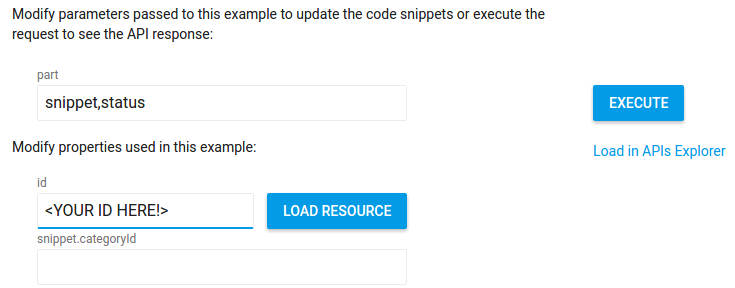
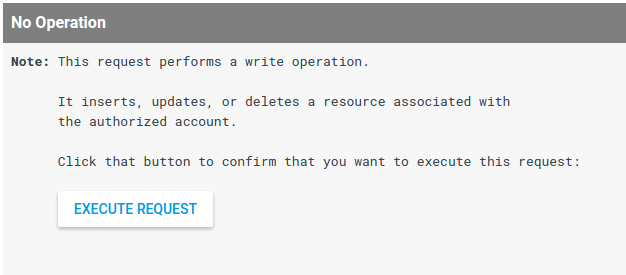
如要執行要求,請按一下要求參數清單旁的「執行」按鈕。如果您之前尚未授權應用程式代為提交 API 要求,系統會提示您進行這項操作。為求謹慎,如果您的要求會執行寫入作業 (插入、更新或刪除與頻道相關聯的資源),系統會提示您先確認您要執行要求,再實際執行。
切換程式碼片段和完整範例
針對每種用途,此工具都會顯示程式碼片段,識別特定呼叫方法的專屬程式碼。每段程式碼片段可識別要呼叫的方法,以及 API 要求中使用的參數和屬性值。
此外,工具還會顯示完整程式碼範例,並將該程式碼片段放入定義樣板函式的範本中,以便授權 API 要求及建構 API 要求。您可以使用範例上方的滑桿,在摘要和完整範例之間切換:

在本機執行完整程式碼範例
完整的程式碼範例經過設計,可以在本機複製及執行。如要執行完整程式碼範例,請注意下列必要條件和設定步驟:
必要條件
- Java 1.7 以上版本
- Gradle 2.3 以上版本
設定專案並執行程式碼範例
-
在 API 控制台建立專案,並設定網頁應用程式的憑證。視情況設定已授權的重新導向 URI。
-
按照 API Java 快速入門指南中的操作說明準備專案,但將預設
build.gradle檔案的內容替換為以下程式碼:apply plugin: 'java' apply plugin: 'application' mainClassName = 'ApiExample' sourceCompatibility = 1.7 targetCompatibility = 1.7 version = '1.0' repositories { mavenCentral() } dependencies { compile 'com.google.api-client:google-api-client:1.22.0' compile 'com.google.oauth-client:google-oauth-client-jetty:1.22.0' compile 'com.google.apis:google-api-services-youtube:v3-rev182-1.22.0' compile group: 'com.google.code.gson', name: 'gson', version: '1.7.2' compile group: 'com.fasterxml.jackson.core', name: 'jackson-databind', version: '2.4.4' } compileJava { options.compilerArgs << "-Xlint:unchecked" << "-Xlint:deprecation" } -
從工作目錄中,將與憑證相關聯的
client_secrets.json檔案儲存至src/main/resources/client_secret.json。 -
從工作目錄,將完整的程式碼範例複製到
src/main/java/ApiExample.java。(每個範例的類別名稱都是ApiExample,因此您不需要修改build.gradle檔案即可執行不同範例)。 -
從指令列執行範例:
gradle -q run
-
大多數範例會向
STDOUT列印內容。你也可以查看 YouTube 網站,瞭解寫入資料的要求有何影響,例如建立播放清單或頻道版面的要求。
-
在 API 控制台建立專案,並設定網頁應用程式的憑證。設定授權的 JavaScript 來源,以識別傳送要求的來源網址 (例如
http://localhost)。 -
將完整的程式碼範例複製到網路伺服器可存取的本機檔案 (例如
/var/www/html/example.html)。 -
請找到程式碼範例,找出用於設定請求用戶端 ID 的那一行,並將值換成您憑證的用戶端 ID:
gapi.client.init({ 'clientId': 'REPLACE_ME', -
使用瀏覽器開啟檔案 (例如
http://localhost/example.html)。建議您使用具備偵錯控制台的瀏覽器,例如 Google Chrome。 -
視需要授權要求。如果要求已獲得授權,偵錯主控台應將要求的 API 回應顯示為 JSON 物件。
必要條件
- 必須安裝 Node.js。
- npm 套件管理工具 (隨附於 Node.js)。
- Node.js 適用的 Google API 用戶端程式庫:
npm install googleapis --save
- 連上網際網路和網路瀏覽器。
- Google 帳戶。
設定專案並執行程式碼範例
-
在 API 控制台建立專案,並在 Google API 控制台中設定 OAuth 2.0 憑證。設定憑證時,將應用程式類型設為「其他」。
-
將與憑證相關聯的
client_secret.json檔案儲存至本機檔案。 -
將完整的程式碼範例複製到
client_secret.json檔案所在目錄中的本機檔案,或者修改範例,以正確識別該檔案的位置。 -
從指令列執行範例:
node sample.js
-
大多數範例會在
STDOUT中列印內容,如果是網頁應用程式範例,則會輸出到您目前瀏覽的網頁。你也可以查看 YouTube 網站,瞭解寫入資料的要求有何影響,例如建立播放清單或頻道版面的要求。
必要條件
- Python 2.6 以上版本
- pip 套件管理工具
- Python 的 Google API 用戶端程式庫:
pip install --upgrade google-api-python-client
- 使用者授權的 google-auth、google-auth-oauthlib 和 google-auth-httplib2。
pip install --upgrade google-auth google-auth-oauthlib google-auth-httplib2
- Flask Python 網頁應用程式架構 (如果您執行的是網路伺服器應用程式的 Python 範例)。
pip install --upgrade flask
- 要求 HTTP 程式庫。
pip install --upgrade requests
設定專案並執行程式碼範例
-
在 API 控制台建立專案,並在 Google API 控制台中設定 OAuth 2.0 憑證。設定憑證時,請將應用程式類型設為「網頁應用程式」,取得使用 Flask Python 網頁應用程式架構的範例,並對這些憑證設定授權的重新導向 URI。否則請將應用程式類型設為「Other」(其他)。
-
將與憑證相關聯的
client_secret.json檔案儲存至本機檔案。 -
將完整的程式碼範例複製到
client_secret.json檔案所在目錄中的本機檔案,或者修改範例,以正確識別該檔案的位置。 -
從指令列執行範例:
python sample.py
網路伺服器應用程式範例的注意事項:
如果是針對網路伺服器應用程式執行 Python 範例,則執行指令碼會啟動本機網路伺服器。如要實際執行 API 要求,您必須在瀏覽器中前往提供的網頁。舉例來說,使用 Flask 網頁應用程式架構的 Python 範例會包含如下一行內容:
app.run('localhost', 8080, debug=True)
這個程式碼會在http://localhost:8080啟動本機網路伺服器。不過,在您實際在瀏覽器中前往http://localhost:8080之前,指令碼不會嘗試執行 API 要求。(您也必須將本機伺服器的網址設為授權憑證的授權重新導向 URI)。 -
大多數範例會在
STDOUT中列印內容,如果是網頁應用程式範例,則會輸出到您目前瀏覽的網頁。你也可以查看 YouTube 網站,瞭解寫入資料的要求有何影響,例如建立播放清單或頻道版面的要求。
必要條件
- PHP 5.4 以上版本,並且已安裝指令列介面 (CLI) 和 JSON 擴充功能。
- Composer 依附元件管理工具。
- PHP 適用的 Google API 用戶端程式庫:
php composer.phar require google/apiclient:^2.0
設定專案並執行程式碼範例
-
在 API 控制台建立專案,並在 Google API 控制台中設定 OAuth 2.0 憑證。設定憑證時,將應用程式類型設為「其他」。
-
將與憑證相關聯的
client_secret.json檔案儲存至本機檔案。 -
將完整的程式碼範例複製到
client_secret.json檔案所在目錄中的本機檔案,或者修改範例,以正確識別該檔案的位置。 -
從指令列執行範例:
php sample.php
-
大多數範例會在
STDOUT中列印內容,如果是網頁應用程式範例,則會輸出到您目前瀏覽的網頁。你也可以查看 YouTube 網站,瞭解寫入資料的要求有何影響,例如建立播放清單或頻道版面的要求。
必要條件
- Ruby 2.0 以上版本
- Ruby 適用的 Google API 用戶端程式庫:
gem install google-api-client
設定專案並執行程式碼範例
-
在 API 控制台建立專案,並在 Google API 控制台中設定 OAuth 2.0 憑證。設定憑證時,將應用程式類型設為「其他」。
-
將與憑證相關聯的
client_secret.json檔案儲存至本機檔案。 -
將完整的程式碼範例複製到
client_secret.json檔案所在目錄中的本機檔案,或者修改範例,以正確識別該檔案的位置。 -
從指令列執行範例:
ruby sample.rb
-
大多數範例會在
STDOUT中列印內容,如果是網頁應用程式範例,則會輸出到您目前瀏覽的網頁。你也可以查看 YouTube 網站,瞭解寫入資料的要求有何影響,例如建立播放清單或頻道版面的要求。
-
在 API 控制台建立專案,並在 Google API 控制台中設定 OAuth 2.0 憑證。設定憑證時,將應用程式類型設為「其他」。
-
將與憑證相關聯的
client_secret.json檔案儲存至本機檔案。 -
將完整的程式碼範例複製到
client_secret.json檔案所在目錄中的本機檔案,或者修改範例,以正確識別該檔案的位置。 -
從指令列執行範例:
go run sample.go
-
大多數範例會在
STDOUT中列印內容,如果是網頁應用程式範例,則會輸出到您目前瀏覽的網頁。你也可以查看 YouTube 網站,瞭解寫入資料的要求有何影響,例如建立播放清單或頻道版面的要求。
使用樣板函式
如上所述,完整的程式碼範例會使用樣板程式碼授權和建構 API 要求。舉例來說,Python 範例中的 build_resource 函式會使用字典,將資源屬性對應至其值,建構可插入或更新的資源。也有針對 JavaScript、PHP、Ruby、Go 和 Apps Script 提供的類似函式。
舉例來說,下列分頁顯示瞭如何呼叫用於建構資源的樣板函式,以建構 playlist 資源。請注意,樣板函式不需要知道要建立的資源類型。
function createResource(properties) {
  var resource = {};
  var normalizedProps = properties;
  for (var p in properties) {
    var value = properties[p];
    if (p && p.substr(-2, 2) == '[]') {
      var adjustedName = p.replace('[]', '');
      if (value) {
        normalizedProps[adjustedName] = value.split(',');
      }
      delete normalizedProps[p];
    }
  }
  for (var p in normalizedProps) {
    // Leave properties that don't have values out of inserted resource.
    if (normalizedProps.hasOwnProperty(p) && normalizedProps[p]) {
      var propArray = p.split('.');
      var ref = resource;
      for (var pa = 0; pa < propArray.length; pa++) {
        var key = propArray[pa];
        if (pa == propArray.length - 1) {
          ref[key] = normalizedProps[p];
        } else {
          ref = ref[key] = ref[key] || {};
        }
      }
    };
  }
  return resource;
}
var resource = createResource({
    'snippet.title': 'Sample playlist ',
    'snippet.description': 'This is a sample playlist description.',
    'snippet.tags[]': 'JavaScript code, interactive',
    'snippet.defaultLanguage': '',
    'status.privacyStatus': 'private'
}
# Build a resource based on a list of properties given as key-value pairs.
# Leave properties with empty values out of the inserted resource.
def build_resource(properties):
  resource = {}
  for p in properties:
    # Given a key like "snippet.title", split into "snippet" and "title", where
    # "snippet" will be an object and "title" will be a property in that object.
    prop_array = p.split('.')
    ref = resource
    for pa in range(0, len(prop_array)):
      is_array = False
      key = prop_array[pa]
      # Convert a name like "snippet.tags[]" to snippet.tags, but handle
      # the value as an array.
      if key[-2:] == '[]':
        key = key[0:len(key)-2:]
        is_array = True
      if pa == (len(prop_array) - 1):
        # Leave properties without values out of inserted resource.
        if properties[p]:
          if is_array:
            ref[key] = properties[p].split(',')
          else:
            ref[key] = properties[p]
      elif key not in ref:
        # For example, the property is "snippet.title", but the resource does
        # not yet have a "snippet" object. Create the snippet object here.
        # Setting "ref = ref[key]" means that in the next time through the
        # "for pa in range ..." loop, we will be setting a property in the
        # resource's "snippet" object.
        ref[key] = {}
        ref = ref[key]
      else:
        # For example, the property is "snippet.description", and the resource
        # already has a "snippet" object.
        ref = ref[key]
  return resource

resource = build_resource({
    'snippet.title': 'Sample playlist ',
    'snippet.description': 'This is a sample playlist description.',
    'snippet.tags[]': 'Python code, interactive',
    'snippet.defaultLanguage': '',
    'status.privacyStatus': 'private'}
// Add a property to the resource.
function addPropertyToResource(&$ref, $property, $value) {
    $keys = explode(".", $property);
    $is_array = false;
    foreach ($keys as $key) {
        // Convert a name like "snippet.tags[]" to "snippet.tags" and
        // set a boolean variable to handle the value like an array.
        if (substr($key, -2) == "[]") {
            $key = substr($key, 0, -2);
            $is_array = true;
        }
        $ref = &$ref[$key];
    }

    // Set the property value. Make sure array values are handled properly.
    if ($is_array && $value) {
        $ref = $value;
        $ref = explode(",", $value);
    } elseif ($is_array) {
        $ref = array();
    } else {
        $ref = $value;
    }
}

// Build a resource based on a list of properties given as key-value pairs.
function createResource($properties) {
    $resource = array();
    foreach ($properties as $prop => $value) {
        if ($value) {
            addPropertyToResource($resource, $prop, $value);
        }
    }
    return $resource;
}

$propertyObject = createResource(array(
    'snippet.title' => 'Sample playlist ',
    'snippet.description' => 'This is a sample playlist description.',
    'snippet.tags[]' => 'Python code, interactive',
    'snippet.defaultLanguage' => '',
    'status.privacyStatus' => 'private'));
敬上
# Build a resource based on a list of properties given as key-value pairs.
def create_resource(properties)
  resource = {}
  properties.each do |prop, value|
    ref = resource
    prop_array = prop.to_s.split(".")
    for p in 0..(prop_array.size - 1)
      is_array = false
      key = prop_array[p]
      if key[-2,2] == "[]"
        key = key[0...-2]
        is_array = true
      end
      if p == (prop_array.size - 1)
        if is_array
          if value == ""
            ref[key.to_sym] = []
          else
            ref[key.to_sym] = value.split(",")
          end
        elsif value != ""
          ref[key.to_sym] = value
        end
      elsif ref.include?(key.to_sym)
        ref = ref[key.to_sym]
      else
        ref[key.to_sym] = {}
        ref = ref[key.to_sym]
      end
    end
  end
  return resource
end

resource = create_resource({
    'snippet.title': 'Sample playlist ',
    'snippet.description': 'This is a sample playlist description.',
    'snippet.tags[]': 'Ruby code, interactive',
    'snippet.default_language': '',
    'status.privacy_status': 'private'})
// Build an object from an object containing properties as key-value pairs
function createResource(properties) {
  var res = {};
  var normalizedProps = {};
  for (var p in properties) {
    var value = properties[p];
    if (p.substr(-2, 2) == '[]' && value) {
      var adjustedName = p.replace('[]', '');
      normalizedProps[adjustedName] = value.split(',');
    } else {
      normalizedProps[p] = value;
    }
  }
  for (var p in normalizedProps) {
    if (normalizedProps.hasOwnProperty(p) && normalizedProps[p]) {
      var propArray = p.split('.');
      var ref = res;
      for (var pa = 0; pa < propArray.length; pa++) {
        var key = propArray[pa];
        if (pa == propArray.length - 1) {
          ref[key] = normalizedProps[p];
        } else {
          ref = ref[key] = ref[key] || {};
        }
      }
    };
  }
  return res;
}

var resource = createResource({
    'snippet.title': 'Sample playlist ',
    'snippet.description': 'This is a sample playlist description.',
    'snippet.tags[]': 'Apps Script code, interactive',
    'snippet.defaultLanguage': '',
    'status.privacyStatus': 'private'
});
func addPropertyToResource(ref map[string]interface{}, keys []string, value string, count int) map[string]interface{} {
        for k := count; k < (len(keys) - 1); k++ {
                switch val := ref[keys[k]].(type) {
                case map[string]interface{}:
                        ref[keys[k]] = addPropertyToResource(val, keys, value, (k + 1))
                case nil:
                        next := make(map[string]interface{})
                        ref[keys[k]] = addPropertyToResource(next, keys, value, (k + 1))
                }
        }
        // Only include properties that have values.
        if (count == len(keys) - 1 && value != "") {
                valueKey := keys[len(keys)-1]
                if valueKey[len(valueKey)-2:] == "[]" {
                        ref[valueKey[0:len(valueKey)-2]] = strings.Split(value, ",")
                } else if len(valueKey) > 4 && valueKey[len(valueKey)-4:] == "|int" {
                        ref[valueKey[0:len(valueKey)-4]], _ = strconv.Atoi(value)
                } else if value == "true" {
                        ref[valueKey] = true
                } else if value == "false" {
                        ref[valueKey] = false
                } else {
                        ref[valueKey] = value
                }
        }
        return ref
}

func createResource(properties map[string]string) string {
        resource := make(map[string]interface{})
        for key, value := range properties {
                keys := strings.Split(key, ".")
                ref := addPropertyToResource(resource, keys, value, 0)
                resource = ref
        }
        propJson, err := json.Marshal(resource)
        if err != nil {
               log.Fatal("cannot encode to JSON ", err)
        }
        return string(propJson)
}

func main() {
        properties := (map[string]string{
                 "snippet.title": "Sample playlist ",
                 "snippet.description": "This is a sample playlist description.",
                 "snippet.tags[]": "Go code, interactive",
                 "snippet.defaultLanguage": "",
                 "status.privacyStatus": "private",
        })
        res := createResource(properties)
載入現有資源
如要測試現有資源的更新要求,您可以將該資源目前的屬性值載入更新表單。舉例來說,如要更新影片的中繼資料,請在 id 屬性欄位中輸入影片 ID,然後按一下「載入資源」按鈕。目前的屬性值會載入表單,您可以只更新想要變更的值。