

آیتمهای خطی منابع والد متعددی دارند که تنظیمات و هدفگیری را از آنها به ارث میبرند. اکثر این منابع را میتوان با استفاده از Display & Video 360 API ایجاد، بازیابی و بهروزرسانی کرد. این صفحه سلسله مراتب منابع را شرح میدهد و مثالهایی از نحوه ایجاد این منابع با استفاده از Display & Video 360 API ارائه میدهد.
سلسله مراتب منابع
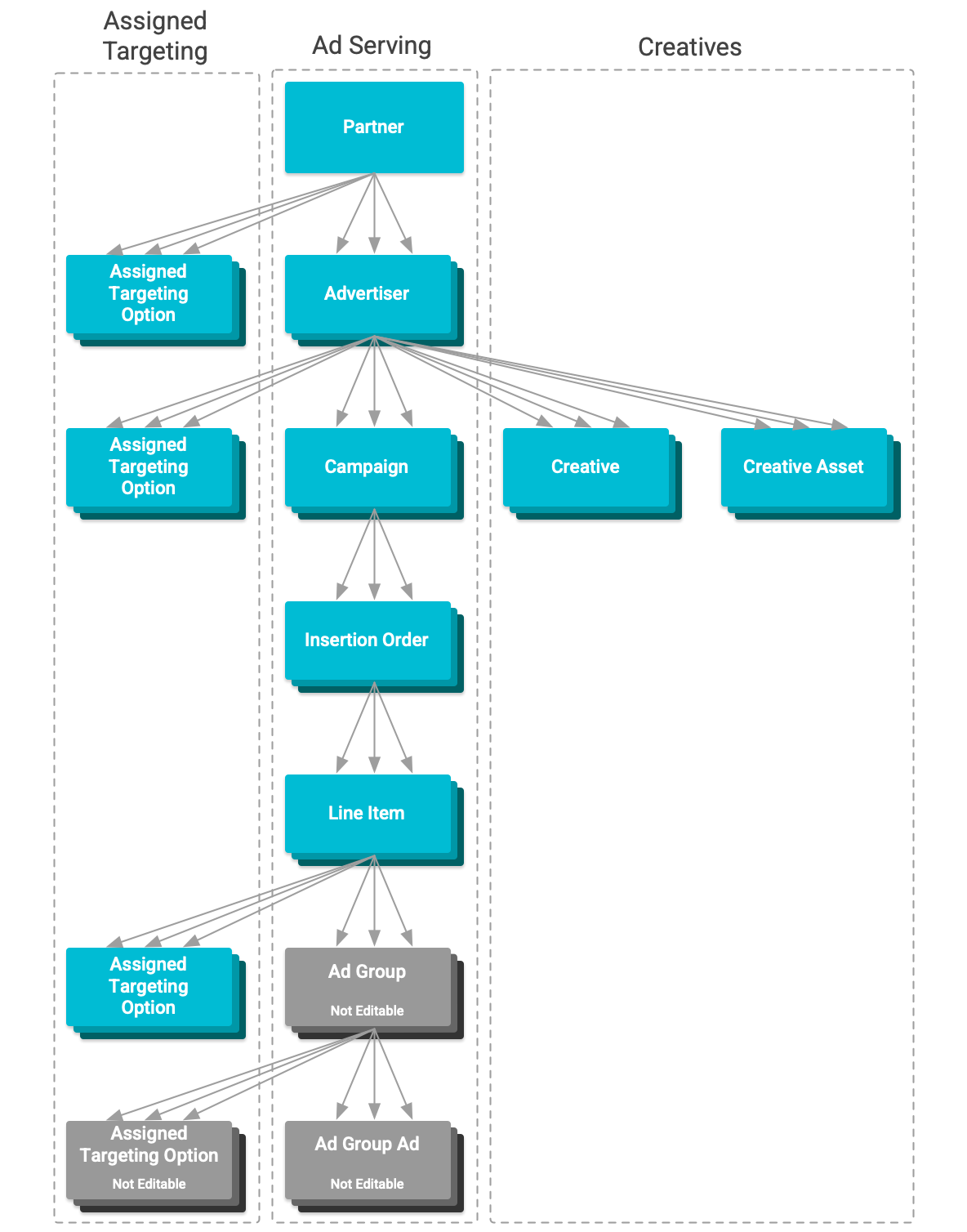
در Display & Video 360، سلسله مراتبی از منابع وجود دارد که تنظیمات آنها در ارائه تبلیغات نقش دارد. هر منبع هدف مشخصی در ارائه تبلیغات دارد. از پایینترین سطح سلسله مراتبی شروع میکنیم:
- آیتمهای خطی منابعی هستند که کنترل میکنند کدام تبلیغات، چه زمانی و به چه کسی نمایش داده شوند.
- آیتمهای خطی YouTube & Partners همچنین دارای گروههای تبلیغاتی و منابع فرزند تبلیغات هستند. آنها سطح اضافی هدفگذاری را تحت یک بودجه تکخطی ارائه میدهند. آیتمهای خطی YouTube & Partners ، گروههای تبلیغاتی، تبلیغات و هدفگذاری آنها را نمیتوان با استفاده از API ویرایش کرد.
- دستورهای درج شامل چندین آیتم خطی هستند. آنها مقادیر پیشفرض را برای تنظیمات آیتم خطی غایب ارائه میدهند.
- کمپینها شامل چندین دستور درج هستند. آنها تنظیماتی را بر روی دستورهای درج خود اعمال نمیکنند. تنظیمات آنها به عنوان چارچوبی عمل میکند که با استفاده از آن میتوان پیشرفت و موفقیت تبلیغاتی که تحت آنها ارائه میشوند را اندازهگیری کرد.
- تبلیغکنندگان مالک چندین کمپین تبلیغاتی هستند. آنها هدفگذاری ایمن برند و سایر تنظیمات عمومی را بر روی تبلیغاتی که تحت نظر آنها ارائه میشوند، اعمال میکنند. آنها همچنین مالک اشیاء خلاقانهای هستند که در تبلیغات ارائه شده تحت آن استفاده میشوند و دسترسی به منابع مورد استفاده در هدفگذاری را فراهم میکنند.
- شرکا مالک چندین تبلیغکننده هستند. آنها تنظیمات هدفگیری ایمنی برند و سایر تنظیمات را بر روی آن تبلیغکنندگان اعمال میکنند. آنها همچنین دسترسی به منابع مورد استفاده در هدفگیری و فعالیتهای نورافکن مورد استفاده در ردیابی تبدیل را فراهم میکنند. شرکا را نمیتوان از طریق API ویرایش کرد.
وراثت
آیتمهای خطی تنظیمات و دسترسیهای متعددی را از منابع والد خود به ارث میبرند. هنگام مدیریت آیتمهای خطی و ارائه تبلیغات، ویژگیهای ارثی که باید در نظر گرفته شوند عبارتند از:
- فعالیتهای خلاقانه و نورافکن موجود: موارد خطی فقط به منابعی دسترسی دارند که متعلق به شرکای اصلی یا تبلیغکنندگان آنها هستند. موارد خلاقانه تحت نظر تبلیغکنندگان ایجاد میشوند و فعالیتهای نورافکن متعلق به شرکا هستند. منابع اختصاص داده شده به فیلدهای منبع
LineItemcreativeIdsوconversionCountingباید به ترتیب از یک تبلیغکننده اصلی و یک شریک مشترک باشند. - موجودیتهای هدفگیریشدهی قابل دسترس: منابعی مانند کانالها ، مخاطبان ترکیبی و موارد دیگر در هدفگیری استفاده میشوند. موارد خطی فقط میتوانند با استفاده از منابعی که برای شریک یا تبلیغکنندهی اصلی قابل دسترسی هستند، هدفگیری شوند.
- هدفگذاری ایمنی برند: موارد خطی، هدفگذاری تعیینشده در سطح شریک و تبلیغکننده را به ارث میبرند. هدفگذاری ارثی قابل حذف نیست. این هدفگذاری موجود را میتوان با فیلد
inheritanceگزینه هدفگذاری اختصاص دادهشده شناسایی کرد و بر هدفگذاریهای بعدی که میتوان اعمال کرد، تأثیر خواهد گذاشت.
ایجاد منابع
همه این منابع را میتوان با استفاده از Display & Video 360 API مدیریت کرد. در اینجا نمونههایی از کد نحوه ایجاد هر یک از این منابع با استفاده از کتابخانههای کلاینت ارائه شده، آورده شده است.
ایجاد یک تبلیغ کننده
در اینجا مثالی از نحوه ایجاد یک تبلیغ کننده آورده شده است:
جاوا
// Create an advertiser object.
Advertiser advertiser = new Advertiser();
advertiser.setPartnerId(partner-id);
advertiser.setDisplayName(display-name);
advertiser.setEntityStatus("ENTITY_STATUS_ACTIVE");

// Create and set the advertiser general configuration.
AdvertiserGeneralConfig advertiserGeneralConfig = new AdvertiserGeneralConfig();
advertiserGeneralConfig.setDomainUrl(domain-url);
advertiserGeneralConfig.setCurrencyCode("USD");
advertiser.setGeneralConfig(advertiserGeneralConfig);

// Create the ad server configuration structure.
AdvertiserAdServerConfig advertiserAdServerConfig = new AdvertiserAdServerConfig();

// Create and add the third party only configuration to the ad server
// configuration.
advertiserAdServerConfig.setThirdPartyOnlyConfig(new ThirdPartyOnlyConfig());

// Set the ad server configuration.
advertiser.setAdServerConfig(advertiserAdServerConfig);

// Create and set the creative configuration.
advertiser.setCreativeConfig(new AdvertiserCreativeConfig());

// Create and set the billing configuration.
AdvertiserBillingConfig advertiserBillingConfig = new AdvertiserBillingConfig();
advertiserBillingConfig.setBillingProfileId(billing-profile-id);
advertiser.setBillingConfig(advertiserBillingConfig);

// Declare whether or not the line items under the advertiser will serve EU
// political ads.
advertiser.setContainsEuPoliticalAds(eu-political-advertising-status);

// Configure the create request.
Advertisers.Create request = service.advertisers().create(advertiser);

// Create the advertiser.
Advertiser response = request.execute();

// Display the new advertiser.
System.out.printf("Advertiser %s was created.", response.getName());
پایتون
# Create an advertiser object.
advertiser_obj = {
    'partnerId': partner-id,
    'displayName': display-name,
    'entityStatus': "ENTITY_STATUS_ACTIVE",
    'generalConfig': {
        'domainUrl' : domain-url,
        'currencyCode' : 'USD'
    },
    'adServerConfig': {
        'thirdPartyOnlyConfig' : {}
    },
    'creativeConfig': {},
    'billingConfig': {
        'billingProfileId': billing-profile-id
    },
    'containsEuPoliticalAds': eu-political-advertising-status
}

# Create the advertiser.
advertiser = service.advertisers().create(
    body=advertiser_obj
).execute()

# Display the new advertiser.
print("Advertiser %s was created." % advertiser["name"])
پی اچ پی
// Create an advertiser object.
$advertiser = new Google_Service_DisplayVideo_Advertiser();
$advertiser->setPartnerId(partner-id);
$advertiser->setDisplayName(display-name);
$advertiser->setEntityStatus('ENTITY_STATUS_ACTIVE');

// Create and set the advertiser general configuration.
$generalConfig =
    new Google_Service_DisplayVideo_AdvertiserGeneralConfig();
$generalConfig->setDomainUrl(domain-url);
$generalConfig->setCurrencyCode('USD');
$advertiser->setGeneralConfig($generalConfig);

// Create the ad server configuration structure.
$adServerConfig =
    new Google_Service_DisplayVideo_AdvertiserAdServerConfig();

// Create and add the third party only configuration to the ad server
// configuration.
$adServerConfig->setThirdPartyOnlyConfig(
    new Google_Service_DisplayVideo_ThirdPartyOnlyConfig()
);

// Set the ad server configuration.
$advertiser->setAdServerConfig($adServerConfig);

// Create and set the creative configuration.
$advertiser->setCreativeConfig(
    new Google_Service_DisplayVideo_AdvertiserCreativeConfig()
);

// Create and set the billing configuration.
$billingConfig = new Google_Service_DisplayVideo_AdvertiserBillingConfig();
$billingConfig->setBillingProfileId(billing-profile-id);
$advertiser->setBillingConfig($billingConfig);

// Declare whether or not the line items under the advertiser will serve EU
// political ads.
$advertiser->setContainsEuPoliticalAds(eu-political-advertising-status);

// Call the API, creating the advertiser.
$result = $this->service->advertisers->create($advertiser);

printf('Advertiser %s was created.\n', $result['name']);
ایجاد یک کمپین
در اینجا مثالی از نحوه ایجاد یک کمپین آورده شده است:
جاوا
// Create a campaign object.
Campaign campaign = new Campaign();
campaign.setDisplayName(display-name);
campaign.setEntityStatus("ENTITY_STATUS_PAUSED");

// Create a campaign goal object.
CampaignGoal campaignGoal = new CampaignGoal();
campaignGoal.setCampaignGoalType("CAMPAIGN_GOAL_TYPE_BRAND_AWARENESS");

// Create and add a performance goal to the campaign goal object.
PerformanceGoal performanceGoal = new PerformanceGoal();
performanceGoal.setPerformanceGoalType("PERFORMANCE_GOAL_TYPE_CPC");
performanceGoal.setPerformanceGoalAmountMicros(1000000L);
campaignGoal.setPerformanceGoal(performanceGoal);

// Set the campaign goal.
campaign.setCampaignGoal(campaignGoal);

// Create a campaign flight object.
// This object details the planned spend and duration of the campaign.
CampaignFlight campaignFlight = new CampaignFlight();
campaignFlight.setPlannedSpendAmountMicros(1000000L);

// Create the date range for the campaign flight.
DateRange dateRange = new DateRange();

// Set the start date to one week from now and the end date to two weeks
// from now.
Calendar calendarStartDate = Calendar.getInstance().add(Calendar.DATE, 7);
Calendar calendarEndDate = Calendar.getInstance().add(Calendar.DATE, 14);
dateRange.setStartDate(
   new Date()
      .setYear(calendarStartDate.get(Calendar.YEAR))
      .setMonth(calendarStartDate.get(Calendar.MONTH))
      .setDay(calendarStartDate.get(Calendar.DAY_OF_MONTH)));
dateRange.setEndDate(
   new Date()
      .setYear(calendarEndDate.get(Calendar.YEAR))
      .setMonth(calendarEndDate.get(Calendar.MONTH))
      .setDay(calendarEndDate.get(Calendar.DAY_OF_MONTH)));

// Add the planned date range to the campaign flight object.
campaignFlight.setPlannedDates(dateRange);

// Set the campaign flight.
campaign.setCampaignFlight(campaignFlight);

// Create and set the frequency cap.
FrequencyCap frequencyCap = new FrequencyCap();
frequencyCap.setMaxImpressions(10);
frequencyCap.setTimeUnit("TIME_UNIT_DAYS");
frequencyCap.setTimeUnitCount(1);
campaign.setFrequencyCap(frequencyCap);

// Configure the create request.
Campaigns.Create request = service.advertisers().campaigns()
   .create(advertiser-id, campaign);

// Create the campaign.
Campaign response = request.execute();

// Display the new campaign.
System.out.printf("Campaign %s was created.", response.getName());
پایتون
# Create a future campaign flight start and end dates.
startDate = date.today() + timedelta(days=7)
endDate = date.today() + timedelta(days=14)

# Create a campaign object.
campaign_obj = {
    'displayName': display-name,
    'entityStatus': 'ENTITY_STATUS_PAUSED',
    'campaignGoal': {
        'campaignGoalType' : 'CAMPAIGN_GOAL_TYPE_BRAND_AWARENESS',
        'performanceGoal': {
            'performanceGoalType': 'PERFORMANCE_GOAL_TYPE_CPC',
            'performanceGoalAmountMicros': 1000000
        }
    },
    'campaignFlight': {
        'plannedSpendAmountMicros': 1000000,
        'plannedDates': {
            'startDate': {
                'year': startDate.year,
                'month': startDate.month,
                'day': startDate.day
            },
            'endDate': {
                'year': endDate.year,
                'month': endDate.month,
                'day': endDate.day
            }
        }
    },
    'frequencyCap': {
        'maxImpressions': 10,
        'timeUnit': 'TIME_UNIT_DAYS',
        'timeUnitCount': 1
    }
}

# Create the campaign.
campaign = service.advertisers().campaigns().create(
    advertiserId=advertiser-id,
    body=campaign_obj
).execute()

# Display the new campaign.
print("Campaign %s was created." % campaign["name"])
پی اچ پی
// Create a campaign object.
$campaign = new Google_Service_DisplayVideo_Campaign();
$campaign->setDisplayName(display-name);
$campaign->setEntityStatus('ENTITY_STATUS_ACTIVE');

// Create a campaign goal object.
$campaignGoal = new Google_Service_DisplayVideo_CampaignGoal();
$campaignGoal->setCampaignGoalType(
    'CAMPAIGN_GOAL_TYPE_BRAND_AWARENESS'
);

// Create and add a performance goal to the campaign goal object.
$performanceGoal = new Google_Service_DisplayVideo_PerformanceGoal();
$performanceGoal->setPerformanceGoalType('PERFORMANCE_GOAL_TYPE_CPC');
$performanceGoal->setPerformanceGoalAmountMicros(1000000);

// Set the campaign goal.
$campaignGoal->setPerformanceGoal($performanceGoal);
$campaign->setCampaignGoal($campaignGoal);

// Create a campaign flight object.
// This object details the planned spend and duration of the campaign.
$campaignFlight = new Google_Service_DisplayVideo_CampaignFlight();
$campaignFlight->setPlannedSpendAmountMicros(1000000);

// Create a date range object for the flight.
$dateRange = new Google_Service_DisplayVideo_DateRange();

// Create and assign a start date one week from now.
$startDateTime = new DateTime('today + 7 days');
$startDate = new Google_Service_DisplayVideo_Date();
$startDate->setYear($startDateTime->format('Y'));
$startDate->setMonth($startDateTime->format('n'));
$startDate->setDay($startDateTime->format('j'));
$dateRange->setStartDate($startDate);

// Create and assign an end date two weeks from now.
$endDateTime = new DateTime('today + 14 days');
$endDate = new Google_Service_DisplayVideo_Date();
$endDate->setYear($endDateTime->format('Y'));
$endDate->setMonth($endDateTime->format('n'));
$endDate->setDay($endDateTime->format('j'));
$dateRange->setendDate($endDate);

// Assign date range to flight.
$campaignFlight->setPlannedDates($dateRange);

// Assign flight to campaign.
$campaign->setCampaignFlight($campaignFlight);

// Create and set the frequency cap.
$frequencyCap = new Google_Service_DisplayVideo_FrequencyCap();
$frequencyCap->setMaxImpressions(10);
$frequencyCap->setTimeUnit('TIME_UNIT_DAYS');
$frequencyCap->setTimeUnitCount(1);
$campaign->setFrequencyCap($frequencyCap);

// Call the API, creating the campaign under the given advertiser.
$result = $this->service->advertisers_campaigns->create(
    advertiser-id,
    $campaign
);

// Display the new campaign.
printf('Campaign %s was created.\n', $result['name']);
ایجاد سفارش درج
در اینجا مثالی از نحوه ایجاد یک دستور درج آورده شده است:
جاوا
// Create an insertion order object.
InsertionOrder insertionOrder = new InsertionOrder();
insertionOrder.setCampaignId(campaign-id);
insertionOrder.setDisplayName(display-name);
insertionOrder.setEntityStatus("ENTITY_STATUS_DRAFT");

// Create and add the pacing setting.
Pacing pacing = new Pacing();
pacing.setPacingPeriod("PACING_PERIOD_DAILY");
pacing.setPacingType("PACING_TYPE_EVEN");
pacing.setDailyMaxMicros(10000L);
insertionOrder.setPacing(pacing);

// Create and set the frequency cap.
FrequencyCap frequencyCap = new FrequencyCap();
frequencyCap.setTimeUnit("TIME_UNIT_DAYS");
frequencyCap.setTimeUnitCount(1);
frequencyCap.setMaxImpressions(10);
insertionOrder.setFrequencyCap(frequencyCap);

// Create and set the key performance indicator (KPI).
Kpi kpi = new Kpi();
kpi.setKpiType("KPI_TYPE_CPC");
kpi.setKpiAmountMicros(1000000L);
insertionOrder.setKpi(kpi);

// Create a budget object.
InsertionOrderBudget insertionOrderBudget = new InsertionOrderBudget();
insertionOrderBudget.setBudgetUnit("BUDGET_UNIT_CURRENCY");

// Create a budget segment object.
InsertionOrderBudgetSegment insertionOrderBudgetSegment =
   new InsertionOrderBudgetSegment();
insertionOrderBudgetSegment.setBudgetAmountMicros(100000L);

// Create the date range for the budget segment.
DateRange dateRange = new DateRange();

// Set the start date to one week from now and the end date to two weeks
// from now.
Calendar calendarStartDate = Calendar.getInstance().add(Calendar.DATE, 7);
Calendar calendarEndDate = Calendar.getInstance().add(Calendar.DATE, 14);
dateRange.setStartDate(
   new Date()
      .setYear(calendarStartDate.get(Calendar.YEAR))
      .setMonth(calendarStartDate.get(Calendar.MONTH))
      .setDay(calendarStartDate.get(Calendar.DAY_OF_MONTH)));
dateRange.setEndDate(
   new Date()
      .setYear(calendarEndDate.get(Calendar.YEAR))
      .setMonth(calendarEndDate.get(Calendar.MONTH))
      .setDay(calendarEndDate.get(Calendar.DAY_OF_MONTH)));

// Add the date range to the budget segment.
insertionOrderBudgetSegment.setDateRange(dateRange);

// Add budget segment list to the budget.
insertionOrderBudget
   .setBudgetSegments(ImmutableList.of(insertionOrderBudgetSegment));

// Set budget.
insertionOrder.setBudget(insertionOrderBudget);

// Set optimization objective.
insertionOrder.setOptimizationObjective("NO_OBJECTIVE");

// Configure the create request.
InsertionOrders.Create request =
   service.advertisers().insertionOrders()
       .create(advertiser-id, insertionOrder);

// Create the insertion order.
InsertionOrder response = request.execute();

// Display the new insertion order.
System.out.printf("InsertionOrder %s was created.", response.getName());
پایتون
# Create a future budget segment start and end dates.
startDate = date.today() + timedelta(days=7)
endDate = date.today() + timedelta(days=14)

# Create an insertion order object.
insertion_order_obj = {
    'campaignId' : campaign-id,
    'displayName': display-name,
    'entityStatus': 'ENTITY_STATUS_DRAFT',
    'pacing': {
        'pacingPeriod': 'PACING_PERIOD_DAILY',
        'pacingType': 'PACING_TYPE_EVEN',
        'dailyMaxMicros': 10000
    },
    'frequencyCap': {
        'maxImpressions': 10,
        'timeUnit': 'TIME_UNIT_DAYS',
        'timeUnitCount': 1
    },
    'kpi' : {
        'kpiType': 'KPI_TYPE_CPC',
        'kpiAmountMicros': 1000000
    },
    'budget': {
        'budgetUnit': 'BUDGET_UNIT_CURRENCY',
        'budgetSegments': [
            {
                'budgetAmountMicros': 100000,
                'dateRange': {
                    'startDate': {
                        'year': startDate.year,
                        'month': startDate.month,
                        'day': startDate.day
                    },
                    'endDate': {
                        'year': endDate.year,
                        'month': endDate.month,
                        'day': endDate.day
                    }
                }
            }
        ]
    },
    'optimizationObjective': 'NO_OBJECTIVE'
}

# Create the insertion order.
insertionOrder = service.advertisers().insertionOrders().create(
    advertiserId=advertiser-id,
    body=insertion_order_obj
).execute()

# Display the new insertion order.
print("Insertion Order %s was created." % insertionOrder["name"])
پی اچ پی
// Create an insertion order object.
$insertionOrder = new Google_Service_DisplayVideo_InsertionOrder();
$insertionOrder->setCampaignId(campaign-id);
$insertionOrder->setDisplayName(display-name);
$insertionOrder->setEntityStatus('ENTITY_STATUS_DRAFT');

// Create and add the pacing setting.
$pacing = new Google_Service_DisplayVideo_Pacing();
$pacing->setPacingPeriod('PACING_PERIOD_DAILY');
$pacing->setPacingType('PACING_TYPE_EVEN');
$pacing->setDailyMaxMicros(10000);
$insertionOrder->setPacing($pacing);

// Create and set the frequency cap.
$frequencyCap = new Google_Service_DisplayVideo_FrequencyCap();
$frequencyCap->setMaxImpressions(10);
$frequencyCap->setTimeUnit('TIME_UNIT_DAYS');
$frequencyCap->setTimeUnitCount(1);
$insertionOrder->setFrequencyCap($frequencyCap);

// Create and set the key performance indicator (KPI).
$kpi = new Google_Service_DisplayVideo_Kpi();
$kpi->setKpiType('KPI_TYPE_CPC');
$kpi->setKpiAmountMicros(1000000);
$insertionOrder->setKpi($kpi);

// Create a budget object.
$budget = new Google_Service_DisplayVideo_InsertionOrderBudget();
$budget->setBudgetUnit('BUDGET_UNIT_CURRENCY');

// Create a budget segment object.
$budgetSegment =
    new Google_Service_DisplayVideo_InsertionOrderBudgetSegment();
$budgetSegment->setBudgetAmountMicros(100000);

// Create a date range object for the budget segment.
$dateRange = new Google_Service_DisplayVideo_DateRange();

// Create and assign a start date one week from now.
$startDateTime = new DateTime('today + 7 days');
$startDate = new Google_Service_DisplayVideo_Date();
$startDate->setYear($startDateTime->format('Y'));
$startDate->setMonth($startDateTime->format('n'));
$startDate->setDay($startDateTime->format('j'));
$dateRange->setStartDate($startDate);

// Create and assign an end date two weeks from now.
$endDateTime = new DateTime('today + 14 days');
$endDate = new Google_Service_DisplayVideo_Date();
$endDate->setYear($endDateTime->format('Y'));
$endDate->setMonth($endDateTime->format('n'));
$endDate->setDay($endDateTime->format('j'));
$dateRange->setendDate($endDate);

// Assign date range to budget segment.
$budgetSegment->setDateRange($dateRange);

// Set budget segment.
$budget->setBudgetSegments(array($budgetSegment));

// Set budget object.
$insertionOrder->setBudget($budget);

// Set optimization object.
$insertionOrder->setOptimizationObjective('NO_OBJECTIVE');

// Call the API, creating the insertion order under the advertiser and
// campaign given.
$result = $this->service->advertisers_insertionOrders->create(
    advertiser-id,
    $insertionOrder
);

printf('Insertion Order %s was created.\n', $result['name']);
یک آیتم خطی ایجاد کنید
در اینجا مثالی از نحوه ایجاد یک آیتم خطی آورده شده است:
جاوا
// Create a line item object.
LineItem lineItem = new LineItem();
lineItem.setInsertionOrderId(insertion-order-id);
lineItem.setDisplayName(display-name);
lineItem.setLineItemType("LINE_ITEM_TYPE_DISPLAY_DEFAULT");
lineItem.setEntityStatus("ENTITY_STATUS_DRAFT");

// Create and set the line item flight.
LineItemFlight lineItemFlight = new LineItemFlight();
lineItemFlight
   .setFlightDateType("LINE_ITEM_FLIGHT_DATE_TYPE_INHERITED");
lineItem.setFlight(lineItemFlight);

// Create and set the line item budget.
LineItemBudget lineItemBudget = new LineItemBudget();
lineItemBudget
   .setBudgetAllocationType("LINE_ITEM_BUDGET_ALLOCATION_TYPE_FIXED");
lineItem.setBudget(lineItemBudget);

// Create and set the pacing setting.
Pacing pacing = new Pacing();
pacing.setPacingPeriod("PACING_PERIOD_DAILY");
pacing.setPacingType("PACING_TYPE_EVEN");
pacing.setDailyMaxMicros(10000L);
lineItem.setPacing(pacing);

// Create and set the frequency cap.
FrequencyCap frequencyCap = new FrequencyCap();
frequencyCap.setTimeUnit("TIME_UNIT_DAYS");
frequencyCap.setTimeUnitCount(1);
frequencyCap.setMaxImpressions(10);
lineItem.setFrequencyCap(frequencyCap);

// Create and set the partner revenue model.
PartnerRevenueModel partnerRevenueModel = new PartnerRevenueModel();
partnerRevenueModel
   .setMarkupType("PARTNER_REVENUE_MODEL_MARKUP_TYPE_CPM");
partnerRevenueModel.setMarkupAmount(10L);
lineItem.setPartnerRevenueModel(partnerRevenueModel);

// Set the list of IDs of the creatives associated with the line item.
lineItem.setCreativeIds(creative-ids);

// Create and set the bidding strategy.
BiddingStrategy biddingStrategy = new BiddingStrategy();
biddingStrategy
   .setFixedBid(new FixedBidStrategy().setBidAmountMicros(100000L));
lineItem.setBidStrategy(biddingStrategy);

// Declare whether or not the line item will serve EU political ads.
lineItem.setContainsEuPoliticalAds(eu-political-advertising-status);

// Configure the create request.
LineItems.Create request =
   service.advertisers().lineItems().create(advertiser-id, lineItem);

// Create the line item.
LineItem response = request.execute();

// Display the new line item.
System.out.printf("LineItem %s was created.", response.getName());
پایتون
# Create an line item object.
line_item_obj = {
    'insertionOrderId' : insertion-order-id,
    'displayName': display-name,
    'lineItemType': 'LINE_ITEM_TYPE_DISPLAY_DEFAULT',
    'entityStatus': 'ENTITY_STATUS_DRAFT',
    'flight': {
        'flightDateType': 'LINE_ITEM_FLIGHT_DATE_TYPE_INHERITED'
    },
    'budget': {
        'budgetAllocationType': 'LINE_ITEM_BUDGET_ALLOCATION_TYPE_FIXED'
    },
    'pacing': {
        'pacingPeriod': 'PACING_PERIOD_DAILY',
        'pacingType': 'PACING_TYPE_EVEN',
        'dailyMaxMicros': 10000
    },
    'frequencyCap': {
        'timeUnit': 'TIME_UNIT_DAYS',
        'timeUnitCount': 1,
        'maxImpressions': 10
    },
    'partnerRevenueModel': {
        'markupType': 'PARTNER_REVENUE_MODEL_MARKUP_TYPE_CPM',
        'markupAmount': 10
    },
    'creativeIds': creative-ids,
    'bidStrategy': {
        'fixedBid': {
            'bidAmountMicros': 100000
        }
    },
    'containsEuPoliticalAds': eu-political-advertising-status
}

# Create the line item.
lineItem = service.advertisers().lineItems().create(
    advertiserId=advertiser-id,
    body=line_item_obj
).execute()

# Display the new line item.
print("Line Item %s was created." % lineItem["name"])
پی اچ پی
// Create a line item object.
$lineItem = new Google_Service_DisplayVideo_LineItem();
$lineItem->setInsertionOrderId(insertion-order-id);
$lineItem->setDisplayName(display-name);
$lineItem->setLineItemType('LINE_ITEM_TYPE_DISPLAY_DEFAULT');
$lineItem->setEntityStatus('ENTITY_STATUS_DRAFT');

// Create and set the line item flight.
$flight = new Google_Service_DisplayVideo_LineItemFlight();
$flight->setFlightDateType('LINE_ITEM_FLIGHT_DATE_TYPE_INHERITED');
$lineItem->setFlight($flight);

// Create and set the line item budget.
$budget = new Google_Service_DisplayVideo_LineItemBudget();
$budget->setBudgetAllocationType(
    'LINE_ITEM_BUDGET_ALLOCATION_TYPE_FIXED'
);
$lineItem->setBudget($budget);

// Create and set the pacing setting.
$pacing = new Google_Service_DisplayVideo_Pacing();
$pacing->setPacingPeriod('PACING_PERIOD_DAILY');
$pacing->setPacingType('PACING_TYPE_EVEN');
$pacing->setDailyMaxMicros(10000);
$lineItem->setPacing($pacing);

// Create and set the frequency cap.
$frequencyCap = new Google_Service_DisplayVideo_FrequencyCap();
$frequencyCap->setMaxImpressions(10);
$frequencyCap->setTimeUnit('TIME_UNIT_DAYS');
$frequencyCap->setTimeUnitCount(1);
$lineItem->setFrequencyCap($frequencyCap);

// Create and set the partner revenue model.
$partnerRevenueModel =
    new Google_Service_DisplayVideo_PartnerRevenueModel();
$partnerRevenueModel->setMarkupType(
    'PARTNER_REVENUE_MODEL_MARKUP_TYPE_CPM'
);
$partnerRevenueModel->setMarkupAmount(10);
$lineItem->setPartnerRevenueModel($partnerRevenueModel);

// Set the list of IDs of the creatives associated with the line item.
lineItem >setCreativeIds(creative-ids);

// Create and set the bidding strategy.
$biddingStrategy =  new Google_Service_DisplayVideo_BiddingStrategy();
$fixedBidStrategy = new Google_Service_DisplayVideo_FixedBidStrategy();
$fixedBidStrategy->setBidAmountMicros(100000);
$biddingStrategy->setFixedBid($fixedBidStrategy);
$lineItem->setBidStrategy($biddingStrategy);

// Declare whether or not the line item will serve EU political ads.
$lineItem->setContainsEuPoliticalAds(eu-political-advertising-status);

// Create the line item.
$result = $this->service->advertisers_lineItems->create(
    advertiser-id,
    $lineItem
);

printf('Line Item %s was created.\n', $result['name']);
موارد خط تکراری
میتوان آیتمهای خطی موجود را کپی کرد که منجر به ایجاد یک آیتم خطی جدید با همان پیکربندیها و تنظیمات هدفگیری آیتم خطی موجود میشود که تحت همان ترتیب درج ایجاد شده است.
در اینجا مثالی از نحوه کپی کردن یک ردیف موجود آورده شده است:
جاوا
// Create the duplicate line item request body.
DuplicateLineItemRequest requestBody = new DuplicateLineItemRequest();
requestBody.setTargetDisplayName(target-display-name);
requestBody.setContainsEuPoliticalAds(eu-political-advertising-status);

// Configure the request.
LineItems.Duplicate request = service.advertisers().lineItems()
    .duplicate(advertiser-id, line-item-id, requestBody);

// Duplicate the line item.
DuplicateLineItemResponse response = request.execute();

// Display the line item ID of the new duplicate line item.
System.out.printf("A duplicate line item with the ID %s was created.",
    response.getDuplicateLineItemId());
پایتون
# Create the duplicate line item request body.
duplicate_request = {
    'targetDisplayName': target-display-name,
    'containsEuPoliticalAds': eu-political-advertising-status
}

# Duplicate the line item.
response = service.advertisers().lineItems().duplicate(
    advertiserId=advertiser-id,
    lineItemId=line-item-id,
    body=duplicate_request
).execute()

# Display the line item ID of the new duplicate line item.
print("A duplicate line item with the ID %s was created."
      % response["duplicateLineItemId"])
پی اچ پی
// Create the duplicate line item request body.
$requestBody = new Google_Service_DisplayVideo_DuplicateLineItemRequest();
$requestBody->setTargetDisplayName(target-display-name);
$requestBody->setContainsEuPoliticalAds(eu-political-advertising-status);

// Call the API, duplicating the line item.
$response = $service
    ->advertisers_lineItems
    ->duplicate(
        advertiser-id,
        line-item-id,
        $requestBody
    );

// Display the line item ID of the new duplicate line item.
printf(
    'A duplicate line item with the ID %s was created.',
    $response->getDuplicateLineItemId()
);