
リソース ターゲティングの管理は、Display & Video 360 API の中心的な機能です。ターゲティングは複数のリソースタイプに割り当てることができ、他の多くのリソースと ID 空間を利用します。このページでは、ディスプレイ&ビデオ 360 API の割り当て済みターゲティング オプション サービスを導入する際に注意すべき制限事項と、実装するうえでのおすすめの方法について詳しく説明します。
ターゲティングの継承を活用する
一部のリソースに割り当てられたターゲティングは、子リソースに継承できます。子リソースに継承されたターゲティング オプションは、子リソースレベルで取得できますが、編集することはできません。これにより、ブランド保護の設定やその他のターゲティングをパートナーまたは広告主全体に適用できます。
継承のパスは、次の図で確認できます。
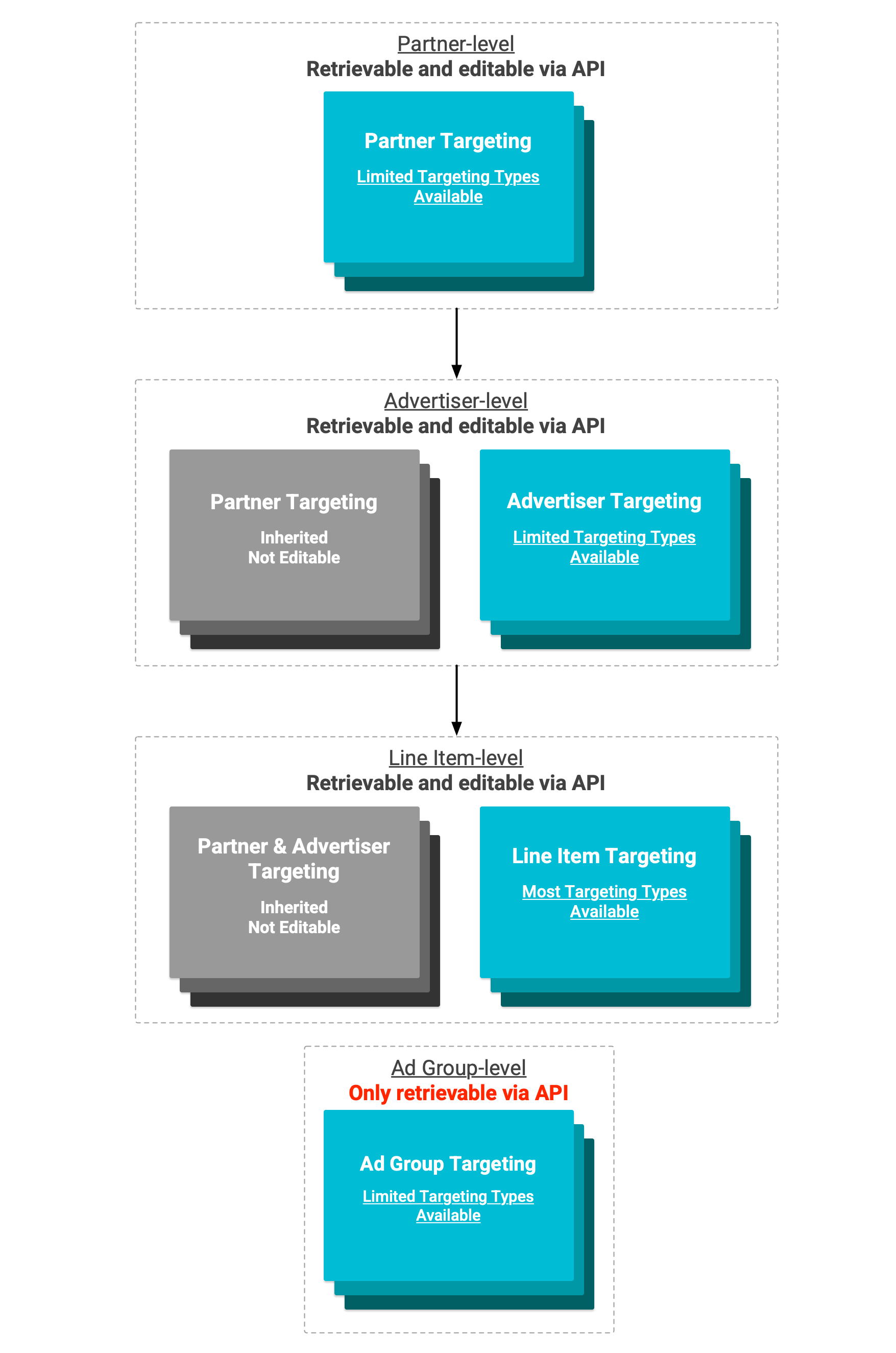
図で指定されているように、一部のターゲティング レベルでは、ターゲティング タイプのサブセットのみがサポートされています。つまり、一部のターゲティング オプションは上位レベルで設定して継承することはできず、下位レベルで設定する必要があります。
YouTube とパートナーのリソースの継承
ディスプレイ&ビデオ 360 API では、YouTube とパートナーのリソースにターゲティングの継承が反映されません。広告グループによって継承されたターゲティングは AdGroup レベルで取得できず、親リソースに割り当てられた YouTube ターゲティングは子リソースに継承されません。
広告グループの機能的なターゲティング設定をすべて取得するには、広告グループ、親の広告申込情報、親の広告主に割り当てられたターゲティング オプションを取得する必要があります。
広告申込情報の作成時に割り当てられたターゲティングに注意する
継承されたターゲティング オプションを除き、ほとんどのターゲティングは広告申込情報の作成後にのみ割り当てることができます。ただし、広告申込情報の作成時に広告申込情報にデフォルトのサブセット値が割り当てられるターゲティング タイプがいくつかあります。これらのターゲティング タイプは次のとおりです。
既存の割り当て済みターゲティング オプションを作成しようとしたり、存在しない割り当て済みターゲティング オプションを削除しようとしたりすると、エラーが返されます。そのため、広告申込情報の作成時に割り当てられているターゲティング スイート全体を把握しておくことをおすすめします。ターゲティング タイプ全体で広告申込情報に割り当てられたターゲティングを取得する必要がある場合は、advertisers.lineItems.bulkListAssignedTargetingOptions を使用します。
また、このタイプに属するターゲティング オプションがリソースに割り当てられていない場合、一部の設定はデフォルトで設定されます。たとえば、リソースに TARGETING_TYPE_AUTHORIZED_SELLER_STATUS ターゲティング オプションが定義されていない場合、そのリソースは「認定販売者と再販業者」ステータスを使用していることになります。
YouTube とパートナーのターゲティングを変更できない
YouTube とパートナーのキャンペーン専用のターゲティングは、ディスプレイ&ビデオ 360 API を使用して更新することはできません。
YouTube とパートナーのターゲティングは、YouTube とパートナーの広告申込情報と広告グループに直接割り当てられたすべてのターゲティングと、次のターゲティング タイプのターゲティングで構成されます。
TARGETING_TYPE_SESSION_POSITIONTARGETING_TYPE_YOUTUBE_CHANNELTARGETING_TYPE_YOUTUBE_VIDEO
このターゲティングは、ディスプレイ&ビデオ 360 の管理画面で直接更新するか、構造化データファイルをアップロードして更新できます。
1 つのオプションでオーディエンス ターゲティングを割り当てる
ほとんどのターゲティング タイプのターゲティング オプションは個別に割り当てられます。オーディエンス グループ ターゲティングはこのモジュール式規則に従わず、広告の配信時に含めるオーディエンスと除外するオーディエンスの ID を一覧表示する、単一の構成可能なオーディエンス グループ ターゲティングの詳細オブジェクトで割り当てられます。このオーディエンス グループ オプションの assignedTargetingOptionId は、割り当てられると常に「audienceGroup」になります。
この設計では、オーディエンス グループのターゲティングを変更するには、まず既存のオーディエンス グループに割り当てられているターゲティング オプションを削除してから、必要な変更を加えて新しいオーディエンス グループのターゲティング オプションを作成する必要があります。これは、advertisers.lineItems.bulkEditAssignedTargetingOptions を使用して 1 回のリクエストで行うことができます。
追加の Google オーディエンスをポジティブにターゲティングするためにオーディエンス ターゲティングを更新する方法の例を次に示します。
Java
long advertiserId = advertiser-id;
long lineItemId = line-item-id
List<Long> addedGoogleAudienceIds =
    Arrays.asList(google-audience-id-to-add,...);

// Build Google audience targeting settings objects to add to audience
// targeting.
ArrayList<GoogleAudienceTargetingSetting> newGoogleAudienceSettings =
    new ArrayList<GoogleAudienceTargetingSetting>();

// Convert list of Google Audience IDs into list of settings.
for (Long googleAudienceId : addedGoogleAudienceIds) {
  newGoogleAudienceSettings.add(new GoogleAudienceTargetingSetting()
      .setGoogleAudienceId(googleAudienceId));
}

// Create relevant bulk edit request objects.
BulkEditLineItemAssignedTargetingOptionsRequest requestContent =
    new BulkEditLineItemAssignedTargetingOptionsRequest();
AudienceGroupAssignedTargetingOptionDetails updatedAudienceGroupDetails;
ArrayList<DeleteAssignedTargetingOptionsRequest> audienceGroupDeleteRequests =
    new ArrayList<DeleteAssignedTargetingOptionsRequest>();

try {
  // Retrieve existing audience group targeting.
  AssignedTargetingOption existingAudienceGroupTargetingOption =
      service
          .advertisers()
          .lineItems()
          .targetingTypes()
          .assignedTargetingOptions()
          .get(
              advertiserId,
              lineItemId,
              "TARGETING_TYPE_AUDIENCE_GROUP",
              "audienceGroup"
          ).execute();

  // Extract existing audience group targeting details.
  updatedAudienceGroupDetails =
      existingAudienceGroupTargetingOption.getAudienceGroupDetails();

  // Build and add delete request for existing audience group targeting.
  ArrayList<String> deleteAudienceGroupAssignedTargetingIds =
      new ArrayList<String>();
  deleteAudienceGroupAssignedTargetingIds.add("audienceGroup");

  audienceGroupDeleteRequests
      .add(new DeleteAssignedTargetingOptionsRequest()
          .setTargetingType("TARGETING_TYPE_AUDIENCE_GROUP")
          .setAssignedTargetingOptionIds(
              deleteAudienceGroupAssignedTargetingIds
          )
      );
}
catch (GoogleJsonResponseException e) {
  updatedAudienceGroupDetails =
      new AudienceGroupAssignedTargetingOptionDetails();
}

// Set delete requests in edit request.
requestContent.setDeleteRequests(audienceGroupDeleteRequests);

// Construct new group of Google Audiences to include in targeting.
GoogleAudienceGroup updatedIncludedGoogleAudienceGroup =
    updatedAudienceGroupDetails.getIncludedGoogleAudienceGroup();
if (updatedIncludedGoogleAudienceGroup != null) {
  List<GoogleAudienceTargetingSetting> updatedGoogleAudienceSettings =
      updatedIncludedGoogleAudienceGroup.getSettings();
  updatedGoogleAudienceSettings.addAll(newGoogleAudienceSettings);
  updatedIncludedGoogleAudienceGroup
      .setSettings(updatedGoogleAudienceSettings);
} else {
  updatedIncludedGoogleAudienceGroup = new GoogleAudienceGroup();
  updatedIncludedGoogleAudienceGroup.setSettings(newGoogleAudienceSettings);
}

// Add new Google Audience group to audience group targeting details.
updatedAudienceGroupDetails
    .setIncludedGoogleAudienceGroup(updatedIncludedGoogleAudienceGroup);

// Create new targeting option to assign.
AssignedTargetingOption newAudienceGroupTargeting =
    new AssignedTargetingOption();
newAudienceGroupTargeting
    .setAudienceGroupDetails(updatedAudienceGroupDetails);

// Build audience group targeting create request and add to list of create
// requests.
ArrayList<AssignedTargetingOption> createAudienceGroupAssignedTargetingOptions =
    new ArrayList<AssignedTargetingOption>();
createAudienceGroupAssignedTargetingOptions.add(newAudienceGroupTargeting);
ArrayList<CreateAssignedTargetingOptionsRequest> targetingCreateRequests =
    new ArrayList<CreateAssignedTargetingOptionsRequest>();
targetingCreateRequests.add(new CreateAssignedTargetingOptionsRequest()
    .setTargetingType("TARGETING_TYPE_AUDIENCE_GROUP")
    .setAssignedTargetingOptions(
        createAudienceGroupAssignedTargetingOptions
    )
);

// Set create requests in edit request.
requestContent.setCreateRequests(targetingCreateRequests);

// Configure and execute the bulk list request.
BulkEditLineItemAssignedTargetingOptionsResponse response =
    service.advertisers().lineItems()
        .bulkEditLineItemAssignedTargetingOptions(
            advertiserId,
            lineItemId,
            requestContent).execute();
Python
advertiser_id = advertiser-id
line_item_id = line-item-id
added_google_audiences = [google-audience-id-to-add,...]

# Build Google audience targeting settings objects to create.
new_google_audience_targeting_settings = []
for google_audience_id in added_google_audiences:
 new_google_audience_targeting_settings.append(
     {'googleAudienceId': google_audience_id}
 )

# Retrieve any existing line item audience targeting.
retrieved_audience_targeting = service.advertisers().lineItems(
).targetingTypes().assignedTargetingOptions().get(
   advertiserId=advertiser_id,
   lineItemId=line_item_id,
   targetingType="TARGETING_TYPE_AUDIENCE_GROUP",
   assignedTargetingOptionId="audienceGroup"
).execute()

updated_audience_group_details = {}

# Copy over any existing audience targeting.
if 'audienceGroupDetails' in retrieved_audience_targeting:
 updated_audience_group_details = retrieved_audience_targeting[
     'audienceGroupDetails']

# Append the new Google audience IDs to any existing positive Google
# audience targeting.
if 'includedGoogleAudienceGroup' in updated_audience_group_details:
 updated_audience_group_details[
     'includedGoogleAudienceGroup']['settings'].extend(
         new_google_audience_targeting_settings)
else:
 updated_audience_group_details['includedGoogleAudienceGroup'] = {
     'settings': new_google_audience_targeting_settings
 }

# Build bulk edit request.
bulk_edit_request = {
   'deleteRequests': [
       {
         'targetingType': "TARGETING_TYPE_AUDIENCE_GROUP",
         'assignedTargetingOptionIds': [
           "audienceGroup"
         ]
       }
   ],
   'createRequests': [
       {
           'targetingType': "TARGETING_TYPE_AUDIENCE_GROUP",
           'assignedTargetingOptions': [
               {'audienceGroupDetails': updated_audience_group_details}
           ]
       }
   ]
}

# Update the audience targeting
updated_audience_targeting = service.advertisers().lineItems(
).bulkEditLineItemAssignedTargetingOptions(
   advertiserId=advertiser_id,
   lineItemId=line_item_id,
   body=bulk_edit_request
).execute()
PHP
$advertiserId = advertiser-id;
$lineItemId = line-item-id;
$addedGoogleAudienceIds = array(google-audience-id-to-add,...);

// Convert list of Google Audience IDs into list of Google audience
// settings.
$newGoogleAudienceSettings = array();
foreach ($addedGoogleAudienceIds as $googleAudienceId) {
    $newSetting =
        new Google_Service_DisplayVideo_GoogleAudienceTargetingSetting();
    $newSetting->setGoogleAudienceId($googleAudienceId);
    $newGoogleAudienceSettings[] = $newSetting;
}

// Create a bulk edit request.
$requestBody =
    new Google_Service_DisplayVideo_BulkEditLineItemAssignedTargetingOptionsRequest();

$audienceGroupDeleteRequests = array();

try {
    // Retrieve existing audience group targeting.
    $existingAudienceGroupTargetingOption = $this
        ->service
        ->advertisers_lineItems_targetingTypes_assignedTargetingOptions
        ->get(
            $advertiserId,
            $lineItemId,
            'TARGETING_TYPE_AUDIENCE_GROUP',
            'audienceGroup'
        );

    // Extract existing audience group targeting details.
    $updatedAudienceGroupDetails =
        $existingAudienceGroupTargetingOption
            ->getAudienceGroupDetails();

    // Build and add delete request for existing audience group
    // targeting.
    $deleteAudienceGroupAssignedTargetingIds = array();
    $deleteAudienceGroupAssignedTargetingIds[] = "audienceGroup";

    $audienceGroupDeleteRequest =
        new Google_Service_DisplayVideo_DeleteAssignedTargetingOptionsRequest();
    $audienceGroupDeleteRequest
        ->setTargetingType('TARGETING_TYPE_AUDIENCE_GROUP');
    $audienceGroupDeleteRequest
        ->setAssignedTargetingOptionIds(
            $deleteAudienceGroupAssignedTargetingIds
        );
    $audienceGroupDeleteRequests[] = $audienceGroupDeleteRequest;
} catch (\Exception $e) {
    $updatedAudienceGroupDetails =
        new Google_Service_DisplayVideo_AudienceGroupAssignedTargetingOptionDetails();
}

// Set delete requests in edit request.
$requestBody->setDeleteRequests($audienceGroupDeleteRequests);

// Construct new group of Google audiences to include in targeting.
$updatedIncludedGoogleAudienceGroup = $updatedAudienceGroupDetails
    ->getIncludedGoogleAudienceGroup();

if (!empty($updatedIncludedGoogleAudienceGroup)) {
    // Get existing settings.
    $updatedGoogleAudienceSettings =
    $updatedIncludedGoogleAudienceGroup->getSettings();

    // Add new Google audiences to existing list.
    $updatedGoogleAudienceSettings = array_merge(
        $updatedGoogleAudienceSettings,
        $newGoogleAudienceSettings
    );

    // Set updated Google audience list.
    $updatedIncludedGoogleAudienceGroup
        ->setSettings($updatedGoogleAudienceSettings);
} else {
    // Create new Google audience group.
    $updatedIncludedGoogleAudienceGroup =
        new Google_Service_DisplayVideo_GoogleAudienceGroup();

    // Set list of new Google audiences for targeting.
    $updatedIncludedGoogleAudienceGroup
        ->setSettings($newGoogleAudienceSettings);
}

// Add new Google Audience group to audience group targeting details.
$updatedAudienceGroupDetails
    ->setIncludedGoogleAudienceGroup(
        $updatedIncludedGoogleAudienceGroup
    );

// Create new targeting option to assign.
$newAudienceGroupTargeting =
    new Google_Service_DisplayVideo_AssignedTargetingOption();
$newAudienceGroupTargeting
    ->setAudienceGroupDetails($updatedAudienceGroupDetails);

// Build audience group targeting create request and add to list of
// create requests.
$createAudienceGroupAssignedTargetingOptions = array();
$createAudienceGroupAssignedTargetingOptions[] =
    $newAudienceGroupTargeting;
$createAudienceGroupTargetingRequest =
    new Google_Service_DisplayVideo_CreateAssignedTargetingOptionsRequest();
$createAudienceGroupTargetingRequest->setTargetingType(
    "TARGETING_TYPE_AUDIENCE_GROUP"
);
$createAudienceGroupTargetingRequest->setAssignedTargetingOptions(
    $createAudienceGroupAssignedTargetingOptions
);
$createRequests[] = $createAudienceGroupTargetingRequest;

// Set create requests in edit request.
$requestBody->setCreateRequests($createRequests);

// Call the API, editing the assigned targeting options for the
// identified line item.
$response = $this
    ->service
    ->advertisers_lineItems
    ->bulkEditLineItemAssignedTargetingOptions(
        $advertiserId,
        $lineItemId,
        $requestBody
    );
ターゲティング オプションのサポート終了に備える
ターゲティング オプションは静的ではなく、少数が随時非推奨になる可能性があります。非推奨になったターゲティング オプションは、広告申込情報の広告配信に影響しません。非推奨後は、これらのオプションは既存の広告申込情報から割り当てが解除されます。また、これらのオプションを取得または割り当てようとするリクエストはエラーになります。
こうしたエラーを回避するため、保存されているターゲティング オプション ID を定期的に確認することをおすすめします。割り当てを節約するため、よく使用する ID をキャッシュに保存することをおすすめします。ただし、ID を保存すると、ターゲティング オプションが非推奨になったことに気づかない可能性があります。そのため、targetingOptions.targetingTypes.get を定期的に使用して、保存されているすべてのターゲティング オプション ID を取得し、ディスプレイ&ビデオ 360 で引き続きサポートされていることを確認する必要があります。
過去および今後の重要な非推奨の詳細については、発表済みの非推奨のページをご覧ください。
同じ広告申込情報を更新する同時リクエストを行わない
複数の同時リクエストを使用して 1 つの広告申込情報の設定または割り当てられたターゲティングを更新しようとすると、エラーが返されます。該当するリクエストは次のとおりです。
advertisers.lineItems.bulkEditAssignedTargetingOptionsadvertisers.lineItems.bulkUpdateadvertisers.lineItems.patchadvertisers.lineItems.targetingTypes.assignedTargetingOptions.createadvertisers.lineItems.targetingTypes.assignedTargetingOptions.delete
1 つの広告申込情報に複数の割り当て済みターゲティング オプションを同時に追加または削除する必要がある場合は、1 つの advertisers.lineItems.bulkEditAssignedTargetingOptions リクエストを使用する必要があります。広告申込情報の設定とターゲット設定を更新する場合は、patch リクエストまたは bulkUpdate リクエストと関連するターゲット設定リクエストをキューに登録して、最初のレスポンスが返ってくるまで 2 番目のリクエストが送信されないようにします。