

本页介绍了如何使用 Google Apps 脚本的 Vertex AI 高级服务,向 Gemini 2.5 Flash 模型提供提示以生成文本。
如需详细了解 Vertex AI 高级服务,请参阅参考文档。
目标
- 设置环境。
- 创建使用 Vertex AI 高级服务的 Apps 脚本项目。
- 运行脚本以生成文本。
前提条件
- 启用了结算功能的 Google Cloud 项目。如需检查现有项目是否已启用结算功能,请参阅验证项目的结算状态。 如需创建项目并设置结算,请参阅创建 Google Cloud 项目。
设置环境
本部分介绍如何在 Google Cloud 控制台和 Apps 脚本中配置和设置环境。
在云项目中启用 Vertex AI API
在 Google Cloud 控制台中,打开您的 Google Cloud 项目并启用 Vertex AI API:
确认您要在正确的云项目 中启用该 API,然后点击下一步。
确认您要启用的 API 正确无误,然后点击启用。
创建和设置 Apps 脚本项目
如需创建和设置 Apps 脚本项目,请完成以下步骤:
- 前往 script.google.com。
- 点击创建项目,创建一个 Apps 脚本项目。
- 点击左上角的未命名项目。
- 将脚本命名为 Vertex AI 快速入门,然后点击重命名。
设置 Vertex AI 高级服务
如需启用 Vertex AI 高级服务并设置代码,请执行以下操作:
- 在脚本编辑器中,前往服务,然后点击添加服务
 。
。 - 在下拉菜单中,选择 Vertex AI API,然后点击添加。
打开
Code.gs文件,并将其内容替换为以下代码:/** * Main entry point to test the Vertex AI integration. */ function main() { const prompt = 'What is Apps Script in one sentence?'; try { const response = callVertexAI(prompt); console.log(`Response: ${response}`); } catch (error) { console.error(`Failed to call Vertex AI: ${error.message}`); } } /** * Calls the Vertex AI Gemini model. * * @param {string} prompt - The user's input prompt. * @return {string} The text generated by the model. */ function callVertexAI(prompt) { // Configuration const projectId = 'GOOGLE_CLOUD_PROJECT_ID'; const region = 'us-central1'; const modelName = 'gemini-2.5-flash'; const model = `projects/${projectId}/locations/${region}/publishers/google/models/${modelName}`; const payload = { contents: [{ role: 'user', parts: [{ text: prompt }] }], generationConfig: { temperature: 0.1, maxOutputTokens: 2048 } }; // Execute the request using the Vertex AI Advanced Service const response = VertexAI.Endpoints.generateContent(payload, model); // Use optional chaining for safe property access return response?.candidates?.[0]?.content?.parts?.[0]?.text || 'No response generated.'; }将
GOOGLE_CLOUD_PROJECT_ID替换为您的 Cloud 项目的项目 ID。点击保存图标
 。
。
测试脚本
- 在脚本编辑器中,点击运行以运行
main函数。 - 根据提示为脚本授权。
- 点击执行日志,查看来自 Vertex AI 的回答。
Vertex AI 服务会返回对提示的回答,即 What is Apps Script in one sentence?。
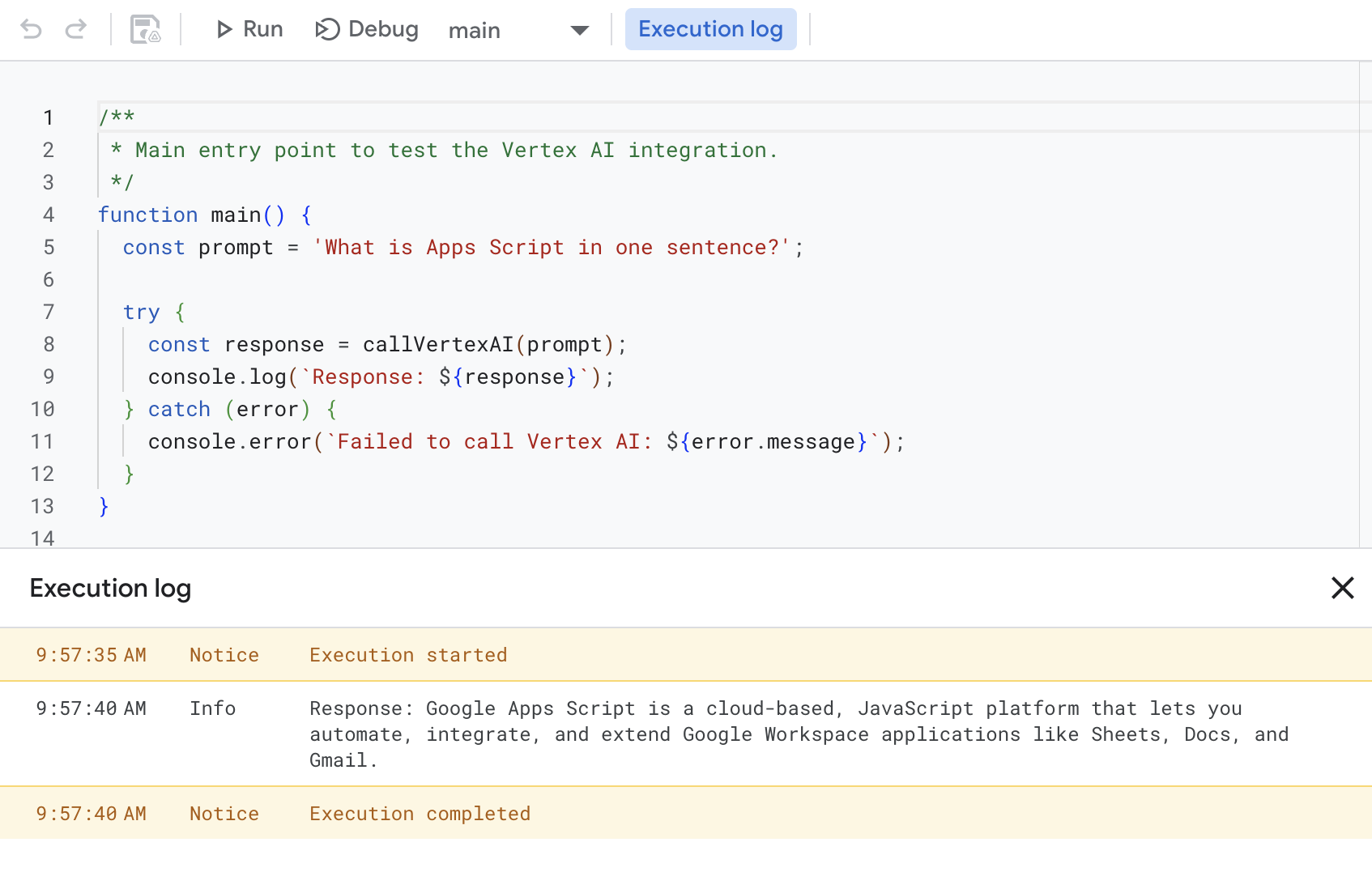
例如,执行日志会返回如下所示的响应:
Response: Google Apps Script is a cloud-based, JavaScript platform that lets you
automate, integrate, and extend Google Workspace applications like Sheets, Docs,
and Gmail.
清理
为避免系统因本教程中使用的资源向您的 Google Cloud 账号收取费用,我们建议您删除云项目。
- 在 Google Cloud 控制台中,前往管理资源页面。依次点击 菜单 > IAM 和管理 > 管理资源。
- 在项目列表中,选择要删除的项目,然后点击删除 。
- 在对话框中输入项目 ID,然后点击关停以删除项目。
为避免因本快速入门中使用的资源而向您的 Google Cloud 账号收取费用,我们建议您删除该云项目。