

Page Summary
-
This guide explains how to integrate Moloco ads into your Flutter app using Google Mobile Ads SDK mediation, specifically covering bidding integrations.
-
The Ad Manager mediation adapter for Moloco supports bidding, waterfall, and various ad formats including App Open, Banner, Interstitial, Rewarded, Rewarded Interstitial, and Native ads.
-
Implementing Moloco mediation requires specific versions of the Google Mobile Ads SDK, Flutter, and platform-specific requirements for Android and iOS.
-
The setup involves configuring apps and ad units within the Moloco Publisher Portal and setting up Moloco demand within the Ad Manager UI, including adding Moloco Ads to ad partner lists for regulatory compliance.
-
You can import the Moloco SDK and adapter via pub.dev or manual integration and test your implementation using test devices and ad inspector.
This guide shows you how to use Google Mobile Ads Flutter Plugin to load and display ads from Moloco Ads SDK using mediation, covering bidding integrations. It covers how to add Moloco Ads SDK to an ad unit's mediation configuration, and how to integrate the Moloco Ads SDK SDK and adapter into a Flutter app.
Supported integrations and ad formats
The Ad Manager mediation adapter for Moloco Ads SDK has the following capabilities:
| Integration | |
|---|---|
| Bidding | |
| Waterfall | |
| Formats | |
| App Open | |
| Banner | |
| Interstitial | |
| Rewarded | |
| Rewarded Interstitial | |
| Native | |
Prerequisites
Before you continue, verify the following:
- Latest Google Mobile Ads Flutter Plugin version.
- Flutter framework version 3.7.0 or later.
- To deploy on Android
- Android API level 24 or later.
- To deploy on iOS
- iOS deployment target of 13.0 or later.
- A working Flutter project configured with Google Mobile Ads Flutter Plugin. See Set up Google Mobile Ads Flutter Plugin for details.
- Set up mediation.
Step 1: Set up configurations in Moloco Ads SDK UI
Log in to the Moloco Publisher Portal.
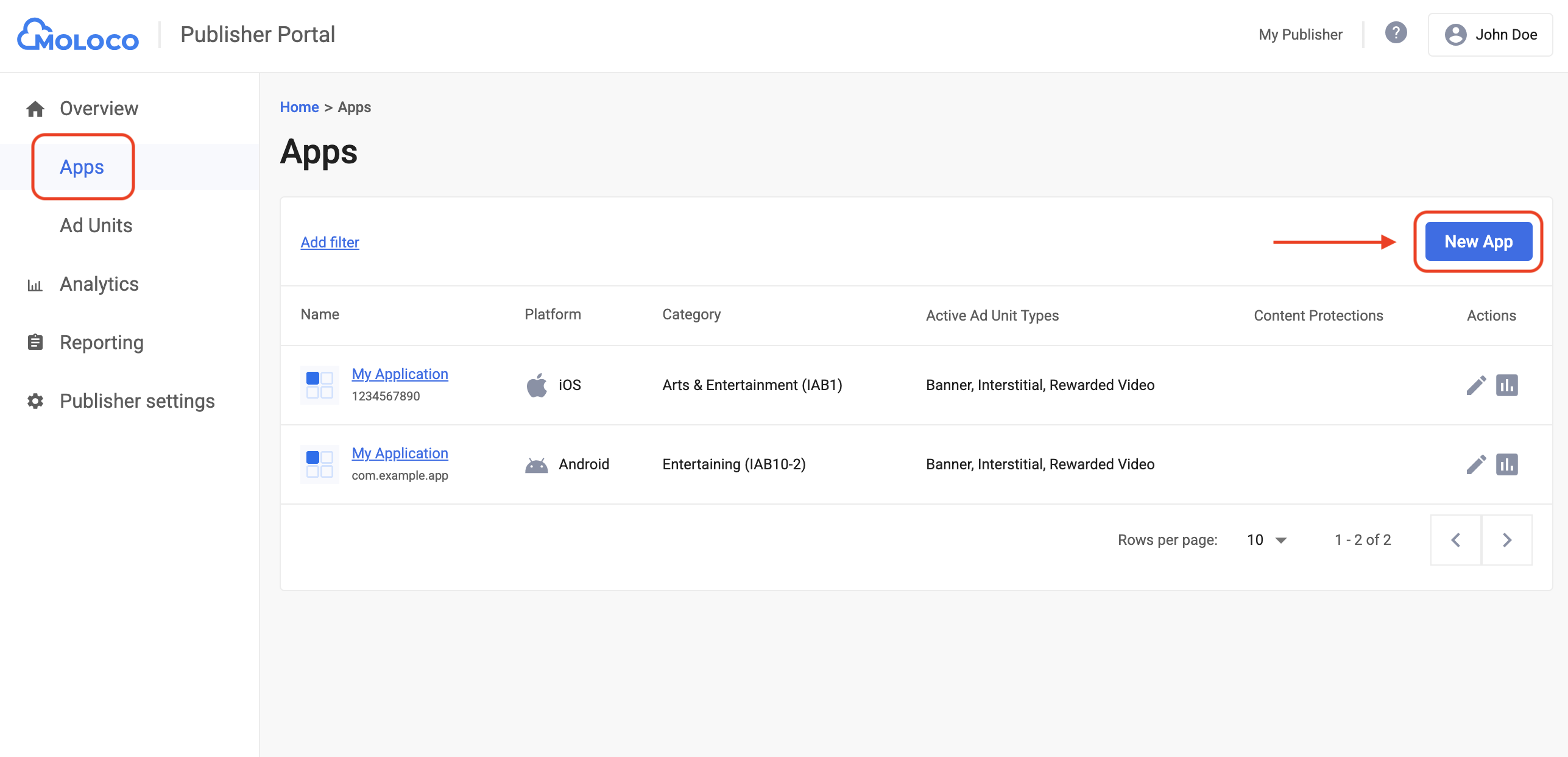
Navigate to Overview > Apps tab, then click the Add App button to create a new app.
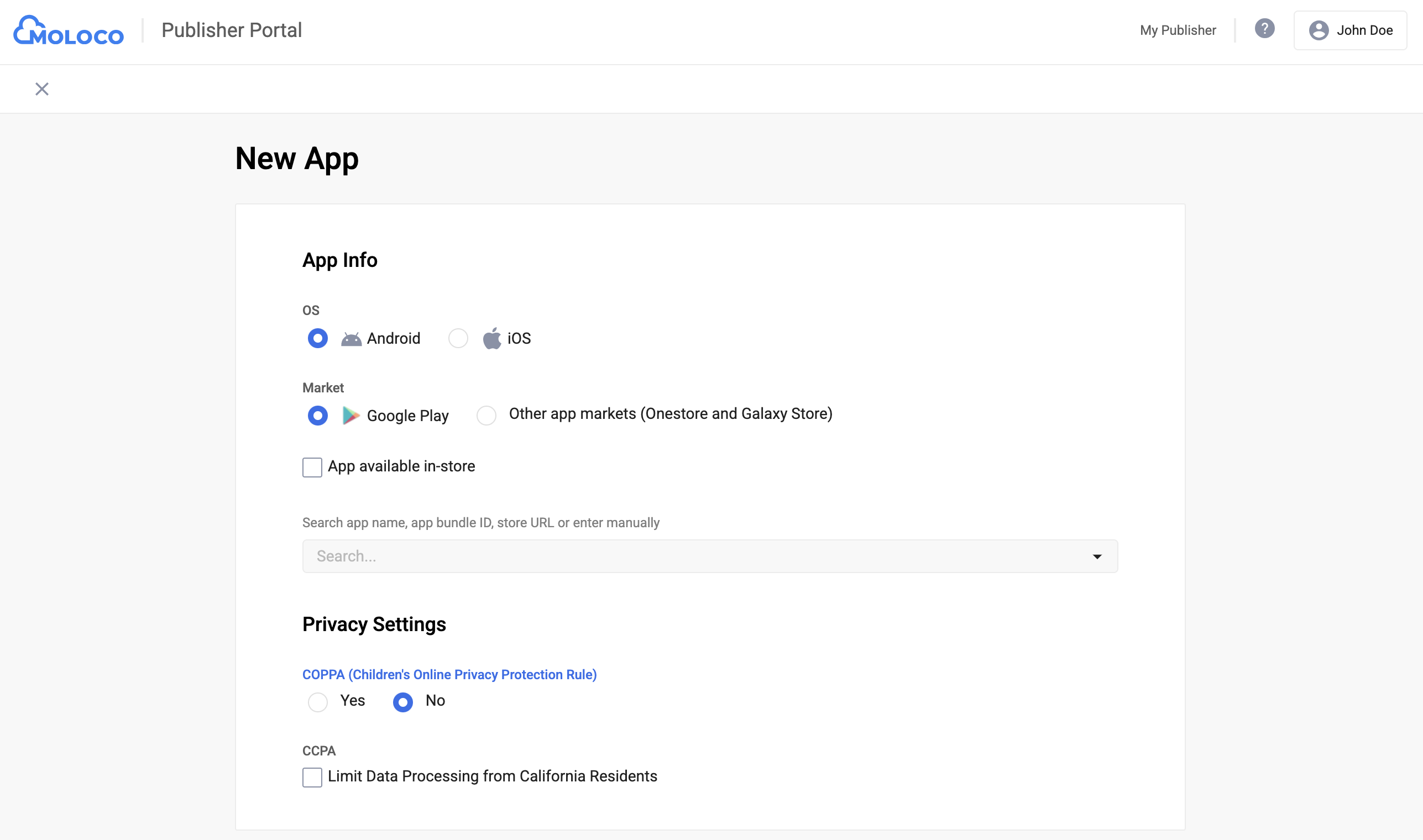
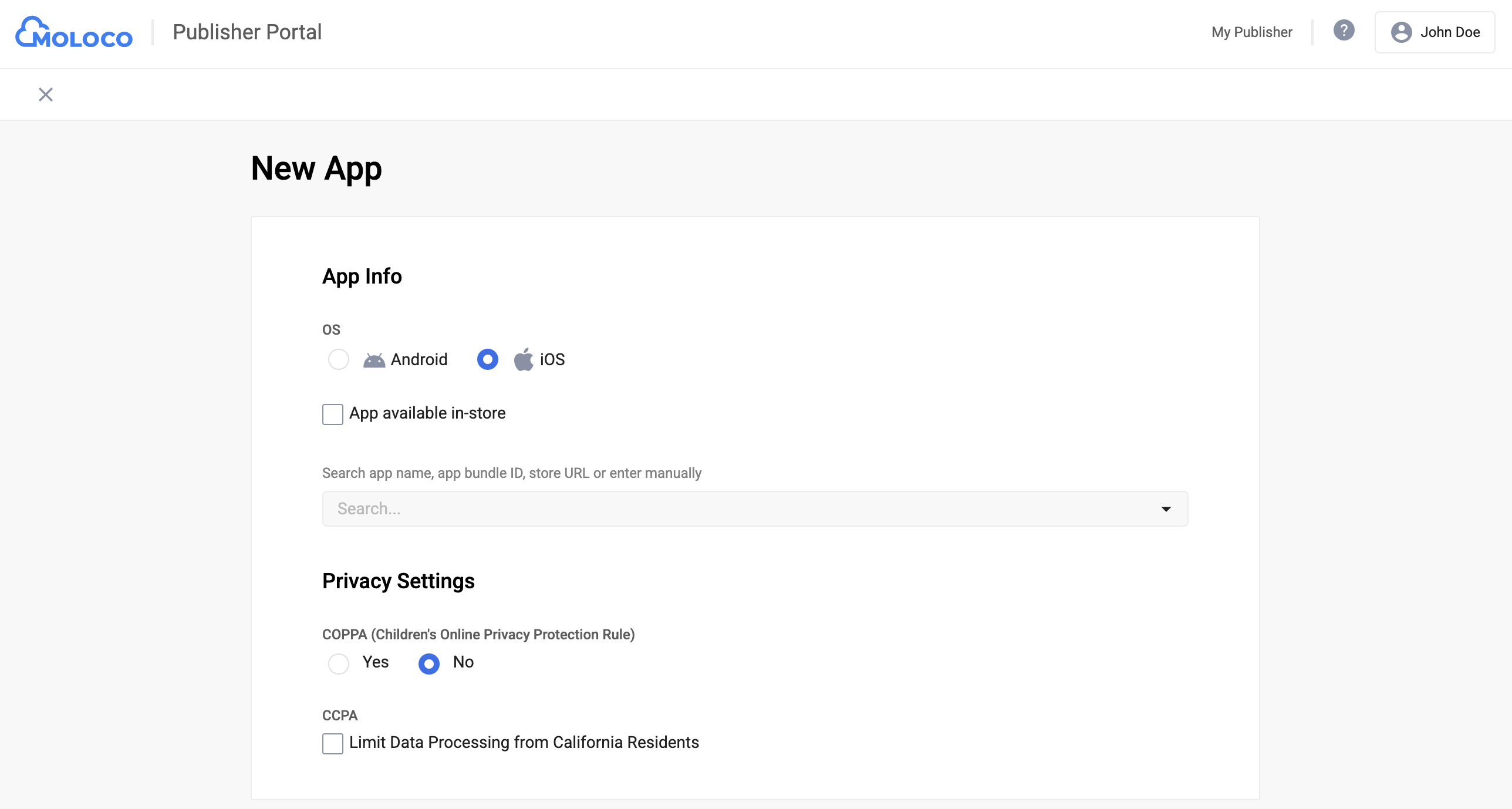
Select the OS and Privacy Settings for your app, fill out the rest of the form, and then click Create.
Android
iOS
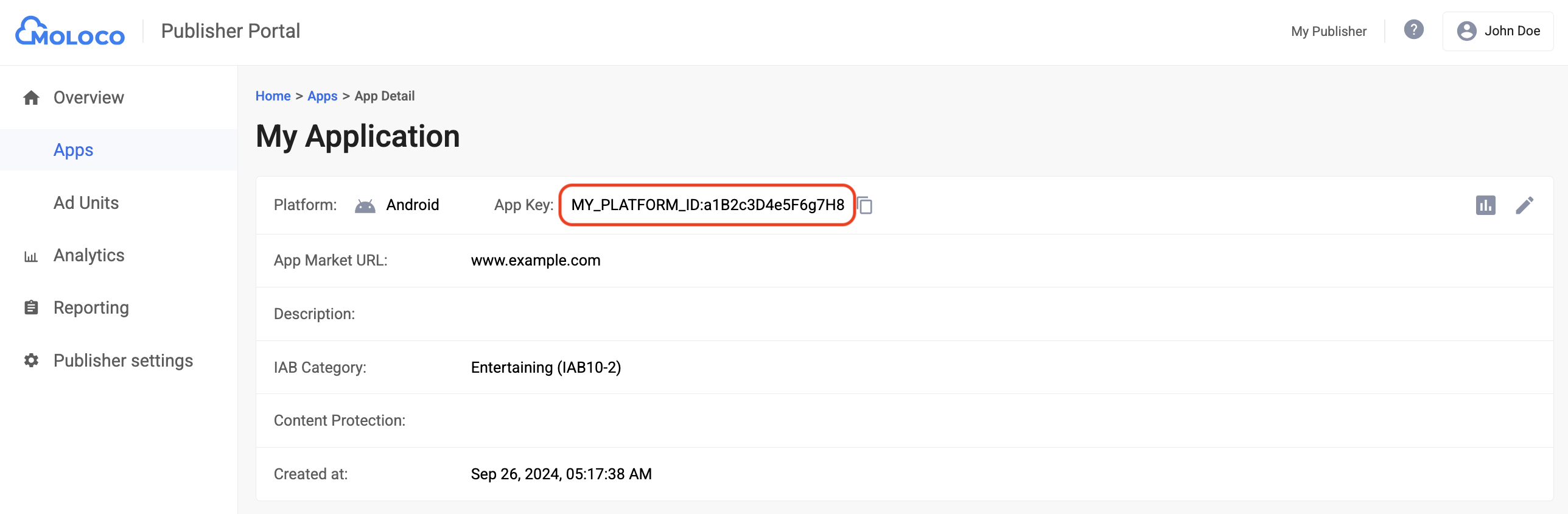
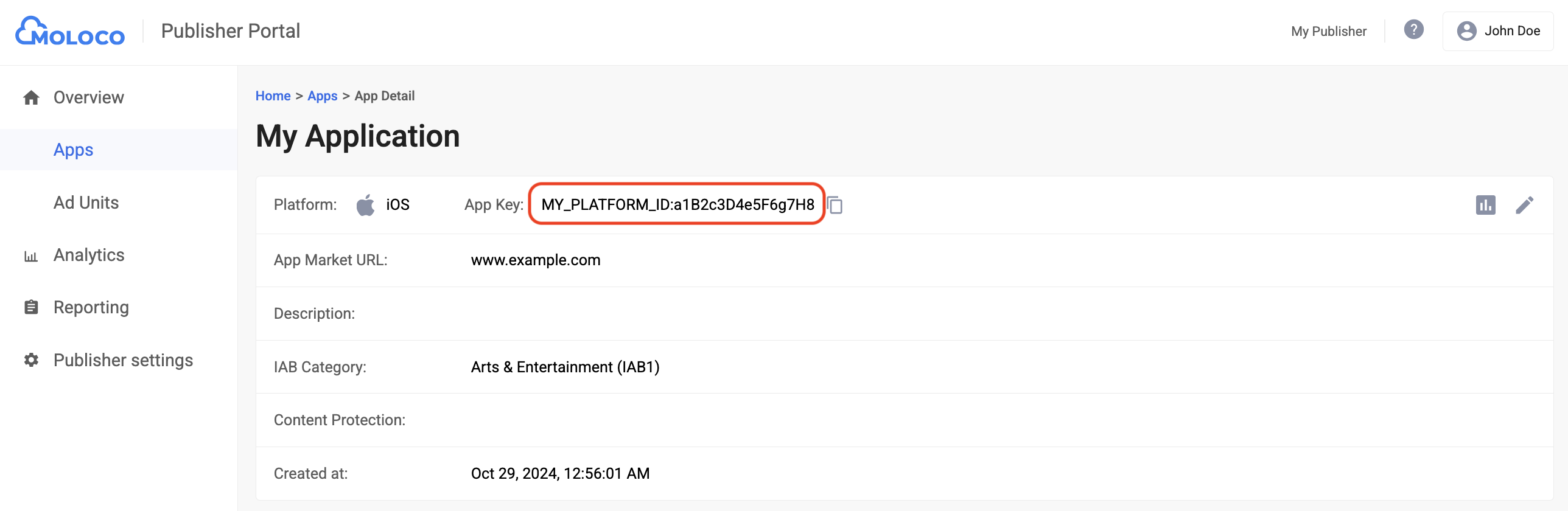
Once your app is created, select it from the Apps tab to view the details and take note of the App Key.
Android
iOS
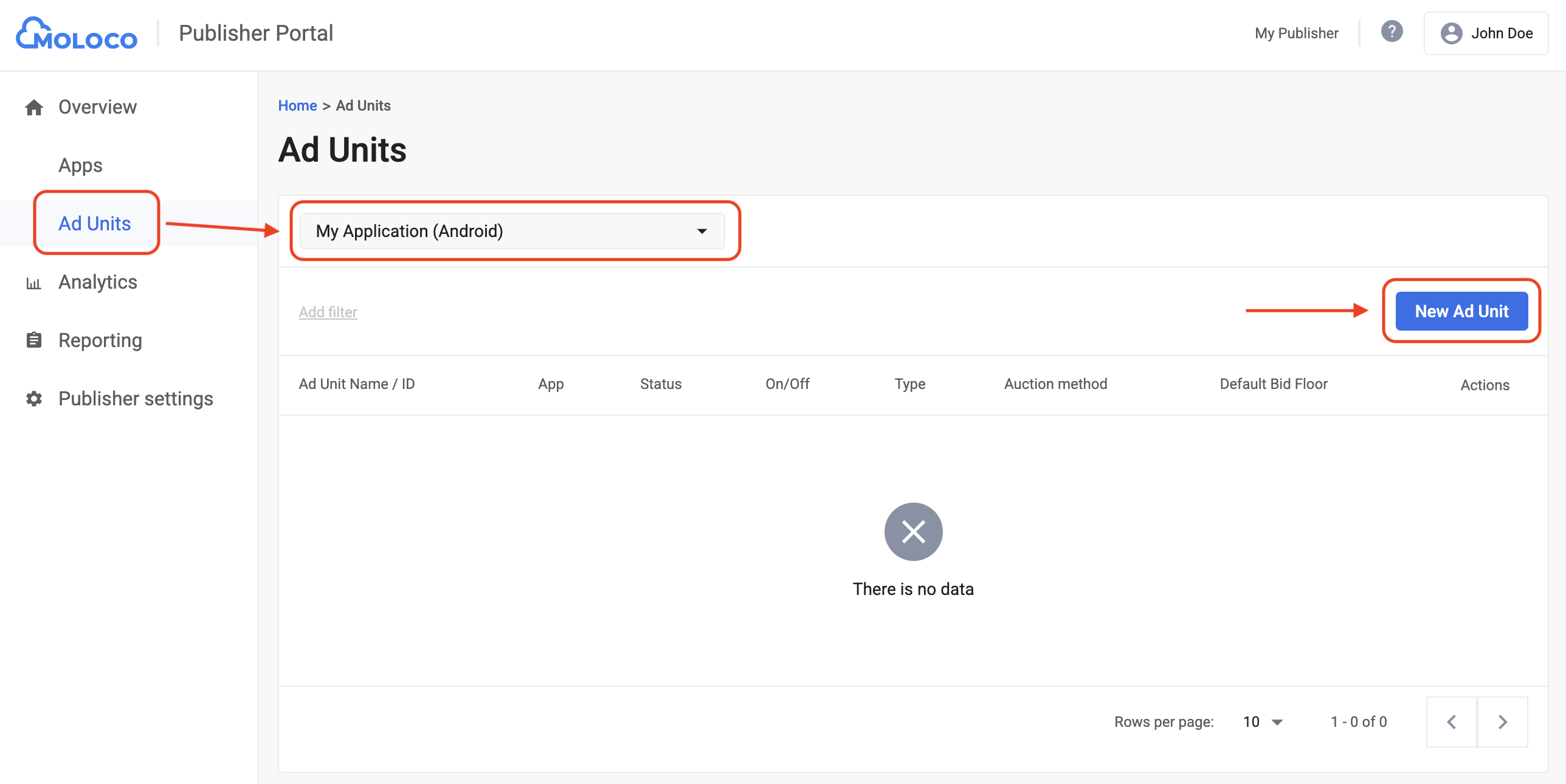
Navigate to the Overview > Ad Units tab, select the app from the drop-down menu, and then click New Ad Unit.
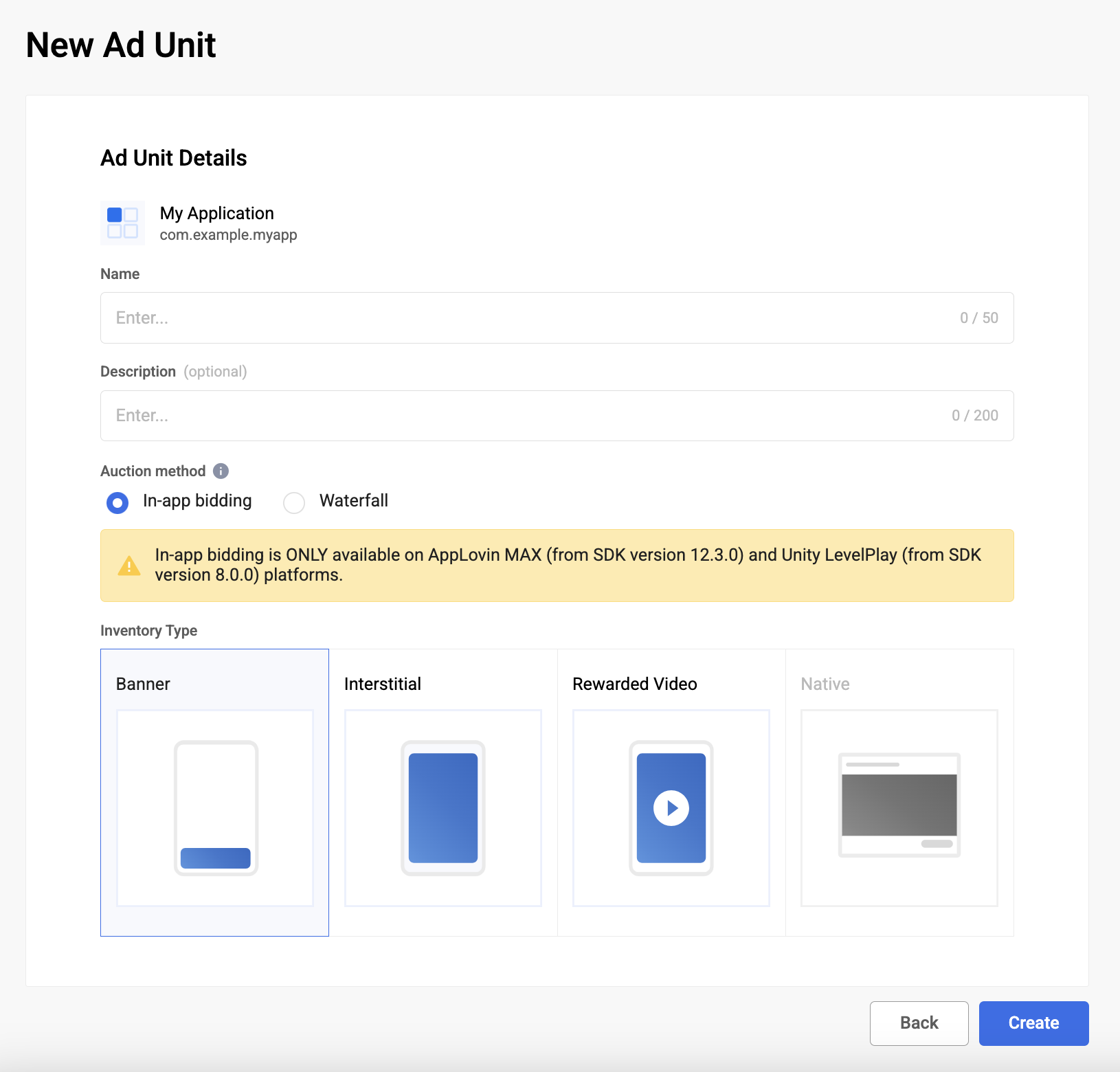
Select In-app bidding as the Auction method and fill out the rest of the form. Then, click Create.
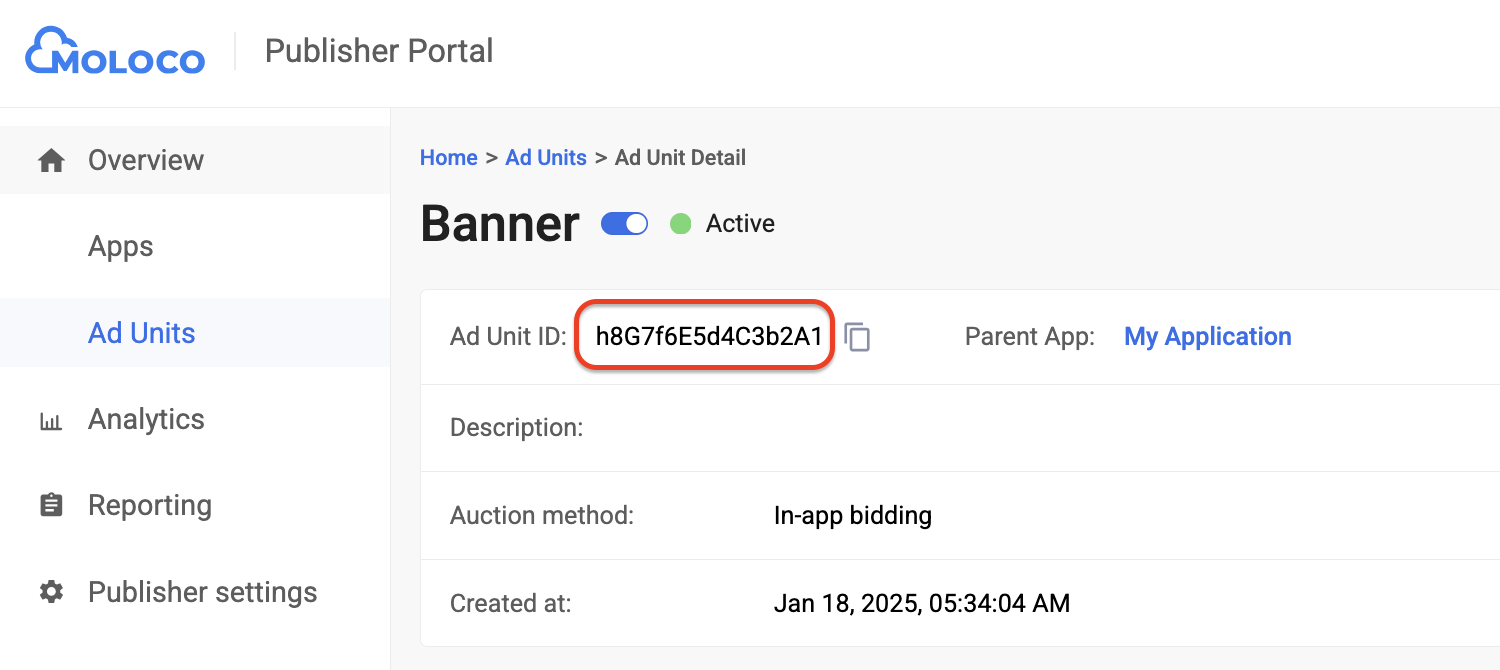
Navigate to your newly created ad unit under the Ad Units tab to view its details. Take note of the Ad Unit ID.
Step 2: Set up Moloco Ads SDK demand in Ad Manager UI
Configure mediation settings for your ad unit
Android
For instructions, see step 2 in the guide for Android.
iOS
For instructions, see step 2 in the guide for iOS.
Add Moloco Ads to GDPR and US state regulations ad partners list
Follow the steps in European regulations settings and US state regulations settings to add Moloco Ads to the European and US state regulations ad partners list in the Ad Manager UI.
Step 3: Import the Moloco Ads SDK SDK and adapter
Integration through pub.dev
Add the following dependency with the latest versions of the
Moloco Ads SDK SDK and adapter in your
package's pubspec.yaml file:
dependencies:
  gma_mediation_moloco: ^3.7.1
Manual Integration
Download the latest version of Google Mobile Ads mediation plugin for
Moloco Ads SDK,
extract the downloaded file, and add the extracted plugin folder
(and its contents) to your Flutter project. Then, reference the plugin in your
pubspec.yaml file by adding the following dependency:
dependencies:
  gma_mediation_moloco:
    path: path/to/local/package
Step 4: Implement privacy settings on Moloco SDK
EU consent and GDPR
To comply with the Google EU User Consent Policy, you must make certain disclosures to your users in the European Economic Area (EEA), the UK, and Switzerland, and obtain their consent for the use of cookies or other local storage where legally required, and for the collection, sharing, and use of personal data for ads personalization. This policy reflects the requirements of the EU ePrivacy Directive and the General Data Protection Regulation (GDPR). You are responsible for verifying that consent is propagated to each ad source in your mediation chain.
Moloco Ads SDK Flutter adapter version
1.0.0
and later supports passing GDPR consent signals from consent management
platforms that integrate with IAB's Transparency and Consent Framework (TCF)
to Moloco Ads SDK SDK.
For more information, see
MolocoPrivacy documentation
for Android and
TCF Consent String
for iOS.
US states privacy laws
US states privacy laws require giving users the right to opt out of the "sale" of their "personal information" (as the law defines those terms), with the opt-out offered through a prominent "Do Not Sell My Personal Information" link on the "selling" party's homepage. The US states privacy laws compliance guide offers the ability to enable restricted data processing for Google ad serving, but Google is unable to apply this setting to each ad network in your mediation chain. Therefore, you must identify each ad network in your mediation chain that may participate in the sale of personal information and follow guidance from each of those networks to ensure compliance.
The Google Mobile Ads Unity mediation plugin for
Moloco Ads SDK includes the
Moloco.SetDoNotSell(bool) method to pass consent information to the
Moloco Ads SDK SDK. The following sample code
shows how to pass this consent information to the
Moloco Ads SDK SDK. If you choose to set
these flags, it is recommended that you do so prior to requesting ads through
Google Mobile Ads Flutter Plugin.
import 'package:gma_mediation_moloco/gma_mediation_moloco.dart';
// ...

GmaMediationMoloco.setDoNotSell(true);
See Moloco Ads SDK's recommended implementation instructions for Android and iOS for more details.
Step 5: Add required code
No additional code is required for Moloco Ads SDK integration.
Step 6: Test your implementation
Enable test ads
Make sure you register your test device for Ad Manager.
Verify test ads
To verify that you are receiving test ads from Moloco Ads SDK, enable single ad source testing in ad inspector using the Moloco (Bidding) ad source(s).
Error codes
If the adapter fails to receive an ad from Moloco, publishers can check the
underlying error from the ad response using ResponseInfo under the following classes:
Android
com.moloco.sdk
com.google.ads.mediation.moloco.MolocoMediationAdapter
iOS
MolocoSDK.MolocoError
GADMediationAdapterMoloco
Here are the codes and accompanying messages thrown by the Moloco adapter when an ad fails to load:
Android
| Error code | Domain | Reason |
|---|---|---|
| 101 | com.google.ads.mediation.moloco | Missing or invalid Moloco App Key. |
| 102 | com.google.ads.mediation.moloco | Missing or invalid Moloco Ad unit ID. |
| 103 | com.google.ads.mediation.moloco | Moloco ad object returned was null. |
| -1 to 5000 | com.moloco.sdk | Moloco SDK returned an error. See Moloco's documentation for more details. |
iOS
| Error code | Domain | Reason |
|---|---|---|
| 101 | com.google.ads.mediation.moloco | Moloco SDK does not support serving ads on iOS 12 and below. |
| 102 | com.google.ads.mediation.moloco | Missing or invalid Moloco App Key. |
| 103 | com.google.ads.mediation.moloco | Missing or invalid Moloco Ad unit ID. |
| 104 | com.google.ads.mediation.moloco | Ad is not ready to be shown. |
| 105 | com.google.ads.mediation.moloco | Ad failed to show. |
| 106 | com.google.ads.mediation.moloco | Rendering data not available to render the ad. |
| -1 to 5000 | Sent by Moloco SDK | Moloco SDK returned an error. See Moloco's documentation for more details. |
Moloco Flutter Mediation Adapter Changelog
Version 3.7.1
- Supports Moloco Android adapter version 4.12.0.1.
- Supports Moloco iOS adapter version 4.10.0.0.
- Built and tested with the Google Mobile Ads Flutter Plugin version 9.1.0.
Version 3.7.0
- Supports Moloco Android adapter version 4.12.0.0.
- Supports Moloco iOS adapter version 4.10.0.0.
- Built and tested with the Google Mobile Ads Flutter Plugin version 9.1.0.
Version 3.6.1
- Updated to support Google Mobile Ads Flutter Plugin version 9.1.0.
- Added Swift Package Manager support.
- Supports Moloco Android adapter version 4.11.1.0.
- Supports Moloco iOS adapter version 4.9.0.0.
- Built and tested with the Google Mobile Ads Flutter Plugin version 9.1.0.
Version 3.6.0
- Supports Moloco Android adapter version 4.11.0.0.
- Supports Moloco iOS adapter version 4.9.0.0.
- Built and tested with the Google Mobile Ads Flutter Plugin version 9.0.0.
Version 3.5.1
- Supports Moloco Android adapter version 4.10.1.0.
- Supports Moloco iOS adapter version 4.8.1.0.
- Built and tested with the Google Mobile Ads Flutter Plugin version 9.0.0.
Version 3.5.0
- Supports Moloco Android adapter version 4.10.0.0.
- Supports Moloco iOS adapter version 4.8.0.0.
- Built and tested with the Google Mobile Ads Flutter Plugin version 9.0.0.
Version 3.4.0
- Updated minimum Flutter version to 3.38.1
- Updated to support Google Mobile Ads Flutter Plugin version 8.0.0
- Supports Moloco Android adapter version 4.7.0.0.
- Supports Moloco iOS adapter version 4.5.1.0.
- Built and tested with the Google Mobile Ads Flutter Plugin version 8.0.0.
Version 3.3.0
- Supports Moloco Android adapter version 4.5.0.0.
- Supports Moloco iOS adapter version 4.3.0.2.
- Built and tested with the Google Mobile Ads Flutter Plugin version 7.0.0.
Version 3.2.0
- Supports Moloco Android adapter version 4.4.0.0.
- Supports Moloco iOS adapter version 4.2.0.0.
- Built and tested with the Google Mobile Ads Flutter Plugin version 7.0.0.
Version 3.1.0
- Updated minimum Flutter version to 3.35.1
- Supports Moloco Android adapter version 4.4.0.0.
- Supports Moloco iOS adapter version 4.1.2.0.
- Built and tested with the Google Mobile Ads Flutter Plugin version 7.0.0.
Version 3.0.0
- Supports Moloco Android adapter version 4.3.1.0.
- Supports Moloco iOS adapter version 4.1.0.0.
- Built and tested with the Google Mobile Ads Flutter Plugin version 6.0.0.
Version 2.1.0
- Supports Moloco Android adapter version 4.2.0.0.
- Supports Moloco iOS adapter version 3.13.0.0.
- Built and tested with the Google Mobile Ads Flutter Plugin version 6.0.0.
Version 2.0.0
- Supports Moloco Android adapter version 4.0.0.0.
- Supports Moloco iOS adapter version 3.13.0.0.
- Built and tested with the Google Mobile Ads Flutter Plugin version 6.0.0.
Version 1.6.0
- Supports Moloco Android adapter version 3.12.0.0.
- Supports Moloco iOS adapter version 3.12.0.0.
- Built and tested with the Google Mobile Ads Flutter Plugin version 6.0.0.
Version 1.5.0
- Supports Moloco Android adapter version 3.11.0.0.
- Supports Moloco iOS adapter version 3.11.0.0.
- Built and tested with the Google Mobile Ads Flutter Plugin version 6.0.0.
Version 1.4.0
- Supports Moloco Android adapter version 3.10.0.0.
- Supports Moloco iOS adapter version 3.10.0.0.
- Built and tested with the Google Mobile Ads Flutter Plugin version 6.0.0.
Version 1.3.1
- Supports Moloco Android adapter version 3.9.0.0.
- Supports Moloco iOS adapter version 3.9.1.0.
- Built and tested with the Google Mobile Ads Flutter Plugin version 6.0.0.
Version 1.3.0
- Supports Moloco Android adapter version 3.9.0.0.
- Supports Moloco iOS adapter version 3.9.0.0.
- Built and tested with the Google Mobile Ads Flutter Plugin version 6.0.0.
Version 1.2.0
- Supports Moloco Android adapter version 3.8.0.1.
- Supports Moloco iOS adapter version 3.8.0.0.
- Built and tested with the Google Mobile Ads Flutter Plugin version 6.0.0.
Version 1.1.0
- Supports Moloco Android adapter version 3.7.0.0.
- Supports Moloco iOS adapter version 3.6.0.0.
- Built and tested with the Google Mobile Ads Flutter Plugin version 5.3.1.
Version 1.0.0
- Initial release.
- Supports Moloco Android adapter version 3.6.1.0.
- Supports Moloco iOS adapter version 3.6.0.0.
- Built and tested with the Google Mobile Ads Flutter Plugin version 5.3.1.