
MediaPipe Tasks provides cross-platform APIs and prebuilt pipelines for running vision, text, audio, retrieval, and decision models directly on-device. Every task pairs an end-to-end runtime pipeline with hardware-accelerated execution across Web, Android, iOS, Python, and Flutter.
To test tasks interactively before writing code, launch MediaPipe Web Demos, browse Samples & Demos, or jump directly to any task guide for a live Web SDK playground and platform Quickstart tabs.
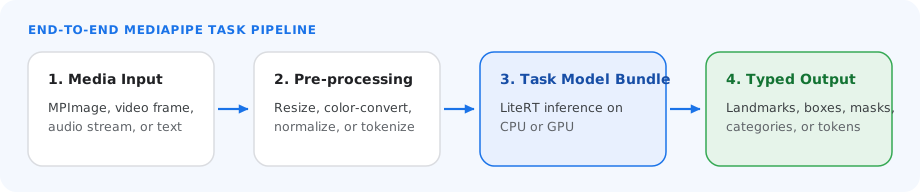
Three steps across platforms
Install the domain package, initialize the task with a .task, .tflite, or .litertlm model bundle, and run inference on images, video frames, text, or audio streams.
End-to-end CPU and GPU pipelines
MediaPipe Tasks handles input preprocessing, tokenization, model execution, and structured post-processing on-device for low-latency real-time applications.
Model asset placement & threading
Every MediaPipe task loads a .task bundle, .tflite model, or .litertlm
checkpoint via BaseOptions. Place your model file in the standard asset
location for your target platform:
- Android: Place
.task,.tflite, or.litertlmfiles in your module'ssrc/main/assets/directory (for example,app/src/main/assets/hand_landmarker.task) and pass the filename toBaseOptions.builder().setModelAssetPath("hand_landmarker.task"). - iOS: Add the model file to your Xcode application target bundle (verified
under Build Phases > Copy Bundle Resources) and resolve its runtime path
with
Bundle.main.path(forResource:ofType:). - Web: Serve the model from your application's static public directory or a
CDN URL and pass the URL to
baseOptions.modelAssetPath(or pass aUint8Array/ReadableStreamDefaultReadertobaseOptions.modelAssetBuffer). - Python: Pass the local filesystem path to
BaseOptions(model_asset_path="..."). - Flutter: List Google's pinned models under
hooks.user_definesinpubspec.yaml, rundart run mediapipe_core:bundle_modelsto bundle them intoassets/mediapipe/, and pass the model to the task options (for example,FaceLandmarkerOptions(model: VisionModels.faceLandmarker)). To use your own model, passmodelPathormodelBytesinstead. See Bundle models.
Supported platforms
Choose a platform to add the MediaPipe Tasks SDK to your project across all five task domains (Vision, Text, Audio, Retrieval, and Decision), read the complete setup guide for each environment, and see Prepare input data to format vision and audio media for inference.
Web and JavaScript
Install the npm package for your domain (@mediapipe/tasks-vision,
@mediapipe/tasks-text, @mediapipe/tasks-audio,
@mediapipe/tasks-retrieval, or @mediapipe/tasks-decision) or import its ESM
bundle from a CDN. See the Web setup guide
and JavaScript API reference.
npm install @mediapipe/tasks-vision @mediapipe/tasks-text @mediapipe/tasks-audio @mediapipe/tasks-retrieval @mediapipe/tasks-decision
Android
Add the Maven dependency for your domain in Gradle. See the Android setup guide and Java API reference.
Android (Kotlin)
dependencies {
  implementation("com.google.mediapipe:tasks-vision:latest.release")
  implementation("com.google.mediapipe:tasks-text:latest.release")
  implementation("com.google.mediapipe:tasks-audio:latest.release")
  implementation("com.google.mediapipe:tasks-retrieval:latest.release")
  implementation("com.google.mediapipe:tasks-decision:latest.release")
}
Android (Java)
dependencies {
  implementation 'com.google.mediapipe:tasks-vision:latest.release'
  implementation 'com.google.mediapipe:tasks-text:latest.release'
  implementation 'com.google.mediapipe:tasks-audio:latest.release'
  implementation 'com.google.mediapipe:tasks-retrieval:latest.release'
  implementation 'com.google.mediapipe:tasks-decision:latest.release'
}
iOS
Add MediaPipe Tasks using Swift Package Manager in Xcode or Package.swift. See
the iOS setup guide and
Swift API reference.
// Package.swift (Swift Package Manager)
dependencies: [
    .package(url: "https://github.com/google-ai-edge/mediapipe", branch: "master"),
],
targets: [
    .target(
        name: "MyAppTarget",
        dependencies: [
            .product(name: "MediaPipeTasksVision", package: "mediapipe"),
            .product(name: "MediaPipeTasksText", package: "mediapipe"),
            .product(name: "MediaPipeTasksAudio", package: "mediapipe"),
            .product(name: "MediaPipeTasksRetrieval", package: "mediapipe"),
            .product(name: "MediaPipeTasksDecision", package: "mediapipe"),
        ]
    ),
]
Python
Install the mediapipe package with pip and import the task modules for
desktop, server, or notebook workflows. See the
Python setup guide and
Python API reference.
# python -m pip install mediapipe
import mediapipe as mp
from mediapipe.tasks import python
from mediapipe.tasks.python import audio, decision, retrieval, text, vision
Flutter
Add the package for your domain (mediapipe_vision, mediapipe_text,
mediapipe_audio, mediapipe_retrieval, or mediapipe_decision) from
pub.dev. The same Dart API runs on
Android, iOS, macOS, Linux, Windows, and the web. See the
Flutter setup guide.
flutter pub add mediapipe_vision mediapipe_text mediapipe_audio mediapipe_retrieval mediapipe_decision