
自适应横幅广告是新一代自适应广告,可针对每台设备优化广告尺寸,从而最大限度地提升广告效果。自适应横幅广告在固定尺寸的横幅广告(仅支持固定高度)的基础上进行了改进,允许开发者指定广告宽度,并根据此宽度来确定最佳广告尺寸。
为了选择最佳广告尺寸,内嵌自适应横幅广告采用的是最大高度,而非固定高度,这有助于提升广告效果。
内嵌自适应横幅广告适用情形
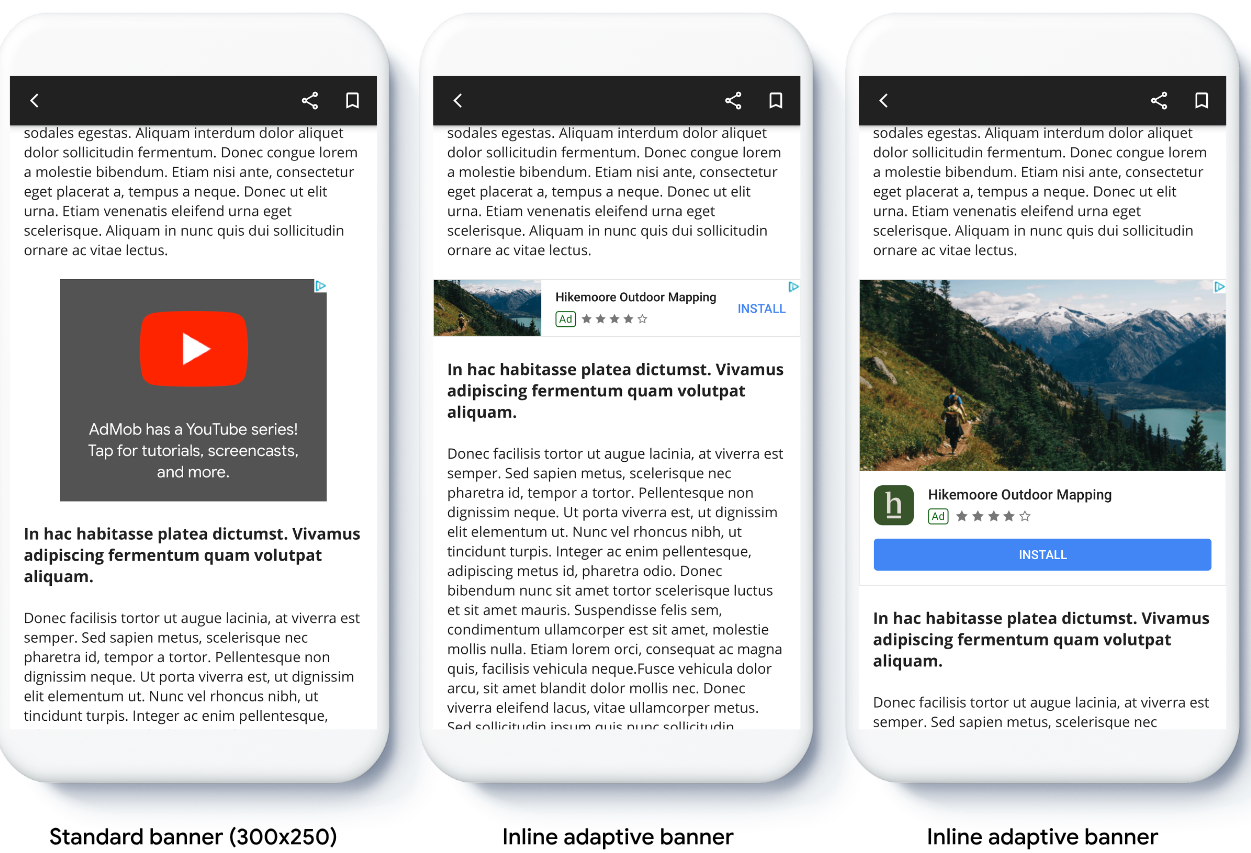
与锚定自适应横幅广告相比,内嵌自适应横幅广告是一种更大、更高的横幅广告。这种广告的高度可调整,最高可与设备屏幕一样高。
这种广告主要放置在滚动显示的内容中,示例如下:
前提条件
- 按照入门指南中有关如何导入 Google Mobile Ads Flutter Plugin的说明进行操作。
准备工作
在应用中植入自适应横幅广告时,请注意以下几点:
确保您使用的是最新版 Google Mobile Ads Flutter Plugin;如果您使用的是中介功能,请使用最新版中介适配器。
按照内嵌自适应横幅广告尺寸的设计,占满可用宽度时效果最佳。在大多数情况下,这里指的是所用设备的屏幕全宽。请务必考虑适用的安全区域。
您可能需要更新或新建订单项才能采用自适应尺寸。了解详情。
获取广告尺寸的方法如下
AdSize.getCurrentOrientationInlineAdaptiveBannerAdSize(int width)AdSize.getLandscapeInlineAdaptiveBannerAdSize(int width)AdSize.getPortraitInlineAdaptiveBannerAdSize(int width)AdSize.getInlineAdaptiveBannerAdSize(int width, int maxHeight)
使用内嵌自适应横幅广告 API 时,Google Mobile Ads Flutter Plugin 会返回带有特定宽度和内嵌标记的
AdSize。高度为零或maxHeight,具体取决于您所使用的 API。您可在返回广告的实际高度后使用该高度。内嵌自适应横幅广告主要放置在滚动显示的内容中。 这种横幅广告可与设备屏幕一样高,也可能会受到最大高度的限制,具体取决于相应 API。
实现
要植入简单的内嵌自适应横幅广告,请按照以下步骤操作。
- 获取内嵌自适应横幅广告尺寸。您获取的尺寸将用于请求自适应横幅广告。要获取自适应广告尺寸,请务必执行以下操作:
- 获取所用设备的宽度(以密度无关像素为单位),或者自行设置宽度(如果您不想使用屏幕的全宽)。您可以使用
MediaQuery.of(context)获取屏幕宽度。 - 使用广告尺寸类中的相应静态方法(例如
AdSize.getCurrentOrientationInlineAdaptiveBannerAdSize(int width)),获取适用于当前屏幕方向的内嵌自适应AdSize对象。 - 如要限制横幅广告的高度,可以使用静态方法
AdSize.getInlineAdaptiveBannerAdSize(int width, int maxHeight)。
- 获取所用设备的宽度(以密度无关像素为单位),或者自行设置宽度(如果您不想使用屏幕的全宽)。您可以使用
- 使用广告单元 ID、自适应广告尺寸和广告请求对象创建
AdManagerBannerAd对象。 - 加载广告。
- 在
onAdLoaded回调中,使用AdManagerBannerAd.getPlatformAdSize()获取更新后的平台广告尺寸并更新AdWidget容器高度。 - 在可滚动列表中呈现广告之前,请检查
AdManagerBannerAd.isMounted属性。此过程可确保广告实例不会装载到 widget 树中。
代码示例
以下示例微件可加载内嵌自适应横幅广告以适应屏幕宽度,且考虑边衬区:
import 'package:flutter/material.dart';
import 'package:google_mobile_ads/google_mobile_ads.dart';

/// This example demonstrates inline adaptive banner ads.
///
/// Loads and shows an inline adaptive banner ad in a scrolling view,
/// and reloads the ad when the orientation changes.
class InlineAdaptiveExample extends StatefulWidget {
  @override
  _InlineAdaptiveExampleState createState() => _InlineAdaptiveExampleState();
}

class _InlineAdaptiveExampleState extends State<InlineAdaptiveExample> {
  static const _insets = 16.0;
  AdManagerBannerAd? _inlineAdaptiveAd;
  bool _isLoaded = false;
  AdSize? _adSize;
  late Orientation _currentOrientation;

  double get _adWidth => MediaQuery.of(context).size.width - (2 * _insets);

  @override
  void didChangeDependencies() {
    super.didChangeDependencies();
    _currentOrientation = MediaQuery.of(context).orientation;
    _loadAd();
  }

  void _loadAd() async {
    await _inlineAdaptiveAd?.dispose();
    setState(() {
      _inlineAdaptiveAd = null;
      _isLoaded = false;
    });

    // Get an inline adaptive size for the current orientation.
    AdSize size = AdSize.getCurrentOrientationInlineAdaptiveBannerAdSize(
        _adWidth.truncate());

    _inlineAdaptiveAd = AdManagerBannerAd(
      // TODO: replace with your own ad unit.
      adUnitId: '/21775744923/example/adaptive-banner',
      size: size,
      request: AdManagerAdRequest(),
      listener: AdManagerBannerAdListener(
        onAdLoaded: (Ad ad) async {
          print('Inline adaptive banner loaded: ${ad.responseInfo}');

          // After the ad is loaded, get the platform ad size and use it to
          // update the height of the container. This is necessary because the
          // height can change after the ad is loaded.
          AdManagerBannerAd bannerAd = (ad as AdManagerBannerAd);
          final AdSize? size = await bannerAd.getPlatformAdSize();
          if (size == null) {
            print('Error: getPlatformAdSize() returned null for $bannerAd');
            return;
          }

          setState(() {
            _inlineAdaptiveAd = bannerAd;
            _isLoaded = true;
            _adSize = size;
          });
        },
        onAdFailedToLoad: (Ad ad, LoadAdError error) {
          print('Inline adaptive banner failedToLoad: $error');
          ad.dispose();
        },
      ),
    );
    await _inlineAdaptiveAd!.load();
  }

  /// Gets a widget containing the ad, if one is loaded.
  ///
  /// Returns an empty container if no ad is loaded, or the orientation
  /// has changed. Also loads a new ad if the orientation changes.
  Widget _getAdWidget() {
    return OrientationBuilder(
      builder: (context, orientation) {
        if (_currentOrientation == orientation &&
            _inlineAdaptiveAd != null &&
            !_inlineAdaptiveAd!.isMounted &&
            _isLoaded &&
            _adSize != null) {
          return Align(
              child: Container(
            width: _adWidth,
            height: _adSize!.height.toDouble(),
            child: AdWidget(
              ad: _inlineAdaptiveAd!,
            ),
          ));
        }
        // Reload the ad if the orientation changes.
        if (_currentOrientation != orientation) {
          _currentOrientation = orientation;
          _loadAd();
        }
        return Container();
      },
    );
  }

  @override
  Widget build(BuildContext context) => Scaffold(
      appBar: AppBar(
        title: Text('Inline adaptive banner example'),
      ),
      body: Center(
        child: Padding(
          padding: const EdgeInsets.symmetric(horizontal: _insets),
          child: ListView.separated(
            itemCount: 20,
            separatorBuilder: (BuildContext context, int index) {
              return Container(
                height: 40,
              );
            },
            itemBuilder: (BuildContext context, int index) {
              if (index == 10) {
                return _getAdWidget();
              }
              return Text(
                'Placeholder text',
                style: TextStyle(fontSize: 24),
              );
            },
          ),
        ),
      ));

  @override
  void dispose() {
    super.dispose();
    _inlineAdaptiveAd?.dispose();
  }
}