

Page Summary
-
YouTube Playables are built using standard web technologies and APIs, making them compatible with game engines that export web builds.
-
Developers can test their Playables on various platforms, including foldable phone emulators, mobile WebViews, and Chrome DevTools.
-
Playables have a 512MB JavaScript heap size limit to ensure smooth performance on iOS devices.
-
YouTube employs a staged rollout process to validate and ensure the quality of Playables before they are widely accessible to users.
-
After a Playable is published, developers should be prepared for fluctuating user engagement and ongoing support.
These are answers to common questions about developing Playables.
General technical
What game engines can I use?
YouTube Playables supports standard web platform APIs. Therefore, Playables supports games made with game engines that export builds for the web that use a standard rendering API (for example, WebGL and Canvas). Engines and frameworks that have been used for Playables in the past include BabylonJS, Cocos, Construct, Defold, melonJS, Phaser, PixiJS, PlayCanvas, React, three.js, Godot, and Unity.
How do I test on foldable phone simulators?
For rapid testing, see Chrome Dev Tools supports simulating a foldable phone. Additionally, there are several emulator options in Android Studio that can be used for more thorough testing.
How can I test on mobile WebViews?
You can use third-party apps like WebView Tester (Android) or WebView - Tester (iOS) to open your game or the SDK test suite in a WebView for additional validation. Since this is third-party software that is not supported or validated by Google, you can also use open-source options, such as WebView Tester (Android) or swift-ios-wkwebview-demo (iOS) to compile your own WebView testing apps.
How does the game run inside of YouTube?
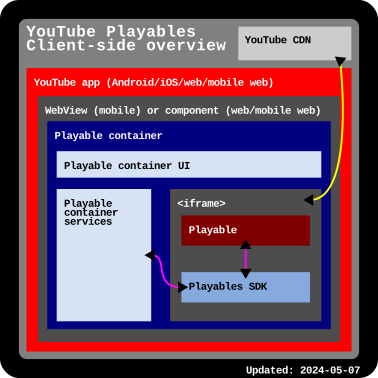
Standard web and mobile technology is used to run Playables within the YouTube mobile and web apps. As a result, Playables supports standard web platform APIs.
This diagram shows a brief technical overview:
What memory usage restrictions exist for Playables on YouTube?
Games can only use up to 512 MB of JavaScript heap size. Playables are run within Safari on iOS and this is the threshold at which the game will frequently crash and reload the browser. You can measure the heap size the game is using at any time using Chrome DevTools to record heap snapshots
How does a game go "live"?
We're careful about rolling out Playables to users, so we perform various stages of Playables validation to verify that YouTube and the individual Playable work well together. This may include limited access, staged rollouts, or adjustments using our automated systems.
Once your Playable is certified and published, you should expect to support full game usage irrespective of any of these rollout mechanisms. You should also expect fluctuations in user engagement at any time.
How do Playables appear to users?
Playables appear on multiple YouTube surfaces, including the Home page, Search results, the Playables destination, and your channel page.
Your channel page will have a Playables tab that lists all of your Playables. When a user opens one of your Playables, they will also find a link to subscribe to your channel.
How do I report a Playable for infringing on copyright/IP?
If your copyrighted content is on YouTube without your permission, follow these email, mail, or fax instructions. Submitting using YouTube Studio is not available at this time.
Does my game need to support gameplay with a mouse?
Yes. As per the "Interaction methods" requirements, your game MUST support mouse input for all interactions (including both menus and core gameplay).
Game limits and publishing
Is there a limit to the number of Playables I can create?
We have a 200-game limit per channel that we are not looking to increase at this moment. In the meantime, we recommend focusing on optimizing or providing your best 200 games.
How do I submit a new version of an existing game?
Our submission process is managed through the Playables Developer Portal. For more information, see Create a new Playable.
Does updating only the metadata or thumbnail still require a review?
Yes. All updates, including metadata changes, must still go through a review process.
Can I publish a game built using open asset store templates?
Games built using commercially licensed templates (for example, from open asset stores) must be significantly modified. If your game is flagged as being "substantially identical" in its gameplay mechanics, UI layout, and core assets to an existing third-party title, it may be rejected during certification or removed for duplicate content violations. To avoid this, ensure your game offers a unique experience beyond just changing the protagonist or title.
Monetization and ads
Why are ads not showing in my game during testing?
If ads aren't showing up, check the following:
- SDK integration: Make sure you've correctly integrated the Playables SDK ad methods. Because Playables automatically balances ad delivery for users, creators, and advertisers, we encourage you to request an interstitial ad at every natural break in your game. The system decides which requests to fill to achieve the right balance.
- Monetization settings: In the Playables Developer Portal, open your game and confirm Interstitial and Rewarded are toggled on under Ad monetization. YouTube handles pre-roll ads automatically.
Advertiser-friendly guidelines: In the Developer Portal, open your game and check for Monetization issues.
Any issues with YouTube's advertiser-friendly content guidelines and monetization requirements are listed there. Make sure that your rewarded ads are opt-in and don't block normal progress, your game doesn't encourage players to click ads, and interstitial ads only appear at natural breaks (like after a level ends), not during active gameplay, as these are all advertiser-friendly guidelines requirements.
If the section says monetization failed, ads are turned off for that release, even if the release passed certification and is live. To turn ads back on, fix the listed issues and resubmit your game for review. Ads return once the new release passes and is published.
Testing account: YouTube Premium members don't see ads, so test with an account that doesn't have Premium. Ads also only show to a subset of users in eligible regions, so a correctly set-up game may not show ads on every account.
Analytics and reporting
Is there a dashboard where I can view detailed analytics, such as retention or crash rates, for my game?
Analytics are available in the Analytics tab in the Playables Developer Portal.
Support and community
Where can I reach out for assistance or connect with the Playables developer community?
You can join the official YouTube Playables Discord community. This is a place where you can get community support, collaborate with other creators, and see the latest announcements and updates from the Playables team.
Other questions
If you are an existing Playables developer, additional FAQ are available.