
ব্যবহারকারীরা এমন কন্টেন্ট দেখতে বা শুনতে পছন্দ করেন যা তারা আগে থেকেই দেখতে পারেন, যেমন তাদের বিদ্যমান সাবস্ক্রিপশন কন্টেন্ট। যদি গুগল জানে যে একজন ব্যবহারকারী আপনার অ্যাপ বা প্ল্যাটফর্মে কোন কন্টেন্ট দেখতে পারেন, তাহলে গুগল তার বিভিন্ন প্ল্যাটফর্মে আরও প্রাসঙ্গিক অভিজ্ঞতা প্রদান করতে পারে এবং ব্যবহারকারীকে সেই কন্টেন্টের দিকে পরিচালিত করতে পারে।
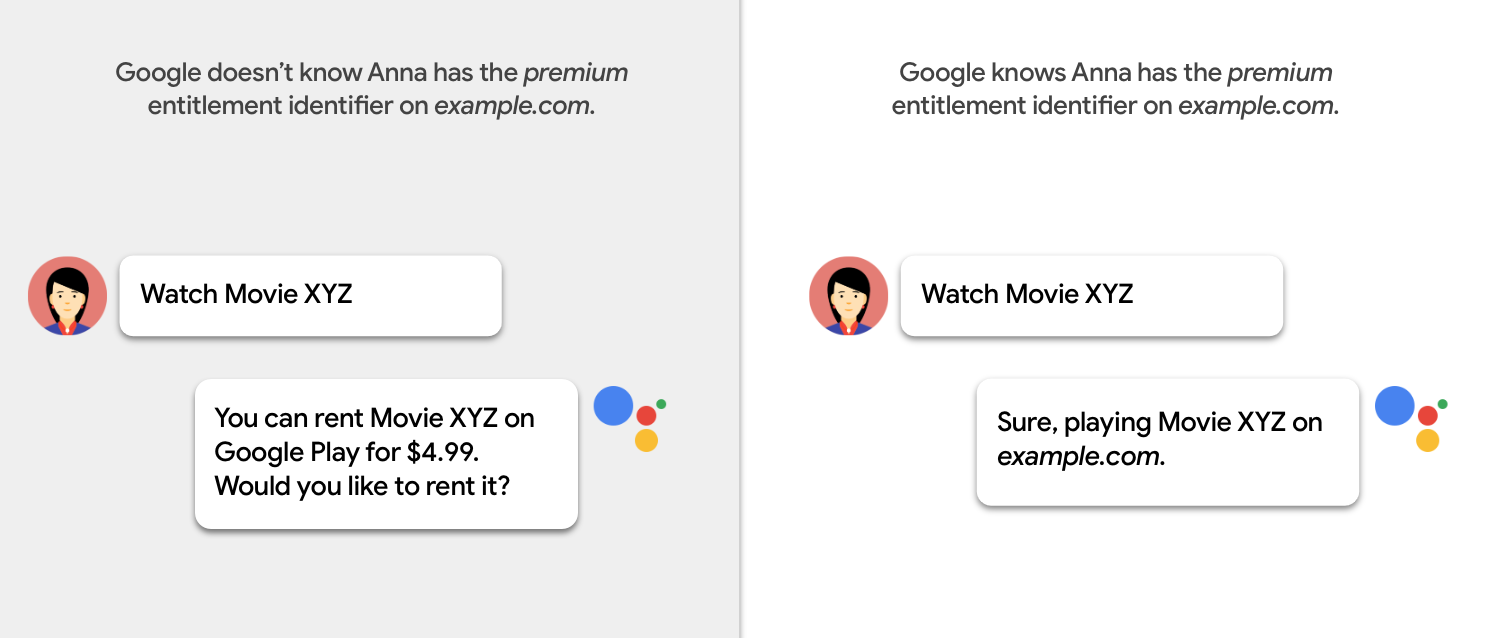
বিষয়বস্তু অ্যাক্সেসের প্রয়োজনীয়তা শনাক্ত করুন
আপনার ক্যাটালগে থাকা প্রতিটি কন্টেন্ট প্যাকেজের জন্য প্রয়োজনীয় অ্যাক্সেস শনাক্ত করতে হবে। তা করার সময়, নিম্নলিখিত প্রশ্নগুলো বিবেচনা করুন:
- কন্টেন্ট অ্যাক্সেস করার জন্য ব্যবহারকারীদের কি আপনার অ্যাপ বা প্ল্যাটফর্মে লগ ইন করতে হবে?
ব্যবহারকারীদের কি সাবস্ক্রিপশনের প্রয়োজন আছে?
শুধুমাত্র কার্যকলাপ দেখুন:
- ব্যবহারকারীদের কি কোনো বাহ্যিক পরিষেবা প্রদানকারীর কাছ থেকে সাবস্ক্রিপশন নিতে হবে?
- আপনারা কি স্তরভিত্তিক, একাধিক প্যাকেজ, বা অ্যাড-অন সাবস্ক্রিপশন অফার করেন?
শুধুমাত্র দেখার কার্যক্রম: ব্যবহারকারীদের কি কন্টেন্টটি ভাড়া বা ক্রয় করতে হবে?
সময়ের সাথে সাথে কি প্রবেশের প্রয়োজনীয়তা পরিবর্তিত হয়?
অ্যাক্সেসের প্রয়োজনীয়তা কি ডিভাইসের অবস্থানের উপর নির্ভর করে?
অ্যাক্সেস সীমাবদ্ধতার প্রকার
দুই ধরনের প্রবেশাধিকার সীমাবদ্ধতা রয়েছে:
পেওয়াল টাইপ
আপনি পেওয়ালের ধরন অনুযায়ী কন্টেন্টে প্রবেশাধিকার সীমাবদ্ধ করতে পারেন। নিচের সারণিতে বিভিন্ন ধরনের পেওয়ালের বিবরণ দেওয়া হলো:
| পেওয়াল টাইপ | উদাহরণ | বিভাগ |
|---|---|---|
| কোনো কেনাকাটা বা লগইন করার প্রয়োজন নেই। | ক্র্যাকল | nologinrequired |
| ব্যবহারকারীকে অবশ্যই লগ ইন করতে হবে, কিন্তু কোনো পেইড সাবস্ক্রিপশনের প্রয়োজন নেই। | ভুডু (এভিওডি) | free |
| ব্যবহারকারীর একটি সক্রিয় সাবস্ক্রিপশন থাকতে হবে। সাবস্ক্রিপশনের স্তর নির্বিশেষে অ্যাক্সেস পাওয়া যাবে। | নেটফ্লিক্স | |
| ব্যবহারকারীর একটি সক্রিয় সাবস্ক্রিপশন থাকতে হবে। অ্যাক্সেস সাবস্ক্রিপশন স্তরের উপর নির্ভরশীল। | হুলু (অতিরিক্ত সংযোজন) | |
| ক্রয়ের পর কন্টেন্টটি একটি নির্দিষ্ট সময়ের জন্য উপলব্ধ থাকবে। | ভুডু | rental |
| ক্রয়ের পর কন্টেন্টটি অনির্দিষ্টকালের জন্য উপলব্ধ থাকবে। | ভুডু | purchase |
| কেবল সাবস্ক্রিপশনের মাধ্যমে কন্টেন্টটি পাওয়া যায়। | এইচবিও গো | externalSubscription |
ওয়াচ অ্যাকশনের জন্য পেওয়ালের ধরণ
ওয়াচ অ্যাকশনগুলির জন্য কন্টেন্ট পেওয়াল টাইপ নির্দিষ্ট করতে, অ্যাকশন অ্যাক্সেস স্পেসিফিকেশনে category প্রপার্টি ব্যবহার করুন:
"potentialAction": {
  "@type":"WatchAction",
  "target": { … },
  "actionAccessibilityRequirement": {
    "@type": "ActionAccessSpecification",
    "category": "subscription",
    "availabilityStarts": "2018-06-01T10:35:29Z",
    "availabilityEnds": "2019-05-31T10:35:29Z",
    "eligibleRegion": {
      "@type": "Country",
      "name": "US"
    }
  },
  ...
}
লিসেন অ্যাকশনের জন্য পেওয়াল টাইপ
লিসেন অ্যাকশনগুলির জন্য কন্টেন্ট পেওয়ালের ধরণ নির্দিষ্ট করতে, অফার অবজেক্টের category প্রপার্টি ব্যবহার করুন:
"potentialAction": {
  "@type":"ListenAction",
  "target": { … },
  "expectsAcceptanceOf":{
    "@type":"Offer",
    "category":"subscription",
    "availabilityStarts": "2018-06-01T10:35:29Z",
    "availabilityEnds": "2019-05-31T10:35:29Z",
    "eligibleRegion": {
      "@type":"Country",
      "name":"US"
    }
  },
  ...
}
ভৌগোলিক এলাকা
আপনাকে অবশ্যই সেই ভৌগোলিক এলাকাগুলো নির্দিষ্ট করতে হবে যেখানে কন্টেন্টটি পাওয়া যায়। নিম্নলিখিত বৈশিষ্ট্যগুলোর মধ্যে একটি বা উভয়টি ব্যবহার করুন:
- একটি অ্যাকশন অ্যাক্সেস স্পেসিফিকেশন অবজেক্টের
eligibleRegionপ্রপার্টি। এই প্রপার্টিটি আবশ্যক। - একটি অ্যাকশন অ্যাক্সেস স্পেসিফিকেশন অবজেক্টের
ineligibleRegionপ্রপার্টি।
ব্যবহারকারী কন্টেন্ট অ্যাক্সেস করতে পারবেন, যদি ডিভাইসের অবস্থান eligibleRegion এ উল্লেখিত কোনো অঞ্চলের মধ্যে থাকে এবং ineligibleRegion এ উল্লেখিত কোনো অঞ্চলের মধ্যে না থাকে।
eligibleRegion এবং ineligibleRegion প্রপার্টিগুলোতে নিম্নলিখিত মানগুলো অনুমোদিত:
-
Country,CityওStateএকটি তালিকা। - একটি
GeoShapeঅবজেক্ট। বিস্তারিত প্রয়োজনীয়তার জন্যGeoShapeপ্রোপার্টি বিভাগটি দেখুন। -
GeoShapeঅবজেক্টগুলোর একটি তালিকা।
যদি কন্টেন্টটি বিশ্বব্যাপী উপলব্ধ থাকে, তাহলে eligibleRegion জন্য নিম্নলিখিত বিশেষ মানটি ব্যবহার করুন:
"eligibleRegion": "EARTH",
যোগ্য অঞ্চলের ব্যবহারের ক্ষেত্রসমূহ
eligibleRegion প্রপার্টির ব্যবহারের কিছু উদাহরণ নিচে দেওয়া হলো:
- উদাহরণ ১:
eligibleRegionএবং এর সাথে দেশগুলোর একটি তালিকা। - উদাহরণ ২: একটি
GeoShapeঅবজেক্ট সহeligibleRegion, যেটিতে জিপ কোডগুলির একটি তালিকা রয়েছে। - উদাহরণ ৩: একটি
GeoShapeঅবজেক্ট সহeligibleRegion, যেটিতে ফরওয়ার্ড সর্টেশন এরিয়া (FSA) কোডগুলির একটি তালিকা রয়েছে। - উদাহরণ ৪: একটি
GeoShapeঅবজেক্টসহeligibleRegion, যেটিতে একটি DMA ID রয়েছে। - উদাহরণ ৫:
eligibleRegionযেখানেGeoShapeঅবজেক্টের একটি তালিকা রয়েছে। প্রতিটিতে একটি DMA ID আছে। - উদাহরণ ৬: অবরুদ্ধ জিপ কোডসহ
ineligibleRegion।
উদাহরণ ১
eligibleRegion এবং দেশসমূহের তালিকা:
"actionAccessibilityRequirement": {
  "@type": "ActionAccessSpecification",
  "category": "subscription",
  "requiresSubscription": {
    "@type": "MediaSubscription",
    "@id": "http://www.example.com/north_america_network/subscription",
    "name": "Example Subscription",
    "commonTier": true
  },
  "eligibleRegion": [
    {
      "@type": "Country",
      "name": "US"
    },
    {
      "@type": "Country",
      "name": "CA"
    }
  ]
}
উদাহরণ ২
একটি GeoShape অবজেক্ট সহ eligibleRegion , যাতে জিপ কোডগুলির একটি তালিকা থাকে:
"actionAccessibilityRequirement": {
  "@type": "ActionAccessSpecification",
  "category": "subscription",
  "requiresSubscription": {
    "@type": "MediaSubscription",
    "@id": "http://www.example.com/local_tv_network/subscription",
    "name": "Example Subscription",
    "commonTier": true
  },
  "eligibleRegion": {
    "@type": "GeoShape",
    "@id": "http://example.com/area1",
    "addressCountry": "US",
    "postalCode": [
      "94118",
      "94119"
    ]
  }
}
উদাহরণ ৩
একটি GeoShape অবজেক্ট সহ eligibleRegion , যাতে ফরওয়ার্ড সর্টেশন এরিয়া (FSA) কোডগুলির একটি তালিকা থাকে:
"actionAccessibilityRequirement": {
  "@type": "ActionAccessSpecification",
  "category": "subscription",
  "requiresSubscription": {
    "@type": "MediaSubscription",
    "@id": "http://www.example.com/local_tv_network/subscription",
    "name": "Example Subscription",
    "commonTier": true
  },
  "additionalProperty": {
      "@type": "PropertyValue",
      "name": "DisplaySubscriptionIdentifier",
      "value": "http://www.example.com/local_tv_network/subscription"
  },
  "eligibleRegion":{
    "@type": "GeoShape",
    "@id": "http://example.com/area2",
    "addressCountry": "CA",
    "postalCode": [
      "1A1",
      "K1A"
    ]
  }
}
উদাহরণ ৪
একটি GeoShape অবজেক্ট সহ eligibleRegion , যেটিতে DMA ID রয়েছে:
"actionAccessibilityRequirement": {
  "@type": "ActionAccessSpecification",
  "category": "subscription",
  "requiresSubscription": {
    "@type": "MediaSubscription",
    "@id": "http://www.example.com/abcd/subscription",
    "name": "Example Subscription",
    "commonTier": true
  },
  "additionalProperty": {
      "@type": "PropertyValue",
      "name": "DisplaySubscriptionIdentifier",
      "value": "http://www.example.com/abcd/subscription"
  },
  "eligibleRegion":{
    "@type": "GeoShape",
    "@id": "http://example.com/area3",
    "addressCountry": "US",
    "identifier": [
      {
        "@type": "PropertyValue",
        "propertyID": "DMA_ID",
        "value": "501"
      }
    ]
  }
}
উদাহরণ ৫
eligibleRegion যেখানে GeoShape অবজেক্টের একটি তালিকা রয়েছে। প্রতিটিতে একটি DMA ID আছে:
"actionAccessibilityRequirement" : {
   "@type" : "ActionAccessSpecification",
   "eligibleRegion" : [
      {
         "@id" : "http://example.com/dma/601",
         "@type" : "GeoShape",
         "addressCountry" : "US",
         "identifier" : {
            "@type" : "PropertyValue",
            "propertyID" : "DMA_ID",
            "value" : "601"
         }
      },
      {
         "@id" : "http://example.com/dma/602",
         "@type" : "GeoShape",
         "addressCountry" : "US",
         "identifier" : {
            "@type" : "PropertyValue",
            "propertyID" : "DMA_ID",
            "value" : "602"
         }
      }
   ]
}
উদাহরণ ৬
ব্লক করা জিপ কোড সহ ineligibleRegion :
"actionAccessibilityRequirement": {
  "@type": "ActionAccessSpecification",
  "category": "subscription",
  "requiresSubscription": {
    "@type": "MediaSubscription",
    "@id": "http://www.example.com/local_tv_network/subscription",
    "name": "Example Subscription",
    "commonTier": true
  },
  "additionalProperty": {
      "@type": "PropertyValue",
      "name": "DisplaySubscriptionIdentifier",
      "value": "http://www.example.com/local_tv_network/subscription"
  },
 "eligibleRegion":   {
      "@type": "Country",
      "name": "US"
    },
  "ineligibleRegion": {
    "@type": "GeoShape",
    "@id": "http://example.com/area1",
    "addressCountry": "US",
    "postalCode": [
      "94118",
      "94119"
    ]
  }
}
অধিকার শনাক্তকারী
এনটাইটেলমেন্ট আইডেন্টিফায়ার, entitlementId , একটি স্ট্রিংকে বোঝায় যা আপনার মিডিয়া ক্যাটালগের কোনো একটি কন্টেন্ট গ্রুপে অ্যাক্সেসকে নির্দেশ করে। কোনো ব্যবহারকারীর আপনার কন্টেন্টে অ্যাক্সেস আছে কিনা তা নির্ধারণ করতে, গুগল নিম্নলিখিত পদক্ষেপগুলো গ্রহণ করে:
- ব্যবহারকারীর এনটাইটেলমেন্ট আইডেন্টিফায়ারগুলো পাওয়ার জন্য আমরা আপনার এনটাইটেলমেন্টস এন্ডপয়েন্টে একটি এপিআই কল করি।
- আমরা আপনার মিডিয়া অ্যাকশন ফিড থেকে কন্টেন্টটির জন্য প্রয়োজনীয় এনটাইটেলমেন্ট আইডেন্টিফায়ারগুলো খুঁজে বের করি।
- আমরা আপনার ফিডে থাকা মিডিয়া সাবস্ক্রিপশন অবজেক্টের
identifierপ্রপার্টির সাথে একজন ব্যবহারকারীরentitlementIdমিলিয়ে দেখি। যদি অন্তত একটিentitlementIdমিলে যায়, তাহলে আমরা নির্ধারণ করি যে ব্যবহারকারী কন্টেন্টটি অ্যাক্সেস করতে পারবেন।

Google entitlementId জন্য নিম্নলিখিত সিনট্যাক্স ব্যবহার করার পরামর্শ দেয়:
<domain name> + colon (:) + <access level to content>
সিনট্যাক্স উদাহরণ:
-
example.com:basic -
example.com:premium -
example.com:sports
এনটাইটেলমেন্ট আইডেন্টিফায়ার উদাহরণ
MediaExampleCompany- এর ফিড অনুযায়ী, Movie XYZ জন্য example.com:basic entitlementId প্রয়োজন, যেমনটি দেখানো হয়েছে:
{
  "@context": ["http://schema.org", {"@language": "en"}],
  "@type": "Movie",
  "@id": "www.example.com/movie_xyz",
  "url": "www.example.com/movie_xyz",
  "name": "Movie XYZ",
  "potentialAction": {
    "@type": "WatchAction",
    "target": [ … ],
    "actionAccessibilityRequirement": {
      "@type": "ActionAccessSpecification",
      "category": "subscription",
      "requiresSubscription": {
        "@type": "MediaSubscription",
        "@id": "http://www.example.com/basic_subscription",
        "name": "Basic subscription",
        "commonTier": true
        ...
      },
      "additionalProperty": {
        "@type": "PropertyValue",
        "name": "DisplaySubscriptionIdentifier",
        "value": "http://www.example.com/basic_subscription"
      },
      ...
    }
  },
  ...
}
সাধারণ অ্যাক্সেস ব্যবহারের ক্ষেত্রসমূহ
নিম্নলিখিতগুলি হলো সাধারণ অ্যাক্সেস ব্যবহারের ক্ষেত্র:
- বিনামূল্যে (লগইন প্রয়োজন নেই): কন্টেন্টটি লগইন, সাবস্ক্রিপশন বা ক্রয় ছাড়াই উপলব্ধ।
- বিনামূল্যে (লগইন আবশ্যক): কন্টেন্টটি ব্যবহারের জন্য ব্যবহারকারীদের লগইন করতে হবে, কিন্তু কোনো সাবস্ক্রিপশনের প্রয়োজন নেই।
- একক-স্তরীয় সাবস্ক্রিপশন: কন্টেন্টটি পেতে সাবস্ক্রিপশন প্রয়োজন। সকল সাবস্ক্রাইবার তাদের সাবস্ক্রিপশন প্যাকেজ নির্বিশেষে একই কন্টেন্ট, তা সিনেমা হোক বা এপিসোড, দেখতে পারেন।
- বহু-স্তরীয় সাবস্ক্রিপশন: এই কন্টেন্টের জন্য সাবস্ক্রিপশন প্রয়োজন। সাবস্ক্রাইবাররা তাদের সাবস্ক্রিপশন স্তরের উপর ভিত্তি করে বিভিন্ন কন্টেন্ট, যেমন সিনেমা বা এপিসোড, দেখতে পারেন। উদাহরণস্বরূপ, সিলভার বনাম গোল্ড ।
- অতিরিক্ত সাবস্ক্রিপশন: এই কন্টেন্টের জন্য সাবস্ক্রিপশন প্রয়োজন। সাবস্ক্রাইবাররা তাদের নিয়মিত সাবস্ক্রিপশনের পাশাপাশি প্রিমিয়াম কন্টেন্ট যোগ করতে পারেন।
- এককালীন ক্রয়: কন্টেন্টটি ক্রয় করা গেলে, ব্যবহারকারী অনির্দিষ্টকালের জন্য তা ব্যবহার করতে পারবেন।
- লাইভ টিভি: সাবস্ক্রিপশনের মাধ্যমে স্থানীয়, জাতীয় এবং প্রিমিয়াম চ্যানেলগুলো দেখা যায়।
- তৃতীয় পক্ষের সাবস্ক্রিপশন: কন্টেন্টটি পেতে ব্যবহারকারীকে তার কেবল প্রোভাইডারের মাধ্যমে লগ ইন করতে হবে।
বিনামূল্যে (কোন লগইন প্রয়োজন নেই)
কোনো লগইন করার প্রয়োজন নেই।
লগইন বা সাবস্ক্রিপশন ছাড়াই কন্টেন্টটি পাওয়া যাবে।
{
  "actionAccessibilityRequirement": {
    "@type": "ActionAccessSpecification",
    "category": "nologinrequired",
    "availabilityStarts": "2015-01-01T00:00Z",
    "availabilityEnds": "2015-12-31T00:00Z",
    "eligibleRegion": {
      "@type": "Country",
      "name": "US"
    }
  }
}
categorynologinrequiredএ সেট করুন।-
expectAcceptanceOfঅন্তর্ভুক্ত করবেন না।
বিনামূল্যে (লগইন আবশ্যক)
লগইন আবশ্যক
কন্টেন্টটি ব্যবহারের জন্য ব্যবহারকারীদের লগ ইন করতে হবে, কিন্তু কোনো সাবস্ক্রিপশনের প্রয়োজন নেই।
{
  "actionAccessibilityRequirement": {
    "@type": "ActionAccessSpecification",
    "category": "free",
    "availabilityStarts": "2015-01-01T00:00Z",
    "availabilityEnds": "2015-12-31T00:00Z",
    "eligibleRegion": {
      "@type": "Country",
      "name": "US"
    }
  }
}
categoryfreeসেট করুন।-
expectAcceptanceOfঅন্তর্ভুক্ত করবেন না।
একক-স্তর সাবস্ক্রিপশন
একক-স্তরীয় সাবস্ক্রিপশন মডেলে, একজন পরিষেবা প্রদানকারীর একটিই সাবস্ক্রিপশন স্তর থাকে। সকল গ্রাহক তাদের সাবস্ক্রিপশন প্যাকেজ নির্বিশেষে একই কন্টেন্ট, তা সিনেমা হোক বা এপিসোড, দেখতে পারেন।
{
  "actionAccessibilityRequirement": {
    "@type": "ActionAccessSpecification",
    "category": "subscription",
    "availabilityStarts": "2015-01-01T00:00Z",
    "availabilityEnds": "2015-12-31T00:00Z",
    "requiresSubscription": {
        "@type": "MediaSubscription",
        "name": "Example Package",
        "commonTier": true,
        "@id": "http://www.example.com/example_package"
    },
    "additionalProperty": {
      "@type": "PropertyValue",
      "name": "DisplaySubscriptionIdentifier",
      "value": "http://www.example.com/example_package"
    },
    "eligibleRegion": {
      "@type": "Country",
      "name": "US"
    }
  }
}
মাল্টি-টিয়ার সাবস্ক্রিপশন
স্তরভিত্তিক সাবস্ক্রিপশন মডেলে, একজন পরিষেবা প্রদানকারীর একাধিক সাবস্ক্রিপশন স্তর থাকে, যেমন গোল্ড , সিলভার এবং ব্রোঞ্জ । যেসব ব্যবহারকারীর উচ্চ স্তরের সাবস্ক্রিপশন থাকে, তারা নিম্ন স্তরের সমস্ত কন্টেন্ট অ্যাক্সেস করতে পারেন। তবে, যেসব ব্যবহারকারীর নিম্ন স্তরের সাবস্ক্রিপশন থাকে, তারা উচ্চ স্তরের কন্টেন্ট অ্যাক্সেস করতে পারেন না।
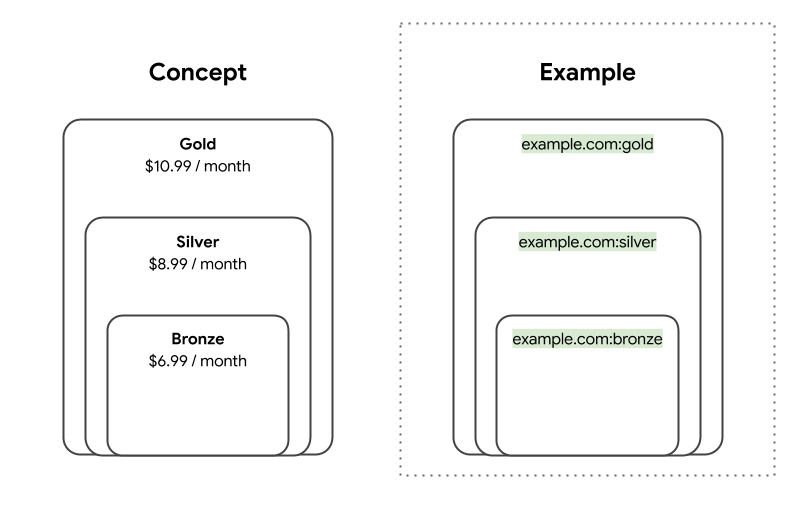
নিম্নলিখিত পরিস্থিতিটি বিবেচনা করুন:
- জেন গোল্ড টিয়ারে সাবস্ক্রাইব করেছেন। আপনার এনটাইটেলমেন্টস এন্ডপয়েন্টটি নিম্নলিখিত
entitlementIdআইডেন্টিফায়ারগুলো রিটার্ন করে:-
example.com:bronze -
example.com:silver -
example.com:gold
-
- জন ব্রোঞ্জ টিয়ারে সাবস্ক্রাইব করেছেন। আপনার এনটাইটেলমেন্টস এন্ডপয়েন্টটি নিম্নলিখিত
entitlementIdফেরত দেয়:-
example.com:bronze
-
- আপনার মিডিয়া অ্যাকশন ফিড নিম্নলিখিত প্রয়োজনীয়তাগুলো বর্ণনা করে:
- মুভি A-এর জন্য
example.com:bronzeপ্রয়োজন। - মুভি B-এর জন্য
example.com:silverপ্রয়োজন।
- মুভি A-এর জন্য
এই পরিস্থিতিতে, গুগল জেন এবং জনের জন্য নিম্নলিখিত অ্যাক্সেস স্তরগুলি নির্ধারণ করে:
- জেন এবং জন উভয়েরই মুভি ‘এ’ -তে প্রবেশাধিকার আছে।
- জেন মুভি বি দেখতে পারে, কিন্তু জন পারে না।
{
  "actionAccessibilityRequirement": {
    "@type": "ActionAccessSpecification",
    "category": "subscription",
    "requiresSubscription": {
      "@type": "MediaSubscription",
      "@id": "http://www.example.com/basic_subscription",
      "name": "Bronze",
      "commonTier": true
      ...
    },
    "additionalProperty": {
      "@type": "PropertyValue",
      "name": "DisplaySubscriptionIdentifier",
      "value": "http://www.example.com/basic_subscription"
    },
    ...
  }
}
অতিরিক্ত সাবস্ক্রিপশন
অ্যাড-অন সাবস্ক্রিপশন মডেলে, একজন পরিষেবা প্রদানকারী ব্যবহারকারীদের তাদের প্রাপ্য সুবিধা প্রসারিত করতে এবং একটি মূল সাবস্ক্রিপশনের সাথে চ্যানেল যুক্ত করার সুযোগ দেয়। ব্যবহারকারীরা তাদের ইচ্ছামতো যত খুশি চ্যানেল যুক্ত করতে পারেন।
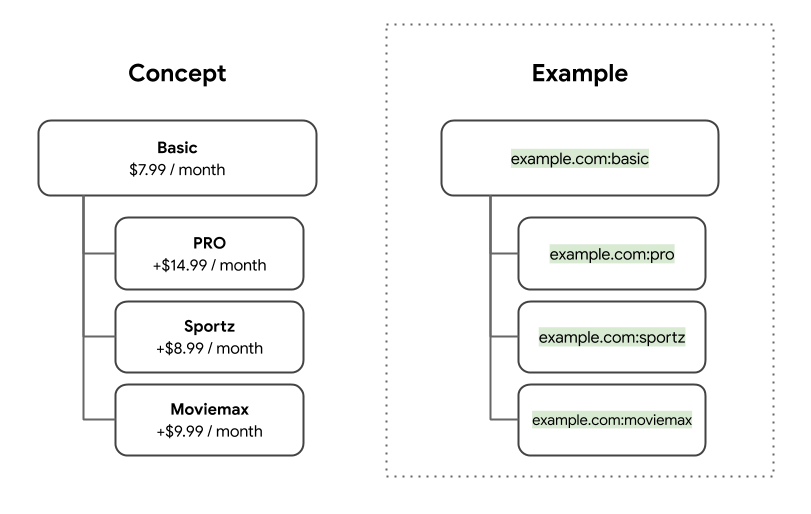
নিম্নলিখিত পরিস্থিতিটি বিবেচনা করুন:
- জেনের বেসিক সাবস্ক্রিপশনের পাশাপাশি প্রো এবং স্পোর্টজও রয়েছে। আপনার এনটাইটেলমেন্টস এন্ডপয়েন্ট নিম্নলিখিত
entitlementIdআইডেন্টিফায়ারগুলো রিটার্ন করে:-
example.com:basic -
example.com:pro -
example.com:sportz
-
- জনের শুধুমাত্র বেসিক সাবস্ক্রিপশন আছে। আপনার এনটাইটেলমেন্টস এন্ডপয়েন্ট নিম্নলিখিত
entitlementIdফেরত দেয়:-
example.com:basic
-
- আপনার মিডিয়া অ্যাকশন ফিড নিম্নলিখিত প্রয়োজনীয়তাগুলো বর্ণনা করে:
- মুভি A-এর জন্য
example.com:basicপ্রয়োজন। - মুভি B-এর জন্য
example.com:proপ্রয়োজন।
- মুভি A-এর জন্য
এই পরিস্থিতিতে, গুগল জেন এবং জনের জন্য নিম্নলিখিত অ্যাক্সেস স্তরগুলি নির্ধারণ করে:
- জেন এবং জন উভয়েরই মুভি ‘এ’ -তে প্রবেশাধিকার আছে।
- জেন মুভি বি দেখতে পারে, কিন্তু জন পারে না।
{
  "actionAccessibilityRequirement": {
    "@type": "ActionAccessSpecification",
    "category": "subscription",
    "availabilityStarts": "2015-01-01T00:00Z",
    "availabilityEnds": "2015-12-31T00:00Z",
    "eligibleRegion": {
      "@type": "Country",
      "name": "US"
    }
    "requiresSubscription": [
      {
          "@type": "MediaSubscription",
          "@id": "https://www.example.com/package/basic",
          "name": "Basic",
          "sameAs": "https://www.example.com/package/basic",
          "commonTier": true
        },
        {
          "@type": "MediaSubscription",
          "@id": "https://www.example.com/packages/basic/pro",
          "name": "PRO",
          "sameAs": "https://www.example.com/package/pro",
          "identifier": "example.com:pro",
          "commonTier": false
        },
        {
          "@type": "MediaSubscription",
          "@id": "https://www.example.com/package/sportz",
          "name": "Sportz",
          "sameAs": "https://www.example.com/package/sports",
          "identifier": "example.com:sportz",
          "commonTier": false
        }
    ],
      "additionalProperty": {
        "@type": "PropertyValue",
        "name": "DisplaySubscriptionIdentifier",
        "value": "http://www.example.com/package/basic"
      },
    }
  }
}
এককালীন ক্রয়
ক্রয়
ক্রয়ের পর কন্টেন্টটি অনির্দিষ্টকালের জন্য উপলব্ধ থাকবে।
{
  "actionAccessibilityRequirement": {
    "@type": "ActionAccessSpecification",
    "category": "purchase",
    "availabilityStarts": "2015-01-01T00:00Z",
    "availabilityEnds": "2015-12-31T00:00Z",
    "eligibleRegion": {
      "@type": "Country",
      "name": "US"
    },
    "expectsAcceptanceOf": {
      "@type": "Offer",
      "price": 7.99,
      "priceCurrency": "USD",
      "seller": {
        "@type": "Organization",
        "name": "Example",
        "sameAs": "http://www.example.com/"
      }
    }
  }
}
purchaseজন্যcategoryনির্ধারণ করুন।- ক্রয়ের মূল্য নির্দেশ করতে
actionAccessibilityRequirementএexpectAcceptanceOfঅন্তর্ভুক্ত করুন।
ভাড়া
ক্রয়ের পর কন্টেন্টটি একটি নির্দিষ্ট সময়ের জন্য উপলব্ধ থাকবে।
{
  "actionAccessibilityRequirement": {
    "@type": "ActionAccessSpecification",
    "category": "rental",
    "availabilityStarts": "2015-01-01T00:00Z",
    "availabilityEnds": "2015-12-31T00:00Z",
    "eligibleRegion": {
      "@type": "Country",
      "name": "US"
    },
    "expectsAcceptanceOf": {
      "@type": "Offer",
      "price": 7.99,
      "priceCurrency": "USD",
      "seller": {
        "@type": "Organization",
        "name": "Example",
        "sameAs": "http://www.example.com/"
      }
    }
  }
}
categoryrentalহিসেবে সেট করুন।- ভাড়ার মূল্য নির্দেশ করতে
actionAccessibilityRequirementএexpectAcceptanceOfঅন্তর্ভুক্ত করুন।
লাইভ টিভি
মিডিয়া অ্যাকশন ফিডে, আপনি নিম্নলিখিত দুটি ব্যবহারকারী শর্তের উপর ভিত্তি করে একটি লাইভ টিভি চ্যানেল বা ইভেন্টে প্রবেশাধিকার সীমাবদ্ধ করতে পারেন:
- ব্যবহারকারীর ডিভাইসের অবস্থান
টিভি চ্যানেলে প্রবেশাধিকার সীমাবদ্ধ করতে, ব্যবহারকারীরা কোন এলাকায় এটি দেখতে পাবে তা নির্দিষ্ট করে দিন। এই শর্তটি সাধারণত স্থানীয় সম্প্রচারিত টিভি চ্যানেলগুলোর ক্ষেত্রে প্রযোজ্য হয়।
- ব্যবহারকারীর অ্যাকাউন্টের অবস্থা
যদি কোনো টিভি চ্যানেলে প্রবেশাধিকার ব্যবহারকারীর অ্যাকাউন্ট-স্তরের সেটিংসের ওপর নির্ভর করে, তাহলে সীমাবদ্ধতাটি বোঝাতে এনটাইটেলমেন্ট আইডেন্টিফায়ার ব্যবহার করুন।
এই শর্তটি সাধারণত নিম্নলিখিত ব্যবহারের ক্ষেত্রগুলিতে প্রযোজ্য হয়:
- বান্ডেল: জাতীয় চ্যানেলগুলো প্রায়শই বান্ডেলের অন্তর্ভুক্ত থাকে এবং ব্যবহারকারীরা নিজেদের পছন্দ অনুযায়ী বান্ডেলটি সাবস্ক্রাইব করেন।
- অতিরিক্ত সংযোজন: কিছু প্রিমিয়াম চ্যানেলের জন্য ব্যবহারকারীদের তাদের সাবস্ক্রিপশনে বেছে বেছে অতিরিক্ত চ্যানেল যোগ করতে হয়।
- আঞ্চলিক ক্রীড়া নেটওয়ার্ক (আরএসএন): আরএসএন সাধারণত ব্যবহারকারীর 'হোম' অবস্থানের সাথে যুক্ত থাকে। ব্যবহারকারীরা তাদের 'হোম' অবস্থানের বাইরে ভ্রমণ করলেও আরএসএন-এ কন্টেন্ট দেখতে পারেন।
তৃতীয় পক্ষের সাবস্ক্রিপশন
তৃতীয় পক্ষের সাবস্ক্রিপশন
সাবস্ক্রাইবাররা ভিন্ন একটি পরিষেবা থেকে কন্টেন্টটি পেতে পারেন।
{
  "actionAccessibilityRequirement": {
    "@type": "ActionAccessSpecification",
    "category": "externalsubscription"
    "availabilityStarts": "2015-01-01T00:00Z",
    "availabilityEnds": "2015-12-31T00:00Z",
    "requiresSubscription":{
      "@type": "MediaSubscription",
      "@id": "https://www.example.com/faq",
      "name": "Example",
      "sameAs": "https://www.example.com/faq",
      "authenticator": {
        "@type": "Organization",
        "name": "TVE"
      }
    },
    "additionalProperty": {
      "@type": "PropertyValue",
      "name": "DisplaySubscriptionIdentifier",
      "value": "http://www.example.com/faq"
     },
    "eligibleRegion": {
      "@type": "Country",
      "name": "US"
    }
  }
}
- সাবস্ক্রাইবারদের প্রমাণীকরণের জন্য একটি ভিন্ন পরিষেবা ব্যবহার করা হয়, তা বোঝাতে
authenticatorযোগ করুন। উদাহরণস্বরূপ, HBO GO ব্যবহারের জন্য কেবল প্রোভাইডারের কাছ থেকে সাবস্ক্রিপশন প্রয়োজন।
সাধারণ স্তরের প্যাকেজগুলি
সাবস্ক্রিপশন প্যাকেজ নির্বিশেষে সকল সাবস্ক্রাইবারের জন্য কমন টিয়ার কন্টেন্ট উপলব্ধ। কমন টিয়ারটি subscription category সমস্ত কন্টেন্টের ক্ষেত্রে প্রযোজ্য। category প্রপার্টি সম্পর্কে আরও তথ্যের জন্য, 'পেওয়াল টাইপ' সেকশনটি দেখুন।
কেন একটি কমন টিয়ার প্যাকেজ প্রয়োজন?
গুগলের একাধিক প্ল্যাটফর্ম ব্যবহারকারীদের টিভি ও সিনেমার সুপারিশ প্রদান করে। খরচ সম্পর্কে ব্যবহারকারীদের প্রত্যাশা তৈরি করতে, গুগলকে অবশ্যই বুঝতে হবে যে কমন টিয়ার ব্যবহারের মাধ্যমে সকল সাবস্ক্রাইবারের জন্য কোন কন্টেন্টগুলো উপলব্ধ। গুগলকে এও বুঝতে হবে যে নির্দিষ্ট সাবস্ক্রিপশন প্যাকেজ থাকা সাবস্ক্রাইবারদের জন্য কোন কন্টেন্টগুলো উপলব্ধ।
আপনি এনটাইটেলমেন্ট এপিআই সমর্থন না করলে, গুগল কমন টিয়ারে উপলব্ধ টাইটেলগুলোর সুপারিশ করে। এই এপিআই গুগলকে বুঝতে সাহায্য করে যে, প্রত্যেক নির্দিষ্ট ব্যবহারকারী কমন টিয়ারের বাইরের কোন কোন টাইটেল অ্যাক্সেস করতে পারবে।
আমার কখন একটি কমন টিয়ার প্যাকেজ তৈরি করা উচিত?
আপনার পরিষেবা যখন সকল গ্রাহকের জন্য উপলব্ধ কন্টেন্ট প্রদান করে, তখন একটি সাধারণ টায়ার প্যাকেজ প্রয়োজন হয়। এর মধ্যে সেইসব পরিষেবাও অন্তর্ভুক্ত, যেগুলো কেবল একটি প্যাকেজ অফার করে এবং সেইসব পরিষেবাও, যেগুলো একাধিক প্যাকেজ বা অ্যাড-অন অফার করে।
যেসব প্রোভাইডারের কোনো কন্টেন্ট সকল সাবস্ক্রাইবারের জন্য উপলব্ধ নেই, তাদের একটি সাধারণ টায়ার প্যাকেজ তৈরি করার প্রয়োজন নেই। এর একটি উদাহরণ হলো সেইসব সার্ভিস প্রোভাইডার, যারা তাদের সমস্ত প্যাকেজে পারস্পরিকভাবে স্বতন্ত্র কন্টেন্ট প্রদান করে।
সাধারণ স্তরের উদাহরণ
নিম্নলিখিতগুলি সাধারণ স্তরের উদাহরণ।
স্তরভিত্তিক সাবস্ক্রিপশন
একটি স্তরভিত্তিক সাবস্ক্রিপশন মডেলে, একজন পরিষেবা প্রদানকারীর একাধিক সাবস্ক্রিপশন স্তর থাকে, যেমন গোল্ড , সিলভার এবং ব্রোঞ্জ স্তর। উচ্চ-স্তরের সাবস্ক্রিপশন থাকা ব্যবহারকারীরা নিম্ন-স্তরের সমস্ত কন্টেন্ট অ্যাক্সেস করতে পারেন। নিম্ন-স্তরের সাবস্ক্রিপশন থাকা ব্যবহারকারীরা উচ্চ-স্তরের কন্টেন্ট অ্যাক্সেস করতে পারেন না। নিচের ছবিটি এই প্যাকেজ কাঠামোর একটি উদাহরণ।
নিম্নলিখিত কোড উদাহরণে, ব্রোঞ্জ প্যাকেজটি হলো সাধারণ স্তর, কারণ সকল ব্যবহারকারী সেই স্তরের সমস্ত কন্টেন্টে প্রবেশাধিকার পায়।
"requiresSubscription": [
    {
      "@type": "MediaSubscription",
      "@id": "https://www.example.com/package/bronze",
      "name": "Bronze",
      "sameAs": "https://www.example.com/package/bronze",
      "commonTier": true
    },
    {
      "@type": "MediaSubscription",
      "@id": "https://www.example.com/package/silver",
      "name": "Silver",
      "sameAs": "https://www.example.com/package/silver",
      "identifier": "example.com:silver",
      "commonTier": false
    },
    {
      "@type": "MediaSubscription",
      "@id": "https://www.example.com/package/gold",
      "name": "Gold",
      "sameAs": "https://www.example.com/package/gold",
      "identifier": "example.com:gold",
      "commonTier": false
    }
  ],
অতিরিক্ত সংযোজন
অ্যাড-অন সাবস্ক্রিপশন মডেলে, একজন পরিষেবা প্রদানকারী ব্যবহারকারীদের তাদের প্রাপ্য সুবিধা প্রসারিত করতে এবং একটি বেসিক সাবস্ক্রিপশনে চ্যানেল যোগ করার সুযোগ দেয়। ব্যবহারকারীরা তাদের ইচ্ছামতো যত খুশি চ্যানেল যোগ করতে পারেন। নিচের ছবিটি এই প্যাকেজ কাঠামোর একটি উদাহরণ।
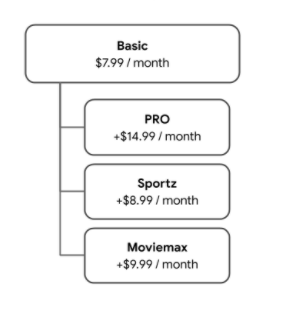
যদি আপনার এমন কোনো চ্যানেল থাকে যা সকল ব্যবহারকারীর জন্য উপলব্ধ এবং এর জন্য কোনো খরচ নেই, তাহলে আপনি প্যাকেজটিকে কমন টিয়ার প্যাকেজের সাথে একীভূত করতে পারেন।
নিম্নলিখিত কোড উদাহরণে, বেসিক প্যাকেজটি হলো কমন টিয়ার, কারণ সকল ব্যবহারকারী এই প্যাকেজের সমস্ত কন্টেন্ট অ্যাক্সেস করতে পারে।
"requiresSubscription": [
    {
      "@type": "MediaSubscription",
      "@id": "https://www.example.com/package/basic",
      "name": "Basic",
      "sameAs": "https://www.example.com/package/basic",
      "commonTier": true
    },
    {
      "@type": "MediaSubscription",
      "@id": "https://www.example.com/packages/basic/pro",
      "name": "PRO",
      "sameAs": "https://www.example.com/package/pro",
      "identifier": "example.com:pro",
      "commonTier": false
    },
    {
      "@type": "MediaSubscription",
      "@id": "https://www.example.com/package/sportz",
      "name": "Sportz",
      "sameAs": "https://www.example.com/package/sports",
      "identifier": "example.com:sportz",
      "commonTier": false
    },
    {
      "@type": "MediaSubscription",
      "@id": "https://www.example.com/package/moviemax",
      "name": "Moviemax",
      "sameAs": "https://www.example.com/package/moviemax",
      "identifier": "example.com:moviemax",
      "commonTier": false
    }
  ],
যেসব প্যাকেজের বিষয়বস্তু পরস্পরকে ছেদ করে
এমন একটি কন্টেন্ট মডেলে যেখানে প্যাকেজগুলোর মধ্যে পারস্পরিক সংযোগ থাকে, সেখানে একজন পরিষেবা প্রদানকারী এমন প্যাকেজ বিক্রি করেন যেগুলোতে অন্য প্যাকেজের কিছু কন্টেন্ট অন্তর্ভুক্ত থাকে। নিচের ছবিটি এই ধরনের প্যাকেজ কাঠামোর একটি উদাহরণ।
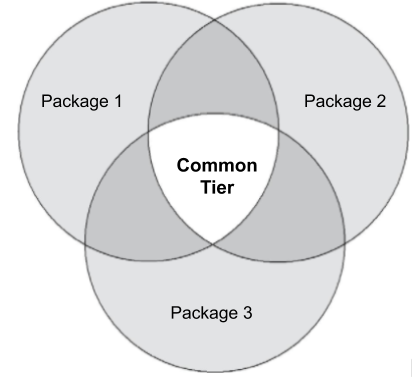
নিম্নলিখিত কোড উদাহরণে, প্রোভাইডারটি তিনটি প্যাকেজ অফার করে, যেখানে কিছু কন্টেন্ট সব প্যাকেজেই পাওয়া যায়। এক্ষেত্রে, একটি চতুর্থ প্যাকেজের প্রয়োজন, যা কমন টিয়ারকে প্রতিনিধিত্ব করবে। এতে অবশ্যই তিনটি প্যাকেজেই উপলব্ধ সমস্ত কন্টেন্ট অন্তর্ভুক্ত থাকতে হবে।
"requiresSubscription": [
    {
      "@type": "MediaSubscription",
      "@id": "https://www.example.com/package/1",
      "name": "Package 1",
      "sameAs": "https://www.example.com/package/1",
      "identifier": "example.com:package1",
      "commonTier": false
    },
    {
      "@type": "MediaSubscription",
      "@id": "https://www.example.com/package/2",
      "name": "Package 2",
      "sameAs": "https://www.example.com/package/2",
      "identifier": "example.com:package2",
      "commonTier": false
    },
    {
      "@type": "MediaSubscription",
      "@id": "https://www.example.com/package/3",
      "name": "Package 3",
      "sameAs": "https://www.example.com/package/3",
      "identifier": "example.com:package3",
      "commonTier": false
    },
    {
      "@type": "MediaSubscription",
      "@id": "https://www.example.com/package/common",
      "name": "Common Tier Package",
      "sameAs": "https://www.example.com/package/common",
      "commonTier": true
    }
  ],
বিষয়বস্তুবিহীন প্যাকেজ যা ছেদ করে
এমন একটি কন্টেন্ট মডেলে যেখানে সমস্ত কন্টেন্ট প্যাকেজ একে অপরের সাথে সংযুক্ত থাকে না, সেখানে একজন পরিষেবা প্রদানকারী এমন প্যাকেজ বিক্রি করে যেগুলিতে অন্য কোনো প্যাকেজের কন্টেন্ট অন্তর্ভুক্ত থাকে না। নিচের ছবিটি এই ধরনের প্যাকেজ কাঠামোর একটি উদাহরণ।

নিম্নলিখিত উদাহরণে, প্রদানকারী তিনটি প্যাকেজ অফার করে, যেগুলোর কোনো কন্টেন্টের মধ্যে মিল নেই। কোনো কমন টিয়ার প্যাকেজের প্রয়োজন নেই।
"requiresSubscription": [
    {
      "@type": "MediaSubscription",
      "@id": "https://www.example.com/package/1",
      "name": "Package 1",
      "sameAs": "https://www.example.com/package/1",
      "identifier": "example.com:package1",
      "commonTier": false
    },
    {
      "@type": "MediaSubscription",
      "@id": "https://www.example.com/package/2",
      "name": "Package 2",
      "sameAs": "https://www.example.com/package/2",
      "identifier": "example.com:package2",
      "commonTier": false
    },
    {
      "@type": "MediaSubscription",
      "@id": "https://www.example.com/package/3",
      "name": "Package 3",
      "sameAs": "https://www.example.com/package/3",
      "identifier": "example.com:package3",
      "commonTier": false
    }
  ],
এনটাইটেলমেন্টস এন্ডপয়েন্ট
এই বিভাগের তথ্য ব্যবহার করে এমন একটি HTTPS এন্ডপয়েন্ট হোস্ট করুন যা একজন ব্যবহারকারীর সাথে সম্পর্কিত এনটাইটেলমেন্টগুলো ফেরত দেবে।
পূর্বশর্ত
শুরু করার আগে, যাচাই করে নিন যে আপনার পরিষেবাটি গুগলের OAuth 2.0 ফ্লো সমর্থন করে।
অনুরোধ
ব্যবহারকারীর অধিকারসমূহ গ্রহণ করার জন্য, গুগল একটি অনুরোধ পাঠায় যাতে ব্যবহারকারীর OAuth টোকেন থাকে। আপনার এন্ডপয়েন্টকে সেই OAuth টোকেনের উপর ভিত্তি করে ব্যবহারকারীকে শনাক্ত করতে হবে। নিম্নলিখিত উদাহরণটি দেখুন:
GET /resource HTTP/1.1
Host: server.example.com
Authorization: Bearer <OAuthToken>
প্রতিক্রিয়া
আপনার এন্ডপয়েন্টকে অবশ্যই নিম্নলিখিত বৈশিষ্ট্যসহ একটি প্রতিক্রিয়া ফেরত দিতে হবে:
| সম্পত্তি | |
|---|---|
subscription | প্রয়োজনীয় এটি রুট রেসপন্সের ভেতরের একটি ফিল্ড। |
subscription.type | প্রয়োজনীয় এই প্রপার্টিটির নিম্নলিখিত মানগুলো থাকতে পারে:
|
subscription.expiration_date | ঐচ্ছিক এই অধিকারের মেয়াদ শেষ হওয়ার তারিখ, যা ISO 8601 ফরম্যাটে টাইমজোন সহ উল্লেখ থাকবে। আরও বিস্তারিত জানতে, মেয়াদ শেষ হওয়ার তারিখসমূহ দেখুন। |
entitlements | ঐচ্ছিক এই রুট প্রপার্টিটিতে ব্যবহারকারীর |
entitlements.entitlement | আপনার সাবস্ক্রিপশনের ধরনের ওপর ভিত্তি করে স্ট্রিমিং ক্যাটালগে প্রবেশাধিকার ভিন্ন হলে এটি প্রয়োজন । এই প্রপার্টিতে |
entitlements.expiration_date | ঐচ্ছিক এই সাবস্ক্রিপশনের মেয়াদ শেষ হওয়ার তারিখ, যা টাইমজোন সহ ISO 8601 ফরম্যাটে উল্লেখ থাকবে। আরও বিস্তারিত জানতে, মেয়াদ শেষ হওয়ার তারিখ (Expiration dates) দেখুন। |
মেয়াদ শেষ হওয়ার তারিখ
একটি এন্ডপয়েন্ট রেসপন্সে মেয়াদ শেষ হওয়ার তারিখ সংক্রান্ত দুটি প্রপার্টি থাকে: subscription.expiration_date এবং entitlements.expiration_date । আপনি এগুলোর মধ্যে যেকোনো একটি অন্তর্ভুক্ত করতে পারেন অথবা কোনোটিই না করতে পারেন, কিন্তু উভয়ই একসাথে নয়। আপনি কোনটি ব্যবহার করবেন তা আপনার সাবস্ক্রিপশন মডেলের উপর নির্ভর করে।
| সাবস্ক্রিপশন মডেল | |
|---|---|
| সকল সাবস্ক্রাইবারের জন্য আপনার স্ট্রিমিং ক্যাটালগে প্রবেশের সুযোগ একই। | যেহেতু আপনার entitlements প্রপার্টিটি নির্দিষ্ট করার প্রয়োজন নেই, তাই subscription.expiration_date নির্দিষ্ট করুন। |
ব্যবহারকারীর সাবস্ক্রিপশনের বিবরণের উপর ভিত্তি করে আপনার স্ট্রিমিং ক্যাটালগে প্রবেশের সুযোগ ভিন্ন হতে পারে। | আপনার সাবস্ক্রিপশন মডেলে যদি একাধিক স্তর বা এমন অ্যাড-অন থাকে যা সময়ের সাথে সাথে মেয়াদোত্তীর্ণ হয়ে যায়, তাহলে নিম্নলিখিতগুলির মধ্যে একটি করুন:
|
উদাহরণমূলক উত্তর
নিম্নলিখিতগুলি বিভিন্ন সাবস্ক্রিপশন অবস্থার উদাহরণমূলক প্রতিক্রিয়া:
- সক্রিয় সাবস্ক্রিপশন
- মেয়াদ শেষ হওয়ার তারিখ সহ সক্রিয় সাবস্ক্রিপশন
- কোন সাবস্ক্রিপশন নেই
- একাধিক স্তর বা অ্যাড-অনের সক্রিয় সাবস্ক্রিপশন
সক্রিয় সাবস্ক্রিপশন
সক্রিয় সাবস্ক্রিপশন
একজন ব্যবহারকারীর example.com- এ একটি সক্রিয় সাবস্ক্রিপশন আছে। এক্ষেত্রে, সকল সাবস্ক্রাইবার তাদের সাবস্ক্রিপশনের ধরন নির্বিশেষে আপনার সম্পূর্ণ স্ট্রিমিং ক্যাটালগ অ্যাক্সেস করতে পারবেন।
{
  "subscription" : {
    "type": "ActiveSubscription",
  }
}
মেয়াদ শেষ হওয়ার তারিখ সহ সক্রিয় সাবস্ক্রিপশন
মেয়াদ শেষ হওয়ার তারিখ সহ সক্রিয় সাবস্ক্রিপশন
একজন ব্যবহারকারীর example.com- এ একটি সক্রিয় সাবস্ক্রিপশন আছে এবং সেই সাবস্ক্রিপশনের একটি মেয়াদ শেষ হওয়ার তারিখ রয়েছে। এক্ষেত্রে, সকল সাবস্ক্রাইবার তাদের সাবস্ক্রিপশনের ধরন নির্বিশেষে আপনার সম্পূর্ণ স্ট্রিমিং ক্যাটালগ অ্যাক্সেস করতে পারবেন।
{
  "subscription" : {
    "type": "ActiveSubscription",
    "expiration_date": "2019-11-10T10:00:00Z"
  }
}
কোন সাবস্ক্রিপশন নেই
কোন সাবস্ক্রিপশন নেই
একজন ব্যবহারকারীর example.com- এ কোনো সাবস্ক্রিপশন নেই।
{
  "subscription" : {
    "type": "InactiveSubscription"
  }
}
একাধিক স্তর বা অ্যাড-অনের সক্রিয় সাবস্ক্রিপশন
একাধিক স্তর বা অ্যাড-অনের সক্রিয় সাবস্ক্রিপশন
একজন ব্যবহারকারীর একটি নির্দিষ্ট তারিখ পর্যন্ত example.com:premium এর সাবস্ক্রিপশন রয়েছে।
{
  "subscription" : {
    "type": "ActiveSubscription",
  }
  "entitlements": [
    {
      "entitlement": "example.com:premium",
      "expiration": "2019-11-10T10:00:00Z"
    }
  ]
}
হারের সীমা
গুগল প্রতি ছয় ঘণ্টা পর্যন্ত একজন ব্যবহারকারীর এনটাইটেলমেন্ট তথ্য রিফ্রেশ করে। প্রতি সেকেন্ডে সর্বোচ্চ কোয়েরির (QPS) ভারসাম্য বজায় রাখতে, গুগল আপনার এন্ডপয়েন্টে কোয়েরিগুলোকে সময়ের সাথে সাথে সমানভাবে বন্টন করে। সুতরাং, আপনি নিম্নলিখিত সূত্রটি ব্যবহার করে আপনার এন্ডপয়েন্টের জন্য প্রত্যাশিত গড় QPS অনুমান করতে পারেন:
প্রত্যাশিত গড় QPS = <মোট ব্যবহারকারীর সংখ্যা> / ২১,৬০০ সেকেন্ড (৬ ঘণ্টা x ৬০ মিনিট x ৬০ সেকেন্ড)
আপনি যদি বিপুল সংখ্যক ব্যবহারকারীকে পরিষেবা দেন, তাহলে গুগল ৬-ঘণ্টার ব্যবধানটি সমন্বয় করতে পারে। প্রয়োজনে, কনফিগারেশন নিয়ে আলোচনার জন্য গুগলের সাথে যোগাযোগ করুন।
গুগলের সাথে যোগাযোগ করুন
আপনার এন্ডপয়েন্ট প্রস্তুত হয়ে গেলে, এন্ডপয়েন্টের ইউআরএলটি জানানোর জন্য গুগলের সাথে যোগাযোগ করুন।
অ্যাকশন অ্যাক্সেস স্পেসিফিকেশন বৈশিষ্ট্য
তথ্যসূত্রের জন্য অ্যাকশন অ্যাক্সেস স্পেসিফিকেশন প্রোপার্টি বিভাগটি দেখুন।
,ব্যবহারকারীরা এমন কন্টেন্ট দেখতে বা শুনতে পছন্দ করেন যা তারা আগে থেকেই দেখতে পারেন, যেমন তাদের বিদ্যমান সাবস্ক্রিপশন কন্টেন্ট। যদি গুগল জানে যে একজন ব্যবহারকারী আপনার অ্যাপ বা প্ল্যাটফর্মে কোন কন্টেন্ট দেখতে পারেন, তাহলে গুগল তার বিভিন্ন প্ল্যাটফর্মে আরও প্রাসঙ্গিক অভিজ্ঞতা প্রদান করতে পারে এবং ব্যবহারকারীকে সেই কন্টেন্টের দিকে পরিচালিত করতে পারে।
বিষয়বস্তু অ্যাক্সেসের প্রয়োজনীয়তা শনাক্ত করুন
আপনার ক্যাটালগে থাকা প্রতিটি কন্টেন্ট প্যাকেজের জন্য প্রয়োজনীয় অ্যাক্সেস শনাক্ত করতে হবে। তা করার সময়, নিম্নলিখিত প্রশ্নগুলো বিবেচনা করুন:
- কন্টেন্ট অ্যাক্সেস করার জন্য ব্যবহারকারীদের কি আপনার অ্যাপ বা প্ল্যাটফর্মে লগ ইন করতে হবে?
ব্যবহারকারীদের কি সাবস্ক্রিপশনের প্রয়োজন আছে?
শুধুমাত্র কার্যকলাপ দেখুন:
- ব্যবহারকারীদের কি কোনো বাহ্যিক পরিষেবা প্রদানকারীর কাছ থেকে সাবস্ক্রিপশন নিতে হবে?
- আপনারা কি স্তরভিত্তিক, একাধিক প্যাকেজ, বা অ্যাড-অন সাবস্ক্রিপশন অফার করেন?
শুধুমাত্র দেখার কার্যক্রম: ব্যবহারকারীদের কি কন্টেন্টটি ভাড়া বা ক্রয় করতে হবে?
সময়ের সাথে সাথে কি প্রবেশের প্রয়োজনীয়তা পরিবর্তিত হয়?
অ্যাক্সেসের প্রয়োজনীয়তা কি ডিভাইসের অবস্থানের উপর নির্ভর করে?
অ্যাক্সেস সীমাবদ্ধতার প্রকার
দুই ধরনের প্রবেশাধিকার সীমাবদ্ধতা রয়েছে:
পেওয়াল টাইপ
আপনি পেওয়ালের ধরন অনুযায়ী কন্টেন্টে প্রবেশাধিকার সীমাবদ্ধ করতে পারেন। নিচের সারণিতে বিভিন্ন ধরনের পেওয়ালের বিবরণ দেওয়া হলো:
| পেওয়াল টাইপ | উদাহরণ | বিভাগ |
|---|---|---|
| কোনো কেনাকাটা বা লগইন করার প্রয়োজন নেই। | ক্র্যাকল | nologinrequired |
| ব্যবহারকারীকে অবশ্যই লগ ইন করতে হবে, কিন্তু কোনো পেইড সাবস্ক্রিপশনের প্রয়োজন নেই। | ভুডু (এভিওডি) | free |
| ব্যবহারকারীর একটি সক্রিয় সাবস্ক্রিপশন থাকতে হবে। সাবস্ক্রিপশনের স্তর নির্বিশেষে অ্যাক্সেস পাওয়া যাবে। | নেটফ্লিক্স | |
| ব্যবহারকারীর একটি সক্রিয় সাবস্ক্রিপশন থাকতে হবে। অ্যাক্সেস সাবস্ক্রিপশন স্তরের উপর নির্ভরশীল। | হুলু (অতিরিক্ত সংযোজন) | |
| ক্রয়ের পর কন্টেন্টটি একটি নির্দিষ্ট সময়ের জন্য উপলব্ধ থাকবে। | ভুডু | rental |
| ক্রয়ের পর কন্টেন্টটি অনির্দিষ্টকালের জন্য উপলব্ধ থাকবে। | ভুডু | purchase |
| কেবল সাবস্ক্রিপশনের মাধ্যমে কন্টেন্টটি পাওয়া যায়। | এইচবিও গো | externalSubscription |
ওয়াচ অ্যাকশনের জন্য পেওয়ালের ধরণ
ওয়াচ অ্যাকশনগুলির জন্য কন্টেন্ট পেওয়াল টাইপ নির্দিষ্ট করতে, অ্যাকশন অ্যাক্সেস স্পেসিফিকেশনে category প্রপার্টি ব্যবহার করুন:
"potentialAction": {
  "@type":"WatchAction",
  "target": { … },
  "actionAccessibilityRequirement": {
    "@type": "ActionAccessSpecification",
    "category": "subscription",
    "availabilityStarts": "2018-06-01T10:35:29Z",
    "availabilityEnds": "2019-05-31T10:35:29Z",
    "eligibleRegion": {
      "@type": "Country",
      "name": "US"
    }
  },
  ...
}
লিসেন অ্যাকশনের জন্য পেওয়াল টাইপ
লিসেন অ্যাকশনগুলির জন্য কন্টেন্ট পেওয়ালের ধরণ নির্দিষ্ট করতে, অফার অবজেক্টের category প্রপার্টি ব্যবহার করুন:
"potentialAction": {
  "@type":"ListenAction",
  "target": { … },
  "expectsAcceptanceOf":{
    "@type":"Offer",
    "category":"subscription",
    "availabilityStarts": "2018-06-01T10:35:29Z",
    "availabilityEnds": "2019-05-31T10:35:29Z",
    "eligibleRegion": {
      "@type":"Country",
      "name":"US"
    }
  },
  ...
}
ভৌগোলিক এলাকা
আপনাকে অবশ্যই সেই ভৌগোলিক এলাকাগুলো নির্দিষ্ট করতে হবে যেখানে কন্টেন্টটি পাওয়া যায়। নিম্নলিখিত বৈশিষ্ট্যগুলোর মধ্যে একটি বা উভয়টি ব্যবহার করুন:
- একটি অ্যাকশন অ্যাক্সেস স্পেসিফিকেশন অবজেক্টের
eligibleRegionপ্রপার্টি। এই প্রপার্টিটি আবশ্যক। - একটি অ্যাকশন অ্যাক্সেস স্পেসিফিকেশন অবজেক্টের
ineligibleRegionপ্রপার্টি।
ব্যবহারকারী কন্টেন্ট অ্যাক্সেস করতে পারবেন, যদি ডিভাইসের অবস্থান eligibleRegion এ উল্লেখিত কোনো অঞ্চলের মধ্যে থাকে এবং ineligibleRegion এ উল্লেখিত কোনো অঞ্চলের মধ্যে না থাকে।
eligibleRegion এবং ineligibleRegion প্রপার্টিগুলোতে নিম্নলিখিত মানগুলো অনুমোদিত:
-
Country,CityওStateএকটি তালিকা। - একটি
GeoShapeঅবজেক্ট। বিস্তারিত প্রয়োজনীয়তার জন্যGeoShapeপ্রোপার্টি বিভাগটি দেখুন। -
GeoShapeঅবজেক্টগুলোর একটি তালিকা।
যদি কন্টেন্টটি বিশ্বব্যাপী উপলব্ধ থাকে, তাহলে eligibleRegion জন্য নিম্নলিখিত বিশেষ মানটি ব্যবহার করুন:
"eligibleRegion": "EARTH",
যোগ্য অঞ্চলের ব্যবহারের ক্ষেত্রসমূহ
eligibleRegion প্রপার্টির ব্যবহারের কিছু উদাহরণ নিচে দেওয়া হলো:
- উদাহরণ ১:
eligibleRegionএবং এর সাথে দেশগুলোর একটি তালিকা। - উদাহরণ ২: একটি
GeoShapeঅবজেক্ট সহeligibleRegion, যেটিতে জিপ কোডগুলির একটি তালিকা রয়েছে। - উদাহরণ ৩: একটি
GeoShapeঅবজেক্ট সহeligibleRegion, যেটিতে ফরওয়ার্ড সর্টেশন এরিয়া (FSA) কোডগুলির একটি তালিকা রয়েছে। - উদাহরণ ৪: একটি
GeoShapeঅবজেক্টসহeligibleRegion, যেটিতে একটি DMA ID রয়েছে। - উদাহরণ ৫:
eligibleRegionযেখানেGeoShapeঅবজেক্টের একটি তালিকা রয়েছে। প্রতিটিতে একটি DMA ID আছে। - উদাহরণ ৬: অবরুদ্ধ জিপ কোডসহ
ineligibleRegion।
উদাহরণ ১
eligibleRegion এবং দেশসমূহের তালিকা:
"actionAccessibilityRequirement": {
  "@type": "ActionAccessSpecification",
  "category": "subscription",
  "requiresSubscription": {
    "@type": "MediaSubscription",
    "@id": "http://www.example.com/north_america_network/subscription",
    "name": "Example Subscription",
    "commonTier": true
  },
  "eligibleRegion": [
    {
      "@type": "Country",
      "name": "US"
    },
    {
      "@type": "Country",
      "name": "CA"
    }
  ]
}
উদাহরণ ২
একটি GeoShape অবজেক্ট সহ eligibleRegion , যাতে জিপ কোডগুলির একটি তালিকা থাকে:
"actionAccessibilityRequirement": {
  "@type": "ActionAccessSpecification",
  "category": "subscription",
  "requiresSubscription": {
    "@type": "MediaSubscription",
    "@id": "http://www.example.com/local_tv_network/subscription",
    "name": "Example Subscription",
    "commonTier": true
  },
  "eligibleRegion": {
    "@type": "GeoShape",
    "@id": "http://example.com/area1",
    "addressCountry": "US",
    "postalCode": [
      "94118",
      "94119"
    ]
  }
}
উদাহরণ ৩
একটি GeoShape অবজেক্ট সহ eligibleRegion , যাতে ফরওয়ার্ড সর্টেশন এরিয়া (FSA) কোডগুলির একটি তালিকা থাকে:
"actionAccessibilityRequirement": {
  "@type": "ActionAccessSpecification",
  "category": "subscription",
  "requiresSubscription": {
    "@type": "MediaSubscription",
    "@id": "http://www.example.com/local_tv_network/subscription",
    "name": "Example Subscription",
    "commonTier": true
  },
  "additionalProperty": {
      "@type": "PropertyValue",
      "name": "DisplaySubscriptionIdentifier",
      "value": "http://www.example.com/local_tv_network/subscription"
  },
  "eligibleRegion":{
    "@type": "GeoShape",
    "@id": "http://example.com/area2",
    "addressCountry": "CA",
    "postalCode": [
      "1A1",
      "K1A"
    ]
  }
}
উদাহরণ ৪
একটি GeoShape অবজেক্ট সহ eligibleRegion , যেটিতে DMA ID রয়েছে:
"actionAccessibilityRequirement": {
  "@type": "ActionAccessSpecification",
  "category": "subscription",
  "requiresSubscription": {
    "@type": "MediaSubscription",
    "@id": "http://www.example.com/abcd/subscription",
    "name": "Example Subscription",
    "commonTier": true
  },
  "additionalProperty": {
      "@type": "PropertyValue",
      "name": "DisplaySubscriptionIdentifier",
      "value": "http://www.example.com/abcd/subscription"
  },
  "eligibleRegion":{
    "@type": "GeoShape",
    "@id": "http://example.com/area3",
    "addressCountry": "US",
    "identifier": [
      {
        "@type": "PropertyValue",
        "propertyID": "DMA_ID",
        "value": "501"
      }
    ]
  }
}
উদাহরণ ৫
eligibleRegion যেখানে GeoShape অবজেক্টের একটি তালিকা রয়েছে। প্রতিটিতে একটি DMA ID আছে:
"actionAccessibilityRequirement" : {
   "@type" : "ActionAccessSpecification",
   "eligibleRegion" : [
      {
         "@id" : "http://example.com/dma/601",
         "@type" : "GeoShape",
         "addressCountry" : "US",
         "identifier" : {
            "@type" : "PropertyValue",
            "propertyID" : "DMA_ID",
            "value" : "601"
         }
      },
      {
         "@id" : "http://example.com/dma/602",
         "@type" : "GeoShape",
         "addressCountry" : "US",
         "identifier" : {
            "@type" : "PropertyValue",
            "propertyID" : "DMA_ID",
            "value" : "602"
         }
      }
   ]
}
উদাহরণ ৬
ব্লক করা জিপ কোড সহ ineligibleRegion :
"actionAccessibilityRequirement": {
  "@type": "ActionAccessSpecification",
  "category": "subscription",
  "requiresSubscription": {
    "@type": "MediaSubscription",
    "@id": "http://www.example.com/local_tv_network/subscription",
    "name": "Example Subscription",
    "commonTier": true
  },
  "additionalProperty": {
      "@type": "PropertyValue",
      "name": "DisplaySubscriptionIdentifier",
      "value": "http://www.example.com/local_tv_network/subscription"
  },
 "eligibleRegion":   {
      "@type": "Country",
      "name": "US"
    },
  "ineligibleRegion": {
    "@type": "GeoShape",
    "@id": "http://example.com/area1",
    "addressCountry": "US",
    "postalCode": [
      "94118",
      "94119"
    ]
  }
}
অধিকার শনাক্তকারী
এনটাইটেলমেন্ট আইডেন্টিফায়ার, entitlementId , একটি স্ট্রিংকে বোঝায় যা আপনার মিডিয়া ক্যাটালগের কোনো একটি কন্টেন্ট গ্রুপে অ্যাক্সেসকে নির্দেশ করে। কোনো ব্যবহারকারীর আপনার কন্টেন্টে অ্যাক্সেস আছে কিনা তা নির্ধারণ করতে, গুগল নিম্নলিখিত পদক্ষেপগুলো গ্রহণ করে:
- ব্যবহারকারীর এনটাইটেলমেন্ট আইডেন্টিফায়ারগুলো পাওয়ার জন্য আমরা আপনার এনটাইটেলমেন্টস এন্ডপয়েন্টে একটি এপিআই কল করি।
- আমরা আপনার মিডিয়া অ্যাকশন ফিড থেকে কন্টেন্টটির জন্য প্রয়োজনীয় এনটাইটেলমেন্ট আইডেন্টিফায়ারগুলো খুঁজে বের করি।
- আমরা আপনার ফিডে থাকা মিডিয়া সাবস্ক্রিপশন অবজেক্টের
identifierপ্রপার্টির সাথে একজন ব্যবহারকারীরentitlementIdমিলিয়ে দেখি। যদি অন্তত একটিentitlementIdমিলে যায়, তাহলে আমরা নির্ধারণ করি যে ব্যবহারকারী কন্টেন্টটি অ্যাক্সেস করতে পারবেন।
Google entitlementId জন্য নিম্নলিখিত সিনট্যাক্স ব্যবহার করার পরামর্শ দেয়:
<domain name> + colon (:) + <access level to content>
সিনট্যাক্স উদাহরণ:
-
example.com:basic -
example.com:premium -
example.com:sports
এনটাইটেলমেন্ট আইডেন্টিফায়ার উদাহরণ
MediaExampleCompany- এর ফিড অনুযায়ী, Movie XYZ জন্য example.com:basic entitlementId প্রয়োজন, যেমনটি দেখানো হয়েছে:
{
  "@context": ["http://schema.org", {"@language": "en"}],
  "@type": "Movie",
  "@id": "www.example.com/movie_xyz",
  "url": "www.example.com/movie_xyz",
  "name": "Movie XYZ",
  "potentialAction": {
    "@type": "WatchAction",
    "target": [ … ],
    "actionAccessibilityRequirement": {
      "@type": "ActionAccessSpecification",
      "category": "subscription",
      "requiresSubscription": {
        "@type": "MediaSubscription",
        "@id": "http://www.example.com/basic_subscription",
        "name": "Basic subscription",
        "commonTier": true
        ...
      },
      "additionalProperty": {
        "@type": "PropertyValue",
        "name": "DisplaySubscriptionIdentifier",
        "value": "http://www.example.com/basic_subscription"
      },
      ...
    }
  },
  ...
}
সাধারণ অ্যাক্সেস ব্যবহারের ক্ষেত্রসমূহ
নিম্নলিখিতগুলি হলো সাধারণ অ্যাক্সেস ব্যবহারের ক্ষেত্র:
- বিনামূল্যে (লগইন প্রয়োজন নেই): কন্টেন্টটি লগইন, সাবস্ক্রিপশন বা ক্রয় ছাড়াই উপলব্ধ।
- বিনামূল্যে (লগইন আবশ্যক): কন্টেন্টটি ব্যবহারের জন্য ব্যবহারকারীদের লগইন করতে হবে, কিন্তু কোনো সাবস্ক্রিপশনের প্রয়োজন নেই।
- একক-স্তরীয় সাবস্ক্রিপশন: কন্টেন্টটি পেতে সাবস্ক্রিপশন প্রয়োজন। সকল সাবস্ক্রাইবার তাদের সাবস্ক্রিপশন প্যাকেজ নির্বিশেষে একই কন্টেন্ট, তা সিনেমা হোক বা এপিসোড, দেখতে পারেন।
- বহু-স্তরীয় সাবস্ক্রিপশন: এই কন্টেন্টের জন্য সাবস্ক্রিপশন প্রয়োজন। সাবস্ক্রাইবাররা তাদের সাবস্ক্রিপশন স্তরের উপর ভিত্তি করে বিভিন্ন কন্টেন্ট, যেমন সিনেমা বা এপিসোড, দেখতে পারেন। উদাহরণস্বরূপ, সিলভার বনাম গোল্ড ।
- অতিরিক্ত সাবস্ক্রিপশন: এই কন্টেন্টের জন্য সাবস্ক্রিপশন প্রয়োজন। সাবস্ক্রাইবাররা তাদের নিয়মিত সাবস্ক্রিপশনের পাশাপাশি প্রিমিয়াম কন্টেন্ট যোগ করতে পারেন।
- এককালীন ক্রয়: কন্টেন্টটি ক্রয় করা গেলে, ব্যবহারকারী অনির্দিষ্টকালের জন্য তা ব্যবহার করতে পারবেন।
- লাইভ টিভি: সাবস্ক্রিপশনের মাধ্যমে স্থানীয়, জাতীয় এবং প্রিমিয়াম চ্যানেলগুলো দেখা যায়।
- তৃতীয় পক্ষের সাবস্ক্রিপশন: কন্টেন্টটি পেতে ব্যবহারকারীকে তার কেবল প্রোভাইডারের মাধ্যমে লগ ইন করতে হবে।
বিনামূল্যে (কোন লগইন প্রয়োজন নেই)
কোনো লগইন করার প্রয়োজন নেই।
লগইন বা সাবস্ক্রিপশন ছাড়াই কন্টেন্টটি পাওয়া যাবে।
{
  "actionAccessibilityRequirement": {
    "@type": "ActionAccessSpecification",
    "category": "nologinrequired",
    "availabilityStarts": "2015-01-01T00:00Z",
    "availabilityEnds": "2015-12-31T00:00Z",
    "eligibleRegion": {
      "@type": "Country",
      "name": "US"
    }
  }
}
categorynologinrequiredএ সেট করুন।-
expectAcceptanceOfঅন্তর্ভুক্ত করবেন না।
বিনামূল্যে (লগইন আবশ্যক)
লগইন আবশ্যক
কন্টেন্টটি ব্যবহারের জন্য ব্যবহারকারীদের লগ ইন করতে হবে, কিন্তু কোনো সাবস্ক্রিপশনের প্রয়োজন নেই।
{
  "actionAccessibilityRequirement": {
    "@type": "ActionAccessSpecification",
    "category": "free",
    "availabilityStarts": "2015-01-01T00:00Z",
    "availabilityEnds": "2015-12-31T00:00Z",
    "eligibleRegion": {
      "@type": "Country",
      "name": "US"
    }
  }
}
categoryfreeসেট করুন।-
expectAcceptanceOfঅন্তর্ভুক্ত করবেন না।
একক-স্তর সাবস্ক্রিপশন
একক-স্তরীয় সাবস্ক্রিপশন মডেলে, একজন পরিষেবা প্রদানকারীর একটিই সাবস্ক্রিপশন স্তর থাকে। সকল গ্রাহক তাদের সাবস্ক্রিপশন প্যাকেজ নির্বিশেষে একই কন্টেন্ট, তা সিনেমা হোক বা এপিসোড, দেখতে পারেন।
{
  "actionAccessibilityRequirement": {
    "@type": "ActionAccessSpecification",
    "category": "subscription",
    "availabilityStarts": "2015-01-01T00:00Z",
    "availabilityEnds": "2015-12-31T00:00Z",
    "requiresSubscription": {
        "@type": "MediaSubscription",
        "name": "Example Package",
        "commonTier": true,
        "@id": "http://www.example.com/example_package"
    },
    "additionalProperty": {
      "@type": "PropertyValue",
      "name": "DisplaySubscriptionIdentifier",
      "value": "http://www.example.com/example_package"
    },
    "eligibleRegion": {
      "@type": "Country",
      "name": "US"
    }
  }
}
মাল্টি-টিয়ার সাবস্ক্রিপশন
স্তরভিত্তিক সাবস্ক্রিপশন মডেলে, একজন পরিষেবা প্রদানকারীর একাধিক সাবস্ক্রিপশন স্তর থাকে, যেমন গোল্ড , সিলভার এবং ব্রোঞ্জ । যেসব ব্যবহারকারীর উচ্চ স্তরের সাবস্ক্রিপশন থাকে, তারা নিম্ন স্তরের সমস্ত কন্টেন্ট অ্যাক্সেস করতে পারেন। তবে, যেসব ব্যবহারকারীর নিম্ন স্তরের সাবস্ক্রিপশন থাকে, তারা উচ্চ স্তরের কন্টেন্ট অ্যাক্সেস করতে পারেন না।
নিম্নলিখিত পরিস্থিতিটি বিবেচনা করুন:
- জেন গোল্ড টিয়ারে সাবস্ক্রাইব করেছেন। আপনার এনটাইটেলমেন্টস এন্ডপয়েন্টটি নিম্নলিখিত
entitlementIdআইডেন্টিফায়ারগুলো রিটার্ন করে:-
example.com:bronze -
example.com:silver -
example.com:gold
-
- জন ব্রোঞ্জ টিয়ারে সাবস্ক্রাইব করেছেন। আপনার এনটাইটেলমেন্টস এন্ডপয়েন্টটি নিম্নলিখিত
entitlementIdফেরত দেয়:-
example.com:bronze
-
- আপনার মিডিয়া অ্যাকশন ফিড নিম্নলিখিত প্রয়োজনীয়তাগুলো বর্ণনা করে:
- মুভি A-এর জন্য
example.com:bronzeপ্রয়োজন। - মুভি B-এর জন্য
example.com:silverপ্রয়োজন।
- মুভি A-এর জন্য
এই পরিস্থিতিতে, গুগল জেন এবং জনের জন্য নিম্নলিখিত অ্যাক্সেস স্তরগুলি নির্ধারণ করে:
- জেন এবং জন উভয়েরই মুভি ‘এ’ -তে প্রবেশাধিকার আছে।
- জেন মুভি বি দেখতে পারে, কিন্তু জন পারে না।
{
  "actionAccessibilityRequirement": {
    "@type": "ActionAccessSpecification",
    "category": "subscription",
    "requiresSubscription": {
      "@type": "MediaSubscription",
      "@id": "http://www.example.com/basic_subscription",
      "name": "Bronze",
      "commonTier": true
      ...
    },
    "additionalProperty": {
      "@type": "PropertyValue",
      "name": "DisplaySubscriptionIdentifier",
      "value": "http://www.example.com/basic_subscription"
    },
    ...
  }
}
অতিরিক্ত সাবস্ক্রিপশন
অ্যাড-অন সাবস্ক্রিপশন মডেলে, একজন পরিষেবা প্রদানকারী ব্যবহারকারীদের তাদের প্রাপ্য সুবিধা প্রসারিত করতে এবং একটি মূল সাবস্ক্রিপশনের সাথে চ্যানেল যুক্ত করার সুযোগ দেয়। ব্যবহারকারীরা তাদের ইচ্ছামতো যত খুশি চ্যানেল যুক্ত করতে পারেন।
নিম্নলিখিত পরিস্থিতিটি বিবেচনা করুন:
- জেনের বেসিক সাবস্ক্রিপশনের পাশাপাশি প্রো এবং স্পোর্টজও রয়েছে। আপনার এনটাইটেলমেন্টস এন্ডপয়েন্ট নিম্নলিখিত
entitlementIdআইডেন্টিফায়ারগুলো রিটার্ন করে:-
example.com:basic -
example.com:pro -
example.com:sportz
-
- জনের শুধুমাত্র বেসিক সাবস্ক্রিপশন আছে। আপনার এনটাইটেলমেন্টস এন্ডপয়েন্ট নিম্নলিখিত
entitlementIdফেরত দেয়:-
example.com:basic
-
- আপনার মিডিয়া অ্যাকশন ফিড নিম্নলিখিত প্রয়োজনীয়তাগুলো বর্ণনা করে:
- মুভি A-এর জন্য
example.com:basicপ্রয়োজন। - মুভি B-এর জন্য
example.com:proপ্রয়োজন।
- মুভি A-এর জন্য
এই পরিস্থিতিতে, গুগল জেন এবং জনের জন্য নিম্নলিখিত অ্যাক্সেস স্তরগুলি নির্ধারণ করে:
- জেন এবং জন উভয়েরই মুভি ‘এ’ -তে প্রবেশাধিকার আছে।
- জেন মুভি বি দেখতে পারে, কিন্তু জন পারে না।
{
  "actionAccessibilityRequirement": {
    "@type": "ActionAccessSpecification",
    "category": "subscription",
    "availabilityStarts": "2015-01-01T00:00Z",
    "availabilityEnds": "2015-12-31T00:00Z",
    "eligibleRegion": {
      "@type": "Country",
      "name": "US"
    }
    "requiresSubscription": [
      {
          "@type": "MediaSubscription",
          "@id": "https://www.example.com/package/basic",
          "name": "Basic",
          "sameAs": "https://www.example.com/package/basic",
          "commonTier": true
        },
        {
          "@type": "MediaSubscription",
          "@id": "https://www.example.com/packages/basic/pro",
          "name": "PRO",
          "sameAs": "https://www.example.com/package/pro",
          "identifier": "example.com:pro",
          "commonTier": false
        },
        {
          "@type": "MediaSubscription",
          "@id": "https://www.example.com/package/sportz",
          "name": "Sportz",
          "sameAs": "https://www.example.com/package/sports",
          "identifier": "example.com:sportz",
          "commonTier": false
        }
    ],
      "additionalProperty": {
        "@type": "PropertyValue",
        "name": "DisplaySubscriptionIdentifier",
        "value": "http://www.example.com/package/basic"
      },
    }
  }
}
এককালীন ক্রয়
ক্রয়
ক্রয়ের পর কন্টেন্টটি অনির্দিষ্টকালের জন্য উপলব্ধ থাকবে।
{
  "actionAccessibilityRequirement": {
    "@type": "ActionAccessSpecification",
    "category": "purchase",
    "availabilityStarts": "2015-01-01T00:00Z",
    "availabilityEnds": "2015-12-31T00:00Z",
    "eligibleRegion": {
      "@type": "Country",
      "name": "US"
    },
    "expectsAcceptanceOf": {
      "@type": "Offer",
      "price": 7.99,
      "priceCurrency": "USD",
      "seller": {
        "@type": "Organization",
        "name": "Example",
        "sameAs": "http://www.example.com/"
      }
    }
  }
}
purchaseজন্যcategoryনির্ধারণ করুন।- ক্রয়ের মূল্য নির্দেশ করতে
actionAccessibilityRequirementএexpectAcceptanceOfঅন্তর্ভুক্ত করুন।
ভাড়া
ক্রয়ের পর কন্টেন্টটি একটি নির্দিষ্ট সময়ের জন্য উপলব্ধ থাকবে।
{
  "actionAccessibilityRequirement": {
    "@type": "ActionAccessSpecification",
    "category": "rental",
    "availabilityStarts": "2015-01-01T00:00Z",
    "availabilityEnds": "2015-12-31T00:00Z",
    "eligibleRegion": {
      "@type": "Country",
      "name": "US"
    },
    "expectsAcceptanceOf": {
      "@type": "Offer",
      "price": 7.99,
      "priceCurrency": "USD",
      "seller": {
        "@type": "Organization",
        "name": "Example",
        "sameAs": "http://www.example.com/"
      }
    }
  }
}
categoryrentalহিসেবে সেট করুন।- ভাড়ার মূল্য নির্দেশ করতে
actionAccessibilityRequirementএexpectAcceptanceOfঅন্তর্ভুক্ত করুন।
লাইভ টিভি
মিডিয়া অ্যাকশন ফিডে, আপনি নিম্নলিখিত দুটি ব্যবহারকারী শর্তের উপর ভিত্তি করে একটি লাইভ টিভি চ্যানেল বা ইভেন্টে প্রবেশাধিকার সীমাবদ্ধ করতে পারেন:
- ব্যবহারকারীর ডিভাইসের অবস্থান
টিভি চ্যানেলে প্রবেশাধিকার সীমাবদ্ধ করতে, ব্যবহারকারীরা কোন এলাকায় এটি দেখতে পাবে তা নির্দিষ্ট করে দিন। এই শর্তটি সাধারণত স্থানীয় সম্প্রচারিত টিভি চ্যানেলগুলোর ক্ষেত্রে প্রযোজ্য হয়।
- ব্যবহারকারীর অ্যাকাউন্টের অবস্থা
যদি কোনো টিভি চ্যানেলে প্রবেশাধিকার ব্যবহারকারীর অ্যাকাউন্ট-স্তরের সেটিংসের ওপর নির্ভর করে, তাহলে সীমাবদ্ধতাটি বোঝাতে এনটাইটেলমেন্ট আইডেন্টিফায়ার ব্যবহার করুন।
এই শর্তটি সাধারণত নিম্নলিখিত ব্যবহারের ক্ষেত্রগুলিতে প্রযোজ্য হয়:
- বান্ডেল: জাতীয় চ্যানেলগুলো প্রায়শই বান্ডেলের অন্তর্ভুক্ত থাকে এবং ব্যবহারকারীরা নিজেদের পছন্দ অনুযায়ী বান্ডেলটি সাবস্ক্রাইব করেন।
- অতিরিক্ত সংযোজন: কিছু প্রিমিয়াম চ্যানেলের জন্য ব্যবহারকারীদের তাদের সাবস্ক্রিপশনে বেছে বেছে অতিরিক্ত চ্যানেল যোগ করতে হয়।
- আঞ্চলিক ক্রীড়া নেটওয়ার্ক (আরএসএন): আরএসএন সাধারণত ব্যবহারকারীর 'হোম' অবস্থানের সাথে যুক্ত থাকে। ব্যবহারকারীরা তাদের 'হোম' অবস্থানের বাইরে ভ্রমণ করলেও আরএসএন-এ কন্টেন্ট দেখতে পারেন।
তৃতীয় পক্ষের সাবস্ক্রিপশন
তৃতীয় পক্ষের সাবস্ক্রিপশন
সাবস্ক্রাইবাররা ভিন্ন একটি পরিষেবা থেকে কন্টেন্টটি পেতে পারেন।
{
  "actionAccessibilityRequirement": {
    "@type": "ActionAccessSpecification",
    "category": "externalsubscription"
    "availabilityStarts": "2015-01-01T00:00Z",
    "availabilityEnds": "2015-12-31T00:00Z",
    "requiresSubscription":{
      "@type": "MediaSubscription",
      "@id": "https://www.example.com/faq",
      "name": "Example",
      "sameAs": "https://www.example.com/faq",
      "authenticator": {
        "@type": "Organization",
        "name": "TVE"
      }
    },
    "additionalProperty": {
      "@type": "PropertyValue",
      "name": "DisplaySubscriptionIdentifier",
      "value": "http://www.example.com/faq"
     },
    "eligibleRegion": {
      "@type": "Country",
      "name": "US"
    }
  }
}
- সাবস্ক্রাইবারদের প্রমাণীকরণের জন্য একটি ভিন্ন পরিষেবা ব্যবহার করা হয়, তা বোঝাতে
authenticatorযোগ করুন। উদাহরণস্বরূপ, HBO GO ব্যবহারের জন্য কেবল প্রোভাইডারের কাছ থেকে সাবস্ক্রিপশন প্রয়োজন।
সাধারণ স্তরের প্যাকেজগুলি
সাবস্ক্রিপশন প্যাকেজ নির্বিশেষে সকল সাবস্ক্রাইবারের জন্য কমন টিয়ার কন্টেন্ট উপলব্ধ। কমন টিয়ারটি subscription category সমস্ত কন্টেন্টের ক্ষেত্রে প্রযোজ্য। category প্রপার্টি সম্পর্কে আরও তথ্যের জন্য, 'পেওয়াল টাইপ' সেকশনটি দেখুন।
কেন একটি কমন টিয়ার প্যাকেজ প্রয়োজন?
গুগলের একাধিক প্ল্যাটফর্ম ব্যবহারকারীদের টিভি ও সিনেমার সুপারিশ প্রদান করে। খরচ সম্পর্কে ব্যবহারকারীদের প্রত্যাশা তৈরি করতে, গুগলকে অবশ্যই বুঝতে হবে যে কমন টিয়ার ব্যবহারের মাধ্যমে সকল সাবস্ক্রাইবারের জন্য কোন কন্টেন্টগুলো উপলব্ধ। গুগলকে এও বুঝতে হবে যে নির্দিষ্ট সাবস্ক্রিপশন প্যাকেজ থাকা সাবস্ক্রাইবারদের জন্য কোন কন্টেন্টগুলো উপলব্ধ।
আপনি এনটাইটেলমেন্ট এপিআই সমর্থন না করলে, গুগল কমন টিয়ারে উপলব্ধ টাইটেলগুলোর সুপারিশ করে। এই এপিআই গুগলকে বুঝতে সাহায্য করে যে, প্রত্যেক নির্দিষ্ট ব্যবহারকারী কমন টিয়ারের বাইরের কোন কোন টাইটেল অ্যাক্সেস করতে পারবে।
আমার কখন একটি কমন টিয়ার প্যাকেজ তৈরি করা উচিত?
আপনার পরিষেবা যখন সকল গ্রাহকের জন্য উপলব্ধ কন্টেন্ট প্রদান করে, তখন একটি সাধারণ টায়ার প্যাকেজ প্রয়োজন হয়। এর মধ্যে সেইসব পরিষেবাও অন্তর্ভুক্ত, যেগুলো কেবল একটি প্যাকেজ অফার করে এবং সেইসব পরিষেবাও, যেগুলো একাধিক প্যাকেজ বা অ্যাড-অন অফার করে।
যেসব প্রোভাইডারের কোনো কন্টেন্ট সকল সাবস্ক্রাইবারের জন্য উপলব্ধ নেই, তাদের একটি সাধারণ টায়ার প্যাকেজ তৈরি করার প্রয়োজন নেই। এর একটি উদাহরণ হলো সেইসব সার্ভিস প্রোভাইডার, যারা তাদের সমস্ত প্যাকেজে পারস্পরিকভাবে স্বতন্ত্র কন্টেন্ট প্রদান করে।
সাধারণ স্তরের উদাহরণ
নিম্নলিখিতগুলি সাধারণ স্তরের উদাহরণ।
স্তরভিত্তিক সাবস্ক্রিপশন
একটি স্তরভিত্তিক সাবস্ক্রিপশন মডেলে, একজন পরিষেবা প্রদানকারীর একাধিক সাবস্ক্রিপশন স্তর থাকে, যেমন গোল্ড , সিলভার এবং ব্রোঞ্জ স্তর। উচ্চ-স্তরের সাবস্ক্রিপশন থাকা ব্যবহারকারীরা নিম্ন-স্তরের সমস্ত কন্টেন্ট অ্যাক্সেস করতে পারেন। নিম্ন-স্তরের সাবস্ক্রিপশন থাকা ব্যবহারকারীরা উচ্চ-স্তরের কন্টেন্ট অ্যাক্সেস করতে পারেন না। নিচের ছবিটি এই প্যাকেজ কাঠামোর একটি উদাহরণ।
নিম্নলিখিত কোড উদাহরণে, ব্রোঞ্জ প্যাকেজটি হলো সাধারণ স্তর, কারণ সকল ব্যবহারকারী সেই স্তরের সমস্ত কন্টেন্টে প্রবেশাধিকার পায়।
"requiresSubscription": [
    {
      "@type": "MediaSubscription",
      "@id": "https://www.example.com/package/bronze",
      "name": "Bronze",
      "sameAs": "https://www.example.com/package/bronze",
      "commonTier": true
    },
    {
      "@type": "MediaSubscription",
      "@id": "https://www.example.com/package/silver",
      "name": "Silver",
      "sameAs": "https://www.example.com/package/silver",
      "identifier": "example.com:silver",
      "commonTier": false
    },
    {
      "@type": "MediaSubscription",
      "@id": "https://www.example.com/package/gold",
      "name": "Gold",
      "sameAs": "https://www.example.com/package/gold",
      "identifier": "example.com:gold",
      "commonTier": false
    }
  ],
অতিরিক্ত সংযোজন
অ্যাড-অন সাবস্ক্রিপশন মডেলে, একজন পরিষেবা প্রদানকারী ব্যবহারকারীদের তাদের প্রাপ্য সুবিধা প্রসারিত করতে এবং একটি বেসিক সাবস্ক্রিপশনে চ্যানেল যোগ করার সুযোগ দেয়। ব্যবহারকারীরা তাদের ইচ্ছামতো যত খুশি চ্যানেল যোগ করতে পারেন। নিচের ছবিটি এই প্যাকেজ কাঠামোর একটি উদাহরণ।
If you have a channel available to all users and there's no cost for the channel, you can merge the package with the common tier package.
In the following code example, the basic package is the common tier because all users have access to all content in this package.
"requiresSubscription": [
    {
      "@type": "MediaSubscription",
      "@id": "https://www.example.com/package/basic",
      "name": "Basic",
      "sameAs": "https://www.example.com/package/basic",
      "commonTier": true
    },
    {
      "@type": "MediaSubscription",
      "@id": "https://www.example.com/packages/basic/pro",
      "name": "PRO",
      "sameAs": "https://www.example.com/package/pro",
      "identifier": "example.com:pro",
      "commonTier": false
    },
    {
      "@type": "MediaSubscription",
      "@id": "https://www.example.com/package/sportz",
      "name": "Sportz",
      "sameAs": "https://www.example.com/package/sports",
      "identifier": "example.com:sportz",
      "commonTier": false
    },
    {
      "@type": "MediaSubscription",
      "@id": "https://www.example.com/package/moviemax",
      "name": "Moviemax",
      "sameAs": "https://www.example.com/package/moviemax",
      "identifier": "example.com:moviemax",
      "commonTier": false
    }
  ],
Packages with content that intersects
In a content model where packages have content that intersects, a service provider sells packages that include some content from other packages. The following image is an example of the package structure.
In the following code example, the provider offers three packages where some content intersects across all of the packages. In this case, a fourth package that represents the common tier is required. It must include all content available across all three packages.
"requiresSubscription": [
    {
      "@type": "MediaSubscription",
      "@id": "https://www.example.com/package/1",
      "name": "Package 1",
      "sameAs": "https://www.example.com/package/1",
      "identifier": "example.com:package1",
      "commonTier": false
    },
    {
      "@type": "MediaSubscription",
      "@id": "https://www.example.com/package/2",
      "name": "Package 2",
      "sameAs": "https://www.example.com/package/2",
      "identifier": "example.com:package2",
      "commonTier": false
    },
    {
      "@type": "MediaSubscription",
      "@id": "https://www.example.com/package/3",
      "name": "Package 3",
      "sameAs": "https://www.example.com/package/3",
      "identifier": "example.com:package3",
      "commonTier": false
    },
    {
      "@type": "MediaSubscription",
      "@id": "https://www.example.com/package/common",
      "name": "Common Tier Package",
      "sameAs": "https://www.example.com/package/common",
      "commonTier": true
    }
  ],
Packages without content that intersects
In a content model where all of the content packages don't intersect, a service provider sells packages that include no content from other packages. The following image is an example of the package structure.
In the following example, the provider offers three packages with no content intersecting across all of the packages. No common tier package is required.
"requiresSubscription": [
    {
      "@type": "MediaSubscription",
      "@id": "https://www.example.com/package/1",
      "name": "Package 1",
      "sameAs": "https://www.example.com/package/1",
      "identifier": "example.com:package1",
      "commonTier": false
    },
    {
      "@type": "MediaSubscription",
      "@id": "https://www.example.com/package/2",
      "name": "Package 2",
      "sameAs": "https://www.example.com/package/2",
      "identifier": "example.com:package2",
      "commonTier": false
    },
    {
      "@type": "MediaSubscription",
      "@id": "https://www.example.com/package/3",
      "name": "Package 3",
      "sameAs": "https://www.example.com/package/3",
      "identifier": "example.com:package3",
      "commonTier": false
    }
  ],
Entitlements endpoint
Use the information from this section to host an HTTPS endpoint that returns the entitlements associated with a user.
Prerequisite
Before you begin, verify that your service supports the OAuth 2.0 flow with Google.
Request
To receive a user's entitlements, Google sends a request that contains the user's OAuth token. Your endpoint needs to identify the user based on that OAuth token. See the following example:
GET /resource HTTP/1.1
Host: server.example.com
Authorization: Bearer <OAuthToken>
Response
Your endpoint needs to return a response with the following properties:
| সম্পত্তি | |
|---|---|
subscription | প্রয়োজনীয় This is a field inside the root response. |
subscription.type | প্রয়োজনীয় This property can have the following values:
|
subscription.expiration_date | ঐচ্ছিক The expiration date of this entitlement, in ISO 8601 format , which includes the timezone. For more details, see Expiration dates . |
entitlements | ঐচ্ছিক This a root property contains the |
entitlements.entitlement | Required if access to your streaming catalog varies based on the type of subscription. This property contains the |
entitlements.expiration_date | ঐচ্ছিক The expiration date of this subscription, in ISO 8601 format , which includes the timezone. For more details, see Expiration dates . |
মেয়াদ শেষ হওয়ার তারিখ
There are two properties in an endpoint response that deal with expiration dates: subscription.expiration_date and entitlements.expiration_date . You can include one of them or neither, but not both. Which one you use depends on your subscription model.
| Subscription model | |
|---|---|
| Access to your streaming catalog is the same for all subscribers. | Because you don't need to specify the entitlements property, specify subscription.expiration_date . |
Access to your streaming catalog varies based on the details of a user's subscription. | If your subscription model has multiple tiers or add-ons that expire over time, do one of the following:
|
Example responses
The following are example responses of different subscription states:
- Active subscription
- Active subscription with an expiration date
- No subscription
- Active subscriptions to multiple tiers or add-ons
Active subscription
Active subscription
A user has an active subscription to example.com . In this case, all subscribers have access to your entire streaming catalog regardless of their subscription type.
{
  "subscription" : {
    "type": "ActiveSubscription",
  }
}
Active subscription with an expiration date
Active subscription with an expiration date
A user has an active subscription to example.com , and the subscription has an expiration date. In this case, all subscribers have access to your entire streaming catalog regardless of their subscription type.
{
  "subscription" : {
    "type": "ActiveSubscription",
    "expiration_date": "2019-11-10T10:00:00Z"
  }
}
No subscription
No subscription
A user has no subscription to example.com .
{
  "subscription" : {
    "type": "InactiveSubscription"
  }
}
Active subscriptions to multiple tiers or add-ons
Active subscriptions to multiple tiers or add-ons
A user has a subscription to example.com:premium until a certain date.
{
  "subscription" : {
    "type": "ActiveSubscription",
  }
  "entitlements": [
    {
      "entitlement": "example.com:premium",
      "expiration": "2019-11-10T10:00:00Z"
    }
  ]
}
Rate limit
Google refreshes a user's entitlements information up to every six hours. To smooth out the maximum queries per second (QPS), Google distributes the queries to your endpoint evenly over time. Thus, you can estimate the expected average QPS for your endpoint with the following formula:
Expected average QPS = <total number of users> / 21,600 seconds (6 hours x 60 minutes x 60 seconds)
If you support a large number of users, Google can adjust the 6-hour interval. If necessary, contact Google to discuss the configuration.
Contact Google
When your endpoint is ready, contact Google to inform the endpoint's URL.
Action access specification properties
See the action access specification properties section for reference information.
,Users prefer to watch or listen to content that they can already access, such as their existing subscription content. If Google knows what content a user can access on your app or platform, then Google can deliver a more relevant experience across Google surfaces and direct the user to that content.
Identify content access requirements
You must identify the access requirement for each content package in your catalog. When you do so, consider the following questions:
- Do users need to log in to your app or platform to access the content?
Do users need a subscription?
Watch Actions only:
- Do users need a subscription from an external service provider?
- Do you offer a tiered, multi-package, or add-on subscription?
Watch Actions only: Do users need to rent or purchase the content?
Does the access requirement change over time?
Does the access requirement depend on the device location?
Access restriction types
There are two kinds of access restrictions:
Paywall type
You can restrict access to content by its paywall type. The following table details the different paywall types:
| Paywall type | উদাহরণ | বিভাগ |
|---|---|---|
| No purchase or login is required. | Crackle | nologinrequired |
| The user must be logged in, but doesn't need a paid subscription. | Vudu (AVOD) | free |
| The user must have an active subscription. Access is independent of the subscription tier. | Netflix | |
| The user must have an active subscription. Access is dependent on the subscription tier. | Hulu (add-ons) | |
| The content is available for a finite amount of time after the purchase. | Vudu | rental |
| The content is available for an indefinite amount of time after the purchase. | Vudu | purchase |
| The content is available by cable subscription. | HBO Go | externalSubscription |
Paywall type for Watch Actions
To specify the content paywall type for Watch Actions, use the category property in the Action access specification :
"potentialAction": {
  "@type":"WatchAction",
  "target": { … },
  "actionAccessibilityRequirement": {
    "@type": "ActionAccessSpecification",
    "category": "subscription",
    "availabilityStarts": "2018-06-01T10:35:29Z",
    "availabilityEnds": "2019-05-31T10:35:29Z",
    "eligibleRegion": {
      "@type": "Country",
      "name": "US"
    }
  },
  ...
}
Paywall type for Listen Actions
To specify the content paywall type for Listen Actions, use the category property in the offer object :
"potentialAction": {
  "@type":"ListenAction",
  "target": { … },
  "expectsAcceptanceOf":{
    "@type":"Offer",
    "category":"subscription",
    "availabilityStarts": "2018-06-01T10:35:29Z",
    "availabilityEnds": "2019-05-31T10:35:29Z",
    "eligibleRegion": {
      "@type":"Country",
      "name":"US"
    }
  },
  ...
}
ভৌগোলিক এলাকা
You must specify the geographic areas where the content is available. Use one or both of the following properties:
- The
eligibleRegionproperty of an Action access specification object. This property is required. - The
ineligibleRegionproperty of an Action access specification object.
A user can access content if the device location is within any region that's specified in eligibleRegion and isn't within any region that's specified in ineligibleRegion .
The eligibleRegion and ineligibleRegion properties allow the following values:
- A list of
Country,City, andState. - A
GeoShapeobject. See theGeoShapeproperties section for detailed requirements. - A list of
GeoShapeobjects.
If the content is available globally, use the following special value for eligibleRegion :
"eligibleRegion": "EARTH",
eligibleRegion use cases
The following are use-case examples of the eligibleRegion property:
- Example 1:
eligibleRegionwith a list of countries. - Example 2:
eligibleRegionwith aGeoShapeobject that contains a list of ZIP codes. - Example 3:
eligibleRegionwith aGeoShapeobject that contains a list of Forward Sortation Area (FSA) codes. - Example 4:
eligibleRegionwith aGeoShapeobject that contains a DMA ID. - Example 5:
eligibleRegionwith a list ofGeoShapeobjects. Each contains a DMA ID. - Example 6:
ineligibleRegionwith blocked-out ZIP codes.
উদাহরণ ১
eligibleRegion with a list of countries:
"actionAccessibilityRequirement": {
  "@type": "ActionAccessSpecification",
  "category": "subscription",
  "requiresSubscription": {
    "@type": "MediaSubscription",
    "@id": "http://www.example.com/north_america_network/subscription",
    "name": "Example Subscription",
    "commonTier": true
  },
  "eligibleRegion": [
    {
      "@type": "Country",
      "name": "US"
    },
    {
      "@type": "Country",
      "name": "CA"
    }
  ]
}
উদাহরণ ২
eligibleRegion with a GeoShape object that contains a list of ZIP codes:
"actionAccessibilityRequirement": {
  "@type": "ActionAccessSpecification",
  "category": "subscription",
  "requiresSubscription": {
    "@type": "MediaSubscription",
    "@id": "http://www.example.com/local_tv_network/subscription",
    "name": "Example Subscription",
    "commonTier": true
  },
  "eligibleRegion": {
    "@type": "GeoShape",
    "@id": "http://example.com/area1",
    "addressCountry": "US",
    "postalCode": [
      "94118",
      "94119"
    ]
  }
}
Example 3
eligibleRegion with a GeoShape object that contains a list of Forward Sortation Area (FSA) codes:
"actionAccessibilityRequirement": {
  "@type": "ActionAccessSpecification",
  "category": "subscription",
  "requiresSubscription": {
    "@type": "MediaSubscription",
    "@id": "http://www.example.com/local_tv_network/subscription",
    "name": "Example Subscription",
    "commonTier": true
  },
  "additionalProperty": {
      "@type": "PropertyValue",
      "name": "DisplaySubscriptionIdentifier",
      "value": "http://www.example.com/local_tv_network/subscription"
  },
  "eligibleRegion":{
    "@type": "GeoShape",
    "@id": "http://example.com/area2",
    "addressCountry": "CA",
    "postalCode": [
      "1A1",
      "K1A"
    ]
  }
}
Example 4
eligibleRegion with a GeoShape object that contains a DMA ID:
"actionAccessibilityRequirement": {
  "@type": "ActionAccessSpecification",
  "category": "subscription",
  "requiresSubscription": {
    "@type": "MediaSubscription",
    "@id": "http://www.example.com/abcd/subscription",
    "name": "Example Subscription",
    "commonTier": true
  },
  "additionalProperty": {
      "@type": "PropertyValue",
      "name": "DisplaySubscriptionIdentifier",
      "value": "http://www.example.com/abcd/subscription"
  },
  "eligibleRegion":{
    "@type": "GeoShape",
    "@id": "http://example.com/area3",
    "addressCountry": "US",
    "identifier": [
      {
        "@type": "PropertyValue",
        "propertyID": "DMA_ID",
        "value": "501"
      }
    ]
  }
}
Example 5
eligibleRegion with a list of GeoShape objects. Each contains a DMA ID:
"actionAccessibilityRequirement" : {
   "@type" : "ActionAccessSpecification",
   "eligibleRegion" : [
      {
         "@id" : "http://example.com/dma/601",
         "@type" : "GeoShape",
         "addressCountry" : "US",
         "identifier" : {
            "@type" : "PropertyValue",
            "propertyID" : "DMA_ID",
            "value" : "601"
         }
      },
      {
         "@id" : "http://example.com/dma/602",
         "@type" : "GeoShape",
         "addressCountry" : "US",
         "identifier" : {
            "@type" : "PropertyValue",
            "propertyID" : "DMA_ID",
            "value" : "602"
         }
      }
   ]
}
Example 6
ineligibleRegion with blocked-out ZIP codes:
"actionAccessibilityRequirement": {
  "@type": "ActionAccessSpecification",
  "category": "subscription",
  "requiresSubscription": {
    "@type": "MediaSubscription",
    "@id": "http://www.example.com/local_tv_network/subscription",
    "name": "Example Subscription",
    "commonTier": true
  },
  "additionalProperty": {
      "@type": "PropertyValue",
      "name": "DisplaySubscriptionIdentifier",
      "value": "http://www.example.com/local_tv_network/subscription"
  },
 "eligibleRegion":   {
      "@type": "Country",
      "name": "US"
    },
  "ineligibleRegion": {
    "@type": "GeoShape",
    "@id": "http://example.com/area1",
    "addressCountry": "US",
    "postalCode": [
      "94118",
      "94119"
    ]
  }
}
Entitlement identifier
The entitlement identifier, entitlementId , refers to a string that represents access to a group of content in your media catalog. To determine whether a user has access to your content, Google takes the following steps:
- We make an API call to your Entitlements endpoint to receive the user's entitlement identifiers.
- We look up the content's required entitlement identifiers from your Media Actions feed.
- We match a user's
entitlementIdto theidentifierproperty of the media subscription object in your feed. If at least oneentitlementIdmatches, we determine that the user can access the content.
Google recommends that you use the following syntax for entitlementId :
<domain name> + colon (:) + <access level to content>
Syntax examples:
-
example.com:basic -
example.com:premium -
example.com:sports
Entitlement identifier example
MediaExampleCompany 's feed specifies that Movie XYZ requires the example.com:basic entitlementId , as shown:
{
  "@context": ["http://schema.org", {"@language": "en"}],
  "@type": "Movie",
  "@id": "www.example.com/movie_xyz",
  "url": "www.example.com/movie_xyz",
  "name": "Movie XYZ",
  "potentialAction": {
    "@type": "WatchAction",
    "target": [ … ],
    "actionAccessibilityRequirement": {
      "@type": "ActionAccessSpecification",
      "category": "subscription",
      "requiresSubscription": {
        "@type": "MediaSubscription",
        "@id": "http://www.example.com/basic_subscription",
        "name": "Basic subscription",
        "commonTier": true
        ...
      },
      "additionalProperty": {
        "@type": "PropertyValue",
        "name": "DisplaySubscriptionIdentifier",
        "value": "http://www.example.com/basic_subscription"
      },
      ...
    }
  },
  ...
}
Common access use cases
The following are common access use cases:
- Free (no login required): The content is available without login, subscription, or purchase.
- Free (login required): The content requires users to be logged in but doesn't require a subscription.
- Single-tier subscription: The content requires a subscription. All subscribers can access the same content, whether movies or episodes, regardless of their subscription package.
- Multi-tier subscription: The content requires a subscription. Subscribers can access different content, whether movies or episodes, based on their subscription tier. For example, Silver versus Gold .
- Add-on subscription: The content requires a subscription. Subscribers can add premium content on top of their regular subscription.
- One-time purchase: The content can be purchased, after which the user can access it indefinitely.
- Live TV: A subscription includes access to local, national, and premium channels.
- Third-party subscription: The content requires the user to log in with their cable provider.
Free (no login required)
No login required
The content is available without login or subscription.
{
  "actionAccessibilityRequirement": {
    "@type": "ActionAccessSpecification",
    "category": "nologinrequired",
    "availabilityStarts": "2015-01-01T00:00Z",
    "availabilityEnds": "2015-12-31T00:00Z",
    "eligibleRegion": {
      "@type": "Country",
      "name": "US"
    }
  }
}
- Set
categorytonologinrequired. - Do not include
expectAcceptanceOf.
Free (login required)
লগইন আবশ্যক
The content requires users to be logged in but doesn't require a subscription.
{
  "actionAccessibilityRequirement": {
    "@type": "ActionAccessSpecification",
    "category": "free",
    "availabilityStarts": "2015-01-01T00:00Z",
    "availabilityEnds": "2015-12-31T00:00Z",
    "eligibleRegion": {
      "@type": "Country",
      "name": "US"
    }
  }
}
- Set
categorytofree. - Do not include
expectAcceptanceOf.
Single-tier subscription
In a single-tiered subscription model, a service provider has one subscription tier. All subscribers can access the same content, whether movies or episodes, regardless of their subscription package.
{
  "actionAccessibilityRequirement": {
    "@type": "ActionAccessSpecification",
    "category": "subscription",
    "availabilityStarts": "2015-01-01T00:00Z",
    "availabilityEnds": "2015-12-31T00:00Z",
    "requiresSubscription": {
        "@type": "MediaSubscription",
        "name": "Example Package",
        "commonTier": true,
        "@id": "http://www.example.com/example_package"
    },
    "additionalProperty": {
      "@type": "PropertyValue",
      "name": "DisplaySubscriptionIdentifier",
      "value": "http://www.example.com/example_package"
    },
    "eligibleRegion": {
      "@type": "Country",
      "name": "US"
    }
  }
}
Multi-tier subscription
In a tiered subscription model, a service provider has multiple subscription tiers, such as Gold , Silver , and Bronze . Users who have the upper tier subscription can access all the lower tier content. However, users who have the lower tier subscription can't access the upper tier content.
Consider the following scenario:
- Jane subscribes to the Gold tier. Your entitlements endpoint returns the following
entitlementIdidentifiers:-
example.com:bronze -
example.com:silver -
example.com:gold
-
- John subscribes to the Bronze tier. Your entitlements endpoint returns the following
entitlementId:-
example.com:bronze
-
- Your Media Actions feed describes the following requirements:
- Movie A requires
example.com:bronze. - Movie B requires
example.com:silver.
- Movie A requires
In this scenario, Google determines the following access levels for Jane and John:
- Both Jane and John have access to Movie A .
- Jane has access to Movie B , but John doesn't.
{
  "actionAccessibilityRequirement": {
    "@type": "ActionAccessSpecification",
    "category": "subscription",
    "requiresSubscription": {
      "@type": "MediaSubscription",
      "@id": "http://www.example.com/basic_subscription",
      "name": "Bronze",
      "commonTier": true
      ...
    },
    "additionalProperty": {
      "@type": "PropertyValue",
      "name": "DisplaySubscriptionIdentifier",
      "value": "http://www.example.com/basic_subscription"
    },
    ...
  }
}
Add-on subscription
In an add-ons subscription model, a service provider allows users to expand their entitlements and add channels to a base subscription. Users can add as many channels as they want to.
Consider the following scenario:
- Jane has PRO and Sportz in addition to the Basic subscription. Your entitlements endpoint returns the following
entitlementIdidentifiers:-
example.com:basic -
example.com:pro -
example.com:sportz
-
- John only has the Basic subscription. Your entitlements endpoint returns the following
entitlementId:-
example.com:basic
-
- Your Media Actions feed describes the following requirements:
- Movie A requires
example.com:basic. - Movie B requires
example.com:pro.
- Movie A requires
In this scenario, Google determines the following access levels for Jane and John:
- Both Jane and John have access to Movie A .
- Jane has access to Movie B , but John doesn't.
{
  "actionAccessibilityRequirement": {
    "@type": "ActionAccessSpecification",
    "category": "subscription",
    "availabilityStarts": "2015-01-01T00:00Z",
    "availabilityEnds": "2015-12-31T00:00Z",
    "eligibleRegion": {
      "@type": "Country",
      "name": "US"
    }
    "requiresSubscription": [
      {
          "@type": "MediaSubscription",
          "@id": "https://www.example.com/package/basic",
          "name": "Basic",
          "sameAs": "https://www.example.com/package/basic",
          "commonTier": true
        },
        {
          "@type": "MediaSubscription",
          "@id": "https://www.example.com/packages/basic/pro",
          "name": "PRO",
          "sameAs": "https://www.example.com/package/pro",
          "identifier": "example.com:pro",
          "commonTier": false
        },
        {
          "@type": "MediaSubscription",
          "@id": "https://www.example.com/package/sportz",
          "name": "Sportz",
          "sameAs": "https://www.example.com/package/sports",
          "identifier": "example.com:sportz",
          "commonTier": false
        }
    ],
      "additionalProperty": {
        "@type": "PropertyValue",
        "name": "DisplaySubscriptionIdentifier",
        "value": "http://www.example.com/package/basic"
      },
    }
  }
}
এককালীন ক্রয়
ক্রয়
The content is available for an indefinite amount of time after the purchase.
{
  "actionAccessibilityRequirement": {
    "@type": "ActionAccessSpecification",
    "category": "purchase",
    "availabilityStarts": "2015-01-01T00:00Z",
    "availabilityEnds": "2015-12-31T00:00Z",
    "eligibleRegion": {
      "@type": "Country",
      "name": "US"
    },
    "expectsAcceptanceOf": {
      "@type": "Offer",
      "price": 7.99,
      "priceCurrency": "USD",
      "seller": {
        "@type": "Organization",
        "name": "Example",
        "sameAs": "http://www.example.com/"
      }
    }
  }
}
- Set
categorytopurchase. - Include
expectAcceptanceOfinactionAccessibilityRequirementto indicate the price of the purchase.
Rental
The content is available for a finite amount of time after the purchase.
{
  "actionAccessibilityRequirement": {
    "@type": "ActionAccessSpecification",
    "category": "rental",
    "availabilityStarts": "2015-01-01T00:00Z",
    "availabilityEnds": "2015-12-31T00:00Z",
    "eligibleRegion": {
      "@type": "Country",
      "name": "US"
    },
    "expectsAcceptanceOf": {
      "@type": "Offer",
      "price": 7.99,
      "priceCurrency": "USD",
      "seller": {
        "@type": "Organization",
        "name": "Example",
        "sameAs": "http://www.example.com/"
      }
    }
  }
}
- Set
categorytorental. - Include
expectAcceptanceOfinactionAccessibilityRequirementto indicate the price of the rental.
লাইভ টিভি
In a Media Actions feed, you can restrict access to a Live TV channel or event based on the following two user conditions:
- The user's device location
To restrict access to the TV channel, specify the area where users have access to it. This condition usually applies to local broadcast TV channels.
- The user's account status
If access to a TV channel depends on a user's account-level setting, use entitlement identifiers to represent the restriction.
This condition usually applies to the following use-cases:
- Bundle: National channels are often included in bundles, and users choose which bundle they want to subscribe to.
- Add-on: Some premium channels require users to selectively add extra channels to their subscription.
- Regional Sports Network (RSN): RSNs are usually associated with a user's "home" location. Users can watch content on the RSN even when they travel outside of their "home" location.
Third-party subscription
Third-party subscription
The content is available to the subscribers from a different service.
{
  "actionAccessibilityRequirement": {
    "@type": "ActionAccessSpecification",
    "category": "externalsubscription"
    "availabilityStarts": "2015-01-01T00:00Z",
    "availabilityEnds": "2015-12-31T00:00Z",
    "requiresSubscription":{
      "@type": "MediaSubscription",
      "@id": "https://www.example.com/faq",
      "name": "Example",
      "sameAs": "https://www.example.com/faq",
      "authenticator": {
        "@type": "Organization",
        "name": "TVE"
      }
    },
    "additionalProperty": {
      "@type": "PropertyValue",
      "name": "DisplaySubscriptionIdentifier",
      "value": "http://www.example.com/faq"
     },
    "eligibleRegion": {
      "@type": "Country",
      "name": "US"
    }
  }
}
- Add
authenticatorto indicate that a different service authenticates the subscribers. For example, HBO GO requires a subscription from the cable provider.
Common tier packages
Common tier content is available to all subscribers regardless of their subscription package. The common tier applies to all content with the category of subscription . For more information on the category property, check the Paywall type section.
Why is a common tier package required?
Multiple Google surfaces provide TV & movie recommendations to users. To set user expectations about cost, Google must understand what content is available to all subscribers through use of the common tier. Google must also understand what content is available to subscribers with specific subscription packages.
Google recommends titles available on the common tier unless you support the entitlement API . The API lets Google understand the non-common-tier titles each specific user can access.
When should I create a common tier package?
A common tier package is required when your service offers content that's available to all subscribers. This includes services that offer only one package and services that offer multiple packages or add-ons.
Providers that have no content available to all subscribers don't need to create a common tier package. An example is service providers that provide mutually exclusive content across all of their packages.
Common tier examples
The following are examples of the common tier.
Tiered Subscription
In a tiered subscription model, a service provider has multiple subscription tiers, such as Gold , Silver , and Bronze tiers. Users with the upper-tier subscription have access to all the content in the lower tiers. Users with the lower-tier subscription don't have access to the content in the upper tier. The following image is an example of the package structure.
In the following code example, the bronze package is the common tier because all users have access to all content in that tier.
"requiresSubscription": [
    {
      "@type": "MediaSubscription",
      "@id": "https://www.example.com/package/bronze",
      "name": "Bronze",
      "sameAs": "https://www.example.com/package/bronze",
      "commonTier": true
    },
    {
      "@type": "MediaSubscription",
      "@id": "https://www.example.com/package/silver",
      "name": "Silver",
      "sameAs": "https://www.example.com/package/silver",
      "identifier": "example.com:silver",
      "commonTier": false
    },
    {
      "@type": "MediaSubscription",
      "@id": "https://www.example.com/package/gold",
      "name": "Gold",
      "sameAs": "https://www.example.com/package/gold",
      "identifier": "example.com:gold",
      "commonTier": false
    }
  ],
Add ons
In an add-ons subscription model, a service provider allows users to expand their entitlements and add channels to a basic subscription. Users can add as many channels as they want. The following image is an example of the package structure.
If you have a channel available to all users and there's no cost for the channel, you can merge the package with the common tier package.
In the following code example, the basic package is the common tier because all users have access to all content in this package.
"requiresSubscription": [
    {
      "@type": "MediaSubscription",
      "@id": "https://www.example.com/package/basic",
      "name": "Basic",
      "sameAs": "https://www.example.com/package/basic",
      "commonTier": true
    },
    {
      "@type": "MediaSubscription",
      "@id": "https://www.example.com/packages/basic/pro",
      "name": "PRO",
      "sameAs": "https://www.example.com/package/pro",
      "identifier": "example.com:pro",
      "commonTier": false
    },
    {
      "@type": "MediaSubscription",
      "@id": "https://www.example.com/package/sportz",
      "name": "Sportz",
      "sameAs": "https://www.example.com/package/sports",
      "identifier": "example.com:sportz",
      "commonTier": false
    },
    {
      "@type": "MediaSubscription",
      "@id": "https://www.example.com/package/moviemax",
      "name": "Moviemax",
      "sameAs": "https://www.example.com/package/moviemax",
      "identifier": "example.com:moviemax",
      "commonTier": false
    }
  ],
Packages with content that intersects
In a content model where packages have content that intersects, a service provider sells packages that include some content from other packages. The following image is an example of the package structure.
In the following code example, the provider offers three packages where some content intersects across all of the packages. In this case, a fourth package that represents the common tier is required. It must include all content available across all three packages.
"requiresSubscription": [
    {
      "@type": "MediaSubscription",
      "@id": "https://www.example.com/package/1",
      "name": "Package 1",
      "sameAs": "https://www.example.com/package/1",
      "identifier": "example.com:package1",
      "commonTier": false
    },
    {
      "@type": "MediaSubscription",
      "@id": "https://www.example.com/package/2",
      "name": "Package 2",
      "sameAs": "https://www.example.com/package/2",
      "identifier": "example.com:package2",
      "commonTier": false
    },
    {
      "@type": "MediaSubscription",
      "@id": "https://www.example.com/package/3",
      "name": "Package 3",
      "sameAs": "https://www.example.com/package/3",
      "identifier": "example.com:package3",
      "commonTier": false
    },
    {
      "@type": "MediaSubscription",
      "@id": "https://www.example.com/package/common",
      "name": "Common Tier Package",
      "sameAs": "https://www.example.com/package/common",
      "commonTier": true
    }
  ],
Packages without content that intersects
In a content model where all of the content packages don't intersect, a service provider sells packages that include no content from other packages. The following image is an example of the package structure.
In the following example, the provider offers three packages with no content intersecting across all of the packages. No common tier package is required.
"requiresSubscription": [
    {
      "@type": "MediaSubscription",
      "@id": "https://www.example.com/package/1",
      "name": "Package 1",
      "sameAs": "https://www.example.com/package/1",
      "identifier": "example.com:package1",
      "commonTier": false
    },
    {
      "@type": "MediaSubscription",
      "@id": "https://www.example.com/package/2",
      "name": "Package 2",
      "sameAs": "https://www.example.com/package/2",
      "identifier": "example.com:package2",
      "commonTier": false
    },
    {
      "@type": "MediaSubscription",
      "@id": "https://www.example.com/package/3",
      "name": "Package 3",
      "sameAs": "https://www.example.com/package/3",
      "identifier": "example.com:package3",
      "commonTier": false
    }
  ],
Entitlements endpoint
Use the information from this section to host an HTTPS endpoint that returns the entitlements associated with a user.
Prerequisite
Before you begin, verify that your service supports the OAuth 2.0 flow with Google.
Request
To receive a user's entitlements, Google sends a request that contains the user's OAuth token. Your endpoint needs to identify the user based on that OAuth token. See the following example:
GET /resource HTTP/1.1
Host: server.example.com
Authorization: Bearer <OAuthToken>
Response
Your endpoint needs to return a response with the following properties:
| সম্পত্তি | |
|---|---|
subscription | প্রয়োজনীয় This is a field inside the root response. |
subscription.type | প্রয়োজনীয় This property can have the following values:
|
subscription.expiration_date | ঐচ্ছিক The expiration date of this entitlement, in ISO 8601 format , which includes the timezone. For more details, see Expiration dates . |
entitlements | ঐচ্ছিক This a root property contains the |
entitlements.entitlement | Required if access to your streaming catalog varies based on the type of subscription. This property contains the |
entitlements.expiration_date | ঐচ্ছিক The expiration date of this subscription, in ISO 8601 format , which includes the timezone. For more details, see Expiration dates . |
মেয়াদ শেষ হওয়ার তারিখ
There are two properties in an endpoint response that deal with expiration dates: subscription.expiration_date and entitlements.expiration_date . You can include one of them or neither, but not both. Which one you use depends on your subscription model.
| Subscription model | |
|---|---|
| Access to your streaming catalog is the same for all subscribers. | Because you don't need to specify the entitlements property, specify subscription.expiration_date . |
Access to your streaming catalog varies based on the details of a user's subscription. | If your subscription model has multiple tiers or add-ons that expire over time, do one of the following:
|
Example responses
The following are example responses of different subscription states:
- Active subscription
- Active subscription with an expiration date
- No subscription
- Active subscriptions to multiple tiers or add-ons
Active subscription
Active subscription
A user has an active subscription to example.com . In this case, all subscribers have access to your entire streaming catalog regardless of their subscription type.
{
  "subscription" : {
    "type": "ActiveSubscription",
  }
}
Active subscription with an expiration date
Active subscription with an expiration date
A user has an active subscription to example.com , and the subscription has an expiration date. In this case, all subscribers have access to your entire streaming catalog regardless of their subscription type.
{
  "subscription" : {
    "type": "ActiveSubscription",
    "expiration_date": "2019-11-10T10:00:00Z"
  }
}
No subscription
No subscription
A user has no subscription to example.com .
{
  "subscription" : {
    "type": "InactiveSubscription"
  }
}
Active subscriptions to multiple tiers or add-ons
Active subscriptions to multiple tiers or add-ons
A user has a subscription to example.com:premium until a certain date.
{
  "subscription" : {
    "type": "ActiveSubscription",
  }
  "entitlements": [
    {
      "entitlement": "example.com:premium",
      "expiration": "2019-11-10T10:00:00Z"
    }
  ]
}
Rate limit
Google refreshes a user's entitlements information up to every six hours. To smooth out the maximum queries per second (QPS), Google distributes the queries to your endpoint evenly over time. Thus, you can estimate the expected average QPS for your endpoint with the following formula:
Expected average QPS = <total number of users> / 21,600 seconds (6 hours x 60 minutes x 60 seconds)
If you support a large number of users, Google can adjust the 6-hour interval. If necessary, contact Google to discuss the configuration.
Contact Google
When your endpoint is ready, contact Google to inform the endpoint's URL.
Action access specification properties
See the action access specification properties section for reference information.
,Users prefer to watch or listen to content that they can already access, such as their existing subscription content. If Google knows what content a user can access on your app or platform, then Google can deliver a more relevant experience across Google surfaces and direct the user to that content.
Identify content access requirements
You must identify the access requirement for each content package in your catalog. When you do so, consider the following questions:
- Do users need to log in to your app or platform to access the content?
Do users need a subscription?
Watch Actions only:
- Do users need a subscription from an external service provider?
- Do you offer a tiered, multi-package, or add-on subscription?
Watch Actions only: Do users need to rent or purchase the content?
Does the access requirement change over time?
Does the access requirement depend on the device location?
Access restriction types
There are two kinds of access restrictions:
Paywall type
You can restrict access to content by its paywall type. The following table details the different paywall types:
| Paywall type | উদাহরণ | বিভাগ |
|---|---|---|
| No purchase or login is required. | Crackle | nologinrequired |
| The user must be logged in, but doesn't need a paid subscription. | Vudu (AVOD) | free |
| The user must have an active subscription. Access is independent of the subscription tier. | Netflix | |
| The user must have an active subscription. Access is dependent on the subscription tier. | Hulu (add-ons) | |
| The content is available for a finite amount of time after the purchase. | Vudu | rental |
| The content is available for an indefinite amount of time after the purchase. | Vudu | purchase |
| The content is available by cable subscription. | HBO Go | externalSubscription |
Paywall type for Watch Actions
To specify the content paywall type for Watch Actions, use the category property in the Action access specification :
"potentialAction": {
  "@type":"WatchAction",
  "target": { … },
  "actionAccessibilityRequirement": {
    "@type": "ActionAccessSpecification",
    "category": "subscription",
    "availabilityStarts": "2018-06-01T10:35:29Z",
    "availabilityEnds": "2019-05-31T10:35:29Z",
    "eligibleRegion": {
      "@type": "Country",
      "name": "US"
    }
  },
  ...
}
Paywall type for Listen Actions
To specify the content paywall type for Listen Actions, use the category property in the offer object :
"potentialAction": {
  "@type":"ListenAction",
  "target": { … },
  "expectsAcceptanceOf":{
    "@type":"Offer",
    "category":"subscription",
    "availabilityStarts": "2018-06-01T10:35:29Z",
    "availabilityEnds": "2019-05-31T10:35:29Z",
    "eligibleRegion": {
      "@type":"Country",
      "name":"US"
    }
  },
  ...
}
ভৌগোলিক এলাকা
You must specify the geographic areas where the content is available. Use one or both of the following properties:
- The
eligibleRegionproperty of an Action access specification object. This property is required. - The
ineligibleRegionproperty of an Action access specification object.
A user can access content if the device location is within any region that's specified in eligibleRegion and isn't within any region that's specified in ineligibleRegion .
The eligibleRegion and ineligibleRegion properties allow the following values:
- A list of
Country,City, andState. - A
GeoShapeobject. See theGeoShapeproperties section for detailed requirements. - A list of
GeoShapeobjects.
If the content is available globally, use the following special value for eligibleRegion :
"eligibleRegion": "EARTH",
eligibleRegion use cases
The following are use-case examples of the eligibleRegion property:
- Example 1:
eligibleRegionwith a list of countries. - Example 2:
eligibleRegionwith aGeoShapeobject that contains a list of ZIP codes. - Example 3:
eligibleRegionwith aGeoShapeobject that contains a list of Forward Sortation Area (FSA) codes. - Example 4:
eligibleRegionwith aGeoShapeobject that contains a DMA ID. - Example 5:
eligibleRegionwith a list ofGeoShapeobjects. Each contains a DMA ID. - Example 6:
ineligibleRegionwith blocked-out ZIP codes.
উদাহরণ ১
eligibleRegion with a list of countries:
"actionAccessibilityRequirement": {
  "@type": "ActionAccessSpecification",
  "category": "subscription",
  "requiresSubscription": {
    "@type": "MediaSubscription",
    "@id": "http://www.example.com/north_america_network/subscription",
    "name": "Example Subscription",
    "commonTier": true
  },
  "eligibleRegion": [
    {
      "@type": "Country",
      "name": "US"
    },
    {
      "@type": "Country",
      "name": "CA"
    }
  ]
}
উদাহরণ ২
eligibleRegion with a GeoShape object that contains a list of ZIP codes:
"actionAccessibilityRequirement": {
  "@type": "ActionAccessSpecification",
  "category": "subscription",
  "requiresSubscription": {
    "@type": "MediaSubscription",
    "@id": "http://www.example.com/local_tv_network/subscription",
    "name": "Example Subscription",
    "commonTier": true
  },
  "eligibleRegion": {
    "@type": "GeoShape",
    "@id": "http://example.com/area1",
    "addressCountry": "US",
    "postalCode": [
      "94118",
      "94119"
    ]
  }
}
Example 3
eligibleRegion with a GeoShape object that contains a list of Forward Sortation Area (FSA) codes:
"actionAccessibilityRequirement": {
  "@type": "ActionAccessSpecification",
  "category": "subscription",
  "requiresSubscription": {
    "@type": "MediaSubscription",
    "@id": "http://www.example.com/local_tv_network/subscription",
    "name": "Example Subscription",
    "commonTier": true
  },
  "additionalProperty": {
      "@type": "PropertyValue",
      "name": "DisplaySubscriptionIdentifier",
      "value": "http://www.example.com/local_tv_network/subscription"
  },
  "eligibleRegion":{
    "@type": "GeoShape",
    "@id": "http://example.com/area2",
    "addressCountry": "CA",
    "postalCode": [
      "1A1",
      "K1A"
    ]
  }
}
Example 4
eligibleRegion with a GeoShape object that contains a DMA ID:
"actionAccessibilityRequirement": {
  "@type": "ActionAccessSpecification",
  "category": "subscription",
  "requiresSubscription": {
    "@type": "MediaSubscription",
    "@id": "http://www.example.com/abcd/subscription",
    "name": "Example Subscription",
    "commonTier": true
  },
  "additionalProperty": {
      "@type": "PropertyValue",
      "name": "DisplaySubscriptionIdentifier",
      "value": "http://www.example.com/abcd/subscription"
  },
  "eligibleRegion":{
    "@type": "GeoShape",
    "@id": "http://example.com/area3",
    "addressCountry": "US",
    "identifier": [
      {
        "@type": "PropertyValue",
        "propertyID": "DMA_ID",
        "value": "501"
      }
    ]
  }
}
Example 5
eligibleRegion with a list of GeoShape objects. Each contains a DMA ID:
"actionAccessibilityRequirement" : {
   "@type" : "ActionAccessSpecification",
   "eligibleRegion" : [
      {
         "@id" : "http://example.com/dma/601",
         "@type" : "GeoShape",
         "addressCountry" : "US",
         "identifier" : {
            "@type" : "PropertyValue",
            "propertyID" : "DMA_ID",
            "value" : "601"
         }
      },
      {
         "@id" : "http://example.com/dma/602",
         "@type" : "GeoShape",
         "addressCountry" : "US",
         "identifier" : {
            "@type" : "PropertyValue",
            "propertyID" : "DMA_ID",
            "value" : "602"
         }
      }
   ]
}
Example 6
ineligibleRegion with blocked-out ZIP codes:
"actionAccessibilityRequirement": {
  "@type": "ActionAccessSpecification",
  "category": "subscription",
  "requiresSubscription": {
    "@type": "MediaSubscription",
    "@id": "http://www.example.com/local_tv_network/subscription",
    "name": "Example Subscription",
    "commonTier": true
  },
  "additionalProperty": {
      "@type": "PropertyValue",
      "name": "DisplaySubscriptionIdentifier",
      "value": "http://www.example.com/local_tv_network/subscription"
  },
 "eligibleRegion":   {
      "@type": "Country",
      "name": "US"
    },
  "ineligibleRegion": {
    "@type": "GeoShape",
    "@id": "http://example.com/area1",
    "addressCountry": "US",
    "postalCode": [
      "94118",
      "94119"
    ]
  }
}
Entitlement identifier
The entitlement identifier, entitlementId , refers to a string that represents access to a group of content in your media catalog. To determine whether a user has access to your content, Google takes the following steps:
- We make an API call to your Entitlements endpoint to receive the user's entitlement identifiers.
- We look up the content's required entitlement identifiers from your Media Actions feed.
- We match a user's
entitlementIdto theidentifierproperty of the media subscription object in your feed. If at least oneentitlementIdmatches, we determine that the user can access the content.
Google recommends that you use the following syntax for entitlementId :
<domain name> + colon (:) + <access level to content>
Syntax examples:
-
example.com:basic -
example.com:premium -
example.com:sports
Entitlement identifier example
MediaExampleCompany 's feed specifies that Movie XYZ requires the example.com:basic entitlementId , as shown:
{
  "@context": ["http://schema.org", {"@language": "en"}],
  "@type": "Movie",
  "@id": "www.example.com/movie_xyz",
  "url": "www.example.com/movie_xyz",
  "name": "Movie XYZ",
  "potentialAction": {
    "@type": "WatchAction",
    "target": [ … ],
    "actionAccessibilityRequirement": {
      "@type": "ActionAccessSpecification",
      "category": "subscription",
      "requiresSubscription": {
        "@type": "MediaSubscription",
        "@id": "http://www.example.com/basic_subscription",
        "name": "Basic subscription",
        "commonTier": true
        ...
      },
      "additionalProperty": {
        "@type": "PropertyValue",
        "name": "DisplaySubscriptionIdentifier",
        "value": "http://www.example.com/basic_subscription"
      },
      ...
    }
  },
  ...
}
Common access use cases
The following are common access use cases:
- Free (no login required): The content is available without login, subscription, or purchase.
- Free (login required): The content requires users to be logged in but doesn't require a subscription.
- Single-tier subscription: The content requires a subscription. All subscribers can access the same content, whether movies or episodes, regardless of their subscription package.
- Multi-tier subscription: The content requires a subscription. Subscribers can access different content, whether movies or episodes, based on their subscription tier. For example, Silver versus Gold .
- Add-on subscription: The content requires a subscription. Subscribers can add premium content on top of their regular subscription.
- One-time purchase: The content can be purchased, after which the user can access it indefinitely.
- Live TV: A subscription includes access to local, national, and premium channels.
- Third-party subscription: The content requires the user to log in with their cable provider.
Free (no login required)
No login required
The content is available without login or subscription.
{
  "actionAccessibilityRequirement": {
    "@type": "ActionAccessSpecification",
    "category": "nologinrequired",
    "availabilityStarts": "2015-01-01T00:00Z",
    "availabilityEnds": "2015-12-31T00:00Z",
    "eligibleRegion": {
      "@type": "Country",
      "name": "US"
    }
  }
}
- Set
categorytonologinrequired. - Do not include
expectAcceptanceOf.
Free (login required)
লগইন আবশ্যক
The content requires users to be logged in but doesn't require a subscription.
{
  "actionAccessibilityRequirement": {
    "@type": "ActionAccessSpecification",
    "category": "free",
    "availabilityStarts": "2015-01-01T00:00Z",
    "availabilityEnds": "2015-12-31T00:00Z",
    "eligibleRegion": {
      "@type": "Country",
      "name": "US"
    }
  }
}
- Set
categorytofree. - Do not include
expectAcceptanceOf.
Single-tier subscription
In a single-tiered subscription model, a service provider has one subscription tier. All subscribers can access the same content, whether movies or episodes, regardless of their subscription package.
{
  "actionAccessibilityRequirement": {
    "@type": "ActionAccessSpecification",
    "category": "subscription",
    "availabilityStarts": "2015-01-01T00:00Z",
    "availabilityEnds": "2015-12-31T00:00Z",
    "requiresSubscription": {
        "@type": "MediaSubscription",
        "name": "Example Package",
        "commonTier": true,
        "@id": "http://www.example.com/example_package"
    },
    "additionalProperty": {
      "@type": "PropertyValue",
      "name": "DisplaySubscriptionIdentifier",
      "value": "http://www.example.com/example_package"
    },
    "eligibleRegion": {
      "@type": "Country",
      "name": "US"
    }
  }
}
Multi-tier subscription
In a tiered subscription model, a service provider has multiple subscription tiers, such as Gold , Silver , and Bronze . Users who have the upper tier subscription can access all the lower tier content. However, users who have the lower tier subscription can't access the upper tier content.
Consider the following scenario:
- Jane subscribes to the Gold tier. Your entitlements endpoint returns the following
entitlementIdidentifiers:-
example.com:bronze -
example.com:silver -
example.com:gold
-
- John subscribes to the Bronze tier. Your entitlements endpoint returns the following
entitlementId:-
example.com:bronze
-
- Your Media Actions feed describes the following requirements:
- Movie A requires
example.com:bronze. - Movie B requires
example.com:silver.
- Movie A requires
In this scenario, Google determines the following access levels for Jane and John:
- Both Jane and John have access to Movie A .
- Jane has access to Movie B , but John doesn't.
{
  "actionAccessibilityRequirement": {
    "@type": "ActionAccessSpecification",
    "category": "subscription",
    "requiresSubscription": {
      "@type": "MediaSubscription",
      "@id": "http://www.example.com/basic_subscription",
      "name": "Bronze",
      "commonTier": true
      ...
    },
    "additionalProperty": {
      "@type": "PropertyValue",
      "name": "DisplaySubscriptionIdentifier",
      "value": "http://www.example.com/basic_subscription"
    },
    ...
  }
}
Add-on subscription
In an add-ons subscription model, a service provider allows users to expand their entitlements and add channels to a base subscription. Users can add as many channels as they want to.
Consider the following scenario:
- Jane has PRO and Sportz in addition to the Basic subscription. Your entitlements endpoint returns the following
entitlementIdidentifiers:-
example.com:basic -
example.com:pro -
example.com:sportz
-
- John only has the Basic subscription. Your entitlements endpoint returns the following
entitlementId:-
example.com:basic
-
- Your Media Actions feed describes the following requirements:
- Movie A requires
example.com:basic. - Movie B requires
example.com:pro.
- Movie A requires
In this scenario, Google determines the following access levels for Jane and John:
- Both Jane and John have access to Movie A .
- Jane has access to Movie B , but John doesn't.
{
  "actionAccessibilityRequirement": {
    "@type": "ActionAccessSpecification",
    "category": "subscription",
    "availabilityStarts": "2015-01-01T00:00Z",
    "availabilityEnds": "2015-12-31T00:00Z",
    "eligibleRegion": {
      "@type": "Country",
      "name": "US"
    }
    "requiresSubscription": [
      {
          "@type": "MediaSubscription",
          "@id": "https://www.example.com/package/basic",
          "name": "Basic",
          "sameAs": "https://www.example.com/package/basic",
          "commonTier": true
        },
        {
          "@type": "MediaSubscription",
          "@id": "https://www.example.com/packages/basic/pro",
          "name": "PRO",
          "sameAs": "https://www.example.com/package/pro",
          "identifier": "example.com:pro",
          "commonTier": false
        },
        {
          "@type": "MediaSubscription",
          "@id": "https://www.example.com/package/sportz",
          "name": "Sportz",
          "sameAs": "https://www.example.com/package/sports",
          "identifier": "example.com:sportz",
          "commonTier": false
        }
    ],
      "additionalProperty": {
        "@type": "PropertyValue",
        "name": "DisplaySubscriptionIdentifier",
        "value": "http://www.example.com/package/basic"
      },
    }
  }
}
এককালীন ক্রয়
ক্রয়
The content is available for an indefinite amount of time after the purchase.
{
  "actionAccessibilityRequirement": {
    "@type": "ActionAccessSpecification",
    "category": "purchase",
    "availabilityStarts": "2015-01-01T00:00Z",
    "availabilityEnds": "2015-12-31T00:00Z",
    "eligibleRegion": {
      "@type": "Country",
      "name": "US"
    },
    "expectsAcceptanceOf": {
      "@type": "Offer",
      "price": 7.99,
      "priceCurrency": "USD",
      "seller": {
        "@type": "Organization",
        "name": "Example",
        "sameAs": "http://www.example.com/"
      }
    }
  }
}
- Set
categorytopurchase. - Include
expectAcceptanceOfinactionAccessibilityRequirementto indicate the price of the purchase.
Rental
The content is available for a finite amount of time after the purchase.
{
  "actionAccessibilityRequirement": {
    "@type": "ActionAccessSpecification",
    "category": "rental",
    "availabilityStarts": "2015-01-01T00:00Z",
    "availabilityEnds": "2015-12-31T00:00Z",
    "eligibleRegion": {
      "@type": "Country",
      "name": "US"
    },
    "expectsAcceptanceOf": {
      "@type": "Offer",
      "price": 7.99,
      "priceCurrency": "USD",
      "seller": {
        "@type": "Organization",
        "name": "Example",
        "sameAs": "http://www.example.com/"
      }
    }
  }
}
- Set
categorytorental. - Include
expectAcceptanceOfinactionAccessibilityRequirementto indicate the price of the rental.
লাইভ টিভি
In a Media Actions feed, you can restrict access to a Live TV channel or event based on the following two user conditions:
- The user's device location
To restrict access to the TV channel, specify the area where users have access to it. This condition usually applies to local broadcast TV channels.
- The user's account status
If access to a TV channel depends on a user's account-level setting, use entitlement identifiers to represent the restriction.
This condition usually applies to the following use-cases:
- Bundle: National channels are often included in bundles, and users choose which bundle they want to subscribe to.
- Add-on: Some premium channels require users to selectively add extra channels to their subscription.
- Regional Sports Network (RSN): RSNs are usually associated with a user's "home" location. Users can watch content on the RSN even when they travel outside of their "home" location.
Third-party subscription
Third-party subscription
The content is available to the subscribers from a different service.
{
  "actionAccessibilityRequirement": {
    "@type": "ActionAccessSpecification",
    "category": "externalsubscription"
    "availabilityStarts": "2015-01-01T00:00Z",
    "availabilityEnds": "2015-12-31T00:00Z",
    "requiresSubscription":{
      "@type": "MediaSubscription",
      "@id": "https://www.example.com/faq",
      "name": "Example",
      "sameAs": "https://www.example.com/faq",
      "authenticator": {
        "@type": "Organization",
        "name": "TVE"
      }
    },
    "additionalProperty": {
      "@type": "PropertyValue",
      "name": "DisplaySubscriptionIdentifier",
      "value": "http://www.example.com/faq"
     },
    "eligibleRegion": {
      "@type": "Country",
      "name": "US"
    }
  }
}
- Add
authenticatorto indicate that a different service authenticates the subscribers. For example, HBO GO requires a subscription from the cable provider.
Common tier packages
Common tier content is available to all subscribers regardless of their subscription package. The common tier applies to all content with the category of subscription . For more information on the category property, check the Paywall type section.
Why is a common tier package required?
Multiple Google surfaces provide TV & movie recommendations to users. To set user expectations about cost, Google must understand what content is available to all subscribers through use of the common tier. Google must also understand what content is available to subscribers with specific subscription packages.
Google recommends titles available on the common tier unless you support the entitlement API . The API lets Google understand the non-common-tier titles each specific user can access.
When should I create a common tier package?
A common tier package is required when your service offers content that's available to all subscribers. This includes services that offer only one package and services that offer multiple packages or add-ons.
Providers that have no content available to all subscribers don't need to create a common tier package. An example is service providers that provide mutually exclusive content across all of their packages.
Common tier examples
The following are examples of the common tier.
Tiered Subscription
In a tiered subscription model, a service provider has multiple subscription tiers, such as Gold , Silver , and Bronze tiers. Users with the upper-tier subscription have access to all the content in the lower tiers. Users with the lower-tier subscription don't have access to the content in the upper tier. The following image is an example of the package structure.
In the following code example, the bronze package is the common tier because all users have access to all content in that tier.
"requiresSubscription": [
    {
      "@type": "MediaSubscription",
      "@id": "https://www.example.com/package/bronze",
      "name": "Bronze",
      "sameAs": "https://www.example.com/package/bronze",
      "commonTier": true
    },
    {
      "@type": "MediaSubscription",
      "@id": "https://www.example.com/package/silver",
      "name": "Silver",
      "sameAs": "https://www.example.com/package/silver",
      "identifier": "example.com:silver",
      "commonTier": false
    },
    {
      "@type": "MediaSubscription",
      "@id": "https://www.example.com/package/gold",
      "name": "Gold",
      "sameAs": "https://www.example.com/package/gold",
      "identifier": "example.com:gold",
      "commonTier": false
    }
  ],
Add ons
In an add-ons subscription model, a service provider allows users to expand their entitlements and add channels to a basic subscription. Users can add as many channels as they want. The following image is an example of the package structure.
If you have a channel available to all users and there's no cost for the channel, you can merge the package with the common tier package.
In the following code example, the basic package is the common tier because all users have access to all content in this package.
"requiresSubscription": [
    {
      "@type": "MediaSubscription",
      "@id": "https://www.example.com/package/basic",
      "name": "Basic",
      "sameAs": "https://www.example.com/package/basic",
      "commonTier": true
    },
    {
      "@type": "MediaSubscription",
      "@id": "https://www.example.com/packages/basic/pro",
      "name": "PRO",
      "sameAs": "https://www.example.com/package/pro",
      "identifier": "example.com:pro",
      "commonTier": false
    },
    {
      "@type": "MediaSubscription",
      "@id": "https://www.example.com/package/sportz",
      "name": "Sportz",
      "sameAs": "https://www.example.com/package/sports",
      "identifier": "example.com:sportz",
      "commonTier": false
    },
    {
      "@type": "MediaSubscription",
      "@id": "https://www.example.com/package/moviemax",
      "name": "Moviemax",
      "sameAs": "https://www.example.com/package/moviemax",
      "identifier": "example.com:moviemax",
      "commonTier": false
    }
  ],
Packages with content that intersects
In a content model where packages have content that intersects, a service provider sells packages that include some content from other packages. The following image is an example of the package structure.
In the following code example, the provider offers three packages where some content intersects across all of the packages. In this case, a fourth package that represents the common tier is required. It must include all content available across all three packages.
"requiresSubscription": [
    {
      "@type": "MediaSubscription",
      "@id": "https://www.example.com/package/1",
      "name": "Package 1",
      "sameAs": "https://www.example.com/package/1",
      "identifier": "example.com:package1",
      "commonTier": false
    },
    {
      "@type": "MediaSubscription",
      "@id": "https://www.example.com/package/2",
      "name": "Package 2",
      "sameAs": "https://www.example.com/package/2",
      "identifier": "example.com:package2",
      "commonTier": false
    },
    {
      "@type": "MediaSubscription",
      "@id": "https://www.example.com/package/3",
      "name": "Package 3",
      "sameAs": "https://www.example.com/package/3",
      "identifier": "example.com:package3",
      "commonTier": false
    },
    {
      "@type": "MediaSubscription",
      "@id": "https://www.example.com/package/common",
      "name": "Common Tier Package",
      "sameAs": "https://www.example.com/package/common",
      "commonTier": true
    }
  ],
Packages without content that intersects
In a content model where all of the content packages don't intersect, a service provider sells packages that include no content from other packages. The following image is an example of the package structure.
In the following example, the provider offers three packages with no content intersecting across all of the packages. No common tier package is required.
"requiresSubscription": [
    {
      "@type": "MediaSubscription",
      "@id": "https://www.example.com/package/1",
      "name": "Package 1",
      "sameAs": "https://www.example.com/package/1",
      "identifier": "example.com:package1",
      "commonTier": false
    },
    {
      "@type": "MediaSubscription",
      "@id": "https://www.example.com/package/2",
      "name": "Package 2",
      "sameAs": "https://www.example.com/package/2",
      "identifier": "example.com:package2",
      "commonTier": false
    },
    {
      "@type": "MediaSubscription",
      "@id": "https://www.example.com/package/3",
      "name": "Package 3",
      "sameAs": "https://www.example.com/package/3",
      "identifier": "example.com:package3",
      "commonTier": false
    }
  ],
Entitlements endpoint
Use the information from this section to host an HTTPS endpoint that returns the entitlements associated with a user.
Prerequisite
Before you begin, verify that your service supports the OAuth 2.0 flow with Google.
Request
To receive a user's entitlements, Google sends a request that contains the user's OAuth token. Your endpoint needs to identify the user based on that OAuth token. See the following example:
GET /resource HTTP/1.1
Host: server.example.com
Authorization: Bearer <OAuthToken>
Response
Your endpoint needs to return a response with the following properties:
| সম্পত্তি | |
|---|---|
subscription | প্রয়োজনীয় This is a field inside the root response. |
subscription.type | প্রয়োজনীয় This property can have the following values:
|
subscription.expiration_date | ঐচ্ছিক The expiration date of this entitlement, in ISO 8601 format , which includes the timezone. For more details, see Expiration dates . |
entitlements | ঐচ্ছিক This a root property contains the |
entitlements.entitlement | Required if access to your streaming catalog varies based on the type of subscription. This property contains the |
entitlements.expiration_date | ঐচ্ছিক The expiration date of this subscription, in ISO 8601 format , which includes the timezone. For more details, see Expiration dates . |
মেয়াদ শেষ হওয়ার তারিখ
There are two properties in an endpoint response that deal with expiration dates: subscription.expiration_date and entitlements.expiration_date . You can include one of them or neither, but not both. Which one you use depends on your subscription model.
| Subscription model | |
|---|---|
| Access to your streaming catalog is the same for all subscribers. | Because you don't need to specify the entitlements property, specify subscription.expiration_date . |
Access to your streaming catalog varies based on the details of a user's subscription. | If your subscription model has multiple tiers or add-ons that expire over time, do one of the following:
|
Example responses
The following are example responses of different subscription states:
- Active subscription
- Active subscription with an expiration date
- No subscription
- Active subscriptions to multiple tiers or add-ons
Active subscription
Active subscription
A user has an active subscription to example.com . In this case, all subscribers have access to your entire streaming catalog regardless of their subscription type.
{
  "subscription" : {
    "type": "ActiveSubscription",
  }
}
Active subscription with an expiration date
Active subscription with an expiration date
A user has an active subscription to example.com , and the subscription has an expiration date. In this case, all subscribers have access to your entire streaming catalog regardless of their subscription type.
{
  "subscription" : {
    "type": "ActiveSubscription",
    "expiration_date": "2019-11-10T10:00:00Z"
  }
}
No subscription
No subscription
A user has no subscription to example.com .
{
  "subscription" : {
    "type": "InactiveSubscription"
  }
}
Active subscriptions to multiple tiers or add-ons
Active subscriptions to multiple tiers or add-ons
A user has a subscription to example.com:premium until a certain date.
{
  "subscription" : {
    "type": "ActiveSubscription",
  }
  "entitlements": [
    {
      "entitlement": "example.com:premium",
      "expiration": "2019-11-10T10:00:00Z"
    }
  ]
}
Rate limit
Google refreshes a user's entitlements information up to every six hours. To smooth out the maximum queries per second (QPS), Google distributes the queries to your endpoint evenly over time. Thus, you can estimate the expected average QPS for your endpoint with the following formula:
Expected average QPS = <total number of users> / 21,600 seconds (6 hours x 60 minutes x 60 seconds)
If you support a large number of users, Google can adjust the 6-hour interval. If necessary, contact Google to discuss the configuration.
Contact Google
When your endpoint is ready, contact Google to inform the endpoint's URL.
Action access specification properties
See the action access specification properties section for reference information.