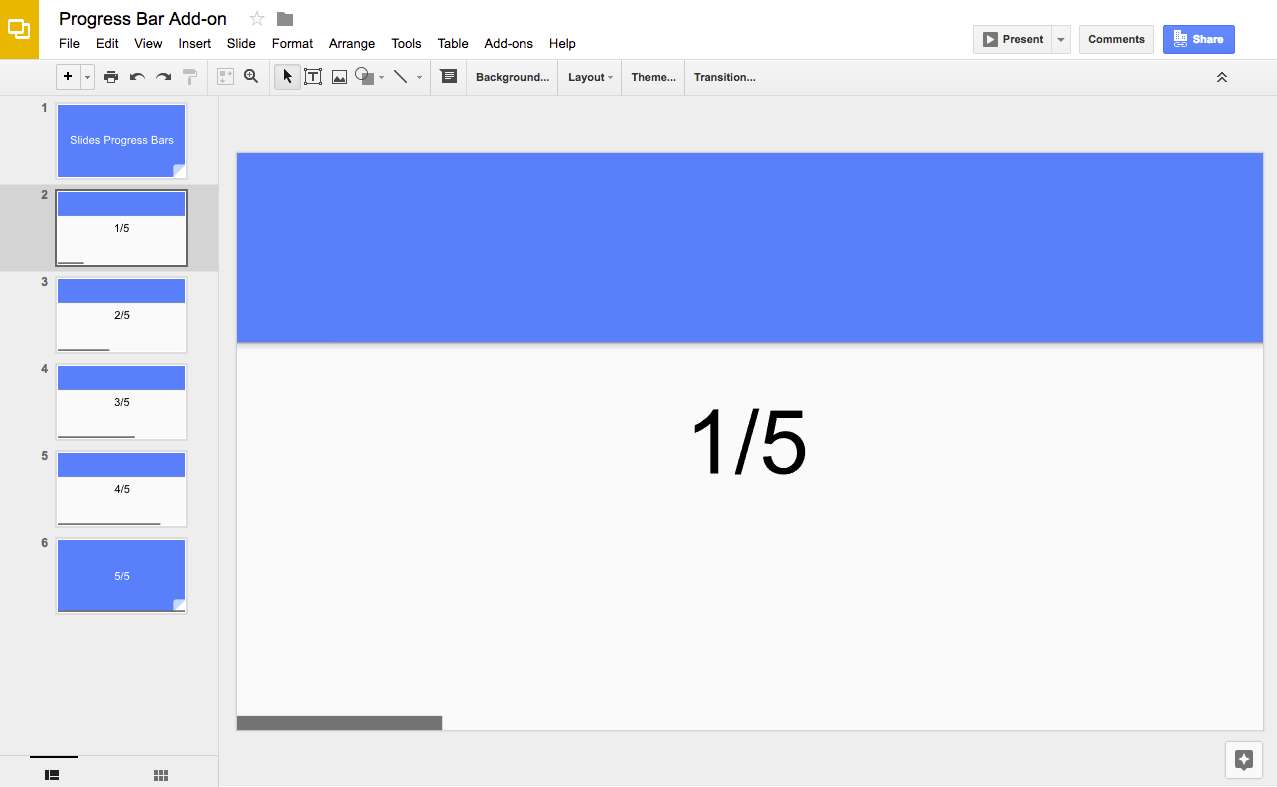
لاستخدام هذا النموذج، يجب استيفاء المتطلبات الأساسية التالية:
حساب Google (قد تتطلب حسابات Google Workspace موافقة المشرف).
متصفّح ويب يمكنه الوصول إلى الإنترنت
إعداد النص البرمجي
انقر على الزر التالي لإنشاء نسخة من عرض شرائح شريط التقدّم التقديمي. مشروع "برمجة تطبيقات Google" لهذا الحلّ مرفق بالعرض التقديمي.
إنشاء نسخة
في العرض التقديمي، انقر على الإضافات>شريط التقدّم>عرض شريط التقدّم.
امنح الإذن للنصّ البرمجي عندما يُطلب منك ذلك.
إذا ظهرت الرسالة التحذيرية لم يتمّ التحقّق منه في شاشة طلب الموافقة على OAuth، يمكنك المتابعة من خلال النقر على الوضع المتقدّم>الانتقال إلى {اسم المشروع} (غير آمن).
انقر مرة أخرى على الإضافات>شريط التقدّم>عرض شريط التقدّم.
لإزالة شريط التقدّم، انقر على الإضافات>شريط التقدّم>إخفاء شريط التقدّم.
مراجعة الرمز البرمجي
لمراجعة رمز "برمجة تطبيقات Google" لهذا الحلّ، انقر على
عرض رمز المصدر:
/** * @OnlyCurrentDoc Adds progress bars to a presentation. */constBAR_ID="PROGRESS_BAR_ID";constBAR_HEIGHT=10;// px/** * Runs when the add-on is installed. * @param {object} e The event parameter for a simple onInstall trigger. To * determine which authorization mode (ScriptApp.AuthMode) the trigger is * running in, inspect e.authMode. (In practice, onInstall triggers always * run in AuthMode.FULL, but onOpen triggers may be AuthMode.LIMITED or * AuthMode.NONE.) */functiononInstall(e){onOpen();}/** * Trigger for opening a presentation. * @param {object} e The onOpen event. */functiononOpen(e){SlidesApp.getUi().createAddonMenu().addItem("Show progress bar","createBars").addItem("Hide progress bar","deleteBars").addToUi();}/** * Create a rectangle on every slide with different bar widths. */functioncreateBars(){deleteBars();// Delete any existing progress barsconstpresentation=SlidesApp.getActivePresentation();constslides=presentation.getSlides();for(leti=0;i < slides.length;++i){constratioComplete=i/(slides.length-1);constx=0;consty=presentation.getPageHeight()-BAR_HEIGHT;constbarWidth=presentation.getPageWidth()*ratioComplete;if(barWidth > 0){constbar=slides[i].insertShape(SlidesApp.ShapeType.RECTANGLE,x,y,barWidth,BAR_HEIGHT,);bar.getBorder().setTransparent();bar.setLinkUrl(BAR_ID);}}}/** * Deletes all progress bar rectangles. */functiondeleteBars(){constpresentation=SlidesApp.getActivePresentation();constslides=presentation.getSlides();for(leti=0;i < slides.length;++i){constelements=slides[i].getPageElements();for(constelofelements){if(el.getPageElementType()===SlidesApp.PageElementType.SHAPE&&
el.asShape().getLink()&&
el.asShape().getLink().getUrl()===BAR_ID){el.remove();}}}}
المساهمون
تحتفظ Google بهذا النموذج بمساعدة خبراء التطوير في Google.
تاريخ التعديل الأخير: 2026-09-14 (حسب التوقيت العالمي المتفَّق عليه)
[[["يسهُل فهم المحتوى.","easyToUnderstand","thumb-up"],["ساعَدني المحتوى في حلّ مشكلتي.","solvedMyProblem","thumb-up"],["غير ذلك","otherUp","thumb-up"]],[["لا يحتوي على المعلومات التي أحتاج إليها.","missingTheInformationINeed","thumb-down"],["الخطوات معقدة للغاية / كثيرة جدًا.","tooComplicatedTooManySteps","thumb-down"],["المحتوى قديم.","outOfDate","thumb-down"],["ثمة مشكلة في الترجمة.","translationIssue","thumb-down"],["مشكلة في العيّنات / التعليمات البرمجية","samplesCodeIssue","thumb-down"],["غير ذلك","otherDown","thumb-down"]],["تاريخ التعديل الأخير: 2026-09-14 (حسب التوقيت العالمي المتفَّق عليه)"],[],["This solution adds a progress bar to Google Slides presentations using Apps Script. The script calculates the total slides and adds a rectangle to the bottom of each slide, increasing the rectangle's width to visually represent progress. Users copy a sample presentation, authorize the script, and then run it to create or remove the progress bars via the \"Extensions\" menu. It utilizes the Slides service to manipulate slides and shapes, adding and deleting these elements.\n"]]