

Page Summary
-
Utilize sandbox data when developing queries to avoid privacy checks and speed up iteration.
-
Decrease the likelihood of results being filtered by carefully considering historical results and modifying query parameters.
-
Avoid querying today's data or the same data more than necessary to reduce filtered rows.
-
Minimize the number of aggregations in a single query by writing focused queries and aggregating results in BigQuery.
-
Optimize joins and use filtered row summaries to account for data filtered by privacy checks.
-
Account for zeroed user IDs in your results, filtering them out for customer insights while including them for total data counts.
-
Improve performance by avoiding reaggregation, optimizing for BigQuery, and using the query advisor to identify potential filtering issues.
The following best practices will provide you with techniques to develop privacy-centric and performant queries. For additional best practices specific to each privacy mode, see the following sections:
Develop queries on sandbox data
Best practice: Only query production data when you're in production.
Utilize sandbox data during your query development whenever possible. Jobs using sandbox data don't use any budget or affect query history to introduce future privacy redactions. Additionally, because of the lack of privacy checks, sandbox queries run faster, allowing for more rapid iteration during query development.
If you have to develop queries on your actual data (such as when using match tables), to make it less likely that you overlap rows, choose date ranges and other parameters which are unlikely to overlap for each iteration of your query. Finally, run your query over the range of data.
Don't query the same data more than necessary
Best practices:
- Select tightly bound start and end dates.
- Instead of querying overlapping windows, run your queries on disjoint sets of data, then aggregate the results in BigQuery.
- Use saved results instead of re-running your query.
- Create temp tables for each date range you're querying over.
Ads Data Hub restricts the total number of times that you can query the same data. As such, you should attempt to limit the number of times that you access a given piece of data.
Don't use more aggregations than necessary in the same query
Best practices:
- Minimize the number of aggregations in a query
- Rewrite queries to combine aggregations when possible
In Ads Data Hub, too many similar cross-user aggregate functions can lead to increased privacy error, and there is a limit of 100 aggregate functions in a subquery. Hence, overall we recommend writing queries that output more rows with focused grouping keys and fewer aggregate columns, rather than more columns with broad grouping keys and complex aggregations. The following pattern should be avoided:
SELECT
  COUNTIF(field_1 = a_1 AND field_2 = b_1) AS cnt_1,
  COUNTIF(field_1 = a_2 AND field_2 = b_2) AS cnt_2
FROM
  table
Queries that count events depending on the same set of fields should be rewritten using the GROUP BY statement.
SELECT
  field_1,
  field_2,
  COUNT(1) AS cnt
FROM
  table
GROUP BY
  1, 2
The result can be aggregated the same way in BigQuery.
Queries that create columns from an array and then aggregate them afterwards should be rewritten to merge these steps.
SELECT
  COUNTIF(a_1) AS cnt_1,
  COUNTIF(a_2) AS cnt_2
FROM
  (SELECT
     1 IN UNNEST(field) AS a_1,
     2 IN UNNEST(field) AS a_2,
   FROM
     table)
The previous query can be rewritten as:
SELECT f, COUNT(1) FROM table, UNNEST(field) AS f GROUP BY 1
Queries that use different combinations of fields in different aggregations can be rewritten into several more focused queries.
SELECT
  COUNTIF(field_1 = a_1) AS cnt_a_1,
  COUNTIF(field_1 = b_1) AS cnt_b_1,
  COUNTIF(field_2 = a_2) AS cnt_a_2,
  COUNTIF(field_2 = b_2) AS cnt_b_2,
FROM table
The previous query can be split into:
SELECT
  field_1, COUNT(*) AS cnt
FROM table
GROUP BY 1
and
SELECT
  field_2, COUNT(*) AS cnt
FROM table
GROUP BY 1
You can split these results into separate queries, create and join the tables in a single query, or combine them with a UNION if schemas are compatible.
Optimize and understand joins
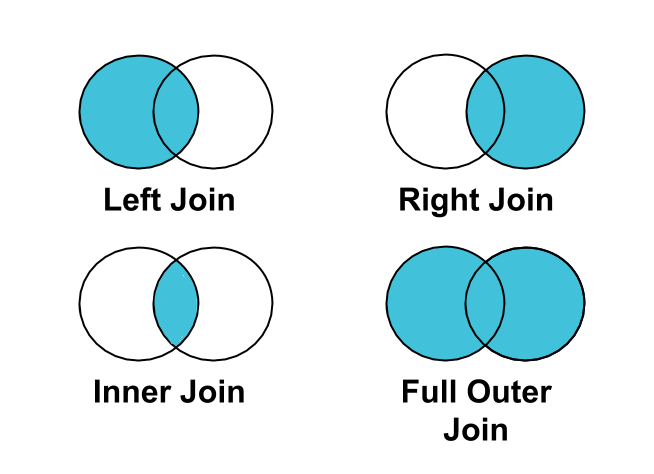
Best practice: Use a LEFT JOIN instead of an INNER JOIN to join clicks
or conversions to impressions.
Not all impressions are associated with clicks or conversions. Therefore, if you
INNER JOIN clicks or conversions on impressions, impressions that aren't tied
to clicks or conversions will be filtered from your results.
Account for zeroed user IDs
Best practice: Account for zeroed user IDs in your results.
An end-user's ID may be set to 0 for a number of reasons, including: opting out
of ads personalization,
regulatory reasons, etc. As
such, data originating from multiple users will be keyed to a user_id of 0.
If you want to understand data totals, such as total impressions or clicks, you should include these events. However, this data won't be useful for deriving insights on customers, and should be filtered if you're doing such analysis.
You can exclude this data from your results by adding WHERE user_id != "0" to
your queries.
Avoid reaggregation
Best practice: Avoid multiple layers of aggregation across users.
Queries that combine results that have already been aggregated, such as in the
case of a query with multiple GROUP BYs, or nested aggregation, require more
resources to process.
Often, queries with multiple layers of aggregation can be broken up, improving performance. You should attempt to keep rows at the event or user level while processing and then combine with a single aggregation.
The following patterns should be avoided:
SELECT SUM(count)
FROM
  (SELECT campaign_id, COUNT(0) AS count FROM ... GROUP BY 1)
Queries that use multiple layers of aggregation should be rewritten to use a single layer of aggregation.
(SELECT ... GROUP BY ... )
JOIN USING (...)
(SELECT ... GROUP BY ... )
Optimize for BigQuery
Generally, queries that do less perform better. When evaluating query performance, the amount of work required depends on the following factors:
- Input data and data sources (I/O): How many bytes does your query read?
- Communication between nodes (shuffling): How many bytes does your query pass to the next stage?
- Computation: How much CPU work does your query require?
- Outputs (materialization): How many bytes does your query write?
- Query anti-patterns: Are your queries following SQL best practices?
If query execution isn't meeting your service level agreements, or you're encountering errors due to resource exhaustion or timeout, consider:
- Using the results from previous queries instead of recomputing. For example, your weekly total could be the sum computed in BigQuery of 7 single day aggregate queries.
- Decomposing queries into logical subqueries (such as splitting multiple joins into multiple queries), or otherwise restricting the set of data being processed. You can combine results from individual jobs into a single dataset in BigQuery. Although this may help with resource exhaustion, it may slow down your query.
- If you're running into resources exceeded errors in BigQuery, try using temp tables to split your query into multiple BigQuery queries.
- Referencing fewer tables in a single query, as this uses large amounts of memory and can cause your query to fail.
- Rewriting your queries such that they join fewer user tables.
- Rewriting your queries to avoid joining the same table back on itself.
Query advisor
If your SQL is valid but might trigger privacy issues, the query advisor surfaces actionable advice during the query development process, to help you avoid undesirable results.
To use the query advisor:
- UI. Recommendations will be surfaced in the query editor, above the query text.
- API. Use the
customers.analysisQueries.validatemethod.