

Kodlama düzeyi: Orta
Süre: 30 dakika
Proje türü: Google Workspace eklentisi
Hedefler
- Çözümün ne işe yaradığını anlayın.
- Apps Komut Dosyası hizmetlerinin çözümde ne yaptığını anlayın.
- Komut dosyasını ayarlayın.
- Komut dosyasını çalıştırın.
Bu çözüm hakkında
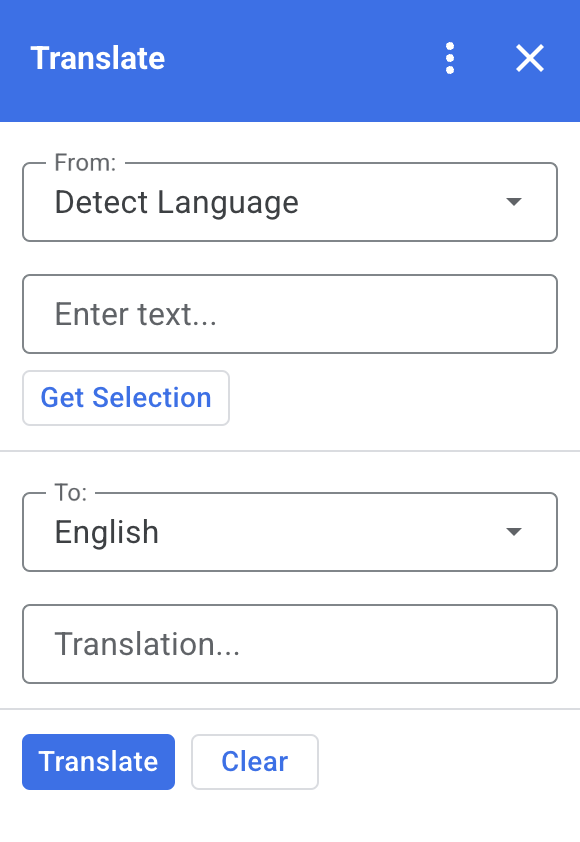
Bu çözümle, Google Dokümanlar, E-Tablolar ve Slaytlar'daki metinleri çevirebilirsiniz.
İşleyiş şekli
Dokümanlar, E-Tablolar veya Slaytlar'da metin seçip eklentide Seçimi Al'ı tıkladığınızda komut dosyası, metni eklentiye kopyalar, çevirir ve çevrilmiş metni gösterir.
Varsayılan olarak, komut dosyası kaynak dili algılar ve metni İngilizceye çevirir. Kaynak ve hedef dilleri düzenleyebilirsiniz.
Apps Komut Dosyası hizmetleri
Bu çözümde aşağıdaki hizmetler kullanılır:
- Kart hizmeti: Eklentinin kullanıcı arayüzünü oluşturur.
- Dil hizmeti: Metni Google Çeviri'yi kullanarak çevirir.
Ön koşullar
Bu örneği kullanmak için aşağıdaki ön koşulları karşılamanız gerekir:
- Google Hesabı (Google Workspace hesapları için yönetici onayı gerekebilir).
- İnternete erişimi olan bir web tarayıcısı.
Komut dosyasını ayarlama
Apps Komut Dosyası projesini oluşturma
Çeviri Apps Komut Dosyası projesini açmak için aşağıdaki düğmeyi tıklayın.
Projeyi açınGenel bakış'ı tıklayın.
Genel bakış sayfasında Kopyasını oluştur'u
 tıklayın.
Test dağıtımı yükleme
- Kopyaladığınız Apps Komut Dosyası projenizde Düzenleyici'yi tıklayın .
Code.gsdosyasını açın ve Çalıştır'ı tıklayın. İstendiğinde komut dosyasını yetkilendirin.- Dağıt > Test dağıtımları'nı tıklayın.
- Yükle > Bitti'yi tıklayın.
Komut dosyasını çalıştırma
- Google Dokümanlar, E-Tablolar veya Slaytlar'da bir dosyayı açın ya da yeni bir dosya oluşturun.
- Sağ kenar çubuğunda Çeviri eklentisini açın.
- İstenirse eklentiyi yetkilendirin.
- Dosyanızdaki metni seçin.
- Eklentide Seçimi Al > Çevir'i tıklayın.
Kodu inceleme
Bu çözümün Apps Komut Dosyası kodunu incelemek için Kaynak kodu görüntüle'yi tıklayın:
Kaynak kodu göster
Code.gs
const DEFAULT_INPUT_TEXT = '';
const DEFAULT_OUTPUT_TEXT = '';
const DEFAULT_ORIGIN_LAN = ''; // Empty string means detect langauge
const DEFAULT_DESTINATION_LAN = 'en' // English

const LANGUAGE_MAP =
  [
    { text: 'Detect Language', val: '' },
    { text: 'Afrikaans', val: 'af' },
    { text: 'Albanian', val: 'sq' },
    { text: 'Amharic', val: 'am' },
    { text: 'Arabic', val: 'ar' },
    { text: 'Armenian', val: 'hy' },
    { text: 'Azerbaijani', val: 'az' },
    { text: 'Basque', val: 'eu' },
    { text: 'Belarusian', val: 'be' },
    { text: 'Bengali', val: 'bn' },
    { text: 'Bosnian', val: 'bs' },
    { text: 'Bulgarian', val: 'bg' },
    { text: 'Catalan', val: 'ca' },
    { text: 'Cebuano', val: 'ceb' },
    { text: 'Chinese (Simplified)', val: 'zh-CN' },
    { text: 'Chinese (Traditional)', val: 'zh-TW' },
    { text: 'Corsican', val: 'co' },
    { text: 'Croatian', val: 'hr' },
    { text: 'Czech', val: 'cs' },
    { text: 'Danish', val: 'da' },
    { text: 'Dutch', val: 'nl' },
    { text: 'English', val: 'en' },
    { text: 'Esperanto', val: 'eo' },
    { text: 'Estonian', val: 'et' },
    { text: 'Finnish', val: 'fi' },
    { text: 'French', val: 'fr' },
    { text: 'Frisian', val: 'fy' },
    { text: 'Galician', val: 'gl' },
    { text: 'Georgian', val: 'ka' },
    { text: 'German', val: 'de' },
    { text: 'Greek', val: 'el' },
    { text: 'Gujarati', val: 'gu' },
    { text: 'Haitian Creole', val: 'ht' },
    { text: 'Hausa', val: 'ha' },
    { text: 'Hawaiian', val: 'haw' },
    { text: 'Hebrew', val: 'he' },
    { text: 'Hindi', val: 'hi' },
    { text: 'Hmong', val: 'hmn' },
    { text: 'Hungarian', val: 'hu' },
    { text: 'Icelandic', val: 'is' },
    { text: 'Igbo', val: 'ig' },
    { text: 'Indonesian', val: 'id' },
    { text: 'Irish', val: 'ga' },
    { text: 'Italian', val: 'it' },
    { text: 'Japanese', val: 'ja' },
    { text: 'Javanese', val: 'jv' },
    { text: 'Kannada', val: 'kn' },
    { text: 'Kazakh', val: 'kk' },
    { text: 'Khmer', val: 'km' },
    { text: 'Korean', val: 'ko' },
    { text: 'Kurdish', val: 'ku' },
    { text: 'Kyrgyz', val: 'ky' },
    { text: 'Lao', val: 'lo' },
    { text: 'Latin', val: 'la' },
    { text: 'Latvian', val: 'lv' },
    { text: 'Lithuanian', val: 'lt' },
    { text: 'Luxembourgish', val: 'lb' },
    { text: 'Macedonian', val: 'mk' },
    { text: 'Malagasy', val: 'mg' },
    { text: 'Malay', val: 'ms' },
    { text: 'Malayalam', val: 'ml' },
    { text: 'Maltese', val: 'mt' },
    { text: 'Maori', val: 'mi' },
    { text: 'Marathi', val: 'mr' },
    { text: 'Mongolian', val: 'mn' },
    { text: 'Myanmar (Burmese)', val: 'my' },
    { text: 'Nepali', val: 'ne' },
    { text: 'Norwegian', val: 'no' },
    { text: 'Nyanja (Chichewa)', val: 'ny' },
    { text: 'Pashto', val: 'ps' },
    { text: 'Persian', val: 'fa' },
    { text: 'Polish', val: 'pl' },
    { text: 'Portuguese (Portugal, Brazil)', val: 'pt' },
    { text: 'Punjabi', val: 'pa' },
    { text: 'Romanian', val: 'ro' },
    { text: 'Russian', val: 'ru' },
    { text: 'Samoan', val: 'sm' },
    { text: 'Scots Gaelic', val: 'gd' },
    { text: 'Serbian', val: 'sr' },
    { text: 'Sesotho', val: 'st' },
    { text: 'Shona', val: 'sn' },
    { text: 'Sindhi', val: 'sd' },
    { text: 'Sinhala (Sinhalese)', val: 'si' },
    { text: 'Slovak', val: 'sk' },
    { text: 'Slovenian', val: 'sl' },
    { text: 'Somali', val: 'so' },
    { text: 'Spanish', val: 'es' },
    { text: 'Sundanese', val: 'su' },
    { text: 'Swahili', val: 'sw' },
    { text: 'Swedish', val: 'sv' },
    { text: 'Tagalog (Filipino)', val: 'tl' },
    { text: 'Tajik', val: 'tg' },
    { text: 'Tamil', val: 'ta' },
    { text: 'Telugu', val: 'te' },
    { text: 'Thai', val: 'th' },
    { text: 'Turkish', val: 'tr' },
    { text: 'Ukrainian', val: 'uk' },
    { text: 'Urdu', val: 'ur' },
    { text: 'Uzbek', val: 'uz' },
    { text: 'Vietnamese', val: 'vi' },
    { text: 'Welsh', val: 'cy' },
    { text: 'Xhosa', val: 'xh' },
    { text: 'Yiddish', val: 'yi' },
    { text: 'Yoruba', val: 'yo' },
    { text: 'Zulu', val: 'zu' }
  ];


/**
 * Callback for rendering the main card.
 * @return {CardService.Card} The card to show the user.
 */
function onHomepage(e) {
  return createSelectionCard(e, DEFAULT_ORIGIN_LAN, DEFAULT_DESTINATION_LAN, DEFAULT_INPUT_TEXT, DEFAULT_OUTPUT_TEXT);
}

/**
 * Main function to generate the main card.
 * @param {String} originLanguage Language of the original text.
 * @param {String} destinationLanguage Language of the translation.
 * @param {String} inputText The text to be translated.
 * @param {String} outputText The text translated.
 * @return {CardService.Card} The card to show to the user.
 */
function createSelectionCard(e, originLanguage, destinationLanguage, inputText, outputText) {
  var hostApp = e['hostApp'];
  var builder = CardService.newCardBuilder();

  // "From" language selection & text input section
  var fromSection = CardService.newCardSection()
    .addWidget(generateLanguagesDropdown('origin', 'From: ', originLanguage))
    .addWidget(CardService.newTextInput()
      .setFieldName('input')
      .setValue(inputText)
      .setTitle('Enter text...')
      .setMultiline(true));

  if (hostApp === 'docs') {
    fromSection.addWidget(CardService.newButtonSet()
      .addButton(CardService.newTextButton()
        .setText('Get Selection')
        .setOnClickAction(CardService.newAction().setFunctionName('getDocsSelection'))
        .setDisabled(false)))
  } else if (hostApp === 'sheets') {
    fromSection.addWidget(CardService.newButtonSet()
      .addButton(CardService.newTextButton()
        .setText('Get Selection')
        .setOnClickAction(CardService.newAction().setFunctionName('getSheetsSelection'))
        .setDisabled(false)))
  } else if (hostApp === 'slides') {
    fromSection.addWidget(CardService.newButtonSet()
      .addButton(CardService.newTextButton()
        .setText('Get Selection')
        .setOnClickAction(CardService.newAction().setFunctionName('getSlidesSelection'))
        .setDisabled(false)))
  }


  builder.addSection(fromSection);

  // "Translation" language selection & text input section
  builder.addSection(CardService.newCardSection()
    .addWidget(generateLanguagesDropdown('destination', 'To: ', destinationLanguage))
    .addWidget(CardService.newTextInput()
      .setFieldName('output')
      .setValue(outputText)
      .setTitle('Translation...')
      .setMultiline(true)));

  //Buttons section
  builder.addSection(CardService.newCardSection()
    .addWidget(CardService.newButtonSet()
      .addButton(CardService.newTextButton()
        .setText('Translate')
        .setTextButtonStyle(CardService.TextButtonStyle.FILLED)
        .setOnClickAction(CardService.newAction().setFunctionName('translateText'))
        .setDisabled(false))
      .addButton(CardService.newTextButton()
        .setText('Clear')
        .setOnClickAction(CardService.newAction().setFunctionName('clearText'))
        .setDisabled(false))));

  return builder.build();

}

/**
 * Helper function to generate the drop down language menu. It checks what language the user had selected.
 * @param {String} fieldName
 * @param {String} fieldTitle
 * @param {String} previousSelected The language the user previously had selected.
 * @return {CardService.SelectionInput} The card to show to the user.
 */
function generateLanguagesDropdown(fieldName, fieldTitle, previousSelected) {
  var selectionInput = CardService.newSelectionInput().setTitle(fieldTitle)
    .setFieldName(fieldName)
    .setType(CardService.SelectionInputType.DROPDOWN);

  LANGUAGE_MAP.forEach((language, index, array) => {
    selectionInput.addItem(language.text, language.val, language.val == previousSelected);
  })

  return selectionInput;
}

/**
 * Helper function to translate the text. If the originLanguage is an empty string, the API detects the language
 * @return {CardService.Card} The card to show to the user.
 */
function translateText(e) {
  var originLanguage = e.formInput.origin;
  var destinationLanguage = e.formInput.destination;
  var inputText = e.formInput.input;

  if (originLanguage !== destinationLanguage && inputText !== undefined) {
    var translation = LanguageApp.translate(e.formInput.input, e.formInput.origin, e.formInput.destination);
    return createSelectionCard(e, originLanguage, destinationLanguage, inputText, translation);
  }
}

/**
 * Helper function to clean the text.
 * @return {CardService.Card} The card to show to the user.
 */
function clearText(e) {
  var originLanguage = e.formInput.origin;
  var destinationLanguage = e.formInput.destination;
  return createSelectionCard(e, originLanguage, destinationLanguage, DEFAULT_INPUT_TEXT, DEFAULT_OUTPUT_TEXT);
}

/**
 * Helper function to get the text selected.
 * @return {CardService.Card} The selected text.
 */
function getDocsSelection(e) {
  var text = '';
  var selection = DocumentApp.getActiveDocument().getSelection();
  Logger.log(selection)
  if (selection) {
    var elements = selection.getRangeElements();
    for (var i = 0; i < elements.length; i++) {
      Logger.log(elements[i]);
      var element = elements[i];
      // Only modify elements that can be edited as text; skip images and other non-text elements.
      if (element.getElement().asText() && element.getElement().asText().getText() !== '') {
        text += element.getElement().asText().getText() + '\n';
      }
    }
  }

  if (text !== '') {
    var originLanguage = e.formInput.origin;
    var destinationLanguage = e.formInput.destination;
    var translation = LanguageApp.translate(text, e.formInput.origin, e.formInput.destination);
    return createSelectionCard(e, originLanguage, destinationLanguage, text, translation);
  }
}

/**
 * Helper function to get the text of the selected cells.
 * @return {CardService.Card} The selected text.
 */
function getSheetsSelection(e) {
  var text = '';
  var ranges = SpreadsheetApp.getActive().getSelection().getActiveRangeList().getRanges();
  for (var i = 0; i < ranges.length; i++) {
    const range = ranges[i];
    const numRows = range.getNumRows();
    const numCols = range.getNumColumns();
    for (let i = 1; i <= numCols; i++) {
      for (let j = 1; j <= numRows; j++) {
        const cell = range.getCell(j, i);
        if (cell.getValue()) {
          text += cell.getValue() + '\n';
        }
      }
    }
  }
  if (text !== '') {
    var originLanguage = e.formInput.origin;
    var destinationLanguage = e.formInput.destination;
    var translation = LanguageApp.translate(text, e.formInput.origin, e.formInput.destination);
    return createSelectionCard(e, originLanguage, destinationLanguage, text, translation);
  }
}

/**
 * Helper function to get the selected text of the active slide.
 * @return {CardService.Card} The selected text.
 */
function getSlidesSelection(e) {
  var text = '';
  var selection = SlidesApp.getActivePresentation().getSelection();
  var selectionType = selection.getSelectionType();
  if (selectionType === SlidesApp.SelectionType.TEXT) {
    var textRange = selection.getTextRange();
    if (textRange.asString() !== '') {
      text += textRange.asString() + '\n';
    }
  }
  if (text !== '') {
    var originLanguage = e.formInput.origin;
    var destinationLanguage = e.formInput.destination;
    var translation = LanguageApp.translate(text, e.formInput.origin, e.formInput.destination);
    return createSelectionCard(e, originLanguage, destinationLanguage, text, translation);
  }
}
appsscript.json
{
  "timeZone": "America/New_York",
  "dependencies": {},
  "exceptionLogging": "STACKDRIVER",
  "oauthScopes": [
    "https://www.googleapis.com/auth/documents.currentonly",
    "https://www.googleapis.com/auth/spreadsheets.currentonly",
    "https://www.googleapis.com/auth/presentations.currentonly"
  ],
  "runtimeVersion": "V8",
  "addOns": {
    "common": {
      "name": "Translate",
      "logoUrl": "https://www.gstatic.com/images/branding/product/1x/translate_24dp.png",
      "layoutProperties": {
        "primaryColor": "#2772ed"
      },
      "homepageTrigger": {
        "runFunction": "onHomepage"
      }
    },
    "docs" : {},
    "slides" : {},
    "sheets" : {}
  }
}
Katkıda bulunanlar
Bu örnek, Google Geliştirici Uzmanları'nın yardımıyla Google tarafından yönetilir.
Sonraki adımlar
- Eklentilerle Google Workspace'in kapsamını genişletme
- Google Workspace eklentileri oluşturma
- Uygulama yayınlama