

Niveau de programmation : Intermédiaire
Durée : 30 minutes
Type de projet : Module complémentaire Google Workspace
Objectifs
- Comprendre le fonctionnement de la solution.
- Comprendre le rôle des services Apps Script dans la solution.
- Configurer le script.
- Exécuter le script.
À propos de cette solution
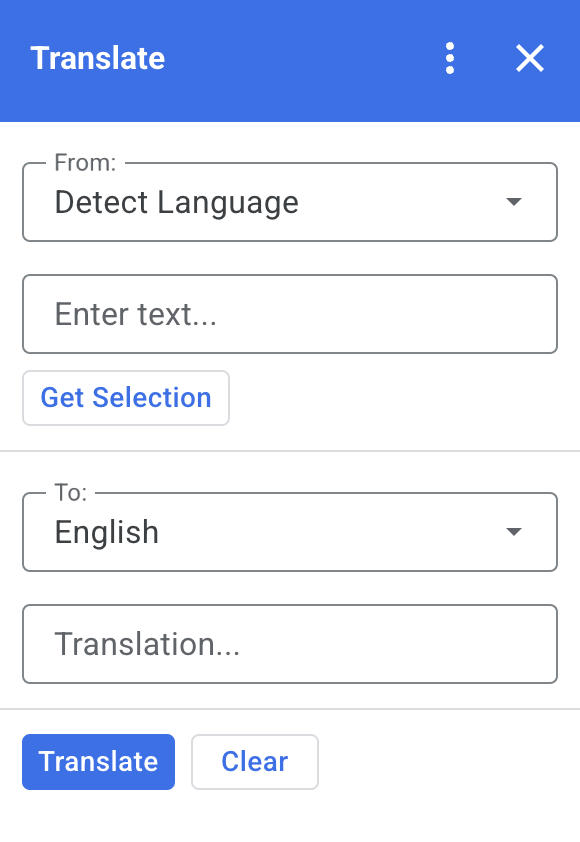
Cette solution vous permet de traduire du texte dans Google Docs, Sheets et Slides.
Fonctionnement
Lorsque vous sélectionnez du texte dans Docs, Sheets ou Slides et que vous cliquez sur Get Selection (Obtenir la sélection) dans le module complémentaire, le script copie le texte dans le module complémentaire, le traduit et affiche le texte traduit.
Par défaut, le script détecte la langue source et traduit le texte en anglais. Vous pouvez modifier les langues source et cible.
Services Apps Script
Cette solution utilise les services suivants :
- Service de cartes : crée l'interface utilisateur du module complémentaire.
- Service de langue : traduit le texte à l'aide de Google Traduction.
Prérequis
Pour utiliser cet exemple, vous devez répondre aux exigences suivantes :
- Un compte Google (l'approbation de l'administrateur peut être nécessaire pour les comptes Google Workspace)
- Un navigateur Web avec accès à Internet
Configurer le script
Créer le projet Apps Script
Cliquez sur le bouton suivant pour ouvrir le projet Apps Script Translate (Traduire).
Ouvrir le projetCliquez sur Overview (Vue d'ensemble) .
Sur la page de présentation, cliquez sur Créer une copie
 .
.
Installer un déploiement de test
- Dans le projet Apps Script copié, cliquez sur Editor .
- Ouvrez le fichier
Code.gset cliquez sur Run (Exécuter). Lorsque vous y êtes invité, autorisez les scripts. - Cliquez sur Deploy (Déployer) > Test deployments (Déploiements de test).
- Cliquez sur Install (Installer) > Done (OK).
Exécuter le script
- Ouvrez un fichier dans Google Docs, Sheets ou Slides, ou créez-en un.
- Dans la barre latérale de droite, ouvrez le module complémentaire Translate (Traduire) .
- Si vous y êtes invité, autorisez le module complémentaire.
- Sélectionnez du texte dans votre fichier.
- Dans le module complémentaire, cliquez sur Get Selection > Translate (Traduire).
Examiner le code
Pour examiner le code Apps Script de cette solution, cliquez sur View source code :
Afficher le code source
Code.gs
const DEFAULT_INPUT_TEXT = '';
const DEFAULT_OUTPUT_TEXT = '';
const DEFAULT_ORIGIN_LAN = ''; // Empty string means detect langauge
const DEFAULT_DESTINATION_LAN = 'en' // English

const LANGUAGE_MAP =
  [
    { text: 'Detect Language', val: '' },
    { text: 'Afrikaans', val: 'af' },
    { text: 'Albanian', val: 'sq' },
    { text: 'Amharic', val: 'am' },
    { text: 'Arabic', val: 'ar' },
    { text: 'Armenian', val: 'hy' },
    { text: 'Azerbaijani', val: 'az' },
    { text: 'Basque', val: 'eu' },
    { text: 'Belarusian', val: 'be' },
    { text: 'Bengali', val: 'bn' },
    { text: 'Bosnian', val: 'bs' },
    { text: 'Bulgarian', val: 'bg' },
    { text: 'Catalan', val: 'ca' },
    { text: 'Cebuano', val: 'ceb' },
    { text: 'Chinese (Simplified)', val: 'zh-CN' },
    { text: 'Chinese (Traditional)', val: 'zh-TW' },
    { text: 'Corsican', val: 'co' },
    { text: 'Croatian', val: 'hr' },
    { text: 'Czech', val: 'cs' },
    { text: 'Danish', val: 'da' },
    { text: 'Dutch', val: 'nl' },
    { text: 'English', val: 'en' },
    { text: 'Esperanto', val: 'eo' },
    { text: 'Estonian', val: 'et' },
    { text: 'Finnish', val: 'fi' },
    { text: 'French', val: 'fr' },
    { text: 'Frisian', val: 'fy' },
    { text: 'Galician', val: 'gl' },
    { text: 'Georgian', val: 'ka' },
    { text: 'German', val: 'de' },
    { text: 'Greek', val: 'el' },
    { text: 'Gujarati', val: 'gu' },
    { text: 'Haitian Creole', val: 'ht' },
    { text: 'Hausa', val: 'ha' },
    { text: 'Hawaiian', val: 'haw' },
    { text: 'Hebrew', val: 'he' },
    { text: 'Hindi', val: 'hi' },
    { text: 'Hmong', val: 'hmn' },
    { text: 'Hungarian', val: 'hu' },
    { text: 'Icelandic', val: 'is' },
    { text: 'Igbo', val: 'ig' },
    { text: 'Indonesian', val: 'id' },
    { text: 'Irish', val: 'ga' },
    { text: 'Italian', val: 'it' },
    { text: 'Japanese', val: 'ja' },
    { text: 'Javanese', val: 'jv' },
    { text: 'Kannada', val: 'kn' },
    { text: 'Kazakh', val: 'kk' },
    { text: 'Khmer', val: 'km' },
    { text: 'Korean', val: 'ko' },
    { text: 'Kurdish', val: 'ku' },
    { text: 'Kyrgyz', val: 'ky' },
    { text: 'Lao', val: 'lo' },
    { text: 'Latin', val: 'la' },
    { text: 'Latvian', val: 'lv' },
    { text: 'Lithuanian', val: 'lt' },
    { text: 'Luxembourgish', val: 'lb' },
    { text: 'Macedonian', val: 'mk' },
    { text: 'Malagasy', val: 'mg' },
    { text: 'Malay', val: 'ms' },
    { text: 'Malayalam', val: 'ml' },
    { text: 'Maltese', val: 'mt' },
    { text: 'Maori', val: 'mi' },
    { text: 'Marathi', val: 'mr' },
    { text: 'Mongolian', val: 'mn' },
    { text: 'Myanmar (Burmese)', val: 'my' },
    { text: 'Nepali', val: 'ne' },
    { text: 'Norwegian', val: 'no' },
    { text: 'Nyanja (Chichewa)', val: 'ny' },
    { text: 'Pashto', val: 'ps' },
    { text: 'Persian', val: 'fa' },
    { text: 'Polish', val: 'pl' },
    { text: 'Portuguese (Portugal, Brazil)', val: 'pt' },
    { text: 'Punjabi', val: 'pa' },
    { text: 'Romanian', val: 'ro' },
    { text: 'Russian', val: 'ru' },
    { text: 'Samoan', val: 'sm' },
    { text: 'Scots Gaelic', val: 'gd' },
    { text: 'Serbian', val: 'sr' },
    { text: 'Sesotho', val: 'st' },
    { text: 'Shona', val: 'sn' },
    { text: 'Sindhi', val: 'sd' },
    { text: 'Sinhala (Sinhalese)', val: 'si' },
    { text: 'Slovak', val: 'sk' },
    { text: 'Slovenian', val: 'sl' },
    { text: 'Somali', val: 'so' },
    { text: 'Spanish', val: 'es' },
    { text: 'Sundanese', val: 'su' },
    { text: 'Swahili', val: 'sw' },
    { text: 'Swedish', val: 'sv' },
    { text: 'Tagalog (Filipino)', val: 'tl' },
    { text: 'Tajik', val: 'tg' },
    { text: 'Tamil', val: 'ta' },
    { text: 'Telugu', val: 'te' },
    { text: 'Thai', val: 'th' },
    { text: 'Turkish', val: 'tr' },
    { text: 'Ukrainian', val: 'uk' },
    { text: 'Urdu', val: 'ur' },
    { text: 'Uzbek', val: 'uz' },
    { text: 'Vietnamese', val: 'vi' },
    { text: 'Welsh', val: 'cy' },
    { text: 'Xhosa', val: 'xh' },
    { text: 'Yiddish', val: 'yi' },
    { text: 'Yoruba', val: 'yo' },
    { text: 'Zulu', val: 'zu' }
  ];


/**
 * Callback for rendering the main card.
 * @return {CardService.Card} The card to show the user.
 */
function onHomepage(e) {
  return createSelectionCard(e, DEFAULT_ORIGIN_LAN, DEFAULT_DESTINATION_LAN, DEFAULT_INPUT_TEXT, DEFAULT_OUTPUT_TEXT);
}

/**
 * Main function to generate the main card.
 * @param {String} originLanguage Language of the original text.
 * @param {String} destinationLanguage Language of the translation.
 * @param {String} inputText The text to be translated.
 * @param {String} outputText The text translated.
 * @return {CardService.Card} The card to show to the user.
 */
function createSelectionCard(e, originLanguage, destinationLanguage, inputText, outputText) {
  var hostApp = e['hostApp'];
  var builder = CardService.newCardBuilder();

  // "From" language selection & text input section
  var fromSection = CardService.newCardSection()
    .addWidget(generateLanguagesDropdown('origin', 'From: ', originLanguage))
    .addWidget(CardService.newTextInput()
      .setFieldName('input')
      .setValue(inputText)
      .setTitle('Enter text...')
      .setMultiline(true));

  if (hostApp === 'docs') {
    fromSection.addWidget(CardService.newButtonSet()
      .addButton(CardService.newTextButton()
        .setText('Get Selection')
        .setOnClickAction(CardService.newAction().setFunctionName('getDocsSelection'))
        .setDisabled(false)))
  } else if (hostApp === 'sheets') {
    fromSection.addWidget(CardService.newButtonSet()
      .addButton(CardService.newTextButton()
        .setText('Get Selection')
        .setOnClickAction(CardService.newAction().setFunctionName('getSheetsSelection'))
        .setDisabled(false)))
  } else if (hostApp === 'slides') {
    fromSection.addWidget(CardService.newButtonSet()
      .addButton(CardService.newTextButton()
        .setText('Get Selection')
        .setOnClickAction(CardService.newAction().setFunctionName('getSlidesSelection'))
        .setDisabled(false)))
  }


  builder.addSection(fromSection);

  // "Translation" language selection & text input section
  builder.addSection(CardService.newCardSection()
    .addWidget(generateLanguagesDropdown('destination', 'To: ', destinationLanguage))
    .addWidget(CardService.newTextInput()
      .setFieldName('output')
      .setValue(outputText)
      .setTitle('Translation...')
      .setMultiline(true)));

  //Buttons section
  builder.addSection(CardService.newCardSection()
    .addWidget(CardService.newButtonSet()
      .addButton(CardService.newTextButton()
        .setText('Translate')
        .setTextButtonStyle(CardService.TextButtonStyle.FILLED)
        .setOnClickAction(CardService.newAction().setFunctionName('translateText'))
        .setDisabled(false))
      .addButton(CardService.newTextButton()
        .setText('Clear')
        .setOnClickAction(CardService.newAction().setFunctionName('clearText'))
        .setDisabled(false))));

  return builder.build();

}

/**
 * Helper function to generate the drop down language menu. It checks what language the user had selected.
 * @param {String} fieldName
 * @param {String} fieldTitle
 * @param {String} previousSelected The language the user previously had selected.
 * @return {CardService.SelectionInput} The card to show to the user.
 */
function generateLanguagesDropdown(fieldName, fieldTitle, previousSelected) {
  var selectionInput = CardService.newSelectionInput().setTitle(fieldTitle)
    .setFieldName(fieldName)
    .setType(CardService.SelectionInputType.DROPDOWN);

  LANGUAGE_MAP.forEach((language, index, array) => {
    selectionInput.addItem(language.text, language.val, language.val == previousSelected);
  })

  return selectionInput;
}

/**
 * Helper function to translate the text. If the originLanguage is an empty string, the API detects the language
 * @return {CardService.Card} The card to show to the user.
 */
function translateText(e) {
  var originLanguage = e.formInput.origin;
  var destinationLanguage = e.formInput.destination;
  var inputText = e.formInput.input;

  if (originLanguage !== destinationLanguage && inputText !== undefined) {
    var translation = LanguageApp.translate(e.formInput.input, e.formInput.origin, e.formInput.destination);
    return createSelectionCard(e, originLanguage, destinationLanguage, inputText, translation);
  }
}

/**
 * Helper function to clean the text.
 * @return {CardService.Card} The card to show to the user.
 */
function clearText(e) {
  var originLanguage = e.formInput.origin;
  var destinationLanguage = e.formInput.destination;
  return createSelectionCard(e, originLanguage, destinationLanguage, DEFAULT_INPUT_TEXT, DEFAULT_OUTPUT_TEXT);
}

/**
 * Helper function to get the text selected.
 * @return {CardService.Card} The selected text.
 */
function getDocsSelection(e) {
  var text = '';
  var selection = DocumentApp.getActiveDocument().getSelection();
  Logger.log(selection)
  if (selection) {
    var elements = selection.getRangeElements();
    for (var i = 0; i < elements.length; i++) {
      Logger.log(elements[i]);
      var element = elements[i];
      // Only modify elements that can be edited as text; skip images and other non-text elements.
      if (element.getElement().asText() && element.getElement().asText().getText() !== '') {
        text += element.getElement().asText().getText() + '\n';
      }
    }
  }

  if (text !== '') {
    var originLanguage = e.formInput.origin;
    var destinationLanguage = e.formInput.destination;
    var translation = LanguageApp.translate(text, e.formInput.origin, e.formInput.destination);
    return createSelectionCard(e, originLanguage, destinationLanguage, text, translation);
  }
}

/**
 * Helper function to get the text of the selected cells.
 * @return {CardService.Card} The selected text.
 */
function getSheetsSelection(e) {
  var text = '';
  var ranges = SpreadsheetApp.getActive().getSelection().getActiveRangeList().getRanges();
  for (var i = 0; i < ranges.length; i++) {
    const range = ranges[i];
    const numRows = range.getNumRows();
    const numCols = range.getNumColumns();
    for (let i = 1; i <= numCols; i++) {
      for (let j = 1; j <= numRows; j++) {
        const cell = range.getCell(j, i);
        if (cell.getValue()) {
          text += cell.getValue() + '\n';
        }
      }
    }
  }
  if (text !== '') {
    var originLanguage = e.formInput.origin;
    var destinationLanguage = e.formInput.destination;
    var translation = LanguageApp.translate(text, e.formInput.origin, e.formInput.destination);
    return createSelectionCard(e, originLanguage, destinationLanguage, text, translation);
  }
}

/**
 * Helper function to get the selected text of the active slide.
 * @return {CardService.Card} The selected text.
 */
function getSlidesSelection(e) {
  var text = '';
  var selection = SlidesApp.getActivePresentation().getSelection();
  var selectionType = selection.getSelectionType();
  if (selectionType === SlidesApp.SelectionType.TEXT) {
    var textRange = selection.getTextRange();
    if (textRange.asString() !== '') {
      text += textRange.asString() + '\n';
    }
  }
  if (text !== '') {
    var originLanguage = e.formInput.origin;
    var destinationLanguage = e.formInput.destination;
    var translation = LanguageApp.translate(text, e.formInput.origin, e.formInput.destination);
    return createSelectionCard(e, originLanguage, destinationLanguage, text, translation);
  }
}
appsscript.json
{
  "timeZone": "America/New_York",
  "dependencies": {},
  "exceptionLogging": "STACKDRIVER",
  "oauthScopes": [
    "https://www.googleapis.com/auth/documents.currentonly",
    "https://www.googleapis.com/auth/spreadsheets.currentonly",
    "https://www.googleapis.com/auth/presentations.currentonly"
  ],
  "runtimeVersion": "V8",
  "addOns": {
    "common": {
      "name": "Translate",
      "logoUrl": "https://www.gstatic.com/images/branding/product/1x/translate_24dp.png",
      "layoutProperties": {
        "primaryColor": "#2772ed"
      },
      "homepageTrigger": {
        "runFunction": "onHomepage"
      }
    },
    "docs" : {},
    "slides" : {},
    "sheets" : {}
  }
}
Contributeurs
Cet exemple est géré par Google avec l'aide des Experts Google Developers.
Étapes suivantes
- Étendre Google Workspace avec des modules complémentaires
- Créer des modules complémentaires Google Workspace
- Publier une application