

۴.۱.۵ ردیابی تبدیل
ارزش و تأثیر تجاری
برای ارائه مؤثر یادگیری ماشینی و تجزیه و تحلیل قدرتمند اکوسیستم گوگل برای کمپینهای تبلیغاتی مشتریان تجاری خود، باید برچسبهای ردیابی تبدیل و بازاریابی مجدد را در وبسایتهای مشتریان قرار دهید.
تبدیل در گوگل ادز زمانی است که کاربر پس از کلیک روی یک تبلیغ، اقدام خاصی مانند خرید یک محصول، نصب یک اپلیکیشن موبایل یا ثبت نام در یک لیست ایمیل انجام میدهد. ردیابی تبدیل، بینشهای کلیدی در مورد اقدامات کاربران پس از مشاهده یا کلیک روی یک تبلیغ، از جمله اطلاعاتی برای محاسبه و مقایسه بازده سرمایهگذاری (ROI) ارائه میدهد تا به مشتریان شما در تصمیمگیری در مورد محل تمرکز هزینههای تبلیغات کمک کند. ردیابی همچنین به اطمینان از در دسترس بودن دادهها برای اهداف تطبیق کمک میکند. سفارشات بسته به محصول یا دسته بندی متفاوت هستند، بنابراین ردیابی تبدیل همچنین میتواند برای نشان دادن چگونگی تبدیل گروههای خاص به فروش مفید باشد.
هدف تبدیل ، گروهی از اقدامات تبدیل با هدف اساسی یکسان است. برای مثال، «خرید» میتواند یک هدف تبدیل باشد که «خرید از وبسایت» و «فروش از فروشگاه» را به عنوان اقدامات تبدیل داشته باشد.
اقدامات تبدیل هنوز برای ردیابی تبدیلها و بهینهسازی کمپین استفاده میشوند. شما اقدامات تبدیل را ایجاد میکنید و گوگل آنها را در اهداف تبدیل گروهبندی میکند.
اقدام تبدیل خرید
پیادهسازی ردیابی تبدیل که در اینجا توضیح داده شده است، حساب گوگل ادز فروشنده شما را قادر میسازد تا تعداد تبدیلهای خرید و ارزش این تبدیلها را اندازهگیری کند. بدون ردیابی تبدیل، شما قادر به اندازهگیری ارزش تجاری حاصل از کمپین از نظر ROAS (بازگشت سرمایه از هزینه تبلیغات) نخواهید بود. همچنین سیگنالهای داده اضافی ارسال میکند که به کمپین امکان میدهد عملکرد را بهینه کند.
سایر اقدامات تبدیل
اگرچه فقط اقدام به تبدیل خرید الزامی است، ردیابی اقدامات تبدیل اضافی میتواند بینشهای بیشتری را در اختیار فروشندگان شما قرار دهد. توصیه میکنیم ضمن پیادهسازی هرچه بیشتر اقدامات تبدیل اصلی، همه چیز را ثبت کنید. لیست کاملی از اقدامات تبدیل توصیهشده در بخش راهنمای API فناوری شرح داده شده است.
به طور کلی، توصیه میشود موارد زیر را ثبت کنید:
- هر رویداد موفقیتآمیزی که مستقیماً با ارزش مرتبط باشد
- رویدادهای موفقیتآمیزی که به تبدیلهای اصلی مانند add_to_cart و sign_up کمک میکنند.
- تعاملات و تعاملات کاربر که به تبلیغکنندگان کمک میکند تا بفهمند چگونه کاربران نهایی خود را درگیر میکنند
اقدامات تبدیل ثانویه فقط برای مشاهده و گزارش هستند و بر قیمتگذاری تأثیر میگذارند. درباره اقدامات تبدیل اولیه و ثانویه بیشتر بدانید.
راهنمایی تجربه کاربری
برای به حداقل رساندن خطر خطا، توصیه میکنیم ردیابی تبدیل را به صورت برنامهنویسی شده و بدون دخالت فروشنده پیادهسازی کنید، اما باید مطمئن شوید که فروشندگان شما میدانند که ردیابی تبدیل راهاندازی شده است.
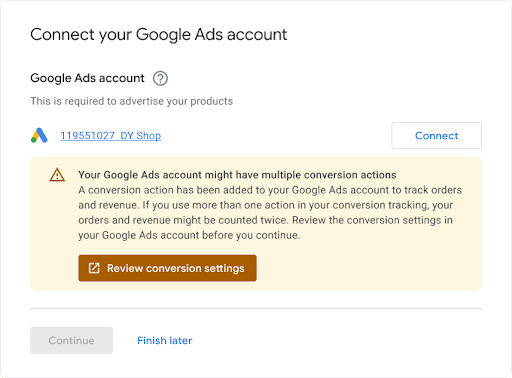
وقتی فروشندگان یک حساب کاربری Ads موجود را لینک میکنند، توصیه میکنیم اعلانی را نمایش دهند مبنی بر اینکه حساب کاربری آنها ممکن است از قبل ردیابی تبدیل را تنظیم کرده باشد، زیرا ممکن است تداخلهایی وجود داشته باشد که باید برطرف شوند. مثالی در زیر نشان داده شده است.
راهنمایی فنی
در اینجا نحوهی عملکرد ردیابی تبدیل آمده است. این بخش هر مرحله را با جزئیات بیشتری شرح میدهد:
شما یک «اقدام تبدیل» در حساب تبلیغات فروشنده خود ایجاد میکنید تا خریدها (و در صورت تمایل سایر اقدامات مشتری) انجام شده در وبسایت آنها را پیگیری کنید.
شما تگ یا قطعه کد مربوط به آن اقدام تبدیل را به یک وبسایت یا برنامه تلفن همراه اضافه میکنید. برای جزئیات بیشتر، به بخش «تنظیم ردیابی تبدیل برای وبسایت خود» مراجعه کنید.
وقتی مشتری روی تبلیغ کلیک میکند، یک کوکی موقت روی رایانه یا دستگاه تلفن همراه مشتری قرار میگیرد.
وقتی مشتری عملی را که برای تبلیغکننده تعریف شده است، انجام میدهد، گوگل کوکی را (از طریق قطعه کد اضافه شده) شناسایی میکند و در صورت لزوم، یک تبدیل را به همراه پارامترهای دیگری مانند «ارزش» ثبت میکند.
پیشنیازها
قبل از شروع، مطمئن شوید که یک شناسه توسعهدهنده تگ گوگل دارید. اگر شناسه توسعهدهنده تگ گوگل ندارید، فرم درخواست شناسه توسعهدهنده تگ گوگل را پر کنید. شناسه توسعهدهنده شما با سایر شناسهها، مانند شناسه اندازهگیری یا شناسه تبدیل، که کاربران نهایی شما به کد اندازهگیری وبسایت خود اضافه میکنند، متفاوت است.
ایجاد و پیکربندی اقدامات تبدیل
مثالهای زیر نحوه ایجاد یک اقدام تبدیل و افزودن آن به حساب تبلیغات را نشان میدهند. هر نمونه تمام وظایف احراز هویت پسزمینه را برای شما انجام میدهد و شما را در ایجاد یک اقدام تبدیل راهنمایی میکند:
جاوا
// Copyright 2018 Google LLC // // Licensed under the Apache License, Version 2.0 (the "License"); // you may not use this file except in compliance with the License. // You may obtain a copy of the License at // // https://www.apache.org/licenses/LICENSE-2.0 // // Unless required by applicable law or agreed to in writing, software // distributed under the License is distributed on an "AS IS" BASIS, // WITHOUT WARRANTIES OR CONDITIONS OF ANY KIND, either express or implied. // See the License for the specific language governing permissions and // limitations under the License. package com.google.ads.googleads.examples.remarketing; import static com.google.ads.googleads.examples.utils.CodeSampleHelper.getPrintableDateTime; import com.beust.jcommander.Parameter; import com.google.ads.googleads.examples.utils.ArgumentNames; import com.google.ads.googleads.examples.utils.CodeSampleParams; import com.google.ads.googleads.lib.GoogleAdsClient; import com.google.ads.googleads.v25.enums.ConversionActionCategoryEnum.ConversionActionCategory; import com.google.ads.googleads.v25.enums.ConversionActionStatusEnum.ConversionActionStatus; import com.google.ads.googleads.v25.enums.ConversionActionTypeEnum.ConversionActionType; import com.google.ads.googleads.v25.errors.GoogleAdsError; import com.google.ads.googleads.v25.errors.GoogleAdsException; import com.google.ads.googleads.v25.resources.ConversionAction; import com.google.ads.googleads.v25.resources.ConversionAction.ValueSettings; import com.google.ads.googleads.v25.services.ConversionActionOperation; import com.google.ads.googleads.v25.services.ConversionActionServiceClient; import com.google.ads.googleads.v25.services.MutateConversionActionResult; import com.google.ads.googleads.v25.services.MutateConversionActionsResponse; import java.io.FileNotFoundException; import java.io.IOException; import java.util.Collections; /** Adds a conversion action. */ public class AddConversionAction { private static class AddConversionActionParams extends CodeSampleParams { @Parameter(names = ArgumentNames.CUSTOMER_ID, required = true) private Long customerId; } public static void main(String[] args) { AddConversionActionParams params = new AddConversionActionParams(); if (!params.parseArguments(args)) { // Either pass the required parameters for this example on the command line, or insert them // into the code here. See the parameter class definition above for descriptions. params.customerId = Long.parseLong("INSERT_CUSTOMER_ID_HERE"); } GoogleAdsClient googleAdsClient = null; try { googleAdsClient = GoogleAdsClient.newBuilder().fromPropertiesFile().build(); } catch (FileNotFoundException fnfe) { System.err.printf( "Failed to load GoogleAdsClient configuration from file. Exception: %s%n", fnfe); System.exit(1); } catch (IOException ioe) { System.err.printf("Failed to create GoogleAdsClient. Exception: %s%n", ioe); System.exit(1); } try { new AddConversionAction().runExample(googleAdsClient, params.customerId); } catch (GoogleAdsException gae) { // GoogleAdsException is the base class for most exceptions thrown by an API request. // Instances of this exception have a message and a GoogleAdsFailure that contains a // collection of GoogleAdsErrors that indicate the underlying causes of the // GoogleAdsException. System.err.printf( "Request ID %s failed due to GoogleAdsException. Underlying errors:%n", gae.getRequestId()); int i = 0; for (GoogleAdsError googleAdsError : gae.getGoogleAdsFailure().getErrorsList()) { System.err.printf(" Error %d: %s%n", i++, googleAdsError); } System.exit(1); } } /** * Runs the example. * * @param googleAdsClient the Google Ads API client. * @param customerId the client customer ID. * @throws GoogleAdsException if an API request failed with one or more service errors. */ private void runExample(GoogleAdsClient googleAdsClient, long customerId) { // Creates a ConversionAction. ConversionAction conversionAction = ConversionAction.newBuilder() // Note that conversion action names must be unique. If a conversion action already // exists with the specified conversion_action_name the create operation will fail with // a ConversionActionError.DUPLICATE_NAME error. .setName("Earth to Mars Cruises Conversion #" + getPrintableDateTime()) .setCategory(ConversionActionCategory.DEFAULT) .setType(ConversionActionType.WEBPAGE) .setStatus(ConversionActionStatus.ENABLED) .setViewThroughLookbackWindowDays(15L) .setValueSettings( ValueSettings.newBuilder() .setDefaultValue(23.41) .setAlwaysUseDefaultValue(true) .build()) .build(); // Creates the operation. ConversionActionOperation operation = ConversionActionOperation.newBuilder().setCreate(conversionAction).build(); try (ConversionActionServiceClient conversionActionServiceClient = googleAdsClient.getLatestVersion().createConversionActionServiceClient()) { MutateConversionActionsResponse response = conversionActionServiceClient.mutateConversionActions( Long.toString(customerId), Collections.singletonList(operation)); System.out.printf("Added %d conversion actions:%n", response.getResultsCount()); for (MutateConversionActionResult result : response.getResultsList()) { System.out.printf( "New conversion action added with resource name: '%s'%n", result.getResourceName()); } } } }
سی شارپ
// Copyright 2019 Google LLC // // Licensed under the Apache License, Version 2.0 (the "License"); // you may not use this file except in compliance with the License. // You may obtain a copy of the License at // // http://www.apache.org/licenses/LICENSE-2.0 // // Unless required by applicable law or agreed to in writing, software // distributed under the License is distributed on an "AS IS" BASIS, // WITHOUT WARRANTIES OR CONDITIONS OF ANY KIND, either express or implied. // See the License for the specific language governing permissions and // limitations under the License. using CommandLine; using Google.Ads.Gax.Examples; using Google.Ads.GoogleAds.Lib; using Google.Ads.GoogleAds.V25.Errors; using Google.Ads.GoogleAds.V25.Resources; using Google.Ads.GoogleAds.V25.Services; using System; using static Google.Ads.GoogleAds.V25.Enums.ConversionActionCategoryEnum.Types; using static Google.Ads.GoogleAds.V25.Enums.ConversionActionStatusEnum.Types; using static Google.Ads.GoogleAds.V25.Enums.ConversionActionTypeEnum.Types; namespace Google.Ads.GoogleAds.Examples.V25 { /// <summary> /// This code example illustrates adding a conversion action. /// </summary> public class AddConversionAction : ExampleBase { /// <summary> /// Command line options for running the <see cref="AddConversionAction"/> example. /// </summary> public class Options : OptionsBase { /// <summary> /// The Google Ads customer ID for which the conversion action is added. /// </summary> [Option("customerId", Required = true, HelpText = "The Google Ads customer ID for which the conversion action is added.")] public long CustomerId { get; set; } } /// <summary> /// Main method, to run this code example as a standalone application. /// </summary> /// <param name="args">The command line arguments.</param> public static void Main(string[] args) { Options options = ExampleUtilities.ParseCommandLine<Options>(args); AddConversionAction codeExample = new AddConversionAction(); Console.WriteLine(codeExample.Description); codeExample.Run(new GoogleAdsClient(), options.CustomerId); } /// <summary> /// Returns a description about the code example. /// </summary> public override string Description => "This code example illustrates adding a conversion action."; /// <summary> /// Runs the code example. /// </summary> /// <param name="client">The Google Ads client.</param> /// <param name="customerId">The Google Ads customer ID for which the conversion action is /// added.</param> public void Run(GoogleAdsClient client, long customerId) { // Get the ConversionActionService. ConversionActionServiceClient conversionActionService = client.GetService(Services.V25.ConversionActionService); // Note that conversion action names must be unique. // If a conversion action already exists with the specified name the create operation // will fail with a ConversionAction.DUPLICATE_NAME error. string ConversionActionName = "Earth to Mars Cruises Conversion #" + ExampleUtilities.GetRandomString(); // Add a conversion action. ConversionAction conversionAction = new ConversionAction() { Name = ConversionActionName, Category = ConversionActionCategory.Default, Type = ConversionActionType.Webpage, Status = ConversionActionStatus.Enabled, ViewThroughLookbackWindowDays = 15, ValueSettings = new ConversionAction.Types.ValueSettings() { DefaultValue = 23.41, AlwaysUseDefaultValue = true } }; // Create the operation. ConversionActionOperation operation = new ConversionActionOperation() { Create = conversionAction }; try { // Create the conversion action. MutateConversionActionsResponse response = conversionActionService.MutateConversionActions(customerId.ToString(), new ConversionActionOperation[] { operation }); // Display the results. foreach (MutateConversionActionResult newConversionAction in response.Results) { Console.WriteLine($"New conversion action with resource name = " + $"'{newConversionAction.ResourceName}' was added."); } } catch (GoogleAdsException e) { Console.WriteLine("Failure:"); Console.WriteLine($"Message: {e.Message}"); Console.WriteLine($"Failure: {e.Failure}"); Console.WriteLine($"Request ID: {e.RequestId}"); throw; } } } }
پی اچ پی
<?php /** * Copyright 2018 Google LLC * * Licensed under the Apache License, Version 2.0 (the "License"); * you may not use this file except in compliance with the License. * You may obtain a copy of the License at * * https://www.apache.org/licenses/LICENSE-2.0 * * Unless required by applicable law or agreed to in writing, software * distributed under the License is distributed on an "AS IS" BASIS, * WITHOUT WARRANTIES OR CONDITIONS OF ANY KIND, either express or implied. * See the License for the specific language governing permissions and * limitations under the License. */ namespace Google\Ads\GoogleAds\Examples\Remarketing; require __DIR__ . '/../../vendor/autoload.php'; use GetOpt\GetOpt; use Google\Ads\GoogleAds\Examples\Utils\ArgumentNames; use Google\Ads\GoogleAds\Examples\Utils\ArgumentParser; use Google\Ads\GoogleAds\Examples\Utils\Helper; use Google\Ads\GoogleAds\Lib\V25\GoogleAdsClient; use Google\Ads\GoogleAds\Lib\V25\GoogleAdsClientBuilder; use Google\Ads\GoogleAds\Lib\V25\GoogleAdsException; use Google\Ads\GoogleAds\Lib\OAuth2TokenBuilder; use Google\Ads\GoogleAds\V25\Enums\ConversionActionCategoryEnum\ConversionActionCategory; use Google\Ads\GoogleAds\V25\Enums\ConversionActionStatusEnum\ConversionActionStatus; use Google\Ads\GoogleAds\V25\Enums\ConversionActionTypeEnum\ConversionActionType; use Google\Ads\GoogleAds\V25\Errors\GoogleAdsError; use Google\Ads\GoogleAds\V25\Resources\ConversionAction; use Google\Ads\GoogleAds\V25\Resources\ConversionAction\ValueSettings; use Google\Ads\GoogleAds\V25\Services\ConversionActionOperation; use Google\Ads\GoogleAds\V25\Services\MutateConversionActionsRequest; use Google\ApiCore\ApiException; /** * This example illustrates adding a conversion action. */ class AddConversionAction { private const CUSTOMER_ID = 'INSERT_CUSTOMER_ID_HERE'; public static function main() { // Either pass the required parameters for this example on the command line, or insert them // into the constants above. $options = (new ArgumentParser())->parseCommandArguments( [ ArgumentNames::CUSTOMER_ID => GetOpt::REQUIRED_ARGUMENT ] ); // Generate a refreshable OAuth2 credential for authentication. $oAuth2Credential = (new OAuth2TokenBuilder())->fromFile()->build(); // Construct a Google Ads client configured from a properties file and the // OAuth2 credentials above. $googleAdsClient = (new GoogleAdsClientBuilder()) ->fromFile() ->withOAuth2Credential($oAuth2Credential) ->build(); try { self::runExample( $googleAdsClient, $options[ArgumentNames::CUSTOMER_ID] ?: self::CUSTOMER_ID ); } catch (GoogleAdsException $googleAdsException) { printf( "Request with ID '%s' has failed.%sGoogle Ads failure details:%s", $googleAdsException->getRequestId(), PHP_EOL, PHP_EOL ); foreach ($googleAdsException->getGoogleAdsFailure()->getErrors() as $error) { /** * @var GoogleAdsError $error */ printf( "\t%s: %s%s", $error->getErrorCode()->getErrorCode(), $error->getMessage(), PHP_EOL ); } exit(1); } catch (ApiException $apiException) { printf( "ApiException was thrown with message '%s'.%s", $apiException->getMessage(), PHP_EOL ); exit(1); } } /** * Runs the example. * * @param GoogleAdsClient $googleAdsClient the Google Ads API client * @param int $customerId the customer ID */ public static function runExample(GoogleAdsClient $googleAdsClient, int $customerId) { // Creates a conversion action. $conversionAction = new ConversionAction( [ // Note that conversion action names must be unique. // If a conversion action already exists with the specified conversion_action_name // the create operation will fail with a ConversionActionError.DUPLICATE_NAME error. 'name' => 'Earth to Mars Cruises Conversion #' . Helper::getPrintableDatetime(), 'category' => ConversionActionCategory::PBDEFAULT, 'type' => ConversionActionType::WEBPAGE, 'status' => ConversionActionStatus::ENABLED, 'view_through_lookback_window_days' => 15, 'value_settings' => new ValueSettings( [ 'default_value' => 23.41, 'always_use_default_value' => true ] ) ] ); // Creates a conversion action operation. $conversionActionOperation = new ConversionActionOperation(); $conversionActionOperation->setCreate($conversionAction); // Issues a mutate request to add the conversion action. $conversionActionServiceClient = $googleAdsClient->getConversionActionServiceClient(); $response = $conversionActionServiceClient->mutateConversionActions( MutateConversionActionsRequest::build($customerId, [$conversionActionOperation]) ); printf("Added %d conversion actions:%s", $response->getResults()->count(), PHP_EOL); foreach ($response->getResults() as $addedConversionAction) { /** * @var ConversionAction $addedConversionAction */ printf( "New conversion action added with resource name: '%s'%s", $addedConversionAction->getResourceName(), PHP_EOL ); } } } AddConversionAction::main();
پایتون
#!/usr/bin/env python # Copyright 2018 Google LLC # # Licensed under the Apache License, Version 2.0 (the "License"); # you may not use this file except in compliance with the License. # You may obtain a copy of the License at # # https://www.apache.org/licenses/LICENSE-2.0 # # Unless required by applicable law or agreed to in writing, software # distributed under the License is distributed on an "AS IS" BASIS, # WITHOUT WARRANTIES OR CONDITIONS OF ANY KIND, either express or implied. # See the License for the specific language governing permissions and # limitations under the License. """This example illustrates adding a conversion action.""" import argparse import sys import uuid from google.ads.googleads.client import GoogleAdsClient from google.ads.googleads.errors import GoogleAdsException from google.ads.googleads.v24.resources.types.conversion_action import ( ConversionAction, ) from google.ads.googleads.v24.services.services.conversion_action_service import ( ConversionActionServiceClient, ) from google.ads.googleads.v24.services.types.conversion_action_service import ( ConversionActionOperation, MutateConversionActionsResponse, ) def main(client: GoogleAdsClient, customer_id: str) -> None: conversion_action_service: ConversionActionServiceClient = ( client.get_service("ConversionActionService") ) # Create the operation. conversion_action_operation: ConversionActionOperation = client.get_type( "ConversionActionOperation" ) # Create conversion action. conversion_action: ConversionAction = conversion_action_operation.create # Note that conversion action names must be unique. If a conversion action # already exists with the specified conversion_action_name, the create # operation will fail with a ConversionActionError.DUPLICATE_NAME error. conversion_action.name = f"Earth to Mars Cruises Conversion {uuid.uuid4()}" conversion_action.type_ = ( client.enums.ConversionActionTypeEnum.UPLOAD_CLICKS ) conversion_action.category = ( client.enums.ConversionActionCategoryEnum.DEFAULT ) conversion_action.status = client.enums.ConversionActionStatusEnum.ENABLED conversion_action.view_through_lookback_window_days = 15 # Create a value settings object. value_settings: ConversionAction.ValueSettings = ( conversion_action.value_settings ) value_settings.default_value = 15.0 value_settings.always_use_default_value = True # Add the conversion action. conversion_action_response: MutateConversionActionsResponse = ( conversion_action_service.mutate_conversion_actions( customer_id=customer_id, operations=[conversion_action_operation], ) ) print( "Created conversion action " f'"{conversion_action_response.results[0].resource_name}".' ) if __name__ == "__main__": parser: argparse.ArgumentParser = argparse.ArgumentParser( description="Adds a conversion action for specified customer." ) # The following argument(s) should be provided to run the example. parser.add_argument( "-c", "--customer_id", type=str, required=True, help="The Google Ads customer ID.", ) args: argparse.Namespace = parser.parse_args() # GoogleAdsClient will read the google-ads.yaml configuration file in the # home directory if none is specified. googleads_client: GoogleAdsClient = GoogleAdsClient.load_from_storage( version="v24" ) try: main(googleads_client, args.customer_id) except GoogleAdsException as ex: print( f'Request with ID "{ex.request_id}" failed with status ' f'"{ex.error.code().name}" and includes the following errors:' ) for error in ex.failure.errors: print(f'\tError with message "{error.message}".') if error.location: for field_path_element in error.location.field_path_elements: print(f"\t\tOn field: {field_path_element.field_name}") sys.exit(1)
روبی
#!/usr/bin/env ruby # Encoding: utf-8 # # Copyright 2018 Google LLC # # Licensed under the Apache License, Version 2.0 (the "License"); # you may not use this file except in compliance with the License. # You may obtain a copy of the License at # # https://www.apache.org/licenses/LICENSE-2.0 # # Unless required by applicable law or agreed to in writing, software # distributed under the License is distributed on an "AS IS" BASIS, # WITHOUT WARRANTIES OR CONDITIONS OF ANY KIND, either express or implied. # See the License for the specific language governing permissions and # limitations under the License. # # This code example illustrates adding a conversion action. require 'optparse' require 'google/ads/google_ads' require 'date' require_relative '../shared/error_handler.rb' def add_conversion_action(customer_id) # GoogleAdsClient will read a config file from # ENV['HOME']/google_ads_config.rb when called without parameters client = Google::Ads::GoogleAds::GoogleAdsClient.new # Add a conversion action. conversion_action = client.resource.conversion_action do |ca| ca.name = "Earth to Mars Cruises Conversion #{(Time.new.to_f * 100).to_i}" ca.type = :UPLOAD_CLICKS ca.category = :DEFAULT ca.status = :ENABLED ca.view_through_lookback_window_days = 15 # Create a value settings object. ca.value_settings = client.resource.value_settings do |vs| vs.default_value = 15 vs.always_use_default_value = true end end # Create the operation. conversion_action_operation = client.operation.create_resource.conversion_action(conversion_action) # Add the ad group ad. response = client.service.conversion_action.mutate_conversion_actions( customer_id: customer_id, operations: [conversion_action_operation], ) puts "New conversion action with resource name = #{response.results.first.resource_name}." end if __FILE__ == $0 options = {} # The following parameter(s) should be provided to run the example. You can # either specify these by changing the INSERT_XXX_ID_HERE values below, or on # the command line. # # Parameters passed on the command line will override any parameters set in # code. # # Running the example with -h will print the command line usage. options[:customer_id] = 'INSERT_CUSTOMER_ID_HERE' OptionParser.new do |opts| opts.banner = sprintf('Usage: %s [options]', File.basename(__FILE__)) opts.separator '' opts.separator 'Options:' opts.on('-C', '--customer-id CUSTOMER-ID', String, 'Customer ID') do |v| options[:customer_id] = v end opts.separator '' opts.separator 'Help:' opts.on_tail('-h', '--help', 'Show this message') do puts opts exit end end.parse! begin add_conversion_action(options.fetch(:customer_id).tr("-", "")) rescue Google::Ads::GoogleAds::Errors::GoogleAdsError => e GoogleAdsErrorHandler.handle_google_ads_error(e) raise # Re-raise the error to maintain original script behavior. end end
پرل
#!/usr/bin/perl -w # # Copyright 2019, Google LLC # # Licensed under the Apache License, Version 2.0 (the "License"); # you may not use this file except in compliance with the License. # You may obtain a copy of the License at # # http://www.apache.org/licenses/LICENSE-2.0 # # Unless required by applicable law or agreed to in writing, software # distributed under the License is distributed on an "AS IS" BASIS, # WITHOUT WARRANTIES OR CONDITIONS OF ANY KIND, either express or implied. # See the License for the specific language governing permissions and # limitations under the License. # # This example illustrates adding a conversion action. use strict; use warnings; use utf8; use FindBin qw($Bin); use lib "$Bin/../../lib"; use Google::Ads::GoogleAds::Client; use Google::Ads::GoogleAds::Utils::GoogleAdsHelper; use Google::Ads::GoogleAds::V25::Resources::ConversionAction; use Google::Ads::GoogleAds::V25::Resources::ValueSettings; use Google::Ads::GoogleAds::V25::Enums::ConversionActionCategoryEnum qw(DEFAULT); use Google::Ads::GoogleAds::V25::Enums::ConversionActionTypeEnum qw(WEBPAGE); use Google::Ads::GoogleAds::V25::Enums::ConversionActionStatusEnum qw(ENABLED); use Google::Ads::GoogleAds::V25::Services::ConversionActionService::ConversionActionOperation; use Getopt::Long qw(:config auto_help); use Pod::Usage; use Cwd qw(abs_path); use Data::Uniqid qw(uniqid); # The following parameter(s) should be provided to run the example. You can # either specify these by changing the INSERT_XXX_ID_HERE values below, or on # the command line. # # Parameters passed on the command line will override any parameters set in # code. # # Running the example with -h will print the command line usage. my $customer_id = "INSERT_CUSTOMER_ID_HERE"; sub add_conversion_action { my ($api_client, $customer_id) = @_; # Note that conversion action names must be unique. # If a conversion action already exists with the specified conversion_action_name, # the create operation fails with error ConversionActionError.DUPLICATE_NAME. my $conversion_action_name = "Earth to Mars Cruises Conversion #" . uniqid(); # Create a conversion action. my $conversion_action = Google::Ads::GoogleAds::V25::Resources::ConversionAction->new({ name => $conversion_action_name, category => DEFAULT, type => WEBPAGE, status => ENABLED, viewThroughLookbackWindowDays => 15, valueSettings => Google::Ads::GoogleAds::V25::Resources::ValueSettings->new({ defaultValue => 23.41, alwaysUseDefaultValue => "true" })}); # Create a conversion action operation. my $conversion_action_operation = Google::Ads::GoogleAds::V25::Services::ConversionActionService::ConversionActionOperation ->new({create => $conversion_action}); # Add the conversion action. my $conversion_actions_response = $api_client->ConversionActionService()->mutate({ customerId => $customer_id, operations => [$conversion_action_operation]}); printf "New conversion action added with resource name: '%s'.\n", $conversion_actions_response->{results}[0]{resourceName}; return 1; } # Don't run the example if the file is being included. if (abs_path($0) ne abs_path(__FILE__)) { return 1; } # Get Google Ads Client, credentials will be read from ~/googleads.properties. my $api_client = Google::Ads::GoogleAds::Client->new(); # By default examples are set to die on any server returned fault. $api_client->set_die_on_faults(1); # Parameters passed on the command line will override any parameters set in code. GetOptions("customer_id=s" => \$customer_id); # Print the help message if the parameters are not initialized in the code nor # in the command line. pod2usage(2) if not check_params($customer_id); # Call the example. add_conversion_action($api_client, $customer_id =~ s/-//gr); =pod =head1 NAME add_conversion_action =head1 DESCRIPTION This example illustrates adding a conversion action. =head1 SYNOPSIS add_conversion_action.pl [options] -help Show the help message. -customer_id The Google Ads customer ID. =cut
حلقه زدن
از آنجایی که مثالهای قبلی ماهیت کلی دارند، در اینجا نکات اضافی وجود دارد تا ConversionAction به درستی برای Performance Max پیکربندی شود. هر یک از اقدامات تبدیل شما باید به شرح زیر پیکربندی شود:
نوع - ConversionActionType را روی WEBPAGE تنظیم کنید، زیرا این رویدادهای خرید در یک وبسایت رخ میدهند.
Biddable - برای اقدام تبدیل اولیه (خرید) روی
trueتنظیم کنید تا کمپینها به سمت فروش بهینه شوند. برای اقدامات تبدیل ثانویه (EG افزودن به سبد خرید)، مقدار را رویfalseتنظیم کنید.دسته بندی - برای هر یک از اقدامات تبدیل (اولیه یا ثانویه)، دسته بندی ConversionActionCategory را تنظیم کنید. در زیر، میتوانید دسته بندی مربوط به اقدامات مکالمه را برای هر یک از 7 اقدام تبدیل که توصیه میکنیم پیادهسازی کنید، پیدا کنید. توجه داشته باشید که گوگل ادز به طور خودکار اقدامات تبدیل را بر اساس دسته بندی آنها به یک هدف تبدیل استاندارد اختصاص میدهد. به عنوان مثال، اقدامات تبدیل خرید به هدف تبدیل استاندارد به نام "خریدها" اختصاص داده میشوند. بعداً میتوانید کمپین Performance Max را برای بهینه سازی برای این هدف خریدها پیکربندی کنید.
میتوانید در زیر لیستی از اقدامات تبدیل پیشنهادی را بیابید. توصیه میکنیم حداقل چهار اقدام تبدیل اول و تا حد امکان سایر اقدامات پیشنهادی را اجرا کنید.
همچنین میتوانید پیادهسازی رویدادهای اضافی مرتبط با فروش آنلاین را در نظر بگیرید. برای ردیابی دقیقتر، میتوانید اقدامات تبدیل اضافی یا اقدامات تبدیل سفارشی ایجاد کنید (به عنوان مثال، اقدامی برای "افزودن اطلاعات پرداخت" هر بار که کاربر از گزینه جستجو در وبسایت استفاده میکند، یا اقدامی برای "جستجو" هر بار که کاربر از گزینه جستجو در وبسایت استفاده میکند). اقدامات تبدیل ثانویه، ردیابی بیشتری را برای فروشندگان شما فراهم میکنند و توسط گوگل ادز برای مشاهده استفاده میشوند.
| اولویت | اقدام تبدیل | دسته بندی اقدامات تبدیل | نام رویداد گوگل تگ | توضیحات |
|---|---|---|---|---|
| اجباری | خرید | خرید | خرید | کاربر خرید را تکمیل میکند |
| اکیداً برای همه فروشگاهسازان توصیه میشود | افزودن به سبد خرید | افزودن به سبد خرید | افزودن به سبد خرید | کاربر محصولی را به سبد خرید اضافه میکند |
| اکیداً برای همه فروشگاهسازان توصیه میشود | شروع تسویه حساب | شروع_پرداخت | شروع_پرداخت | کاربر فرآیند پرداخت را آغاز میکند |
| اکیداً برای همه فروشگاهسازان توصیه میشود | مشاهده کالا | نمای صفحه | نمای صفحه | کاربر صفحه محصول را باز میکند |
| در صورت لزوم اکیداً توصیه میشود (معمولاً برای سازندگان فروشگاه قابل اجرا نیست) | ثبت نام کنید | ثبت نام | ثبت نام | کاربر برای یک حساب کاربری ثبت نام میکند |
| در صورت لزوم اکیداً توصیه میشود (معمولاً برای سازندگان فروشگاه قابل اجرا نیست) | تولید سرنخ (لید) | فرم ارسال | تولید_لید | کاربر از طریق فرم، سرنخ (لید) ایجاد میکند |
| در صورت لزوم اکیداً توصیه میشود (معمولاً برای سازندگان فروشگاه قابل اجرا نیست) | اشتراک | اشتراک_پرداختی | قابل اجرا نیست (سفارشی) | کاربر در یک سرویس پولی مشترک میشود |
| در صورت لزوم اکیداً توصیه میشود (معمولاً برای سازندگان فروشگاه قابل اجرا نیست) | رزرو نوبت | رزرو وقت | قابل اجرا نیست (سفارشی) | کاربر یک قرار ملاقات رزرو میکند |
| در صورت لزوم اکیداً توصیه میشود (معمولاً برای سازندگان فروشگاه قابل اجرا نیست) | درخواست قیمت | درخواست_نقل_قول | قابل اجرا نیست (سفارشی) | کاربر فرمی را برای درخواست تخمین قیمت ارسال میکند |
فروشندگانی که حساب تبلیغات موجود دارند
اگر به فروشندگان اجازه دهید با یک حساب کاربری تبلیغات موجود وارد سیستم شوند ، ممکن است با موقعیتی مواجه شوید که حساب کاربری از قبل دارای اقدامات تبدیل باشد. ما استفاده از یک اقدام تبدیل موجود را توصیه نمیکنیم، زیرا هیچ تضمینی وجود ندارد که به درستی تنظیم شده باشد. علاوه بر این، برای مدیریت این سناریوهای احتمالی، باید مراحل اضافی زیر را انجام دهید:
حساب کاربری چندین هدف دارد (برای مثال، خریدها + بازدید صفحات + مخاطبین) که همگی به عنوان "پیشفرض حساب" علامتگذاری شدهاند. وقتی یک کمپین جدید ایجاد میشود، به طور پیشفرض برای همه این اهداف بهینهسازی انجام میدهد. شما این را برای کمپین Performance Max نمیخواهید.
حساب کاربری از قبل یک (یا چند) اقدام تبدیل برای ردیابی خریدها دارد و در حال حاضر تحت هدف خریدها گروهبندی شده است. این بدان معناست که پس از دو برابر شدن کمپین، یک خرید محسوب میشود، زیرا دو تگ تبدیل فعال شدهاند.
برای اطمینان از اینکه کمپین Performance Max فقط از اقدام تبدیل سفارشی شما استفاده میکند:
یک CustomConversionGoal ایجاد کنید و عمل تبدیل خرید خود را به لیست
conversion_actions[]هدف اضافه کنید. وضعیت را روی ENABLED تنظیم کنید.در ConversionGoalCampaignConfig مربوط به کمپین Performance Max،
custom_conversion_goalروی هدف سفارشی که در مرحله (1) ایجاد کردید، تنظیم کنید.در نتیجه مرحله (2)، گوگل ادز باید به طور خودکار ConversionGoalCampaignConfig کمپین را بهروزرسانی میکرد، به طوری که
goal_config_levelروی CAMPAIGN تنظیم شده باشد (به جای CUSTOMER که آن را به سمت استفاده از اهداف پیشفرض حساب هدایت میکند)، اما ارزش دارد که دوباره بررسی کنید که آیا واقعاً این اتفاق افتاده است یا خیر.
برچسب مربوط به عمل تبدیل را بازیابی کنید
پس از ایجاد عملیات تبدیل، باید قطعه کد مربوطه به نام تگ را در صفحه تبدیل در وبسایت تبلیغکننده وارد کنید. برای اطمینان از اینکه گوگل ادز میتواند تمام تبدیلها را صرف نظر از مرورگر مشتری اندازهگیری کند، از تگ ردیابی تبدیل گوگل ادز بهروزرسانیشده استفاده کنید. این تگ از دو بخش تشکیل شده است:
تگ
global_site_tagکه باید در هر صفحه از وبسایت تبلیغکننده نصب شود.قطعه
event_snippetکه باید در صفحات وبی قرار گیرد که نشاندهندهی یک اقدام تبدیل مانند صفحهی تأیید پرداخت یا ارسال سرنخ هستند.
شما میتوانید این دو بخش را با ConversionActionService بازیابی کنید.
این تگ، کوکیهایی را تنظیم میکند که یک شناسه منحصر به فرد برای مشتری یا کلیک روی تبلیغی که مشتری را به سایت آورده است، ذخیره میکنند. کوکیها اطلاعات کلیک روی تبلیغ را از پارامتر شناسه کلیک گوگل ( GCLID ) که در تگ ردیابی تبدیل گنجانده شده است، دریافت میکنند. شما باید وبسایت و سیستم ردیابی سرنخ تبلیغکننده را قادر به ثبت و ذخیره GCLID کنید، که شناسه منحصر به فردی است که گوگل ادز برای هر نمایش از یک تبلیغ گوگل ارائه میدهد.
اطلاعات بیشتر در مورد برچسب سراسری و محل نصب آن
تگ گوگل (gtag.js) یک چارچوب تگگذاری و API است که به شما امکان میدهد دادههای رویداد را هم به گوگل ادز و هم به گوگل آنالیتیکس ارسال کنید. تگ سایت سراسری به همراه یک قطعه کد رویداد یا یک قطعه کد تلفن برای ردیابی تبدیلهای شما کار میکند. تگ گوگل را به بخش <head> هر صفحه در سایت تبلیغکننده اضافه کنید و آن را برای کار با گوگل ادز پیکربندی کنید. سپس میتوانید از دستورات gtag() برای ثبت رویدادها و ارسال دادهها به گوگل ادز استفاده کنید. برای درک نحوه عملکرد این کار، به بخش «استفاده از تگ سایت سراسری برای ردیابی تبدیل گوگل ادز» مراجعه کنید.
شما از دستورات زیر با تگ گوگل استفاده میکنید:
پیکربندی: یک محصول گوگل (گوگل ادز، آنالیتیکس و غیره) را راهاندازی کنید، تنظیمات را پیکربندی کنید و برای ارسال دادهها به یک حساب آماده شوید.
رویداد: با ارسال رویدادی مانند خرید (توصیه میشود) یا افزودن به سبد خرید ( اقدامات تبدیل ثانویه )، یک تبدیل ثبت کنید. توصیه میکنیم راهنمای مرجع رویداد gtag.js را مطالعه کنید.
تنظیم: پارامترهای مشترک برای همه رویدادهای صفحه، مانند واحد پول را تنظیم میکند.
مثال زیر یک قطعه کد جاوا اسکریپت از تگ سراسری سایت برای ارسال دادهها به گوگل ادز است. مقدار جایگذاری GOOGLE_CONVERSION_ID یک شناسه عددی منحصر به فرد برای یک حساب تبلیغکننده است.
<!-- Google Tag (gtag.js) - Google Ads: GOOGLE_CONVERSION_ID -->
<script async src="https://www.googletagmanager.com/gtag/js?id=AW-GOOGLE_CONVERSION_ID">
</script>
<script>
  window.dataLayer = window.dataLayer || [];
  function gtag(){dataLayer.push(arguments)};
  gtag('js', new Date());
   gtag('set', 'developer_id.<developer ID>', true); // Replace with your Google tag Developer ID
  gtag('config', 'AW-GOOGLE_CONVERSION_ID');
</script>
قطعه کد تگ گوگل باید فقط یک بار در هر صفحه ظاهر شود. اگر نمونهای از gtag.js وجود دارد، باید شناسههای تگ جدید را به تگ موجود اضافه کنید. برای ارسال داده به چندین حساب، میتوانید برای هر حسابی که استفاده میکنید، یک فراخوانی به دستور 'config' اضافه کنید و شناسه تبدیل هر حساب را مشخص کنید، همانطور که در مثال زیر نشان داده شده است:
<!-- Google Tag (gtag.js) - Google Ads: GOOGLE_CONVERSION_ID_1 -->
<script async src="https://www.googletagmanager.com/gtag/js?id=AW-GOOGLE_CONVERSION_ID_1"></script>
<script>
  window.dataLayer = window.dataLayer || [];
  function gtag(){dataLayer.push(arguments)};
  gtag('js', new Date());
  gtag('config', 'AW-GOOGLE_CONVERSION_ID_1');
  gtag('config', 'AW-GOOGLE_CONVERSION_ID_2');
</script>
اطلاعات بیشتر در مورد قطعه کد رویداد و محل نصب آن
برای اینکه ردیابی تبدیل خرید کار کند، قطعه کد رویداد خرید باید در خود صفحه تبدیل نصب شود. این معمولاً صفحه تأیید سفارش است. میتوان آن را در هر جایی از کد، بعد از قطعه کد سراسری قرار داد. قطعه کدهای رویداد برای اقدامات تبدیل ثانویه (به عنوان مثال: افزودن به سبد خرید) باید در صفحات مربوطه قرار گیرند.
در قطعه کد نمونه زیر، AW-CONVERSION_ID و gTag_developer_ID به معنای شناسه تبدیل منحصر به فرد برای حساب Google Ads و حساب توسعهدهنده Google Tag شما هستند، در حالی که AW-CONVERSION_LABEL به معنای برچسب تبدیل است که برای هر اقدام تبدیل منحصر به فرد است:
<!-- Event snippet for a purchase conversion page -->
<script>
  gtag('event', 'conversion', {
       'send_to':'AW-CONVERSION_ID/CONVERSION_LABEL',
       'developer_id.<gTag developer ID>': true,
       'transaction_id': '<transaction_id (string)>' //unique ID for the transaction (e.g. an order ID); it's used for de-duplication purposes
       'value': 1.0,
       'currency': 'USD', //three-letter currency code, useful for advertisers who accept multiple currencies
       'country': 'US',
       'new_customer': false, //new customer acquisition goal
       'tax': 1.24, //tax cost-US only
       'shipping': 0.00, //shipping cost-US only
       'delivery_postal_code': '94043', //shipping data validation-US only
       'estimated_delivery_date': '2020-07-31', //shipping validation-US only
       'aw_merchant_id': 12345, //shipping validation-US only
       'aw_feed_country': 'US', //shipping validation-US only
       'aw_feed_language': 'EN', //shipping validation-US only
       'items': [
       {
             'id': 'P12345',
             'name': 'Android Warhol T-Shirt',
             'quantity': 2,
             'price': 12.04,
             'estimated_delivery_date': '2020-07-31', //shipping-US only
              'google_business_vertical': 'retail'
       }, …],
  });
</script>
اگرچه برخی از پارامترها اختیاری هستند، توصیه میشود تا حد امکان اطلاعات مربوط به هر رویداد را وارد کنید. درباره پارامترهای موجود برای هر نوع رویداد بیشتر بدانید .
پارامترها اطلاعات بیشتری در مورد روشهای تعامل کاربران با وبسایت یا برنامه شما ارائه میدهند.
اگر میخواهید یک رویداد تبدیل را بر اساس یک کلیک (EG روی یک دکمه یا یک پاسخ پویا برای یک سایت با استفاده از AJAX) اندازهگیری کنید، میتوانید از قطعه کد زیر نیز استفاده کنید:
<!-- Event snippet for test conversion click -->
In your html page, add the snippet and call gtag_report_conversion when someone clicks on the chosen link or button. -->
<script>
function gtag_report_conversion(url) {
  var callback = function () {
    if (typeof(url) != 'undefined') {
      window.location = url;
    }
  };
  gtag('event', 'conversion', {
      'send_to': 'AW-CONVERSION_ID/CONVERSION_LABEL',
      'value': 1.0,
      'event_callback': callback,
      //other parameters
  });
  return false;
}
</script>
پیادهسازی API رضایت (که با نام حالت رضایت نیز شناخته میشود)
تگ گوگل دارای یک API رضایت داخلی برای مدیریت رضایت کاربر است. این API میتواند رضایت کاربر برای کوکیها برای اهداف تبلیغاتی را از کوکیها برای اهداف تحلیلی متمایز کند.
نتیجه مورد انتظار این است که مشتریان حداقل فراخوانی gtag('consent', 'update' {...}) را بدون نیاز به هیچ اقدامی از سوی مشتری دریافت کنند. این باید تضمین کند که برچسبهای گوگل (Google Ads، Floodlight، Google Analytics، Conversion Linker) قادر به خواندن آخرین وضعیت رضایت کاربر و لحاظ کردن این وضعیت در درخواستهای شبکه به گوگل (از طریق پارامتر &gcs) هستند.
مراحل پیادهسازی اضافی شامل استقرار یا کمک به تبلیغکنندگان در استقرار (مثلاً از طریق رابط کاربری) حالت gtag('consent', default' {...}) و رفع انسداد تگهای گوگل (مثال: عدم فعالسازی مشروط مبتنی بر رضایت) برای فعال کردن حالت رضایت برای فعالسازی آنها به شیوهای آگاهانه از رضایت است.
برای جزئیات پیادهسازی، به مدیریت تنظیمات رضایت (وب) مراجعه کنید.
نکات
از حساب مدیریت تبلیغات گوگل، میتوانید تبدیلها را در تمام حسابهای تبلیغکننده خود با استفاده از یک تگ کد تبدیل واحد پیگیری کنید. درباره ردیابی تبدیل بین حسابها (cross account conversion tracking) ببینید.
بهترین راه برای آزمایش اینکه آیا پیادهسازی ردیابی تبدیل شما کار میکند یا خیر، رفتن به یکی از وبسایتهای فروشنده (یا یک وبسایت آزمایشی داخلی) و انجام یک خرید واقعی است. سپس میتوانید در ابزار دستیار برچسب گوگل (Google Tag Assistant) مشاهده کنید تا با استفاده از این راهنمای عیبیابی ، تأیید کنید که گوگل ادز برچسب شما را دیده و تبدیلها را با موفقیت ثبت میکند. برای عیبیابی بیشتر، به عیبیابی برچسبگذاری در کل سایت خود مراجعه کنید.
شما میتوانید برچسب تبدیل قبلی را با تبدیلهای بهبود یافته تکمیل کنید، که میتواند دقت اندازهگیری تبدیل شما را بهبود بخشد و پیشنهاد قیمت قویتری را باز کند. درباره تنظیم تبدیلهای بهبود یافته بیشتر بدانید. قبل از اجرای تبدیلهای بهبود یافته ، باید مطمئن شوید که فروشندگان شما میتوانند از سیاستهای دادههای مشتری تبدیل بهبود یافته در Google Ads پیروی کنند.