
เลือกเส้นทางการผสานรวม
เลือกเส้นทางที่เหมาะกับความต้องการของคุณมากที่สุด
| เส้นทาง | เหมาะสำหรับ | ดูข้อมูลเพิ่มเติม |
|---|---|---|
| Universal Commerce Protocol (UCP) | ผู้ขายและผู้ค้าปลีก | เอกสาร UCP |
| การลิงก์บัญชีมาตรฐาน | สมาร์ทโฮม ทีวี และ YouTube | เอกสาร |
การลิงก์บัญชีช่วยให้ผู้ถือบัญชี Google เชื่อมต่อกับบริการของคุณได้อย่างรวดเร็ว ราบรื่น และปลอดภัย คุณอาจเลือกที่จะติดตั้งใช้งานการลิงก์บัญชี Google เพื่อแชร์ข้อมูลของผู้ใช้จากแพลตฟอร์มของคุณกับแอปและบริการของ Google
โปรโตคอล OAuth 2.0 ที่ปลอดภัยช่วยให้คุณลิงก์บัญชี Google ของผู้ใช้กับบัญชีในแพลตฟอร์มของคุณได้อย่างปลอดภัย ซึ่งจะให้สิทธิ์แอปพลิเคชันและอุปกรณ์ของ Google เข้าถึงบริการของคุณ
ผู้ใช้สามารถลิงก์หรือยกเลิกการลิงก์บัญชี และสร้างบัญชีใหม่ในแพลตฟอร์มของคุณได้ด้วยการลิงก์บัญชี Google
กรณีการใช้งาน
เหตุผลบางประการที่ควรติดตั้งใช้งานการลิงก์บัญชี Google มีดังนี้
แชร์ข้อมูลของผู้ใช้จากแพลตฟอร์มของคุณกับแอปและบริการของ Google
ผสานรวมกับ Google Shopping และพื้นที่แสดงผลของ AI (Search, Gemini) โดยใช้ Universal Commerce Protocol (UCP)
เล่นเนื้อหาวิดีโอและภาพยนตร์โดยใช้ Google TV
จัดการและควบคุม อุปกรณ์สมาร์ทโฮมที่เชื่อมต่ออินเทอร์เน็ตของ Google โดยใช้แอป Google Home และ Google Assistant เช่น "Ok Google เปิดไฟ"
สร้างประสบการณ์การใช้งานและฟังก์ชันการทำงานของ Google Assistant ที่ปรับแต่งโดยผู้ใช้ด้วย Conversational Actions, "Ok Google สั่งเมนูเดิมจาก Starbucks ให้หน่อย"
เปิดโอกาสให้ผู้ใช้ได้รับรางวัลโดยการดูสตรีมแบบสดที่มีสิทธิ์บน YouTube หลังจากลิงก์บัญชี Google กับ บัญชีพาร์ทเนอร์ด้านรางวัล
ป้อนข้อมูลล่วงหน้าในบัญชีใหม่ระหว่างการลงชื่อสมัครใช้ด้วยข้อมูลที่แชร์โดยได้รับความยินยอมจาก โปรไฟล์บัญชี Google
ความสามารถและข้อกำหนด
เมทริกซ์ต่อไปนี้กำหนดการสนับสนุนและคำแนะนำสำหรับโฟลว์การลิงก์แต่ละรายการ
| โฟลว์การลิงก์ | ฟีเจอร์มาตรฐาน | ฟีเจอร์ UCP |
|---|---|---|
| App Flip | แนะนำ | แนะนำ |
| การลิงก์ที่มีประสิทธิภาพ | แนะนำ | แนะนำ |
| การลิงก์ OAuth | ต้องระบุ (สำรอง) | ต้องระบุ (สำรอง) |
| OAuth 2.1 | แนะนำ | แนะนำ |
การพัฒนาด้าน Agentic AI (MCP และ UCP)
โมเดลภาษาขนาดใหญ่ (LLM) และ AI Agent ต้องมีการตรวจสอบสิทธิ์ที่รัดกุมเพื่อเข้าถึงข้อมูลผู้ใช้ การลิงก์บัญชี Google รองรับกระบวนทัศน์ที่เกิดขึ้นใหม่เหล่านี้
- Model Context Protocol (MCP): GAL ทำหน้าที่เป็นกลไกการรักษาความปลอดภัย Agent ใช้โทเค็น OAuth 2.1 เพื่อค้นหาเครื่องมือเซิร์ฟเวอร์ MCP ของคุณอย่างปลอดภัย
Universal Commerce Protocol (UCP): ช่วยให้ Shopping Agent เข้าถึง โปรไฟล์ผู้ใช้และเวกเตอร์การชำระเงินได้อย่างปลอดภัย
ปรับปรุงความเป็นส่วนตัวของผู้ใช้โดยกำหนดขอบเขตที่กำหนดเองเพื่อแชร์เฉพาะข้อมูลที่จำเป็น และเพิ่มความไว้วางใจจากผู้ใช้ด้วยการกำหนดวิธีใช้ข้อมูลของผู้ใช้อย่างชัดเจน
คุณสามารถยกเลิกสิทธิ์เข้าถึงข้อมูลและบริการที่โฮสต์อยู่ในแพลตฟอร์มของคุณได้โดยการ ยกเลิกการลิงก์บัญชี การติดตั้งใช้งานปลายทางการเพิกถอนโทเค็นที่ไม่บังคับช่วยให้คุณซิงค์กับเหตุการณ์ที่ Google เริ่มต้นได้ ในขณะที่การปกป้องบัญชี (RISC) ช่วยให้คุณแจ้งให้ Google ทราบถึงเหตุการณ์การยกเลิกการลิงก์ที่เกิดขึ้นในแพลตฟอร์มของคุณ
โฟลว์การลิงก์บัญชี
การลิงก์บัญชี Google มี 3 โฟลว์ ซึ่งทั้งหมดใช้ OAuth และกำหนดให้คุณต้องจัดการหรือควบคุมปลายทางการให้สิทธิ์และการแลกเปลี่ยนโทเค็นที่เป็นไปตามข้อกำหนด OAuth 2.0
ในระหว่างกระบวนการเชื่อมต่อ คุณจะออกโทเค็นเพื่อการเข้าถึงให้กับบัญชี Google แต่ละบัญชีหลังจากได้รับความยินยอมจากเจ้าของบัญชีในการลิงก์บัญชีและแชร์ข้อมูล
การลิงก์ OAuth
นี่คือโฟลว์การลิงก์ OAuth ที่ส่งผู้ใช้ไปยังเว็บไซต์ของคุณ เพื่อทำการลิงก์ ระบบจะเปลี่ยนเส้นทางผู้ใช้ไปยังเว็บไซต์ของคุณเพื่อลงชื่อเข้าใช้บัญชี เมื่อลงชื่อเข้าใช้แล้ว ผู้ใช้จะให้ความยินยอมในการแชร์ข้อมูลในบริการของคุณกับ Google จากนั้นบัญชี Google ของผู้ใช้และบริการของคุณจะลิงก์กัน
การลิงก์ OAuth รองรับโฟลว์ OAuth แบบรหัสการให้สิทธิ์และแบบโดยนัย บริการของคุณต้องโฮสต์ปลายทางการให้สิทธิ์ที่เป็นไปตามข้อกำหนด OAuth 2.0 สำหรับโฟลว์แบบโดยนัย และต้องแสดงทั้งปลายทางการให้สิทธิ์และการแลกเปลี่ยนโทเค็นเมื่อใช้โฟลว์แบบรหัสการให้สิทธิ์
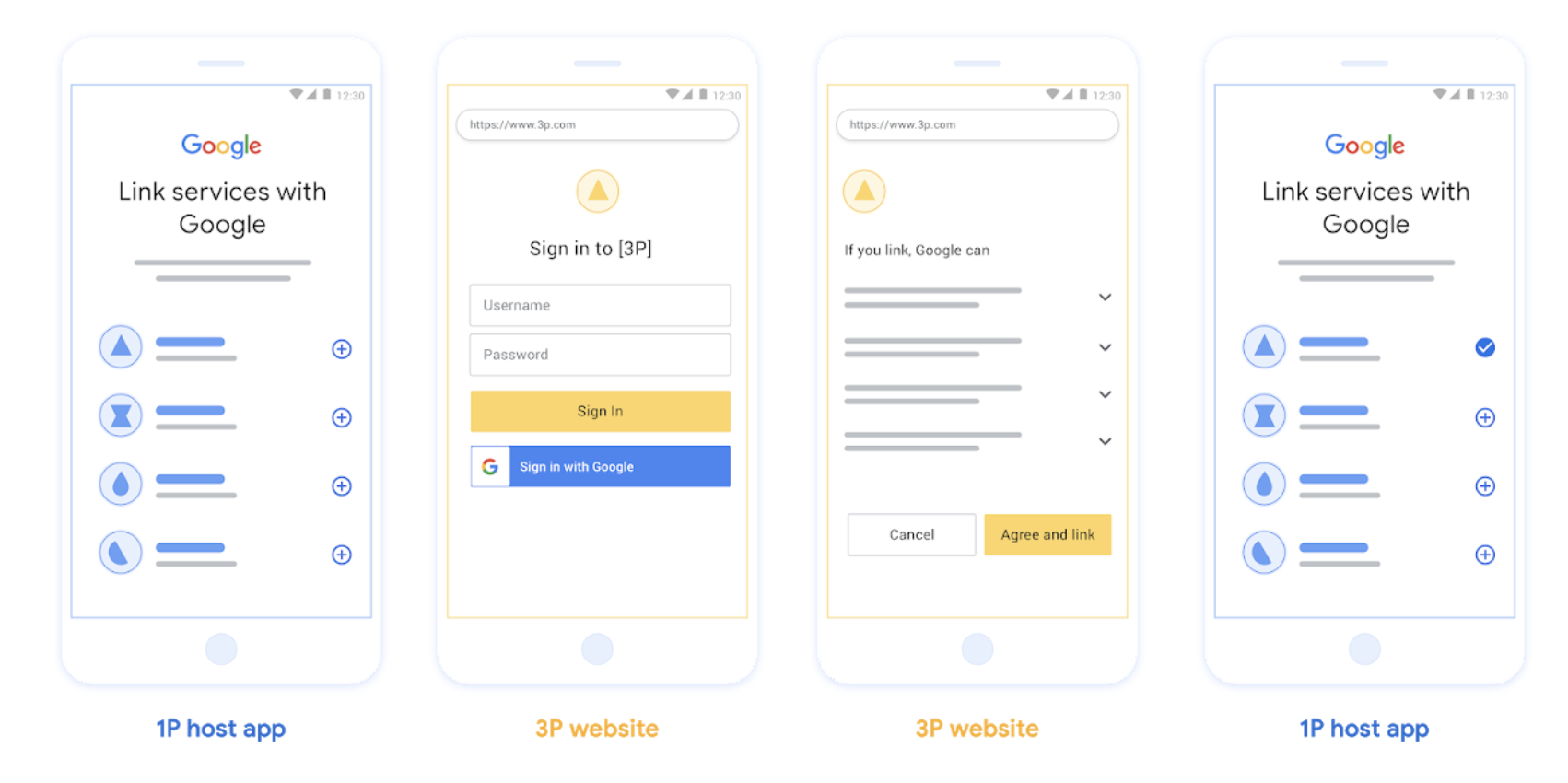
รูปที่ 1 การลิงก์บัญชีในโทรศัพท์ของผู้ใช้ด้วยการลิงก์ OAuth
การลิงก์ App Flip ที่ใช้ OAuth ("App Flip")
โฟลว์ OAuth ที่ส่งผู้ใช้ไปยังแอป ของคุณเพื่อทำการลิงก์
การลิงก์ App Flip ที่ใช้ OAuth จะแนะนำผู้ใช้ขณะที่ผู้ใช้ย้าย ไปมาระหว่างแอปบนอุปกรณ์เคลื่อนที่ Android หรือ iOS ที่ยืนยันแล้วกับแพลตฟอร์มของ Google เพื่อตรวจสอบ การเปลี่ยนแปลงการเข้าถึงข้อมูลที่เสนอและให้ความยินยอมในการลิงก์บัญชี ในแพลตฟอร์มของคุณกับบัญชี Google หากต้องการเปิดใช้ App Flip บริการของคุณต้อง รองรับ การลิงก์ OAuth หรือ การลิงก์การลงชื่อเข้าใช้ด้วย Google ที่ใช้ OAuth โดยใช้โฟลว์ รหัสการให้สิทธิ์
App Flip รองรับทั้ง Android และ iOS
วิธีการทำงาน
แอป Google จะตรวจสอบว่าแอปของคุณติดตั้งอยู่ในอุปกรณ์ของผู้ใช้หรือไม่
- หากพบแอป ระบบจะ "พลิก" ผู้ใช้ไปยังแอปของคุณ แอปของคุณจะขอความยินยอมจากผู้ใช้ในการลิงก์บัญชีกับ Google แล้ว "พลิกกลับ" ไปยังพื้นที่แสดงผลของ Google
- หากไม่พบแอปหรือเกิดข้อผิดพลาดระหว่างกระบวนการเชื่อมต่อ App Flip ระบบจะเปลี่ยนเส้นทางผู้ใช้ไปยังโฟลว์การลิงก์ที่มีประสิทธิภาพหรือการลิงก์ OAuth
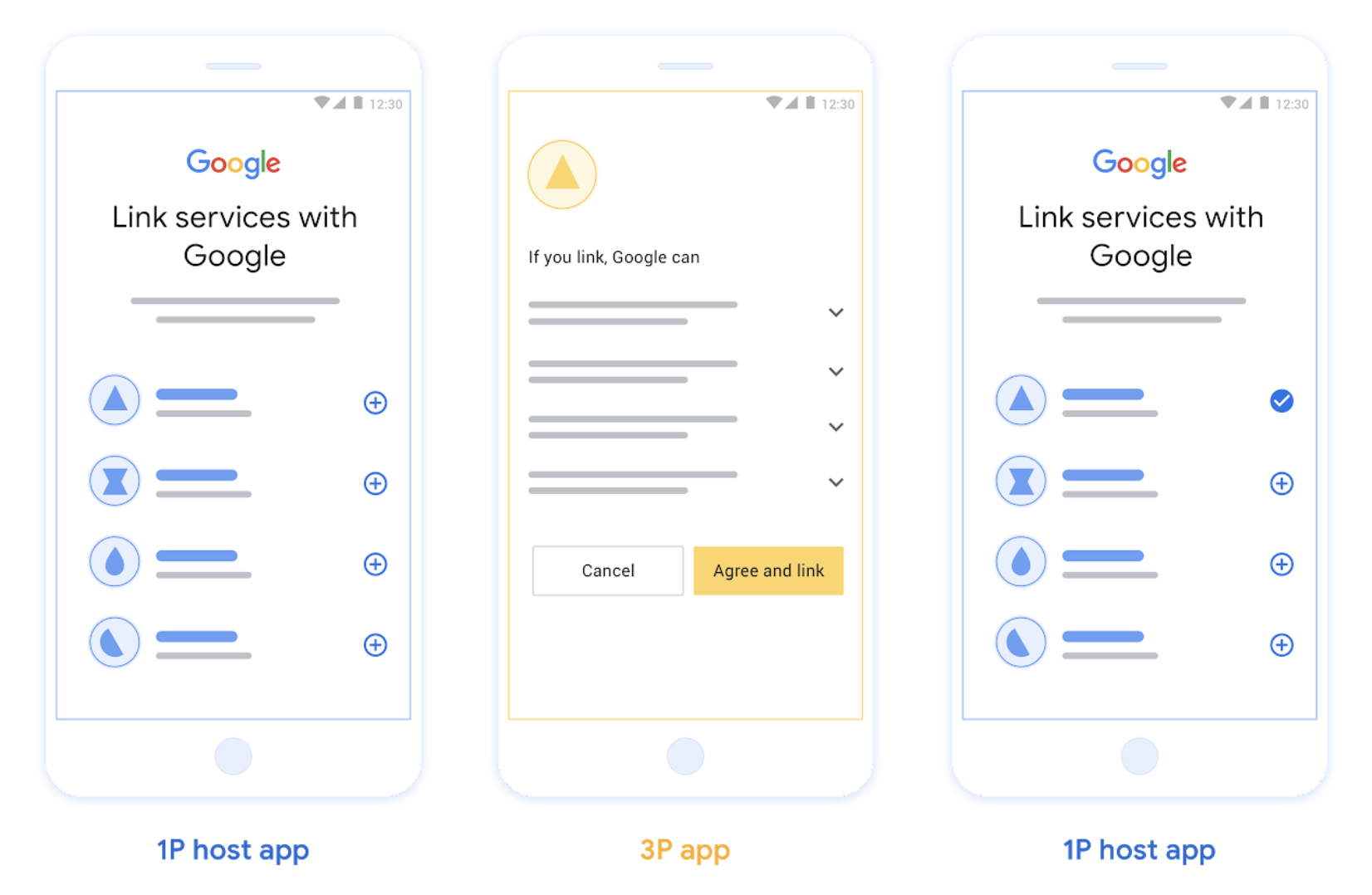
รูปที่ 2 การลิงก์บัญชีในโทรศัพท์ของผู้ใช้ด้วย App Flip
การลิงก์ที่มีประสิทธิภาพที่ใช้ OAuth ("ที่มีประสิทธิภาพ")
การลงชื่อเข้าใช้ด้วย Google ที่ใช้ OAuth ที่มีการเชื่อมโยงที่คล่องตัว จะเพิ่มการลงชื่อเข้าใช้ด้วย Google ไว้เหนือการลิงก์ OAuth ซึ่งช่วยให้ผู้ใช้ทำกระบวนการเชื่อมต่อให้เสร็จสมบูรณ์ได้โดยไม่ต้องออกจากแพลตฟอร์มของ Google จึงช่วยลดความยุ่งยากและการออก
การลิงก์ที่มีประสิทธิภาพที่ใช้ OAuth มอบ
ประสบการณ์การใช้งานที่ดีที่สุดให้แก่ผู้ใช้ด้วยการลงชื่อเข้าใช้ การสร้างบัญชี และการ
ลิงก์บัญชีที่ราบรื่นโดยการรวมการลงชื่อเข้าใช้ด้วย Google กับการลิงก์ OAuth บริการของคุณต้องรองรับปลายทางการให้สิทธิ์และการแลกเปลี่ยนโทเค็นที่เป็นไปตามข้อกำหนด OAuth 2.0
นอกจากนี้ ปลายทางการแลกเปลี่ยนโทเค็นต้องรองรับ
การยืนยันตัวตน JSON Web Token (JWT)
และติดตั้งใช้งาน Intent check และ get ที่จำเป็น รวมถึง Intent create (ไม่บังคับ)
วิธีการทำงาน
Google จะยืนยันบัญชีผู้ใช้และส่งข้อมูลนี้ให้คุณ
- หากมีบัญชีของผู้ใช้ในฐานข้อมูล ผู้ใช้จะลิงก์บัญชี Google กับบัญชีในบริการของคุณได้สำเร็จ
- หากไม่มีบัญชีของผู้ใช้ในฐานข้อมูลและบริการของคุณรองรับการสร้างบัญชี ผู้ใช้จะสร้างบัญชีบุคคลที่สามใหม่ด้วยข้อมูลที่ Google ยืนยัน (อีเมล ชื่อ และรูปโปรไฟล์) หรือเลือกที่จะลงชื่อเข้าใช้และลิงก์กับอีเมลอื่นโดยใช้การลิงก์ OAuth ได้
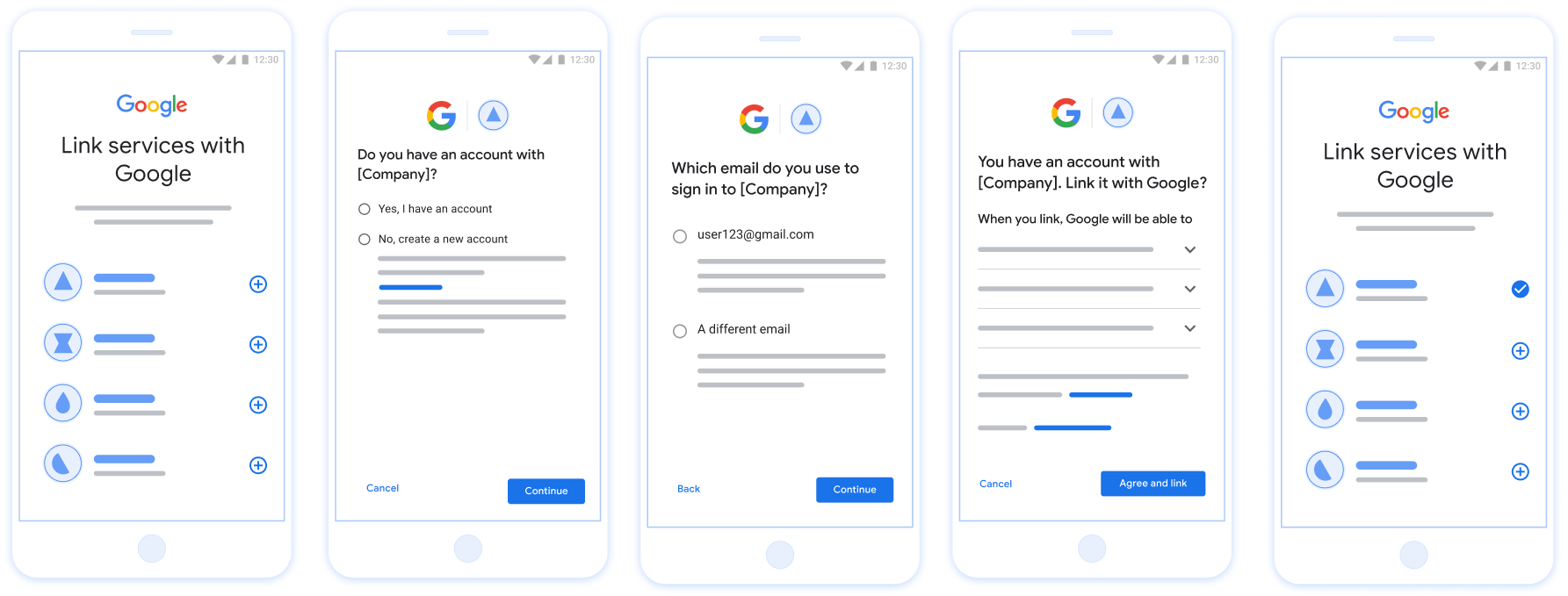
รูปที่ 3 การลิงก์บัญชีในโทรศัพท์ของผู้ใช้ด้วยการลิงก์ที่มีประสิทธิภาพ
คุณควรใช้โฟลว์ใด
เราขอแนะนำให้ติดตั้งใช้งานทุกโฟลว์เพื่อให้ผู้ใช้ได้รับประสบการณ์การลิงก์ที่ดีที่สุด โฟลว์ที่มีประสิทธิภาพและโฟลว์ App Flip ช่วยลดความยุ่งยากในการเชื่อมต่อ เนื่องจากผู้ใช้สามารถทำกระบวนการเชื่อมต่อให้เสร็จสมบูรณ์ได้ในไม่กี่ขั้นตอน โฟลว์การลิงก์ OAuth ใช้ความพยายามน้อยที่สุดและเป็นจุดเริ่มต้นที่ดี หลังจากนั้นคุณสามารถเพิ่มโฟลว์การลิงก์อื่นๆ ได้
ทำงานกับโทเค็น
การลิงก์บัญชี Google อาศัยกลไกโทเค็น OAuth 2.0 มาตรฐาน คุณจะออกโทเค็นเพื่อการเข้าถึงและโทเค็นการรีเฟรชให้กับ Google หลังจากที่ผู้ใช้ให้ความยินยอมในการลิงก์บัญชี
- โทเค็นเพื่อการเข้าถึง: โทเค็นที่มีอายุการใช้งานสั้นซึ่ง Google ใช้เพื่อเข้าถึง API ของคุณ
- โทเค็นการรีเฟรช: โทเค็นที่มีอายุการใช้งานยาวนานซึ่ง Google ใช้เพื่อรับโทเค็นเพื่อการเข้าถึงใหม่เมื่อโทเค็นเดิมหมดอายุ
โปรดดูสัญญาโปรโตคอลและข้อกำหนดของพารามิเตอร์โดยละเอียดได้ที่ Token Exchange Endpoint
การลิงก์แบบถาวร
การลิงก์แบบถาวรเป็นข้อกำหนดหลักสำหรับการผสานรวมที่เสถียร ซึ่งช่วยให้มั่นใจว่าบัญชีผู้ใช้จะยังคงลิงก์อยู่แม้ในกรณีที่เครือข่ายล่มชั่วคราวหรือมีการรีเฟรชข้อมูลเข้าสู่ระบบเป็นระยะ
หากต้องการติดตั้งใช้งานการลิงก์แบบถาวร ให้ใช้แนวทาง "หน้าต่างบานเลื่อน" โดยขยายเวลาหมดอายุของโทเค็นการรีเฟรช ที่มีอยู่ แทนที่จะหมุนเวียนโทเค็น (อ้างอิง RFC 6749 ส่วนที่ 6) ซึ่งจะป้องกันไม่ให้เกิดสภาวะการแข่งขันและการยกเลิกการลิงก์โดยไม่ได้ตั้งใจที่อาจเกิดขึ้นหากมีการออกโทเค็นการรีเฟรชใหม่ แต่ Google ไม่ได้รับหรือจัดเก็บโทเค็นดังกล่าวได้สำเร็จ
ลงทะเบียนกับ Google
เราต้องการรายละเอียดการตั้งค่า OAuth 2.0 และแชร์ข้อมูลเข้าสู่ระบบเพื่อเปิดใช้การลิงก์บัญชี โปรดดูรายละเอียดที่ การลงทะเบียน