لینک‌دهی ساده با OAuth و ورود با گوگل

نمای کلی

ورود با گوگل مبتنی بر OAuth لینک‌دهی ساده، ورود با گوگل را علاوه بر لینک‌دهی OAuth اضافه می‌کند. این یک تجربه لینک‌دهی یکپارچه برای کاربران گوگل فراهم می‌کند و همچنین امکان ایجاد حساب کاربری را فراهم می‌کند که به کاربر اجازه می‌دهد با استفاده از حساب گوگل خود، یک حساب کاربری جدید در سرویس شما ایجاد کند.

برای انجام لینک کردن حساب کاربری با OAuth و ورود با گوگل، این مراحل کلی را دنبال کنید:

  1. ابتدا، از کاربر بخواهید که برای دسترسی به پروفایل گوگل خود رضایت دهد.
  2. از اطلاعات موجود در پروفایل آنها برای بررسی وجود حساب کاربری استفاده کنید.
  3. برای کاربران موجود، حساب‌ها را پیوند دهید.
  4. اگر در سیستم احراز هویت خود نمی‌توانید کاربر گوگل را پیدا کنید، شناسه توکن دریافتی از گوگل را اعتبارسنجی کنید. سپس می‌توانید بر اساس اطلاعات پروفایل موجود در شناسه توکن، یک کاربر ایجاد کنید.
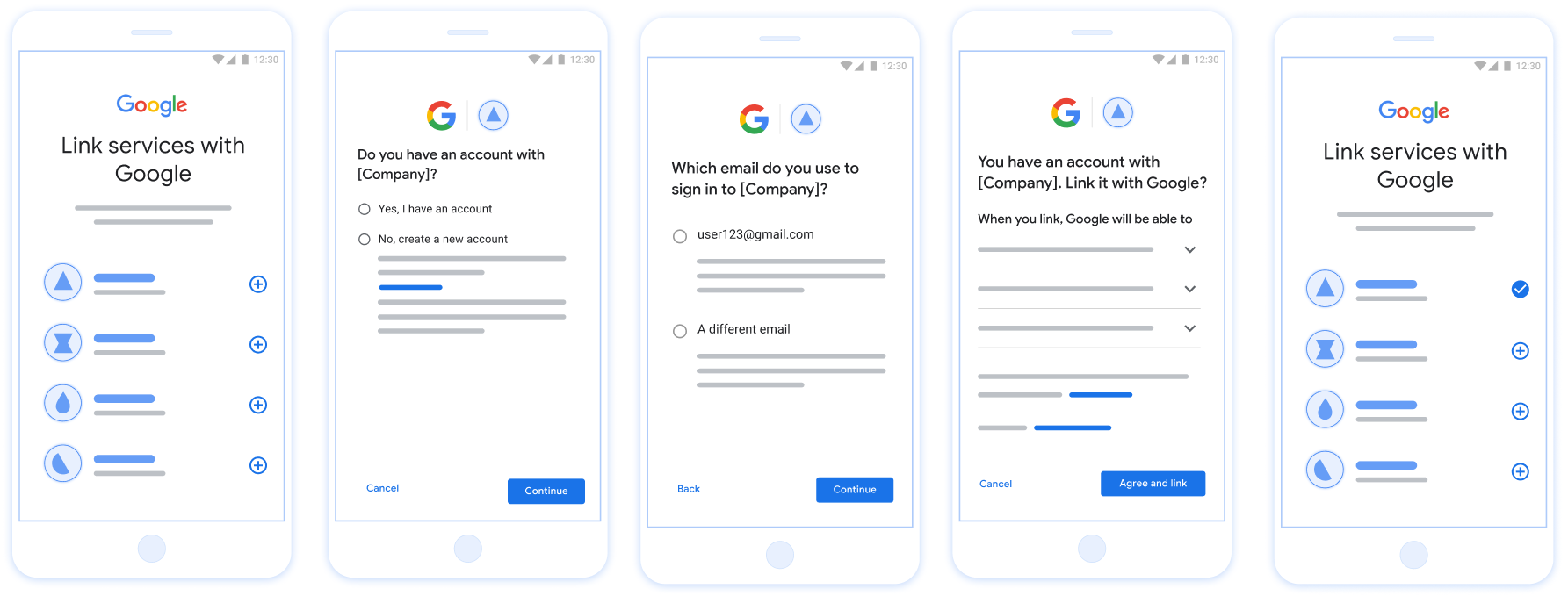
این شکل مراحل اتصال حساب گوگل کاربر را با استفاده از جریان ساده اتصال نشان می‌دهد. تصویر اول نشان می‌دهد که چگونه کاربر می‌تواند برنامه شما را برای اتصال انتخاب کند. تصویر دوم به کاربر اجازه می‌دهد تأیید کند که آیا در سرویس شما حساب کاربری دارد یا خیر. تصویر سوم به کاربر اجازه می‌دهد حساب گوگلی را که می‌خواهد با آن متصل شود انتخاب کند. تصویر چهارم تأیید اتصال حساب گوگل او به برنامه شما را نشان می‌دهد. تصویر پنجم یک حساب کاربری متصل شده با موفقیت را در برنامه گوگل نشان می‌دهد.
پیوند حساب کاربری روی گوشی کاربر با Streamlined Linking

شکل ۱. اتصال حساب کاربری روی گوشی کاربر با استفاده از قابلیت اتصال ساده

لینک‌دهی ساده: OAuth + ورود با Google Flow

نمودار توالی زیر، تعاملات بین کاربر، گوگل و نقطه پایانی تبادل توکن شما را برای لینک‌سازی ساده‌شده (Streamlined Linking) به تفصیل نشان می‌دهد.

کاربر اپلیکیشن گوگل / سرور توکن شما نقطه پایانی تبادل API شما ۱. کاربر پیوند را آغاز می‌کند ۲. درخواست ورود با گوگل ۳. با گوگل وارد شوید ۴. بررسی قصد (JWT Assertion) ۵. حساب_پیدا شد: درست/نادرست اگر حساب پیدا شد: ۶. مصمم باشید اگر حساب کاربری ندارید: ۶. هدف ایجاد کنید ۷. توکن_دسترسی، توکن_رفرش ۸. ذخیره توکن‌های کاربر ۹. دسترسی به منابع کاربر
شکل ۲. توالی رویدادها در جریان پیوند ساده.

نقش‌ها و مسئولیت‌ها

جدول زیر نقش‌ها و مسئولیت‌های بازیگران در جریان پیوند ساده را تعریف می‌کند.

بازیگر / جزء نقش GAL مسئولیت‌ها
برنامه/سرور گوگل کلاینت OAuth رضایت کاربر را برای ورود با گوگل دریافت می‌کند، اطلاعات احراز هویت (JWT) را به سرور شما ارسال می‌کند و توکن‌های حاصل را به طور ایمن ذخیره می‌کند.
نقطه پایانی تبادل توکن شما ارائه دهنده هویت / سرور مجوز اعتبارسنجی ادعاهای هویت، بررسی حساب‌های کاربری موجود، مدیریت اهداف اتصال حساب کاربری ( check ، get ، create ) و صدور توکن‌ها بر اساس اهداف درخواستی.
API سرویس شما سرور منابع دسترسی به داده‌های کاربر را در صورت ارائه یک توکن دسترسی معتبر فراهم می‌کند.

الزامات مربوط به لینک‌سازی ساده

  • جریان لینک‌دهی اولیه OAuth وب را پیاده‌سازی کنید. سرویس شما باید از نقاط پایانی مجوزدهی و تبادل توکن سازگار با OAuth 2.0 پشتیبانی کند.
  • نقطه پایانی تبادل توکن شما باید از ادعاهای JSON Web Token (JWT) پشتیبانی کند و اهداف check ، create و get را پیاده‌سازی کند.

سرور OAuth خود را پیاده‌سازی کنید

نقطه پایانی تبادل توکن شما باید از اهداف check ، create و get پشتیبانی کند. برای تکمیل جریان اتصال حساب و یادگیری زمان استفاده از اهداف مختلف، این مراحل را دنبال کنید:

  1. آیا کاربر در سیستم احراز هویت شما حساب کاربری دارد؟ (کاربر با انتخاب بله یا خیر تصمیم می‌گیرد)
    1. بله: آیا کاربر از ایمیل مرتبط با حساب گوگل خود برای ورود به پلتفرم شما استفاده می‌کند؟ (کاربر با انتخاب بله یا خیر تصمیم می‌گیرد)
      1. بله: آیا کاربر در سیستم احراز هویت شما حساب کاربری منطبقی دارد؟ ( check intent ، تأیید است)
        1. بله: اگر get intent با موفقیت برگردد، get intent فراخوانی می‌شود و حساب کاربری مرتبط می‌شود.
        2. خیر: ایجاد حساب کاربری جدید؟ (کاربر با انتخاب بله یا خیر تصمیم می‌گیرد)
          1. بله: در صورت موفقیت آمیز بودن create intent ، تابع create intent فراخوانی شده و حساب کاربری لینک می‌شود.
          2. خیر: جریان Web OAuth فعال می‌شود، کاربر به مرورگر خود هدایت می‌شود و به کاربر این امکان داده می‌شود که با یک ایمیل دیگر لینک دهد.
      2. خیر: جریان Web OAuth فعال می‌شود، کاربر به مرورگر خود هدایت می‌شود و به کاربر این امکان داده می‌شود که با یک ایمیل دیگر لینک دهد.
    2. خیر: آیا کاربر در سیستم احراز هویت شما حساب کاربری منطبقی دارد؟ (منظور check intent ، تأیید است)
      1. بله: اگر get intent با موفقیت برگردد، get intent فراخوانی می‌شود و حساب کاربری مرتبط می‌شود.
      2. خیر: در صورت موفقیت آمیز بودن create intent تابع create intent فراخوانی شده و حساب کاربری لینک می‌شود.

Check for an existing user account (check intent)

After the user gives consent to access their Google profile, Google sends a request that contains a signed assertion of the Google user's identity. The assertion contains information that includes the user's Google Account ID, name, and email address. The token exchange endpoint configured for your project handles that request.

If the corresponding Google account is already present in your authentication system, your token exchange endpoint responds with account_found=true. If the Google account doesn't match an existing user, your token exchange endpoint returns an HTTP 404 Not Found error with account_found=false.

The request has the following form:

POST /token HTTP/1.1
Host: oauth2.example.com
Content-Type: application/x-www-form-urlencoded

grant_type=urn:ietf:params:oauth:grant-type:jwt-bearer&intent=check&assertion=JWT&scope=SCOPES&client_id=GOOGLE_CLIENT_ID&client_secret=GOOGLE_CLIENT_SECRET

Your token exchange endpoint must be able to handle the following parameters:

Token endpoint parameters
intent For these requests, the value of this parameter is check.
grant_type The type of token being exchanged. For these requests, this parameter has the value urn:ietf:params:oauth:grant-type:jwt-bearer.
assertion A JSON Web Token (JWT) that provides a signed assertion of the Google user's identity. The JWT contains information that includes the user's Google Account ID, name, and email address.
client_id The client ID you assigned to Google.
client_secret The client secret you assigned to Google.

To respond to the check intent requests, your token exchange endpoint must perform the following steps:

  • Validate and decode the JWT assertion.
  • Check if the Google account is already present in your authentication system.
تایید و رمزگشایی ادعای JWT

می‌توانید با استفاده از کتابخانه رمزگشایی JWT برای زبان خود، ادعای JWT را تأیید و رمزگشایی کنید. از کلیدهای عمومی Google که در قالب‌های JWK یا PEM موجود است برای تأیید امضای توکن استفاده کنید.

هنگام رمزگشایی، ادعای JWT مانند مثال زیر است:

{
  "sub": "1234567890",      // The unique ID of the user's Google Account
  "iss": "https://accounts.google.com",        // The assertion's issuer
  "aud": "123-abc.apps.googleusercontent.com", // Your server's client ID
  "iat": 233366400,         // Unix timestamp of the assertion's creation time
  "exp": 233370000,         // Unix timestamp of the assertion's expiration time
  "name": "Jan Jansen",
  "given_name": "Jan",
  "family_name": "Jansen",
  "email": "jan@gmail.com", // If present, the user's email address
  "email_verified": true,   // true, if Google has verified the email address
  "hd": "example.com",      // If present, the host domain of the user's GSuite email address
                            // If present, a URL to user's profile picture
  "picture": "https://lh3.googleusercontent.com/a-/AOh14GjlTnZKHAeb94A-FmEbwZv7uJD986VOF1mJGb2YYQ",
  "locale": "en_US"         // User's locale, from browser or phone settings
}

علاوه بر تأیید امضای رمز، تأیید کنید که صادرکننده ادعا (فیلد iss ) https://accounts.google.com باشد، مخاطب (فیلد aud ) شناسه مشتری اختصاص داده شده شما باشد، و اینکه نشانه منقضی نشده باشد ( exp میدان).

با استفاده از فیلدهای email ، email_verified و hd می‌توانید تعیین کنید که آیا Google میزبان آدرس ایمیل است یا خیر. در مواردی که Google معتبر است، کاربر در حال حاضر مالک قانونی حساب است و ممکن است از گذرواژه یا روش‌های چالش دیگر صرف نظر کنید. در غیر این صورت، می توان از این روش ها برای تأیید حساب قبل از پیوند استفاده کرد.

مواردی که گوگل معتبر است:

  • email دارای پسوند @gmail.com است، این یک حساب کاربری جیمیل است.
  • email_verified درست است و hd تنظیم شده است، این یک حساب G Suite است.

کاربران می توانند بدون استفاده از Gmail یا G Suite برای حساب های Google ثبت نام کنند. وقتی email حاوی پسوند @gmail.com نیست و hd وجود ندارد، گوگل معتبر نیست و رمز عبور یا روش‌های چالش دیگری برای تأیید کاربر توصیه می‌شود. email_verified همچنین می تواند درست باشد زیرا Google در ابتدا کاربر را هنگام ایجاد حساب Google تأیید کرد، اما مالکیت حساب ایمیل شخص ثالث ممکن است از آن زمان تغییر کرده باشد.

Check if the Google account is already present in your authentication system

Check whether either of the following conditions are true:

  • The Google Account ID, found in the assertion's sub field, is in your user database.
  • The email address in the assertion matches a user in your user database.

If either condition is true, the user has already signed up. In that case, return a response like the following:

HTTP/1.1 200 Success
Content-Type: application/json;charset=UTF-8

{
  "account_found":"true",
}

If neither the Google Account ID nor the email address specified in the assertion matches a user in your database, the user hasn't signed up yet. In this case, your token exchange endpoint needs to reply with a HTTP 404 error that specifies "account_found": "false", as in the following example:

HTTP/1.1 404 Not found
Content-Type: application/json;charset=UTF-8

{
  "account_found":"false",
}

Handle automatic linking (get intent)

After the user gives consent to access their Google profile, Google sends a request that contains a signed assertion of the Google user's identity. The assertion contains information that includes the user's Google Account ID, name, and email address. The token exchange endpoint configured for your project handles that request.

If the corresponding Google Account is already present in your authentication system, your token exchange endpoint returns a token for the user. If the Google Account doesn't match an existing user, your token exchange endpoint returns a linking_error error and optional login_hint.

The request has the following form:

POST /token HTTP/1.1
Host: oauth2.example.com
Content-Type: application/x-www-form-urlencoded

grant_type=urn:ietf:params:oauth:grant-type:jwt-bearer&intent=get&assertion=JWT&scope=SCOPES&client_id=GOOGLE_CLIENT_ID&client_secret=GOOGLE_CLIENT_SECRET

Your token exchange endpoint must be able to handle the following parameters:

Token endpoint parameters
intent For these requests, the value of this parameter is get.
grant_type The type of token being exchanged. For these requests, this parameter has the value urn:ietf:params:oauth:grant-type:jwt-bearer.
assertion A JSON Web Token (JWT) that provides a signed assertion of the Google user's identity. The JWT contains information that includes the user's Google Account ID, name, and email address.
scope Optional: Any scopes that you've configured Google to request from users.
client_id The client ID you assigned to Google.
client_secret The client secret you assigned to Google.

To respond to the get intent requests, your token exchange endpoint must perform the following steps:

  • Validate and decode the JWT assertion.
  • Check if the Google account is already present in your authentication system.
تایید و رمزگشایی ادعای JWT

می‌توانید با استفاده از کتابخانه رمزگشایی JWT برای زبان خود، ادعای JWT را تأیید و رمزگشایی کنید. از کلیدهای عمومی Google که در قالب‌های JWK یا PEM موجود است برای تأیید امضای توکن استفاده کنید.

هنگام رمزگشایی، ادعای JWT مانند مثال زیر است:

{
  "sub": "1234567890",      // The unique ID of the user's Google Account
  "iss": "https://accounts.google.com",        // The assertion's issuer
  "aud": "123-abc.apps.googleusercontent.com", // Your server's client ID
  "iat": 233366400,         // Unix timestamp of the assertion's creation time
  "exp": 233370000,         // Unix timestamp of the assertion's expiration time
  "name": "Jan Jansen",
  "given_name": "Jan",
  "family_name": "Jansen",
  "email": "jan@gmail.com", // If present, the user's email address
  "email_verified": true,   // true, if Google has verified the email address
  "hd": "example.com",      // If present, the host domain of the user's GSuite email address
                            // If present, a URL to user's profile picture
  "picture": "https://lh3.googleusercontent.com/a-/AOh14GjlTnZKHAeb94A-FmEbwZv7uJD986VOF1mJGb2YYQ",
  "locale": "en_US"         // User's locale, from browser or phone settings
}

علاوه بر تأیید امضای رمز، تأیید کنید که صادرکننده ادعا (فیلد iss ) https://accounts.google.com باشد، مخاطب (فیلد aud ) شناسه مشتری اختصاص داده شده شما باشد، و اینکه نشانه منقضی نشده باشد ( exp میدان).

با استفاده از فیلدهای email ، email_verified و hd می‌توانید تعیین کنید که آیا Google میزبان آدرس ایمیل است یا خیر. در مواردی که Google معتبر است، کاربر در حال حاضر مالک قانونی حساب است و ممکن است از گذرواژه یا روش‌های چالش دیگر صرف نظر کنید. در غیر این صورت، می توان از این روش ها برای تأیید حساب قبل از پیوند استفاده کرد.

مواردی که گوگل معتبر است:

  • email دارای پسوند @gmail.com است، این یک حساب کاربری جیمیل است.
  • email_verified درست است و hd تنظیم شده است، این یک حساب G Suite است.

کاربران می توانند بدون استفاده از Gmail یا G Suite برای حساب های Google ثبت نام کنند. وقتی email حاوی پسوند @gmail.com نیست و hd وجود ندارد، گوگل معتبر نیست و رمز عبور یا روش‌های چالش دیگری برای تأیید کاربر توصیه می‌شود. email_verified همچنین می تواند درست باشد زیرا Google در ابتدا کاربر را هنگام ایجاد حساب Google تأیید کرد، اما مالکیت حساب ایمیل شخص ثالث ممکن است از آن زمان تغییر کرده باشد.

Check if the Google account is already present in your authentication system

Check whether either of the following conditions are true:

  • The Google Account ID, found in the assertion's sub field, is in your user database.
  • The email address in the assertion matches a user in your user database.

If an account is found for the user, issue an access token and return the values in a JSON object in the body of your HTTPS response, like in the following example:

{
  "token_type": "Bearer",
  "access_token": "ACCESS_TOKEN",
  "refresh_token": "REFRESH_TOKEN",
  "expires_in": SECONDS_TO_EXPIRATION
}

In some cases, account linking based on ID token might fail for the user. If it does so for any reason, your token exchange endpoint needs to reply with a HTTP 401 error that specifies error=linking_error, as the following example shows:

HTTP/1.1 401 Unauthorized
Content-Type: application/json;charset=UTF-8

{
  "error":"linking_error",
  "login_hint":"foo@bar.com"
}

When Google receives a 401 error response with linking_error, Google sends the user to your authorization endpoint with login_hint as a parameter. The user completes account linking using the OAuth linking flow in their browser.

Handle account creation using Sign in with Google (create intent)

When a user needs to create an account on your service, Google makes a request to your token exchange endpoint that specifies intent=create.

The request has the following form:

POST /token HTTP/1.1
Host: oauth2.example.com
Content-Type: application/x-www-form-urlencoded

response_type=token&grant_type=urn:ietf:params:oauth:grant-type:jwt-bearer&scope=SCOPES&intent=create&assertion=JWT&client_id=GOOGLE_CLIENT_ID&client_secret=GOOGLE_CLIENT_SECRET

Your token exchange endpoint must able to handle the following parameters:

Token endpoint parameters
intent For these requests, the value of this parameter is create.
grant_type The type of token being exchanged. For these requests, this parameter has the value urn:ietf:params:oauth:grant-type:jwt-bearer.
assertion A JSON Web Token (JWT) that provides a signed assertion of the Google user's identity. The JWT contains information that includes the user's Google Account ID, name, and email address.
client_id The client ID you assigned to Google.
client_secret The client secret you assigned to Google.

The JWT within the assertion parameter contains the user's Google Account ID, name, and email address, which you can use to create a new account on your service.

To respond to the create intent requests, your token exchange endpoint must perform the following steps:

  • Validate and decode the JWT assertion.
  • Validate user information and create new account.
تایید و رمزگشایی ادعای JWT

می‌توانید با استفاده از کتابخانه رمزگشایی JWT برای زبان خود، ادعای JWT را تأیید و رمزگشایی کنید. از کلیدهای عمومی Google که در قالب‌های JWK یا PEM موجود است برای تأیید امضای توکن استفاده کنید.

هنگام رمزگشایی، ادعای JWT مانند مثال زیر است:

{
  "sub": "1234567890",      // The unique ID of the user's Google Account
  "iss": "https://accounts.google.com",        // The assertion's issuer
  "aud": "123-abc.apps.googleusercontent.com", // Your server's client ID
  "iat": 233366400,         // Unix timestamp of the assertion's creation time
  "exp": 233370000,         // Unix timestamp of the assertion's expiration time
  "name": "Jan Jansen",
  "given_name": "Jan",
  "family_name": "Jansen",
  "email": "jan@gmail.com", // If present, the user's email address
  "email_verified": true,   // true, if Google has verified the email address
  "hd": "example.com",      // If present, the host domain of the user's GSuite email address
                            // If present, a URL to user's profile picture
  "picture": "https://lh3.googleusercontent.com/a-/AOh14GjlTnZKHAeb94A-FmEbwZv7uJD986VOF1mJGb2YYQ",
  "locale": "en_US"         // User's locale, from browser or phone settings
}

علاوه بر تأیید امضای رمز، تأیید کنید که صادرکننده ادعا (فیلد iss ) https://accounts.google.com باشد، مخاطب (فیلد aud ) شناسه مشتری اختصاص داده شده شما باشد، و اینکه نشانه منقضی نشده باشد ( exp میدان).

با استفاده از فیلدهای email ، email_verified و hd می‌توانید تعیین کنید که آیا Google میزبان آدرس ایمیل است یا خیر. در مواردی که Google معتبر است، کاربر در حال حاضر مالک قانونی حساب است و ممکن است از گذرواژه یا روش‌های چالش دیگر صرف نظر کنید. در غیر این صورت، می توان از این روش ها برای تأیید حساب قبل از پیوند استفاده کرد.

مواردی که گوگل معتبر است:

  • email دارای پسوند @gmail.com است، این یک حساب کاربری جیمیل است.
  • email_verified درست است و hd تنظیم شده است، این یک حساب G Suite است.

کاربران می توانند بدون استفاده از Gmail یا G Suite برای حساب های Google ثبت نام کنند. وقتی email حاوی پسوند @gmail.com نیست و hd وجود ندارد، گوگل معتبر نیست و رمز عبور یا روش‌های چالش دیگری برای تأیید کاربر توصیه می‌شود. email_verified همچنین می تواند درست باشد زیرا Google در ابتدا کاربر را هنگام ایجاد حساب Google تأیید کرد، اما مالکیت حساب ایمیل شخص ثالث ممکن است از آن زمان تغییر کرده باشد.

Validate user information and create new account

Check whether either of the following conditions are true:

  • The Google Account ID, found in the assertion's sub field, is in your user database.
  • The email address in the assertion matches a user in your user database.

If either condition is true, prompt the user to link their existing account with their Google Account. To do so, respond to the request with an HTTP 401 error that specifies error=linking_error and gives the user's email address as the login_hint. The following is a sample response:

HTTP/1.1 401 Unauthorized
Content-Type: application/json;charset=UTF-8

{
  "error":"linking_error",
  "login_hint":"foo@bar.com"
}

When Google receives a 401 error response with linking_error, Google sends the user to your authorization endpoint with login_hint as a parameter. The user completes account linking using the OAuth linking flow in their browser.

If neither condition is true, create a new user account with the information provided in the JWT. New accounts don't typically have a password set. It's recommended that you add Sign in with Google to other platforms to enable users to sign in with Google across the surfaces of your application. Alternatively, you can email the user a link that starts your password recovery flow to allow the user to set a password to sign in on other platforms.

When the creation is completed, issue an access token and refresh token and return the values in a JSON object in the body of your HTTPS response, like in the following example:

{
  "token_type": "Bearer",
  "access_token": "ACCESS_TOKEN",
  "refresh_token": "REFRESH_TOKEN",
  "expires_in": SECONDS_TO_EXPIRATION
}

شناسه کلاینت API گوگل خود را دریافت کنید

در طول فرآیند ثبت نام اتصال حساب کاربری، از شما خواسته می‌شود که شناسه کلاینت API گوگل خود را ارائه دهید. برای دریافت شناسه کلاینت API خود، از پروژه‌ای که هنگام تکمیل مراحل اتصال OAuth ایجاد کرده‌اید، استفاده کنید. برای انجام این کار، مراحل زیر را انجام دهید:

  1. به صفحه مشتریان بروید.
  2. یک پروژه Google APIs ایجاد یا انتخاب کنید.

    اگر پروژه شما برای نوع برنامه وب، شناسه کلاینت ندارد، برای ایجاد آن روی «ایجاد کلاینت» کلیک کنید. حتماً دامنه سایت خود را در کادر «منشأ جاوا اسکریپت مجاز» (Authorized JavaScript origins) وارد کنید. هنگام انجام آزمایش‌ها یا توسعه محلی، باید هم http://localhost و هم http://localhost:<port_number> را به فیلد «منشأ جاوا اسکریپت مجاز» اضافه کنید.

اعتبارسنجی پیاده‌سازی شما

You can validate your implementation by using the OAuth 2.0 Playground tool.

In the tool, do the following steps:

  1. Click Configuration to open the OAuth 2.0 Configuration window.
  2. In the OAuth flow field, select Client-side.
  3. In the OAuth Endpoints field, select Custom.
  4. Specify your OAuth 2.0 endpoint and the client ID you assigned to Google in the corresponding fields.
  5. In the Step 1 section, don't select any Google scopes. Instead, leave this field blank or type a scope valid for your server (or an arbitrary string if you don't use OAuth scopes). When you're done, click Authorize APIs.
  6. In the Step 2 and Step 3 sections, go through the OAuth 2.0 flow and verify that each step works as intended.

You can validate your implementation by using the Google Account Linking Demo tool.

In the tool, do the following steps:

  1. Click the Sign in with Google button.
  2. Choose the account you'd like to link.
  3. Enter the service ID.
  4. Optionally enter one or more scopes that you will request access for.
  5. Click Start Demo.
  6. When prompted, confirm that you may consent and deny the linking request.
  7. Confirm that you are redirected to your platform.