

4.3.2. Единые счета
На рисунке ниже показан рекомендуемый способ организации управляющих аккаунтов Google Рекламы и аккаунтов рекламодателей.
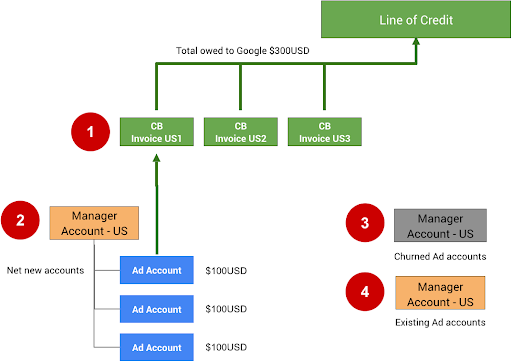
Примечания ниже относятся к номерам на рисунке выше.
В единый счет можно добавить не более 15 000 аккаунтов или счетов. Если в первом едином счете (CB US1) будет 15 000 счетов или аккаунтов, все последующие счета или аккаунты нужно будет добавить в CB US2.
Чтобы настроить единые счета для управляющего аккаунта, заполните эту форму. Сначала вам нужно получить одобренную кредитную линию в Google. Если у вас ее ещё нет, вы можете запросить ее, заполнив форму для связи с Google.
Неактивные аккаунты (отток) можно перенести в другой управляющий аккаунт. Разделение аккаунтов поможет вам не превысить лимит в 15 000. В качестве меры предосторожности мы рекомендуем удалить заказы на бюджет для этих аккаунтов, чтобы они не могли продолжать тратить средства, пока не будут повторно активированы вручную.
Если ваша интеграция позволяет пользователям использовать существующие аккаунты рекламодателя, создайте для них отдельный управляющий аккаунт. Единый счет не следует использовать для существующих аккаунтов, поскольку в них уже могут быть расходы на кампании других типов и, скорее всего, уже настроена прямая оплата.
Чтобы настроить единые счета непосредственно в интерфейсе Google Рекламы, следуйте инструкциям.
Технические рекомендации
Чтобы настроить платежные данные для аккаунтов Google Рекламы продавцов и управлять ими с помощью API, используйте ресурсы BillingSetup для получения и изменения конфигурации платежных данных на уровне аккаунта. Платежная конфигурация – это связь между платежным аккаунтом и определенным аккаунтом Google Рекламы. Он определяет, кто оплачивает аккаунт рекламодателя. Следуйте инструкциям по настройке платежного аккаунта.
Управление бюджетами аккаунта
Бюджет аккаунта определяет свойства бюджета на уровне аккаунта, такие как время начала и окончания действия и лимит расходов. Все изменения в бюджетах аккаунтов вносятся путем подачи отдельных предложений по бюджету аккаунта, которые после рассмотрения и утверждения становятся бюджетами аккаунтов. Используйте ресурсы AccountBudgetProposal, чтобы создавать новые или обновлять существующие объекты AccountBudgets.
В примерах ниже показано, как создать новое предложение по бюджету.
Java
private void runExample(GoogleAdsClient googleAdsClient, long customerId, long billingSetupId) { // Creates an AccountBudgetProposal. This will be reviewed offline by Google Ads, and if // approved will become an AccountBudget. AccountBudgetProposal proposal = AccountBudgetProposal.newBuilder() .setBillingSetup(ResourceNames.billingSetup(customerId, billingSetupId)) .setProposalType(AccountBudgetProposalType.CREATE) .setProposedName("Account Budget (example)") // Specifies the account budget starts immediately. .setProposedStartTimeType(TimeType.NOW) // Alternatively you can specify a specific start time. Refer to the // AccountBudgetProposal // resource documentation for allowed formats. // // .setProposedStartDateTime("2020-01-02 03:04:05") // Specifies that the budget runs forever. .setProposedEndTimeType(TimeType.FOREVER) // Alternatively you can specify a specific end time. Allowed formats are as above. // .setProposedEndDateTime("2021-02-03 04:05:06") // Optional: sets notes for the budget. These are free text and do not effect budget // delivery. // .setProposedNotes("Received prepayment of $0.01") // Sets the spending limit to 0.01, measured in the Google Ads account currency. .setProposedSpendingLimitMicros(10_000) // Optional: sets PO number for record keeping. This value is at the user's // discretion, and has no effect on Google Billing & Payments. // .setProposedPurchaseOrderNumber("PO number 12345") .build(); // Creates an operation which will add the new AccountBudgetProposal. AccountBudgetProposalOperation operation = AccountBudgetProposalOperation.newBuilder().setCreate(proposal).build(); try (AccountBudgetProposalServiceClient accountBudgetProposalServiceClient = googleAdsClient.getLatestVersion().createAccountBudgetProposalServiceClient()) { // Sends the request to the Account Budget Proposal Service. MutateAccountBudgetProposalResponse response = accountBudgetProposalServiceClient.mutateAccountBudgetProposal( String.valueOf(customerId), operation); System.out.printf( "Account budget proposal created: %s.%n", response.getResult().getResourceName()); } }
C#
public void Run(GoogleAdsClient client, long customerId, long billingSetupId) { // Get the AccountBudgetProposalServiceClient. AccountBudgetProposalServiceClient proposalService = client.GetService(Services.V26.AccountBudgetProposalService); // Create an AccountBudgetProposal. The proposal will be reviewed offline by Google Ads, // and if approved will become an AccountBudget. AccountBudgetProposal proposal = new AccountBudgetProposal() { BillingSetup = ResourceNames.BillingSetup(customerId, billingSetupId), ProposalType = AccountBudgetProposalType.Create, ProposedName = "Account Budget (example)", // Specify the account budget starts immediately ProposedStartTimeType = TimeType.Now, // Alternatively, you can specify a specific start time. Refer to the // AccountBudgetProposal resource documentation for allowed formats. // //ProposedStartDateTime = "2020-01-02 03:04:05", // Specify that the budget runs forever. ProposedEndTimeType = TimeType.Forever, // Alternatively you can specify a specific end time. Allowed formats are as above. //ProposedEndDateTime = "2021-02-03 04:05:06", // Optional: set notes for the budget. These are free text and do not effect budget // delivery. //ProposedNotes = "Received prepayment of $0.01", // Set the spending limit to 0.01, measured in the Google Ads account currency. ProposedSpendingLimitMicros = 10_000 // Optional: set PO number for record keeping. This value is at the user's // discretion, and has no effect on Google Billing & Payments. //ProposedPurchaseOrderNumber = "PO number 12345" }; // Create an operation which will add the new AccountBudgetProposal AccountBudgetProposalOperation operation = new AccountBudgetProposalOperation() { Create = proposal }; try { // Send the request to the Account Budget Proposal Service. MutateAccountBudgetProposalResponse response = proposalService. MutateAccountBudgetProposal(customerId.ToString(), operation); // Display the results. Console.WriteLine($"Account budget proposal '{response.Result.ResourceName}' " + "was created."); } catch (GoogleAdsException e) { Console.WriteLine("Failure:"); Console.WriteLine($"Message: {e.Message}"); Console.WriteLine($"Failure: {e.Failure}"); Console.WriteLine($"Request ID: {e.RequestId}"); throw; } }
PHP
public static function runExample( GoogleAdsClient $googleAdsClient, int $customerId, int $billingSetupId ) { // Constructs an account budget proposal. $accountBudgetProposal = new AccountBudgetProposal([ 'billing_setup' => ResourceNames::forBillingSetup($customerId, $billingSetupId), 'proposal_type' => AccountBudgetProposalType::CREATE, 'proposed_name' => 'Account Budget (example)', // Specifies the account budget starts immediately. 'proposed_start_time_type' => TimeType::NOW, // Alternatively you can specify a specific start time. Refer to the // AccountBudgetProposal class for allowed formats. // // 'proposed_start_date_time' => '2020-01-02 03:04:05', // Specify that the budget runs forever. 'proposed_end_time_type' => TimeType::FOREVER, // Alternatively you can specify a specific end time. Allowed formats are as above. // 'proposed_end_date_time' => '2021-02-03 04:05:06', // Optional: set notes for the budget. These are free text and do not effect budget // delivery. // 'proposed_notes' => 'Received prepayment of $0.01', // Optional: set PO number for record keeping. This value is at the user's // discretion, and has no effect on Google Billing & Payments. // 'proposed_purchase_order_number' => 'PO number 12345', // Set the spending limit to 0.01, measured in the Google Ads account currency. 'proposed_spending_limit_micros' => 10000 ]); $accountBudgetProposalOperation = new AccountBudgetProposalOperation(); $accountBudgetProposalOperation->setCreate($accountBudgetProposal); // Issues a mutate request to add the account budget proposal. $accountBudgetProposalServiceClient = $googleAdsClient->getAccountBudgetProposalServiceClient(); $response = $accountBudgetProposalServiceClient->mutateAccountBudgetProposal( MutateAccountBudgetProposalRequest::build($customerId, $accountBudgetProposalOperation) ); printf( "Added an account budget proposal with resource name '%s'.%s", $response->getResult()->getResourceName(), PHP_EOL ); }
Python
def main(client: GoogleAdsClient, customer_id: str, billing_setup_id: str): account_budget_proposal_service = client.get_service( "AccountBudgetProposalService" ) billing_setup_service = client.get_service("BillingSetupService") account_budget_proposal_operation = client.get_type( "AccountBudgetProposalOperation" ) proposal = account_budget_proposal_operation.create proposal.proposal_type = client.enums.AccountBudgetProposalTypeEnum.CREATE proposal.billing_setup = billing_setup_service.billing_setup_path( customer_id, billing_setup_id ) proposal.proposed_name = "Account Budget Proposal (example)" # Specify the account budget starts immediately proposal.proposed_start_time_type = client.enums.TimeTypeEnum.NOW # Alternatively you can specify a specific start time. Refer to the # AccountBudgetProposal resource documentation for allowed formats. # # proposal.proposed_start_date_time = '2020-01-02 03:04:05' # Specify that the budget runs forever proposal.proposed_end_time_type = client.enums.TimeTypeEnum.FOREVER # Alternatively you can specify a specific end time. Allowed formats are as # above. # # proposal.proposed_end_date_time = '2021-01-02 03:04:05' # Optional: set notes for the budget. These are free text and do not effect # budget delivery. # # proposal.proposed_notes = 'Received prepayment of $0.01' proposal.proposed_spending_limit_micros = 10000 account_budget_proposal_response = ( account_budget_proposal_service.mutate_account_budget_proposal( customer_id=customer_id, operation=account_budget_proposal_operation, ) ) print( "Created account budget proposal " f'"{account_budget_proposal_response.result.resource_name}".' )
Ruby
def add_account_budget_proposal(customer_id, billing_setup_id) # GoogleAdsClient will read a config file from # ENV['HOME']/google_ads_config.rb when called without parameters client = Google::Ads::GoogleAds::GoogleAdsClient.new operation = client.operation.create_resource.account_budget_proposal do |proposal| proposal.billing_setup = client.path.billing_setup(customer_id, billing_setup_id) proposal.proposal_type = :CREATE proposal.proposed_name = 'Account Budget (example)' # Specify the account budget starts immediately proposal.proposed_start_time_type = :NOW # Alternatively you can specify a specific start time. Refer to the # AccountBudgetProposal resource documentation for allowed formats. # # proposal.proposed_start_date_time = '2020-01-02 03:04:05' # Specify that the budget runs forever. proposal.proposed_end_time_type = :FOREVER # Alternatively you can specify a specific end time. Allowed formats are as # above. # # proposal.proposed_end_date_time = '2021-01-02 03:04:05' # Optional: set notes for the budget. These are free text and do not affect # budget delivery. # # proposal.proposed_notes = 'Received prepayment of $0.01' # Set the spending limit to 0.01, measured in the Google Ads account currency. proposal.proposed_spending_limit_micros = 10_000 end account_budget_proposal_service = client.service.account_budget_proposal # Add budget proposal. response = account_budget_proposal_service.mutate_account_budget_proposal( customer_id: customer_id, operation: operation, ) puts sprintf("Created budget proposal %s.", response.results.first.resource_name) end
Perl
sub add_account_budget_proposal { my ($api_client, $customer_id, $billing_setup_id) = @_; # Create an account budget proposal. my $account_budget_proposal = Google::Ads::GoogleAds::V26::Resources::AccountBudgetProposal->new({ billingSetup => Google::Ads::GoogleAds::V26::Utils::ResourceNames::billing_setup( $customer_id, $billing_setup_id ), proposalType => CREATE, proposedName => "Account Budget (example)", # Specify that the account budget starts immediately. proposedStartTimeType => NOW, # Alternatively you can specify a specific start time. Refer to the # AccountBudgetProposal class for allowed formats. # # proposedStartDateTime => "2020-01-02 03:04:05", # Specify that the account budget runs forever. proposedEndDateTime => FOREVER, # Alternatively you can specify a specific end time. Allowed formats are as below. # proposedEndDateTime => "2021-02-03 04:05:06", # Optional: set notes for the budget. These are free text and do not effect budget # delivery. # proposedNotes => "Received prepayment of $0.01", # Optional: set PO number for record keeping. This value is at the user's # discretion, and has no effect on Google Billing & Payments. # proposedPurchaseOrderNumber => "PO number 12345", # Set the spending limit to 0.01, measured in the Google Ads account currency. proposedSpendingLimitMicros => 10000 }); # Create an account budget proposal operation. my $account_budget_proposal_operation = Google::Ads::GoogleAds::V26::Services::AccountBudgetProposalService::AccountBudgetProposalOperation ->new({ create => $account_budget_proposal }); # Add the account budget proposal. my $account_budget_proposal_response = $api_client->AccountBudgetProposalService()->mutate({ customerId => $customer_id, operation => $account_budget_proposal_operation }); printf "Created account budget proposal '%s'.\n", $account_budget_proposal_response->{result}{resourceName}; return 1; }
curl
Чтобы изменить бюджет аккаунта, используйте AccountBudgetProposalService для управления параметрами бюджета. Чаще всего требуется изменить лимит расходов и поля даты и времени. Полный список изменяемых полей приведен в статье AccountBudgetProposal. В примере ниже показано, как изменить предложенный лимит расходов для существующего бюджета аккаунта.
Java
private void runExample(GoogleAdsClient googleAdsClient, long customerId, long billingSetupId) { // Creates an AccountBudgetProposal. This will be reviewed offline by Google Ads, and if // approved will become an AccountBudget. AccountBudgetProposal proposal = AccountBudgetProposal.newBuilder() .setBillingSetup(ResourceNames.billingSetup(customerId, billingSetupId)) .setProposalType(AccountBudgetProposalType.CREATE) .setProposedName("Account Budget (example)") // Specifies the account budget starts immediately. .setProposedStartTimeType(TimeType.NOW) // Alternatively you can specify a specific start time. Refer to the // AccountBudgetProposal // resource documentation for allowed formats. // // .setProposedStartDateTime("2020-01-02 03:04:05") // Specifies that the budget runs forever. .setProposedEndTimeType(TimeType.FOREVER) // Alternatively you can specify a specific end time. Allowed formats are as above. // .setProposedEndDateTime("2021-02-03 04:05:06") // Optional: sets notes for the budget. These are free text and do not effect budget // delivery. // .setProposedNotes("Received prepayment of $0.01") // Sets the spending limit to 0.01, measured in the Google Ads account currency. .setProposedSpendingLimitMicros(10_000) // Optional: sets PO number for record keeping. This value is at the user's // discretion, and has no effect on Google Billing & Payments. // .setProposedPurchaseOrderNumber("PO number 12345") .build(); // Creates an operation which will add the new AccountBudgetProposal. AccountBudgetProposalOperation operation = AccountBudgetProposalOperation.newBuilder().setCreate(proposal).build(); try (AccountBudgetProposalServiceClient accountBudgetProposalServiceClient = googleAdsClient.getLatestVersion().createAccountBudgetProposalServiceClient()) { // Sends the request to the Account Budget Proposal Service. MutateAccountBudgetProposalResponse response = accountBudgetProposalServiceClient.mutateAccountBudgetProposal( String.valueOf(customerId), operation); System.out.printf( "Account budget proposal created: %s.%n", response.getResult().getResourceName()); } }
C#
public void Run(GoogleAdsClient client, long customerId, long billingSetupId) { // Get the AccountBudgetProposalServiceClient. AccountBudgetProposalServiceClient proposalService = client.GetService(Services.V26.AccountBudgetProposalService); // Create an AccountBudgetProposal. The proposal will be reviewed offline by Google Ads, // and if approved will become an AccountBudget. AccountBudgetProposal proposal = new AccountBudgetProposal() { BillingSetup = ResourceNames.BillingSetup(customerId, billingSetupId), ProposalType = AccountBudgetProposalType.Create, ProposedName = "Account Budget (example)", // Specify the account budget starts immediately ProposedStartTimeType = TimeType.Now, // Alternatively, you can specify a specific start time. Refer to the // AccountBudgetProposal resource documentation for allowed formats. // //ProposedStartDateTime = "2020-01-02 03:04:05", // Specify that the budget runs forever. ProposedEndTimeType = TimeType.Forever, // Alternatively you can specify a specific end time. Allowed formats are as above. //ProposedEndDateTime = "2021-02-03 04:05:06", // Optional: set notes for the budget. These are free text and do not effect budget // delivery. //ProposedNotes = "Received prepayment of $0.01", // Set the spending limit to 0.01, measured in the Google Ads account currency. ProposedSpendingLimitMicros = 10_000 // Optional: set PO number for record keeping. This value is at the user's // discretion, and has no effect on Google Billing & Payments. //ProposedPurchaseOrderNumber = "PO number 12345" }; // Create an operation which will add the new AccountBudgetProposal AccountBudgetProposalOperation operation = new AccountBudgetProposalOperation() { Create = proposal }; try { // Send the request to the Account Budget Proposal Service. MutateAccountBudgetProposalResponse response = proposalService. MutateAccountBudgetProposal(customerId.ToString(), operation); // Display the results. Console.WriteLine($"Account budget proposal '{response.Result.ResourceName}' " + "was created."); } catch (GoogleAdsException e) { Console.WriteLine("Failure:"); Console.WriteLine($"Message: {e.Message}"); Console.WriteLine($"Failure: {e.Failure}"); Console.WriteLine($"Request ID: {e.RequestId}"); throw; } }
PHP
public static function runExample( GoogleAdsClient $googleAdsClient, int $customerId, int $billingSetupId ) { // Constructs an account budget proposal. $accountBudgetProposal = new AccountBudgetProposal([ 'billing_setup' => ResourceNames::forBillingSetup($customerId, $billingSetupId), 'proposal_type' => AccountBudgetProposalType::CREATE, 'proposed_name' => 'Account Budget (example)', // Specifies the account budget starts immediately. 'proposed_start_time_type' => TimeType::NOW, // Alternatively you can specify a specific start time. Refer to the // AccountBudgetProposal class for allowed formats. // // 'proposed_start_date_time' => '2020-01-02 03:04:05', // Specify that the budget runs forever. 'proposed_end_time_type' => TimeType::FOREVER, // Alternatively you can specify a specific end time. Allowed formats are as above. // 'proposed_end_date_time' => '2021-02-03 04:05:06', // Optional: set notes for the budget. These are free text and do not effect budget // delivery. // 'proposed_notes' => 'Received prepayment of $0.01', // Optional: set PO number for record keeping. This value is at the user's // discretion, and has no effect on Google Billing & Payments. // 'proposed_purchase_order_number' => 'PO number 12345', // Set the spending limit to 0.01, measured in the Google Ads account currency. 'proposed_spending_limit_micros' => 10000 ]); $accountBudgetProposalOperation = new AccountBudgetProposalOperation(); $accountBudgetProposalOperation->setCreate($accountBudgetProposal); // Issues a mutate request to add the account budget proposal. $accountBudgetProposalServiceClient = $googleAdsClient->getAccountBudgetProposalServiceClient(); $response = $accountBudgetProposalServiceClient->mutateAccountBudgetProposal( MutateAccountBudgetProposalRequest::build($customerId, $accountBudgetProposalOperation) ); printf( "Added an account budget proposal with resource name '%s'.%s", $response->getResult()->getResourceName(), PHP_EOL ); }
Python
def main(client: GoogleAdsClient, customer_id: str, billing_setup_id: str): account_budget_proposal_service = client.get_service( "AccountBudgetProposalService" ) billing_setup_service = client.get_service("BillingSetupService") account_budget_proposal_operation = client.get_type( "AccountBudgetProposalOperation" ) proposal = account_budget_proposal_operation.create proposal.proposal_type = client.enums.AccountBudgetProposalTypeEnum.CREATE proposal.billing_setup = billing_setup_service.billing_setup_path( customer_id, billing_setup_id ) proposal.proposed_name = "Account Budget Proposal (example)" # Specify the account budget starts immediately proposal.proposed_start_time_type = client.enums.TimeTypeEnum.NOW # Alternatively you can specify a specific start time. Refer to the # AccountBudgetProposal resource documentation for allowed formats. # # proposal.proposed_start_date_time = '2020-01-02 03:04:05' # Specify that the budget runs forever proposal.proposed_end_time_type = client.enums.TimeTypeEnum.FOREVER # Alternatively you can specify a specific end time. Allowed formats are as # above. # # proposal.proposed_end_date_time = '2021-01-02 03:04:05' # Optional: set notes for the budget. These are free text and do not effect # budget delivery. # # proposal.proposed_notes = 'Received prepayment of $0.01' proposal.proposed_spending_limit_micros = 10000 account_budget_proposal_response = ( account_budget_proposal_service.mutate_account_budget_proposal( customer_id=customer_id, operation=account_budget_proposal_operation, ) ) print( "Created account budget proposal " f'"{account_budget_proposal_response.result.resource_name}".' )
Ruby
def add_account_budget_proposal(customer_id, billing_setup_id) # GoogleAdsClient will read a config file from # ENV['HOME']/google_ads_config.rb when called without parameters client = Google::Ads::GoogleAds::GoogleAdsClient.new operation = client.operation.create_resource.account_budget_proposal do |proposal| proposal.billing_setup = client.path.billing_setup(customer_id, billing_setup_id) proposal.proposal_type = :CREATE proposal.proposed_name = 'Account Budget (example)' # Specify the account budget starts immediately proposal.proposed_start_time_type = :NOW # Alternatively you can specify a specific start time. Refer to the # AccountBudgetProposal resource documentation for allowed formats. # # proposal.proposed_start_date_time = '2020-01-02 03:04:05' # Specify that the budget runs forever. proposal.proposed_end_time_type = :FOREVER # Alternatively you can specify a specific end time. Allowed formats are as # above. # # proposal.proposed_end_date_time = '2021-01-02 03:04:05' # Optional: set notes for the budget. These are free text and do not affect # budget delivery. # # proposal.proposed_notes = 'Received prepayment of $0.01' # Set the spending limit to 0.01, measured in the Google Ads account currency. proposal.proposed_spending_limit_micros = 10_000 end account_budget_proposal_service = client.service.account_budget_proposal # Add budget proposal. response = account_budget_proposal_service.mutate_account_budget_proposal( customer_id: customer_id, operation: operation, ) puts sprintf("Created budget proposal %s.", response.results.first.resource_name) end
Perl
sub add_account_budget_proposal { my ($api_client, $customer_id, $billing_setup_id) = @_; # Create an account budget proposal. my $account_budget_proposal = Google::Ads::GoogleAds::V26::Resources::AccountBudgetProposal->new({ billingSetup => Google::Ads::GoogleAds::V26::Utils::ResourceNames::billing_setup( $customer_id, $billing_setup_id ), proposalType => CREATE, proposedName => "Account Budget (example)", # Specify that the account budget starts immediately. proposedStartTimeType => NOW, # Alternatively you can specify a specific start time. Refer to the # AccountBudgetProposal class for allowed formats. # # proposedStartDateTime => "2020-01-02 03:04:05", # Specify that the account budget runs forever. proposedEndDateTime => FOREVER, # Alternatively you can specify a specific end time. Allowed formats are as below. # proposedEndDateTime => "2021-02-03 04:05:06", # Optional: set notes for the budget. These are free text and do not effect budget # delivery. # proposedNotes => "Received prepayment of $0.01", # Optional: set PO number for record keeping. This value is at the user's # discretion, and has no effect on Google Billing & Payments. # proposedPurchaseOrderNumber => "PO number 12345", # Set the spending limit to 0.01, measured in the Google Ads account currency. proposedSpendingLimitMicros => 10000 }); # Create an account budget proposal operation. my $account_budget_proposal_operation = Google::Ads::GoogleAds::V26::Services::AccountBudgetProposalService::AccountBudgetProposalOperation ->new({ create => $account_budget_proposal }); # Add the account budget proposal. my $account_budget_proposal_response = $api_client->AccountBudgetProposalService()->mutate({ customerId => $customer_id, operation => $account_budget_proposal_operation }); printf "Created account budget proposal '%s'.\n", $account_budget_proposal_response->{result}{resourceName}; return 1; }
curl
Чтобы закрыть активный бюджет аккаунта, установите время окончания на текущее время, отправив предложение с AccountBudgetProposalType.END.
выставлять счета;
Счет выставляется ежемесячно, если рекламодатель включил эту функцию. В счетах содержатся сведения о корректировках, расходах на соблюдение требований, налогах и бюджетах аккаунтов. Их можно скачать в формате PDF. Как правило, менеджеры используют их для автоматической сверки счетов клиентов. Чтобы включить выставление счетов, вам потребуется:
В аккаунте Google Рекламы должна быть включена кредитная линия. Чтобы узнать, как управлять платежами с помощью Google Ads API, ознакомьтесь с руководствами по платежным конфигурациям и бюджетам.
Если задано,
login-customer-idдолжно указывать идентификатор клиента управляющего аккаунта, который управляет аккаунтом Google Рекламы, для которого вы получаете счета. В интерфейсе Google Рекламы он называется управляющим аккаунтом, ответственным за оплату.
Получите ресурсы Invoice для данных счета с помощью метода InvoiceService. Вызовите метод InvoiceService.ListInvoices, заполнив все обязательные поля в ListInvoicesRequest: customer_id, billing_setup, issue_year и issue_month. Ниже приведены примеры таких запросов.
Java
// Issues the request. ListInvoicesResponse response = invoiceServiceClient.listInvoices( String.valueOf(customerId), ResourceNames.billingSetup(customerId, billingSetupId), String.valueOf(oneMonthAgo.getYear()), MonthOfYear.valueOf(oneMonthAgo.getMonth().toString()));
C#
ListInvoicesResponse response = invoiceServiceClient.ListInvoices(customerId.ToString(), ResourceNames.BillingSetup(customerId, billingSetupId), // Year must be 2019 or later. lastMonthDateTime.Year.ToString("yyyy"), lastMonth);
PHP
// Issues the request. $response = $googleAdsClient->getInvoiceServiceClient()->listInvoices( ListInvoicesRequest::build( $customerId, ResourceNames::forBillingSetup($customerId, $billingSetupId), // The year needs to be 2019 or later. date('Y', $lastMonth), MonthOfYear::value(strtoupper(date('F', $lastMonth))) ) );
Python
# Issues a request to list invoices. response = client.get_service("InvoiceService").list_invoices( customer_id=customer_id, billing_setup=client.get_service("GoogleAdsService").billing_setup_path( customer_id, billing_setup_id ), # The year needs to be 2019 or later, per the docs: # https://developers.google.com/google-ads/api/docs/billing/invoice?hl=en#retrieving_invoices issue_year=str(last_month.year), issue_month=last_month.strftime("%B").upper(), )
Ruby
# Issues a request to list invoices. response = client.service.invoice.list_invoices( customer_id: customer_id, billing_setup: client.path.billing_setup(customer_id, billing_setup_id), # The year needs to be 2019 or later. issue_year: last_month.year.to_s, # '%^B' option returns the uppercased full month name (e.g. 'JANUARY'). issue_month: last_month.strftime("%^B").to_sym, )
Perl
# Issue the request. my $response = $api_client->InvoiceService()->list({ customerId => $customer_id, billingSetup => Google::Ads::GoogleAds::V26::Utils::ResourceNames::billing_setup( ($customer_id, $billing_setup_id) ), # The year needs to be 2019 or later. issueYear => strftime("%Y", @last_month), issueMonth => uc(strftime("%B", @last_month))});
curl
Ответ представляет собой объект ListInvoicesResponse, содержащий список подходящих объектов Invoices. В счете объединяются данные всех аккаунтов Google Рекламы с платежными конфигурациями, в которых используется тот же базовый платежный аккаунт, что и в запрошенной платежной конфигурации. Это происходит, только если для платежного аккаунта доступна консолидация платежей.