

4.3.2 통합 결제 옵션
다음 그림은 Google Ads 관리자 계정과 광고주 계정을 구성하는 권장 방법을 보여줍니다.
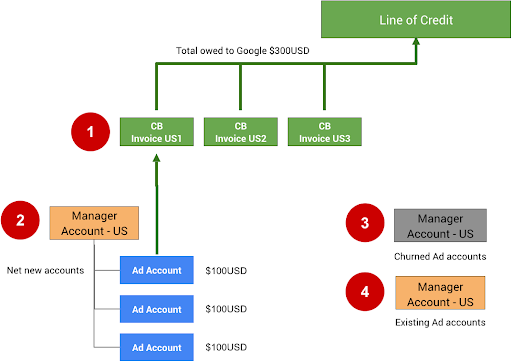
다음 참고사항은 위 그림의 숫자를 나타냅니다.
통합 청구서 (CB)에는 추가할 수 있는 계정 또는 인보이스 수에 15,000개의 제한이 있습니다. 첫 번째 통합 결제 (CB US1)가 인보이스 또는 계정 15, 000개에 도달하면 이후의 모든 인보이스 또는 계정을 CB US2에 추가해야 합니다.
통합 결제 신청 양식을 통해 신청하여 관리자 계정에 통합 결제를 설정할 수 있습니다. 먼저 Google에서 승인된 신용 한도가 있어야 합니다. 아직 없는 경우 Google에 문의 양식을 통해 신청할 수 있습니다.
휴면 계정 (이탈)은 다른 관리자 계정으로 이동할 수 있습니다. 이러한 계정을 분리하면 15,000개 한도를 초과하지 않을 수 있습니다. 예방 조치로 이러한 계정의 예산 주문을 삭제하여 수동으로 다시 활성화하지 않는 한 계속 지출할 수 없도록 하는 것이 좋습니다.
통합을 통해 사용자가 기존 Google Ads 계정을 사용할 수 있는 경우 이러한 계정에 대해 별도의 관리자 계정을 만드세요. 기존 계정의 경우 다른 캠페인 유형에 이미 지출하고 있을 수 있으며 직접 청구가 이미 설정되어 있을 가능성이 높으므로 통합 청구를 사용해서는 안 됩니다.
Google Ads UI에서 직접 통합 결제를 설정하려면 통합 결제 설정의 안내를 따르세요.
기술 안내
API를 사용하여 판매자 Google Ads 계정의 결제를 설정하고 관리하려면 BillingSetup 리소스를 사용하여 계정 전체 결제 구성을 가져오고 관리합니다. 결제 설정은 지급 계정과 특정 Google Ads 계정 간의 연결입니다. 광고주 계정의 비용을 누가 지불하는지 효과적으로 결정합니다. 결제 설정 안내를 따릅니다.
계정 예산 관리
계정 예산은 시작 시간, 종료 시간, 지출 한도와 같은 계정 수준 예산 속성을 정의합니다. 계정 예산의 모든 변경사항은 별도의 계정 예산 제안을 제출하여 이루어지며, 이 제안은 검토 및 승인 후 계정 예산이 됩니다. AccountBudgetProposal 리소스를 사용하여 새 AccountBudgets를 만들거나 기존 AccountBudgets를 업데이트합니다.
다음 예에서는 새 예산 제안을 만드는 방법을 보여줍니다.
자바
private void runExample(GoogleAdsClient googleAdsClient, long customerId, long billingSetupId) { // Creates an AccountBudgetProposal. This will be reviewed offline by Google Ads, and if // approved will become an AccountBudget. AccountBudgetProposal proposal = AccountBudgetProposal.newBuilder() .setBillingSetup(ResourceNames.billingSetup(customerId, billingSetupId)) .setProposalType(AccountBudgetProposalType.CREATE) .setProposedName("Account Budget (example)") // Specifies the account budget starts immediately. .setProposedStartTimeType(TimeType.NOW) // Alternatively you can specify a specific start time. Refer to the // AccountBudgetProposal // resource documentation for allowed formats. // // .setProposedStartDateTime("2020-01-02 03:04:05") // Specifies that the budget runs forever. .setProposedEndTimeType(TimeType.FOREVER) // Alternatively you can specify a specific end time. Allowed formats are as above. // .setProposedEndDateTime("2021-02-03 04:05:06") // Optional: sets notes for the budget. These are free text and do not effect budget // delivery. // .setProposedNotes("Received prepayment of $0.01") // Sets the spending limit to 0.01, measured in the Google Ads account currency. .setProposedSpendingLimitMicros(10_000) // Optional: sets PO number for record keeping. This value is at the user's // discretion, and has no effect on Google Billing & Payments. // .setProposedPurchaseOrderNumber("PO number 12345") .build(); // Creates an operation which will add the new AccountBudgetProposal. AccountBudgetProposalOperation operation = AccountBudgetProposalOperation.newBuilder().setCreate(proposal).build(); try (AccountBudgetProposalServiceClient accountBudgetProposalServiceClient = googleAdsClient.getLatestVersion().createAccountBudgetProposalServiceClient()) { // Sends the request to the Account Budget Proposal Service. MutateAccountBudgetProposalResponse response = accountBudgetProposalServiceClient.mutateAccountBudgetProposal( String.valueOf(customerId), operation); System.out.printf( "Account budget proposal created: %s.%n", response.getResult().getResourceName()); } }
C#
public void Run(GoogleAdsClient client, long customerId, long billingSetupId) { // Get the AccountBudgetProposalServiceClient. AccountBudgetProposalServiceClient proposalService = client.GetService(Services.V25.AccountBudgetProposalService); // Create an AccountBudgetProposal. The proposal will be reviewed offline by Google Ads, // and if approved will become an AccountBudget. AccountBudgetProposal proposal = new AccountBudgetProposal() { BillingSetup = ResourceNames.BillingSetup(customerId, billingSetupId), ProposalType = AccountBudgetProposalType.Create, ProposedName = "Account Budget (example)", // Specify the account budget starts immediately ProposedStartTimeType = TimeType.Now, // Alternatively, you can specify a specific start time. Refer to the // AccountBudgetProposal resource documentation for allowed formats. // //ProposedStartDateTime = "2020-01-02 03:04:05", // Specify that the budget runs forever. ProposedEndTimeType = TimeType.Forever, // Alternatively you can specify a specific end time. Allowed formats are as above. //ProposedEndDateTime = "2021-02-03 04:05:06", // Optional: set notes for the budget. These are free text and do not effect budget // delivery. //ProposedNotes = "Received prepayment of $0.01", // Set the spending limit to 0.01, measured in the Google Ads account currency. ProposedSpendingLimitMicros = 10_000 // Optional: set PO number for record keeping. This value is at the user's // discretion, and has no effect on Google Billing & Payments. //ProposedPurchaseOrderNumber = "PO number 12345" }; // Create an operation which will add the new AccountBudgetProposal AccountBudgetProposalOperation operation = new AccountBudgetProposalOperation() { Create = proposal }; try { // Send the request to the Account Budget Proposal Service. MutateAccountBudgetProposalResponse response = proposalService. MutateAccountBudgetProposal(customerId.ToString(), operation); // Display the results. Console.WriteLine($"Account budget proposal '{response.Result.ResourceName}' " + "was created."); } catch (GoogleAdsException e) { Console.WriteLine("Failure:"); Console.WriteLine($"Message: {e.Message}"); Console.WriteLine($"Failure: {e.Failure}"); Console.WriteLine($"Request ID: {e.RequestId}"); throw; } }
PHP
public static function runExample( GoogleAdsClient $googleAdsClient, int $customerId, int $billingSetupId ) { // Constructs an account budget proposal. $accountBudgetProposal = new AccountBudgetProposal([ 'billing_setup' => ResourceNames::forBillingSetup($customerId, $billingSetupId), 'proposal_type' => AccountBudgetProposalType::CREATE, 'proposed_name' => 'Account Budget (example)', // Specifies the account budget starts immediately. 'proposed_start_time_type' => TimeType::NOW, // Alternatively you can specify a specific start time. Refer to the // AccountBudgetProposal class for allowed formats. // // 'proposed_start_date_time' => '2020-01-02 03:04:05', // Specify that the budget runs forever. 'proposed_end_time_type' => TimeType::FOREVER, // Alternatively you can specify a specific end time. Allowed formats are as above. // 'proposed_end_date_time' => '2021-02-03 04:05:06', // Optional: set notes for the budget. These are free text and do not effect budget // delivery. // 'proposed_notes' => 'Received prepayment of $0.01', // Optional: set PO number for record keeping. This value is at the user's // discretion, and has no effect on Google Billing & Payments. // 'proposed_purchase_order_number' => 'PO number 12345', // Set the spending limit to 0.01, measured in the Google Ads account currency. 'proposed_spending_limit_micros' => 10000 ]); $accountBudgetProposalOperation = new AccountBudgetProposalOperation(); $accountBudgetProposalOperation->setCreate($accountBudgetProposal); // Issues a mutate request to add the account budget proposal. $accountBudgetProposalServiceClient = $googleAdsClient->getAccountBudgetProposalServiceClient(); $response = $accountBudgetProposalServiceClient->mutateAccountBudgetProposal( MutateAccountBudgetProposalRequest::build($customerId, $accountBudgetProposalOperation) ); printf( "Added an account budget proposal with resource name '%s'.%s", $response->getResult()->getResourceName(), PHP_EOL ); }
Python
def main(client: GoogleAdsClient, customer_id: str, billing_setup_id: str): account_budget_proposal_service = client.get_service( "AccountBudgetProposalService" ) billing_setup_service = client.get_service("BillingSetupService") account_budget_proposal_operation = client.get_type( "AccountBudgetProposalOperation" ) proposal = account_budget_proposal_operation.create proposal.proposal_type = client.enums.AccountBudgetProposalTypeEnum.CREATE proposal.billing_setup = billing_setup_service.billing_setup_path( customer_id, billing_setup_id ) proposal.proposed_name = "Account Budget Proposal (example)" # Specify the account budget starts immediately proposal.proposed_start_time_type = client.enums.TimeTypeEnum.NOW # Alternatively you can specify a specific start time. Refer to the # AccountBudgetProposal resource documentation for allowed formats. # # proposal.proposed_start_date_time = '2020-01-02 03:04:05' # Specify that the budget runs forever proposal.proposed_end_time_type = client.enums.TimeTypeEnum.FOREVER # Alternatively you can specify a specific end time. Allowed formats are as # above. # # proposal.proposed_end_date_time = '2021-01-02 03:04:05' # Optional: set notes for the budget. These are free text and do not effect # budget delivery. # # proposal.proposed_notes = 'Received prepayment of $0.01' proposal.proposed_spending_limit_micros = 10000 account_budget_proposal_response = ( account_budget_proposal_service.mutate_account_budget_proposal( customer_id=customer_id, operation=account_budget_proposal_operation, ) ) print( "Created account budget proposal " f'"{account_budget_proposal_response.result.resource_name}".' )
Ruby
def add_account_budget_proposal(customer_id, billing_setup_id) # GoogleAdsClient will read a config file from # ENV['HOME']/google_ads_config.rb when called without parameters client = Google::Ads::GoogleAds::GoogleAdsClient.new operation = client.operation.create_resource.account_budget_proposal do |proposal| proposal.billing_setup = client.path.billing_setup(customer_id, billing_setup_id) proposal.proposal_type = :CREATE proposal.proposed_name = 'Account Budget (example)' # Specify the account budget starts immediately proposal.proposed_start_time_type = :NOW # Alternatively you can specify a specific start time. Refer to the # AccountBudgetProposal resource documentation for allowed formats. # # proposal.proposed_start_date_time = '2020-01-02 03:04:05' # Specify that the budget runs forever. proposal.proposed_end_time_type = :FOREVER # Alternatively you can specify a specific end time. Allowed formats are as # above. # # proposal.proposed_end_date_time = '2021-01-02 03:04:05' # Optional: set notes for the budget. These are free text and do not affect # budget delivery. # # proposal.proposed_notes = 'Received prepayment of $0.01' # Set the spending limit to 0.01, measured in the Google Ads account currency. proposal.proposed_spending_limit_micros = 10_000 end account_budget_proposal_service = client.service.account_budget_proposal # Add budget proposal. response = account_budget_proposal_service.mutate_account_budget_proposal( customer_id: customer_id, operation: operation, ) puts sprintf("Created budget proposal %s.", response.results.first.resource_name) end
Perl
sub add_account_budget_proposal { my ($api_client, $customer_id, $billing_setup_id) = @_; # Create an account budget proposal. my $account_budget_proposal = Google::Ads::GoogleAds::V25::Resources::AccountBudgetProposal->new({ billingSetup => Google::Ads::GoogleAds::V25::Utils::ResourceNames::billing_setup( $customer_id, $billing_setup_id ), proposalType => CREATE, proposedName => "Account Budget (example)", # Specify that the account budget starts immediately. proposedStartTimeType => NOW, # Alternatively you can specify a specific start time. Refer to the # AccountBudgetProposal class for allowed formats. # # proposedStartDateTime => "2020-01-02 03:04:05", # Specify that the account budget runs forever. proposedEndDateTime => FOREVER, # Alternatively you can specify a specific end time. Allowed formats are as below. # proposedEndDateTime => "2021-02-03 04:05:06", # Optional: set notes for the budget. These are free text and do not effect budget # delivery. # proposedNotes => "Received prepayment of $0.01", # Optional: set PO number for record keeping. This value is at the user's # discretion, and has no effect on Google Billing & Payments. # proposedPurchaseOrderNumber => "PO number 12345", # Set the spending limit to 0.01, measured in the Google Ads account currency. proposedSpendingLimitMicros => 10000 }); # Create an account budget proposal operation. my $account_budget_proposal_operation = Google::Ads::GoogleAds::V25::Services::AccountBudgetProposalService::AccountBudgetProposalOperation ->new({ create => $account_budget_proposal }); # Add the account budget proposal. my $account_budget_proposal_response = $api_client->AccountBudgetProposalService()->mutate({ customerId => $customer_id, operation => $account_budget_proposal_operation }); printf "Created account budget proposal '%s'.\n", $account_budget_proposal_response->{result}{resourceName}; return 1; }
curl
계정 예산을 업데이트하려면 AccountBudgetProposalService를 사용하여 예산 매개변수를 관리합니다. 가장 일반적인 관리 작업은 지출 한도 및 날짜-시간 필드를 업데이트하는 것입니다. 변경 가능한 필드의 전체 목록은 AccountBudgetProposal를 참고하세요. 다음 예에서는 기존 계정 예산의 제안된 지출 한도를 업데이트하는 방법을 보여줍니다.
자바
private void runExample(GoogleAdsClient googleAdsClient, long customerId, long billingSetupId) { // Creates an AccountBudgetProposal. This will be reviewed offline by Google Ads, and if // approved will become an AccountBudget. AccountBudgetProposal proposal = AccountBudgetProposal.newBuilder() .setBillingSetup(ResourceNames.billingSetup(customerId, billingSetupId)) .setProposalType(AccountBudgetProposalType.CREATE) .setProposedName("Account Budget (example)") // Specifies the account budget starts immediately. .setProposedStartTimeType(TimeType.NOW) // Alternatively you can specify a specific start time. Refer to the // AccountBudgetProposal // resource documentation for allowed formats. // // .setProposedStartDateTime("2020-01-02 03:04:05") // Specifies that the budget runs forever. .setProposedEndTimeType(TimeType.FOREVER) // Alternatively you can specify a specific end time. Allowed formats are as above. // .setProposedEndDateTime("2021-02-03 04:05:06") // Optional: sets notes for the budget. These are free text and do not effect budget // delivery. // .setProposedNotes("Received prepayment of $0.01") // Sets the spending limit to 0.01, measured in the Google Ads account currency. .setProposedSpendingLimitMicros(10_000) // Optional: sets PO number for record keeping. This value is at the user's // discretion, and has no effect on Google Billing & Payments. // .setProposedPurchaseOrderNumber("PO number 12345") .build(); // Creates an operation which will add the new AccountBudgetProposal. AccountBudgetProposalOperation operation = AccountBudgetProposalOperation.newBuilder().setCreate(proposal).build(); try (AccountBudgetProposalServiceClient accountBudgetProposalServiceClient = googleAdsClient.getLatestVersion().createAccountBudgetProposalServiceClient()) { // Sends the request to the Account Budget Proposal Service. MutateAccountBudgetProposalResponse response = accountBudgetProposalServiceClient.mutateAccountBudgetProposal( String.valueOf(customerId), operation); System.out.printf( "Account budget proposal created: %s.%n", response.getResult().getResourceName()); } }
C#
public void Run(GoogleAdsClient client, long customerId, long billingSetupId) { // Get the AccountBudgetProposalServiceClient. AccountBudgetProposalServiceClient proposalService = client.GetService(Services.V25.AccountBudgetProposalService); // Create an AccountBudgetProposal. The proposal will be reviewed offline by Google Ads, // and if approved will become an AccountBudget. AccountBudgetProposal proposal = new AccountBudgetProposal() { BillingSetup = ResourceNames.BillingSetup(customerId, billingSetupId), ProposalType = AccountBudgetProposalType.Create, ProposedName = "Account Budget (example)", // Specify the account budget starts immediately ProposedStartTimeType = TimeType.Now, // Alternatively, you can specify a specific start time. Refer to the // AccountBudgetProposal resource documentation for allowed formats. // //ProposedStartDateTime = "2020-01-02 03:04:05", // Specify that the budget runs forever. ProposedEndTimeType = TimeType.Forever, // Alternatively you can specify a specific end time. Allowed formats are as above. //ProposedEndDateTime = "2021-02-03 04:05:06", // Optional: set notes for the budget. These are free text and do not effect budget // delivery. //ProposedNotes = "Received prepayment of $0.01", // Set the spending limit to 0.01, measured in the Google Ads account currency. ProposedSpendingLimitMicros = 10_000 // Optional: set PO number for record keeping. This value is at the user's // discretion, and has no effect on Google Billing & Payments. //ProposedPurchaseOrderNumber = "PO number 12345" }; // Create an operation which will add the new AccountBudgetProposal AccountBudgetProposalOperation operation = new AccountBudgetProposalOperation() { Create = proposal }; try { // Send the request to the Account Budget Proposal Service. MutateAccountBudgetProposalResponse response = proposalService. MutateAccountBudgetProposal(customerId.ToString(), operation); // Display the results. Console.WriteLine($"Account budget proposal '{response.Result.ResourceName}' " + "was created."); } catch (GoogleAdsException e) { Console.WriteLine("Failure:"); Console.WriteLine($"Message: {e.Message}"); Console.WriteLine($"Failure: {e.Failure}"); Console.WriteLine($"Request ID: {e.RequestId}"); throw; } }
PHP
public static function runExample( GoogleAdsClient $googleAdsClient, int $customerId, int $billingSetupId ) { // Constructs an account budget proposal. $accountBudgetProposal = new AccountBudgetProposal([ 'billing_setup' => ResourceNames::forBillingSetup($customerId, $billingSetupId), 'proposal_type' => AccountBudgetProposalType::CREATE, 'proposed_name' => 'Account Budget (example)', // Specifies the account budget starts immediately. 'proposed_start_time_type' => TimeType::NOW, // Alternatively you can specify a specific start time. Refer to the // AccountBudgetProposal class for allowed formats. // // 'proposed_start_date_time' => '2020-01-02 03:04:05', // Specify that the budget runs forever. 'proposed_end_time_type' => TimeType::FOREVER, // Alternatively you can specify a specific end time. Allowed formats are as above. // 'proposed_end_date_time' => '2021-02-03 04:05:06', // Optional: set notes for the budget. These are free text and do not effect budget // delivery. // 'proposed_notes' => 'Received prepayment of $0.01', // Optional: set PO number for record keeping. This value is at the user's // discretion, and has no effect on Google Billing & Payments. // 'proposed_purchase_order_number' => 'PO number 12345', // Set the spending limit to 0.01, measured in the Google Ads account currency. 'proposed_spending_limit_micros' => 10000 ]); $accountBudgetProposalOperation = new AccountBudgetProposalOperation(); $accountBudgetProposalOperation->setCreate($accountBudgetProposal); // Issues a mutate request to add the account budget proposal. $accountBudgetProposalServiceClient = $googleAdsClient->getAccountBudgetProposalServiceClient(); $response = $accountBudgetProposalServiceClient->mutateAccountBudgetProposal( MutateAccountBudgetProposalRequest::build($customerId, $accountBudgetProposalOperation) ); printf( "Added an account budget proposal with resource name '%s'.%s", $response->getResult()->getResourceName(), PHP_EOL ); }
Python
def main(client: GoogleAdsClient, customer_id: str, billing_setup_id: str): account_budget_proposal_service = client.get_service( "AccountBudgetProposalService" ) billing_setup_service = client.get_service("BillingSetupService") account_budget_proposal_operation = client.get_type( "AccountBudgetProposalOperation" ) proposal = account_budget_proposal_operation.create proposal.proposal_type = client.enums.AccountBudgetProposalTypeEnum.CREATE proposal.billing_setup = billing_setup_service.billing_setup_path( customer_id, billing_setup_id ) proposal.proposed_name = "Account Budget Proposal (example)" # Specify the account budget starts immediately proposal.proposed_start_time_type = client.enums.TimeTypeEnum.NOW # Alternatively you can specify a specific start time. Refer to the # AccountBudgetProposal resource documentation for allowed formats. # # proposal.proposed_start_date_time = '2020-01-02 03:04:05' # Specify that the budget runs forever proposal.proposed_end_time_type = client.enums.TimeTypeEnum.FOREVER # Alternatively you can specify a specific end time. Allowed formats are as # above. # # proposal.proposed_end_date_time = '2021-01-02 03:04:05' # Optional: set notes for the budget. These are free text and do not effect # budget delivery. # # proposal.proposed_notes = 'Received prepayment of $0.01' proposal.proposed_spending_limit_micros = 10000 account_budget_proposal_response = ( account_budget_proposal_service.mutate_account_budget_proposal( customer_id=customer_id, operation=account_budget_proposal_operation, ) ) print( "Created account budget proposal " f'"{account_budget_proposal_response.result.resource_name}".' )
Ruby
def add_account_budget_proposal(customer_id, billing_setup_id) # GoogleAdsClient will read a config file from # ENV['HOME']/google_ads_config.rb when called without parameters client = Google::Ads::GoogleAds::GoogleAdsClient.new operation = client.operation.create_resource.account_budget_proposal do |proposal| proposal.billing_setup = client.path.billing_setup(customer_id, billing_setup_id) proposal.proposal_type = :CREATE proposal.proposed_name = 'Account Budget (example)' # Specify the account budget starts immediately proposal.proposed_start_time_type = :NOW # Alternatively you can specify a specific start time. Refer to the # AccountBudgetProposal resource documentation for allowed formats. # # proposal.proposed_start_date_time = '2020-01-02 03:04:05' # Specify that the budget runs forever. proposal.proposed_end_time_type = :FOREVER # Alternatively you can specify a specific end time. Allowed formats are as # above. # # proposal.proposed_end_date_time = '2021-01-02 03:04:05' # Optional: set notes for the budget. These are free text and do not affect # budget delivery. # # proposal.proposed_notes = 'Received prepayment of $0.01' # Set the spending limit to 0.01, measured in the Google Ads account currency. proposal.proposed_spending_limit_micros = 10_000 end account_budget_proposal_service = client.service.account_budget_proposal # Add budget proposal. response = account_budget_proposal_service.mutate_account_budget_proposal( customer_id: customer_id, operation: operation, ) puts sprintf("Created budget proposal %s.", response.results.first.resource_name) end
Perl
sub add_account_budget_proposal { my ($api_client, $customer_id, $billing_setup_id) = @_; # Create an account budget proposal. my $account_budget_proposal = Google::Ads::GoogleAds::V25::Resources::AccountBudgetProposal->new({ billingSetup => Google::Ads::GoogleAds::V25::Utils::ResourceNames::billing_setup( $customer_id, $billing_setup_id ), proposalType => CREATE, proposedName => "Account Budget (example)", # Specify that the account budget starts immediately. proposedStartTimeType => NOW, # Alternatively you can specify a specific start time. Refer to the # AccountBudgetProposal class for allowed formats. # # proposedStartDateTime => "2020-01-02 03:04:05", # Specify that the account budget runs forever. proposedEndDateTime => FOREVER, # Alternatively you can specify a specific end time. Allowed formats are as below. # proposedEndDateTime => "2021-02-03 04:05:06", # Optional: set notes for the budget. These are free text and do not effect budget # delivery. # proposedNotes => "Received prepayment of $0.01", # Optional: set PO number for record keeping. This value is at the user's # discretion, and has no effect on Google Billing & Payments. # proposedPurchaseOrderNumber => "PO number 12345", # Set the spending limit to 0.01, measured in the Google Ads account currency. proposedSpendingLimitMicros => 10000 }); # Create an account budget proposal operation. my $account_budget_proposal_operation = Google::Ads::GoogleAds::V25::Services::AccountBudgetProposalService::AccountBudgetProposalOperation ->new({ create => $account_budget_proposal }); # Add the account budget proposal. my $account_budget_proposal_response = $api_client->AccountBudgetProposalService()->mutate({ customerId => $customer_id, operation => $account_budget_proposal_operation }); printf "Created account budget proposal '%s'.\n", $account_budget_proposal_response->{result}{resourceName}; return 1; }
curl
활성 계정 예산을 종료하려면 AccountBudgetProposalType.END이 포함된 제안을 전송하여 종료 시간을 현재 시간으로 설정합니다.
인보이스 발행
광고주가 사용 설정한 경우 인보이스가 매월 발행됩니다. 인보이스에는 조정, 규제 비용, 세금, 계정 예산과 같은 세부정보가 포함되어 있으며 PDF 파일로 다운로드할 수 있습니다. 관리자는 일반적으로 이를 사용하여 자체 고객 인보이스를 자동으로 조정합니다. 인보이스를 사용 설정하려면 다음이 필요합니다.
Google Ads 계정에 월별 인보이스가 사용 설정되어 있어야 합니다. Google Ads API를 사용하여 결제를 관리하는 방법을 알아보려면 계정 결제 설정 및 예산에 관한 가이드를 참고하세요.
설정된 경우
login-customer-id는 인보이스를 가져오는 Google Ads 계정을 관리하는 관리자 계정의 고객 ID를 지정해야 합니다. Google Ads UI에서는 결제 관리자로 표시됩니다.
InvoiceService을 사용하여 인보이스 데이터의 Invoice 리소스를 가져옵니다. InvoiceService.ListInvoices 메서드를 요청하여 ListInvoicesRequest의 필수 필드(customer_id, billing_setup, issue_year, issue_month)를 모두 설정합니다. 다음 예에서는 이 요청을 만드는 방법을 보여줍니다.
자바
// Issues the request. ListInvoicesResponse response = invoiceServiceClient.listInvoices( String.valueOf(customerId), ResourceNames.billingSetup(customerId, billingSetupId), String.valueOf(oneMonthAgo.getYear()), MonthOfYear.valueOf(oneMonthAgo.getMonth().toString()));
C#
ListInvoicesResponse response = invoiceServiceClient.ListInvoices(customerId.ToString(), ResourceNames.BillingSetup(customerId, billingSetupId), // Year must be 2019 or later. lastMonthDateTime.Year.ToString("yyyy"), lastMonth);
PHP
// Issues the request. $response = $googleAdsClient->getInvoiceServiceClient()->listInvoices( ListInvoicesRequest::build( $customerId, ResourceNames::forBillingSetup($customerId, $billingSetupId), // The year needs to be 2019 or later. date('Y', $lastMonth), MonthOfYear::value(strtoupper(date('F', $lastMonth))) ) );
Python
# Issues a request to list invoices. response = client.get_service("InvoiceService").list_invoices( customer_id=customer_id, billing_setup=client.get_service("GoogleAdsService").billing_setup_path( customer_id, billing_setup_id ), # The year needs to be 2019 or later, per the docs: # https://developers.google.com/google-ads/api/docs/billing/invoice?hl=en#retrieving_invoices issue_year=str(last_month.year), issue_month=last_month.strftime("%B").upper(), )
Ruby
# Issues a request to list invoices. response = client.service.invoice.list_invoices( customer_id: customer_id, billing_setup: client.path.billing_setup(customer_id, billing_setup_id), # The year needs to be 2019 or later. issue_year: last_month.year.to_s, # '%^B' option returns the uppercased full month name (e.g. 'JANUARY'). issue_month: last_month.strftime("%^B").to_sym, )
Perl
# Issue the request. my $response = $api_client->InvoiceService()->list({ customerId => $customer_id, billingSetup => Google::Ads::GoogleAds::V25::Utils::ResourceNames::billing_setup( ($customer_id, $billing_setup_id) ), # The year needs to be 2019 or later. issueYear => strftime("%Y", @last_month), issueMonth => uc(strftime("%B", @last_month))});
curl
응답은 일치하는 Invoices 목록이 포함된 ListInvoicesResponse 객체입니다. 인보이스는 요청된 결제 설정에서 사용하는 기본 결제 계정과 동일한 기본 결제 계정을 사용하는 결제 설정이 있는 모든 Google Ads 계정의 데이터를 결합합니다. 기본 결제 계정이 통합 청구를 사용할 수 있는 경우에만 이 문제가 발생합니다.