

4.1.5 Tracking Konversi
Nilai dan Dampak Bisnis
Untuk menyediakan machine learning dan analisis yang canggih dari ekosistem Google secara efektif untuk kampanye iklan klien penjual Anda, Anda harus menempatkan tag pelacakan konversi dan pemasaran ulang di situs klien.
Konversi di Google Ads terjadi saat pengguna melakukan beberapa tindakan tertentu setelah mengklik iklan, seperti membeli produk, menginstal aplikasi seluler, atau mendaftar ke milis. Tracking konversi memberikan insight utama tentang tindakan pengguna setelah melihat atau mengklik iklan, termasuk informasi untuk menghitung dan membandingkan laba atas investasi (ROI) guna membantu klien Anda mengambil keputusan tentang tempat untuk memfokuskan pembelanjaan iklan. Pelacakan juga membantu memastikan bahwa data tersedia untuk tujuan rekonsiliasi. Pesanan berbeda-beda bergantung pada produk atau kategori, sehingga pelacakan konversi juga dapat berguna untuk menunjukkan cara kelompok listingan tertentu dikonversi menjadi penjualan.
Sasaran konversi adalah grup tindakan konversi dengan sasaran pokok yang sama. Misalnya, 'Pembelian' dapat menjadi sasaran konversi yang memiliki 'Pembelian situs' dan 'Penjualan di toko' sebagai tindakan konversi.
Tindakan konversi masih digunakan untuk melacak konversi dan mengoptimalkan kampanye. Anda membuat tindakan konversi dan Google mengelompokkannya dalam sasaran konversi.
Tindakan konversi pembelian
Dengan menerapkan tracking konversi yang dijelaskan di sini, akun Google Ads penjual Anda dapat mengukur jumlah konversi Pembelian dan nilai konversi ini. Tanpa pelacakan konversi, Anda tidak dapat mengukur nilai bisnis yang dihasilkan kampanye dalam hal ROAS (laba atas belanja iklan). Fitur ini juga mengirimkan sinyal data tambahan yang memungkinkan kampanye mengoptimalkan performa.
Tindakan konversi lainnya
Meskipun hanya tindakan konversi pembelian yang diperlukan, pelacakan tindakan konversi tambahan dapat memberikan insight tambahan kepada penjual Anda. Sebaiknya catat semua hal yang memungkinkan, sekaligus menerapkan sebanyak mungkin tindakan konversi inti. Daftar lengkap tindakan konversi yang direkomendasikan dijelaskan di bagian panduan Tech API.
Secara umum, sebaiknya Anda merekam hal berikut:
- Semua peristiwa sukses yang terkait langsung dengan nilai
- Peristiwa sukses yang berkontribusi pada konversi inti seperti add_to_cart dan sign_up.
- Engagement dan interaksi pengguna yang membantu pengiklan memahami cara mereka berinteraksi dengan pengguna akhir
Tindakan konversi sekunder hanya untuk pengamatan dan pelaporan, memengaruhi bidding.Pelajari lebih lanjut tindakan konversi utama dan sekunder.
Panduan UX
Untuk meminimalkan risiko error, sebaiknya Anda menerapkan tracking konversi secara terprogram tanpa input penjual, tetapi Anda harus memastikan bahwa penjual Anda mengetahui bahwa tracking konversi telah disiapkan.
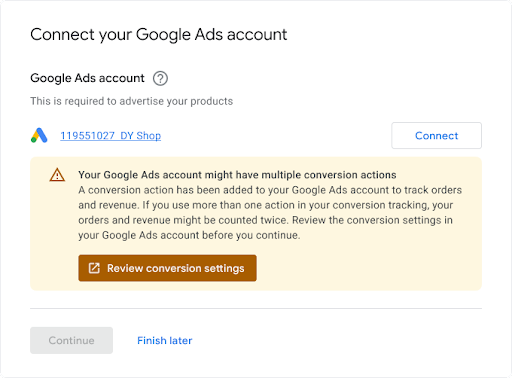
Saat penjual menautkan akun Google Ads yang ada, sebaiknya tampilkan notifikasi bahwa akun mereka mungkin sudah menyiapkan tracking konversi, karena mungkin ada konflik yang harus diselesaikan. Contohnya ditampilkan di bawah ini.
Panduan Teknis
Berikut cara kerja tracking konversi. Bagian ini menguraikan setiap langkah lebih lanjut:
Anda membuat 'ConversionAction' di akun Google Ads penjual untuk melacak pembelian (dan secara opsional tindakan pelanggan lainnya) yang dilakukan di situsnya.
Anda menambahkan tag, atau cuplikan kode, untuk tindakan konversi tersebut ke situs atau aplikasi seluler. Untuk mengetahui detailnya, lihat Menyiapkan tracking konversi untuk situs Anda.
Saat pelanggan mengklik iklan, cookie sementara akan ditempatkan di komputer atau perangkat seluler pelanggan.
Saat pelanggan menyelesaikan tindakan yang ditentukan untuk pengiklan, Google akan mengenali cookie (melalui cuplikan kode yang ditambahkan), dan mencatat konversi bersama dengan parameter lain seperti 'nilai' jika sesuai.
Prasyarat
Sebelum memulai, pastikan Anda memiliki ID Developer tag Google. Jika Anda belum memiliki ID Developer tag Google, isi formulir permintaan ID Developer tag Google. ID Developer Anda berbeda dengan ID lain, seperti ID Pengukuran atau ID Konversi, yang ditambahkan pengguna akhir ke kode pengukuran situs mereka.
Membuat dan mengonfigurasi tindakan konversi
Contoh berikut menunjukkan cara membuat tindakan konversi dan menambahkannya ke akun Google Ads. Setiap sampel menangani semua tugas autentikasi latar belakang untuk Anda, dan memandu Anda membuat tindakan konversi:
Java
// Copyright 2018 Google LLC // // Licensed under the Apache License, Version 2.0 (the "License"); // you may not use this file except in compliance with the License. // You may obtain a copy of the License at // // https://www.apache.org/licenses/LICENSE-2.0 // // Unless required by applicable law or agreed to in writing, software // distributed under the License is distributed on an "AS IS" BASIS, // WITHOUT WARRANTIES OR CONDITIONS OF ANY KIND, either express or implied. // See the License for the specific language governing permissions and // limitations under the License. package com.google.ads.googleads.examples.remarketing; import static com.google.ads.googleads.examples.utils.CodeSampleHelper.getPrintableDateTime; import com.beust.jcommander.Parameter; import com.google.ads.googleads.examples.utils.ArgumentNames; import com.google.ads.googleads.examples.utils.CodeSampleParams; import com.google.ads.googleads.lib.GoogleAdsClient; import com.google.ads.googleads.v25.enums.ConversionActionCategoryEnum.ConversionActionCategory; import com.google.ads.googleads.v25.enums.ConversionActionStatusEnum.ConversionActionStatus; import com.google.ads.googleads.v25.enums.ConversionActionTypeEnum.ConversionActionType; import com.google.ads.googleads.v25.errors.GoogleAdsError; import com.google.ads.googleads.v25.errors.GoogleAdsException; import com.google.ads.googleads.v25.resources.ConversionAction; import com.google.ads.googleads.v25.resources.ConversionAction.ValueSettings; import com.google.ads.googleads.v25.services.ConversionActionOperation; import com.google.ads.googleads.v25.services.ConversionActionServiceClient; import com.google.ads.googleads.v25.services.MutateConversionActionResult; import com.google.ads.googleads.v25.services.MutateConversionActionsResponse; import java.io.FileNotFoundException; import java.io.IOException; import java.util.Collections; /** Adds a conversion action. */ public class AddConversionAction { private static class AddConversionActionParams extends CodeSampleParams { @Parameter(names = ArgumentNames.CUSTOMER_ID, required = true) private Long customerId; } public static void main(String[] args) { AddConversionActionParams params = new AddConversionActionParams(); if (!params.parseArguments(args)) { // Either pass the required parameters for this example on the command line, or insert them // into the code here. See the parameter class definition above for descriptions. params.customerId = Long.parseLong("INSERT_CUSTOMER_ID_HERE"); } GoogleAdsClient googleAdsClient = null; try { googleAdsClient = GoogleAdsClient.newBuilder().fromPropertiesFile().build(); } catch (FileNotFoundException fnfe) { System.err.printf( "Failed to load GoogleAdsClient configuration from file. Exception: %s%n", fnfe); System.exit(1); } catch (IOException ioe) { System.err.printf("Failed to create GoogleAdsClient. Exception: %s%n", ioe); System.exit(1); } try { new AddConversionAction().runExample(googleAdsClient, params.customerId); } catch (GoogleAdsException gae) { // GoogleAdsException is the base class for most exceptions thrown by an API request. // Instances of this exception have a message and a GoogleAdsFailure that contains a // collection of GoogleAdsErrors that indicate the underlying causes of the // GoogleAdsException. System.err.printf( "Request ID %s failed due to GoogleAdsException. Underlying errors:%n", gae.getRequestId()); int i = 0; for (GoogleAdsError googleAdsError : gae.getGoogleAdsFailure().getErrorsList()) { System.err.printf(" Error %d: %s%n", i++, googleAdsError); } System.exit(1); } } /** * Runs the example. * * @param googleAdsClient the Google Ads API client. * @param customerId the client customer ID. * @throws GoogleAdsException if an API request failed with one or more service errors. */ private void runExample(GoogleAdsClient googleAdsClient, long customerId) { // Creates a ConversionAction. ConversionAction conversionAction = ConversionAction.newBuilder() // Note that conversion action names must be unique. If a conversion action already // exists with the specified conversion_action_name the create operation will fail with // a ConversionActionError.DUPLICATE_NAME error. .setName("Earth to Mars Cruises Conversion #" + getPrintableDateTime()) .setCategory(ConversionActionCategory.DEFAULT) .setType(ConversionActionType.WEBPAGE) .setStatus(ConversionActionStatus.ENABLED) .setViewThroughLookbackWindowDays(15L) .setValueSettings( ValueSettings.newBuilder() .setDefaultValue(23.41) .setAlwaysUseDefaultValue(true) .build()) .build(); // Creates the operation. ConversionActionOperation operation = ConversionActionOperation.newBuilder().setCreate(conversionAction).build(); try (ConversionActionServiceClient conversionActionServiceClient = googleAdsClient.getLatestVersion().createConversionActionServiceClient()) { MutateConversionActionsResponse response = conversionActionServiceClient.mutateConversionActions( Long.toString(customerId), Collections.singletonList(operation)); System.out.printf("Added %d conversion actions:%n", response.getResultsCount()); for (MutateConversionActionResult result : response.getResultsList()) { System.out.printf( "New conversion action added with resource name: '%s'%n", result.getResourceName()); } } } }
C#
// Copyright 2019 Google LLC // // Licensed under the Apache License, Version 2.0 (the "License"); // you may not use this file except in compliance with the License. // You may obtain a copy of the License at // // http://www.apache.org/licenses/LICENSE-2.0 // // Unless required by applicable law or agreed to in writing, software // distributed under the License is distributed on an "AS IS" BASIS, // WITHOUT WARRANTIES OR CONDITIONS OF ANY KIND, either express or implied. // See the License for the specific language governing permissions and // limitations under the License. using CommandLine; using Google.Ads.Gax.Examples; using Google.Ads.GoogleAds.Lib; using Google.Ads.GoogleAds.V25.Errors; using Google.Ads.GoogleAds.V25.Resources; using Google.Ads.GoogleAds.V25.Services; using System; using static Google.Ads.GoogleAds.V25.Enums.ConversionActionCategoryEnum.Types; using static Google.Ads.GoogleAds.V25.Enums.ConversionActionStatusEnum.Types; using static Google.Ads.GoogleAds.V25.Enums.ConversionActionTypeEnum.Types; namespace Google.Ads.GoogleAds.Examples.V25 { /// <summary> /// This code example illustrates adding a conversion action. /// </summary> public class AddConversionAction : ExampleBase { /// <summary> /// Command line options for running the <see cref="AddConversionAction"/> example. /// </summary> public class Options : OptionsBase { /// <summary> /// The Google Ads customer ID for which the conversion action is added. /// </summary> [Option("customerId", Required = true, HelpText = "The Google Ads customer ID for which the conversion action is added.")] public long CustomerId { get; set; } } /// <summary> /// Main method, to run this code example as a standalone application. /// </summary> /// <param name="args">The command line arguments.</param> public static void Main(string[] args) { Options options = ExampleUtilities.ParseCommandLine<Options>(args); AddConversionAction codeExample = new AddConversionAction(); Console.WriteLine(codeExample.Description); codeExample.Run(new GoogleAdsClient(), options.CustomerId); } /// <summary> /// Returns a description about the code example. /// </summary> public override string Description => "This code example illustrates adding a conversion action."; /// <summary> /// Runs the code example. /// </summary> /// <param name="client">The Google Ads client.</param> /// <param name="customerId">The Google Ads customer ID for which the conversion action is /// added.</param> public void Run(GoogleAdsClient client, long customerId) { // Get the ConversionActionService. ConversionActionServiceClient conversionActionService = client.GetService(Services.V25.ConversionActionService); // Note that conversion action names must be unique. // If a conversion action already exists with the specified name the create operation // will fail with a ConversionAction.DUPLICATE_NAME error. string ConversionActionName = "Earth to Mars Cruises Conversion #" + ExampleUtilities.GetRandomString(); // Add a conversion action. ConversionAction conversionAction = new ConversionAction() { Name = ConversionActionName, Category = ConversionActionCategory.Default, Type = ConversionActionType.Webpage, Status = ConversionActionStatus.Enabled, ViewThroughLookbackWindowDays = 15, ValueSettings = new ConversionAction.Types.ValueSettings() { DefaultValue = 23.41, AlwaysUseDefaultValue = true } }; // Create the operation. ConversionActionOperation operation = new ConversionActionOperation() { Create = conversionAction }; try { // Create the conversion action. MutateConversionActionsResponse response = conversionActionService.MutateConversionActions(customerId.ToString(), new ConversionActionOperation[] { operation }); // Display the results. foreach (MutateConversionActionResult newConversionAction in response.Results) { Console.WriteLine($"New conversion action with resource name = " + $"'{newConversionAction.ResourceName}' was added."); } } catch (GoogleAdsException e) { Console.WriteLine("Failure:"); Console.WriteLine($"Message: {e.Message}"); Console.WriteLine($"Failure: {e.Failure}"); Console.WriteLine($"Request ID: {e.RequestId}"); throw; } } } }
PHP
<?php /** * Copyright 2018 Google LLC * * Licensed under the Apache License, Version 2.0 (the "License"); * you may not use this file except in compliance with the License. * You may obtain a copy of the License at * * https://www.apache.org/licenses/LICENSE-2.0 * * Unless required by applicable law or agreed to in writing, software * distributed under the License is distributed on an "AS IS" BASIS, * WITHOUT WARRANTIES OR CONDITIONS OF ANY KIND, either express or implied. * See the License for the specific language governing permissions and * limitations under the License. */ namespace Google\Ads\GoogleAds\Examples\Remarketing; require __DIR__ . '/../../vendor/autoload.php'; use GetOpt\GetOpt; use Google\Ads\GoogleAds\Examples\Utils\ArgumentNames; use Google\Ads\GoogleAds\Examples\Utils\ArgumentParser; use Google\Ads\GoogleAds\Examples\Utils\Helper; use Google\Ads\GoogleAds\Lib\V25\GoogleAdsClient; use Google\Ads\GoogleAds\Lib\V25\GoogleAdsClientBuilder; use Google\Ads\GoogleAds\Lib\V25\GoogleAdsException; use Google\Ads\GoogleAds\Lib\OAuth2TokenBuilder; use Google\Ads\GoogleAds\V25\Enums\ConversionActionCategoryEnum\ConversionActionCategory; use Google\Ads\GoogleAds\V25\Enums\ConversionActionStatusEnum\ConversionActionStatus; use Google\Ads\GoogleAds\V25\Enums\ConversionActionTypeEnum\ConversionActionType; use Google\Ads\GoogleAds\V25\Errors\GoogleAdsError; use Google\Ads\GoogleAds\V25\Resources\ConversionAction; use Google\Ads\GoogleAds\V25\Resources\ConversionAction\ValueSettings; use Google\Ads\GoogleAds\V25\Services\ConversionActionOperation; use Google\Ads\GoogleAds\V25\Services\MutateConversionActionsRequest; use Google\ApiCore\ApiException; /** * This example illustrates adding a conversion action. */ class AddConversionAction { private const CUSTOMER_ID = 'INSERT_CUSTOMER_ID_HERE'; public static function main() { // Either pass the required parameters for this example on the command line, or insert them // into the constants above. $options = (new ArgumentParser())->parseCommandArguments( [ ArgumentNames::CUSTOMER_ID => GetOpt::REQUIRED_ARGUMENT ] ); // Generate a refreshable OAuth2 credential for authentication. $oAuth2Credential = (new OAuth2TokenBuilder())->fromFile()->build(); // Construct a Google Ads client configured from a properties file and the // OAuth2 credentials above. $googleAdsClient = (new GoogleAdsClientBuilder()) ->fromFile() ->withOAuth2Credential($oAuth2Credential) ->build(); try { self::runExample( $googleAdsClient, $options[ArgumentNames::CUSTOMER_ID] ?: self::CUSTOMER_ID ); } catch (GoogleAdsException $googleAdsException) { printf( "Request with ID '%s' has failed.%sGoogle Ads failure details:%s", $googleAdsException->getRequestId(), PHP_EOL, PHP_EOL ); foreach ($googleAdsException->getGoogleAdsFailure()->getErrors() as $error) { /** * @var GoogleAdsError $error */ printf( "\t%s: %s%s", $error->getErrorCode()->getErrorCode(), $error->getMessage(), PHP_EOL ); } exit(1); } catch (ApiException $apiException) { printf( "ApiException was thrown with message '%s'.%s", $apiException->getMessage(), PHP_EOL ); exit(1); } } /** * Runs the example. * * @param GoogleAdsClient $googleAdsClient the Google Ads API client * @param int $customerId the customer ID */ public static function runExample(GoogleAdsClient $googleAdsClient, int $customerId) { // Creates a conversion action. $conversionAction = new ConversionAction( [ // Note that conversion action names must be unique. // If a conversion action already exists with the specified conversion_action_name // the create operation will fail with a ConversionActionError.DUPLICATE_NAME error. 'name' => 'Earth to Mars Cruises Conversion #' . Helper::getPrintableDatetime(), 'category' => ConversionActionCategory::PBDEFAULT, 'type' => ConversionActionType::WEBPAGE, 'status' => ConversionActionStatus::ENABLED, 'view_through_lookback_window_days' => 15, 'value_settings' => new ValueSettings( [ 'default_value' => 23.41, 'always_use_default_value' => true ] ) ] ); // Creates a conversion action operation. $conversionActionOperation = new ConversionActionOperation(); $conversionActionOperation->setCreate($conversionAction); // Issues a mutate request to add the conversion action. $conversionActionServiceClient = $googleAdsClient->getConversionActionServiceClient(); $response = $conversionActionServiceClient->mutateConversionActions( MutateConversionActionsRequest::build($customerId, [$conversionActionOperation]) ); printf("Added %d conversion actions:%s", $response->getResults()->count(), PHP_EOL); foreach ($response->getResults() as $addedConversionAction) { /** * @var ConversionAction $addedConversionAction */ printf( "New conversion action added with resource name: '%s'%s", $addedConversionAction->getResourceName(), PHP_EOL ); } } } AddConversionAction::main();
Python
#!/usr/bin/env python # Copyright 2018 Google LLC # # Licensed under the Apache License, Version 2.0 (the "License"); # you may not use this file except in compliance with the License. # You may obtain a copy of the License at # # https://www.apache.org/licenses/LICENSE-2.0 # # Unless required by applicable law or agreed to in writing, software # distributed under the License is distributed on an "AS IS" BASIS, # WITHOUT WARRANTIES OR CONDITIONS OF ANY KIND, either express or implied. # See the License for the specific language governing permissions and # limitations under the License. """This example illustrates adding a conversion action.""" import argparse import sys import uuid from google.ads.googleads.client import GoogleAdsClient from google.ads.googleads.errors import GoogleAdsException from google.ads.googleads.v24.resources.types.conversion_action import ( ConversionAction, ) from google.ads.googleads.v24.services.services.conversion_action_service import ( ConversionActionServiceClient, ) from google.ads.googleads.v24.services.types.conversion_action_service import ( ConversionActionOperation, MutateConversionActionsResponse, ) def main(client: GoogleAdsClient, customer_id: str) -> None: conversion_action_service: ConversionActionServiceClient = ( client.get_service("ConversionActionService") ) # Create the operation. conversion_action_operation: ConversionActionOperation = client.get_type( "ConversionActionOperation" ) # Create conversion action. conversion_action: ConversionAction = conversion_action_operation.create # Note that conversion action names must be unique. If a conversion action # already exists with the specified conversion_action_name, the create # operation will fail with a ConversionActionError.DUPLICATE_NAME error. conversion_action.name = f"Earth to Mars Cruises Conversion {uuid.uuid4()}" conversion_action.type_ = ( client.enums.ConversionActionTypeEnum.UPLOAD_CLICKS ) conversion_action.category = ( client.enums.ConversionActionCategoryEnum.DEFAULT ) conversion_action.status = client.enums.ConversionActionStatusEnum.ENABLED conversion_action.view_through_lookback_window_days = 15 # Create a value settings object. value_settings: ConversionAction.ValueSettings = ( conversion_action.value_settings ) value_settings.default_value = 15.0 value_settings.always_use_default_value = True # Add the conversion action. conversion_action_response: MutateConversionActionsResponse = ( conversion_action_service.mutate_conversion_actions( customer_id=customer_id, operations=[conversion_action_operation], ) ) print( "Created conversion action " f'"{conversion_action_response.results[0].resource_name}".' ) if __name__ == "__main__": parser: argparse.ArgumentParser = argparse.ArgumentParser( description="Adds a conversion action for specified customer." ) # The following argument(s) should be provided to run the example. parser.add_argument( "-c", "--customer_id", type=str, required=True, help="The Google Ads customer ID.", ) args: argparse.Namespace = parser.parse_args() # GoogleAdsClient will read the google-ads.yaml configuration file in the # home directory if none is specified. googleads_client: GoogleAdsClient = GoogleAdsClient.load_from_storage( version="v24" ) try: main(googleads_client, args.customer_id) except GoogleAdsException as ex: print( f'Request with ID "{ex.request_id}" failed with status ' f'"{ex.error.code().name}" and includes the following errors:' ) for error in ex.failure.errors: print(f'\tError with message "{error.message}".') if error.location: for field_path_element in error.location.field_path_elements: print(f"\t\tOn field: {field_path_element.field_name}") sys.exit(1)
Ruby
#!/usr/bin/env ruby # Encoding: utf-8 # # Copyright 2018 Google LLC # # Licensed under the Apache License, Version 2.0 (the "License"); # you may not use this file except in compliance with the License. # You may obtain a copy of the License at # # https://www.apache.org/licenses/LICENSE-2.0 # # Unless required by applicable law or agreed to in writing, software # distributed under the License is distributed on an "AS IS" BASIS, # WITHOUT WARRANTIES OR CONDITIONS OF ANY KIND, either express or implied. # See the License for the specific language governing permissions and # limitations under the License. # # This code example illustrates adding a conversion action. require 'optparse' require 'google/ads/google_ads' require 'date' require_relative '../shared/error_handler.rb' def add_conversion_action(customer_id) # GoogleAdsClient will read a config file from # ENV['HOME']/google_ads_config.rb when called without parameters client = Google::Ads::GoogleAds::GoogleAdsClient.new # Add a conversion action. conversion_action = client.resource.conversion_action do |ca| ca.name = "Earth to Mars Cruises Conversion #{(Time.new.to_f * 100).to_i}" ca.type = :UPLOAD_CLICKS ca.category = :DEFAULT ca.status = :ENABLED ca.view_through_lookback_window_days = 15 # Create a value settings object. ca.value_settings = client.resource.value_settings do |vs| vs.default_value = 15 vs.always_use_default_value = true end end # Create the operation. conversion_action_operation = client.operation.create_resource.conversion_action(conversion_action) # Add the ad group ad. response = client.service.conversion_action.mutate_conversion_actions( customer_id: customer_id, operations: [conversion_action_operation], ) puts "New conversion action with resource name = #{response.results.first.resource_name}." end if __FILE__ == $0 options = {} # The following parameter(s) should be provided to run the example. You can # either specify these by changing the INSERT_XXX_ID_HERE values below, or on # the command line. # # Parameters passed on the command line will override any parameters set in # code. # # Running the example with -h will print the command line usage. options[:customer_id] = 'INSERT_CUSTOMER_ID_HERE' OptionParser.new do |opts| opts.banner = sprintf('Usage: %s [options]', File.basename(__FILE__)) opts.separator '' opts.separator 'Options:' opts.on('-C', '--customer-id CUSTOMER-ID', String, 'Customer ID') do |v| options[:customer_id] = v end opts.separator '' opts.separator 'Help:' opts.on_tail('-h', '--help', 'Show this message') do puts opts exit end end.parse! begin add_conversion_action(options.fetch(:customer_id).tr("-", "")) rescue Google::Ads::GoogleAds::Errors::GoogleAdsError => e GoogleAdsErrorHandler.handle_google_ads_error(e) raise # Re-raise the error to maintain original script behavior. end end
Perl
#!/usr/bin/perl -w # # Copyright 2019, Google LLC # # Licensed under the Apache License, Version 2.0 (the "License"); # you may not use this file except in compliance with the License. # You may obtain a copy of the License at # # http://www.apache.org/licenses/LICENSE-2.0 # # Unless required by applicable law or agreed to in writing, software # distributed under the License is distributed on an "AS IS" BASIS, # WITHOUT WARRANTIES OR CONDITIONS OF ANY KIND, either express or implied. # See the License for the specific language governing permissions and # limitations under the License. # # This example illustrates adding a conversion action. use strict; use warnings; use utf8; use FindBin qw($Bin); use lib "$Bin/../../lib"; use Google::Ads::GoogleAds::Client; use Google::Ads::GoogleAds::Utils::GoogleAdsHelper; use Google::Ads::GoogleAds::V25::Resources::ConversionAction; use Google::Ads::GoogleAds::V25::Resources::ValueSettings; use Google::Ads::GoogleAds::V25::Enums::ConversionActionCategoryEnum qw(DEFAULT); use Google::Ads::GoogleAds::V25::Enums::ConversionActionTypeEnum qw(WEBPAGE); use Google::Ads::GoogleAds::V25::Enums::ConversionActionStatusEnum qw(ENABLED); use Google::Ads::GoogleAds::V25::Services::ConversionActionService::ConversionActionOperation; use Getopt::Long qw(:config auto_help); use Pod::Usage; use Cwd qw(abs_path); use Data::Uniqid qw(uniqid); # The following parameter(s) should be provided to run the example. You can # either specify these by changing the INSERT_XXX_ID_HERE values below, or on # the command line. # # Parameters passed on the command line will override any parameters set in # code. # # Running the example with -h will print the command line usage. my $customer_id = "INSERT_CUSTOMER_ID_HERE"; sub add_conversion_action { my ($api_client, $customer_id) = @_; # Note that conversion action names must be unique. # If a conversion action already exists with the specified conversion_action_name, # the create operation fails with error ConversionActionError.DUPLICATE_NAME. my $conversion_action_name = "Earth to Mars Cruises Conversion #" . uniqid(); # Create a conversion action. my $conversion_action = Google::Ads::GoogleAds::V25::Resources::ConversionAction->new({ name => $conversion_action_name, category => DEFAULT, type => WEBPAGE, status => ENABLED, viewThroughLookbackWindowDays => 15, valueSettings => Google::Ads::GoogleAds::V25::Resources::ValueSettings->new({ defaultValue => 23.41, alwaysUseDefaultValue => "true" })}); # Create a conversion action operation. my $conversion_action_operation = Google::Ads::GoogleAds::V25::Services::ConversionActionService::ConversionActionOperation ->new({create => $conversion_action}); # Add the conversion action. my $conversion_actions_response = $api_client->ConversionActionService()->mutate({ customerId => $customer_id, operations => [$conversion_action_operation]}); printf "New conversion action added with resource name: '%s'.\n", $conversion_actions_response->{results}[0]{resourceName}; return 1; } # Don't run the example if the file is being included. if (abs_path($0) ne abs_path(__FILE__)) { return 1; } # Get Google Ads Client, credentials will be read from ~/googleads.properties. my $api_client = Google::Ads::GoogleAds::Client->new(); # By default examples are set to die on any server returned fault. $api_client->set_die_on_faults(1); # Parameters passed on the command line will override any parameters set in code. GetOptions("customer_id=s" => \$customer_id); # Print the help message if the parameters are not initialized in the code nor # in the command line. pod2usage(2) if not check_params($customer_id); # Call the example. add_conversion_action($api_client, $customer_id =~ s/-//gr); =pod =head1 NAME add_conversion_action =head1 DESCRIPTION This example illustrates adding a conversion action. =head1 SYNOPSIS add_conversion_action.pl [options] -help Show the help message. -customer_id The Google Ads customer ID. =cut
curl
Karena contoh sebelumnya bersifat umum, berikut adalah catatan tambahan agar ConversionAction dikonfigurasi dengan benar untuk Performa Maksimal. Setiap tindakan konversi Anda harus dikonfigurasi sebagai berikut:
Jenis - Tetapkan ConversionActionType sebagai WEBPAGE, karena peristiwa pembelian ini terjadi di situs.
Dapat di-bid – Setel ke
trueuntuk tindakan konversi utama (pembelian) guna mengoptimalkan kampanye untuk penjualan. Untuk tindakan konversi sekunder (misalnya, tambahkan ke keranjang), tetapkan nilai kefalse.Kategori - Untuk setiap tindakan konversi (utama atau sekunder),tetapkan ConversionActionCategory. Di bawah, Anda dapat menemukan kategori tindakan konversi yang relevan untuk setiap 7 tindakan konversi yang kami rekomendasikan untuk diterapkan. Perhatikan bahwa Google Ads otomatis menetapkan tindakan konversi ke sasaran konversi standar berdasarkan kategorinya. Misalnya, tindakan konversi pembelian ditetapkan ke sasaran konversi standar yang disebut "Pembelian". Selanjutnya, Anda dapat mengonfigurasi kampanye Performa Maksimal untuk mengoptimalkan sasaran Pembelian ini.
Anda dapat menemukan daftar tindakan konversi yang direkomendasikan di bawah. Sebaiknya terapkan setidaknya empat tindakan konversi pertama dan sebanyak mungkin tindakan lain yang direkomendasikan.
Anda juga dapat mempertimbangkan untuk menerapkan peristiwa tambahan yang relevan untuk penjualan online. Untuk pelacakan yang lebih terperinci, Anda juga dapat membuat tindakan konversi tambahan atau tindakan konversi yang disesuaikan (misalnya, tindakan untuk "tambahkan informasi pembayaran" setiap kali pengguna menggunakan opsi penelusuran di situs, atau tindakan untuk "penelusuran" setiap kali pengguna menggunakan opsi penelusuran di situs). Tindakan konversi sekunder memberikan pelacakan tambahan untuk penjual Anda dan digunakan oleh Google Ads untuk pengamatan.
| Prioritas | Tindakan Konversi | Kategori Tindakan Konversi | Nama Peristiwa Tag Google | Deskripsi |
|---|---|---|---|---|
| Wajib | Beli | PEMBELIAN | purchase | Pengguna menyelesaikan pembelian |
| Sangat direkomendasikan untuk semua pembuat toko | Menambahkan ke keranjang | ADD_TO_CART | add_to_cart | Pengguna menambahkan produk ke keranjang |
| Sangat direkomendasikan untuk semua pembuat toko | Memulai checkout | BEGIN_CHECKOUT | begin_checkout | Pengguna memulai proses checkout |
| Sangat direkomendasikan untuk semua pembuat toko | Lihat item | PAGE_VIEW | page_view | Pengguna membuka halaman produk |
| Sangat direkomendasikan jika ada (biasanya tidak berlaku untuk pembuat toko) | Daftar | DAFTAR | sign_up | Pengguna mendaftar untuk membuat akun |
| Sangat direkomendasikan jika ada (biasanya tidak berlaku untuk pembuat toko) | Menghasilkan prospek | SUBMIT_LEAD_FORM | generate_lead | Pengguna menghasilkan prospek melalui formulir |
| Sangat direkomendasikan jika ada (biasanya tidak berlaku untuk pembuat toko) | Langganan | SUBSCRIBE_PAID | tidak berlaku (kustom) | Pengguna berlangganan layanan berbayar |
| Sangat direkomendasikan jika ada (biasanya tidak berlaku untuk pembuat toko) | Membuat janji temu | BOOK_APPOINTMENT | tidak berlaku (kustom) | Pengguna membuat janji temu |
| Sangat direkomendasikan jika ada (biasanya tidak berlaku untuk pembuat toko) | Meminta penawaran harga | REQUEST_QUOTE | tidak berlaku (kustom) | Pengguna mengirimkan formulir yang meminta perkiraan harga |
Penjual yang sudah memiliki akun Google Ads
Jika Anda mengizinkan penjual melakukan aktivasi dengan akun Google Ads yang ada, Anda mungkin mengalami situasi di mana akun tersebut sudah memiliki tindakan konversi. Sebaiknya jangan gunakan tindakan konversi yang sudah ada karena tidak ada jaminan bahwa tindakan konversi tersebut telah disiapkan dengan benar. Selain itu, ada langkah tambahan yang harus Anda lakukan untuk menangani potensi skenario ini:
Akun memiliki beberapa sasaran (misalnya, Pembelian + Tayangan halaman + Kontak) yang semuanya ditandai sebagai "default akun". Saat kampanye baru dibuat, kampanye tersebut secara default dioptimalkan untuk semua sasaran ini. Anda tidak menginginkan hal ini untuk kampanye Performa Maksimal.
Akun sudah memiliki satu (atau lebih) tindakan konversi untuk melacak pembelian dan tindakan konversi tersebut sudah dikelompokkan dalam sasaran Pembelian. Artinya, setelah kampanye menghitung pembelian dua kali, karena ada dua tag konversi yang diaktifkan.
Untuk memastikan kampanye Performa Maksimal menggunakan tindakan konversi kustom Anda dan hanya tindakan tersebut:
Buat CustomConversionGoal, lalu tambahkan tindakan konversi Pembelian ke daftar
conversion_actions[]sasaran. Setel status ke AKTIF.Di ConversionGoalCampaignConfig kampanye Performa Maksimal, tetapkan
custom_conversion_goalke sasaran kustom yang Anda buat pada langkah (1).Sebagai hasil dari langkah (2), Google Ads seharusnya telah otomatis memperbarui ConversionGoalCampaignConfig kampanye sehingga
goal_config_levelditetapkan ke CAMPAIGN (bukan CUSTOMER, yang akan mengarahkannya untuk menggunakan sasaran default akun), tetapi sebaiknya periksa kembali apakah hal ini benar-benar terjadi.
Mengambil tag untuk tindakan konversi
Setelah membuat tindakan konversi, Anda harus menyisipkan cuplikan kode yang sesuai yang disebut tag ke halaman konversi di situs pengiklan. Untuk memastikan Google Ads dapat mengukur semua konversi, terlepas dari browser pelanggan, gunakan tag tracking konversi Google Ads yang diperbarui. Tag ini terdiri dari dua bagian:
global_site_tag, yang harus diinstal di setiap halaman situs pengiklan.event_snippet, yang harus ditempatkan di halaman web yang menunjukkan tindakan konversi seperti halaman konfirmasi checkout atau pengiriman prospek.
Anda dapat mengambil kedua bagian ini dengan ConversionActionService.
Tag menetapkan cookie yang menyimpan ID unik untuk pelanggan atau klik iklan yang mengarahkan pelanggan ke situs. Cookie tersebut menerima informasi klik iklan dari parameter ID Klik Google (GCLID) yang disertakan dalam tag tracking konversi. Anda harus mengaktifkan situs pengiklan dan sistem pelacakan prospek untuk mencatat dan menyimpan GCLID, yang merupakan ID unik yang diberikan Google Ads untuk setiap tayangan iklan Google.
Info selengkapnya tentang tag global dan tempat menginstalnya
Tag Google (gtag.js) adalah framework pemberian tag dan API yang memungkinkan Anda mengirim data peristiwa ke Google Ads dan Google Analytics. Tag situs global berfungsi bersama dengan cuplikan peristiwa atau cuplikan telepon untuk melacak konversi Anda. Tambahkan tag Google ke bagian <head> di setiap halaman
di situs pengiklan dan konfigurasikan agar berfungsi dengan Google Ads. Kemudian, Anda dapat
menggunakan perintah gtag() untuk merekam peristiwa dan mengirim data ke Google Ads.
Untuk memahami cara kerjanya, lihat
Menggunakan tag situs global untuk tracking konversi Google Ads.
Anda menggunakan perintah berikut dengan tag Google:
config: Menginisialisasi produk Google (Google Ads, Analytics, dll.), mengonfigurasi setelan, dan bersiap untuk mengirim data ke akun.
event: Daftarkan konversi dengan mengirim peristiwa seperti pembelian (direkomendasikan) atau menambahkan ke keranjang belanja (tindakan konversi sekunder). Sebaiknya tinjau Panduan referensi Peristiwa gtag.js.
set: Tetapkan parameter umum untuk semua peristiwa di halaman, seperti mata uang.
Contoh berikut adalah cuplikan kode JavaScript dari tag situs global untuk mengirim data ke Google Ads. Nilai placeholder GOOGLE_CONVERSION_ID adalah ID numerik unik untuk satu akun pengiklan.
<!-- Google Tag (gtag.js) - Google Ads: GOOGLE_CONVERSION_ID -->
<script async src="https://www.googletagmanager.com/gtag/js?id=AW-GOOGLE_CONVERSION_ID">
</script>
<script>
  window.dataLayer = window.dataLayer || [];
  function gtag(){dataLayer.push(arguments)};
  gtag('js', new Date());
   gtag('set', 'developer_id.<developer ID>', true); // Replace with your Google tag Developer ID
  gtag('config', 'AW-GOOGLE_CONVERSION_ID');
</script>
Cuplikan tag Google hanya boleh muncul satu kali per halaman. Jika sudah ada instance gtag.js, Anda harus menambahkan ID tag baru ke tag yang ada. Untuk mengirim data ke beberapa akun, Anda dapat menambahkan panggilan ke perintah 'config' untuk setiap akun yang Anda gunakan, dengan menentukan ID konversi setiap akun, seperti yang ditunjukkan dalam contoh berikut:
<!-- Google Tag (gtag.js) - Google Ads: GOOGLE_CONVERSION_ID_1 -->
<script async src="https://www.googletagmanager.com/gtag/js?id=AW-GOOGLE_CONVERSION_ID_1"></script>
<script>
  window.dataLayer = window.dataLayer || [];
  function gtag(){dataLayer.push(arguments)};
  gtag('js', new Date());
  gtag('config', 'AW-GOOGLE_CONVERSION_ID_1');
  gtag('config', 'AW-GOOGLE_CONVERSION_ID_2');
</script>
Selengkapnya tentang cuplikan peristiwa dan tempat menginstalnya
Agar tracking konversi pembelian berfungsi, cuplikan peristiwa pembelian harus diinstal di halaman konversi itu sendiri. Ini biasanya adalah halaman konfirmasi pesanan. Cuplikan dapat ditempatkan di mana pun di kode, setelah cuplikan tag global. Cuplikan peristiwa untuk tindakan konversi sekunder (misalnya: tambahkan ke keranjang) harus ditempatkan di halaman masing-masing.
Dalam contoh cuplikan di bawah, AW-CONVERSION_ID dan gTag_developer_ID adalah ID konversi unik untuk akun Google Ads dan akun developer Google Tag Anda, sementara AW-CONVERSION_LABEL adalah label konversi yang unik per tindakan konversi:
<!-- Event snippet for a purchase conversion page -->
<script>
  gtag('event', 'conversion', {
       'send_to':'AW-CONVERSION_ID/CONVERSION_LABEL',
       'developer_id.<gTag developer ID>': true,
       'transaction_id': '<transaction_id (string)>' //unique ID for the transaction (e.g. an order ID); it's used for de-duplication purposes
       'value': 1.0,
       'currency': 'USD', //three-letter currency code, useful for advertisers who accept multiple currencies
       'country': 'US',
       'new_customer': false, //new customer acquisition goal
       'tax': 1.24, //tax cost-US only
       'shipping': 0.00, //shipping cost-US only
       'delivery_postal_code': '94043', //shipping data validation-US only
       'estimated_delivery_date': '2020-07-31', //shipping validation-US only
       'aw_merchant_id': 12345, //shipping validation-US only
       'aw_feed_country': 'US', //shipping validation-US only
       'aw_feed_language': 'EN', //shipping validation-US only
       'items': [
       {
             'id': 'P12345',
             'name': 'Android Warhol T-Shirt',
             'quantity': 2,
             'price': 12.04,
             'estimated_delivery_date': '2020-07-31', //shipping-US only
              'google_business_vertical': 'retail'
       }, …],
  });
</script>
Meskipun beberapa parameter bersifat opsional, sebaiknya Anda menyertakan sebanyak mungkin informasi yang tersedia untuk setiap peristiwa. Pelajari lebih lanjut parameter yang tersedia untuk setiap jenis peristiwa.
Parameter memberikan informasi tambahan tentang cara pengguna berinteraksi dengan situs atau aplikasi Anda.
Jika ingin mengukur peristiwa konversi berdasarkan klik (misalnya, pada tombol atau respons dinamis untuk situs yang menggunakan AJAX), Anda juga dapat menggunakan cuplikan berikut:
<!-- Event snippet for test conversion click -->
In your html page, add the snippet and call gtag_report_conversion when someone clicks on the chosen link or button. -->
<script>
function gtag_report_conversion(url) {
  var callback = function () {
    if (typeof(url) != 'undefined') {
      window.location = url;
    }
  };
  gtag('event', 'conversion', {
      'send_to': 'AW-CONVERSION_ID/CONVERSION_LABEL',
      'value': 1.0,
      'event_callback': callback,
      //other parameters
  });
  return false;
}
</script>
Menerapkan Consent API (juga dikenal sebagai Mode Izin)
Tag Google memiliki Consent API bawaan untuk mengelola izin pengguna. Consent API dapat membedakan izin pengguna untuk cookie yang digunakan untuk tujuan iklan dengan cookie yang digunakan untuk tujuan analisis.
Hasil yang diharapkan adalah pelanggan mendapatkan setidaknya panggilan gtag('consent', 'update' {...}) yang terintegrasi tanpa perlu tindakan apa pun dari pelanggan. Dengan begitu, tag Google (Google Ads, Floodlight, Google Analytics, Conversion Linker) dapat membaca status izin pengguna terbaru dan menyertakan status tersebut dalam permintaan jaringan kepada Google (melalui parameter &gcs).
Langkah-langkah penerapan tambahan adalah men-deploy atau membantu pengiklan dalam men-deploy (misalnya, melalui UI) status gtag('consent', default' {...}) dan membatalkan pemblokiran tag Google (contoh: tanpa pengaktifan bersyarat berbasis izin) untuk mengaktifkan mode izin guna mengaktifkannya dengan cara yang berdasarkan izin.
Untuk mengetahui detail penerapan, lihat Mengelola setelan izin (web).
Tips
Dari akun pengelola Google Ads,Anda dapat melacak konversi di semua akun pengiklan menggunakan satu tag kode konversi. Lihat tentang tracking konversi lintas-akun.
Cara terbaik untuk menguji apakah penerapan tracking konversi Anda berfungsi adalah dengan membuka salah satu situs penjual Anda (atau situs pengujian internal) dan melakukan pembelian sungguhan. Kemudian, Anda dapat mengamati di alat Google Tag Assistant untuk menggunakan panduan pemecahan masalah ini guna memverifikasi bahwa Google Ads telah melihat tag Anda dan berhasil mencatat konversi. Untuk pemecahan masalah lainnya, baca artikel Memecahkan masalah pemberian tag di seluruh situs.
Anda dapat melengkapi tag konversi sebelumnya dengan konversi yang disempurnakan, yang dapat meningkatkan akurasi pengukuran konversi Anda dan memungkinkan bidding yang lebih efektif. Pelajari lebih lanjut cara menyiapkan konversi yang disempurnakan. Sebelum menerapkan konversi yang disempurnakan, Anda harus memastikan bahwa penjual Anda dapat mematuhi Kebijakan data pelanggan untuk konversi yang disempurnakan di Google Ads.